
 我要评论
我要评论一、json 类型 在 mysql中的使用
mysql 5.7.8 版本开始就原生支持 json 类型了。
1-1、基本用法
建表时直接用 json 作为字段类型:
create table orders (
    id int primary key auto_increment,
    user_id int,
    extra json  -- json 类型字段
);
插入数据:
insert into orders (user_id, extra) values (1, '{"color": "red", "size": "xl"}');
1-2、常用的 json 函数
查询 json 中的某个字段:
-- -> 返回 json 格式,->> 返回纯文本
select extra->'$.color' from orders;      -- 返回 "red"(带引号)
select extra->>'$.color' from orders;     -- 返回 red(不带引号)
修改 json 中的某个字段:
update orders set extra = json_set(extra, '$.color', 'blue') where id = 1;
按 json 字段的值来查询:
select * from orders where extra->>'$.color' = 'red';
使用json_contains查询包含特定的值
select * from order where json_contains(extra, '"red"', '$.color');
1-3、和直接存 varchar 字符串的区别
虽然你插入时写的是 json 字符串,但 mysql 内部会把它解析并转换成二进制格式存储。
| 对比项 | json 类型 | varchar 存 json 字符串 |
|---|---|---|
| 存储格式 | 二进制(优化过的) | 普通字符串 |
| 格式校验 | ✅ 插入时自动校验格式合法性 | ❌ 不校验,存什么都行 |
| 查询字段 | ✅ 支持 -> ->> 直接查内部字段 | ❌ 只能整体查,或用字符串函数 |
| 索引 | ✅ 支持对 json 内部字段建虚拟列索引 | ❌ 不支持 |
| 性能 | 读取内部字段更快 | 每次都要解析整个字符串 |
所以本质上存的是二进制,只是展示给你看的时候会格式化成 json 字符串的样子。
1-4、mysql 内置的 json 操作函数:json_set
json_set 是 mysql 内置的 json 操作函数,作用是修改 json 中某个字段的值,如果字段不存在就新增,存在就覆盖。
1、语法
json_set(json字段, 路径, 新值, 路径, 新值, ...)
支持一次修改多个字段。
2、举个例子
假设 extra 字段当前值是:
{"color": "red", "size": "xl"}
修改已有字段:
update orders set extra = json_set(extra, '$.color', 'blue');
-- 结果:{"color": "blue", "size": "xl"}
新增不存在的字段:
update orders set extra = json_set(extra, '$.price', 99);
-- 结果:{"color": "red", "size": "xl", "price": 99}
同时修改多个:
update orders set extra = json_set(extra, '$.color', 'blue', '$.size', 'm');
-- 结果:{"color": "blue", "size": "m"}
3、相似函数对比
| 函数 | 作用 |
|---|---|
| json_set | 有则覆盖,无则新增 |
| json_insert | 只新增,已存在的字段不覆盖 |
| json_replace | 只覆盖,不存在的字段不新增 |
| json_remove | 删除某个字段 |
大多数情况用 json_set 就够了,因为它最灵活。
二、在 mybatis-plus 中使用
java 实体类中对应字段用 string 或自定义对象接收,需要加json类型处理器。
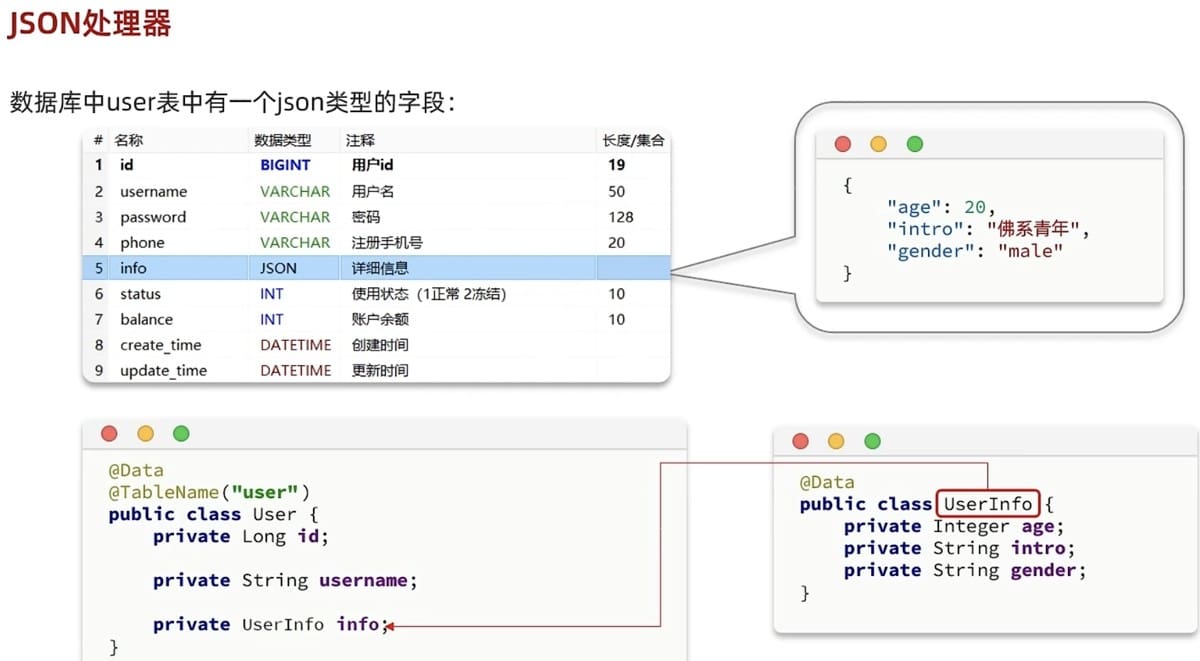
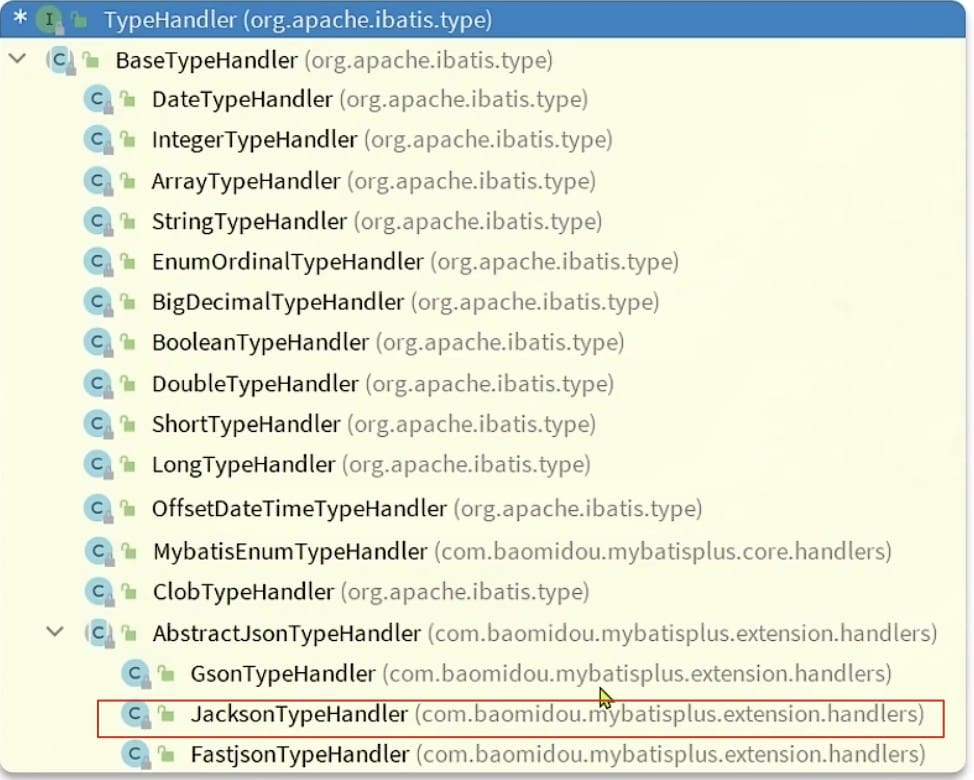
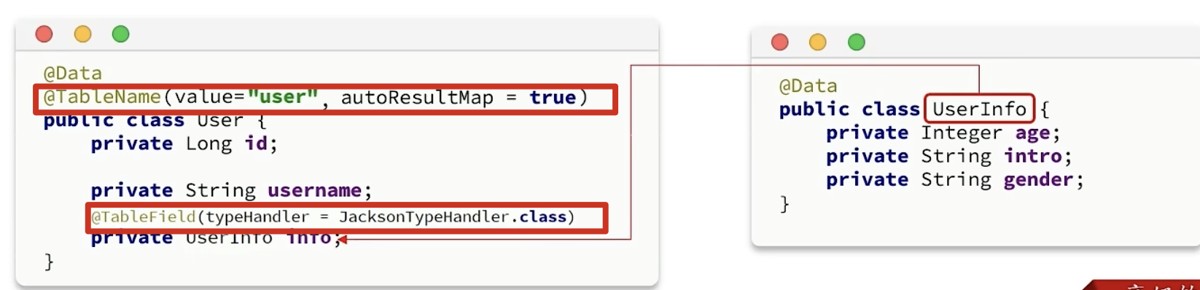
【注意】:
没有application.yml全局配置!!!
2-1、完整示例
1、定义json类型字段对应的java类
@data
@noargsconstructor
@allargsconstructor(staticname = "of")
public class jsoninfo {

    private string color;

    private string size;

}
2、在对应的table entity类上添加两个注解:
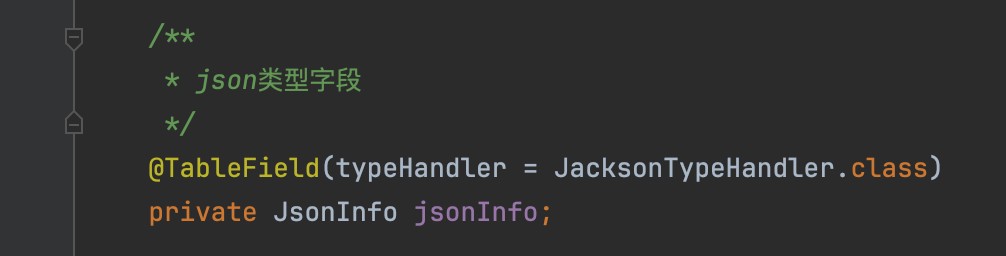
3、postman测试
(1)查询
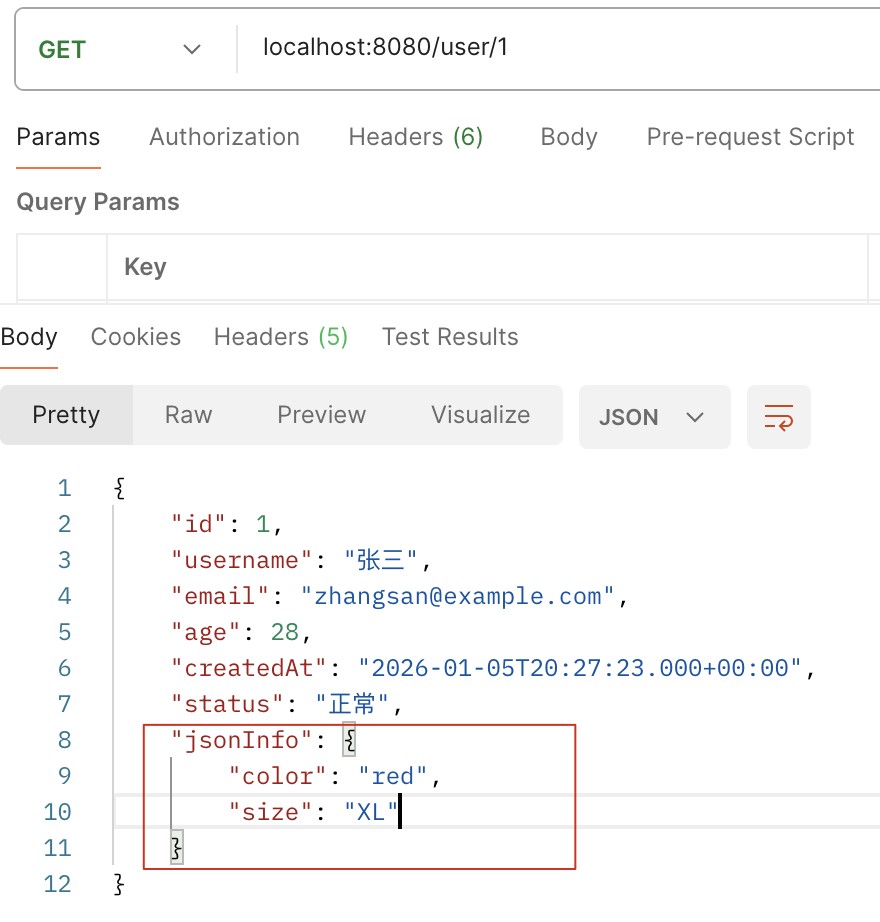
(2)插入
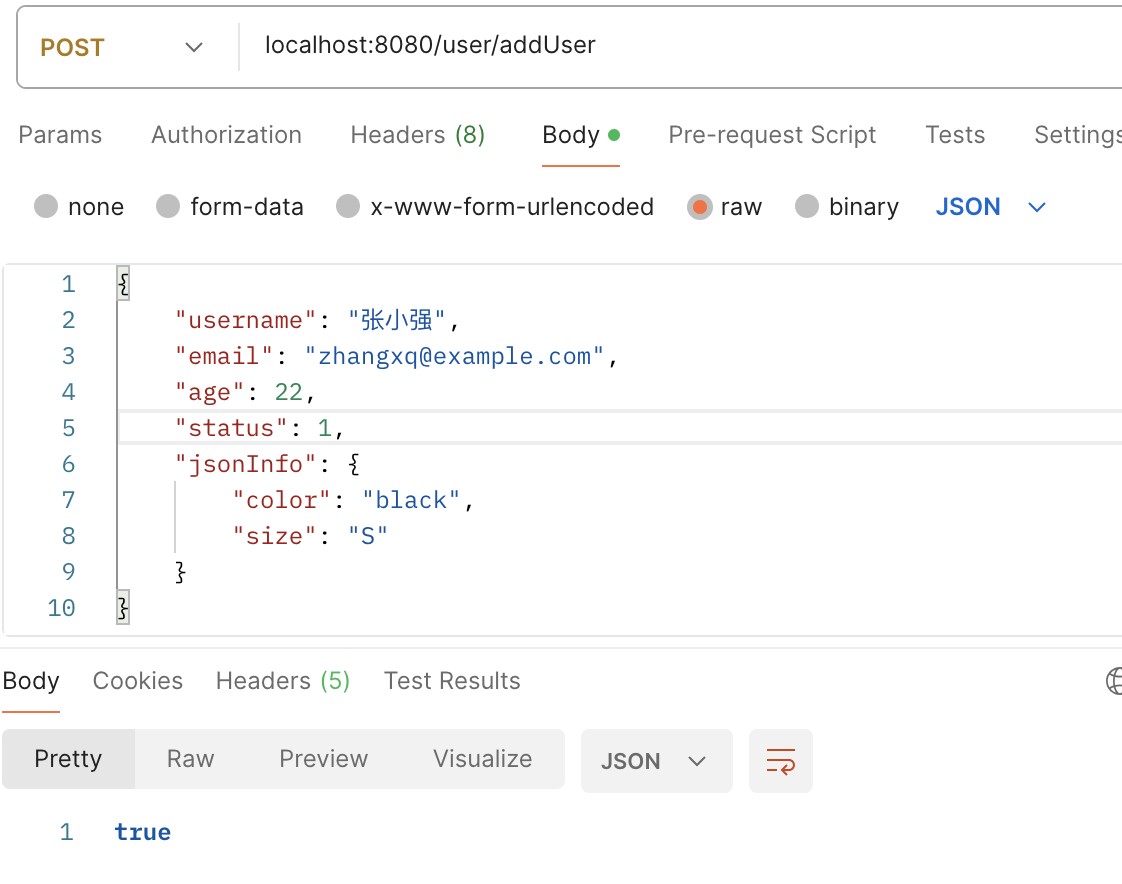
三、@tablename(autoresultmap = true) 详解
这是 mybatis-plus 框架中的注解属性,主要用于处理特殊类型字段的映射问题。
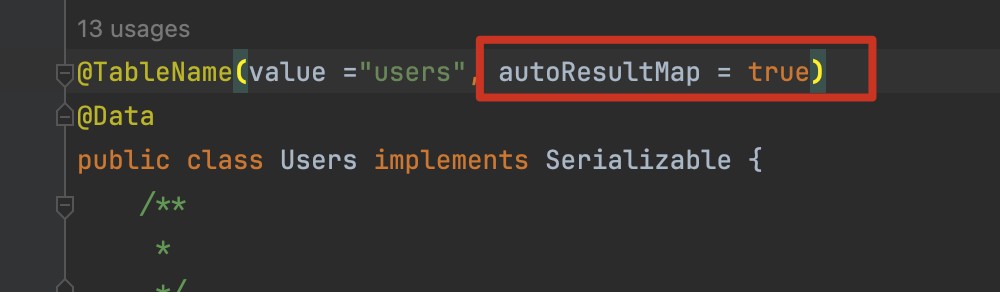
它的核心作用是:让 mybatis-plus 自动构建一个 resultmap 并注入到 mybatis 中,主要用于解决自定义类型处理器(typehandler)在查询时不生效的问题。
【备注】:
resultmap 是 mybatis 中用于定义数据库查询结果与 java 对象之间映射关系的核心配置。
数据库查询结果 (resultset)
         ↓
    resultmap (映射规则)
         ↓
   java 对象 (pojo/entity)
简单说:resultmap 告诉 mybatis "如何把数据库的列映射到 java 对象的属性"
resultmap vs resulttype
| 对比项 | resulttype | resultmap |
|---|---|---|
| 配置方式 | 自动映射 | 手动配置映射规则 |
| 适用场景 | 字段名=属性名 | 字段名≠属性名/关联查询/类型转换 |
| 灵活性 | 低 | 高 |
| 代码量 | 少 | 多 |
| typehandler | 不支持 | ✅ 支持· |
3-1、核心含义
| 属性 | 默认值 | 作用 |
|---|---|---|
| autoresultmap | false | 是否自动构建 resultmap 并使用 resultmap 映射 |
当设置为 true 时,mybatis-plus 会自动生成 resultmap,支持自定义类型处理器(typehandler)生效。
为什么需要它?
mybatis 中,typehandler(类型处理器)只有两种生效方式:
- 定义在 xml 的 <resultmap> 里 —— 只作用于查询结果封装
- 定义在 sql 的 #{property, typehandler=xxx} 中 —— 只作用于插入/更新设值
而 mybatis-plus 的通用 crud 方法(如 selectbyid、selectlist)默认不走你手写的 resultmap。
如果你在字段上用了 @tablefield(typehandler = xxxtypehandler.class),但不开启 autoresultmap,查询时这个 typehandler 就不会被调用,导致字段值为 null。
开启 autoresultmap = true 后,mybatis-plus 会在启动时扫描实体类字段,自动生成包含 typehandler 配置的 resultmap,这样内置查询方法就能正确映射复杂类型了。
3-2、典型使用场景
场景一:mysql json 类型字段(最常见)
当数据库字段是 json 类型,实体类属性是 java 对象/集合 时:
// 实体类
@tablename(value = "users", autoresultmap = true)
public class user {
    @tableid
    private long id;

    // json 字段,需要类型转换
    @tablefield(typehandler = jacksontypehandler.class)
    private userinfo info;

    @tablefield(typehandler = jacksontypehandler.class)
    private list<string> tags;
}
# application.yml 配置
mybatis-plus:
  type-handlers-package: com.example.demo.handler
  type-aliases-package: com.example.demo.entity
场景二:比如你有个 mysqljson字段,想映射到 java 的list或map:
@data
@tablename(value = "tb_user", autoresultmap = true)  // 必须开启!
public class user {
    private long id;
    private string name;

    // json 字段 → java list
    @tablefield(typehandler = jacksontypehandler.class)
    private list<role> roles;

    // json 字段 → java map
    @tablefield(typehandler = jacksontypehandler.class)
    private map<string, object> extra;
}
不设置 autoresultmap = true → 查出来的 roles 和 extra 都是 null
设置了 autoresultmap = true → typehandler 生效,json 正确解析为 java 对象
场景三:自定义 typehandler
// 自定义类型处理器
public class encrypttypehandler extends basetypehandler<string> {
    @override
    public void setparameter(preparedstatement ps, int i, string parameter, jdbctype jdbctype) {
        ps.setstring(i, encrypt(parameter));
    }

    @override
    public string getnullableresult(resultset rs, string columnname) {
        return decrypt(rs.getstring(columnname));
    }
    // ... 其他方法
}
// 实体类
@tablename(value = "users", autoresultmap = true)
public class user {
    @tablefield(typehandler = encrypttypehandler.class)
    private string phone;  // 数据库中加密存储
}
3-3、注意事项
| 问题 | 说明 |
|---|---|
| 必须配合 typehandler | 只设置 autoresultmap=true 不够,字段上还需加 @tablefield(typehandler=...) |
| xml 映射文件 | 如果使用 xml,需要在 resultmap 中指定 typehandler |
| 性能影响 | 开启后会生成额外 resultmap,轻微影响性能 |
| mp 版本 | 3.3.1+ 版本支持较好 |
3-4、完整示例
// 实体类
@tablename(value = "articles", autoresultmap = true)
@data
public class article {
    @tableid
    private long id;

    private string title;

    // json 字段存储为对象
    @tablefield(typehandler = jacksontypehandler.class)
    private articlecontent content;

    // json 字段存储为列表
    @tablefield(typehandler = jacksontypehandler.class)
    private list<string> tags;
}
// json 对象
@data
public class articlecontent {
    private string text;
    private string coverimage;
    private integer wordcount;
}
// mapper 接口
@mapper
public interface articlemapper extends basemapper<article> {
    // 自定义查询也需要 resultmap 支持
    @select("select * from articles where id = #{id}")
    article selectdetail(long id);
}
3-5、什么时候需要设置?
| 情况 | 是否需要 |
|---|---|
| 普通字段映射 | ❌ 不需要 |
| 数据库 json → java 对象 | ✅ 需要 |
| 数据库 json → java 集合 | ✅ 需要 |
| 使用自定义 typehandler | ✅ 需要 |
| 字段加密/脱敏处理 | ✅ 需要 |
一句话:只要用了 @tablefield(typehandler = ...),实体类就必须加 @tablename(autoresultmap = true),否则查询时 typehandler 不生效。
3-6、自动生成的 resultmap 名称
mybatis-plus 自动注入的 resultmap 名称格式为:
| 格式 | 示例 |
|---|---|
| 短名称 | mybatis-plus_xxx |
| 长名称(全限定) | com.example.mapper.usermapper.mybatis-plus_xxx |
如果你在自己的 mapper 里写自定义 sql,想复用这个自动 resultmap:
@mapper
public interface usermapper extends basemapper<user> {

    @resultmap("mybatis-plus_user")  // 引用自动生成的 resultmap
    @select("select * from tb_user where age > #{age}")
    list<user> selectbyage(@param("age") integer age);
}
总结
autoresultmap = true
       ↓
让 mybatis-plus 自动生成 resultmap
       ↓
使 @tablefield(typehandler = ...) 生效
       ↓
实现 数据库特殊类型 ↔ java 对象 的转换简单说:处理 json 字段或自定义类型转换时,必须开启这个选项!
到此这篇关于mybatisplus中json处理器的实现的文章就介绍到这了,更多相关mybatisplus json处理器内容请搜索代码网以前的文章或继续浏览下面的相关文章希望大家以后多多支持代码网!





发表评论