
 我要评论
我要评论mysql 表的约束是作用于字段上的规则,用于限制存储的数据,保证数据库中数据的正确、有效性和完整性 。
有哪些常用约束
- 主键约束 (primary key):唯一标识记录,不能重复且不能为空,一张表只能有一个主键 。
- 唯一约束 (unique):保证字段值不重复,但允许为空,一张表可以有多个唯一约束 。
- 非空约束 (not null):规定字段值不能为空,空字符串不等于 null。
- 默认约束 (default):插入数据时若未赋值,自动使用指定的默认值 。
- 外键约束 (foreign key):建立表间关联,保证参照完整性,仅 innodb 引擎支持 。
- 检查约束 (check):限制字段值的合法范围,mysql 5.7 忽略该约束,8.0 版本支持 。
- 自增长约束 (auto_increment):整数类型字段自动递增,通常与主键搭配使用 。百科
怎么添加和删除约束
- 创建表时添加:在定义字段时直接指定,如
id int primary key。 - 修改表时添加:使用
alter table命令,如alter table 表名 add primary key(字段名)。 - 删除约束:主键用
alter table 表名 drop primary key,唯一键通过删除索引实现,外键用drop foreign key。
约束有什么实际作用
约束通过技术手段强制插入正确的数据,避免出现主键重复、外键关联无效、必填字段为空等情况,是数据库稳定运行的安全防线 。设计时应结合业务场景合理选择,避免过度约束导致效率下降 。
前言
mysql 的约束,主要用于限制表中数据的取值范围和数据之间的关系,保证数据库中的数据符合预期,也就是保证数据的完整性。
1. 非空约束
要求字段不能为空 null。
实际的业务场景中,某些字段必须要有数据,创建表时,就可以在该字段后面加上 not null,即要求在插入数据时必须给该字段赋值,否则报错。
例如:
create table student (
	id int ,
	name varchar(20) not null
);
此时:
insert into student (id, name) values (1, null);
就会插入失败,保证了某些重要字段必须要有数据!
2. 默认值
某个字段可能具有比较确定的值,就可以在一开始指定默认的值,插入时可以选择性的使用默认值。
比如,描述一个学生的性别,可以设置默认值为男。插入数据时,如果不指定性别就默认男。
例如:
create table student (
	id int not null,
	name varchar(20) not null,
	gender char(2) default '男'
);
插入数据时可以指定也可以选择默认值:
insert into student (id, name) values (1, '张三');
insert into student (id, name, gender) values (2, '李四', '女');
not null 字段也可以设置默认值:当我们没有给字段传值时就会自动填入一个默认合法的值。
实例:
mysql> create table test (
    -> a int not null default 123,
    -> s char(8) not null
    -> );
mysql> insert into test (s) values ('hello');
mysql> select * from test;
+-----+-------+
| a   | s     |
+-----+-------+
| 123 | hello |
+-----+-------+
3. 列描述
comment,类似于 c/c++ 中的注释,用来描述相关字段,会根据表创建语句保存。
例如:
mysql> create table user (
    -> name varchar(20) comment '用户名',
    -> account varchar(32) comment '账号',
    -> password char(12) comment '密码'
    -> );
4. zerofill
当我创建一个表,desc table_name:就可以看到各个字段的属性。
mysql> desc t2;
+-------+------------------+------+-----+---------+-------+
| field | type             | null | key | default | extra |
+-------+------------------+------+-----+---------+-------+
| a     | int(11)          | yes  |     | null    |       |
| b     | int(10) unsigned | yes  |     | null    |       |
+-------+------------------+------+-----+---------+-------+
int(11),int(10) unsigned 中的 11 和 10 其实是有符号整型和无符号整型数的显示宽度,有符号整型类型比无符号整型多一个符号位。
int 范围-2147483648 ~ 2147483647,不管 int(5),还是 int(8),该字段的取值范围不变。当搭配 zerofill 就会显示指定的宽度,不够补 0。
实例:
mysql> create table t3 (
    -> a int(5) zerofill,
    -> b int(5)
    -> );
mysql> insert into t3 (a, b) values (12, 12);
mysql> select * from t3;
+-------+------+
| a     | b    |
+-------+------+
| 00012 |   12 |
+-------+------+
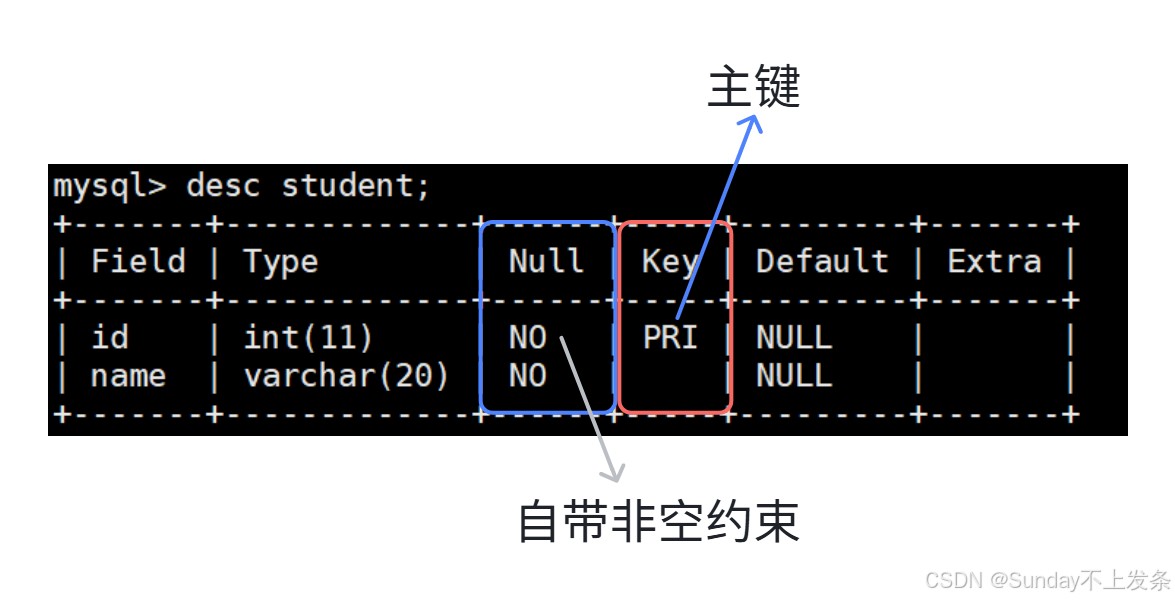
5. 主键
主键:primary key 用来唯一标识表中的一条数据,不能为空,不能重复。
例如:
create table student (
	id int primary key,
	name varchar(20) not null
);
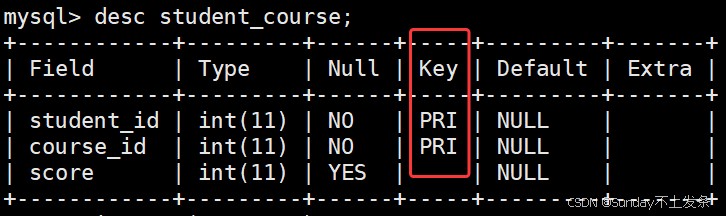
(1)复合主键:一张表只能有一个主键,但一个主键可以由多个字段共同组成,称为“复合主键”。
比如有一张学生选课的课表:
student_id    course_id    score
1             101          90
1             102          85
2             101          95
2             103          88
- student_id:不能单独作为主键,因为一个学生可以选多门课程。
- course_id:也不能单独作为主键,因为一门课可以被多个学生选择。
但是:
student_id + course_id
可以唯一确定一条选课记录,所以可以使用复合主键(注意写法):
create table student_course (
	student_id int,
	course_id int,
	score int,
	primary key (student_id, course_id)
);
mysql> select * from student_course;
+------------+-----------+-------+
| student_id | course_id | score |
+------------+-----------+-------+
|          1 |       123 |    80 |
|          1 |       124 |    85 |
|          2 |       123 |    90 |
|          2 |       124 |    80 |
+------------+-----------+-------+
(2)添加主键
创建表时没有主键,可以追加主键:
alter table 表名 primary key(字段列名);
注意:如果该字段在表中的有重复的数据,就会失败!
(3)删除主键
alter table 表名 drop primary key;
6. 自增键
自增键:auto_increment,如果不给值,就会从 1 或者按照当前计数器开始以步长为1递增。
- 自增键字段必须先得是主键
- 该字段类型必须是整型
- 一张表只有一个自增键
例如:
create table t4 (
	id int primary key auto_increment,
	name char(12)
);
mysql> insert into t4 (name) values ('a');
mysql> insert into t4 (name) values ('b');
mysql> select * from t4;
+----+------+
| id | name |
+----+------+
|  1 | a    |
|  2 | b    |
+----+------+
mysql> insert into t4 (id, name) values (5, 'c');
mysql> insert into t4 (name) values ('d');
mysql> select * from t4;
+----+------+
| id | name |
+----+------+
|  1 | a    |
|  2 | b    |
|  5 | c    |
|  6 | d    |
+----+------+
7. 唯一键
在实际的业务场景中,可能不光要求主键字段是唯一的,还有一些字段也可能是唯一的。但一张表只有一个主键,为了满足对其它字段唯一性的约束需求,所以引入了唯一键。
- 唯一键可以有多个
- 唯一键可以为空,允许多个为空,空字段不作唯一性比较
例如:
一个学生的学号作为主键,唯一;所有人的号码也是唯一的,可以将号码字段设置为唯一键。
create table stu (
	id int primary key,
	name varchar(20) not null,
	num char(12) unique
);
mysql> insert into stu values (1, '张三', '123456');
mysql> insert into stu values (2, '李四', '456789');
mysql> insert into stu values (3, 'lisa', null);
mysql> insert into stu values (4, 'rose', null);
mysql> select * from stu;
+----+--------+--------+
| id | name   | number |
+----+--------+--------+
|  1 | 张三   | 123456 |
|  2 | 李四   | 456789 |
|  3 | lisa   | null   |
|  4 | rose   | null   |
+----+--------+--------+
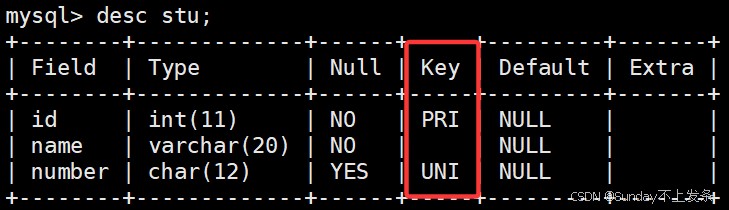
主键可以理解为:主键 = 唯一键 + not null 。
8. 外键
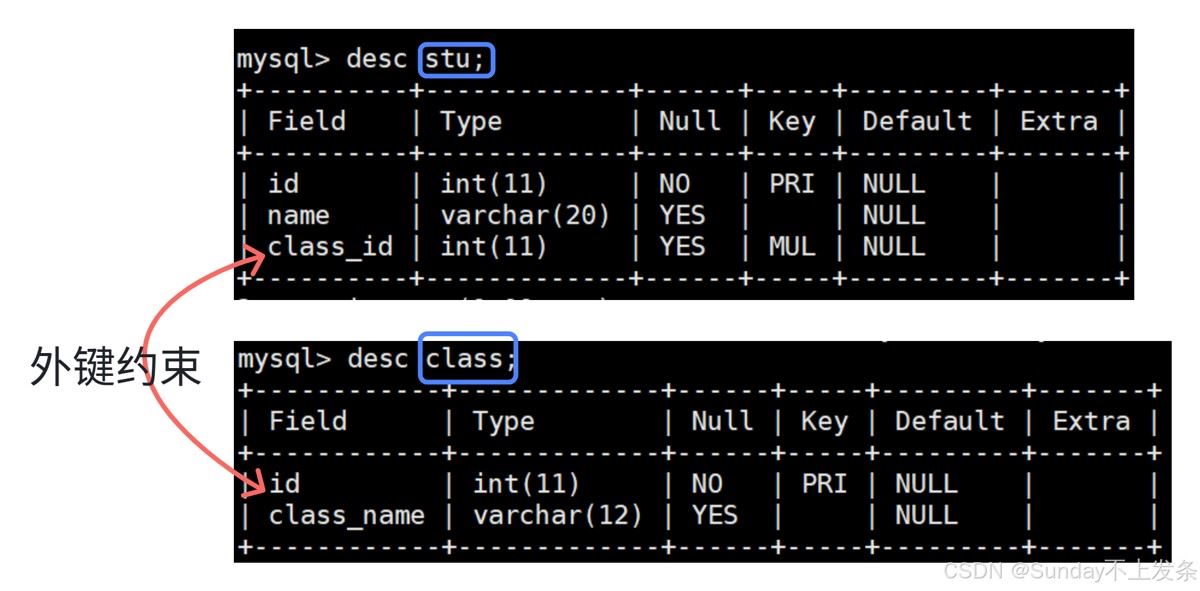
外键用于维护主表和从表之间的数据关系。
- 外键关系 定义在从表
- 主表中相关字段必须是主键 或 唯一键
语法:
foreign key (从表列名) references 主表(主表列名)
例如:
维护学生表与班级表,学生应该属于不同的班级。
# ------------------主表----------------------------------
create table class (
	id int primary key,
	class_name varchar(12)
);
# -------------------从表---------------------------------
create table stu (
	id int primary key,
	name varchar(20),
	class_id int,
	foreign key (class_id) references class(id)
);
此时:
+-----+------------+
| id  | class_name |
+-----+------------+
| 101 | 一班       |
| 102 | 二班       |
+-----+------------+
- 如果从表插入的数据的
class_id不在主表的id中,就会失败。 - 如果从表中有一条数据
| 3 | 张三 | 101 |,如果想要删除主表的|101 | 一班 |字段,也会失败。
mysql> delete from class where id = 101;
error 1451 (23000): cannot delete or update a parent row: a foreign key
constraint fails (`db1`.`stu`, constraint `stu_ibfk_1` foreign key
(`class_id`) references `class` (`id`))
外键约束要求子表中的外键值必须与父表中被引用的键建立合法对应关系,从而保证表与表之间的数据一致性。
到此这篇关于mysql深度实践之表的约束的文章就介绍到这了,更多相关mysql表的约束内容请搜索代码网以前的文章或继续浏览下面的相关文章希望大家以后多多支持代码网!



发表评论