
 我要评论
我要评论内容摘要:本文给出一套基于 java 17、spring boot 3 和阿里云 oss java sdk 3.17.4 的文件上传后端实现。重点不是把 oss api 逐个罗列,而是建立“文件摘要—资产元数据—分片会话—业务引用”的一致性契约:小文件走普通上传,大文件走可恢复的 multipart upload,摘要命中时只创建引用不重复传输,预览通过短期签名 url 完成。示例代码使用 xxx 脱敏配置,真实 oss、数据库和权限环境仍需单独验收。
1. 先确定闭环:上传成功不等于对象写入成功
1.1 本文解决的问题
一个可维护的 oss 文件系统至少要同时回答四个问题:
- 文件是否已经存在,能否安全复用(秒传)?
- 网络中断后,如何知道哪些分片已经成功(断点续传)?
- oss 对象完成后,数据库何时才允许把文件标记为可用?
- 私有对象如何生成可过期的预览链接,而不是把临时 url 当永久数据保存?
本文的主结论是:可靠性来自状态和幂等契约,而不是来自某一个上传方法。 oss 是对象内容的权威,数据库是资产元数据和业务引用的权威;只有在 oss 完成、大小校验通过、摘要校验通过后,file_asset.status 才能进入 available。
1.2 范围与非目标
范围:普通上传、md5 秒传、oss multipart upload、断点恢复、取消/清理、私有对象预览签名 url、spring mvc api、mysql 表结构和测试边界。
非目标:前端完整 ui、病毒扫描、内容审核、cdn 配置、视频转码。前端只需要遵循本文接口契约即可接入。
1.3 证据边界
| 结论 | 依据 | 当前边界 |
|---|---|---|
| sdk 调用形态 | 仓库 ai-image-backend/pom.xml 锁定 aliyun-sdk-oss:3.17.4,现有 ossclient 已使用初始化、分片、完成和预签名 api | 示例未在真实 oss 上运行 |
| 对象私有化 + 签名 url | 阿里云 oss api 模型和项目既有预签名调用 | referer 规则、ram policy 需在目标 bucket 验收 |
| 秒传条件 | 本文设计契约 | 需要按真实租户权限模型补充集成测试 |
2. 架构与状态:四类数据必须分开
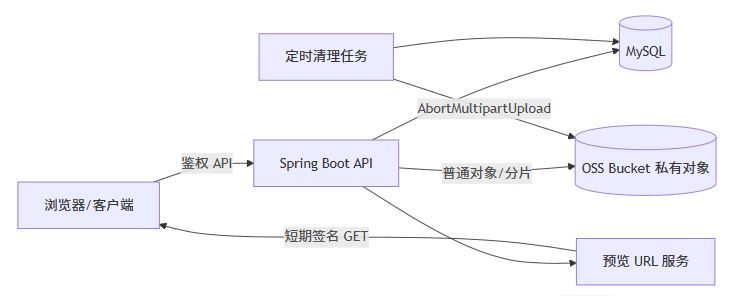
读图要点:普通上传和分片上传都经过同一个资产服务收敛状态;预览只根据 fileid 动态签名,不把签名 url 写回资产表;清理任务只处理超时的上传会话。
2.1 文件资产状态
init → uploading → verifying → available
  │        │             │
  └──────→ failed ←──────┘
uploading → cancelled
init:已完成参数预检,尚未产生可用对象。uploading:普通对象写入中,或 multipart 会话存在。verifying:oss 已完成,服务端正在校验大小、摘要和权限元数据。available:对象存在且可以建立业务引用。failed/cancelled:不可继续使用;multipart 会话必须尝试中止。
状态不变量:只有 available 可以被秒传命中或生成预览 url;重复完成请求在 available 状态下返回同一个 fileid,不得再次合并或创建重复资产。
2.2 数据库表(mysql)
create table file_asset (
    id bigint primary key auto_increment,
    digest char(32) not null,
    size_bytes bigint not null,
    original_name varchar(255) not null,
    mime_type varchar(128) not null,
    object_key varchar(512) not null,
    bucket_name varchar(128) not null,
    status varchar(24) not null,
    visibility varchar(16) not null default 'private',
    created_by bigint not null,
    created_at datetime(3) not null,
    updated_at datetime(3) not null,
    unique key uk_asset_digest_size (digest, size_bytes),
    unique key uk_asset_object_key (bucket_name, object_key),
    key idx_asset_status (status)
);
create table file_reference (
    id bigint primary key auto_increment,
    file_id bigint not null,
    biz_type varchar(64) not null,
    biz_id varchar(64) not null,
    created_by bigint not null,
    created_at datetime(3) not null,
    unique key uk_reference (file_id, biz_type, biz_id),
    constraint fk_reference_asset foreign key (file_id) references file_asset(id)
);
create table multipart_upload_session (
    id varchar(64) primary key,
    upload_id varchar(256) not null,
    file_id bigint null,
    object_key varchar(512) not null,
    digest char(32) not null,
    size_bytes bigint not null,
    original_name varchar(255) not null,
    mime_type varchar(128) not null,
    biz_type varchar(64) not null,
    biz_id varchar(64) not null,
    part_size_bytes int not null,
    status varchar(24) not null,
    expires_at datetime(3) not null,
    created_by bigint not null,
    created_at datetime(3) not null,
    updated_at datetime(3) not null,
    unique key uk_multipart_upload_id (upload_id)
);
create table multipart_upload_part (
    session_id varchar(64) not null,
    part_number int not null,
    etag varchar(128) not null,
    size_bytes bigint not null,
    updated_at datetime(3) not null,
    primary key (session_id, part_number),
    constraint fk_part_session foreign key (session_id) references multipart_upload_session(id)
);
unique(digest, size_bytes) 只保证全局资产去重;如果业务要求组织隔离,应把 org_id 加入唯一键和所有查询条件。不能先假定全局秒传符合权限模型。
3. 核心配置与 oss 客户端
3.1 maven 依赖
<dependency>
  <groupid>com.aliyun.oss</groupid>
  <artifactid>aliyun-sdk-oss</artifactid>
  <version>3.17.4</version>
</dependency>
3.2application-local.yml
app:
  oss:
    endpoint: https://xxx
    region: xxx
    bucket: xxx
    preview-domain: https://xxx
    access-key-id: xxx
    access-key-secret: xxx
    folder: files
    preview-expire-seconds: 300
    multipart:
      threshold-bytes: 104857600       # 100 mib,达到后使用分片
      part-size-bytes: 10485760         # 10 mib
      max-parts: 10000
      session-expire-minutes: 1440
示例保留文件配置,敏感值使用 xxx。生产环境应使用 ram 最小权限和密钥托管,但不要把真实密钥写入仓库、日志或文档。
3.3 配置绑定和客户端 bean
package com.example.file.config;

import com.aliyun.oss.oss;
import com.aliyun.oss.ossclientbuilder;
import jakarta.annotation.predestroy;
import lombok.data;
import org.springframework.boot.context.properties.configurationproperties;
import org.springframework.context.annotation.bean;
import org.springframework.context.annotation.configuration;

/** oss 连接和上传策略配置。 */
@data
@configuration
@configurationproperties(prefix = "app.oss")
public class ossproperties {
  private string endpoint;
  private string region;
  private string bucket;
  private string previewdomain;
  private string accesskeyid;
  private string accesskeysecret;
  private string folder = "files";
  private long previewexpireseconds = 300;
  private multipart multipart = new multipart();

  @data
  public static class multipart {
    private long thresholdbytes = 100l * 1024 * 1024;
    private int partsizebytes = 10 * 1024 * 1024;
    private int maxparts = 10_000;
    private long sessionexpireminutes = 24 * 60;
  }
}

@configuration
class ossclientconfiguration {
  private final ossproperties properties;
  private oss client;

  ossclientconfiguration(ossproperties properties) {
    this.properties = properties;
  }

  @bean
  oss ossclient() {
    client = new ossclientbuilder().build(
        properties.getendpoint(),
        properties.getaccesskeyid(),
        properties.getaccesskeysecret());
    return client;
  }

  @predestroy
  void shutdown() {
    if (client != null) {
      client.shutdown();
    }
  }
}
输入是配置文件,输出是线程安全的 oss 客户端 bean。@predestroy 不能省略,否则连接池可能在应用重启时泄漏。示例未展示真实超时和代理参数;高并发生产环境应按 sdk 版本补充连接池、连接超时和重试配置。
4. oss 适配层:普通对象、分片和预览
适配层只负责 oss 协议,不负责数据库状态和业务权限。这样做的原因是:oss 异常可以统一映射,业务服务可以在“对象已完成但数据库失败”时执行补偿,而不是把事务逻辑埋进 sdk 调用。
package com.example.file.oss;

import com.example.file.config.ossproperties;
import com.aliyun.oss.httpmethod;
import com.aliyun.oss.oss;
import com.aliyun.oss.model.abortmultipartuploadrequest;
import com.aliyun.oss.model.completemultipartuploadrequest;
import com.aliyun.oss.model.generatepresignedurlrequest;
import com.aliyun.oss.model.initiatemultipartuploadrequest;
import com.aliyun.oss.model.objectmetadata;
import com.aliyun.oss.model.partetag;
import com.aliyun.oss.model.uploadpartrequest;
import com.aliyun.oss.model.uploadpartresult;
import java.io.inputstream;
import java.net.url;
import java.time.duration;
import java.util.arraylist;
import java.util.date;
import java.util.list;
import org.springframework.stereotype.component;

/** 对阿里云 oss sdk 的最小封装,屏蔽 bucket 和 sdk 请求对象。 */
@component
public class ossgateway {
  private final oss client;
  private final ossproperties properties;

  public ossgateway(oss client, ossproperties properties) {
    this.client = client;
    this.properties = properties;
  }

  /** 普通上传。调用方必须提供长度,避免 sdk 退化为不可控的流式行为。 */
  public void putobject(string objectkey, inputstream input, long contentlength, string contenttype) {
    objectmetadata metadata = new objectmetadata();
    metadata.setcontentlength(contentlength);
    metadata.setcontenttype(contenttype);
    client.putobject(properties.getbucket(), objectkey, input, metadata);
  }

  /** 初始化 multipart upload,返回 oss uploadid。 */
  public string initiatemultipart(string objectkey, string contenttype) {
    initiatemultipartuploadrequest request =
        new initiatemultipartuploadrequest(properties.getbucket(), objectkey);
    objectmetadata metadata = new objectmetadata();
    metadata.setcontenttype(contenttype);
    request.setobjectmetadata(metadata);
    return client.initiatemultipartupload(request).getuploadid();
  }

  /** 上传单个分片,etag 是完成合并时的权威凭证。 */
  public partetag uploadpart(
      string objectkey, string uploadid, int partnumber, inputstream input, long partsize) {
    uploadpartrequest request = new uploadpartrequest();
    request.setbucketname(properties.getbucket());
    request.setkey(objectkey);
    request.setuploadid(uploadid);
    request.setpartnumber(partnumber);
    request.setpartsize(partsize);
    request.setinputstream(input);
    uploadpartresult result = client.uploadpart(request);
    return result.getpartetag();
  }

  /** 按 partnumber 升序完成合并。parts 必须来自服务端持久化的 etag。 */
  public void completemultipart(string objectkey, string uploadid, list<partetag> parts) {
    // oss sdk 3.17.4 可能在完成前排序该列表,不能传入 list.of()/stream.tolist() 的不可变结果。
    list<partetag> mutableparts = new arraylist<>(parts);
    client.completemultipartupload(
        new completemultipartuploadrequest(
            properties.getbucket(), objectkey, uploadid, mutableparts));
  }

  /** 取消未完成会话,释放 oss 临时分片。 */
  public void abortmultipart(string objectkey, string uploadid) {
    client.abortmultipartupload(
        new abortmultipartuploadrequest(properties.getbucket(), objectkey, uploadid));
  }

  public boolean exists(string objectkey) {
    return client.doesobjectexist(properties.getbucket(), objectkey);
  }

  public long objectsize(string objectkey) {
    return client.getobjectmetadata(properties.getbucket(), objectkey).getcontentlength();
  }

  /** 为私有对象生成短期 get url;url 不写入 file_asset。 */
  public string presignget(string objectkey, duration validity) {
    if (validity.isnegative() || validity.iszero()) {
      throw new illegalargumentexception("签名有效期必须大于 0");
    }
    date expiration = new date(system.currenttimemillis() + validity.tomillis());
    generatepresignedurlrequest request = new generatepresignedurlrequest(
        properties.getbucket(), objectkey, httpmethod.get);
    request.setexpiration(expiration);
    url url = client.generatepresignedurl(request);
    return url.toexternalform();
  }

  /**
   * 生成无有效期的公开访问地址。
   *
   * <p>该方法只拼接配置好的 https 域名和对象键,不生成签名参数,也不会改变对象 acl。
   * 只有 bucket/object 已明确允许匿名读取时才能调用。
   */
  public string publicurl(string objectkey) {
    if (objectkey == null || objectkey.isblank()) {
      throw new illegalargumentexception("对象键不能为空");
    }
    if (properties.getpreviewdomain() == null || properties.getpreviewdomain().isblank()) {
      throw new illegalstateexception("未配置公开访问域名");
    }
    string folder = properties.getfolder().replaceall("^/+|/+$", "");
    if (!objectkey.startswith(folder + "/")) {
      throw new illegalargumentexception("对象键不在受管目录下");
    }
    java.net.uri domain = java.net.uri.create(properties.getpreviewdomain().trim());
    if (!"https".equalsignorecase(domain.getscheme()) || domain.gethost() == null) {
      throw new illegalargumentexception("公开访问域名必须是 https url");
    }
    return properties.getpreviewdomain().trim().replaceall("/+$", "") + "/" + objectkey;
  }
}
4.1 代码契约
| 项目 | 说明 |
|---|---|
| 输入 | objectkey、流、长度、mime、uploadid、partnumber、etag |
| 输出 | oss uploadid、partetag、预览 url或无返回值 |
| 不变量 | bucket 固定来自服务端配置;完成列表按编号排序;对象键不接受用户路径 |
| 失败 | sdk 异常向上抛出,由业务层映射为 oss_error;取消失败必须记录告警并重试 |
| 证据 | 仓库现有 ossclient 已使用同组 sdk 方法;本段是独立示例实现 |
4.2 按有效期生成预览链接(可直接复制)
上面的 presignget 就是签名链接生成方法:validity 是从当前服务器时间开始计算的相对有效期,sdk 最终把它转换为 url 中的 expires、ossaccesskeyid 和 signature 参数。调用方不需要、也不应该自己拼接签名参数。
/** 返回带过期时间的预览结果,便于前端提前刷新。 */
public previewurlresult generatepreviewurl(long fileid, long operatorid) {
  fileasset asset = assetrepository.findavailablebyid(fileid)
      .orelsethrow(() -> new fileuploadexception("file_not_found", "文件不存在"));
  permissionservice.assertreadable(asset, operatorid);

  duration validity = duration.ofseconds(properties.getpreviewexpireseconds());
  instant expiresat = instant.now().plus(validity);
  string url = ossgateway.presignget(asset.objectkey(), validity);
  return new previewurlresult(fileid, url, expiresat);
}

public record previewurlresult(long fileid, string url, instant expiresat) {}
如果业务需要不同有效期,可以把秒数作为受限参数传入,但必须在服务端设置上下限,不能允许客户端传入超长时间:
public string generatepreviewurl(string objectkey, long requestedseconds) {
  long minseconds = 30;
  long maxseconds = 3600;
  long seconds = math.max(minseconds, math.min(requestedseconds, maxseconds));
  return ossgateway.presignget(objectkey, duration.ofseconds(seconds));
}
这段方法的输入是已通过权限校验的 fileid 和有效期配置,输出是临时 url 及其绝对过期时间。服务器时钟明显漂移会导致“刚生成就过期”或提前失效,部署时应启用时间同步。签名 url 泄露后,在过期前仍然有效,因此有效期不是主动撤销机制。
4.3 生成无有效期的公开链接(可直接复制)
无有效期链接不是“永不过期的签名链接”,而是公开读对象的普通 url。它不包含 expires、ossaccesskeyid、signature 参数,能否访问完全取决于 bucket/object acl、bucket policy 和域名配置。
/** 公开对象链接:不签名、不设置过期时间。 */
public string generatepublicurl(long fileid, long operatorid) {
  fileasset asset = assetrepository.findavailablebyid(fileid)
      .orelsethrow(() -> new fileuploadexception("file_not_found", "文件不存在"));
  permissionservice.assertreadable(asset, operatorid);
  if (!visibility.public.name().equals(asset.visibility())) {
    throw new fileuploadexception("file_not_public", "该文件不是公开对象");
  }
  return ossgateway.publicurl(asset.objectkey());
}
controller 可以把两种链接分别暴露,避免客户端误把公开 url 当成私有签名 url:
@getmapping("/{fileid}/public-url")
public publicurlresponse publicurl(
    @pathvariable long fileid, authentication authentication) {
  string url = filepresentationservice.generatepublicurl(
      fileid, currentuserid(authentication));
  return new publicurlresponse(fileid, url);
}

public record publicurlresponse(long fileid, string url) {}
两种方法必须按对象可见性选择:
| 方法 | url 参数 | 前提 | 适用场景 |
|---|---|---|---|
presignget(objectkey, validity) | 包含过期签名参数 | 对象私有 | 用户文件、临时预览、下载 |
publicurl(objectkey) | 无签名、无过期时间 | 对象允许匿名读 | 公开图片、公开静态资源 |
公开 url 没有主动撤销能力。若对象后来改为私有,旧链接才会失效;在公开期间被搜索引擎、缓存或第三方保存的副本不由 oss 链接本身控制。因此默认文件资产应使用 private,只有明确的公开业务才允许调用 publicurl。
5. 秒传:摘要命中后创建引用,不复用旧签名 url
5.1 摘要和对象键
客户端可以先计算 md5,但服务端必须把客户端摘要当作候选值,而不是事实。普通上传完成后重新读取对象或使用受信校验结果确认大小;如果安全要求更高,使用 sha-256 或上传后流式计算摘要。
package com.example.file.service;

import com.example.file.config.ossproperties;
import java.nio.charset.standardcharsets;
import java.security.messagedigest;
import java.util.hexformat;
import java.util.uuid;
import org.springframework.stereotype.component;

/** 生成不可由用户控制目录的 oss 对象键。 */
@component
public class objectkeyfactory {
  private final ossproperties properties;

  public objectkeyfactory(ossproperties properties) {
    this.properties = properties;
  }

  public string create(string digest, string originalname) {
    string extension = extensionof(originalname);
    string shard = digest.substring(0, 2);
    return "%s/%s/%s/%s%s".formatted(
        trimslash(properties.getfolder()), shard, digest, uuid.randomuuid(), extension);
  }

  private string extensionof(string name) {
    int slash = math.max(name.lastindexof('/'), name.lastindexof('\\'));
    string base = slash >= 0 ? name.substring(slash + 1) : name;
    int dot = base.lastindexof('.');
    if (dot <= 0 || dot == base.length() - 1) {
      return "";
    }
    string extension = base.substring(dot).tolowercase();
    return extension.matches("\\.[a-z0-9]{1,10}") ? extension : "";
  }

  private string trimslash(string value) {
    return value == null ? "files" : value.replaceall("^/+|/+$", "");
  }
}
5.2 秒传服务核心逻辑
以下 fileassetrepository 和 filereferencerepository 是项目适配接口,可用 mybatis、jpa 或 mybatis-plus 实现;文档不虚构具体 orm 映射。
@service
public class fileassetservice {
  private final fileassetrepository assetrepository;
  private final filereferencerepository referencerepository;
  private final ossgateway ossgateway;
  private final objectkeyfactory keyfactory;

  public fileassetservice(
      fileassetrepository assetrepository,
      filereferencerepository referencerepository,
      ossgateway ossgateway,
      objectkeyfactory keyfactory) {
    this.assetrepository = assetrepository;
    this.referencerepository = referencerepository;
    this.ossgateway = ossgateway;
    this.keyfactory = keyfactory;
  }

  /**
   * 尝试秒传。命中条件是摘要、大小、权限、资产状态和 oss 对象同时满足。
   */
  @transactional
  public instantuploadresult tryinstantupload(instantuploadcommand command, long operatorid) {
    fileasset asset = assetrepository.findavailablebydigestandsize(
        command.digest(), command.sizebytes(), command.orgid()).orelse(null);
    if (asset == null || !ossgateway.exists(asset.objectkey())) {
      return instantuploadresult.miss();
    }
    referencerepository.insertifabsent(
        new filereference(asset.id(), command.biztype(), command.bizid(), operatorid));
    return instantuploadresult.hit(asset.id());
  }

  /** 普通上传完成后的登记;对象校验失败时不创建可用资产。 */
  @transactional
  public fileasset registeruploadedobject(
      uploadmetadata metadata, long operatorid) {
    if (!ossgateway.exists(metadata.objectkey())
        || ossgateway.objectsize(metadata.objectkey()) != metadata.sizebytes()) {
      throw new fileuploadexception("object_verify_failed", "oss 对象不存在或大小不匹配");
    }
    fileasset asset = assetrepository.insertavailable(
        new fileassetdraft(
            metadata.digest(), metadata.sizebytes(), metadata.originalname(),
            metadata.mimetype(), metadata.objectkey(), operatorid));
    referencerepository.insertifabsent(
        new filereference(asset.id(), metadata.biztype(), metadata.bizid(), operatorid));
    return asset;
  }
}
秒传的关键不是“查到 md5 就返回成功”,而是:
- 查询必须带组织/租户范围,避免越权复用;
status=available和 oss 对象存在是两个独立条件;- 返回
fileid,前端之后通过fileid获取新签名 url; - 唯一索引和
insertifabsent处理并发重复请求。
反例:如果历史数据只保存了一个已过期的签名 url,没有 objectkey/fileid,不能把 url 当作秒传资产;应先做对象键恢复或让本次上传重新落库。
6. 普通上传 api:小文件的一次性闭环
普通上传适合小于阈值的文件。它的优点是事务边界简单,代价是请求会经过业务服务,消耗应用带宽和连接;不要把它用于数百 mb 的长请求。
@restcontroller
@requestmapping("/api/files")
public class fileuploadcontroller {
  private final fileuploadapplicationservice applicationservice;

  public fileuploadcontroller(fileuploadapplicationservice applicationservice) {
    this.applicationservice = applicationservice;
  }

  @postmapping(value = "/upload", consumes = mediatype.multipart_form_data_value)
  public uploadresponse upload(
      @requestpart("file") multipartfile file,
      @requestparam string digest,
      @requestparam string biztype,
      @requestparam string bizid,
      authentication authentication) throws ioexception {
    return applicationservice.uploadsmallfile(
        new smalluploadcommand(
            file.getoriginalfilename(), file.getcontenttype(), file.getsize(),
            digest, biztype, bizid, file.getinputstream()),
        currentuserid(authentication));
  }

  private long currentuserid(authentication authentication) {
    return long.parselong(authentication.getname());
  }
}
应用服务必须在调用 oss 前校验:最大大小、允许的 mime 白名单、原始文件名长度、摘要格式和业务权限。成功路径如下:
@service
public class fileuploadapplicationservice {
  private final ossgateway ossgateway;
  private final objectkeyfactory keyfactory;
  private final fileassetservice assetservice;
  private final ossproperties properties;

  @transactional
  public uploadresponse uploadsmallfile(smalluploadcommand command, long operatorid)
      throws ioexception {
    validate(command);
    instantuploadresult instant = assetservice.tryinstantupload(
        new instantuploadcommand(command.digest(), command.sizebytes(),
            command.biztype(), command.bizid(), currentorgid()), operatorid);
    if (instant.hit()) {
      return uploadresponse.instant(instant.fileid());
    }

    string objectkey = keyfactory.create(command.digest(), command.originalname());
    try (inputstream input = command.input()) {
      ossgateway.putobject(objectkey, input, command.sizebytes(), safecontenttype(command.mimetype()));
    }
    fileasset asset = assetservice.registeruploadedobject(
        new uploadmetadata(
            command.digest(), command.sizebytes(), command.originalname(),
            safecontenttype(command.mimetype()), objectkey,
            command.biztype(), command.bizid()), operatorid);
    return uploadresponse.uploaded(asset.id());
  }

  private void validate(smalluploadcommand command) {
    if (command.sizebytes() <= 0 || command.sizebytes() > properties.getmultipart().getthresholdbytes()) {
      throw new fileuploadexception("file_size_invalid", "文件大小不符合普通上传范围");
    }
    if (!command.digest().matches("[0-9a-fa-f]{32}")) {
      throw new fileuploadexception("digest_invalid", "md5 格式错误");
    }
  }
}
注意:上例为最小示例,currentorgid() 应接入项目的组织上下文;不能留成固定值。若数据库登记失败,必须通过补偿任务根据 objectkey 清理孤儿对象,不能假设数据库事务会回滚 oss。
7. 分片上传与断点续传
7.1 初始化
初始化接口先尝试秒传;未命中时创建数据库会话和 oss uploadid。会话 id 是业务侧稳定标识,不能直接把 oss uploadid 暴露为唯一业务主键。
@postmapping("/multipart/init")
public multipartinitresponse init(
    @requestbody multipartinitrequest request, authentication authentication) {
  return multipartservice.init(request, currentuserid(authentication));
}

@service
public class multipartservice {
  private final ossgateway ossgateway;
  private final multipartsessionrepository sessionrepository;
  private final multipartpartrepository partrepository;
  private final fileassetservice assetservice;
  private final objectkeyfactory keyfactory;
  private final ossproperties properties;

  @transactional
  public multipartinitresponse init(multipartinitrequest request, long operatorid) {
    validatemultipart(request);
    instantuploadresult instant = assetservice.tryinstantupload(
        new instantuploadcommand(request.digest(), request.sizebytes(),
            request.biztype(), request.bizid(), request.orgid()), operatorid);
    if (instant.hit()) {
      return multipartinitresponse.instant(instant.fileid());
    }

    string objectkey = keyfactory.create(request.digest(), request.originalname());
    string uploadid = ossgateway.initiatemultipart(objectkey, request.mimetype());
    string sessionid = uuid.randomuuid().tostring();
    multipartuploadsession session = new multipartuploadsession(
        sessionid, uploadid, objectkey, request.digest(), request.sizebytes(),
        request.originalname(), request.mimetype(), request.biztype(), request.bizid(),
        properties.getmultipart().getpartsizebytes(), operatorid,
        instant.now().plus(properties.getmultipart().getsessionexpireminutes(), chronounit.minutes));
    sessionrepository.insert(session);
    return multipartinitresponse.created(
        sessionid, objectkey, session.partsizebytes(), list.of());
  }

  private void validatemultipart(multipartinitrequest request) {
    long partcount = (request.sizebytes() + properties.getmultipart().getpartsizebytes() - 1)
        / properties.getmultipart().getpartsizebytes();
    if (partcount > properties.getmultipart().getmaxparts()) {
      throw new fileuploadexception("part_count_exceeded", "分片数量超过 oss 限制");
    }
  }
}
7.2 上传分片
@postmapping(value = "/multipart/{sessionid}/parts/{partnumber}",
    consumes = mediatype.multipart_form_data_value)
public partuploadresponse uploadpart(
    @pathvariable string sessionid,
    @pathvariable int partnumber,
    @requestpart("part") multipartfile part,
    authentication authentication) throws ioexception {
  return multipartservice.uploadpart(
      sessionid, partnumber, part, currentuserid(authentication));
}

@transactional
public partuploadresponse uploadpart(
    string sessionid, int partnumber, multipartfile part, long operatorid) throws ioexception {
  multipartuploadsession session = sessionrepository.lockowned(sessionid, operatorid)
      .orelsethrow(() -> new fileuploadexception("session_not_found", "上传会话不存在或无权限"));
  checkpartnumberandsize(session, partnumber, part.getsize());

  try (inputstream input = part.getinputstream()) {
    partetag etag = ossgateway.uploadpart(
        session.objectkey(), session.uploadid(), partnumber, input, part.getsize());
    partrepository.upsert(new multipartpart(
        sessionid, partnumber, etag.getetag(), part.getsize(), instant.now()));
    return new partuploadresponse(partnumber, etag.getetag());
  }
}
重试规则:同一 sessionid + partnumber 重传时,以 oss 返回的新 etag 覆盖旧记录;完成时只信任数据库最新 etag。不要让客户端直接提交任意 etag 列表。
7.3 查询已上传分片
@getmapping("/multipart/{sessionid}/parts")
public list<partuploadresponse> listparts(
    @pathvariable string sessionid, authentication authentication) {
  sessionrepository.assertowned(sessionid, currentuserid(authentication));
  return partrepository.findall(sessionid).stream()
      .sorted(comparator.comparingint(multipartpart::partnumber))
      .map(part -> new partuploadresponse(part.partnumber(), part.etag()))
      .tolist();
}
前端刷新页面后,使用 sessionid 重新查询该列表,只上传缺失分片。跨设备恢复需要把 sessionid 持久化到服务端业务记录,而不能只放浏览器 localstorage。
7.4 完成合并与二次校验
@postmapping("/multipart/{sessionid}/complete")
public uploadresponse complete(
    @pathvariable string sessionid, authentication authentication) {
  return multipartservice.complete(sessionid, currentuserid(authentication));
}

@transactional
public uploadresponse complete(string sessionid, long operatorid) {
  multipartuploadsession session = sessionrepository.lockowned(sessionid, operatorid)
      .orelsethrow(() -> new fileuploadexception("session_not_found", "上传会话不存在或无权限"));
  if (session.isexpired()) {
    throw new fileuploadexception("session_expired", "上传会话已过期");
  }
  if (session.isavailable()) {
    return uploadresponse.uploaded(session.fileid());
  }

  list<multipartpart> persistedparts = partrepository.findall(sessionid).stream()
      .sorted(comparator.comparingint(multipartpart::partnumber))
      .tolist();
  assertallpartspresent(session, persistedparts);
  list<partetag> etags = persistedparts.stream()
      .map(part -> new partetag(part.partnumber(), part.etag()))
      .tolist();
  ossgateway.completemultipart(session.objectkey(), session.uploadid(), etags);

  if (!ossgateway.exists(session.objectkey())
      || ossgateway.objectsize(session.objectkey()) != session.sizebytes()) {
    sessionrepository.markfailed(sessionid, "object_verify_failed");
    throw new fileuploadexception("object_verify_failed", "合并后对象校验失败");
  }
  fileasset asset = assetservice.registeruploadedobject(
      new uploadmetadata(
          session.digest(), session.sizebytes(), session.originalname(),
          session.mimetype(), session.objectkey(), session.biztype(), session.bizid()),
      operatorid);
  sessionrepository.markavailable(sessionid, asset.id());
  return uploadresponse.uploaded(asset.id());
}
为什么必须二次校验:completemultipartupload 成功只说明 oss 接受了分片列表,不等于业务元数据(大小、摘要、权限引用)已经一致。摘要的服务端最终校验可采用合并后流式计算,但不能为了示例把超大对象完整读入内存。注意 etags 虽由 stream.tolist() 创建为不可变列表,但进入 ossgateway 后被复制为可变 arraylist;这是 sdk 3.17.4 可能排序列表时避免 unsupportedoperationexception 的必要适配。
7.5 取消与超时清理
@deletemapping("/multipart/{sessionid}")
@responsestatus(httpstatus.no_content)
public void cancel(@pathvariable string sessionid, authentication authentication) {
  multipartservice.cancel(sessionid, currentuserid(authentication));
}

@transactional
public void cancel(string sessionid, long operatorid) {
  multipartuploadsession session = sessionrepository.lockowned(sessionid, operatorid)
      .orelsethrow(() -> new fileuploadexception("session_not_found", "上传会话不存在或无权限"));
  if (!session.isavailable() && !session.iscancelled()) {
    ossgateway.abortmultipart(session.objectkey(), session.uploadid());
    sessionrepository.markcancelled(sessionid);
  }
}

@scheduled(fixeddelaystring = "${app.oss.multipart.cleanup-delay-ms:3600000}")
public void cleanupexpiredsessions() {
  for (multipartuploadsession session : sessionrepository.findexpireduploading(instant.now())) {
    try {
      ossgateway.abortmultipart(session.objectkey(), session.uploadid());
      sessionrepository.markcancelled(session.id());
    } catch (runtimeexception ex) {
      log.warn("oss multipart cleanup failed, sessionid={}", session.id(), ex);
    }
  }
}
取消是幂等操作:已取消再次取消直接返回;已完成不能取消对象。清理任务必须分页执行并限制每轮数量,避免一次扫描锁住整张表。
8. 预览链接与安全边界
8.1 只保存稳定标识
@getmapping("/{fileid}/preview-url")
public previewurlresponse previewurl(
    @pathvariable long fileid, authentication authentication) {
  fileasset asset = assetrepository.findavailablebyid(fileid)
      .orelsethrow(() -> new fileuploadexception("file_not_found", "文件不存在"));
  permissionservice.assertreadable(asset, currentuserid(authentication));
  duration validity = duration.ofseconds(properties.getpreviewexpireseconds());
  string url = ossgateway.presignget(asset.objectkey(), validity);
  return new previewurlresponse(
      fileid, url, instant.now().plus(validity), properties.getpreviewexpireseconds());
}
数据库保存 fileid/objectkey,私有对象每次访问动态生成签名 url;公开对象可以按需生成无有效期 publicurl。签名响应建议包含 expiresat 或 expiresinseconds,前端在过期前刷新;公开 url 不需要刷新,但修改 acl 后必须重新验证。不要把完整签名 url 写入永久字段或日志。
8.2 防盗链不能按目录假设
oss referer 防盗链规则是 bucket 级能力,不能把“只保护 files/ 前缀”当作已支持功能。若只保护某个前缀:
- 相关对象设置为私有 acl;
- 新上传对象默认私有;
- 通过短期签名 get url 或业务代理提供访问;
- 历史对象按前缀批量迁移 acl,并独立验收;
- 对高敏感内容叠加业务鉴权、一次性票据或代理下载。
签名 url 在过期前被复制仍然可用;有效期不是撤销机制。浏览器 referer 可能为空,移动端 webview 和脚本客户端也可能不发送预期 referer,因此不能只依赖 referer 作为授权。
9. 接口契约和错误码
| 接口 | 成功返回 | 关键错误 |
|---|---|---|
post /api/files/upload | fileid、mode=uploaded/instant | file_size_invalid、digest_invalid、oss_error |
post /api/files/multipart/init | sessionid、partsize、已上传分片 | part_count_exceeded、no_permission |
post /api/files/multipart/{id}/parts/{n} | partnumber、etag | session_expired、part_size_invalid |
get /api/files/multipart/{id}/parts | 分片编号和 etag | session_not_found |
post /api/files/multipart/{id}/complete | fileid | part_missing、object_verify_failed |
delete /api/files/multipart/{id} | http 204 | no_permission、oss_error |
get /api/files/{id}/preview-url | 短期 url 和过期秒数 | file_not_found、no_permission |
get /api/files/{id}/public-url | 无签名、无有效期 url | file_not_public、no_permission |
建议所有响应带 traceid;日志关联 oss requestid,但不得输出 accesskey、secret、完整签名 url。
10. 测试与验证边界
10.1 必测用例
@test
void instantuploadcreatesreferencewithoutuploadingagain() { /* verify putobject never called */ }

@test
void multipartresumeuploadsonlymissingparts() { /* persisted part 1 is reused */ }

@test
void completerejectsmissingpart() { /* expect part_missing */ }

@test
void completepassesmutablepartlisttoosssdk() { /* sdk sorting must not throw unsupportedoperationexception */ }

@test
void duplicatecompletereturnsexistingasset() { /* idempotent */ }

@test
void expiredpreviewurlisrejectedbyoss() { /* requires isolated real oss or contract test */ }
10.2 验证分层
| 层次 | 已证明什么 | 未证明什么 |
|---|---|---|
| 单元测试 | 状态判断、分片排序、幂等分支和错误码 | sdk 网络、真实 acl、签名时钟偏差 |
| 隔离集成环境 | 数据库唯一索引、事务和权限过滤 | 生产 bucket 策略、跨地域网络 |
| 真实 oss 验收 | 对象存在、etag、合并、签名过期、abort | 高并发容量、灾备和成本曲线 |
推荐验收命令(按实际模块调整):
mvn -pl ai-image-backend -am -dskiptests=false test
git diff --check -- docs/java实现阿里云oss文件上传链路与断点续传.md
如果没有真实 oss 凭证和隔离 bucket,不得把 mock 测试写成“生产链路已打通”。
11. 取舍、失败路径与上线前检查
11.1 方案取舍
| 决策 | 选择 | 代价/不适用 |
|---|---|---|
| 小文件上传 | 后端中转 | 占用应用带宽,不适合大文件 |
| 大文件上传 | multipart upload | 需要会话、分片和清理状态 |
| 秒传摘要 | md5 + size | 有碰撞理论风险;高安全场景用 sha-256 |
| 预览方式 | 私有对象 + 5 分钟签名 url | 泄露后过期前仍可访问 |
| 业务权限 | fileid 动态鉴权 | 每次预览多一次 api 调用 |
11.2 失败路径
- oss 上传成功、数据库写入失败:资产处于“孤儿对象”状态,补偿任务按 objectkey 和创建时间清理。
- 客户端完成时漏传分片:服务端根据持久化分片列表返回
part_missing,不能盲目调用 complete。 - 客户端伪造 etag:服务端忽略请求体中的 etag,只使用上传接口返回并持久化的值。
- 同摘要不同租户误命中:检查查询条件、唯一索引和权限上下文;不能只修前端。
- 签名 url 403:检查服务器时钟、bucket acl、endpoint/region、url 过期时间和对象是否存在。
11.3 上线前检查清单
- accesskey 仅使用 ram 最小权限,示例和日志无真实密钥。
- bucket 默认私有,预览通过动态签名或业务代理。
- 秒传查询带租户/组织范围,数据库唯一索引与业务规则一致。
- multipart 会话、分片记录和孤儿对象有清理机制。
- 普通上传阈值、分片大小、并发数和会话过期时间可配置。
- 已验证中文文件名、0 字节、边界大小、重复请求、断网恢复和过期 url。
- 真实 oss 验收与单元测试结果分开记录。
12. 结论
这套实现的关键不是把 putobject、uploadpart 和 generatepresignedurl 拼在一起,而是让四个权威关系保持一致:oss 保存对象内容,file_asset 保存稳定元数据,multipart_upload_session/part 保存恢复依据,file_reference 保存业务归属。普通上传解决低延迟小文件;分片上传解决大文件和弱网;秒传减少重复传输;短期签名 url 解决私有预览。只有状态收敛、幂等、权限隔离和补偿清理同时具备,才称得上完整闭环。
正式落地前仍需补齐:目标文件类型与大小、组织/租户隔离规则、真实 bucket/ram policy、前端直传还是后端中转、是否需要 cdn/审核/病毒扫描,以及真实 oss 和浏览器端到端验收。
结论:已生成 java 版阿里云 oss 普通上传、秒传、分片上传、断点续传、取消清理和预览签名 url 的全链路实现文档;示例代码可作为项目适配基线,生产可用性仍以隔离 oss、数据库和权限验收为准。
以上就是java实现阿里云oss文件上传链路的详细内容,更多关于java阿里云oss文件上传链路的资料请关注代码网其它相关文章!





发表评论