
 我要评论
我要评论一、spring框架概述
1、 什么是spring
spring是一个开源框架,spring是于2003 年兴起的一个轻量级的java 开发框架,由rod johnson 在其著作expert one-on-one j2ee development and design中阐述的部分理念和原型衍生而来。
它是为了解决企业应用开发的复杂性而创建的。
框架的主要优势之一就是其分层架构,分层架构允许使用者选择使用哪一个组件,同时为 j2ee 应用程序开发提供集成的框架。
spring使用基本的javabean来完成以前只可能由ejb完成的事情。然而,spring的用途不仅限于服务器端的开发。
从简单性、可测试性和松耦合的角度而言,任何java应用都可以从spring中受益。spring的核心是控制反转(ioc)和面向切面(aop)。
简单来说,spring是一个分层的javase/ee full-stack(一站式) 轻量级开源框架。
2、 spring的优点
1)方便解耦,简化开发 (高内聚低耦合)
spring就是一个大工厂可以将所有对象创建和依赖关系维护,交给spring管理spring工厂是用于生成bean。
2)aop编程的支持
spring提供面向切面编程,可以方便的实现对程序进行权限拦截、运行监控等功能
3)声明式事务的支持
只需要通过配置就可以完成对事务的管理,而无需手动编程
4)方便程序的测试
spring对junit4支持,可以通过注解方便的测试spring程序
5)方便集成各种优秀框架
spring不排斥各种优秀的开源框架,其内部提供了对各种优秀框架(如:struts、hibernate、mybatis、quartz等)
6)降低javaee api的使用难度
spring 对javaee开发中非常难用的一些api(jdbc、javamail、远程调用等),都提供了封装.
二、eclipse中安装spring
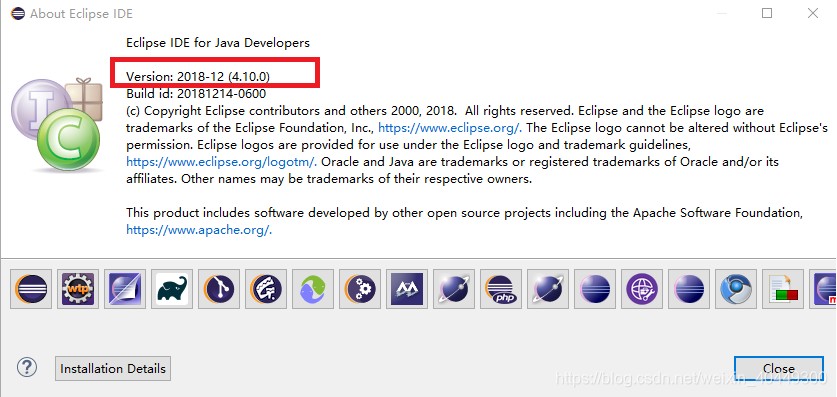
1、查看eclipse版本(必须和spring版本对应才行)
----->打开eclipse----->help-------->about eclipse ide
2、安装spring ide插件
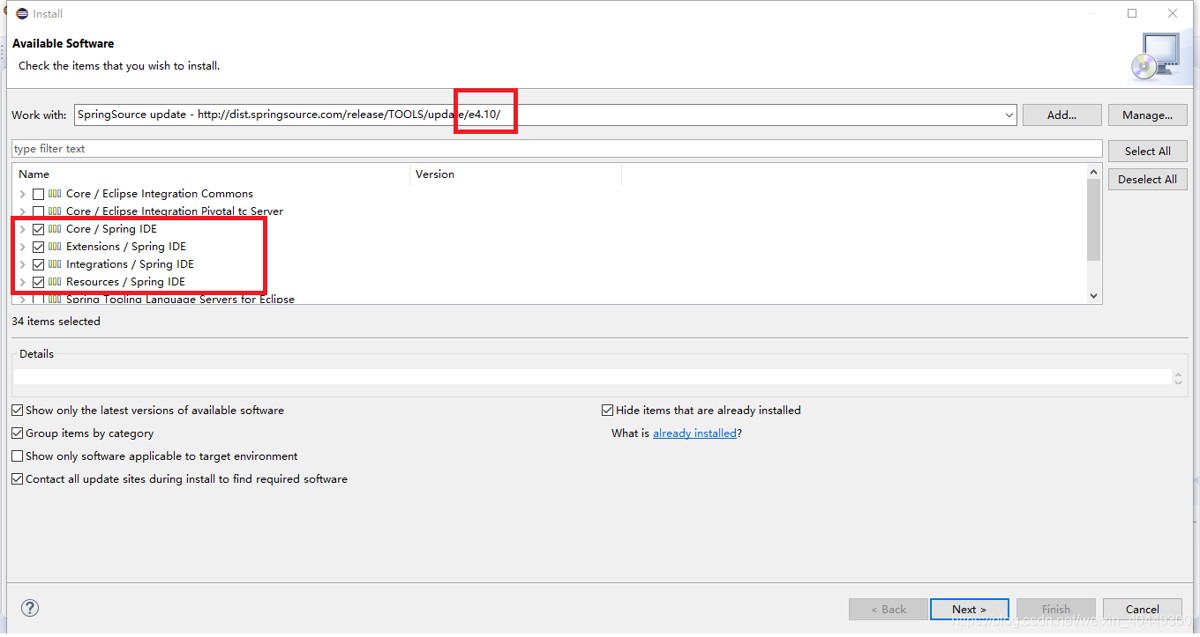
1)help->install new software
2)选择add,添加name(可以随便取)和location
3)勾选中下边四个和spring相关的文件。core/spring ide、extensions/spring ide、integrations/spring ide、resources/spring ide四项
3、点next直到选择
i accpet the terms of the license agreements点finish然后等待插件安装完成并提示重启。
报错:
an error occurred while collecting items to be installed session context was:(profile=d__eclipse_java-2018-12_eclipse,phase=org.eclipse.equinox.internal.p2.engine.phases.collect, operand=, action=).unable to read repository at http://download.springsource.com/release/tools/update/3.9.7.release/e4.10/plugins/org.springframework.ide.eclipse.boot.properties.editor.source_3.9.7.201812201020-release.jar.
read timed out
解决办法:
打开window->preferences->install/update->available software sites,将oracle enterprise pack for eclipse改为disable
4、查看安装是否成功
点击菜单help-->welcome,如果找到spring ide项,恭喜你,安装成功了。
如果没有找到,怎么办呢?接着往下操作
5、安装失败了
你可以换一种方式安装了,先下载
6、打开菜单
help-->install new software...
7、在弹出框install中点add...按钮
name栏输入localspringide,在location栏点击archive...按钮,选择刚下载的springsource-tool-suite-x.x.x.release-e4.10.0-updatesite.zip,点ok按钮后依然在在列表框中勾选带spring ide的项,点下一步,然后根据提示直到安装完成,然后重启eclipse即可。
查看安装是否成功~
三、spring使用
1、环境条件
1)windows 10系统
2)eclipse(开发环境)
3)spring ide(上面已经安装了)
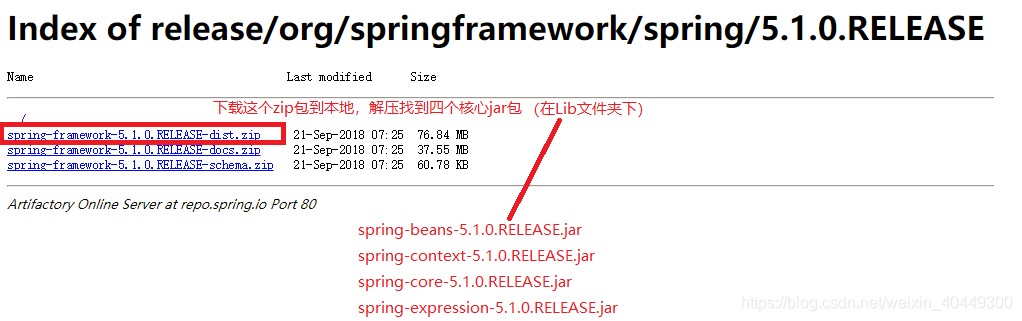
4)spring framework(一会儿要用的jar包) 地址:http://repo.spring.io/release/org/springframework/spring/
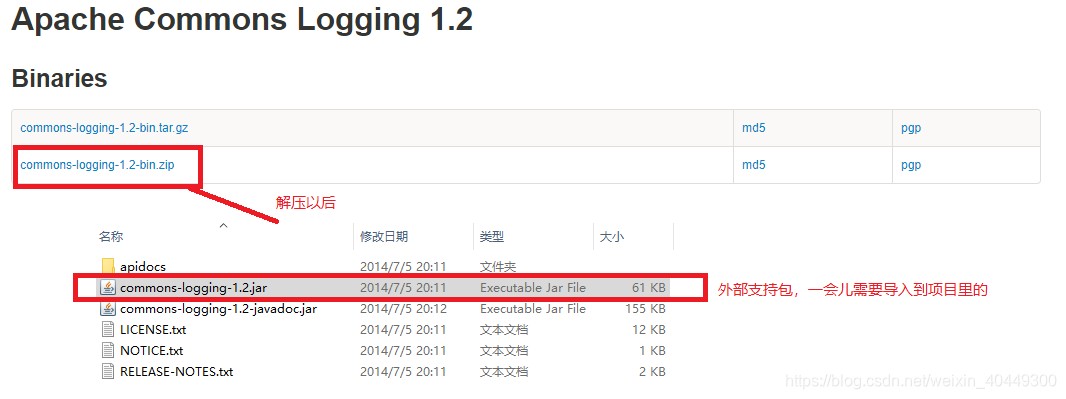
5)commens-logging-x.x.x.jar地址:http://commons.apache.org/proper/commons-logging/download_logging.cgi
2、新建一个java工程,名字就叫first_spring
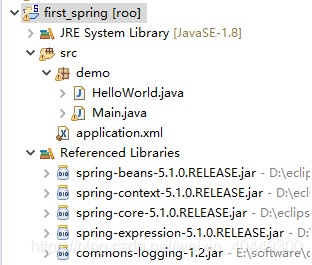
创建一个包名demo,创建两个类分别为helloworld和main,导入4个spring核心jar包(分别是:spring-beans-5.1.0.release.jar、spring-context-5.1.0.release.jar、spring-core-5.1.0.release.jar、spring-expression-5.1.0.release.jar)和1个外部依赖包(spring-expression-5.1.0.release.jar)。
1)helloworld.java代码
package demo;
public class helloworld {
	public void say(){
		system.out.println("|-----------------------|");
		system.out.println("|      hello world      |");
		system.out.println("|-----------------------|");
	}
}
2) main.java测试代码
import org.springframework.context.applicationcontext;
import org.springframework.context.support.classpathxmlapplicationcontext;
public class main {
	/**
	 * @param args
	 */
	public static void main(string[] args) {
		// todo auto-generated method stub
		applicationcontext a = new classpathxmlapplicationcontext("classpath:/application.xml");
        helloworld helloworld = (helloworld) a.getbean("helloworld");
	    helloworld.say();
	}
}
3) application.xml配置文件
<?xml version="1.0" encoding="utf-8"?>
<beans xmlns="http://www.springframework.org/schema/beans"
	xmlns:xsi="http://www.w3.org/2001/xmlschema-instance"
	xsi:schemalocation="http://www.springframework.org/schema/beans http://www.springframework.org/schema/beans/spring-beans.xsd">
<bean id="helloworld" class="demo.helloworld"></bean>
</beans>
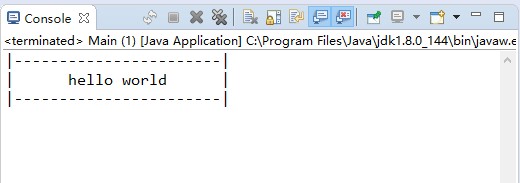
4)结果
总结
以上为个人经验,希望能给大家一个参考,也希望大家多多支持代码网。



发表评论