
 我要评论
我要评论前情提要:本篇文章将详细介绍oracle的sql语言中的转换函数和条件表达式,并且附上对应的详细例子和sql语句的编写以及解析。
oracle版本:19c
一、隐式和显式数据类型转换
1.1 隐式数据转换
在表达式中,oracle服务器可以自动转换以下内容:

为了执行相关表达式,oracle服务器可以自动转换以下内容

1.2 显示表达式转换
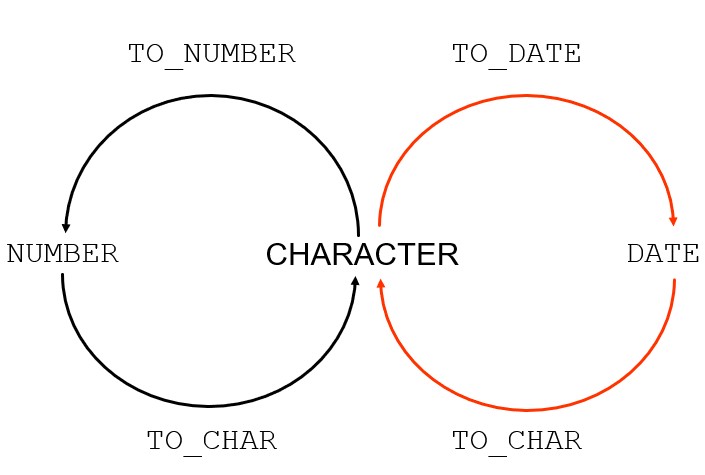
在 oracle 中,character(字符型,如 varchar2)是连接数字(number)和日期(date)的桥梁。
二、to_char, to_date, to_number 函数
2.1 使用to_char函数转换日期
to_char(date[,'format_model'])
格式模型:
必须用单引号引起来
区分大小写
可以包含任何有效的日期格式元素
使用fm元素以删除填充的空格或抑制前导零
日期值之间用逗号分隔
日期格式模型的元素
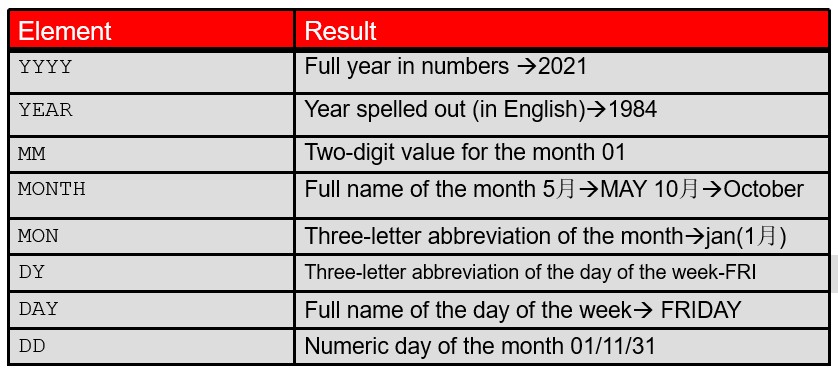
| 元素 | 结果 |
|---|---|
| yyyy | 数字表示的完整年份 → 2021 |
| year | 拼写出的年份(英语)→ 1984 |
| mm | 月份的两位数值 01 |
| month | 月份的完整名称 5月 → may 10月 → october |
| mon | 月份的三字母缩写 → jan(1月) |
| dy | 星期的三字母缩写 - fri |
| day | 星期的完整名称 → friday |
| dd | 月份的数字日期 01/11/31 |
- 时间元素格式化日期的时间部分:
| hh24:mi:ss am | 15:45:32 pm |
|---|
通过将字符串括在双引号中来添加字符串
| hh24:mi:ss am | 15:45:32 pm |
|---|
数字后缀说明数字:
| ddspth | fourteenth |
|---|
示例:使用to_char函数转换日期
- 查看默认日期格式
sql> select last_name,hire_date from employees where department_id=100;
last_name                 hire_date
------------------------- ---------
greenberg                 17-aug-02
faviet                    16-aug-02
chen                      28-sep-05
sciarra                   30-sep-05
urman                     07-mar-06
popp                      07-dec-07

6 rows selected.
- 按照yyyy-mm-dd格式输出日期
sql> select last_name,to_char(hire_date,'yyyy-mm-dd') as hirdate from employees where department_id=100;

last_name                 hirdate
------------------------- ----------
greenberg                 2002-08-17
faviet                    2002-08-16
chen                      2005-09-28
sciarra                   2005-09-30
urman                     2006-03-07
popp                      2007-12-07

6 rows selected.

-- 使用fm去除日期中的前导0
-- fm是一个格式修饰符(fill mode)。它的主要作用是去除填充的空格和前导零。
-- 该例中fm作用于整个yyyy-mm-dd字符串,也就是说月和日的前导0都会被去掉
sql> select last_name,to_char(hire_date,'fmyyyy-mm-dd') as hirdate from employees where department_id=100;
last_name                 hirdate
------------------------- ----------
greenberg                 2002-8-17
faviet                    2002-8-16
chen                      2005-9-28
sciarra                   2005-9-30
urman                     2006-3-7
popp                      2007-12-7

6 rows selected.
按照dd month yyyy格式输出日期
-- 使用fm
sql> select last_name,to_char(hire_date, 'fmdd month yyyy') as hiredate from employees where department_id=100;

last_name                 hiredate
------------------------- --------------------------------------------
greenberg                 17 august 2002
faviet                    16 august 2002
chen                      28 september 2005
sciarra                   30 september 2005
urman                     7 march 2006
popp                      7 december 2007

6 rows selected.

-- 不使用fm
sql> select last_name,to_char(hire_date, 'dd month yyyy') as hiredate from employees where department_id=100;
last_name                 hiredate
------------------------- --------------------------------------------
greenberg                 17 august    2002
faviet                    16 august    2002
chen                      28 september 2005
sciarra                   30 september 2005
urman                     07 march     2006
popp                      07 december  2007

6 rows selected.
2.2 将to_char函数与数字一起使用
to_char(number[, 'format_model'])
这些是一些可以与to_char函数一起使用的格式元素,用于将数字值显示为字符:
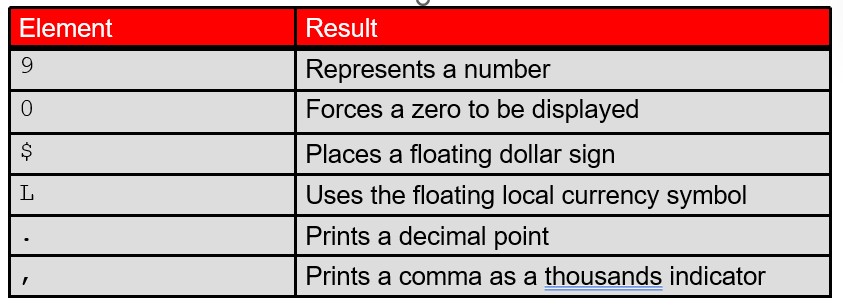
| 元素 | 结果 |
|---|---|
| 9 | 代表一个数字 |
| 0 | 强制显示零 |
| $ | 放置浮动美元符号 |
| l | 使用浮动本地货币符号 |
| . | 打印小数点 |
| , | 打印逗号作为千位指示符 |
示例:to_char转换数字输出格式
按照指定格式输出数字
-- 格式中是9的话就按照正常数字输出,如果是0就会在超出位数部分补0
-- 输出小数位就打小数点和
sql> select last_name,salary,to_char(salary,'99,999.99') from employees where department_id=100;
last_name                     salary to_char(sa
------------------------- ---------- ----------
greenberg                      12008  12,008.00
faviet                          9000   9,000.00
chen                            8200   8,200.00
sciarra                         7700   7,700.00
urman                           7800   7,800.00
popp                            6900   6,900.00

6 rows selected.

-- 需要注意的是指定的格式的位数(9的个数)可以比实际位数多,但是不能比实际位数少!!!
-- 以下例子有一个人的位数比指定的位数多,就会无法输出
sql> select last_name,salary,to_char(salary,'9,999.99') from employees where department_id=100;
last_name                     salary to_char(s
------------------------- ---------- ---------
greenberg                      12008 #########
faviet                          9000  9,000.00
chen                            8200  8,200.00
sciarra                         7700  7,700.00
urman                           7800  7,800.00
popp                            6900  6,900.00

6 rows selected.
$和l的使用
sql> select last_name,salary,to_char(salary,'$9,999.99') from employees where department_id=100;
last_name                     salary to_char(sa
------------------------- ---------- ----------
greenberg                      12008 ##########
faviet                          9000  $9,000.00
chen                            8200  $8,200.00
sciarra                         7700  $7,700.00
urman                           7800  $7,800.00
popp                            6900  $6,900.00

6 rows selected.

-- l可以输出当前本地系统的货币符号
-- 可以使用以下sql来判断当前地区和货币
sql> select userenv('language') from dual;	-- 查看语言判断地区

userenv('language')
----------------------------------------------------
american_america.al32utf8


sql> select * from v$nls_parameters where parameter = 'nls_currency';	-- 直接查看货币单位

parameter
----------------------------------------------------------------
value                                                                con_id
---------------------------------------------------------------- ----------
nls_currency
$                                                                         0

-- 可见当前货币单位是$,那么使用l也会输出$
sql> select last_name,salary,to_char(salary,'l99,999.99') from employees where department_id=100;
last_name                     salary to_char(salary,'l99,
------------------------- ---------- --------------------
greenberg                      12008           $12,008.00
faviet                          9000            $9,000.00
chen                            8200            $8,200.00
sciarra                         7700            $7,700.00
urman                           7800            $7,800.00
popp                            6900            $6,900.00

6 rows selected.
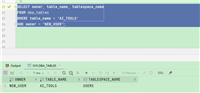
以sql developer演示l
select * from v$nls_parameters where parameter = 'nls_currency';

select last_name,salary,to_char(salary,'l99,999.99') from employees where department_id=100;
2.3 使用to_number和to_date函数
使用to_number函数将字符串转换为数字格式:
to_number(char[, 'format_model'])
使用to_date函数将字符串转换为日期格式:
to_date(char[, 'format_model'])
这些函数具有fx修饰符。 此修饰符指定to_date函数的字符参数和日期格式模型的完全匹配
to_number
to_number函数用于将字符串类型转换为数值类型,是oracle中常用的类型转换函数之一,与to_char()函数的作用正好相反。
需要注意的是to_number函数中的格式是用来描述字符串的格式的,而不是用来指定字符串变成什么格式的
比如说字符串为$1234,然后格式为$9999,这是表示你的字符串格式是$符号加4位数字,然后函数就会返回4位的1234
格式与to_char一致
| 元素 | 结果 |
|---|---|
| 9 | 代表一个数字 |
| 0 | 强制显示零 |
| $ | 放置浮动美元符号 |
| l | 使用浮动本地货币符号 |
| . | 打印小数点 |
| , | 打印逗号作为千位指示符 |
-- 将字符串转换为数值
sql> select to_number('0001234') from dual;
to_number('0001234')
--------------------
                1234

-- 需要注意的是使用0格式值时需要保证格式位数和数值位数一致,否则会报错
sql> select to_number('1234','0000') from dual;
to_number('1234','0000')
------------------------
                    1234


sql> select to_number('1234','00000') from dual;
select to_number('1234','00000') from dual
                 *
error at line 1:
ora-01722: invalid number

-- 将金额字符串转化为数值
sql> select to_number('$1234','$999999') from dual;

to_number('$1234','$999999')
----------------------------
                        1234
to_date
to_date函数用于将字符串转换为日期类型
需要注意的是to_date函数中的格式是用来描述字符串的,和to_number一个道理
比如字符串是04/16/2026,格式是mm/dd/yyyy,这是表示字符串的前面的04代表月份,中间的16代表日期,后面的2026代表年份,最后会返回默认的日期格式
格式元素与to_char一致
| 元素 | 结果 |
|---|---|
| yyyy | 数字表示的完整年份 → 2021 |
| year | 拼写出的年份(英语)→ 1984 |
| mm | 月份的两位数值 01 |
| month | 月份的完整名称 5月 → may 10月 → october |
| mon | 月份的三字母缩写 → jan(1月) |
| dy | 星期的三字母缩写 - fri |
| day | 星期的完整名称 → friday |
| dd | 月份的数字日期 01/11/31 |
sql> select to_date('04/16/2026','mm/dd/yyyy') from dual;

to_date('
---------
16-apr-26
三、通用函数
以下函数适用于任何数据类型,并且与使用null有关:
- nvl (expr1, expr2)
- nvl2 (expr1, expr2, expr3)
- nullif (expr1, expr2)
- coalesce (expr1, expr2, ..., exprn)
3.1 nvl函数
将空值转换为实际值:
可以使用的数据类型是日期,字符和数字。
数据类型必须匹配:
nvl(commission_pct,0)
nvl(hire_date,'01-jan-97')
nvl(job_id,'no job yet')
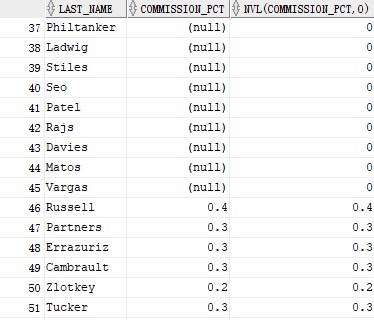
示例
-- 将为null的转换为指定值,对不为null的不做处理
select last_name,commission_pct,nvl(commission_pct,0) from employees;
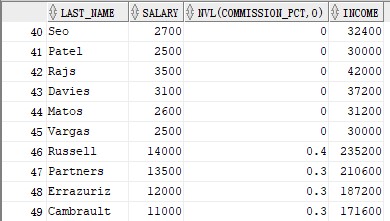
-- 计算员工一年总收入
select last_name, salary, nvl(commission_pct, 0),(salary*12) + (salary*12*nvl(commission_pct, 0)) income from employees;
3.2 nvl2函数
nvl2(expr1,expr2,expr3)
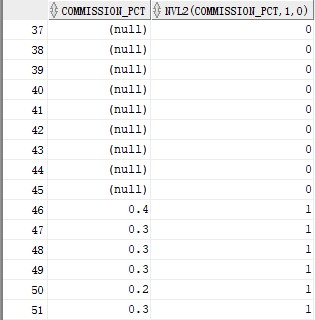
根据expr1返回结果,若expr1不为null则返回expr2,若expr1为null则返回expr3
示例
select commission_pct,nvl2(commission_pct,1,0) from employees;
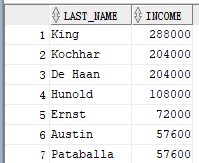
-- 计算员工一年总收入
select last_name,nvl2(commission_pct,(commission_pct+salary)*12, salary*12) income from employees;
3.3 nullif函数
nullif(expr1, expr2)
nullif函数用于比较两个表达式,若相等则返回null,否则返回第一个表达式的值,是sql中处理空值和避免计算错误的重要工具。
示例
-- 当值一样转换为null,判断数据是否有相同值
select first_name, length(first_name) "expr1",
       last_name,  length(last_name)  "expr2",
       nullif(length(first_name), length(last_name)) result
from employees; 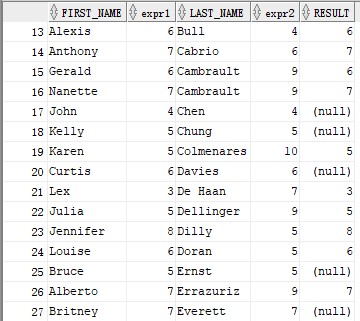
3.4 coalesce
coalesce函数相对于nvl函数的优势在于,coalesce函数可以采用多个替代值。
coalesce函数是sql中用于处理空值(null)的标准函数,它按从左到右的顺序依次检查参数,返回第一个非null的值,若所有参数均为null则返回null,广泛应用于空值替换、数据清洗和安全计算等场景。
select coalesce('1','2',null,'3'),coalesce(null,'1','2',null),coalesce(null,null) from dual;
示例
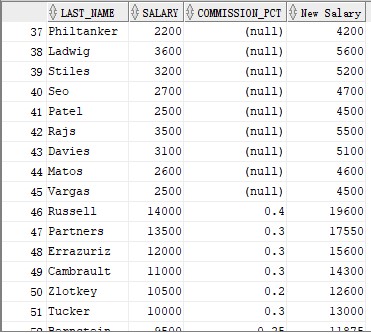
-- 计算工资
select last_name, salary, commission_pct,
coalesce((salary+(commission_pct*salary)), salary+2000)"new salary"
from   employees;
四、条件表达式
在sql语句中提供if-then-else逻辑的使用
使用以下方法:
case 表达式
decode 函数
4.1 case表达式
通过执行if-then-else语句来促进有条件的查询
case expr when comparison_expr1 then return_expr1
         [when comparison_expr2 then return_expr2
          when comparison_exprn then return_exprn
          else else_expr]
end
示例
select last_name, job_id, salary,
       case job_id when 'it_prog'  then  1.10*salary
                   when 'st_clerk' then  1.15*salary
                   when 'sa_rep'   then  1.20*salary
       else      salary end     "revised_salary"
from   employees;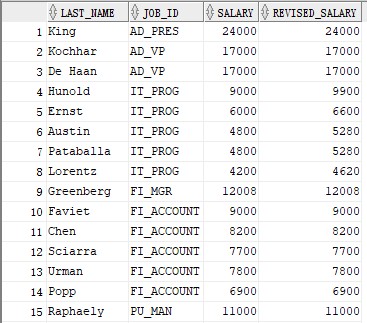
需要注意的是case表达式是自上到下匹配,如果匹配到则返回结果并且不会再进行后续的匹配了
-- 对工资进行分级
select last_name,salary,
case when salary < 5000 then 'low'
      when salary < 10000 then 'medium'
      when salary < 20000 then 'good'
      else 'excellent'
end qualified_salary
from employees;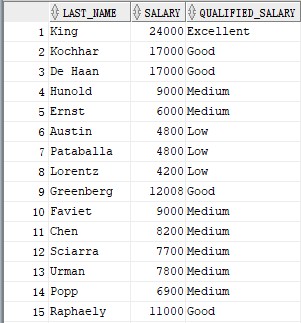
-- 上面的例子使用的case表达式判断是正常的顺序,如果将顺序调换就达不到上面的效果
select last_name,salary,
(case when salary < 20000 then 'good'
      when salary < 10000 then 'medium'
      when salary < 5000 then 'low'
      else 'excellent'
end) qualified_salary
from employees;
-- 这里将good和low的判断条件顺序调换
-- 可见case是匹配到结果后就退出,所以在使用时需要注意判断条件的顺序是否合理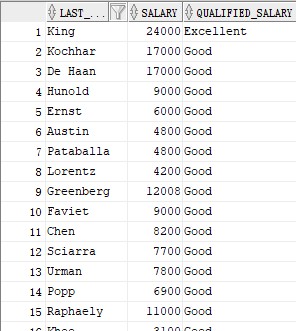
4.2 decode函数
decode函数是oracle数据库特有的条件判断工具,通过简洁的等值匹配语法实现if-then-else逻辑,特别适合处理简单等值转换和数据映射,但在非oracle环境中通常需要转换为case表达式。
decode(col|expression, search1, result1
      			   [, search2, result2,...,]
      			   [, default])
col|expression:列或者要比较的资源值
search:与col|expression比较的目标值
result:匹配时返回的替换值
default:可选参数,无匹配时返回的默认值
示例
-- 判断工资/2000后的整数位
select last_name, salary,
       decode (trunc(salary/2000, 0),
                         0, 0.00,
                         1, 0.09,
                         2, 0.20,
                         3, 0.30,
                         4, 0.40,
                         5, 0.42,
                         6, 0.44,
                            0.45) tax_rate
from   employees
where  department_id = 80;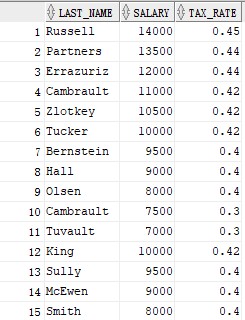
-- 根据工作计算工资
select last_name, job_id, salary,
       decode(job_id, 'it_prog',  1.10*salary,
                      'st_clerk', 1.15*salary,
                      'sa_rep',   1.20*salary,
              salary) revised_salary
from   employees;
总结
以上为个人经验,希望能给大家一个参考,也希望大家多多支持代码网。




发表评论