
 我要评论
我要评论oracle版本:19c
一、单行函数简介
sql函数
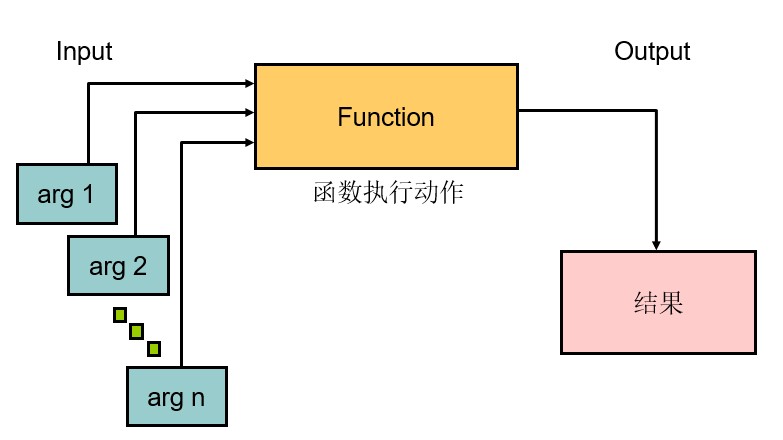
两种类型的sql函数
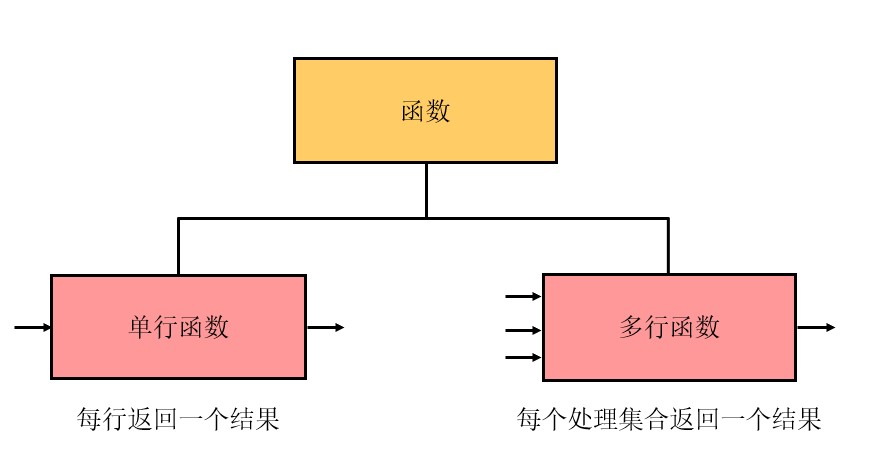
单行函数:
处理数据项
接受参数并返回一个值
对返回的每一行采取行动
每行返回一个结果
可能会修改数据类型
可以嵌套
接受可以是列或表达式的参数
function_name [(arg1, arg2,...)]
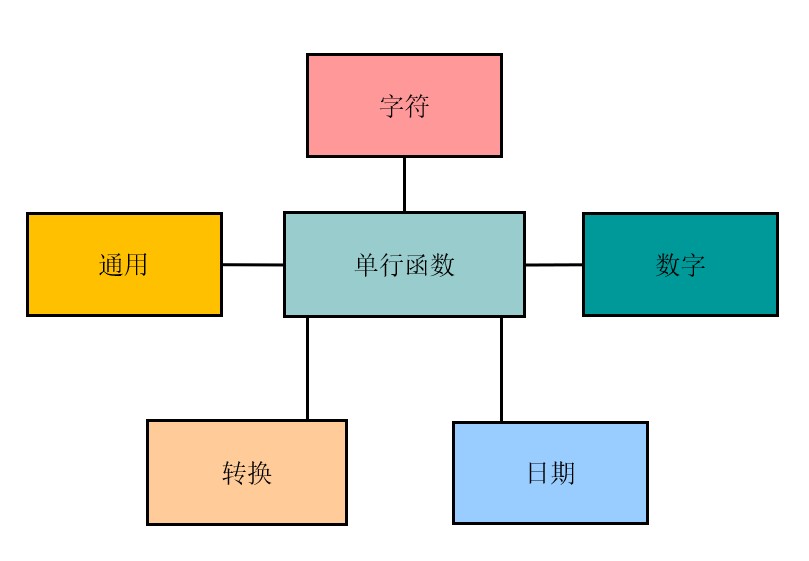
二、字符函数
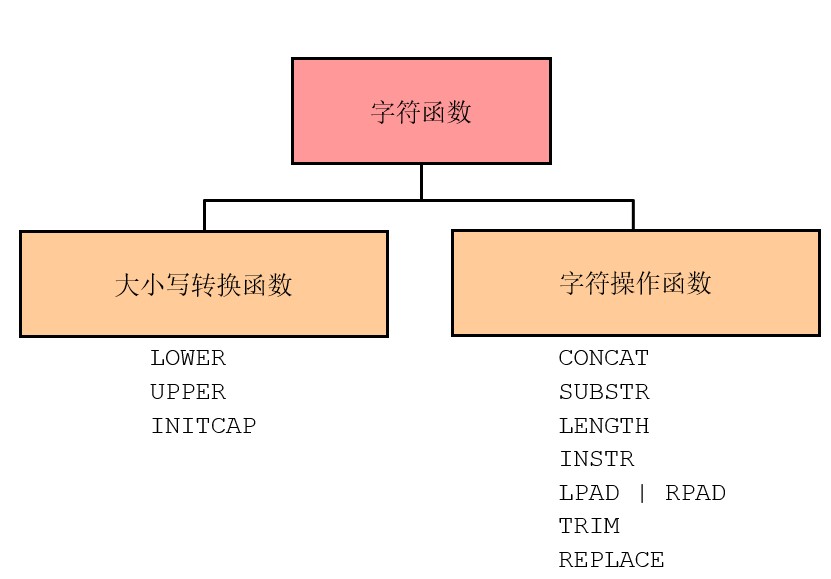
2.1 大小写转换函数
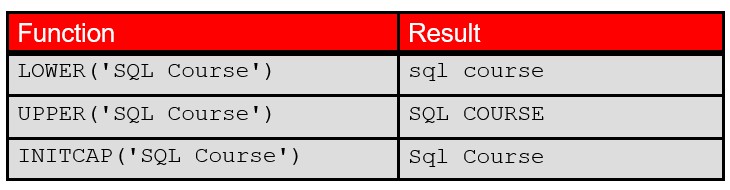
lower
-- lower函数可以将字符串全部转换为小写
sql> select lower('hello world') from dual;

lower('hell
-----------
hello world

-- 使用示例:使用lower函数处理列进行条件匹配
-- 可见本来名字首字母为大写,但是经过处理后可以直接和全部小写的条件进行匹配
sql> select employee_id, last_name, department_id
  2  from   employees
  3  where  lower(last_name) = 'higgins';

employee_id last_name                 department_id
----------- ------------------------- -------------
        205 higgins                             110
upper
-- upper函数可以将字符串全部转换为大写
sql> select upper('hello world') from dual;

upper('hell
-----------
hello world
initcap
-- initcap函数可以将字符串中所有单词的首字母转化为大写
sql> select initcap('hello world') from dual;

initcap('he
-----------
hello world
2.2 字符操作函数
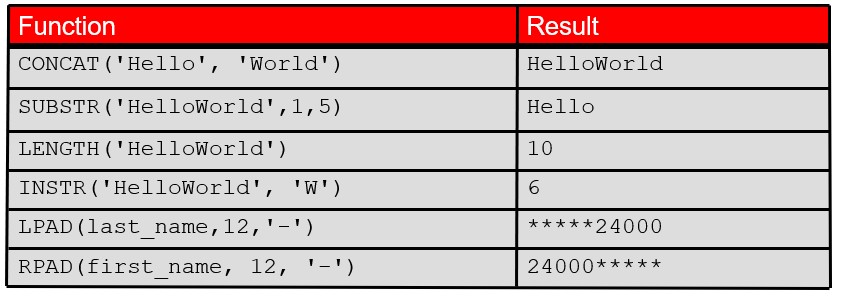
concat
-- concat函数可以将任意两个字符串连接(注意oracle中的concat函数严格限制只支持两个参数)
-- 如果需要连接多个字符串可以使用多个concat嵌套,但是更加推荐使用‘||'
sql> select concat('hello','world') from dual;

concat('he
----------
helloworld

sql> select 'hello' || 'world' || 'haha' from dual;

'hello'||'worl
--------------
helloworldhaha
substr
-- substr可以截取字符串

-- 从第3个字符开始,截取4个字符
sql> select substr('helloworld',3,4) from dual;

subs
----
llow

-- 从第3个字符开始,截取到末尾
sql> select substr('helloworld',3) from dual;

substr('
--------
lloworld

-- 从倒数第6个字符开始,截取4个字符
sql> select substr('helloworld',-6,4) from dual;
subs
----
owor

-- 从倒数第6个字符开始,截取到末尾
sql> select substr('helloworld',-6) from dual;
substr
------
oworld

-- 如果起始位置超过字符串长度,则返回空字符串
sql> select substr('helloworld',13) from dual;
substr('helloworld',13)
-----------------------

-- 如果截取长度为0,则返回空字符串
sql> select substr('helloworld',1,0) from dual;
substr('helloworld',1,0)
------------------------
length
-- 计算字符串的长度
sql> select length('helloworld') from dual;
length('helloworld')
--------------------
                  10
instr
-- 在源字符串中查找目标子串的位置,返回目标子串在源字符串中的起始位置序号(从1开始计数),若未找到则返回0。
sql> select instr('helloworld','wo') from dual;

instr('helloworld','wo')
------------------------
                       6

sql> select instr('helloworld','w') from dual;
instr('helloworld','w')
-----------------------
                      6
lpan
-- 使用指定字符长度和补齐空位的字符,在不够长的字符串前面补齐
-- 指定长度和补齐空位的字符
sql> select lpad(last_name,12,'-') from employees;
lpad(last_name,12,'-')
------------------------------------------------
-------urman
------vargas
-----vishney
-----vollman
-------walsh
-------weiss
------whalen
-----zlotkey

107 rows selected.
rpad
-- 使用指定字符长度和补齐空位的字符,在不够长的字符串后面补齐
-- 指定长度和补齐空位的字符
sql> select rpad(last_name,12,'-') from employees;
rpad(last_name,12,'-')
------------------------------------------------
urman-------
vargas------
vishney-----
vollman-----
walsh-------
weiss-------
whalen------
zlotkey-----

107 rows selected.
三、函数的嵌套
单行函数可以嵌套到任何级别。
嵌套函数的执行从最里层到最外层。
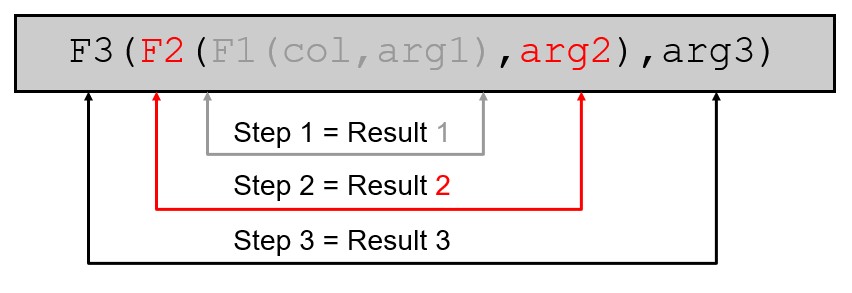
示例
-- 嵌套了upper和concat
sql> select last_name,
  2  upper(concat(last_name,'-test'))
  3* from employees;
last_name                 upper(concat(last_name,'-test'
------------------------- ------------------------------
urman                     urman-test
vargas                    vargas-test
vishney                   vishney-test
vollman                   vollman-test
walsh                     walsh-test
weiss                     weiss-test
whalen                    whalen-test
zlotkey                   zlotkey-test
四、数字函数
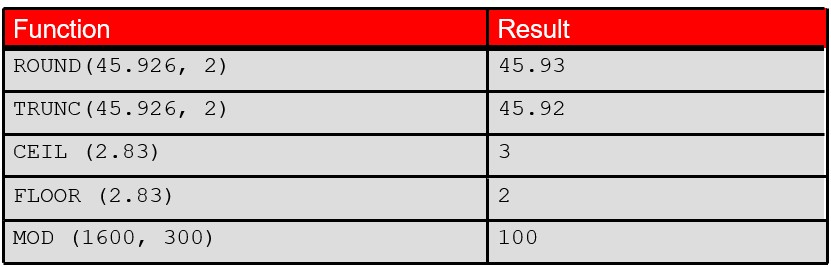
round
-- 根据指定的小数位进行四舍五入
-- 指定小数位为2
sql> select round(45.9635,2) from dual;

round(45.9635,2)
----------------
           45.96

-- 指定小数位为3
sql> select round(45.9635,3) from dual;
round(45.9635,3)
----------------
          45.964

-- 不指定小数位或者指定为0,代表取整数
sql> select round(45.93) from dual;

round(45.93)
------------
          46


sql> select round(45.93,0) from dual;
round(45.93,0)
--------------
            46

-- 指定小数位为负数,代表小数点左边几位
sql> select round(45.93,-1) from dual;

round(45.93,-1)
---------------
             50
trunc
-- 根据指定小数位进行截取,不四舍五入
-- 指定小数位为2
sql> select trunc(45.9635,2) from dual;
trunc(45.9635,2)
----------------
           45.96

-- 指定小数位为3
sql> select trunc(45.9635,3) from dual;
trunc(45.9635,3)
----------------
          45.963

-- 不指定小数位或者指定为0,代表取整数
sql> select trunc(45.93) from dual;

trunc(45.93)
------------
          45


sql> select trunc(45.93,0) from dual;
trunc(45.93,0)
--------------
            45

-- 指定小数位为负数,代表小数点左边几位
sql> select trunc(45.93,-1) from dual;
trunc(45.93,-1)
---------------
             40
ceil
-- 返回大于或等于指定数字的最小整数
sql> select ceil(2.83) from dual;
ceil(2.83)
----------
         3

-- 需要注意负数,-2比-2.83大,所以返回-2
sql> select ceil(-2.83) from dual;

ceil(-2.83)
-----------
         -2
floor
-- 返回等于或小于指定数字的最大整数
sql> select floor(2.83) from dual;
floor(2.83)
-----------
          2

-- -3比-2.83小,所以返回-3
sql> select floor(-2.83) from dual;
floor(-2.83)
------------
          -3
mod
-- 取余
sql> select mod(9,3) from dual;

  mod(9,3)
----------
         0

sql> select mod(9,2) from dual;

  mod(9,2)
----------
         1
五、对日期的处理
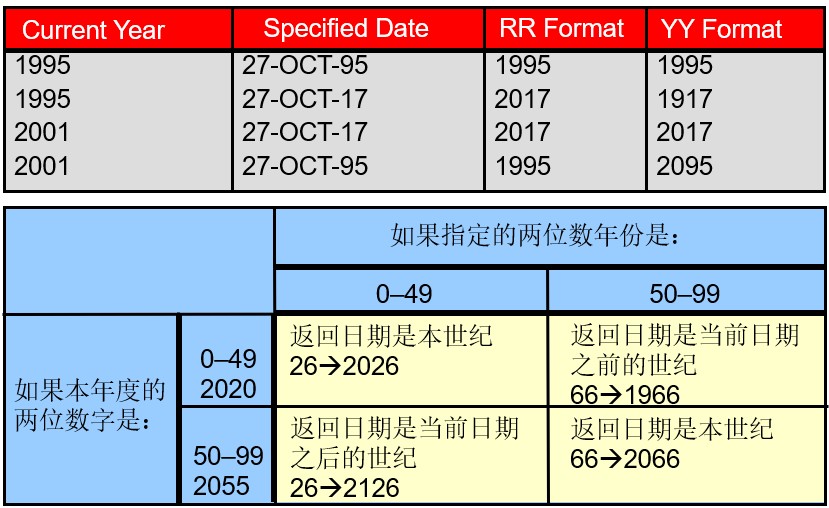
oracle数据库以内部数字格式存储日期:世纪,年,月,日,小时,分钟和秒.
默认日期显示格式为dd-mon-rr.
通过仅指定年份的最后两位数字,使您能够存储20世纪21世纪的日期
使您能够以相同的方式存储21世纪的20世纪日期
示例
sql> select last_name, hire_date
  2  from   employees
  3* where  hire_date < '01-feb-2008';

last_name                 hire_date
------------------------- ---------
jones                     17-mar-07
walsh                     24-apr-06
feeney                    23-may-06
oconnell                  21-jun-07
grant                     13-jan-08
whalen                    17-sep-03
hartstein                 17-feb-04
fay                       17-aug-05
mavris                    07-jun-02
baer                      07-jun-02
higgins                   07-jun-02
rr格式
5.1 修改当前会话的默认日期格式
可以设定时间格式为中国人适应的yyyy-mm-dd hh24:mi:ss
年 月 日 时(24时制) 分 秒
-- 修改当前会话的默认日期格式
sql> alter session set nls_date_format='yyyy-mm-dd hh24:mi:ss';
session altered.


sql> select last_name, hire_date
  2* from employees;

last_name                 hire_date
------------------------- -------------------
grant                     2008-01-13 00:00:00
whalen                    2003-09-17 00:00:00
hartstein                 2004-02-17 00:00:00
fay                       2005-08-17 00:00:00
mavris                    2002-06-07 00:00:00
baer                      2002-06-07 00:00:00
higgins                   2002-06-07 00:00:00
gietz                     2002-06-07 00:00:00

107 rows selected.
5.2 查看日期
使用sysdate函数
sysdate是一个返回以下内容的函数:
date
time
sql> select sysdate from dual;

sysdate
---------
14-apr-26

-- 可以修改日期格式然后再查看
sql> alter session set nls_date_format='yyyy-mm-dd hh24:mi:ss';

session altered.

sql> select sysdate from dual;

sysdate
-------------------
2026-04-14 14:38:49
使用current_date 和 current_timestamp函数
current_date 从用户会话返回当前日期。
current_timestamp 从用户会话返回当前日期和时间。
sql> select current_date ,current_timestamp from dual;
current_date        current_timestamp
------------------- ---------------------------------------------
2026-04-14 14:43:55 14-apr-26 02.43.55.257266000 pm asia/shanghai
5.3 日期的计算
从日期中添加或减去一个数字,以得到结果日期值。
减去两个日期以找出这些日期之间的天数。
通过将小时数除以24,可以在日期中加上小时。
对日期使用算术运算符
-- 计算部分id为90的员工入职了多少周
sql> select last_name, (sysdate-hire_date)/7 as weeks
  2  from   employees
  3  where  department_id = 90;

last_name                      weeks
------------------------- ----------
king                      1191.08786
kochhar                     1072.945
de haan                   1317.51643
5.4 日期处理函数
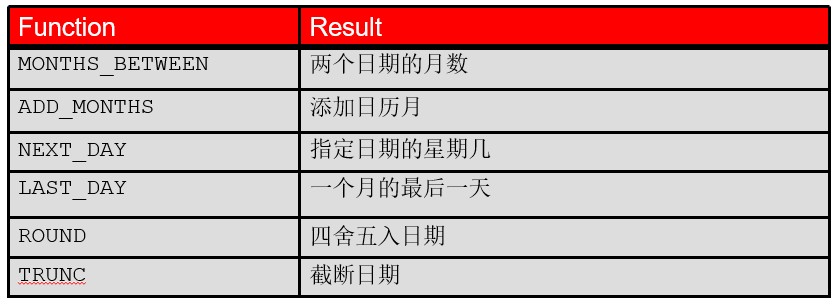
months_between
months_between函数用于精确计算两个日期之间的月份数差值,可返回包含小数部分的精确结果,适用于需要高精度日期差计算的业务场景。
sql> select months_between('2026-09-09','2001-01-01') from dual;
months_between('2026-09-09','2001-01-01')
-----------------------------------------
                               308.258065
add_months
add_months函数用于在指定日期上精确增加或减少指定的月份数,自动处理月末日期转换,是oracle数据库中处理月份增减的核心函数。
sql> select add_months('2026-04-14',1) from dual;
add_months('2026-04
-------------------
2026-05-14 00:00:00


sql> select add_months('2026-04-14',1.9) from dual;
add_months('2026-04
-------------------
2026-05-14 00:00:00
next_day
next_day函数用于返回指定日期之后的下一个指定星期几的日期,是oracle数据库中处理周计算的核心函数,支持通过字符串或数字指定目标星期。
-- 返回最接近指定的日期2026-04-14的星期五的日期,也就是2026-04-17
sql> select next_day('2026-04-14','friday') from dual;
next_day('2026-04-1
-------------------
2026-04-17 00:00:00
last_day
last_day函数是oracle数据库中用于返回指定日期所在月份最后一天的核心日期函数,能够自动处理不同月份天数差异及闰年情况,无需手动判断月末日期。
-- 返回指定日期的所在月份的最后一天
sql> select last_day('2026-04-14') from dual;
last_day('2026-04-1
-------------------
2026-04-30 00:00:00
使用round和trunc函数
round函数处理日期
-- round在处理mounth这种,应该知道16号之前都是返回本月的一号的零时零点零分,16号之后(含16号)都是返回下个月1号的零时零点零分
sql> select round(to_date('2026-04-14','yyyy-mm-dd'),'month') from dual;

round(to_date('2026
-------------------
2026-04-01 00:00:00

-- round在处理year这种,应该知道过了6月30号,也就是从7月1号开始都是返回下一年的一月一号的零时零点零分,6月30号(含30号当天)都是返回本年的一月一号的零时零点零分
sql> select round(to_date('2020-07-01 00:24:04','yyyy-mm-dd hh24:mi:ss'),'year') from dual;

round(to_date('2020
-------------------
2021-01-01 00:00:00
trunc函数处理日期
-- trunc在处理month这种,无论你是月初 月中还是月末都返回本月的1号的零时零点零分
sql> select trunc(to_date('2020-10-31 00:00:00','yyyy-mm-dd hh24:mi:ss'),'month') from dual;

trunc(to_date('2020
-------------------
2020-10-01 00:00:00

-- trunc在处理year这种,无论你是年初 年中还是年末都返回本年的一月一号的零时零点零分
sql> select trunc(to_date('2020-12-31 00:24:04','yyyy-mm-dd hh24:mi:ss'),'year') from dual;

trunc(to_date('2020
-------------------
2020-01-01 00:00:00
总结
以上为个人经验,希望能给大家一个参考,也希望大家多多支持代码网。




发表评论