
 我要评论
我要评论创建基于单表的视图
在 checkrecord 表上创建一个名为 v_checkrecord 的视图 只映射id,username,nickname字段
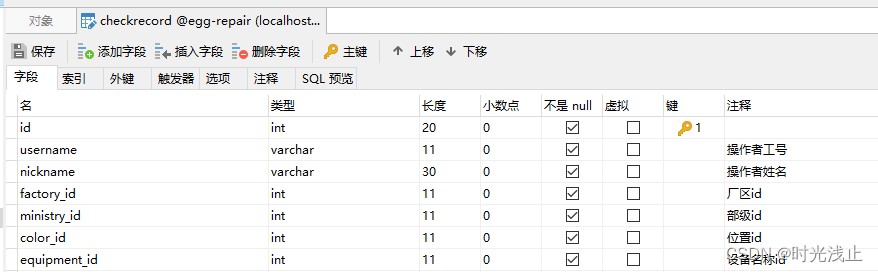
create view
v_checkrecord (s_id,s_username,s_nickname)
as
select id,username,nickname from checkrecord
通过这个视图可以很好地保护基本表中的数据。
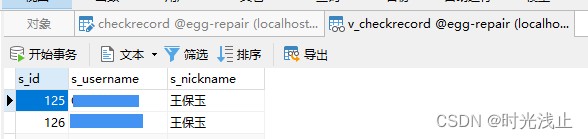
查询视图
select * from v_checkrecord
修改视图
注意:与创建视图就差一个代码不一样 修改:alter ,创建: create
alter view
v_checkrecord (s_id,s_username,s_nickname,s_one)
as
select id,username,nickname,one from checkrecord
删除视图
drop view if exists v_checkrecord
创建本地用户
使用 create user 创建一个用户,用户名是 test1,密码是 test1,主机名是 localhost。
sql 语句和执行过程如下。
create user 'test1'@'localhost' identified by 'test1';
创建远程用户
create user 'test'@'%' identified by 'test123456';
修改用户
使用 rename user 语句将用户名 test1 修改为 testuser1,主机是 localhost。
sql 语句和执行过程如下。
rename user 'test1'@'localhost' to 'testuser1'@'localhost';
删除用户
drop user 'testuser1'@'localhost';
查看用户权限
使用 show grants for 语句查看权限。
其语法格式如下:
show grants for 'test1'@'localhost';
其中,'test1表示用户名,localhost表示主机名或主机 ip。
授权并创建用户
使用 grant 语句创建一个新的用户 testuser,密码为 testpwd。
用户 testuser 对所有的数据有查询、插入权限,并授予 grant 权限。
sql 语句和执行过程如下。
grant select,insert on *.* to 'testuser'@'localhost' identified by 'testpwd' with grant option;
使用 grant 语句创建一个新的用户 testuser,密码为 testpwd。
用户 testuser 对v_checkrecord数据有查询权限,并授予 grant 权限。
sql 语句和执行过程如下。
grant select on v_checkrecord to 'testuser'@'localhost' identified by 'testpwd' with grant option;
授权一个视图查询权限 用户是已经提前创建好了
grant select on v_spot_check to 'test1'@'%';
在sql查询中,如果你想为结果集中的特定值或列起别名,你可以使用as关键字。这在你希望将数字值(如1和0)转换为更具描述性的文本时特别有用。
假设你有一个名为settings的表,其中有一个名为is_enabled的列,该列包含1(启用)或0(禁用)的值。
你可以使用case语句结合as关键字来为这些值起别名,如下所示:
select
    id,
    setting_name,
    case
        when is_enabled = 1 then '启用'
        when is_enabled = 0 then '禁用'
        else '未知' -- 可选,用于处理其他可能的值或未知情况
    end as status
from
    settings;
在这个查询中:
- case语句用于检查is_enabled列的值。
- 如果is_enabled是1,则case语句返回’启用’。
- 如果is_enabled是0,则case语句返回’禁用’。
- as status将case语句的结果列命名为status。
总结
以上为个人经验,希望能给大家一个参考,也希望大家多多支持代码网。



发表评论