
 我要评论
我要评论在 spring boot 项目开发中,我们通常会在application.properties或application.yml配置文件中直接填写数据库连接信息(url、用户名、密码)。这种方式虽然便捷,但存在一个致命的安全隐患:连接信息以明文形式存储。一旦配置文件泄露(如代码提交到 git 仓库、服务器被入侵等),数据库将直接面临被攻击的风险。
本文将针对这一问题,详细介绍两种在 spring boot 项目中实现数据库连接信息加密的方案,帮助你彻底解决配置明文存储的安全问题。
一、为什么必须加密数据库连接信息?
在讲解方案前,我们先明确加密的必要性,避免 “为了加密而加密” 的误区:
- 代码仓库泄露风险:开发者若不慎将包含明文密码的配置文件提交到公开 git 仓库,任何人都能获取数据库权限。
- 服务器运维风险:服务器上的配置文件可能被运维人员或黑客查看,直接暴露核心数据库信息。
- 合规性要求:金融、医疗等行业的合规标准(如等保 2.0)明确要求敏感信息必须加密存储,明文存储属于违规操作。
因此,对数据库连接信息(尤其是密码)进行加密,是项目安全防护的基础且必要的一步。
二、具体实现
1.创建解密加密工具类具体代码如下
package xyz.huanziheng.pet.utils;
import javax.crypto.cipher;
import javax.crypto.keygenerator;
import javax.crypto.secretkey;
import javax.crypto.spec.secretkeyspec;
import java.nio.charset.standardcharsets;
import java.security.*;
import java.security.spec.pkcs8encodedkeyspec;
import java.security.spec.x509encodedkeyspec;
import java.util.base64;
/**
 * @author fanmengze
 * @date 2023/11/13 21:59
 **/
public class encryptionutil {
    /**
     * 生成aes密钥
     *
     * @param password 密码
     * @return 密钥
     * @throws nosuchalgorithmexception 密钥生成算法不支持异常
     */
    private static secretkey generateaeskey(string password) throws nosuchalgorithmexception {
        keygenerator keygenerator = keygenerator.getinstance("aes");
        keygenerator.init(128);
        byte[] passwordbytes = password.getbytes(standardcharsets.utf_8);
        messagedigest digest = messagedigest.getinstance("sha-256");
        byte[] keybytes = digest.digest(passwordbytes);
        return new secretkeyspec(keybytes, "aes");
    }
    /**
     * 对称加密算法aes加密
     *
     * @param plaintext 明文
     * @param password  密码
     * @return 加密后的密文
     * @throws exception 加密异常
     */
    public static string encryptwithaes(string plaintext, string password) throws exception {
        cipher cipher = cipher.getinstance("aes");
        secretkey secretkey = generateaeskey(password);
        cipher.init(cipher.encrypt_mode, secretkey);
        byte[] encryptedbytes = cipher.dofinal(plaintext.getbytes(standardcharsets.utf_8));
        return base64.getencoder().encodetostring(encryptedbytes);
    }
    /**
     * 对称加密算法aes解密
     *
     * @param ciphertext 密文
     * @param password   密码
     * @return 解密后的明文
     * @throws exception 解密异常
     */
    public static string decryptwithaes(string ciphertext, string password) throws exception {
        cipher cipher = cipher.getinstance("aes");
        secretkey secretkey = generateaeskey(password);
        cipher.init(cipher.decrypt_mode, secretkey);
        byte[] decryptedbytes = cipher.dofinal(base64.getdecoder().decode(ciphertext));
        return new string(decryptedbytes, standardcharsets.utf_8);
    }
    /**
     * 生成rsa密钥对
     *
     * @return 密钥对
     * @throws nosuchalgorithmexception 密钥生成算法不支持异常
     */
    public static keypair generatersakeypair() throws nosuchalgorithmexception {
        keypairgenerator keypairgenerator = keypairgenerator.getinstance("rsa");
        keypairgenerator.initialize(2048);
        return keypairgenerator.generatekeypair();
    }
    /**
     * 获取rsa公钥的base64编码字符串
     *
     * @return rsa公钥base64编码字符串
     */
    public static string getrsapublickeystring(publickey publickey) {
        keyfactory keyfactory;
        try {
            keyfactory = keyfactory.getinstance("rsa");
            x509encodedkeyspec publickeyspec = new x509encodedkeyspec(publickey.getencoded());
            return base64.getencoder().encodetostring(keyfactory.generatepublic(publickeyspec).getencoded());
        } catch (exception e) {
            e.printstacktrace();
            return null;
        }
    }
    /**
     * 根据base64编码的字符串还原为rsa公钥
     *
     * @param publickeystring rsa公钥base64编码字符串
     * @return rsa公钥
     */
    public static publickey getpublickey(string publickeystring) {
        try {
            keyfactory keyfactory = keyfactory.getinstance("rsa");
            x509encodedkeyspec publickeyspec = new x509encodedkeyspec(base64.getdecoder().decode(publickeystring));
            return keyfactory.generatepublic(publickeyspec);
        } catch (exception e) {
            e.printstacktrace();
            return null;
        }
    }
    /**
     * 获取rsa私钥的base64编码字符串
     *
     * @return rsa私钥base64编码字符串
     */
    public static string getrsaprivatekeystring(privatekey privatekey) {
        keyfactory keyfactory;
        try {
            keyfactory = keyfactory.getinstance("rsa");
            pkcs8encodedkeyspec privatekeyspec = new pkcs8encodedkeyspec(privatekey.getencoded());
            return base64.getencoder().encodetostring(keyfactory.generateprivate(privatekeyspec).getencoded());
        } catch (exception e) {
            e.printstacktrace();
            return null;
        }
    }
    /**
     * 根据base64编码的字符串还原为rsa私钥
     *
     * @param privatekeystring rsa私钥base64编码字符串
     * @return rsa私钥
     */
    public static privatekey getprivatekey(string privatekeystring) {
        try {
            keyfactory keyfactory = keyfactory.getinstance("rsa");
            pkcs8encodedkeyspec privatekeyspec = new pkcs8encodedkeyspec(base64.getdecoder().decode(privatekeystring));
            return keyfactory.generateprivate(privatekeyspec);
        } catch (exception e) {
            e.printstacktrace();
            return null;
        }
    }
    /**
     * 非对称加密算法rsa加密
     *
     * @param plaintext 明文
     * @param publickey 公钥
     * @return 加密后的密文
     * @throws exception 加密异常
     */
    public static string encryptwithrsa(string plaintext, publickey publickey) throws exception {
        cipher cipher = cipher.getinstance("rsa");
        keypair keypair = generatersakeypair();
        cipher.init(cipher.encrypt_mode, publickey);
        byte[] encryptedbytes = cipher.dofinal(plaintext.getbytes(standardcharsets.utf_8));
        return base64.getencoder().encodetostring(encryptedbytes);
    }
    /**
     * 非对称加密算法rsa解密
     *
     * @param ciphertext 密文
     * @param privatekey 私钥
     * @return 解密后的明文
     * @throws exception 解密异常
     */
    public static string decryptwithrsa(string ciphertext, privatekey privatekey) throws exception {
        cipher cipher = cipher.getinstance("rsa");
        keypair keypair = generatersakeypair();
        cipher.init(cipher.decrypt_mode, privatekey);
        byte[] decryptedbytes = cipher.dofinal(base64.getdecoder().decode(ciphertext));
        return new string(decryptedbytes, standardcharsets.utf_8);
    }
    /**
     * 哈希算法sha-256
     *
     * @param plaintext 明文
     * @return 哈希值
     * @throws nosuchalgorithmexception 哈希算法不支持异常
     */
    public static string hashwithsha256(string plaintext) throws nosuchalgorithmexception {
        messagedigest digest = messagedigest.getinstance("sha-256");
        byte[] hashbytes = digest.digest(plaintext.getbytes(standardcharsets.utf_8));
        return bytestohex(hashbytes);
    }
    /**
     * 将字节数组转换为十六进制字符串
     *
     * @param bytes 字节数组
     * @return 十六进制字符串
     */
    private static string bytestohex(byte[] bytes) {
        stringbuilder sb = new stringbuilder();
        for (byte b : bytes) {
            string hex = integer.tohexstring(0xff & b);
            if (hex.length() == 1) {
                sb.append('0');
            }
            sb.append(hex);
        }
        return sb.tostring();
    }
    /**
     * base64 编码
     *
     * @param plaintext 内容
     * @return 十六进制字符串
     */
    public static string encodebase64(string plaintext) {
        byte[] plainbytes = plaintext.getbytes(standardcharsets.utf_8);
        return base64.getencoder().encodetostring(plainbytes);
    }
    /**
     * base64 解码
     *
     * @param base64text 十六进制字符串
     * @return 内容
     */
    public static string decodebase64(string base64text) {
        byte[] base64bytes = base64.getdecoder().decode(base64text);
        return new string(base64bytes, standardcharsets.utf_8);
    }
}
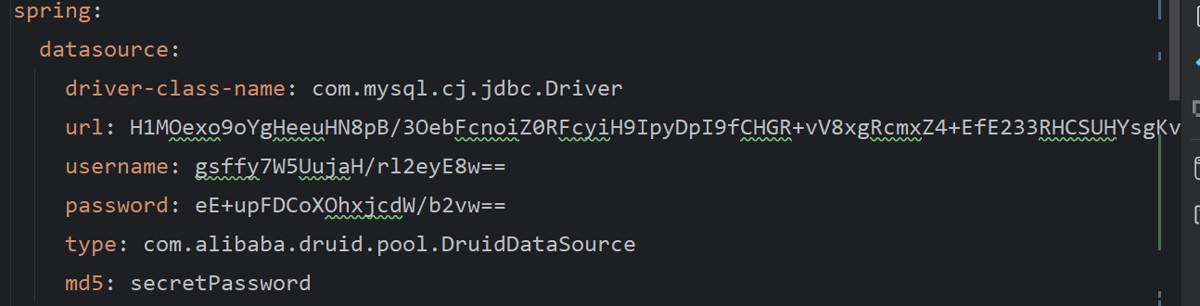
2.对连接信息加密
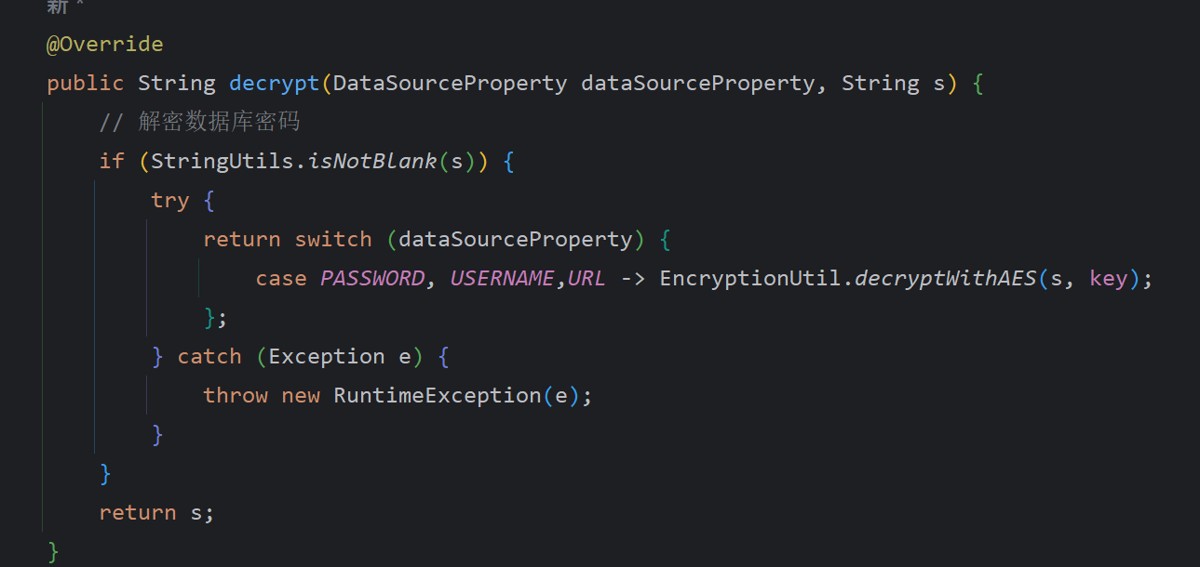
3. 实现datasourcedecipher接口重写decrypt方法
三、总结
数据库连接信息加密是 spring boot 项目安全防护的重要环节。mybatis-flex自带这个方法,其他框架推荐优先使用 jasypt,它能以最低的成本实现加密;若项目有特殊加密需求(如国密算法),则可选择自定义加密方案。
到此这篇关于spring boot+mybatis-flex之数据库连接信息加密实战指南的文章就介绍到这了,更多相关spring boot数据库连接信息加密内容请搜索代码网以前的文章或继续浏览下面的相关文章希望大家以后多多支持代码网!





发表评论