
 我要评论
我要评论在现代数据驱动的应用场景中,处理大文件已成为开发者绕不开的挑战。无论是日志分析、数据迁移、图像处理,还是机器学习训练集预处理,我们常常需要面对数gb甚至数十gb级别的文件。传统的逐行或整块读取方式,在内存占用和性能上都显得捉襟见肘。这时候,分块读取与写入策略就成为了高效处理大文件的核心武器。
本文将带你深入探索如何使用 python 实现高性能的大文件读写优化,涵盖从底层原理到实战代码的完整流程。我们将通过 mermaid 流程图 可视化关键逻辑,提供可直接运行的代码示例,并结合真实场景说明最佳实践。无论你是初学者还是有经验的工程师,都能从中获得实用价值。
为什么我们需要分块读取?
想象一下:你有一个 10gb 的日志文件,内容如下(仅示意):
2024-05-10 12:34:56 [info] user login success
2024-05-10 12:34:57 [error] database connection failed
2024-05-10 12:34:58 [warn] high cpu usage detected
...
如果你用以下方式读取:
with open("large_log.txt", "r") as f:
    content = f.read()  # 一次性加载整个文件到内存
那么你的程序会瞬间消耗 10gb 内存!这不仅可能导致系统卡顿、崩溃,还会严重影响并发性能。这就是“内存爆炸”问题。
正确做法是:按块读取(chunked reading),只将当前处理的部分加载进内存。
小贴士:根据 python 官方文档,read() 方法默认读取全部内容,而 read(size) 可以指定每次读取的字节数。
分块读取的基本原理
分块读取的核心思想是:不一次性加载全部数据,而是以固定大小的“块”为单位逐步处理。
块大小的选择原则
| 块大小(kb) | 适用场景 | 优点 | 缺点 |
|---|---|---|---|
| 1–4 kb | 极高并发、低内存设备 | 内存占用极小 | 磁盘 i/o 次数多 |
| 8–32 kb | 一般应用、平衡性能 | 性价比高 | 仍可能频繁调用 |
| 64–256 kb | 大文件处理、批量任务 | 减少 i/o 次数 | 占用较多内存 |
| 1–4 mb | 高吞吐、批量导入导出 | 最大化效率 | 需要足够内存 |
推荐初始值:64 kb(≈ 65536 字节),可根据实际测试调整。
代码示例:基础分块读取
def chunked_read(filename, chunk_size=65536):
    """
    按块读取大文件,适用于文本或二进制文件。

    :param filename: 文件路径
    :param chunk_size: 每次读取的字节数,默认 64kb
    :yield: 每一块的数据
    """
    with open(filename, 'rb') as f:
        while true:
            chunk = f.read(chunk_size)
            if not chunk:
                break
            yield chunk

# 使用示例
if __name__ == "__main__":
    file_path = "large_file.log"
    total_bytes = 0

    for i, chunk in enumerate(chunked_read(file_path, chunk_size=65536)):
        total_bytes += len(chunk)
        print(f"chunk {i+1}: {len(chunk)} bytes read")

        # 模拟处理逻辑(如解析日志、压缩等)
        # process_chunk(chunk)

    print(f"✅ total size: {total_bytes} bytes")
这段代码的关键在于:
- 使用
rb模式读取二进制数据,避免编码问题; while true+f.read(chunk_size)实现流式读取;yield返回生成器,节省内存。
分块写入策略:高效输出大文件
与读取相对应,分块写入同样重要。例如你需要将一个大文件拆分成多个小文件,或者进行加密/压缩后输出。
分块写入模板
def chunked_write(output_filename, chunks, chunk_size=65536):
    """
    将数据块写入文件,支持流式输出。

    :param output_filename: 输出文件名
    :param chunks: 可迭代的块数据(字节串)
    :param chunk_size: 块大小(可选)
    """
    with open(output_filename, 'wb') as f:
        for chunk in chunks:
            if isinstance(chunk, str):
                chunk = chunk.encode('utf-8')
            f.write(chunk)
        print(f"💾 successfully wrote to {output_filename}")

# 模拟生成数据块
def generate_data_chunks():
    for i in range(1000):
        yield f"line {i}: this is a test line.\n".encode('utf-8')

# 执行写入
chunked_write("output_large_file.txt", generate_data_chunks())
注意:如果输入是字符串,请先转为 bytes,否则会抛出 typeerror。
mermaid 流程图:分块读写核心流程
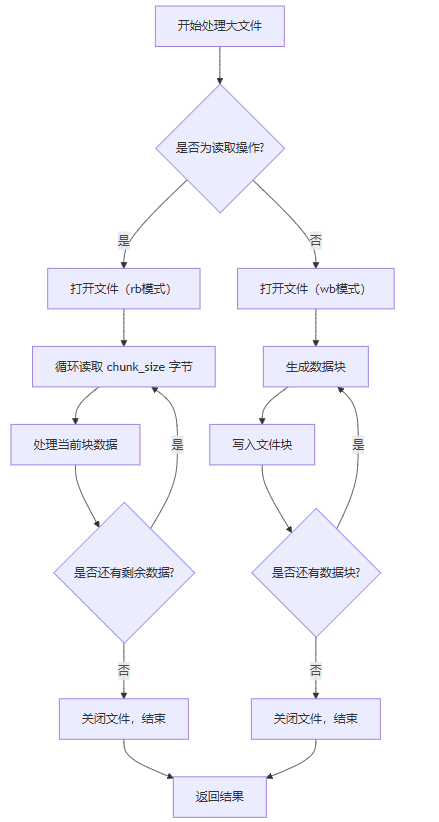
该图清晰展示了分块读写的双向流程,强调了“边读边处理、边写边释放”的设计哲学。
实战案例:日志文件过滤与分割
假设我们有一个 100gb 的服务器日志文件,目标是:
- 提取所有
[error]日志; - 按天分组保存为独立文件。
优化方案:分块 + 滑动窗口匹配
import re
from datetime import datetime

# 正则表达式匹配错误日志
error_pattern = re.compile(r'\[error\]')
date_pattern = re.compile(r'(\d{4}-\d{2}-\d{2})')

def filter_and_split_logs(input_file, output_dir, chunk_size=65536):
    """
    分块读取日志,提取 error 并按日期分组输出。
    """
    current_date = none
    buffer = b""  # 用于跨块的缓冲区
    file_handles = {}

    def get_output_handle(date_str):
        """获取对应日期的输出文件句柄"""
        if date_str not in file_handles:
            filename = f"{output_dir}/error_{date_str}.log"
            file_handles[date_str] = open(filename, 'ab')
        return file_handles[date_str]

    with open(input_file, 'rb') as f:
        while true:
            chunk = f.read(chunk_size)
            if not chunk:
                break

            # 合并缓冲区与新块
            combined = buffer + chunk
            buffer = b""  # 清空缓冲区

            # 查找最后一个换行符位置,防止截断行
            last_newline = combined.rfind(b'\n')
            if last_newline == -1:
                # 整个块都没有换行,全部放入缓冲区
                buffer = combined
                continue
            else:
                # 分割为已完整行 + 未完成行
                complete_lines = combined[:last_newline + 1]
                buffer = combined[last_newline + 1:]

            # 处理完整行
            for line in complete_lines.splitlines(true):  # true 保留换行符
                line = line.strip()
                if not line:
                    continue

                # 检查是否包含 [error]
                if error_pattern.search(line.decode('utf-8', errors='ignore')):
                    # 提取日期
                    match = date_pattern.search(line.decode('utf-8', errors='ignore'))
                    if match:
                        date_str = match.group(1)
                    else:
                        date_str = "unknown"

                    # 写入对应文件
                    handle = get_output_handle(date_str)
                    handle.write(line + b'\n')

    # 关闭所有打开的文件
    for handle in file_handles.values():
        handle.close()

    print(f"✅ processing completed. errors saved in {output_dir}/")

# 调用函数
filter_and_split_logs("server_logs_2024.log", "./errors_by_date")
亮点分析
- 滑动窗口缓冲:避免跨块日志被截断;
- 惰性打开文件:只在首次遇到某天日志时才创建文件;
- 内存友好:全程仅维护少量缓冲区;
- 可扩展性强:可轻松改为其他过滤规则(如
[warn]、ip地址匹配)。
高级技巧:异步分块读写(asyncio)
对于 i/o 密集型任务,异步编程能进一步提升吞吐量。虽然 python 的 asyncio 不适合所有场景,但在处理多个大文件时非常有效。
异步分块读取示例
import asyncio
import aiofiles

async def async_chunked_read(filename, chunk_size=65536):
    """
    异步分块读取文件。
    """
    async with aiofiles.open(filename, 'rb') as f:
        while true:
            chunk = await f.read(chunk_size)
            if not chunk:
                break
            yield chunk

# 异步主函数
async def main():
    file_path = "large_file.bin"
    async for chunk in async_chunked_read(file_path):
        # 模拟耗时处理(如哈希计算、压缩)
        await asyncio.sleep(0.001)  # 模拟延迟
        print(f"processed {len(chunk)} bytes")

# 运行异步任务
if __name__ == "__main__":
    asyncio.run(main())
安装命令:pip install aiofiles
性能对比:传统 vs 分块 vs 异步
| 方式 | 内存峰值 | i/o 次数 | 适用场景 | 是否推荐 |
|---|---|---|---|---|
f.read() 全部加载 | 极高(文件大小) | 1 次 | 小文件(<1mb) | ❌ |
f.read(chunk_size) | 低(~chunk_size) | n 次 | 大文件处理 | ✅ |
asyncio + aiofiles | 极低 | n 次(并发) | 多文件、高并发 | ✅✅ |
推荐:在处理 单个大文件 时优先使用同步分块;若需同时处理多个文件,考虑异步。
错误处理与健壮性设计
大文件处理极易遭遇异常,必须做好防御:
完整异常处理模板
import os
import logging

logging.basicconfig(level=logging.info)
logger = logging.getlogger(__name__)

def robust_chunked_process(input_file, output_file, chunk_size=65536, max_retries=3):
    """
    带重试机制的稳健分块处理。
    """
    if not os.path.exists(input_file):
        raise filenotfounderror(f"input file not found: {input_file}")

    retry_count = 0
    while retry_count < max_retries:
        try:
            with open(input_file, 'rb') as fin, open(output_file, 'wb') as fout:
                while true:
                    chunk = fin.read(chunk_size)
                    if not chunk:
                        break
                    fout.write(chunk)
            logger.info(f"✅ successfully processed {input_file} -> {output_file}")
            return true

        except (ioerror, oserror) as e:
            retry_count += 1
            logger.warning(f"io error on attempt {retry_count}: {e}")
            if retry_count >= max_retries:
                logger.error(f"❌ failed after {max_retries} retries.")
                raise
            else:
                # 简单延时重试
                import time
                time.sleep(1)

    return false
关键点
- 检查文件是否存在;
- 包含重试机制;
- 使用
logging替代print; - 避免资源泄漏(使用
with语句)。
实用工具类:通用大文件处理器
将上述功能封装成可复用的工具类:
class largefileprocessor:
    def __init__(self, chunk_size=65536):
        self.chunk_size = chunk_size

    def read_in_chunks(self, filename):
        with open(filename, 'rb') as f:
            while true:
                chunk = f.read(self.chunk_size)
                if not chunk:
                    break
                yield chunk

    def write_from_chunks(self, filename, chunks):
        with open(filename, 'wb') as f:
            for chunk in chunks:
                f.write(chunk)

    def copy_with_progress(self, src, dst, show_progress=true):
        total = 0
        copied = 0

        # 获取总大小(可选)
        try:
            total = os.path.getsize(src)
        except oserror:
            pass

        with open(src, 'rb') as fin, open(dst, 'wb') as fout:
            while true:
                chunk = fin.read(self.chunk_size)
                if not chunk:
                    break
                fout.write(chunk)
                copied += len(chunk)
                if show_progress and total > 0:
                    percent = (copied / total) * 100
                    print(f"\rprogress: {percent:.1f}% ({copied}/{total} bytes)", end="", flush=true)
        if show_progress:
            print("\n✅ copy complete.")

# 使用示例
processor = largefileprocessor(chunk_size=131072)  # 128kb
processor.copy_with_progress("big_file.zip", "backup.zip")
支持进度显示、自定义块大小、可扩展。
更多建议 & 最佳实践
- 选择合适的块大小:可通过
time.time()测试不同chunk_size下的性能; - 避免在循环中做复杂计算:如正则匹配、json 解析等应尽量简化;
- 使用上下文管理器:确保文件正确关闭;
- 监控内存使用:可用
psutil监控进程内存; - 考虑使用 mmap:对随机访问场景更优(但不适用于流式);
- 定期清理缓存:如使用
del手动释放临时变量。
性能测试脚本(可自行运行)
import time
import os

def benchmark_chunk_size(filename, sizes=[8192, 65536, 262144, 1048576]):
    """
    测试不同块大小下的读取性能。
    """
    for size in sizes:
        start_time = time.time()
        total_bytes = 0
        with open(filename, 'rb') as f:
            while true:
                chunk = f.read(size)
                if not chunk:
                    break
                total_bytes += len(chunk)
        duration = time.time() - start_time
        print(f"chunk size: {size} bytes → time: {duration:.3f}s, speed: {total_bytes/duration/1e6:.2f} mb/s")

# 生成测试文件(仅一次)
if __name__ == "__main__":
    test_file = "test_large_file.dat"
    if not os.path.exists(test_file):
        with open(test_file, 'wb') as f:
            f.write(b"hello world!" * 1000000)  # ~10mb
    benchmark_chunk_size(test_file)
你可以修改 test_file 路径,测试真实大文件。
总结:掌握分块读写,成为 python 高效专家
今天我们深入探讨了大文件处理的终极解决方案——分块读取与写入策略。通过一系列实战代码与架构设计,你已经掌握了:
- 何时使用分块读写;
- 如何合理设置块大小;
- 如何避免内存溢出;
- 如何实现异步与错误恢复;
- 如何构建可复用的工具类。
这些技能不仅适用于日志处理,还广泛应用于:
- 视频/音频流处理;
- 数据库备份与还原;
- 机器学习数据管道;
- 网络传输协议实现。
记住:不要让大文件拖垮你的程序,要用智慧去驾驭它。
以上就是python中大文件读写的两大优化策略详解的详细内容,更多关于python大文件读写优化的资料请关注代码网其它相关文章!






发表评论