
 我要评论
我要评论前言
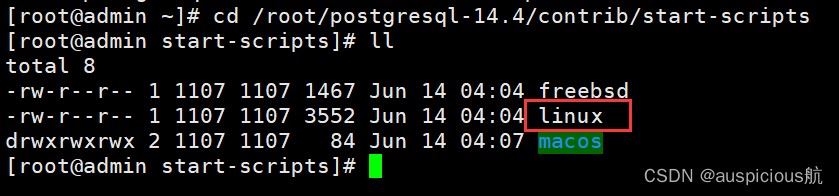
postgresql的开机自启动脚本位于postgresql源码目录的contrib/start-scripts路径下
如果不知道具体的路径,可以用find命令进行查找。
命令如下:
[root@admin ~]# find / -name start-scripts
/root/postgresql-14.4/contrib/start-scripts
linux文件即为linux系统上的启动脚本
操作步骤
1、将linux文件复制到 /etc/init.d 目录下,并且将其重名为postgresql
[root@admin start-scripts]# cp linux /etc/init.d/postgresql
2、进入 /etc/init.d 目录下,修改postgresql文件
[root@admin start-scripts]# cd /etc/init.d/
[root@admin init.d]# vim postgresql
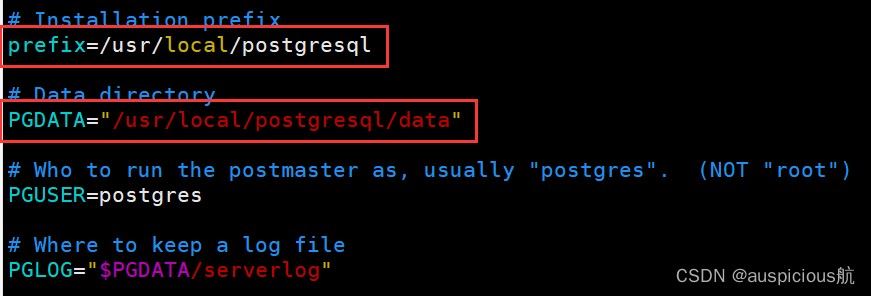
查看postgresql用户下的环境变量,然后做以下修改:
将prefix设置为postgresql的安装路径:/usr/local/postgresql
将pgdata设置为postgresql的数据目录路径:/usr/local/postgresql/data
保存退出!
3、添加到开机启动
修改文件属性并添加开机启动
[root@admin init.d]# chmod a+x postgresql
[root@admin init.d]# chkconfig --add postgresql
[root@admin init.d]# ll
total 44
-rw-r--r--. 1 root root 18281 aug 24  2018 functions
-rwxr-xr-x. 1 root root  4569 aug 24  2018 netconsole
-rwxr-xr-x. 1 root root  7923 aug 24  2018 network
-rwxr-xr-x  1 root root  3569 aug 26 09:54 postgresql
-rw-r--r--. 1 root root  1160 oct 31  2018 readme
[root@admin init.d]# chkconfig --list
note: this output shows sysv services only and does not include native
      systemd services. sysv configuration data might be overridden by native
      systemd configuration.
      if you want to list systemd services use 'systemctl list-unit-files'.
      to see services enabled on particular target use
      'systemctl list-dependencies [target]'.
netconsole     	0:off	1:off	2:off	3:off	4:off	5:off	6:off
network        	0:off	1:off	2:on	3:on	4:on	5:on	6:off
postgresql     	0:off	1:off	2:on	3:on	4:on	5:on	6:off
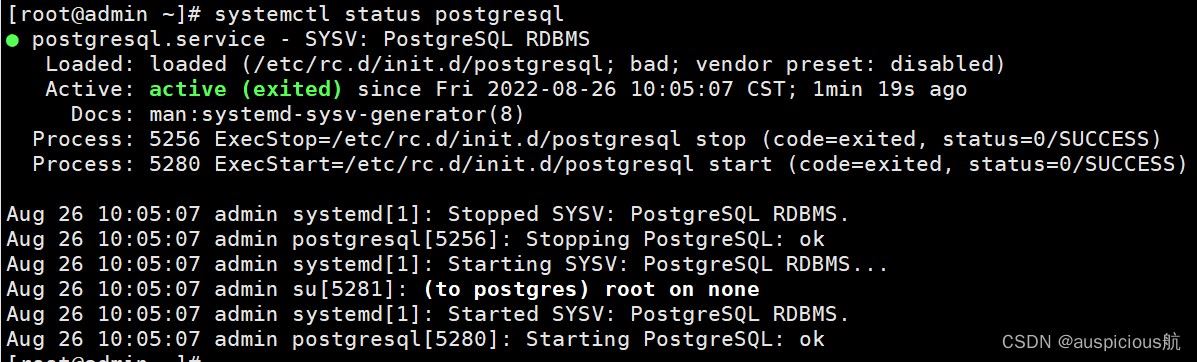
服务正常开启,重启机器测试:
重启之后,开机,服务正常开启:
总结
以上为个人经验,希望能给大家一个参考,也希望大家多多支持代码网。






发表评论