
 我要评论
我要评论nginx版本 1.29.1
问题
10.20.4.1 访问这个10.20.4.2:5000服务跨域了,麻烦处理一下
跨域报错

根据您图片中的错误信息,前端运行在 http://10.20.4.1,试图向 http://10.20.4.2:50000/upload发送 post 请求,但被 cors 策略阻止,因为响应中没有 access-control-allow-origin头部。
应该5000是python端口
我采用了nginx代理,添加允许跨域
user nginx;
worker_processes auto;
error_log /var/log/nginx/error.log warn;
pid /var/run/nginx.pid;
events {
    worker_connections 1024;
}
http {
    include /etc/nginx/mime.types;
    default_type application/octet-stream;
    log_format main '$remote_addr - $remote_user [$time_local] "$request" '
                    '$status $body_bytes_sent "$http_referer" '
                    '"$http_user_agent" "$http_x_forwarded_for"';
    access_log /var/log/nginx/access.log main;
    sendfile on;
    keepalive_timeout 65;
    # 动态设置允许的cors源
    # 1. 检查 map 块:确保包含 http://10.20.4.1
    map $http_origin $cors_allowed_origin {
        default "";
        "http://10.20.4.1" "http://10.20.4.1"; # 必须存在这一行
        "http://10.20.4.2" "http://10.20.4.2"; # 必须存在这一行
        # ... 其他允许的来源
    }
    server {
        listen 50000;
        server_name 10.20.4.2;
        # 2. 检查 server 或 location 块:确保添加了 cors 头
        location / {
            # 处理 options 预检请求
            if ($request_method = 'options') {
                add_header 'access-control-allow-origin' $cors_allowed_origin;
                add_header 'access-control-allow-methods' 'get, post, put, delete, options';
                add_header 'access-control-allow-headers' '*';
                add_header 'access-control-max-age' 1728000;
                add_header 'content-length' 0;
                add_header 'content-type' 'text/plain; charset=utf-8';
                return 204;
            }
            # 反向代理到后端
            proxy_pass http://10.20.4.2:5000;
            # ... 其他 proxy_set_header ...
            # 为实际响应添加 cors 头,使用 always 确保任何状态码都添加
            add_header 'access-control-allow-origin' $cors_allowed_origin always;
            add_header 'access-control-allow-methods' 'get, post, put, delete, options' always;
            add_header 'access-control-allow-headers' '*' always;
        }
    }
}
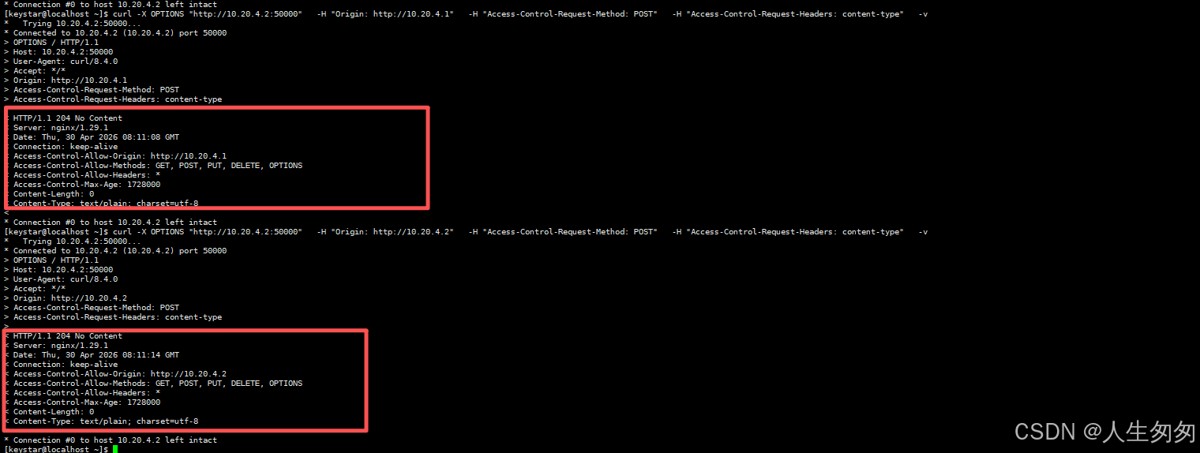
测试实际 post 请求
此命令模拟前端实际发送的 post 请求,检查响应是否包含 cors 头部。
curl -x options "http://10.20.4.2:50000" \
  -h "origin: http://10.20.4.1" \
  -h "access-control-request-method: post" \
  -h "access-control-request-headers: content-type" \
  -v
到此这篇关于通过nginx解决跨域问题的文章就介绍到这了,更多相关nginx解决跨域内容请搜索代码网以前的文章或继续浏览下面的相关文章希望大家以后多多支持代码网!




发表评论