
 我要评论
我要评论python批量打开windows cmd
最近要测试一个问题,需要打开三十多个cmd,不断tcping server 80端口看链路延时和tcp丢包重传情况。
因为测试的是压力,如果手动打开cmd很耗费时间,就想写一个python的小程序来实现这个功能。
首先先把tcping软件放到c:\windows\system32这个路径下,确保cmd能够使用tcping
先看几个简单实现的用法
import os
import subprocess
os.system('tcping 192.168.88.2')
#用os.system可以在工作台上看到得到的结果
sub=subprocess.popen('tcping  192.168.88.2',shell=true)
sub.wait()
#用subprocess.popen在shell下实现,用wait()看回显结果
这里推荐使用subprocess
可以同时打开多个进程
import subprocess
sub=subprocess.popen('tcping -t 192.168.88.2',creationflags=subprocess.create_new_console)
#直接调用tcping.exe在新窗口打开
sub=subprocess.popen('cmd.exe /c tcping -t 192.168.88.2',creationflags=subprocess.create_new_console)
#在cmd中调用tcping.exe在并新窗口打开
这上面两种方法都可以实现tcping并在新窗口打开,而且要结束kill进程,都是kill tcping.exe,第二种方法虽然在cmd中调用,只kill cmd.exe关闭不了窗口。
实现批量打开
写一个简单的for循环即可实现
import subprocess
for i in range(30):
     sub = subprocess.popen('tcping -t 192.168.88.2', creationflags=subprocess.create_new_console)
由于实现的不断tcping,不关闭窗口或者不输入ctrl+c是不会停止,因此要结束运行还要写个简单的小程序直接kill运行的进程。
要kill进行要么kill进程号要么kill进程名称,这里推荐kill进程名称,因为在实现kill 进程号的时候发现,在运行的时候进程号会发生改变,导致进程无法kill.
kill进程名能够批量全部删除
import os
os.system('taskkill /im tcping.exe /f')
查看进程号和进程名
import psutil
print(psutil.pids())
#查看进程号
pid_name = [psutil.process(i).name() for i in psutil.pids()]
print(pid_name)
#查看进程名
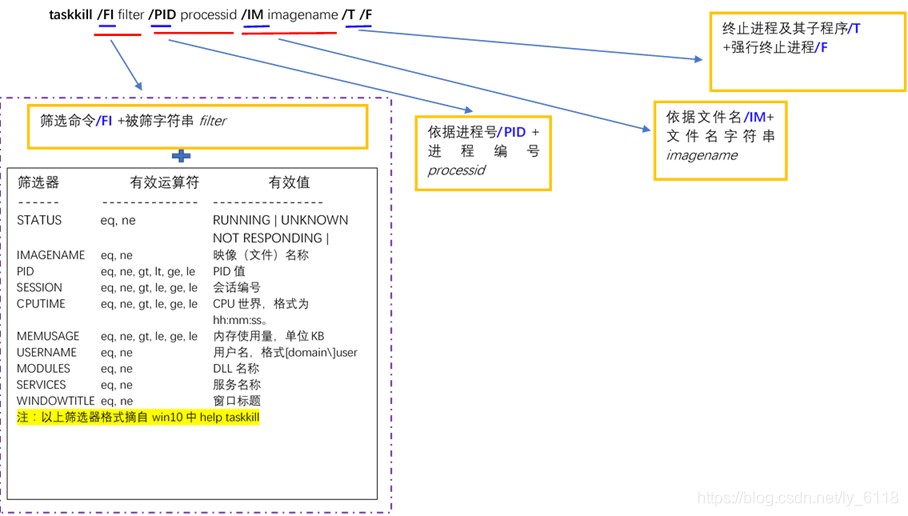
ps: taskkill的用法
taskkill [/s system [/u username [/p [password]]]]
{[/fi filter] [/pid processid] | /im imagename} [/t] [/f]
常用调用方式为:
总结
以上为个人经验,希望能给大家一个参考,也希望大家多多支持代码网。



发表评论