
 我要评论
我要评论前言
文本读取在上位机开发中经常会使用到,实现的方式也有很多种,今天跟大家分享一下c#实现读取文本的7种方式。
这里我们先写好了一个测试界面,提供一个文件路径选择的入口,具体如下所示:
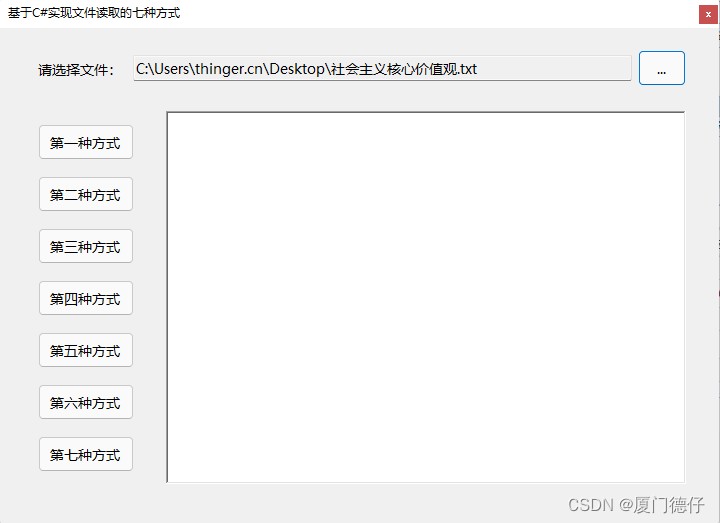
方式一
基于filestream,并结合它的read方法读取指定的字节数组,最后转换成字符串进行显示。
 this.rtb_content.clear();
            filestream fs = new filestream(this.txt_filepath.text, filemode.open, fileaccess.read);
            int n = (int)fs.length;
            byte[] b = new byte[n];
            int r = fs.read(b, 0, n);
            fs.close();
            this.rtb_content.text = encoding.utf8.getstring(b, 0, n);
方式二
            this.rtb_content.clear();
            filestream fs = new filestream(this.txt_filepath.text, filemode.open, fileaccess.read);
            long n = fs.length;
            byte[] b = new byte[n];
            int data, index;
            index = 0;
            data = fs.readbyte();
            while (data != -1)
            {
                b[index++] = convert.tobyte(data);
                data = fs.readbyte();
            }
            fs.close();
            this.rtb_content.text = encoding.utf8.getstring(b);
方式三
基于file类,直接全部读取出来并显示。
  this.rtb_content.clear();
            this.rtb_content.text = file.readalltext(this.txt_filepath.text, encoding.utf8);
方式四
基于streamreader,一行一行读取,最后拼接并显示。
            this.rtb_content.clear();
            streamreader sr = new streamreader(this.txt_filepath.text, encoding.utf8);
            string line = sr.readline();
            while (line != null)
            {
                this.rtb_content.appendtext(line);
                line = sr.readline();
                if (line != null)
                {
                    this.rtb_content.appendtext("\r\n");
                }
            }
            sr.close();
方式五
基于streamreader,一次性读取到结尾,最后显示。
            this.rtb_content.clear();
            streamreader sr = new streamreader(this.txt_filepath.text, encoding.utf8);
            this.rtb_content.text = sr.readtoend();
            sr.close();
方式六
基于streamreader,一行一行读取,通过endofsteam判断是否到结尾,最后拼接并显示。
            this.rtb_content.clear();
            streamreader sr = new streamreader(this.txt_filepath.text, encoding.utf8);

            while (!sr.endofstream)
            {
                this.rtb_content.appendtext(sr.readline());
                if (!sr.endofstream)
                {
                    this.rtb_content.appendtext("\r\n");
                }
            }
            sr.close();
方式七
基于filestream和streamreader来实现。
            this.rtb_content.clear();
            filestream fs = new filestream(this.txt_filepath.text, filemode.open, fileaccess.read);
            streamreader sr = new streamreader(fs, encoding.utf8);
            this.rtb_content.text = sr.readtoend();
            fs.close();
            sr.close();
总结
以上7种方式主要是分别基于filestream、file和streamreader这三种来实现的,这三种方式的区别在于:
filestream类可以对任意类型的文件进行读取操作,而且我们也可以按照需要指定每一次读取字节长度,以此减少内存的消耗,提高读取效率。
streamreader的特点是,它只能对文本文件进行读写操作,可以一行一行的写入和读取。
file类它是一个静态类,当我们查看file类的那些静态方法时,我们可以发现,在这个类里面的方法封装了可以执行文件读写操作的对象,例如:filestream,streamreader,我们通过file去执行任何文件的读写操作时,实际上是使用filestream或steamreader对象来执行文件的读写操作,代码如下所示:
        public static string readalltext(string path, encoding encoding)
        {
            if (path == null)
            {
                throw new argumentnullexception("path");
            }
            if (encoding == null)
            {
                throw new argumentnullexception("encoding");
            }
            if (path.length == 0)
            {
                throw new argumentexception(environment.getresourcestring("argument_emptypath"));
            }

            return internalreadalltext(path, encoding, checkhost: true);
        }

        private static string internalreadalltext(string path, encoding encoding, bool checkhost)
        {
            using (streamreader streamreader = new streamreader(path, encoding, detectencodingfrombyteordermarks: true, streamreader.defaultbuffersize, checkhost))
            {
                return streamreader.readtoend();
            }
        }
方法补充
在 c# 中读取文本文件有多种方式,每种方式适用于不同的场景。下面从简单到复杂,介绍最常用的方法,并提供代码示例和选型建议。
快速选择(速查表)
| 需求 | 推荐方法 | 代码量 | 内存占用 | 适用场景 |
|---|---|---|---|---|
| 一次性读取整个文件 | file.readalltext | 极少 | 高(整个文件) | 小文件(< 10 mb) |
| 按行读入数组 | file.readalllines | 极少 | 高 | 小文件,需要每行独立处理 |
| 逐行处理(不占内存) | file.readlines | 少 | 低(流式) | 大文件,逐行处理 |
| 手动控制编码/缓冲 | streamreader | 中等 | 可控 | 需要精细控制读取过程 |
| 异步读取(不阻塞ui) | streamreader.readtoendasync | 中等 | 高 | winform/wpf 等需要保持界面响应 |
| 读取大型文件并解析 | streamreader.readline + 循环 | 中等 | 低 | 超大日志文件、csv 解析等 |
1. 最简单:file.readalltext —— 一次读取全部文本
using system.io;

string content = file.readalltext("file.txt", encoding.utf8);
console.writeline(content);特点:代码最简洁,直接将文件内容读入一个字符串。适合小文件,大文件会消耗大量内存。
可选编码参数:encoding.utf8, encoding.default, encoding.ascii 等。
2. 按行读取为数组:file.readalllines
string[] lines = file.readalllines("file.txt", encoding.utf8);
foreach (string line in lines)
{
    console.writeline(line);
}特点:返回字符串数组,每行一个元素。同样适合小文件。
3. 逐行流式读取:file.readlines —— 推荐处理大文件
foreach (string line in file.readlines("file.txt", encoding.utf8))
{
    console.writeline(line);
    // 处理每行,不会一次性加载整个文件
}特点:返回 ienumerable<string>,使用 yield 实现延迟执行,内存效率极高。推荐用于任何大小的文本文件。
4. 手动流式读取:streamreader(更精细控制)
using (streamreader reader = new streamreader("file.txt", encoding.utf8))
{
    string line;
    while ((line = reader.readline()) != null)
    {
        console.writeline(line);
    }
    // 若需一次性读到底:string all = reader.readtoend();
}特点:可以控制缓冲区大小、位置(basestream.seek)等。适合需要自定义解析逻辑的场景。
5. 异步读取(winform/wpf/asp.net core 中保持响应)
using (streamreader reader = new streamreader("file.txt", encoding.utf8))
{
    string content = await reader.readtoendasync();
    // 或 async 逐行:
    // while ((line = await reader.readlineasync()) != null) { ... }
}特点:异步方法不会阻塞调用线程,适合 ui 程序或高并发服务器端。
6. 读取指定编码的文件(如 gb2312)
// 需注册编码提供程序(.net core 需额外添加)
encoding.registerprovider(codepagesencodingprovider.instance);
encoding gb2312 = encoding.getencoding("gb2312");
string content = file.readalltext("gbk_file.txt", gb2312);注意:.net core/.net 5+ 默认不支持 gb18030 等扩展编码,需添加 system.text.encoding.codepages 包。
性能与内存对比
| 方法 | 内存峰值 | 适用文件大小 | 读取速度(小文件) | 读取速度(大文件) |
|---|---|---|---|---|
readalltext | 文件大小的 2~3 倍 | < 50 mb | 快 | 极慢/可能 oom |
readalllines | 文件大小的 ~2 倍 + 每行对象开销 | < 50 mb | 较快 | 慢/可能 oom |
readlines | o(1)(只缓存当前行) | 不限 | 中等(需迭代) | 快(流式) |
streamreader.readline | o(1) | 不限 | 中等 | 快 |
结论:处理超过 100 mb 的大文件,务必使用 file.readlines 或 streamreader。
到此这篇关于基于c#实现文本读取的常用方式详解的文章就介绍到这了,更多相关c#文本读取内容请搜索代码网以前的文章或继续浏览下面的相关文章希望大家以后多多支持代码网!





发表评论