
 我要评论
我要评论引言
在现代高并发服务架构中,linux系统的文件描述符(file descriptor)管理能力直接决定了应用的稳定性和吞吐量。特别是对于java应用而言——无论是tomcat、netty、spring boot还是自研rpc框架——一旦遭遇“too many open files”错误,轻则请求失败,重则服务崩溃。本文将带你深入理解linux文件描述符机制,手把手教你如何正确调整系统最大文件打开数限制,并结合真实java代码示例,让你的应用稳如泰山!
什么是文件描述符?为什么它如此重要?
在linux系统中,一切皆文件(everything is a file)。这不仅包括普通文件、目录,还包括网络套接字(socket)、管道(pipe)、设备等。每当一个进程打开一个“文件”,内核就会为其分配一个文件描述符(file descriptor, fd),它本质上是一个非负整数,用于标识该进程所打开的资源。
// 示例:java中打开一个socket连接,会占用一个fd
socket socket = new socket("example.com", 80);
// 此时系统为该java进程分配了一个新的文件描述符
文件描述符是有限资源。每个进程默认只能打开1024个文件描述符(具体值因发行版而异)。对于高并发java服务,比如一个web服务器同时处理数千个http连接,很容易就达到上限。
当你看到 java.io.ioexception: too many open files 异常时,就是系统在告诉你:“兄弟,你的fd用完了!”
文件描述符使用情况可视化分析
让我们先通过一个简单的mermaid图表,直观理解文件描述符在系统中的层级结构:
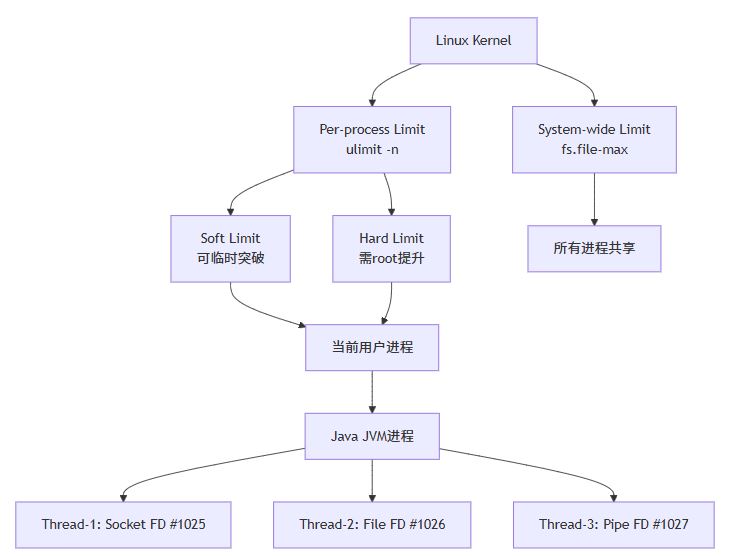
这个图展示了从系统全局限制到单个java线程所持fd的层级关系。接下来我们将逐层剖析并提供调优方案。
如何查看当前系统的fd限制?
在动手调整之前,我们首先要学会“诊断”。以下是几个关键命令:
查看系统级最大文件数限制
cat /proc/sys/fs/file-max
# 输出示例:3263487
这个值表示整个系统允许打开的最大文件描述符总数。
查看当前用户的软硬限制
ulimit -sn   # 软限制(soft limit)
ulimit -hn   # 硬限制(hard limit)
软限制是实际生效的限制,硬限制是软限制的上限。普通用户只能在软限制范围内调整,要突破硬限制需要root权限。
查看某java进程当前使用的fd数量
假设你的java进程pid是12345:
ls -l /proc/12345/fd | wc -l
# 或者更精确地:
lsof -p 12345 | wc -l
实时监控系统fd使用总量
cat /proc/sys/fs/file-nr
# 输出三个数字:已分配fd数 已分配但未使用fd数 系统最大fd数
四步走:永久调整系统fd限制
调整分为两个层面:系统全局配置 和 用户/进程级配置。我们推荐两者结合,确保万无一失。
第一步:修改系统级最大文件数(需root)
编辑 /etc/sysctl.conf:
sudo vim /etc/sysctl.conf
添加或修改以下行:
fs.file-max = 10000000
然后执行:
sudo sysctl -p
立即生效,无需重启。
建议设置为物理内存kb数的1~2倍。例如32gb内存 → 3210241024 ≈ 3355万,这里设1000万是保守且安全的。
第二步:修改用户级软硬限制(需root)
编辑 /etc/security/limits.conf:
sudo vim /etc/security/limits.conf
在文件末尾添加(假设运行java的是 appuser 用户):
appuser soft nofile 65536
appuser hard nofile 65536
* soft nofile 65536
* hard nofile 65536
* 表示对所有用户生效。如果你知道确切用户名,建议指定,避免影响系统其他服务。
注意:某些系统(如ubuntu)可能还需要修改 /etc/systemd/system.conf 和 /etc/systemd/user.conf 中的 defaultlimitnofile。
第三步:为systemd服务单独配置(如java以服务方式运行)
如果你的java应用是通过systemd启动的(如 systemctl start myapp),还需额外配置:
创建或编辑服务覆盖文件:
sudo systemctl edit my-java-app.service
添加:
[service]
limitnofile=65536
然后重新加载并重启服务:
sudo systemctl daemon-reload
sudo systemctl restart my-java-app.service
第四步:验证配置是否生效
重启终端或重新登录用户后,执行:
ulimit -n
# 应输出 65536

# 启动java程序后,检查其fd限制
cat /proc/$(pgrep -f yourmainclass)/limits | grep "max open files"
如果显示 65536,恭喜你,配置成功!
java代码实战:模拟高并发场景下的fd耗尽与优化
下面我们编写一个java程序,模拟在未调整fd限制的情况下,如何快速触发“too many open files”错误;然后再展示优化后的健壮版本。
错误示范:不关闭资源导致fd泄漏
import java.net.socket;
import java.util.concurrent.executorservice;
import java.util.concurrent.executors;
public class badclient {
    public static void main(string[] args) throws exception {
        executorservice executor = executors.newfixedthreadpool(100);
        // 模拟发起大量连接,但不关闭socket
        for (int i = 0; i < 2000; i++) {
            final int id = i;
            executor.submit(() -> {
                try {
                    socket socket = new socket("httpbin.org", 80);
                    system.out.println("client " + id + " connected. fd used.");
                    // 故意不关闭socket!模拟资源泄漏
                    thread.sleep(1000);
                } catch (exception e) {
                    e.printstacktrace();
                }
            });
        }
        executor.shutdown();
        while (!executor.isterminated()) {
            thread.sleep(100);
        }
    }
}
运行此程序,你很快会看到:
java.net.socketexception: too many open files
	at java.base/java.net.socket.createimpl(socket.java:462)
	at java.base/java.net.socket.getimpl(socket.java:522)
	at java.base/java.net.socket.getoutputstream(socket.java:944)
	...
这就是典型的fd耗尽异常!
正确做法:使用try-with-resources自动关闭
import java.io.bufferedreader;
import java.io.inputstreamreader;
import java.io.printwriter;
import java.net.socket;
import java.util.concurrent.executorservice;
import java.util.concurrent.executors;
import java.util.concurrent.atomic.atomicinteger;
public class goodclient {
    private static final atomicinteger successcount = new atomicinteger(0);
    private static final atomicinteger errorcount = new atomicinteger(0);
    public static void main(string[] args) throws exception {
        executorservice executor = executors.newfixedthreadpool(200);
        for (int i = 0; i < 10000; i++) { // 尝试1万个连接
            final int id = i;
            executor.submit(() -> {
                try {
                    // 使用 try-with-resources 自动关闭资源
                    try (socket socket = new socket("httpbin.org", 80);
                         printwriter out = new printwriter(socket.getoutputstream(), true);
                         bufferedreader in = new bufferedreader(new inputstreamreader(socket.getinputstream()))) {
                        out.println("get / http/1.1");
                        out.println("host: httpbin.org");
                        out.println("connection: close");
                        out.println();
                        string line;
                        while ((line = in.readline()) != null) {
                            // 只读一行响应头即可
                            if (line.isempty()) break;
                        }
                        int count = successcount.incrementandget();
                        if (count % 1000 == 0) {
                            system.out.println("✅ 成功完成 " + count + " 次连接");
                        }
                    }
                } catch (exception e) {
                    int count = errorcount.incrementandget();
                    if (count <= 10) { // 只打印前10个错误
                        system.err.println("❌ client " + id + " failed: " + e.getmessage());
                    }
                }
            });
        }
        executor.shutdown();
        while (!executor.isterminated()) {
            thread.sleep(100);
        }
        system.out.println("\n📊 最终统计:成功=" + successcount.get() + ", 失败=" + errorcount.get());
    }
}
这段代码的关键改进:
- ✅ 使用
try-with-resources语法确保socket和流被自动关闭。 - ✅ 控制并发线程数(200),避免瞬间冲击。
- ✅ 添加计数器和日志,便于观察执行状态。
即使你将循环次数提高到10万次,只要系统fd限制足够(我们前面已设为65536),程序也能稳定运行!
连接池优化:进一步减少fd开销
对于生产环境,我们不应每次都新建socket连接。推荐使用连接池技术,复用已有连接。
下面是一个基于apache httpclient的连接池示例:
import org.apache.http.httpentity;
import org.apache.http.client.methods.closeablehttpresponse;
import org.apache.http.client.methods.httpget;
import org.apache.http.impl.client.closeablehttpclient;
import org.apache.http.impl.client.httpclients;
import org.apache.http.impl.conn.poolinghttpclientconnectionmanager;
import org.apache.http.util.entityutils;
import java.util.concurrent.executorservice;
import java.util.concurrent.executors;
import java.util.concurrent.atomic.atomicinteger;
public class pooledhttpclientexample {
    public static void main(string[] args) throws exception {
        // 创建连接池管理器
        poolinghttpclientconnectionmanager cm = new poolinghttpclientconnectionmanager();
        cm.setmaxtotal(1000); // 最大总连接数
        cm.setdefaultmaxperroute(200); // 每个路由默认最大连接数
        closeablehttpclient httpclient = httpclients.custom()
                .setconnectionmanager(cm)
                .build();
        executorservice executor = executors.newfixedthreadpool(50);
        atomicinteger counter = new atomicinteger(0);
        for (int i = 0; i < 5000; i++) {
            executor.submit(() -> {
                try {
                    httpget request = new httpget("https://httpbin.org/get");
                    try (closeablehttpresponse response = httpclient.execute(request)) {
                        httpentity entity = response.getentity();
                        if (entity != null) {
                            string result = entityutils.tostring(entity);
                            // system.out.println(result.substring(0, 50) + "...");
                        }
                        int c = counter.incrementandget();
                        if (c % 500 == 0) {
                            system.out.println("✅ 完成第 " + c + " 次请求");
                        }
                    }
                } catch (exception e) {
                    e.printstacktrace();
                }
            });
        }
        executor.shutdown();
        while (!executor.isterminated()) {
            thread.sleep(100);
        }
        httpclient.close(); // 关闭连接池
        system.out.println("🎉 所有请求完成!");
    }
}
在这个例子中:
- 我们只创建了最多1000个tcp连接(由连接池管理),而不是5000个。
- 连接被多个线程复用,极大减少了fd的创建与销毁开销。
- 即使请求数很大,fd使用量也保持平稳。
生产建议:对于数据库连接、redis客户端、http客户端等,务必使用成熟的连接池库(如hikaricp、jedispool、okhttp等)。
监控与告警:防患于未然
调整完系统参数只是第一步。我们还需要建立监控机制,提前发现fd使用异常。
方法一:shell脚本监控
#!/bin/bash
# check_fd.sh

pid=$1
warn_threshold=50000
crit_threshold=60000

if [ -z "$pid" ]; then
    echo "usage: $0 <pid>"
    exit 1
fi

if ! kill -0 $pid 2>/dev/null; then
    echo "❌ pid $pid 不存在或无权限访问"
    exit 2
fi

fd_count=$(ls -l /proc/$pid/fd 2>/dev/null | wc -l)

echo "📌 进程 $pid 当前fd数量: $fd_count"

if [ $fd_count -gt $crit_threshold ]; then
    echo "🚨 critical: fd数量超过阈值 $crit_threshold"
    exit 2
elif [ $fd_count -gt $warn_threshold ]; then
    echo "⚠️ warning: fd数量接近阈值 $warn_threshold"
    exit 1
else
    echo "✅ ok: fd使用正常"
    exit 0
fi
配合cron定时任务或prometheus node exporter使用,实现自动化监控。
方法二:java内置监控(jmx)
我们也可以在java程序内部暴露fd使用指标:
import java.lang.management.managementfactory;
import java.lang.management.operatingsystemmxbean;
import java.lang.reflect.method;
import java.nio.file.files;
import java.nio.file.paths;
public class fdusagemonitor implements runnable {
    private final string processname;
    public fdusagemonitor(string name) {
        this.processname = name;
    }
    @override
    public void run() {
        try {
            long pid = processhandle.current().pid();
            string fdpath = "/proc/" + pid + "/fd";
            long fdcount = files.list(paths.get(fdpath)).count();
            operatingsystemmxbean osbean = managementfactory.getoperatingsystemmxbean();
            double loadavg = getsystemloadaverage(osbean);
            system.out.printf(
                "[%s] pid=%d, fd=%d, load=%.2f%n",
                processname, pid, fdcount, loadavg
            );
            // 如果fd超过阈值,记录日志或发送告警
            if (fdcount > 50000) {
                system.err.println("🔥 fd使用过高!考虑扩容或排查泄漏");
            }
        } catch (exception e) {
            e.printstacktrace();
        }
    }
    private double getsystemloadaverage(operatingsystemmxbean osbean) {
        try {
            method method = osbean.getclass().getmethod("getsystemloadaverage");
            return (double) method.invoke(osbean);
        } catch (exception e) {
            return -1.0;
        }
    }
    public static void main(string[] args) throws interruptedexception {
        fdusagemonitor monitor = new fdusagemonitor("myapp");
        // 每10秒打印一次
        while (true) {
            monitor.run();
            thread.sleep(10000);
        }
    }
}
将此类集成到你的应用中,可以实时掌握fd使用趋势。
高级话题:容器环境下的fd限制
如今很多java应用运行在docker或kubernetes中。容器环境有自己的一套限制机制。
docker中设置ulimit
# dockerfile
from openjdk:17-jdk-slim

copy app.jar /app.jar

# 设置容器内ulimit
cmd ["sh", "-c", "ulimit -n 65536 && java -jar /app.jar"]
或者在运行时指定:
docker run --ulimit nofile=65536:65536 my-java-app
kubernetes pod级别设置
apiversion: v1
kind: pod
metadata:
  name: java-app-pod
spec:
  containers:
  - name: java-app
    image: my-java-app:latest
    resources:
      limits:
        memory: "2gi"
        cpu: "1"
    securitycontext:
      runasuser: 1000
  # 设置pod级别的ulimit(需启用特性门控)
  # 注:原生k8s不直接支持ulimit,通常通过initcontainer或宿主机配置解决
在k8s中,更常见的做法是在node节点上预先配置好ulimit,或使用特权容器执行sysctl调整。
压力测试:验证你的调优成果
使用apache bench (ab) 或 wrk 对你的java服务进行压力测试:
# 安装ab(ubuntu)
sudo apt install apache2-utils

# 发起10万请求,1000并发
ab -n 100000 -c 1000 http://localhost:8080/api/health
同时在另一个终端监控fd使用:
watch -n 1 'ls -l /proc/$(pgrep -f yourapp)/fd 2>/dev/null | wc -l'
你应该能看到fd数量在某个稳定值上下波动,而不是持续增长——这说明连接被正确复用和释放。
故障排查清单
当遇到“too many open files”时,请按以下顺序排查:
- ✅ 是否已按本文方法调整系统和用户级ulimit?
- ✅ java进程是否继承了正确的limit?(检查
/proc/<pid>/limits) - ✅ 是否存在资源泄漏?(socket、fileinputstream、resultset等未关闭)
- ✅ 是否使用了连接池?连接池大小是否合理?
- ✅ 是否有第三方库或中间件(如log4j、数据库驱动)导致fd泄漏?
- ✅ 是否在容器环境中?容器是否继承了宿主机的ulimit?
- ✅ 是否达到系统级
fs.file-max上限?(cat /proc/sys/fs/file-nr)
学习延伸:深入理解linux资源限制机制
linux的资源限制功能由pam(pluggable authentication modules)模块 pam_limits.so 实现。当你登录系统时,该模块会读取 /etc/security/limits.conf 并应用相应限制。
此外,还有 prlimit 命令可以动态调整运行中进程的限制:
# 查看某进程的fd限制
prlimit --pid 12345 --nofile

# 动态调整(需权限)
sudo prlimit --pid 12345 --nofile=65536:65536
这对于线上紧急扩容非常有用!
总结:稳健之道,在于未雨绸缪
文件描述符虽小,却关乎服务生死。作为java开发者,我们不仅要写好业务代码,更要理解底层系统机制。通过本文的学习,你应该已经掌握:
- ✅ linux fd的基本概念与重要性
- ✅ 如何查看和调整系统/用户级fd限制
- ✅ java中正确管理资源的最佳实践
- ✅ 使用连接池降低fd开销
- ✅ 监控与告警机制的建立
- ✅ 容器环境下的特殊考量
记住:不要等到线上故障才想起调优! 在项目初期就做好容量规划和系统配置,才能让你的服务在流量洪峰中屹立不倒。
附录:完整配置参考模板
/etc/sysctl.conf
# 最大文件描述符总数
fs.file-max = 10000000

# 网络相关优化(可选)
net.core.somaxconn = 65535
net.ipv4.tcp_max_syn_backlog = 65535
/etc/security/limits.conf
# java应用用户
appuser soft nofile 65536
appuser hard nofile 65536

# 所有用户
* soft nofile 65536
* hard nofile 65536

# root用户
root soft nofile 65536
root hard nofile 65536
systemd服务配置(/etc/systemd/system/myapp.service.d/override.conf)
[service]
limitnofile=65536
user=appuser
group=appuser
常见问题解答(faq)
q:为什么我改了limits.conf但java进程还是1024?
a:很可能是因为你通过ssh登录后没有重新登录,或者java是通过systemd启动的。请确认使用 su - username 完全切换用户,或配置systemd服务限制。
q:设置太大会不会浪费内存?
a:不会。fd限制只是“上限”,实际内存消耗取决于真正打开的文件数量。内核按需分配数据结构。
q:docker容器内如何永久生效?
a:在dockerfile中使用 run ulimit -n 65536 是无效的,因为ulimit是shell内置命令。应在启动命令中设置,或构建基础镜像时修改 /etc/security/limits.conf。
q:java有没有办法在代码里设置ulimit?
a:不能。ulimit是进程级别的系统调用,必须在jvm启动前由父进程设置。java程序无法自行提升限制。
彩蛋:一键检测脚本
保存以下脚本为 fd-check.sh,一键诊断你的系统和java进程:
#!/bin/bash
echo "🔍 开始fd健康检查..."

echo "1. 系统最大fd数:"
cat /proc/sys/fs/file-max

echo "2. 当前用户fd限制:"
ulimit -sn
ulimit -hn

echo "3. 系统当前fd使用情况:"
cat /proc/sys/fs/file-nr

java_pid=$(pgrep -f "java.*yourmainclass" | head -1)
if [ ! -z "$java_pid" ]; then
    echo "4. java进程(pid=$java_pid) fd限制:"
    cat /proc/$java_pid/limits | grep "open files"

    echo "5. java进程当前fd数量:"
    ls -l /proc/$java_pid/fd 2>/dev/null | wc -l
else
    echo "⚠️ 未找到java进程,请手动指定pid"
fi

echo "✅ 检查完毕。"
至此,你已掌握linux文件描述符调优的全套技能!快去给你的java服务加上这层“防护甲”吧!🛡️🚀
编程不仅是逻辑的艺术,更是与操作系统共舞的哲学。愿你的每一行代码,都能在坚实的系统基石上,绽放光彩。
以上就是linux调整系统最大文件打开数限制的实战指南的详细内容,更多关于linux调整最大文件打开数限制的资料请关注代码网其它相关文章!


发表评论