
 我要评论
我要评论前言
在很多互联网应用中,经常需要对身份证信息进行自动识别,例如:
用户实名认证
金融开户
电商实名认证
政务系统资料录入
传统手动录入效率低且容易出错,而 身份证 ocr 识别 api 可以自动识别图片中的身份证信息,大幅提升系统自动化能力。
本文将通过 python 和 java 示例,详细介绍如何快速接入身份证 ocr 识别接口。
一、身份证 ocr 识别是什么
身份证 ocr(optical character recognition)是一种 基于图像识别技术的文字识别能力,可以自动从身份证图片中提取关键信息,例如:
姓名
性别
民族
出生日期
身份证号
住址
签发机关
有效期限
附加:身份证的头像处理
开发者只需要上传身份证图片,ocr api 就可以返回结构化 json 数据。
常见应用场景:
用户实名认证系统中的信息获取
金融 kyc 认证
酒店入住登记
政务系统信息录入
二、身份证 ocr api 接入流程
一般 ocr api 接入流程如下:
准备身份证图片
        ↓
图片转 base64
        ↓
调用 ocr api
        ↓
返回 json 识别结果
        ↓
解析字段信息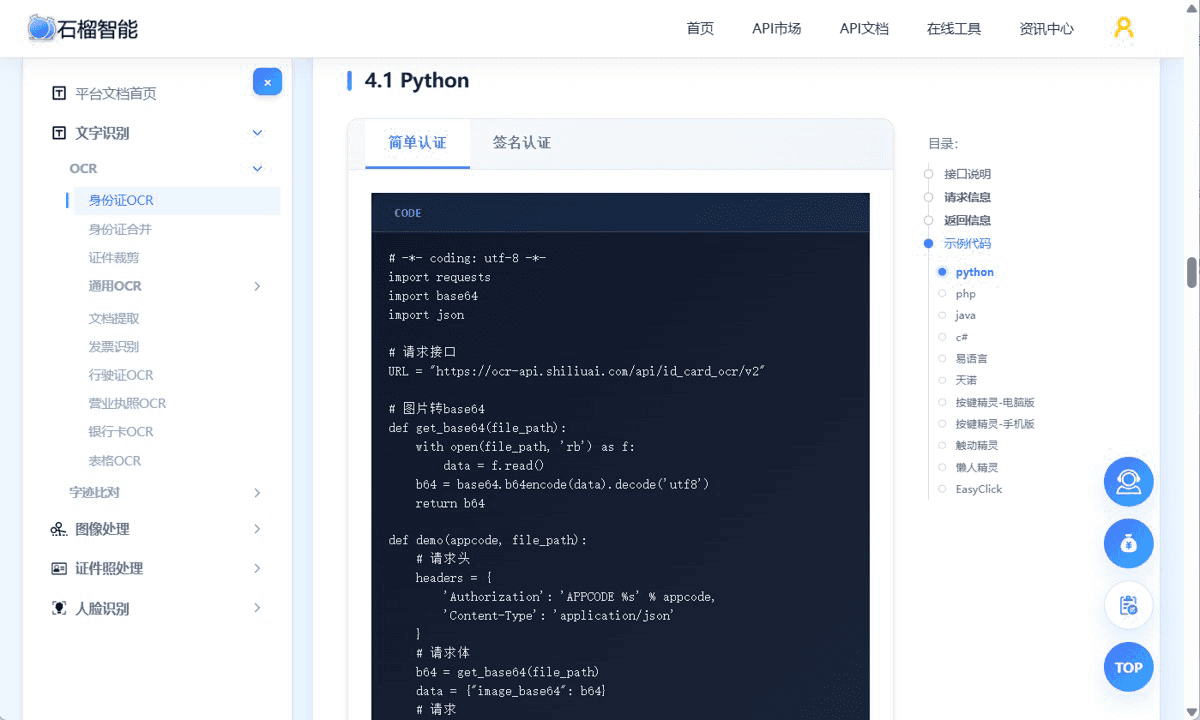
接口请求说明:
详细接入可以参考说身份证ocr接入文档:https://market.shiliuai.com/doc/id-card-ocr
请求地址(url):
post http(s)://ocr-api.shiliuai.com/api/id_card_ocr/v2
请求方式:post
请求头(header):
| 参数 | 类型 | 说明 |
|---|---|---|
| authorization | string | 'appcode ' + 您的appcode (注意英文空格) |
| content-type | string | application/json |
请求体(body)
| 参数 | 是否必填 | 类型 | 说明 |
|---|---|---|---|
| image_base64 | 必填 | string | base64编码的图片文件,像素范围:[15,8192],小于20m |
| return_rectified_card | 选填 | bool | 是否返回裁剪并矫正的身份证图片,默认为false |
| card_margin_ratio | 选填 | float | 裁剪时的边距比例,等于边距/长边,默认为0 |
| card_width | 选填 | int | 裁剪后的证件图片的宽度 |
| card_height | 选填 | int | 裁剪后的证件图片的高度(如果card_width和card_height都不传,或者都传-1,那么用原图中证件大小 如果其中一个>0, 另一个不传或传-1,那么表示该长度按比例缩放得到) |
| return_rectified_head | 选填 | bool | 是否返回裁剪并矫正的头像图片,默认为false,头像图片里,头顶和上边会有一些距离( 长宽比是441:358 ) |
| head_width | 选填 | int | 裁剪后的头像图片的宽度,如果head_width和head_height都不传,或者都传-1,那么用原图中头像大小,如果其中一个>0, 另一个不传或传-1,那么表示该长度按比例缩放得到 |
| head_height | 选填 | int | 裁剪后的头像图片的高度 |
返回信息
返回类型:
json
返回码:
| 参数名 | 类型 | 说明 |
|---|---|---|
| code | int | 返回码,0表示成功 |
| message | string | 返回信息 |
返回信息:
| 参数 | 参数类型 | 说明 |
|---|---|---|
| code | int | 错误码 |
| msg | string | 错误信息(英文) |
| msg_cn | string | 错误信息(中文) |
| success | bool | 识别是否成功 |
| image_id | string | 图片id |
| request_id | string | 唯一请求id |
| data | data | 具体看下面 |
其中data信息:
| 参数 | 参数类型 | 说明 | 举例 |
|---|---|---|---|
| is_front | bool | 是否正面 | |
| complete_score | float | 完整度[0, 1] | 0.8 |
| is_complete | bool | 是否完整,当complete_score==1时,为true | true |
| unoccluded_score | float | 无遮挡程度[0, 1] | |
| is_unoccluded | bool | 是否无遮挡,当unoccluded_score>0.99时,为true | |
| clear_score | float | [0, 1],清晰度,用文字可识别度计算 | 0.9 |
| is_clear | bool | 是否清晰,当clear_score>0.5时,为true | |
| rectified_card_base64 | string | 裁剪并矫正的身份证图片, 当return_rectified_card=true时有该项 | |
| rectified_head_base64 | string | 裁剪并矫正的头像图片, 当return_rectified_head=true且是正面时有该项 |
返回示例:
{
  "code": 200,
  "msg": "success",
  "msg_cn": "成功",
  "success": true,
  "image_id": "xxxx",
  "request_id": "req_xxxx",
  "data": {
    "is_front": true,
    "complete_score": 0.98,
    "is_complete": true,
    "clear_score": 0.92,
    "is_clear": true,
    "name": "张三",
    "sex": "男",
    "ethnicity": "汉",
    "birthdate": "1990年01月01日",
    "address": "北京市朝阳区xxx",
    "idnumber": "110101199001011234"
  }
}
三、python 调用身份证 ocr api 示例
首先安装 python 依赖:
pip install requests
示例代码:
# api文档:https://market.shiliuai.com/doc/id-card-ocr
# -*- coding: utf-8 -*-
import requests
import base64
import json
# 请求接口
url = "https://ocr-api.shiliuai.com/api/id_card_ocr/v2"
# 图片转base64
def get_base64(file_path):
    with open(file_path, 'rb') as f:
        data = f.read()
    b64 = base64.b64encode(data).decode('utf8')
    return b64
def demo(appcode, file_path):
    # 请求头
    headers = {
        'authorization': 'appcode %s' % appcode,
        'content-type': 'application/json'
    }
    # 请求体
    b64 = get_base64(file_path)
    data = {"image_base64": b64}
    # 请求
    response = requests.post(url=url, headers=headers, json=data)
    content = json.loads(response.content)
    print(content)
if __name__=="__main__":
    appcode = "你的appcode"
    file_path = "本地图片路径"
    demo(appcode, file_path)
四、java 调用身份证 ocr api 示例
java 可以使用 httpurlconnection 或 okhttp 调用接口。
示例代码:
//=====================================================
// api文档:https://market.shiliuai.com/doc/id-card-ocr
//=====================================================
import com.alibaba.fastjson2.json;
import com.alibaba.fastjson2.jsonobject;
import org.apache.http.httpresponse;
import org.apache.http.client.methods.httppost;
import org.apache.http.entity.stringentity;
import org.apache.http.impl.client.closeablehttpclient;
import org.apache.http.impl.client.httpclients;
import org.apache.http.util.entityutils;
import org.apache.commons.io.fileutils;
import java.io.file;
import java.io.ioexception;
import java.util.hashmap;
import java.util.map;
import java.util.base64;
public class main {
    public static string get_base64(string path) {
        string b64 = "";
        try {
            // 使用commons io简化文件读取
            byte[] content = fileutils.readfiletobytearray(new file(path));
            // 使用jdk自带的base64
            b64 = base64.getencoder().encodetostring(content);
        } catch (ioexception e) {
            e.printstacktrace();
        }
        return b64;
    }
    public static void main(string[] args) {
        string url = "https://ocr-api.shiliuai.com/api/id_card_ocr/v2"; // 请求接口
        string appcode = "你的appcode";
        string imgfile = "本地图片路径";
        map headers = new hashmap<>();
        headers.put("authorization", "appcode " + appcode);
        headers.put("content-type", "application/json");
        // 请求体
        jsonobject requestobj = new jsonobject();
        requestobj.put("image_base64", get_base64(imgfile));
        string bodys = requestobj.tostring();
        try (closeablehttpclient httpclient = httpclients.createdefault()) {
            // 创建post请求
            httppost httppost = new httppost(url);
            // 设置请求头
            for (map.entry entry : headers.entryset()) {
                httppost.addheader(entry.getkey(), entry.getvalue());
            }
            // 设置请求体
            stringentity entity = new stringentity(bodys, "utf-8");
            httppost.setentity(entity);
            // 执行请求
            httpresponse response = httpclient.execute(httppost);
            int stat = response.getstatusline().getstatuscode();
            if (stat != 200) {
                system.out.println("http code: " + stat);
                return;
            }
            string res = entityutils.tostring(response.getentity());
            jsonobject res_obj = json.parseobject(res);
            system.out.println(res_obj.tojsonstring());
        } catch (exception e) {
            e.printstacktrace();
        }
    }
}
五、身份证 ocr 识别示例效果
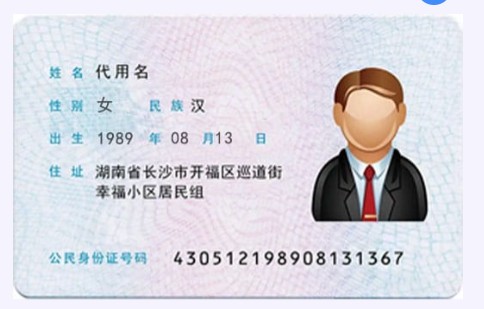
示例身份证图片:
识别结果:
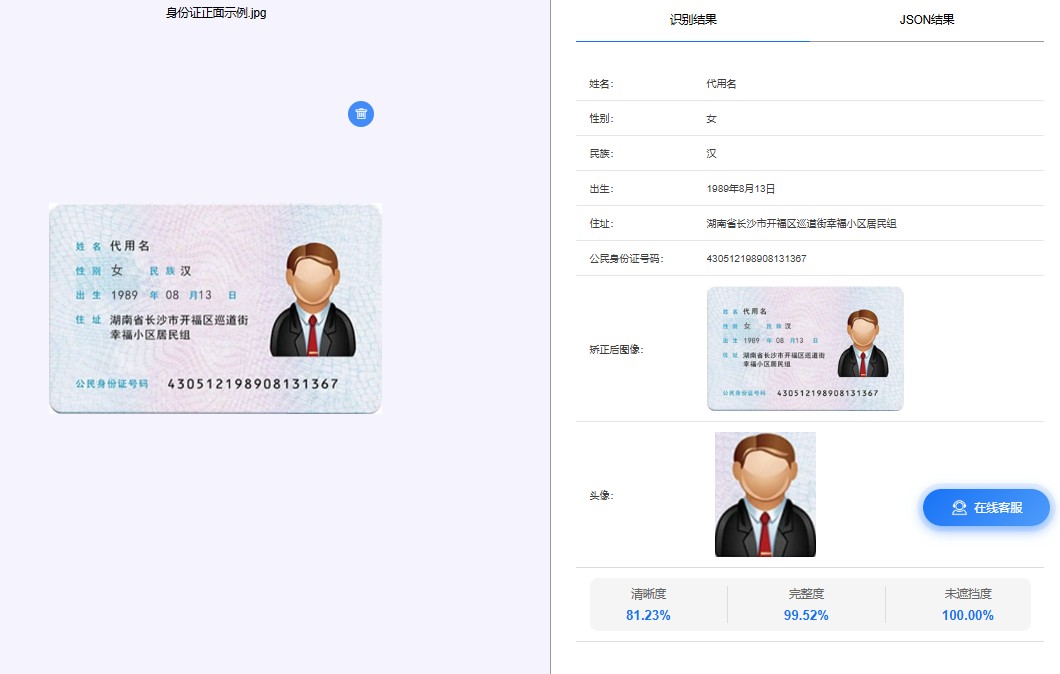
开发者可以直接将返回 json 存入数据库或用于实名认证流程。
六、身份证 ocr 识别常见问题
1 图片模糊识别率低
建议:
分辨率 ≥ 800px
避免反光
身份证完整入镜
2 身份证倾斜
可以在识别前做简单图像处理:
自动旋转
边缘检测
裁剪身份证区域
3 批量识别效率问题
对于批量识别场景,可以:
使用多线程调用 api
异步队列处理
批量任务系统
七、在线体验身份证 ocr
如果想快速测试身份证识别效果,可以先通过在线工具进行测试,然后再接入 api。
在线体验:https://market.shiliuai.com/id-card-ocr
支持:
身份证正面识别
身份证反面识别
自动信息提取
人像提取与优化调整操作
开发者可以根据测试效果再接入 api。
八、总结
身份证 ocr 是 ocr 技术中非常常见的应用场景,通过 api 接口可以快速实现:
用户实名认证
自动信息录入
身份证信息提取
本文介绍了 身份证 ocr api 接入流程,并提供 python 和 java 示例代码,开发者可以根据自己的项目需求快速接入。
如果你正在开发 实名认证系统、金融系统或自动化信息录入系统,ocr api 可以大幅减少人工输入成本,提高系统效率。
到此这篇关于身份证ocr识别api接入的文章就介绍到这了,更多相关身份证ocr识别api接入内容请搜索代码网以前的文章或继续浏览下面的相关文章希望大家以后多多支持代码网!



发表评论