
 我要评论
我要评论1.maven依赖
<!-- k8s client -->
<dependency>
    <groupid>io.fabric8</groupid>
    <artifactid>kubernetes-client</artifactid>
    <version>4.10.2</version>
</dependency>
2.初始化 k8s 客户端
初始化kubernetesclient客户端
首先需要找到 /etc/kubernetes/admin.conf文件
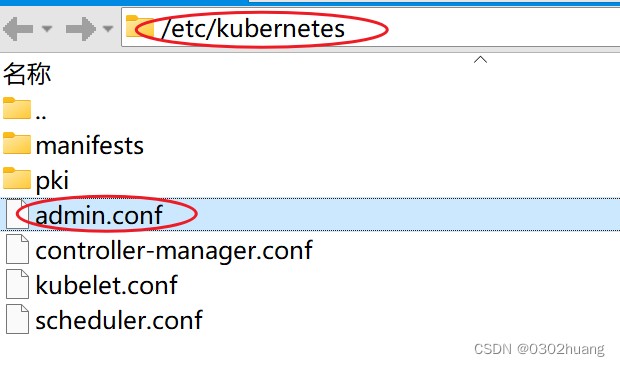
这是连接k8s的配置文件,通过这个文件,就可以在java程序中连接上k8s,初始化kubernetesclient客户端
将该文件的内容复制进kubeconfig,预先存好kubeconfig的文件位置:c:\users\26411\desktop\ai平台\kubeconfig
application.yml
k8s:
  kubeconfig: c:\users\26411\desktop\ai平台\kubeconfig
编写配置类,初始化kubernetesclient为bean
@configuration
public class k8sconfig {

    @value("${k8s.kubeconfig}")
    private string kubeconfigpath;

    @bean
    public kubernetesclient getclient() throws ioexception {
        file configfile = new file(kubeconfigpath);
        final string configyaml = string.join("\n", files.readalllines(configfile.topath()));
        config config = config.fromkubeconfig(configyaml);
        config.settrustcerts(true);
        return new defaultkubernetesclient(config);
    }
}
3.测试类测试简单功能
测试后,在 xshell 中使用 kubectl 命令查看正常,测试成功。
@springboottest
public class k8stest {
    string namespace = "default";
    @autowired
    private kubernetesclient kubernetesclient;

    /**
     * 获取pod
     */
    @test
    void testgetpod(){
        pod pod = kubernetesclient.pods().innamespace("kube-system").withname("kube-apiserver-master").get();
        system.out.println(pod);
    }

    /**
     * 创建deployment
     */
    @test
    void testcreatedeployment(){
        deployment deployment = getdeployment();
        deployment de = kubernetesclient.apps().deployments().innamespace(namespace).create(deployment);
    }

    private deployment getdeployment() {
        map<string, string> labels = new hashmap<>();
        labels.put("run","nginx");
        labelselector labelselector = new labelselector();
        labelselector.setmatchlabels(labels);
        return new deploymentbuilder()
                .withnewmetadata()
                    .withname("nginx")
                    .withnamespace(namespace)
                    .addtolabels(labels)
                .endmetadata()
                .withnewspec()
                    .withselector(labelselector)
                    .withnewtemplate()
                        .withnewmetadata()
                            .withname("nginx")
                            .addtolabels(labels)
                            .withnamespace(namespace)
                        .endmetadata()
                        .withnewspec()
                           .addtocontainers(buildcontainer())
                        .endspec()
                    .endtemplate()
                .endspec()
                .build();
    }

    private container buildcontainer() {
        containerport containerport = new containerport();
        containerport.setprotocol("tcp");
        containerport.setcontainerport(80);

        return new containerbuilder()
                .withnewname("nginx")
                .withnewimage("nginx:latest")
                .withports(containerport)
                .build();
    }

    /**
     * 创建service
     */
    @test
    void testcreateservice(){
        service service = kubernetesclient.services().innamespace(namespace).create(getservice());
        system.out.println(service);
    }

    private service getservice() {
        hashmap<string, string> selector = new hashmap<>();
        selector.put("run","nginx");
        serviceport port = new serviceport();
        port.setprotocol("tcp");
        port.setport(80);
        port.settargetport(new intorstring(80));
        return new servicebuilder()
                .withnewmetadata()
                    .withname("svc-nginx")
                    .withnamespace(namespace)
                .endmetadata()
                .withnewspec()
                    .withclusterip("10.109.179.231")
                    .withports(port)
                    .withselector(selector)
                    .withtype("nodeport")
                .endspec().build();
    }

}
4.编写工具类封装简单功能
@component
public class k8sutil {

    @autowired
    private kubernetesclient kubernetesclient;

    /**
     * 获取一个 pod
     *
     * @param namespace 名称空间
     * @param podname   pod名字
     * @return {@link pod}
     */
    public pod getonepod(string namespace, string podname){
        return kubernetesclient.pods().innamespace(namespace).withname(podname).get();
    }

    /**
     * 创建一个 pod
     *
     * @param namespace 名称空间
     * @param podbody   pod内容
     * @return {@link pod}
     */
    public pod createonepod(string namespace, pod podbody){
        return kubernetesclient.pods().innamespace(namespace).create(podbody);
    }

    /**
     * 创建deployment
     *
     * @param deploymentdto 部署dto
     * @return {@link deployment}
     */
    public deployment createdeployment(deploymentdto deploymentdto){
        deployment deployment = getdeployment(deploymentdto);
        return  kubernetesclient.apps().deployments()
                .innamespace(deploymentdto.getnamespace())
                .create(deployment);
    }

    private deployment getdeployment(deploymentdto deploymentdto) {
        return new deploymentbuilder()
                .withnewmetadata()
                    .withname(deploymentdto.getdeploymentname())
                    .withnamespace(deploymentdto.getnamespace())
                    .addtolabels(deploymentdto.getlabels())
                .endmetadata()
                .withnewspec()
                    .withreplicas(deploymentdto.getreplicas())
                    .withselector(deploymentdto.getlabelselector())
                    // template() pod模板
                    .withnewtemplate()
                        .withnewmetadata()
                            .addtolabels(deploymentdto.getlabels())
                        .endmetadata()
                        .withnewspec()
                            .addtocontainers(buildcontainer(deploymentdto))
                        .endspec()
                    .endtemplate()
                .endspec()
                .build();
    }

    private container buildcontainer(deploymentdto deploymentdto) {
        containerport containerport = new containerport();
        containerport.setprotocol(deploymentdto.getprotocol());
        containerport.setcontainerport(deploymentdto.getcontainerport());

        return new containerbuilder()
                .withnewname(deploymentdto.getcontainername())
                .withnewimage(deploymentdto.getimage())
                .withports(containerport)
                .build();
    }

    /**
     * 创建service
     *
     * @param servicedto 服务dto
     * @return {@link service}
     */
    public service createservice(servicedto servicedto) {
        service service = getservice(servicedto);
        return kubernetesclient.services().innamespace(servicedto.getnamespace()).create(service);
    }

    private service getservice(servicedto servicedto) {
        serviceport port = new serviceport();
        port.setprotocol(servicedto.getprotocol());
        port.setport(servicedto.getport());
        port.settargetport(new intorstring(servicedto.gettargetport()));

        return new servicebuilder()
                .withnewmetadata()
                    .withname(servicedto.getservicename())
                    .withnamespace(servicedto.getnamespace())
                .endmetadata()
                .withnewspec()
                    //.withclusterip()
                    .withports(port)
                    .withselector(servicedto.getselector())
                    .withtype(servicedto.gettype())
                .endspec()
                .build();
    }

}
附上两个封装信息的实体类
@data
public class deploymentdto {
    /**
     * 名称空间
     */
    private string namespace;
    /**
     * deployment名字
     */
    private string deploymentname;
    /**
     * 副本个数
     */
    private integer replicas;
    /**
     * pod模板的标签、deployment标签选择器 会匹配到的标签
     */
    private map<string,string> labels;
    /**
     * deployment标签选择器
     */
    private labelselector labelselector;

    // spec下的 containers
    /**
     * 容器要拉取运行的镜像
     */
    private string image;
    /**
     * 容器名称
     */
    private string containername;
    /**
     * 容器端口
     */
    private integer containerport;
    /**
     * 协议
     */
    private string protocol;
}
@data
public class servicedto {
    /**
     * 名称空间
     */
    private string namespace;
    /**
     * service名称
     */
    private string servicename;
    /**
     * 端口
     */
    private integer port;
    /**
     * 协议
     */
    private string protocol;
    /**
     * 目标端口
     */
    private integer targetport;
    /**
     * service的标签选择器    选择有对应标签的pod (但是其实通过deployment操控)
     */
    private map<string,string> selector;
    /**
     * 类型   :nodeport、clusterip等等
     */
    private string type;
}
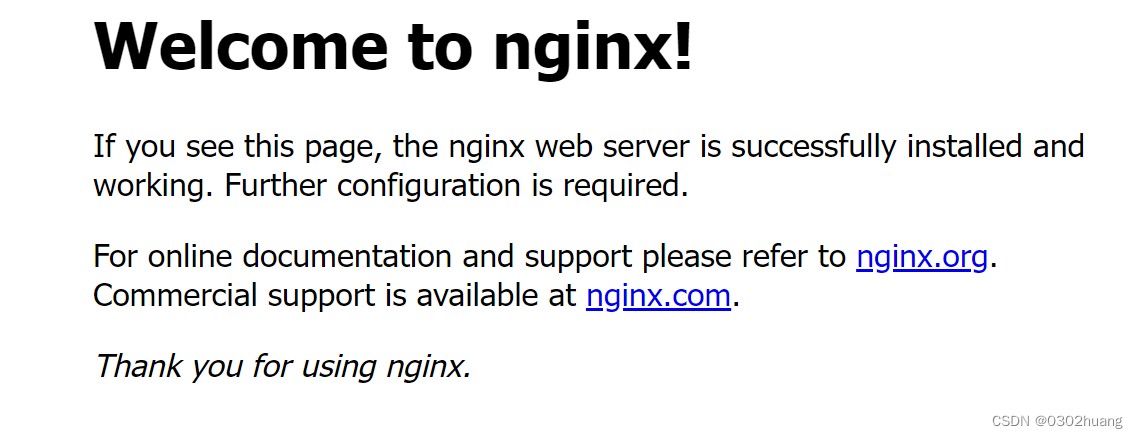
5.访问部署的nginx

访问 http://192.168.242.100:30439/
6.后续扩展
封装操作更多的功能,操作更多资源,例如 ingress
总结
以上为个人经验,希望能给大家一个参考,也希望大家多多支持代码网。






发表评论