
 我要评论
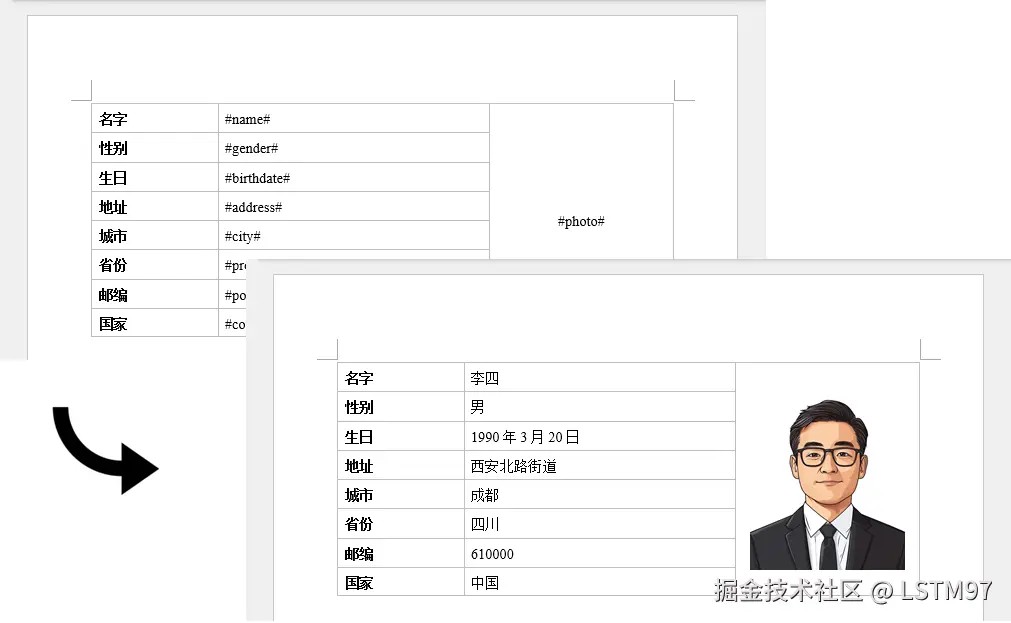
我要评论在日常开发中,我们经常遇到需要批量生成合同、通知书、报告等word文档的场景。最优雅的方式莫过于准备一个模板文件,然后通过代码替换其中的占位符,快速生成最终文档。今天就来分享如何使用 free spire.doc for .net 轻松实现这一功能。
为什么选择 free spire.doc?
free spire.doc 是一款免费、易用的 word 操作组件,无需安装 microsoft office 即可完成文档的创建、读取、编辑和保存。它支持 .net framework 和 .net core,非常适合服务端批量处理场景。
通过 nuget 安装:
pm> install-package freespire.doc
实现思路
预先设计一个 word 模板(如 template.docx),用特定占位符标记需要填充的内容
在代码中加载模板,将占位符替换为实际数据
支持文本替换,也支持插入图片(如证件照)
保存为新的 word 文档
完整代码
using spire.doc;
using spire.doc.documents;
using spire.doc.fields;
using system.drawing;

namespace createwordbyreplacingplaceholders
{
    class program
    {
        static void main(string[] args)
        {
            // initialize a new document object
            document document = new document();

            // load the template word file
            document.loadfromfile("c:\users\administrator\desktop\template.docx");

            // dictionary to hold placeholders and their replacements
            dictionary<string, string> replacedict = new dictionary<string, string>
            {
                { "#name#", "李四" },
                { "#gender#", "男" },
                { "#birthdate#", "1990年3月20日" },
                { "#address#", "西安北路街道" },
                { "#city#", "成都" },
                { "#province#", "四川" },
                { "#postal#", "610000" },
                { "#country#", "中国" }
            };

            // replace placeholders in the document with corresponding values
            foreach (keyvaluepair<string, string> kvp in replacedict)
            {
                document.replace(kvp.key, kvp.value, true, true);
            }

            // path to the image file
            string imagepath = "c:\users\administrator\desktop\portrait.png";

            // replace the placeholder for the photograph with an image
            replacetextwithimage(document, "#photo#", imagepath);

            // save the modified document
            document.savetofile("replaceplaceholders.docx", fileformat.docx);

            // release resources
            document.dispose();
        }

        // method to replace a placeholder in the document with an image
        static void replacetextwithimage(document document, string stringtoreplace, string imagepath)
        {
            // load the image from the specified path
            image image = image.fromfile(imagepath);
            docpicture pic = new docpicture(document);
            pic.loadimage(image);
            pic.width = 130;

            // find the placeholder in the document
            textselection selection = document.findstring(stringtoreplace, false, true);

            // get the range of the found text
            textrange range = selection.getasonerange();
            int index = range.ownerparagraph.childobjects.indexof(range);

            // insert the image and remove the placeholder text
            range.ownerparagraph.childobjects.insert(index, pic);
            range.ownerparagraph.childobjects.remove(range);
        }
    }
}
代码详解
1. 文本替换
首先准备一个字典,存储占位符与替换文本的对应关系:
dictionary<string, string> replacedict = new dictionary<string, string>
{
    { "#name#", "李四" },
    { "#gender#", "男" },
    // ... 其他字段
};
然后遍历字典,调用 document.replace 方法完成替换。该方法的后两个参数分别表示是否区分大小写和是否仅替换整个单词。
2. 图片替换
图片替换稍微复杂一些,核心步骤如下:
- 使用
image.fromfile加载图片文件 - 创建
docpicture对象并加载图片,设置图片宽度 - 通过
findstring定位占位符的位置 - 获取占位符所在段落及索引
- 在相同位置插入图片,然后移除占位符文本
3. 保存文档
最后调用 savetofile 方法保存为新文档,并释放资源。
模板准备建议
在 word 模板中,将需要动态填充的位置用占位符标记,例如:
| 字段 | 占位符 |
|---|---|
| 姓名 | #name# |
| 性别 | #gender# |
| 出生日期 | #birthdate# |
| 照片 | #photo# |
使用注意事项
- 确保模板文件路径和图片路径正确
- 占位符建议使用独特标识(如
#字段名#),避免误替换 - 图片替换时可调整
width和height属性控制显示尺寸 - 处理完成后记得调用
dispose()释放资源
总结
通过 free spire.doc,我们只需维护一套模板文件,即可快速生成成千上万份个性化文档,大幅提升工作效率。该组件还支持合并单元格、设置字体样式、添加页眉页脚等高级功能
到此这篇关于c#代码实现根据模板快速生成word文档的文章就介绍到这了,更多相关c#模板生成word内容请搜索代码网以前的文章或继续浏览下面的相关文章希望大家以后多多支持代码网!





发表评论