
 我要评论
我要评论spring security是一个基于spring框架的安全性解决方案,提供了全面的安全功能和集成能力,用于保护java应用程序的身份验证、授权和其他安全需求。
spring security的主要功能包括
- 身份验证(authentication):spring security提供了多种身份验证机制。
- 授权(authorization):spring security支持基于角色和权限的授权机制,可以精确控制用户对系统资源的访问权限。它提供了注解和标签,使开发人员可以在代码中灵活定义和配置授权规则。
- 认证流程的安全控制:spring security提供了很多机制来确保认证流程的安全性。
- web安全:spring security可以通过过滤器链的方式保护web应用程序的安全性。
- 方法级安全:spring security允许在方法级别上进行安全控制,通过注解或xml配置来限制对特定方法的访问权限。
- 安全事件和审计:spring security提供了安全事件机制,可以记录和处理安全相关的事件,例如登录成功、权限拒绝等。它还支持审计功能,可用于记录和追踪用户的操作行为。
spring security是一个功能强大、灵活可扩展的安全框架,可以帮助开发人员在java应用程序中实现全面的身份验证和授权功能,提高应用程序的安全性和可信度。
在springboot中使用首先需要导入依赖
<!--        springsecurity-->
        <dependency>
            <groupid>org.springframework.boot</groupid>
            <artifactid>spring-boot-starter-security</artifactid>
        </dependency>
配置securityconfig和jwt工具类
在securityconfig中可以对访问权限进行设置,将登录以及注册接口设置为开放(不然系统就无法访问),也可以将不需要进行权限认证的接口也再此设置为开发;同时也可以通过注解的方式对需要进行权限认证的接口进行设置。
@configuration
@enableglobalmethodsecurity(prepostenabled = true)
public class securityconfig extends websecurityconfigureradapter {

    @bean
    public passwordencoder passwordencoder() {
        return  new bcryptpasswordencoder();
    }

    @autowired
    private jwtauthenticationtokenfilter filter;

    @autowired
    private authenticationentrypoint authenticationentrypoint;

    @resource
    private accessdeniedhandler accessdeniedhandler;
    @override
    protected void configure(httpsecurity http) throws exception {
        http
                //关闭csrf
                .csrf().disable()
                //不通过session获取securitycontext
                .sessionmanagement().sessioncreationpolicy(sessioncreationpolicy.stateless)
                .and()
                .authorizerequests()

                // 对于登录接口 允许匿名访问 未登录状态也可以访问
                .antmatchers("/login/login").anonymous()
                .antmatchers("/login/register").anonymous()
                .antmatchers("/login/sendcode").anonymous()
                .antmatchers("/pay/notify").anonymous()
                // 需要用户带有管理员权限
//                .antmatchers("/find").hasrole("管理员")
//                // 需要用户具备这个接口的权限
//                .antmatchers("/find").hasauthority("menu:user")

                // 除上面外的所有请求全部需要鉴权认证
                .anyrequest().authenticated();
        //添加过滤器
        http.addfilterbefore(filter, usernamepasswordauthenticationfilter.class);

        //配置异常处理器
        http.exceptionhandling()
                //配置认证失败处理器
                .authenticationentrypoint(authenticationentrypoint)
                .accessdeniedhandler(accessdeniedhandler);

        //允许跨域
        http.cors();
    }

    @bean
    @override
    public authenticationmanager authenticationmanagerbean() throws exception {
        return super.authenticationmanagerbean();
    }
}
public class jwtutil {

    //有效期为
    public static final long jwt_ttl = 60 * 60 *1000l;// 60 * 60 *1000  一个小时
    //设置秘钥明文
    public static final string jwt_key = "sangeng";

    public static string getuuid(){
        string token = uuid.randomuuid().tostring().replaceall("-", "");
        return token;
    }

    /**
     * 生成jtw
     * @param subject token中要存放的数据(json格式)
     * @return
     */
    public static string createjwt(string subject) {
        jwtbuilder builder = getjwtbuilder(subject, null, getuuid());// 设置过期时间
        return builder.compact();
    }

    /**
     * 生成jtw
     * @param subject token中要存放的数据(json格式)
     * @param ttlmillis token超时时间
     * @return
     */
    public static string createjwt(string subject, long ttlmillis) {
        jwtbuilder builder = getjwtbuilder(subject, ttlmillis, getuuid());// 设置过期时间
        return builder.compact();
    }

    private static jwtbuilder getjwtbuilder(string subject, long ttlmillis, string uuid) {
        signaturealgorithm signaturealgorithm = signaturealgorithm.hs256;
        secretkey secretkey = generalkey();
        long nowmillis = system.currenttimemillis();
        date now = new date(nowmillis);
        if(ttlmillis==null){
            ttlmillis=jwtutil.jwt_ttl;
        }
        long expmillis = nowmillis + ttlmillis;
        date expdate = new date(expmillis);
        return jwts.builder()
                .setid(uuid)              //唯一的id
                .setsubject(subject)   // 主题  可以是json数据
                .setissuer("sg")     // 签发者
                .setissuedat(now)      // 签发时间
                .signwith(signaturealgorithm, secretkey) //使用hs256对称加密算法签名, 第二个参数为秘钥
                .setexpiration(expdate);
    }

    /**
     * 创建token
     * @param id
     * @param subject
     * @param ttlmillis
     * @return
     */
    public static string createjwt(string id, string subject, long ttlmillis) {
        jwtbuilder builder = getjwtbuilder(subject, ttlmillis, id);// 设置过期时间
        return builder.compact();
    }

    public static void main(string[] args) throws exception {
        string jwt = createjwt("1234");
        claims claims = parsejwt(jwt);
        string subject = claims.getsubject();

        system.out.println(subject);
    }

    /**
     * 生成加密后的秘钥 secretkey
     * @return
     */
    public static secretkey generalkey() {
        byte[] encodedkey = base64.getdecoder().decode(jwtutil.jwt_key);
        secretkey key = new secretkeyspec(encodedkey, 0, encodedkey.length, "aes");
        return key;
    }

    /**
     * 解析
     *
     * @param jwt
     * @return
     * @throws exception
     */
    public static claims parsejwt(string jwt) throws exception {
        secretkey secretkey = generalkey();
        return jwts.parser()
                .setsigningkey(secretkey)
                .parseclaimsjws(jwt)
                .getbody();
    }


}
定义用户类
实现userdetails接口,对用户权限进行封装。
@data
@noargsconstructor
public class loginuser implements userdetails {

    private user user;

    private list<string> permissions;

    public loginuser(user user, list<string> permissions) {
        this.user = user;
        this.permissions = permissions;
    }


    //返回权限信息

    @jsonfield(serialize = false)  //不需要存到redis中,进行序列化忽略
    private list<simplegrantedauthority> authorities;
    @override
    public collection<? extends grantedauthority> getauthorities() {

        if (authorities != null){
            return authorities;
        }
       authorities = permissions.stream()
                .map(simplegrantedauthority::new)
                .collect(collectors.tolist());

        return authorities;
    }

    @override
    public string getpassword() {
        return user.getuserpwd();
    }

    @override
    public string getusername() {
        return user.getusername();
    }

    //判断是否没过期
    @override
    public boolean isaccountnonexpired() {
        return true;
    }

    @override
    public boolean isaccountnonlocked() {
        return true;
    }

    @override
    public boolean iscredentialsnonexpired() {
        return true;
    }

    @override
    public boolean isenabled() {
        return true;
    }
}
实现userdetailsservice接口
重写loaduserbyusername方法查询用户权限信息
@override
public userdetails loaduserbyusername(string username) throws usernamenotfoundexception {

    //查询用户信息
    lambdaquerywrapper<user> wrapper = new lambdaquerywrapper<>();
    wrapper.eq(user::getusername, username);
    user user = usermapper.selectone(wrapper);
    //如果没有查询到用户就抛出异常
    if (objects.isnull(user)){
        throw new runtimeexception("用户名或密码错误");
    }
    list<string> list = menumapper.selectpermsbyuserid(user.getid());

    return new loginuser(user,list);
}
配置过滤器
@component
public class jwtauthenticationtokenfilter extends onceperrequestfilter {

    @autowired
    private rediscache rediscache;

    @override
    protected void dofilterinternal(httpservletrequest request, httpservletresponse response, filterchain filterchain) throws servletexception, ioexception {
        string token = request.getheader("token");

        if (!stringutils.hastext(token)) {
            //token为空,放行
            filterchain.dofilter(request, response);
            return;
        }
        //解析token
        string userid;
        try {
            claims claims = jwtutil.parsejwt(token);
            userid = claims.getsubject();
        } catch (exception e) {
            throw new runtimeexception("token非法");
        }
        //从redis中获取用户信息
        string rediskey = "login:" + userid;

        loginuser loginuser = rediscache.getcacheobject(rediskey);
        if (objects.isnull(loginuser)){
            throw new runtimeexception("用户未登录");
        }
        //存入securitycontextholder
        // 获取权限信息封装到authentication中
        usernamepasswordauthenticationtoken usernamepasswordauthenticationtoken =
                new usernamepasswordauthenticationtoken(loginuser, null, loginuser.getauthorities());

        securitycontextholder.getcontext().setauthentication(usernamepasswordauthenticationtoken);
        //放行
        filterchain.dofilter(request, response);
    }
}
配置认证失败和权限不足的返回类
这两个方法,在securityconfig中进行添加。当对于清空出现时,调用方法,返回给前端状态码,以及自定义信息。
@component
public class authenticationentrypointimpl implements authenticationentrypoint {
    @override
    public void commence(httpservletrequest request, httpservletresponse response, authenticationexception authexception) throws ioexception, servletexception {
        result result = new result(httpstatus.unauthorized.value(), "认证失败");
        string json = json.tojsonstring(result);
        //处理异常
        webutils.renderstring(response, json);

    }
}
@component
public class accessdeniedhandlerimpl implements accessdeniedhandler {
    @override
    public void handle(httpservletrequest request, httpservletresponse response, accessdeniedexception accessdeniedexception) throws ioexception, servletexception {
        result result = new result(httpstatus.forbidden.value(), "权限不足");
        string json = json.tojsonstring(result);
        webutils.renderstring(response, json);
    }
}
配置完成后,在前端页面访问后端接口,过滤器会进行拦截,判断前端请求中请求头是否携带token,携带并成功验证用户后,会将用户的权限信息封装到authentication中,后续判断该用户是否拥有访问该接口的权限。
例如设置下面接口的访问中需要用户拥有getuseraddress权限。
@requestmapping("/getuseraddress")
@preauthorize("hasauthority('getuseraddress')")
public result getuseraddress(long userid) {

    return addressservice.getuseraddress(userid);
}
用户、角色、权限表信息如下

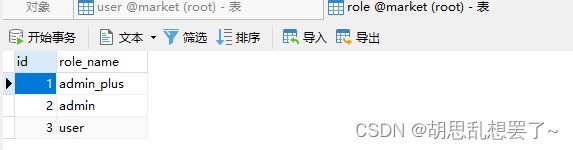
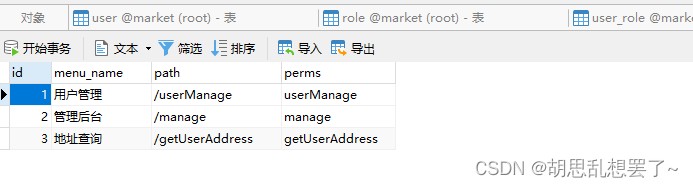
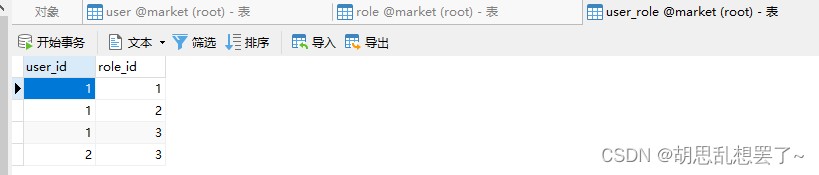
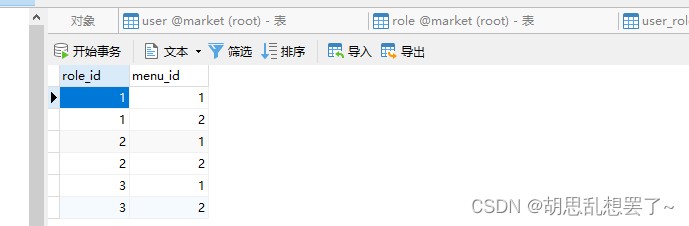
可以看到用户1不存在访问getuseraddress的权限。
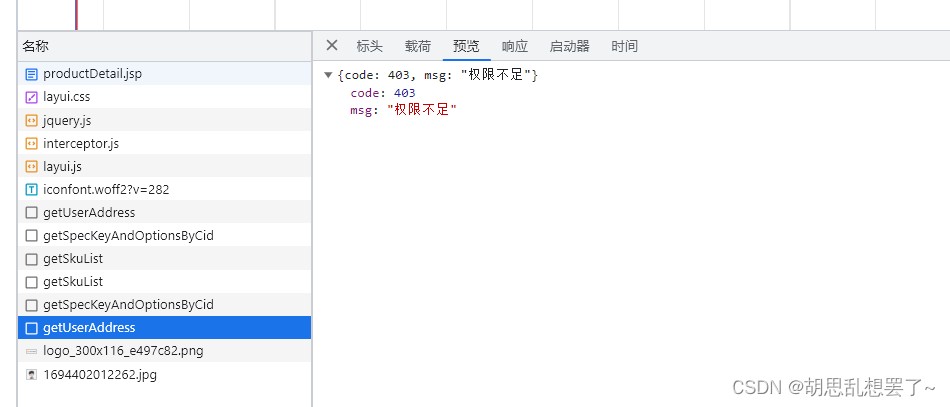
当使用用户1登录后,在前端对该接口进行访问时,后端会返回权限不足的状态码以及相应的信息信息。该接口的方法也不会执行。
总结
以上为个人经验,希望能给大家一个参考,也希望大家多多支持代码网。

发表评论