
 我要评论
我要评论一、概述:当时间管理遇上现代ui
在日常开发中,我们经常需要精确控制系统时间,但windows自带的时间设置工具实在太简陋了!今天我要分享的是用pyqt5开发的高颜值时间控制器,它不仅颜值在线,还具备:
- 现代化fluent design界面
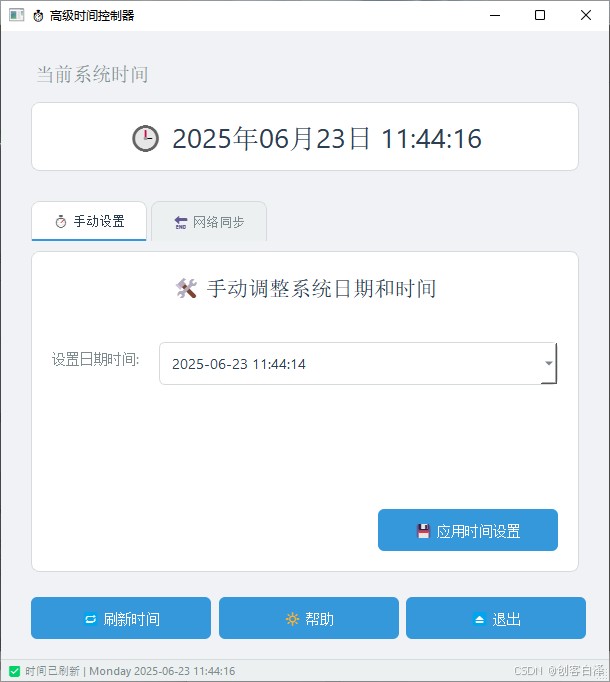
- 实时时间显示(精确到秒)
- 可视化时间修改(带日历控件)
- ntp网络时间同步模拟
- 智能权限检测(自动识别管理员权限)
技术亮点:本项目的界面设计参考了windows 11的fluent ui设计规范,采用qss实现深度样式定制,是学习pyqt5现代化开发的绝佳案例!

二、功能全景:六大核心模块解析
2.1 实时时钟模块
class modernterminallabel(qlabel):
    """🔄 动态时钟标签"""
    def __init__(self):
        self.setstylesheet("""
            background: qlineargradient(x1:0, y1:0, x2:1, y2:1,
                          stop:0 #3498db, stop:1 #2c3e50);
            border-radius: 10px;
            color: white;
            padding: 15px;
        """)
自定义渐变效果时钟标签
2.2 时间设置模块
功能特点:
- 集成qdatetimeedit控件
- 带弹出式日历选择
- 自动检测管理员权限
2.3 ntp同步模块
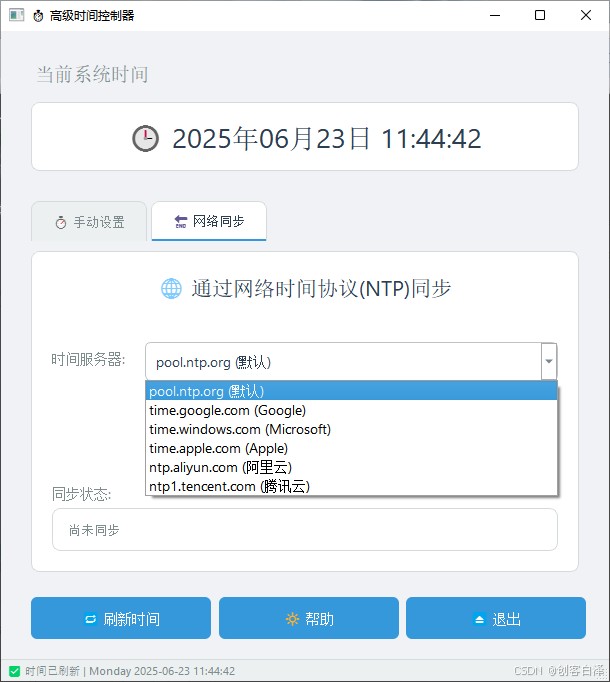
支持服务器列表:
pool.ntp.org(默认)time.google.com(谷歌)time.windows.com(微软)ntp.aliyun.com(阿里云)
三、效果展示:眼见为实
3.1 主界面(light模式)
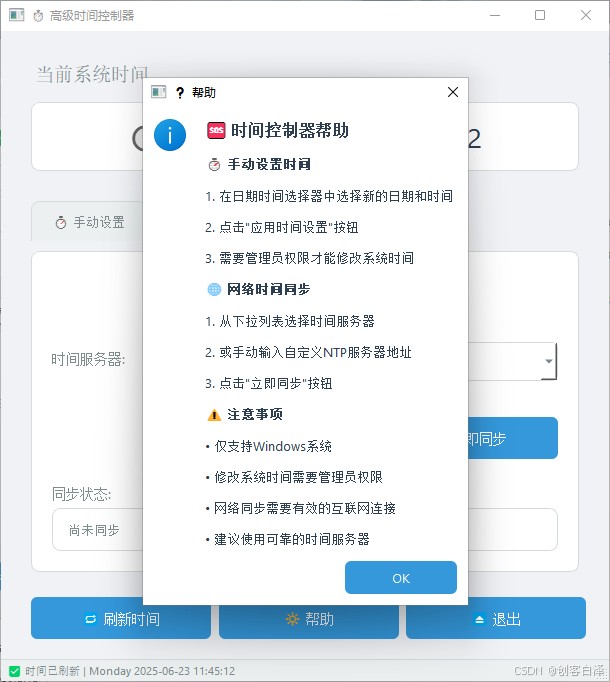
3.2 帮助页面展示
3.3 时间同步演示
四、手把手实现教程
4.1 环境准备
pip install pyqt5==5.15.9 pywin32
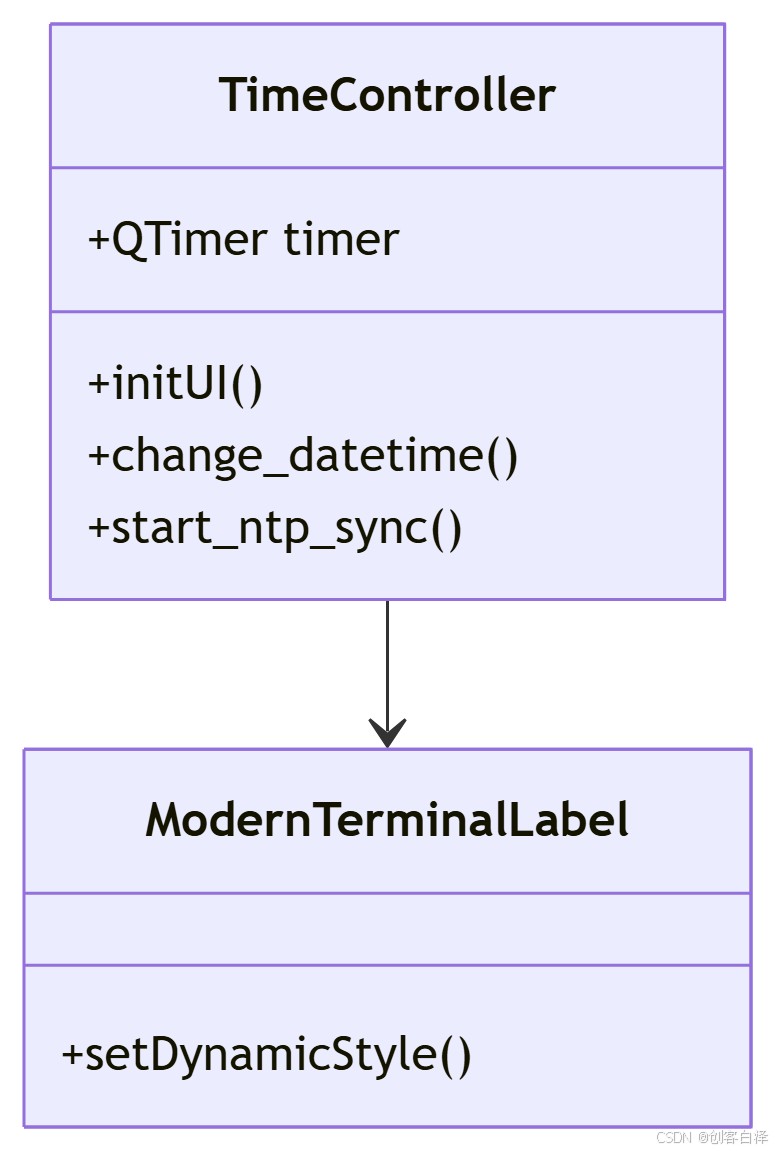
4.2 核心类结构
4.3 关键代码解析
时间修改功能
def change_datetime(self):
    try:
        # 🛡️ 权限检查
        if not ctypes.windll.shell32.isuseranadmin():
            self.show_error("💢 需要管理员权限!")
            return

        # ⏱️ 设置系统时间
        ctypes.windll.kernel32.setlocaltime(byref(time_struct))
        self.show_success("✅ 时间修改成功!")
    except exception as e:
        self.show_error(f"❌ 错误:{str(e)}")
ntp同步动画
def update_sync_status(self, step):
    steps = [
        "🛰️ 正在连接服务器...",
        "⏳ 获取时间数据...",
        "⚙️ 校准系统中...",
        "🎉 同步完成!"
    ]
    self.status_label.settext(steps[step])
五、源码获取与进阶改造
5.1 完整项目下载
import sys
import ctypes
import platform
from datetime import datetime
from pyqt5.qtwidgets import (qapplication, qmainwindow, qwidget, qvboxlayout,
                             qhboxlayout, qlabel, qdatetimeedit, qpushbutton,
                             qmessagebox, qtabwidget, qlineedit, qcombobox,
                             qformlayout, qframe, qsizepolicy, qspaceritem)
from pyqt5.qtcore import qdatetime, qt, qtimer
from pyqt5.qtgui import qfont, qcolor, qpalette, qfontdatabase, qicon

class modernterminallabel(qlabel):
    """现代化终端风格标签"""
    def __init__(self, text, font_size=14, bold=false):
        super().__init__(text)
        self.setalignment(qt.aligncenter)
        self.setsizepolicy(qsizepolicy.expanding, qsizepolicy.fixed)

        # 字体选择优先级列表
        preferred_fonts = ["segoe ui", "arial", "helvetica", "microsoft yahei", "pingfang sc"]
        font_db = qfontdatabase()
        available_fonts = font_db.families()

        # 选择第一个可用的字体
        selected_font = "arial"  # 默认回退字体
        for font_name in preferred_fonts:
            if font_name in available_fonts:
                selected_font = font_name
                break

        font = qfont(selected_font, font_size)
        font.setbold(bold)
        self.setfont(font)
        self.setstylesheet("color: #2c3e50;")

class modernbutton(qpushbutton):
    """现代化按钮"""
    def __init__(self, text, icon=none, parent=none):
        super().__init__(text, parent)
        self.setcursor(qt.pointinghandcursor)
        self.setminimumheight(42)

        if icon:
            self.seticon(qicon.fromtheme(icon))

        self.setstylesheet("""
            qpushbutton {
                background-color: #3498db;
                color: white;
                border: none;
                border-radius: 6px;
                padding: 10px 20px;
                font-family: 'segoe ui';
                font-size: 14px;
                font-weight: medium;
                min-width: 140px;
            }
            qpushbutton:hover {
                background-color: #2980b9;
            }
            qpushbutton:pressed {
                background-color: #1a6ca8;
            }
            qpushbutton:disabled {
                background-color: #bdc3c7;
            }
        """)

class timecontroller(qmainwindow):
    def __init__(self):
        super().__init__()

        # 窗口设置
        self.setwindowtitle("⏱️ 高级时间控制器")
        self.setwindowicon(qicon.fromtheme("clock"))
        self.resize(608, 650)
        self.setminimumsize(608, 650)

        # 设置现代化主题
        self.setautofillbackground(true)
        palette = self.palette()
        palette.setcolor(qpalette.window, qcolor(240, 242, 245))
        palette.setcolor(qpalette.base, qcolor(255, 255, 255))
        palette.setcolor(qpalette.text, qcolor(44, 62, 80))
        self.setpalette(palette)

        # 主部件
        central_widget = qwidget()
        self.setcentralwidget(central_widget)

        # 主布局
        main_layout = qvboxlayout(central_widget)
        main_layout.setcontentsmargins(30, 30, 30, 20)
        main_layout.setspacing(25)

        # 初始化ui
        self.init_ui(main_layout)

        # 状态栏
        self.statusbar().setstylesheet("""
            qstatusbar {
                background-color: #ecf0f1;
                color: #7f8c8d;
                border-top: 1px solid #d5dbdb;
                font-family: 'segoe ui';
                font-size: 11px;
                height: 24px;
            }
        """)
        self.statusbar().showmessage("🟢 系统准备就绪 | 当前用户: {}".format(platform.node()))

        # 设置定时器每秒更新一次时间
        self.timer = qtimer(self)
        self.timer.timeout.connect(self.update_current_time)
        self.timer.start(1000)  # 1000毫秒 = 1秒

    def init_ui(self, layout):
        """初始化用户界面"""


        # 当前时间显示
        self.time_display = qwidget()
        time_display_layout = qvboxlayout(self.time_display)
        time_display_layout.setcontentsmargins(0, 0, 0, 0)

        time_label = modernterminallabel("当前系统时间", 14)
        time_label.setalignment(qt.alignleft)
        time_label.setstylesheet("color: #7f8c8d; margin-bottom: 5px;")
        time_display_layout.addwidget(time_label)

        self.time_value = modernterminallabel("", 20)
        self.time_value.setstylesheet("""
            qlabel {
                background-color: white;
                color: #2c3e50;
                border: 1px solid #d5dbdb;
                border-radius: 8px;
                padding: 15px;
                margin: 5px 0;
            }
        """)
        time_display_layout.addwidget(self.time_value)

        layout.addwidget(self.time_display)
        self.update_current_time()

        # 标签页区域
        self.tabs = qtabwidget()
        self.tabs.setstylesheet("""
            qtabwidget::pane {
                border: 1px solid #d5dbdb;
                border-radius: 8px;
                background: white;
                margin-top: 10px;
            }
            qtabbar::tab {
                background: #ecf0f1;
                color: #7f8c8d;
                border: 1px solid #d5dbdb;
                border-bottom: none;
                border-top-left-radius: 8px;
                border-top-right-radius: 8px;
                padding: 10px 20px;
                margin-right: 4px;
                font-family: 'segoe ui';
                font-size: 13px;
            }
            qtabbar::tab:selected {
                background: white;
                color: #2c3e50;
                border-bottom: 2px solid #3498db;
            }
            qtabbar::tab:hover {
                background: #e0e6e9;
            }
        """)

        # 创建标签页
        self.create_manual_tab()
        self.create_sync_tab()

        layout.addwidget(self.tabs)

        # 底部按钮区域
        button_layout = qhboxlayout()
        button_layout.setspacing(15)

        # 添加弹性空间使按钮右对齐
        button_layout.addstretch()

        refresh_btn = modernbutton("🔁 刷新时间", "view-refresh")
        refresh_btn.clicked.connect(self.update_current_time)
        button_layout.addwidget(refresh_btn)

        help_btn = modernbutton("🔆 帮助", "help-contents")
        help_btn.clicked.connect(self.show_help)
        button_layout.addwidget(help_btn)

        exit_btn = modernbutton("⏏️ 退出", "application-exit")
        exit_btn.clicked.connect(self.close)
        button_layout.addwidget(exit_btn)

        layout.addlayout(button_layout)

    def create_manual_tab(self):
        """创建手动设置时间标签页"""
        tab = qwidget()
        layout = qvboxlayout(tab)
        layout.setcontentsmargins(20, 20, 20, 20)
        layout.setspacing(25)

        # 说明文字
        info_label = modernterminallabel("🛠️ 手动调整系统日期和时间", 16)
        info_label.setstylesheet("color: #2c3e50; margin-bottom: 15px;")
        layout.addwidget(info_label)

        # 表单区域
        form_layout = qformlayout()
        form_layout.sethorizontalspacing(20)
        form_layout.setverticalspacing(15)
        form_layout.setlabelalignment(qt.alignright)

        # 日期时间选择器
        self.datetime_edit = qdatetimeedit()
        self.datetime_edit.setdisplayformat("yyyy-mm-dd hh:mm:ss")
        self.datetime_edit.setdatetime(qdatetime.currentdatetime())
        self.datetime_edit.setcalendarpopup(true)
        self.datetime_edit.setstylesheet("""
            qdatetimeedit {
                background-color: white;
                color: #2c3e50;
                border: 1px solid #d5dbdb;
                border-radius: 6px;
                padding: 10px;
                font-family: 'segoe ui';
                font-size: 14px;
                min-width: 220px;
            }
            qdatetimeedit:hover {
                border: 1px solid #bdc3c7;
            }
            qcalendarwidget {
                background-color: white;
                color: #2c3e50;
                font-family: 'segoe ui';
            }
        """)

        dt_label = qlabel("设置日期时间:")
        dt_label.setstylesheet("color: #7f8c8d; font-family: 'segoe ui'; font-size: 14px;")
        form_layout.addrow(dt_label, self.datetime_edit)

        layout.addlayout(form_layout)

        # 应用按钮
        apply_btn = modernbutton("💾 应用时间设置", "document-save")
        apply_btn.clicked.connect(self.change_datetime)
        layout.addwidget(apply_btn, 0, qt.alignright)

        self.tabs.addtab(tab, "⏱️ 手动设置")

    def create_sync_tab(self):
        """创建时间同步标签页"""
        tab = qwidget()
        layout = qvboxlayout(tab)
        layout.setcontentsmargins(20, 20, 20, 20)
        layout.setspacing(25)

        # 说明文字
        info_label = modernterminallabel("🌐 通过网络时间协议(ntp)同步", 16)
        info_label.setstylesheet("color: #2c3e50; margin-bottom: 15px;")
        layout.addwidget(info_label)

        # 表单区域
        form_layout = qformlayout()
        form_layout.sethorizontalspacing(20)
        form_layout.setverticalspacing(15)
        form_layout.setlabelalignment(qt.alignright)

        # 服务器选择
        server_label = qlabel("时间服务器:")
        server_label.setstylesheet("color: #7f8c8d; font-family: 'segoe ui'; font-size: 14px;")

        self.server_combo = qcombobox()
        self.server_combo.additems([
            "pool.ntp.org (默认)",
            "time.google.com (google)",
            "time.windows.com (microsoft)",
            "time.apple.com (apple)",
            "ntp.aliyun.com (阿里云)",
            "ntp1.tencent.com (腾讯云)"
        ])
        self.server_combo.seteditable(true)
        self.server_combo.setstylesheet("""
            qcombobox {
                background-color: white;
                color: #2c3e50;
                border: 1px solid #d5dbdb;
                border-radius: 6px;
                padding: 8px;
                font-family: 'segoe ui';
                font-size: 14px;
                min-width: 250px;
            }
            qcombobox:hover {
                border: 1px solid #bdc3c7;
            }
            qcombobox qabstractitemview {
                background-color: white;
                selection-background-color: #3498db;
                selection-color: white;
                font-family: 'segoe ui';
                font-size: 13px;
            }
        """)
        form_layout.addrow(server_label, self.server_combo)

        layout.addlayout(form_layout)

        # 同步按钮
        sync_btn = modernbutton("♾️ 立即同步", "network-workgroup")
        sync_btn.clicked.connect(self.start_ntp_sync)
        layout.addwidget(sync_btn, 0, qt.alignright)

        # 同步状态区域
        sync_status_layout = qvboxlayout()
        sync_status_layout.setspacing(5)

        status_label = qlabel("同步状态:")
        status_label.setstylesheet("color: #7f8c8d; font-family: 'segoe ui'; font-size: 14px;")
        sync_status_layout.addwidget(status_label)

        self.sync_status = qlabel("尚未同步")
        self.sync_status.setstylesheet("""
            qlabel {
                background-color: white;
                color: #7f8c8d;
                border: 1px solid #d5dbdb;
                border-radius: 8px;
                padding: 12px;
                font-family: 'segoe ui';
                font-size: 13px;
            }
        """)
        sync_status_layout.addwidget(self.sync_status)

        layout.addlayout(sync_status_layout)

        self.tabs.addtab(tab, "🔄 网络同步")

    def update_current_time(self):
        """更新当前时间显示"""
        now = datetime.now()
        self.time_value.settext(f"🕒 {now.strftime('%y年%m月%d日 %h:%m:%s')}")
        # 只在手动刷新时更新状态栏消息
        if not hasattr(self, 'is_timer_update'):
            self.statusbar().showmessage(f"✅ 时间已刷新 | {now.strftime('%a %y-%m-%d %h:%m:%s')}", 3000)

        # 设置标志位表示这是定时器触发的更新
        self.is_timer_update = true
        qtimer.singleshot(100, lambda: delattr(self, 'is_timer_update'))

    def change_datetime(self):
        """更改系统日期时间"""
        if platform.system() != "windows":
            self.show_message("❌ 错误", "⚠️ 仅支持windows系统", qmessagebox.critical)
            return

        if not ctypes.windll.shell32.isuseranadmin():
            self.show_message("⛔ 权限不足", "🔑 需要管理员权限才能修改系统时间", qmessagebox.critical)
            return

        new_datetime = self.datetime_edit.datetime().topydatetime()

        try:
            ctypes.windll.kernel32.setlocaltime(ctypes.byref(self.get_system_time_struct(new_datetime)))
            self.update_current_time()
            self.show_message("✅ 成功", "⏱️ 系统时间已成功修改", qmessagebox.information)
        except exception as e:
            self.show_message("❌ 错误", f"⚠️ 修改失败: {str(e)}", qmessagebox.critical)

    def start_ntp_sync(self):
        """开始ntp时间同步"""
        server = self.server_combo.currenttext().split(" ")[0]  # 获取服务器地址部分
        if not server:
            self.show_message("⚠️ 警告", "📡 请选择或输入有效的时间服务器地址", qmessagebox.warning)
            return

        # 模拟同步过程
        self.sync_status.settext("⏳ 正在连接服务器 {}...".format(server))
        qtimer.singleshot(1500, lambda: self.update_sync_status(1, server))

    def update_sync_status(self, step, server):
        """更新同步状态"""
        if step == 1:
            self.sync_status.settext("🔍 正在从 {} 获取时间数据...".format(server))
            qtimer.singleshot(1500, lambda: self.update_sync_status(2, server))
        elif step == 2:
            self.sync_status.settext("⚙️ 正在校准系统时间...")
            qtimer.singleshot(1500, lambda: self.finish_ntp_sync(server))

    def finish_ntp_sync(self, server):
        """完成ntp同步"""
        now = datetime.now()
        self.sync_status.settext("✅ 同步成功\n服务器: {}\n时间: {}".format(
            server, now.strftime("%y-%m-%d %h:%m:%s")))
        self.datetime_edit.setdatetime(qdatetime.currentdatetime())
        self.update_current_time()
        self.show_message("✅ 成功", "🌐 已成功从 {} 同步时间".format(server), qmessagebox.information)

    def show_help(self):
        """显示帮助信息"""
        help_text = """
        <h3>🆘 时间控制器帮助</h3>

        <h4>⏱️ 手动设置时间</h4>
        <p>1. 在日期时间选择器中选择新的日期和时间</p>
        <p>2. 点击"应用时间设置"按钮</p>
        <p>3. 需要管理员权限才能修改系统时间</p>

        <h4>🌐 网络时间同步</h4>
        <p>1. 从下拉列表选择时间服务器</p>
        <p>2. 或手动输入自定义ntp服务器地址</p>
        <p>3. 点击"立即同步"按钮</p>

        <h4>⚠️ 注意事项</h4>
        <p>• 仅支持windows系统</p>
        <p>• 修改系统时间需要管理员权限</p>
        <p>• 网络同步需要有效的互联网连接</p>
        <p>• 建议使用可靠的时间服务器</p>
        """
        msg = qmessagebox(self)
        msg.setwindowtitle("❓ 帮助")
        msg.settextformat(qt.richtext)
        msg.settext(help_text)
        msg.seticon(qmessagebox.information)
        msg.setstylesheet("""
            qmessagebox {
                background-color: white;
                font-family: 'segoe ui';
            }
            qlabel {
                color: #2c3e50;
                font-size: 13px;
            }
            qpushbutton {
                background-color: #3498db;
                color: white;
                border: none;
                border-radius: 6px;
                padding: 8px 16px;
                min-width: 80px;
                font-family: 'segoe ui';
            }
            qpushbutton:hover {
                background-color: #2980b9;
            }
        """)
        msg.exec_()

    def get_system_time_struct(self, dt):
        """将datetime对象转换为systemtime结构体"""
        class systemtime(ctypes.structure):
            _fields_ = [
                ('wyear', ctypes.c_uint16),
                ('wmonth', ctypes.c_uint16),
                ('wdayofweek', ctypes.c_uint16),
                ('wday', ctypes.c_uint16),
                ('whour', ctypes.c_uint16),
                ('wminute', ctypes.c_uint16),
                ('wsecond', ctypes.c_uint16),
                ('wmilliseconds', ctypes.c_uint16)
            ]

        st = systemtime()
        st.wyear = dt.year
        st.wmonth = dt.month
        st.wday = dt.day
        st.whour = dt.hour
        st.wminute = dt.minute
        st.wsecond = dt.second
        st.wmilliseconds = dt.microsecond // 1000
        return st

    def show_message(self, title, text, icon):
        """显示现代化消息框"""
        msg = qmessagebox(self)
        msg.setwindowtitle(title)
        msg.settext(text)
        msg.seticon(icon)
        msg.setstylesheet("""
            qmessagebox {
                background-color: white;
                font-family: 'segoe ui';
            }
            qlabel {
                color: #2c3e50;
                font-size: 14px;
            }
            qpushbutton {
                background-color: #3498db;
                color: white;
                border: none;
                border-radius: 6px;
                padding: 8px 16px;
                min-width: 80px;
                font-family: 'segoe ui';
            }
            qpushbutton:hover {
                background-color: #2980b9;
            }
        """)
        msg.exec_()

if __name__ == "__main__":
    app = qapplication(sys.argv)
    app.setstyle("fusion")

    # 设置应用程序字体
    font_db = qfontdatabase()
    preferred_fonts = ["segoe ui", "arial", "helvetica", "microsoft yahei", "pingfang sc"]
    selected_font = "arial"
    for font_name in preferred_fonts:
        if font_name in font_db.families():
            selected_font = font_name
            break

    font = qfont(selected_font, 10)
    app.setfont(font)

    window = timecontroller()
    window.show()

    sys.exit(app.exec_())
5.2 二次开发建议
添加真实ntp协议支持:
import ntplib
def real_ntp_sync(server):
    client = ntplib.ntpclient()
    response = client.request(server)
    return response.tx_time
实现多主题切换:
def set_theme(theme):
    if theme == "dark":
        apply_dark_theme()
    else:
        apply_light_theme()
六、总结与展望
6.1 项目总结
通过本项目我们掌握了:
- pyqt5现代化界面开发技巧
- windows系统时间管理api
- qss样式表深度定制
- 状态机动画实现
6.2 未来升级计划
- 增加linux/macos支持
- 添加定时同步功能
- 实现时间修改历史记录
- 开发插件系统
以上就是使用python打造高颜值系统时间控制器的详细内容,更多关于python系统时间控制器的资料请关注代码网其它相关文章!





发表评论