
 我要评论
我要评论在当今高负载、高并发的服务器环境中,linux系统的稳定性和性能表现至关重要。而随着时间推移,系统会积累大量缓存数据和临时文件,这些“数字垃圾”不仅占用宝贵的磁盘空间,还可能影响i/o性能、内存利用率甚至整体系统响应速度。本文将深入探讨linux环境下如何有效清理系统缓存与无用文件,并结合java编程实践,帮助开发者构建自动化运维工具,实现系统资源的智能管理。
为什么需要清理linux系统缓存?
很多人误以为“linux很智能,不需要手动清理”,这种观点在大多数情况下是正确的——linux内核确实具备优秀的内存管理机制。但以下几种情况仍需人工干预:
- 内存压力大:当物理内存不足且swap频繁使用时
- 性能测试前:为获得准确基准数据需清空干扰缓存
- 容器环境:docker/kubernetes中缓存可能导致oom
- 磁盘空间告急:日志、临时文件堆积导致分区满载
- 安全审计后:清除敏感操作留下的痕迹文件
小贴士:生产环境慎用强制清理命令!建议在维护窗口或低峰期操作。
linux缓存机制简介
linux使用三种主要缓存提升系统性能:
- page cache(页缓存):缓存文件读写内容,加速磁盘i/o
- buffer cache(缓冲区缓存):缓存块设备元数据,如inode、dentry
- slab cache:内核对象缓存,如task_struct、socket结构体
我们可以通过 /proc/meminfo 查看当前缓存状态:
cat /proc/meminfo | grep -e "(cached|buffers|slab)"
输出示例:
cached:           2048576 kb
buffers:           123456 kb
slab:              789012 kb
手动清理缓存的几种方式
方法一:使用sync && echo n > /proc/sys/vm/drop_caches
这是最直接也是最危险的方式:
# 清理页缓存
echo 1 > /proc/sys/vm/drop_caches

# 清理目录项和inode缓存
echo 2 > /proc/sys/vm/drop_caches

# 同时清理页缓存、目录项和inode缓存(推荐)
echo 3 > /proc/sys/vm/drop_caches
重要提醒:执行前务必先 sync 同步磁盘!
sync && echo 3 > /proc/sys/vm/drop_caches
方法二:使用sysctl命令
更规范的做法是通过 sysctl:
sync && sysctl vm.drop_caches=3
这种方式更具可读性,也便于脚本化。
方法三:定时任务自动清理
创建一个简单的清理脚本:
#!/bin/bash
# clean_cache.sh

log_file="/var/log/clean_cache.log"
echo "[$(date)] 开始清理缓存..." >> $log_file

# 同步磁盘
sync

# 清理缓存
echo 3 > /proc/sys/vm/drop_caches

echo "[$(date)] 缓存清理完成" >> $log_file
free -h >> $log_file
echo "------------------------" >> $log_file
添加到crontab(每周日凌晨3点执行):
0 3 * * 0 /path/to/clean_cache.sh
清理无用文件:不仅仅是缓存
除了内存缓存,磁盘上的无用文件同样需要定期清理:
1. 清理包管理器缓存
ubuntu/debian (apt):
sudo apt-get clean          # 清除.deb包缓存
sudo apt-get autoclean      # 清除过期包
sudo apt-get autoremove     # 删除无用依赖
centos/rhel (yum/dnf):
sudo yum clean all          # 清除yum缓存
# 或
sudo dnf clean all          # dnf用户
2. 清理日志文件
# 查看大日志文件
find /var/log -name "*.log" -size +100m -exec ls -lh {} \;

# 清空特定日志(保留文件结构)
truncate -s 0 /var/log/syslog

# 使用logrotate配置自动轮转(推荐)
sudo logrotate -f /etc/logrotate.conf
3. 清理临时文件
# 清理/tmp目录(重启后自动清空,也可手动)
sudo find /tmp -type f -atime +7 -delete

# 清理用户临时文件
sudo rm -rf /tmp/*
sudo rm -rf /var/tmp/*

# 清理thumbnail缓存(桌面环境)
rm -rf ~/.cache/thumbnails/*
java代码实战:构建缓存清理工具类
下面我们用java编写一个跨平台的系统缓存清理工具,支持linux环境检测、权限验证、执行清理命令并记录日志。
import java.io.*;
import java.nio.file.files;
import java.nio.file.paths;
import java.time.localdatetime;
import java.time.format.datetimeformatter;
import java.util.arraylist;
import java.util.list;
import java.util.logging.filehandler;
import java.util.logging.logger;
import java.util.logging.simpleformatter;

/**
 * linux系统缓存清理工具类
 * @author sysadmin
 * @version 1.0
 */
public class linuxcachecleaner {

    private static final logger logger = logger.getlogger(linuxcachecleaner.class.getname());
    private static final string log_file_path = "/var/log/java_cache_cleaner.log";

    static {
        try {
            filehandler filehandler = new filehandler(log_file_path, true);
            filehandler.setformatter(new simpleformatter());
            logger.addhandler(filehandler);
        } catch (ioexception e) {
            system.err.println("无法初始化日志处理器: " + e.getmessage());
        }
    }

    /**
     * 检测是否为linux系统
     */
    public static boolean islinuxsystem() {
        string osname = system.getproperty("os.name").tolowercase();
        return osname.contains("linux");
    }

    /**
     * 检查是否具有root权限(通过尝试写入/proc/sys)
     */
    public static boolean hasrootpermission() {
        try {
            process process = runtime.getruntime().exec("id -u");
            bufferedreader reader = new bufferedreader(new inputstreamreader(process.getinputstream()));
            string uid = reader.readline();
            process.waitfor();
            return "0".equals(uid.trim()); // root用户uid为0
        } catch (exception e) {
            logger.warning("权限检测失败: " + e.getmessage());
            return false;
        }
    }

    /**
     * 执行系统命令并返回输出
     */
    private static list<string> executecommand(string command) throws ioexception, interruptedexception {
        list<string> output = new arraylist<>();

        processbuilder pb = new processbuilder("/bin/bash", "-c", command);
        pb.redirecterrorstream(true); // 合并错误流

        process process = pb.start();
        bufferedreader reader = new bufferedreader(new inputstreamreader(process.getinputstream()));

        string line;
        while ((line = reader.readline()) != null) {
            output.add(line);
        }

        int exitcode = process.waitfor();
        if (exitcode != 0) {
            throw new runtimeexception("命令执行失败,退出码: " + exitcode);
        }

        return output;
    }

    /**
     * 获取当前内存使用情况
     */
    public static memoryinfo getmemoryinfo() {
        try {
            list<string> lines = executecommand("cat /proc/meminfo");
            long total = 0, free = 0, cached = 0, buffers = 0;

            for (string line : lines) {
                if (line.startswith("memtotal:")) {
                    total = parsememoryvalue(line);
                } else if (line.startswith("memfree:")) {
                    free = parsememoryvalue(line);
                } else if (line.startswith("cached:")) {
                    cached = parsememoryvalue(line);
                } else if (line.startswith("buffers:")) {
                    buffers = parsememoryvalue(line);
                }
            }

            return new memoryinfo(total, free, cached, buffers);
        } catch (exception e) {
            logger.severe("获取内存信息失败: " + e.getmessage());
            return new memoryinfo(0, 0, 0, 0);
        }
    }

    private static long parsememoryvalue(string line) {
        string[] parts = line.split("\\s+");
        return long.parselong(parts[1]); // 单位是kb
    }

    /**
     * 清理系统缓存(页缓存+目录项+inode)
     */
    public static boolean cleansystemcache() {
        if (!islinuxsystem()) {
            logger.warning("非linux系统,不支持此操作");
            return false;
        }

        if (!hasrootpermission()) {
            logger.severe("需要root权限才能清理系统缓存");
            return false;
        }

        try {
            memoryinfo before = getmemoryinfo();

            logger.info("开始清理系统缓存...");
            logger.info("清理前内存状态: " + before);

            // 先同步磁盘
            executecommand("sync");

            // 清理缓存
            executecommand("echo 3 > /proc/sys/vm/drop_caches");

            thread.sleep(2000); // 等待缓存释放

            memoryinfo after = getmemoryinfo();
            logger.info("清理后内存状态: " + after);

            long cachefreed = (before.cached + before.buffers) - (after.cached + after.buffers);
            logger.info(string.format("释放缓存: %.2f mb", cachefreed / 1024.0));

            return true;
        } catch (exception e) {
            logger.severe("清理缓存失败: " + e.getmessage());
            return false;
        }
    }

    /**
     * 清理apt包管理器缓存(仅限debian系)
     */
    public static boolean cleanaptcache() {
        if (!islinuxsystem()) {
            return false;
        }

        try {
            logger.info("开始清理apt缓存...");

            executecommand("apt-get clean");
            executecommand("apt-get autoclean");
            executecommand("apt-get autoremove -y");

            logger.info("apt缓存清理完成");
            return true;
        } catch (exception e) {
            logger.warning("apt清理失败: " + e.getmessage());
            return false;
        }
    }

    /**
     * 清理临时文件(/tmp 和 /var/tmp)
     */
    public static boolean cleantempfiles(int daysold) {
        if (!islinuxsystem()) {
            return false;
        }

        if (!hasrootpermission()) {
            logger.severe("需要root权限才能清理临时文件");
            return false;
        }

        try {
            logger.info("开始清理临时文件(超过" + daysold + "天)...");

            string cmd1 = "find /tmp -type f -mtime +" + daysold + " -delete 2>/dev/null || true";
            string cmd2 = "find /var/tmp -type f -mtime +" + daysold + " -delete 2>/dev/null || true";

            executecommand(cmd1);
            executecommand(cmd2);

            logger.info("临时文件清理完成");
            return true;
        } catch (exception e) {
            logger.warning("临时文件清理失败: " + e.getmessage());
            return false;
        }
    }

    /**
     * 综合清理:缓存 + 包管理器 + 临时文件
     */
    public static void comprehensiveclean() {
        logger.info("=== 开始综合系统清理 ===");

        localdatetime start = localdatetime.now();

        cleansystemcache();
        cleanaptcache(); // 如果不是debian系会自动跳过
        cleantempfiles(7);

        localdatetime end = localdatetime.now();
        long duration = java.time.duration.between(start, end).toseconds();

        logger.info("=== 综合清理完成,耗时: " + duration + "秒 ===");
    }

    /**
     * 内存信息数据类
     */
    public static class memoryinfo {
        public final long total;   // kb
        public final long free;    // kb
        public final long cached;  // kb
        public final long buffers; // kb

        public memoryinfo(long total, long free, long cached, long buffers) {
            this.total = total;
            this.free = free;
            this.cached = cached;
            this.buffers = buffers;
        }

        public double gettotalgb() {
            return total / 1024.0 / 1024.0;
        }

        public double getusedgb() {
            return (total - free) / 1024.0 / 1024.0;
        }

        public double getcachedgb() {
            return cached / 1024.0 / 1024.0;
        }

        @override
        public string tostring() {
            return string.format(
                "总内存: %.2fgb, 已用: %.2fgb, 缓存: %.2fgb, 缓冲: %.2fmb",
                gettotalgb(),
                getusedgb(),
                getcachedgb(),
                buffers / 1024.0
            );
        }
    }

    /**
     * 主方法 - 命令行接口
     */
    public static void main(string[] args) {
        system.out.println("🚀 linux系统缓存清理工具 v1.0");
        system.out.println("作者: sysadmin | " + localdatetime.now().format(datetimeformatter.ofpattern("yyyy-mm-dd hh:mm:ss")));
        system.out.println();

        if (!islinuxsystem()) {
            system.err.println("❌ 错误: 此工具仅支持linux系统");
            return;
        }

        if (!hasrootpermission()) {
            system.err.println("⚠️  警告: 当前用户非root,部分功能可能受限");
        }

        // 显示菜单
        system.out.println("请选择操作:");
        system.out.println("1. 查看内存状态");
        system.out.println("2. 清理系统缓存");
        system.out.println("3. 清理apt缓存");
        system.out.println("4. 清理临时文件(7天以上)");
        system.out.println("5. 综合清理");
        system.out.println("0. 退出");
        system.out.print("请输入选项: ");

        try (bufferedreader reader = new bufferedreader(new inputstreamreader(system.in))) {
            string choice = reader.readline().trim();

            switch (choice) {
                case "1":
                    memoryinfo info = getmemoryinfo();
                    system.out.println("📊 当前内存状态:");
                    system.out.println(info);
                    break;
                case "2":
                    if (cleansystemcache()) {
                        system.out.println("✅ 系统缓存清理成功");
                    } else {
                        system.out.println("❌ 系统缓存清理失败");
                    }
                    break;
                case "3":
                    if (cleanaptcache()) {
                        system.out.println("✅ apt缓存清理成功");
                    } else {
                        system.out.println("⚠️  apt缓存清理失败或系统不支持");
                    }
                    break;
                case "4":
                    if (cleantempfiles(7)) {
                        system.out.println("✅ 临时文件清理成功");
                    } else {
                        system.out.println("❌ 临时文件清理失败");
                    }
                    break;
                case "5":
                    comprehensiveclean();
                    system.out.println("✅ 综合清理完成");
                    break;
                case "0":
                    system.out.println("👋 再见!");
                    return;
                default:
                    system.out.println("❌ 无效选项");
            }
        } catch (exception e) {
            system.err.println("程序执行出错: " + e.getmessage());
        }
    }
}
缓存清理效果可视化分析
为了更直观地理解缓存清理的效果,我们可以通过mermaid图表展示内存使用变化:
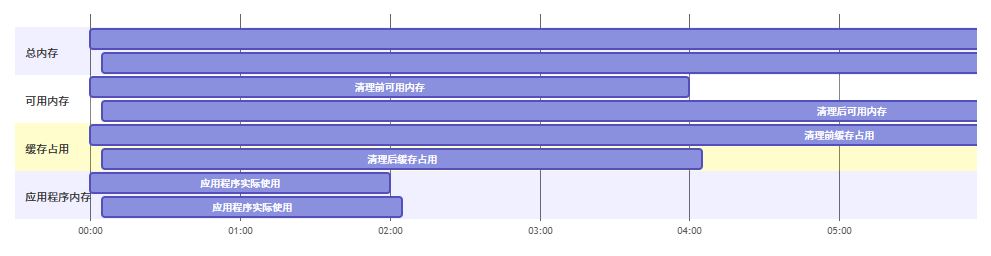
从上图可见,清理缓存后可用内存显著增加,而应用程序实际使用的内存量保持不变,说明清理的是"可回收"的缓存数据,不会影响正在运行的服务。
清理缓存的利弊权衡
✅ 优点:
- 释放内存:立即获得更多可用ram
- 性能基准:获得干净的测试环境
- 解决异常:某些情况下能解决内存泄漏假象
- 磁盘空间:清理相关临时文件释放存储
❌ 缺点:
- 性能下降:首次访问文件需要重新加载到缓存
- i/o压力:短期内磁盘读取增加
- 风险操作:不当使用可能导致系统不稳定
- 治标不治本:不能解决真正的内存泄漏问题
数据参考:根据linux performance的研究,适度缓存可提升文件访问速度达300%以上。
构建自动化监控与清理系统
我们可以扩展前面的java工具,加入定时监控和智能清理功能:
import java.time.localtime;
import java.util.timer;
import java.util.timertask;
import java.util.concurrent.executors;
import java.util.concurrent.scheduledexecutorservice;
import java.util.concurrent.timeunit;

/**
 * 自动化缓存监控与清理服务
 */
public class autocachecleanerservice {

    private scheduledexecutorservice scheduler;
    private final linuxcachecleaner cleaner;
    private final long memorythresholdmb; // 触发清理的内存阈值(mb)
    private final int checkintervalminutes; // 检查间隔(分钟)

    public autocachecleanerservice(long memorythresholdmb, int checkintervalminutes) {
        this.cleaner = new linuxcachecleaner();
        this.memorythresholdmb = memorythresholdmb;
        this.checkintervalminutes = checkintervalminutes;
        this.scheduler = executors.newscheduledthreadpool(1);
    }

    /**
     * 启动监控服务
     */
    public void start() {
        system.out.println("🔄 启动自动化缓存监控服务...");
        system.out.println("内存阈值: " + memorythresholdmb + " mb");
        system.out.println("检查间隔: " + checkintervalminutes + " 分钟");

        scheduler.scheduleatfixedrate(
            this::checkandclean,
            0,
            checkintervalminutes,
            timeunit.minutes
        );
    }

    /**
     * 停止监控服务
     */
    public void stop() {
        if (scheduler != null) {
            scheduler.shutdown();
            system.out.println("⏹️  自动化缓存监控服务已停止");
        }
    }

    /**
     * 检查内存使用情况并决定是否清理
     */
    private void checkandclean() {
        try {
            linuxcachecleaner.memoryinfo info = cleaner.getmemoryinfo();
            long usedmemorymb = (info.total - info.free) / 1024; // 转换为mb

            system.out.println("[" + localtime.now() + "] 当前内存使用: " + usedmemorymb + " mb");

            // 判断是否达到清理阈值
            if (usedmemorymb > memorythresholdmb) {
                system.out.println("⚠️  内存使用超过阈值,准备清理...");

                // 检查是否在业务高峰期(9:00-18:00避免清理)
                localtime now = localtime.now();
                if (now.isafter(localtime.of(9, 0)) && now.isbefore(localtime.of(18, 0))) {
                    system.out.println("🕒 当前为业务高峰期,推迟清理");
                    return;
                }

                // 执行清理
                if (cleaner.cleansystemcache()) {
                    system.out.println("✅ 缓存清理成功");

                    // 重新获取内存信息
                    linuxcachecleaner.memoryinfo after = cleaner.getmemoryinfo();
                    long freedmb = (usedmemorymb - (after.total - after.free) / 1024);
                    system.out.println("📈 释放内存: " + freedmb + " mb");
                }
            }
        } catch (exception e) {
            system.err.println("监控检查出错: " + e.getmessage());
        }
    }

    /**
     * 示例:启动监控服务
     */
    public static void main(string[] args) {
        // 设置当内存使用超过8gb时触发清理,每30分钟检查一次
        autocachecleanerservice service = new autocachecleanerservice(8192, 30);

        // 注册关闭钩子
        runtime.getruntime().addshutdownhook(new thread(service::stop));

        // 启动服务
        service.start();

        // 保持主线程运行
        try {
            thread.currentthread().join();
        } catch (interruptedexception e) {
            system.out.println("服务被中断");
        }
    }
}
高级技巧:基于使用模式的智能清理
我们可以进一步优化,根据文件访问频率决定哪些缓存值得保留:
import java.io.ioexception;
import java.nio.file.*;
import java.time.instant;
import java.time.temporal.chronounit;
import java.util.*;
import java.util.stream.collectors;

/**
 * 智能缓存清理器 - 基于文件访问模式
 */
public class smartcachecleaner extends linuxcachecleaner {

    /**
     * 分析指定目录下的文件访问模式
     */
    public map<string, fileaccessstats> analyzefileaccesspatterns(string directorypath, int daysback) {
        map<string, fileaccessstats> stats = new hashmap<>();

        try {
            instant cutoff = instant.now().minus(daysback, chronounit.days);

            files.walk(paths.get(directorypath))
                .filter(files::isregularfile)
                .foreach(path -> {
                    try {
                        basicfileattributes attrs = files.readattributes(path, basicfileattributes.class);

                        // 过滤太旧的文件
                        if (attrs.creationtime().toinstant().isbefore(cutoff)) {
                            return;
                        }

                        fileaccessstats stat = new fileaccessstats(
                            path.tostring(),
                            attrs.size(),
                            attrs.lastmodifiedtime().toinstant(),
                            attrs.lastaccesstime().toinstant()
                        );

                        stats.put(path.tostring(), stat);

                    } catch (ioexception e) {
                        logger.warning("无法读取文件属性: " + path + " - " + e.getmessage());
                    }
                });

        } catch (ioexception e) {
            logger.severe("遍历目录失败: " + e.getmessage());
        }

        return stats;
    }

    /**
     * 根据访问频率识别"冷数据"
     */
    public list<string> identifycolddata(map<string, fileaccessstats> stats, int coldthresholddays) {
        instant threshold = instant.now().minus(coldthresholddays, chronounit.days);

        return stats.values().stream()
            .filter(stat -> stat.lastaccesstime.isbefore(threshold))
            .sorted((a, b) -> long.compare(a.size, b.size)) // 按大小排序
            .map(stat -> stat.filepath)
            .collect(collectors.tolist());
    }

    /**
     * 清理冷数据文件(移动到备份目录而非删除)
     */
    public boolean archivecolddata(list<string> coldfiles, string archivedir) {
        if (!files.exists(paths.get(archivedir))) {
            try {
                files.createdirectories(paths.get(archivedir));
            } catch (ioexception e) {
                logger.severe("无法创建归档目录: " + e.getmessage());
                return false;
            }
        }

        boolean success = true;

        for (string filepath : coldfiles) {
            try {
                path source = paths.get(filepath);
                path target = paths.get(archivedir, source.getfilename().tostring());

                // 移动文件
                files.move(source, target, standardcopyoption.replace_existing);
                logger.info("归档冷数据: " + filepath + " -> " + target);

            } catch (ioexception e) {
                logger.warning("归档失败: " + filepath + " - " + e.getmessage());
                success = false;
            }
        }

        return success;
    }

    /**
     * 文件访问统计信息
     */
    public static class fileaccessstats {
        public final string filepath;
        public final long size; // 字节
        public final instant lastmodifiedtime;
        public final instant lastaccesstime;

        public fileaccessstats(string filepath, long size, instant lastmodifiedtime, instant lastaccesstime) {
            this.filepath = filepath;
            this.size = size;
            this.lastmodifiedtime = lastmodifiedtime;
            this.lastaccesstime = lastaccesstime;
        }

        public double getsizemb() {
            return size / 1024.0 / 1024.0;
        }

        public long getdayssincelastaccess() {
            return chronounit.days.between(lastaccesstime, instant.now());
        }

        @override
        public string tostring() {
            return string.format(
                "%s | %.2fmb | 最后访问: %d天前",
                filepath,
                getsizemb(),
                getdayssincelastaccess()
            );
        }
    }

    /**
     * 演示智能清理流程
     */
    public static void demosmartcleaning() {
        smartcachecleaner cleaner = new smartcachecleaner();

        system.out.println("🧠 开始智能缓存分析...");

        // 分析/var/log目录下30天内的文件
        map<string, fileaccessstats> stats = cleaner.analyzefileaccesspatterns("/var/log", 30);

        system.out.println("📊 发现 " + stats.size() + " 个文件");

        // 识别超过7天未访问的"冷数据"
        list<string> coldfiles = cleaner.identifycolddata(stats, 7);

        system.out.println("❄️  发现 " + coldfiles.size() + " 个冷数据文件");

        // 显示最大的5个冷文件
        stats.values().stream()
            .filter(stat -> stat.getdayssincelastaccess() > 7)
            .sorted((a, b) -> long.compare(b.size, a.size))
            .limit(5)
            .foreach(system.out::println);

        // 归档冷数据(需要root权限)
        if (!coldfiles.isempty()) {
            system.out.println("📦 开始归档冷数据...");
            boolean result = cleaner.archivecolddata(coldfiles, "/var/log/archive");
            system.out.println(result ? "✅ 归档完成" : "❌ 归档失败");
        }
    }
}
容器环境中的缓存管理
在docker和kubernetes环境中,缓存管理有其特殊性:
docker容器缓存清理
/**
 * docker环境缓存清理工具
 */
public class dockercachecleaner {

    /**
     * 清理docker构建缓存
     */
    public static boolean cleandockerbuildcache() {
        try {
            system.out.println("🧹 清理docker构建缓存...");

            // 清理未使用的构建缓存
            linuxcachecleaner.executecommand("docker builder prune -a -f");

            // 清理未使用的镜像
            linuxcachecleaner.executecommand("docker image prune -a -f");

            // 清理未使用的容器
            linuxcachecleaner.executecommand("docker container prune -f");

            // 清理未使用的卷
            linuxcachecleaner.executecommand("docker volume prune -f");

            // 清理未使用的网络
            linuxcachecleaner.executecommand("docker network prune -f");

            system.out.println("✅ docker缓存清理完成");
            return true;
        } catch (exception e) {
            system.err.println("docker清理失败: " + e.getmessage());
            return false;
        }
    }

    /**
     * 获取docker磁盘使用情况
     */
    public static string getdockerdiskusage() {
        try {
            list<string> output = linuxcachecleaner.executecommand("docker system df");
            return string.join("\n", output);
        } catch (exception e) {
            return "无法获取docker磁盘使用情况: " + e.getmessage();
        }
    }
}
性能监控与报警集成
将缓存清理与监控系统集成,实现智能化运维:
import java.util.properties;
import javax.mail.*;
import javax.mail.internet.*;

/**
 * 缓存清理报警通知系统
 */
public class cachealertsystem {

    private final properties mailproperties;
    private final string fromemail;
    private final string password;

    public cachealertsystem(string smtphost, int smtpport, string fromemail, string password) {
        this.mailproperties = new properties();
        this.fromemail = fromemail;
        this.password = password;

        mailproperties.put("mail.smtp.host", smtphost);
        mailproperties.put("mail.smtp.port", smtpport);
        mailproperties.put("mail.smtp.auth", "true");
        mailproperties.put("mail.smtp.starttls.enable", "true");
    }

    /**
     * 发送报警邮件
     */
    public boolean sendalertemail(string toemail, string subject, string body) {
        try {
            session session = session.getinstance(mailproperties, new authenticator() {
                @override
                protected passwordauthentication getpasswordauthentication() {
                    return new passwordauthentication(fromemail, password);
                }
            });

            message message = new mimemessage(session);
            message.setfrom(new internetaddress(fromemail));
            message.setrecipients(message.recipienttype.to, internetaddress.parse(toemail));
            message.setsubject(subject);
            message.settext(body);

            transport.send(message);
            system.out.println("📧 报警邮件发送成功");
            return true;
        } catch (messagingexception e) {
            system.err.println("邮件发送失败: " + e.getmessage());
            return false;
        }
    }

    /**
     * 内存监控与报警
     */
    public void monitormemorywithalert(string alertemail, long thresholdmb) {
        system.out.println("🔔 启动内存监控报警系统...");

        timer timer = new timer();
        timer.scheduleatfixedrate(new timertask() {
            @override
            public void run() {
                try {
                    linuxcachecleaner.memoryinfo info = new linuxcachecleaner().getmemoryinfo();
                    long usedmb = (info.total - info.free) / 1024;

                    system.out.println("[" + java.time.localtime.now() + "] 内存使用: " + usedmb + " mb");

                    if (usedmb > thresholdmb) {
                        string subject = "🚨 系统内存警告 - " + java.time.localdatetime.now();
                        string body = string.format(
                            "服务器内存使用超过阈值!\n\n" +
                            "当前使用: %d mb\n" +
                            "阈值: %d mb\n" +
                            "总内存: %.2f gb\n" +
                            "缓存占用: %.2f gb\n\n" +
                            "建议执行缓存清理或扩容。",
                            usedmb,
                            thresholdmb,
                            info.gettotalgb(),
                            info.getcachedgb()
                        );

                        sendalertemail(alertemail, subject, body);
                    }
                } catch (exception e) {
                    system.err.println("监控检查出错: " + e.getmessage());
                }
            }
        }, 0, 5 * 60 * 1000); // 每5分钟检查一次
    }
}
安全考虑与最佳实践
在实施缓存清理策略时,必须考虑安全性:
1. 权限最小化原则
/**
 * 安全的缓存清理执行器
 */
public class securecachecleaner {

    /**
     * 使用sudo执行特定命令(需要配置sudoers)
     */
    public static boolean executewithsudo(string command, string sudopassword) {
        try {
            // 创建processbuilder
            processbuilder pb = new processbuilder("/bin/bash", "-c",
                "echo '" + sudopassword + "' | sudo -s " + command);

            pb.redirecterrorstream(true);

            process process = pb.start();
            bufferedreader reader = new bufferedreader(new inputstreamreader(process.getinputstream()));

            string line;
            while ((line = reader.readline()) != null) {
                system.out.println(line);
            }

            int exitcode = process.waitfor();
            return exitcode == 0;

        } catch (exception e) {
            system.err.println("安全执行失败: " + e.getmessage());
            return false;
        }
    }

    /**
     * 验证要清理的路径是否安全
     */
    public static boolean issafepath(string path) {
        // 禁止清理系统关键目录
        string[] dangerouspaths = {
            "/", "/bin", "/sbin", "/usr", "/etc", "/lib", "/lib64",
            "/proc", "/sys", "/dev", "/boot", "/root"
        };

        for (string dangerous : dangerouspaths) {
            if (path.equals(dangerous) || path.startswith(dangerous + "/")) {
                return false;
            }
        }

        // 必须是绝对路径
        if (!path.startswith("/")) {
            return false;
        }

        // 不能包含..或符号链接攻击
        try {
            path normalized = paths.get(path).normalize();
            if (!normalized.tostring().equals(path)) {
                return false;
            }
        } catch (exception e) {
            return false;
        }

        return true;
    }
}
未来展望:ai驱动的智能缓存管理
随着人工智能技术的发展,未来的缓存管理系统将更加智能化:
/**
 * ai预测式缓存管理器(概念演示)
 */
public class aicachemanager {

    /**
     * 基于历史数据预测最佳清理时机
     */
    public static class cachepredictionmodel {

        private final list<memorysnapshot> history;
        private final int predictionwindowhours;

        public cachepredictionmodel(int predictionwindowhours) {
            this.history = new arraylist<>();
            this.predictionwindowhours = predictionwindowhours;
        }

        /**
         * 添加内存快照
         */
        public void addsnapshot(linuxcachecleaner.memoryinfo info) {
            history.add(new memorysnapshot(
                system.currenttimemillis(),
                (info.total - info.free) / 1024, // 使用内存mb
                info.cached / 1024,              // 缓存mb
                info.buffers / 1024              // 缓冲mb
            ));

            // 保留最近30天的数据
            long cutoff = system.currenttimemillis() - 30l * 24 * 60 * 60 * 1000;
            history.removeif(snapshot -> snapshot.timestamp < cutoff);
        }

        /**
         * 预测未来内存压力
         */
        public double predictmemorypressure() {
            if (history.size() < 24) { // 至少需要24个样本
                return 0.5; // 默认中等压力
            }

            // 简单的线性回归预测(实际应用中应使用机器学习模型)
            double avggrowthrate = calculateaveragegrowthrate();
            double currentusage = history.get(history.size() - 1).usedmemorymb;

            // 预测predictionwindowhours小时后的内存使用
            double predictedusage = currentusage * (1 + avggrowthrate * predictionwindowhours);

            // 返回压力系数(0-1)
            linuxcachecleaner.memoryinfo currentinfo = new linuxcachecleaner().getmemoryinfo();
            double totalmemorymb = currentinfo.total / 1024;

            return math.min(predictedusage / totalmemorymb, 1.0);
        }

        private double calculateaveragegrowthrate() {
            if (history.size() < 2) return 0;

            double totalgrowth = 0;
            int count = 0;

            for (int i = 1; i < history.size(); i++) {
                double growth = history.get(i).usedmemorymb - history.get(i-1).usedmemorymb;
                double timediffhours = (history.get(i).timestamp - history.get(i-1).timestamp) / (3600.0 * 1000);

                if (timediffhours > 0) {
                    totalgrowth += growth / timediffhours;
                    count++;
                }
            }

            return count > 0 ? totalgrowth / count : 0;
        }
    }

    /**
     * 内存快照数据类
     */
    private static class memorysnapshot {
        final long timestamp;
        final double usedmemorymb;
        final double cachedmemorymb;
        final double buffermemorymb;

        memorysnapshot(long timestamp, double usedmemorymb, double cachedmemorymb, double buffermemorymb) {
            this.timestamp = timestamp;
            this.usedmemorymb = usedmemorymb;
            this.cachedmemorymb = cachedmemorymb;
            this.buffermemorymb = buffermemorymb;
        }
    }

    /**
     * 演示ai预测式缓存管理
     */
    public static void demoaicachemanagement() {
        cachepredictionmodel model = new cachepredictionmodel(4); // 预测4小时后的情况

        // 模拟收集历史数据
        for (int i = 0; i < 48; i++) { // 48小时数据
            linuxcachecleaner.memoryinfo info = new linuxcachecleaner().getmemoryinfo();
            model.addsnapshot(info);

            try {
                thread.sleep(1000); // 实际应用中应该是定时采集
            } catch (interruptedexception e) {
                break;
            }
        }

        // 预测内存压力
        double pressure = model.predictmemorypressure();
        system.out.println("🔮 预测内存压力系数: " + string.format("%.2f", pressure));

        // 根据预测结果决定是否清理
        if (pressure > 0.8) {
            system.out.println("⚠️  预测高内存压力,建议提前清理缓存");
            new linuxcachecleaner().cleansystemcache();
        } else if (pressure > 0.6) {
            system.out.println("ℹ️  预测中等内存压力,建议监控");
        } else {
            system.out.println("✅ 预测低内存压力,无需操作");
        }
    }
}
总结与建议
linux系统缓存清理是一把双刃剑,合理使用可以提升系统性能,滥用则可能导致性能下降。以下是几点核心建议:
- 理解原理:先弄清楚linux缓存机制,不要盲目清理
- 监控先行:建立完善的监控体系,基于数据做决策
- 谨慎操作:生产环境务必在维护窗口操作,先备份
- 自动化:使用脚本或java程序实现规范化、可追溯的操作
- 智能管理:结合ai预测,实现预防性维护而非应急处理
记住:最好的缓存管理策略是让系统自己管理,只有在必要时才进行人工干预。正如linux之父linus torvalds所说:“performance is not about making things faster, it’s about making things less slow.”
附录:完整工具包使用示例
最后,让我们整合所有功能,创建一个完整的系统维护工具:
/**
 * 完整的linux系统维护工具包
 */
public class linuxmaintenancetoolkit {

    public static void main(string[] args) {
        system.out.println("🛠️  linux系统维护工具包 v2.0");
        system.out.println("================================");

        if (!linuxcachecleaner.islinuxsystem()) {
            system.err.println("❌ 此工具仅支持linux系统");
            return;
        }

        showmenu();
    }

    private static void showmenu() {
        scanner scanner = new scanner(system.in);

        while (true) {
            system.out.println("\n📋 主菜单:");
            system.out.println("1. 系统状态检查");
            system.out.println("2. 缓存清理");
            system.out.println("3. 磁盘清理");
            system.out.println("4. docker清理");
            system.out.println("5. 自动化监控");
            system.out.println("6. 智能分析");
            system.out.println("0. 退出");
            system.out.print("请选择功能: ");

            string choice = scanner.nextline().trim();

            switch (choice) {
                case "1":
                    showsystemstatus();
                    break;
                case "2":
                    performcachecleanup();
                    break;
                case "3":
                    performdiskcleanup();
                    break;
                case "4":
                    performdockercleanup();
                    break;
                case "5":
                    startautomonitoring();
                    break;
                case "6":
                    performsmartanalysis();
                    break;
                case "0":
                    system.out.println("👋 感谢使用,再见!");
                    scanner.close();
                    return;
                default:
                    system.out.println("❌ 无效选项,请重新选择");
            }
        }
    }

    private static void showsystemstatus() {
        system.out.println("\n📊 系统状态报告:");

        // 内存信息
        linuxcachecleaner.memoryinfo meminfo = new linuxcachecleaner().getmemoryinfo();
        system.out.println("内存状态: " + meminfo);

        // cpu信息
        try {
            list<string> cpuinfo = linuxcachecleaner.executecommand("lscpu | grep -e '(model name|cpu\\(s\\)|thread\\(s\\) per core)'");
            system.out.println("cpu信息:");
            cpuinfo.foreach(system.out::println);
        } catch (exception e) {
            system.out.println("无法获取cpu信息: " + e.getmessage());
        }

        // 磁盘使用
        try {
            system.out.println("\n磁盘使用情况:");
            list<string> diskinfo = linuxcachecleaner.executecommand("df -h");
            diskinfo.foreach(system.out::println);
        } catch (exception e) {
            system.out.println("无法获取磁盘信息: " + e.getmessage());
        }
    }

    private static void performcachecleanup() {
        system.out.println("\n🧽 缓存清理选项:");
        system.out.println("1. 清理系统缓存");
        system.out.println("2. 清理apt缓存");
        system.out.println("3. 清理yum/dnf缓存");
        system.out.println("4. 全部清理");
        system.out.print("请选择: ");

        scanner scanner = new scanner(system.in);
        string choice = scanner.nextline().trim();

        linuxcachecleaner cleaner = new linuxcachecleaner();

        switch (choice) {
            case "1":
                cleaner.cleansystemcache();
                break;
            case "2":
                cleaner.cleanaptcache();
                break;
            case "3":
                try {
                    linuxcachecleaner.executecommand("yum clean all || dnf clean all");
                    system.out.println("✅ yum/dnf缓存清理完成");
                } catch (exception e) {
                    system.out.println("❌ 清理失败: " + e.getmessage());
                }
                break;
            case "4":
                cleaner.comprehensiveclean();
                break;
            default:
                system.out.println("无效选项");
        }
    }

    private static void performdiskcleanup() {
        system.out.println("\n🗑️  磁盘清理选项:");
        system.out.println("1. 清理临时文件(7天以上)");
        system.out.println("2. 清理日志文件(30天以上)");
        system.out.println("3. 清理缩略图缓存");
        system.out.print("请选择: ");

        scanner scanner = new scanner(system.in);
        string choice = scanner.nextline().trim();

        try {
            switch (choice) {
                case "1":
                    new linuxcachecleaner().cleantempfiles(7);
                    break;
                case "2":
                    linuxcachecleaner.executecommand(
                        "find /var/log -name \"*.log\" -mtime +30 -exec truncate -s 0 {} \\;"
                    );
                    system.out.println("✅ 日志文件清理完成");
                    break;
                case "3":
                    linuxcachecleaner.executecommand("rm -rf ~/.cache/thumbnails/* 2>/dev/null || true");
                    system.out.println("✅ 缩略图缓存清理完成");
                    break;
                default:
                    system.out.println("无效选项");
            }
        } catch (exception e) {
            system.out.println("清理失败: " + e.getmessage());
        }
    }

    private static void performdockercleanup() {
        system.out.println("\n🐳 docker清理选项:");
        system.out.println("1. 查看docker磁盘使用");
        system.out.println("2. 清理所有未使用资源");
        system.out.println("3. 仅清理构建缓存");
        system.out.print("请选择: ");

        scanner scanner = new scanner(system.in);
        string choice = scanner.nextline().trim();

        try {
            switch (choice) {
                case "1":
                    system.out.println(dockercachecleaner.getdockerdiskusage());
                    break;
                case "2":
                    dockercachecleaner.cleandockerbuildcache();
                    break;
                case "3":
                    linuxcachecleaner.executecommand("docker builder prune -a -f");
                    system.out.println("✅ docker构建缓存清理完成");
                    break;
                default:
                    system.out.println("无效选项");
            }
        } catch (exception e) {
            system.out.println("docker操作失败: " + e.getmessage());
        }
    }

    private static void startautomonitoring() {
        system.out.print("请输入内存阈值(mb,默认8192): ");
        scanner scanner = new scanner(system.in);
        string input = scanner.nextline().trim();
        long threshold = input.isempty() ? 8192 : long.parselong(input);

        system.out.print("请输入检查间隔(分钟,默认30): ");
        input = scanner.nextline().trim();
        int interval = input.isempty() ? 30 : integer.parseint(input);

        autocachecleanerservice service = new autocachecleanerservice(threshold, interval);
        service.start();

        system.out.println("ℹ️  监控服务已启动,按enter键返回主菜单...");
        scanner.nextline();
    }

    private static void performsmartanalysis() {
        system.out.println("\n🤖 智能分析选项:");
        system.out.println("1. 分析日志文件访问模式");
        system.out.println("2. 预测内存压力");
        system.out.println("3. 识别大文件");
        system.out.print("请选择: ");

        scanner scanner = new scanner(system.in);
        string choice = scanner.nextline().trim();

        try {
            switch (choice) {
                case "1":
                    smartcachecleaner.demosmartcleaning();
                    break;
                case "2":
                    aicachemanager.demoaicachemanagement();
                    break;
                case "3":
                    system.out.print("请输入目录路径(默认/var/log): ");
                    string dir = scanner.nextline().trim();
                    if (dir.isempty()) dir = "/var/log";

                    system.out.print("请输入最小文件大小(mb,默认100): ");
                    string sizeinput = scanner.nextline().trim();
                    long minsizemb = sizeinput.isempty() ? 100 : long.parselong(sizeinput);

                    list<string> output = linuxcachecleaner.executecommand(
                        "find " + dir + " -type f -size +" + minsizemb + "m -exec ls -lh {} \\;"
                    );

                    system.out.println("\n📁 发现的大文件:");
                    if (output.isempty()) {
                        system.out.println("未发现大于" + minsizemb + "mb的文件");
                    } else {
                        output.foreach(system.out::println);
                    }
                    break;
                default:
                    system.out.println("无效选项");
            }
        } catch (exception e) {
            system.out.println("分析失败: " + e.getmessage());
        }
    }
}
这个完整的工具包整合了本文介绍的所有功能,提供了一个交互式的系统维护界面,既适合新手学习使用,也能满足专业系统管理员的需求。
记住:系统维护不是一次性任务,而是持续的过程。通过合理使用这些工具和技术,你可以确保linux系统始终保持最佳性能状态!
以上就是linux清理系统缓存与无用文件的几种方式的详细内容,更多关于linux清理系统缓存与无用文件的资料请关注代码网其它相关文章!




发表评论