
 我要评论
我要评论在现代应用开发中,postgresql 作为一款功能强大、开源且高度可扩展的关系型数据库,被广泛应用于各种业务场景。然而,即使拥有优秀的索引设计,如果使用不当,依然会导致索引“失效”——即查询优化器无法有效利用已创建的索引,从而导致全表扫描(seq scan),严重影响系统性能。本文将深入探讨 避免 postgresql 索引失效的十大实用技巧,结合 java 代码示例、执行计划分析以及可视化图表,帮助开发者和 dba 构建高性能、高响应的应用系统。
什么是“索引失效”?
严格来说,postgresql 中的索引不会“物理失效”,而是指查询优化器在执行计划中 未选择使用索引,转而采用更慢的扫描方式(如顺序扫描)。这通常由查询写法、数据分布、统计信息或索引类型不匹配等原因引起。
技巧一:避免在索引列上使用函数或表达式
这是最常见的索引失效原因之一。当 where 子句中对索引列应用了函数(如 upper()、to_char())或表达式(如 col + 1),postgresql 无法直接使用 b-tree 索引进行匹配,除非你创建了 函数索引(functional index)。
❌ 错误示例
-- 假设 users 表有 email 列,并在 email 上建了普通索引
create index idx_users_email on users(email);

-- 查询时使用 upper 函数
select * from users where upper(email) = 'user@example.com';
此时,即使 email 有索引,优化器也无法使用它,因为索引存储的是原始值,而非 upper(email) 的结果。
✅ 正确做法:创建函数索引
-- 创建基于 upper(email) 的函数索引
create index idx_users_email_upper on users(upper(email));

-- 现在查询可以命中索引
select * from users where upper(email) = 'user@example.com';
java 示例(使用 spring data jpa)
// userrepository.java
public interface userrepository extends jparepository<user, long> {
    // 使用 @query 注解显式调用函数索引
    @query("select u from user u where upper(u.email) = upper(:email)")
    optional<user> findbyemailignorecase(@param("email") string email);
}
验证方法:使用 explain (analyze, buffers) 查看执行计划。若出现 index scan using idx_users_email_upper,说明索引生效。
explain (analyze, buffers)
select * from users where upper(email) = 'user@example.com';
可视化:普通索引 vs 函数索引
技巧二:谨慎使用like模糊查询,避免前导通配符
like 查询在处理用户搜索时非常常见,但其使用方式直接影响索引是否可用。
- ✅
like 'abc%':可以使用 b-tree 索引(前缀匹配) - ❌
like '%abc'或like '%abc%':无法使用 b-tree 索引,会触发全表扫描
示例分析
-- 在 product_name 上有索引
create index idx_products_name on products(product_name);

-- 能用索引
select * from products where product_name like 'iphone%';

-- 不能用索引
select * from products where product_name like '%phone';
解决方案
- 避免前导通配符:如果业务允许,引导用户输入前缀。
- 使用
pg_trgm扩展 + gin/gist 索引:支持任意位置的模糊匹配。
-- 启用 pg_trgm 扩展
create extension if not exists pg_trgm;

-- 创建 gin 索引(适合高并发读)
create index idx_products_name_trgm on products using gin (product_name gin_trgm_ops);

-- 现在以下查询也能走索引
select * from products where product_name like '%phone%';
java 示例(mybatis)
<!-- productmapper.xml -->
<select id="searchproducts" resulttype="product">
    select * from products
    where product_name like concat('%', #{keyword}, '%')
</select>
注意:pg_trgm 索引体积较大,且对写入性能有影响,建议仅在必要字段上使用。
性能对比图
渲染错误: mermaid 渲染失败: parsing failed: unexpected character: ->“<- at offset: 32, skipped 5 characters. unexpected character: ->(<- at offset: 38, skipped 7 characters. unexpected character: ->:<- at offset: 46, skipped 1 characters. unexpected character: ->“<- at offset: 55, skipped 5 characters. unexpected character: ->(<- at offset: 61, skipped 7 characters. unexpected character: ->:<- at offset: 69, skipped 1 characters. unexpected character: ->“<- at offset: 78, skipped 5 characters. unexpected character: ->(<- at offset: 84, skipped 8 characters. unexpected character: ->:<- at offset: 93, skipped 1 characters. expecting token of type 'eof' but found `45`. expecting token of type 'eof' but found `30`. expecting token of type 'eof' but found `25`.
技巧三:确保数据类型匹配,避免隐式类型转换
当查询条件中的常量与索引列的数据类型不一致时,postgresql 会尝试进行隐式类型转换,这可能导致索引失效。
典型场景
-- user_id 是 bigint 类型,有索引
create index idx_orders_user_id on orders(user_id);

-- 错误:传入字符串 '123'
select * from orders where user_id = '123';  -- 隐式转换为 text → bigint

-- 正确:传入数字 123
select * from orders where user_id = 123;
虽然 postgresql 通常能处理这种转换,但在某些情况下(尤其是涉及操作符重载或自定义类型时),优化器可能放弃使用索引。
java 示例(jdbc)
// ❌ 错误:使用字符串参数
string sql = "select * from orders where user_id = ?";
preparedstatement stmt = connection.preparestatement(sql);
stmt.setstring(1, "123"); // 传入字符串

// ✅ 正确:使用 long
stmt.setlong(1, 123l); // 传入 long
在 spring boot 中,使用 @param 时也应确保类型匹配:
@query("select o from order o where o.userid = :userid")
list<order> findbyuserid(@param("userid") long userid); // 不要用 string
诊断技巧:查看执行计划中是否有 cast 或 function scan 节点,这可能是隐式转换的信号。
技巧四:合理使用复合索引(composite index)及其最左前缀原则 📏
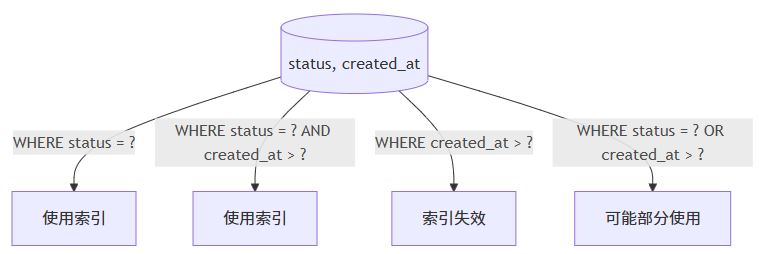
复合索引是提升多条件查询性能的利器,但必须遵循 最左前缀原则(leftmost prefix rule)。
最左前缀原则说明
对于索引 (col1, col2, col3),以下查询可以使用索引:
where col1 = ?where col1 = ? and col2 = ?where col1 = ? and col2 = ? and col3 = ?
但以下查询 无法使用该索引:
where col2 = ?where col3 = ?where col2 = ? and col3 = ?
示例
-- 创建复合索引
create index idx_orders_status_date on orders(status, created_at);

-- ✅ 可用索引
select * from orders where status = 'shipped';

-- ✅ 可用索引
select * from orders where status = 'shipped' and created_at > '2023-01-01';

-- ❌ 无法使用索引
select * from orders where created_at > '2023-01-01';
java 示例(动态查询)
// 使用 spring data jpa 的 specification
public class orderspecs {
    public static specification<order> bystatusanddate(string status, localdate date) {
        return (root, query, cb) -> {
            list<predicate> predicates = new arraylist<>();
            if (status != null) {
                predicates.add(cb.equal(root.get("status"), status));
            }
            if (date != null) {
                predicates.add(cb.greaterthan(root.get("createdat"), date.atstartofday()));
            }
            // 注意:只有 status 有值时,索引才可能被使用
            return cb.and(predicates.toarray(new predicate[0]));
        };
    }
}
索引使用路径图
建议:将选择性高(区分度大)的列放在复合索引左侧。
技巧五:避免在索引列上使用not、!=或<>操作符
这些操作符通常导致索引失效,因为它们需要排除大量行,优化器可能认为全表扫描更高效。
示例
-- 有索引
create index idx_users_status on users(status);

-- ❌ 可能不走索引
select * from users where status != 'inactive';

-- ✅ 改写为 in 或具体值
select * from users where status in ('active', 'pending');
何时可能走索引?
如果 != 的值占比极小(如 99% 的用户都是 ‘active’,只查 != 'active'),优化器可能使用索引,但这不可靠。
java 示例(业务逻辑优化)
// ❌ 不推荐
list<user> users = userrepository.findbystatusnot("inactive");

// ✅ 推荐:明确列出有效状态
list<string> activestatuses = arrays.aslist("active", "pending", "verified");
list<user> users = userrepository.findbystatusin(activestatuses);
经验法则:如果 != 条件返回超过 10% 的行,优化器几乎总是选择 seq scan。
技巧六:谨慎使用or条件,考虑改写为union
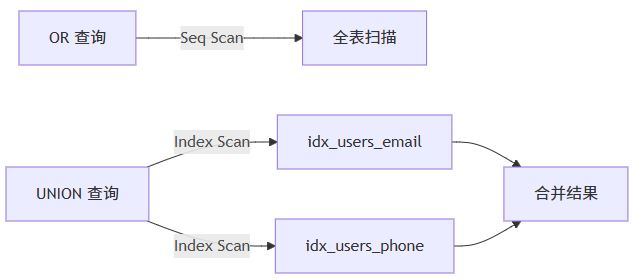
or 条件在多个索引列上使用时,可能导致索引合并失败,从而退化为全表扫描。
问题示例
create index idx_users_email on users(email);
create index idx_users_phone on users(phone);

-- ❌ 可能不走索引
select * from users where email = 'a@example.com' or phone = '1234567890';
解决方案:使用union
-- ✅ 每个子查询都能走索引
select * from users where email = 'a@example.com'
union
select * from users where phone = '1234567890';
注意:union 会去重,若不需要去重,使用 union all 更高效。
java 示例(mybatis 动态 sql)
<select id="findbyemailorphone" resulttype="user">
    select * from (
        select * from users where email = #{email}
        union all
        select * from users where phone = #{phone}
    ) as combined
</select>
执行计划对比
技巧七:保持统计信息更新,避免因陈旧统计导致错误计划
postgresql 的查询优化器依赖 表的统计信息(通过 analyze 收集)来估算行数和选择执行计划。如果统计信息过期,即使有索引,优化器也可能错误地选择 seq scan。
触发场景
- 大量数据导入/删除后
- 表结构变更后
- 自动
autovacuum未及时运行
手动更新统计
-- 更新单表统计
analyze users;

-- 更新整个数据库
analyze;
检查统计信息
-- 查看表的行数估计是否准确
select relname, reltuples from pg_class where relname = 'users';

-- 查看列的最常见值(mcv)
select attname, most_common_vals from pg_stats
where tablename = 'users' and attname = 'status';
java 应用中的维护策略
在数据批量导入后,可调用存储过程或执行 sql 更新统计:
@transactional
public void bulkimportusers(list<user> users) {
    userrepository.saveall(users);

    // 手动触发 analyze(谨慎使用,生产环境建议由 dba 控制)
    jdbctemplate.execute("analyze users");
}
注意:频繁手动 analyze 可能影响性能,建议依赖 autovacuum,并合理配置其参数。
技巧八:避免在where中对索引列进行算术运算
与函数类似,在索引列上进行加减乘除等运算也会导致索引失效。
示例
-- 有索引
create index idx_orders_amount on orders(amount);

-- ❌ 无法使用索引
select * from orders where amount * 1.1 > 100;

-- ✅ 改写为
select * from orders where amount > 100 / 1.1;
java 示例(参数预处理)
// controller 层预计算
double threshold = 100.0 / 1.1;
list<order> orders = orderrepository.findbyamountgreaterthan(threshold);
原则:将计算移到应用层,让 where 条件保持为 column op constant 形式。
技巧九:理解 null 值对索引的影响,必要时使用部分索引
postgresql 的 b-tree 索引 默认包含 null 值,但某些查询(如 is null)可能无法高效使用索引,除非创建 部分索引(partial index)。
场景:经常查询非空 email
-- 普通索引包含 null,体积大
create index idx_users_email on users(email);

-- 更优:只索引非空 email
create index idx_users_email_not_null on users(email) where email is not null;

-- 查询非空 email 时效率更高
select * from users where email = 'user@example.com';
场景:查询特定状态的订单
-- 只索引未完成的订单
create index idx_orders_pending on orders(order_id) where status in ('pending', 'processing');

-- 查询时自动使用
select * from orders where status = 'pending';
java 示例(repository 定义)
public interface orderrepository extends jparepository<order, long> {
    // spring data jpa 会自动使用部分索引(如果存在)
    list<order> findbystatus(string status);
}
优势:部分索引更小、更快,且减少写入开销。
技巧十:使用explain分析执行计划,持续监控索引使用情况
最后也是最重要的技巧:不要猜测,要验证。使用 explain 是诊断索引是否生效的黄金标准。
基本用法
explain select * from users where email = 'user@example.com';

-- 更详细
explain (analyze, buffers, format json)
select * from users where email = 'user@example.com';
关键指标
- node type:是否为
index scan或index only scan - actual rows:实际返回行数 vs 估算行数
- buffers:是否命中 shared_buffers
java 集成(开发环境)
可在测试中打印执行计划:
@test
void testindexusage() {
    string explainsql = "explain (analyze, buffers) " +
        "select * from users where email = 'test@example.com'";
    list<string> plan = jdbctemplate.queryforlist(explainsql, string.class);
    plan.foreach(system.out::println);
}
监控未使用索引
定期检查哪些索引从未被使用:
select
    schemaname,
    tablename,
    indexname,
    idx_scan
from pg_stat_user_indexes
where idx_scan = 0
order by tablename, indexname;
建议:删除长期未使用的索引,减少写入开销。
结语:构建索引感知的应用系统
避免索引失效不是一次性任务,而是贯穿应用开发、测试、上线和运维的持续过程。通过掌握以上十大技巧,结合 explain 工具和良好的编码习惯,你可以显著提升 postgresql 查询性能,降低系统延迟,提升用户体验。
记住:索引是工具,不是魔法。只有理解其工作原理,才能真正发挥其威力。
以上就是postgresql避免索引失效的十大实用技巧的详细内容,更多关于postgresql避免索引失效技巧的资料请关注代码网其它相关文章!




发表评论