
 我要评论
我要评论在做文档智能、内容审核、数据清洗的时候,经常需要快速判断一张图片里有没有文字。
如果图片数量成百上千甚至上万,手动看显然不现实;用 paddleocr / easyocr 虽然准确,但对 gpu/cpu 消耗大、速度慢、部署麻烦,尤其在离线批量处理场景下很不友好。
今天分享一个纯 opencv + 简单图像特征分析的方案:
- 支持递归扫描整个目录及其所有子目录的所有图片
- 不依赖任何深度学习 ocr 库(零额外安装)
- 生成美观的 html 交互式报告(带缩略图、相对路径、置信度着色)
- 假阳性大幅降低(对 ui 图标、风景照、纯色图误判率显著下降)
实测在几千张混合图片上,速度比 ocr 快 5~20 倍(视图片大小而定)。初步过滤无用的图片
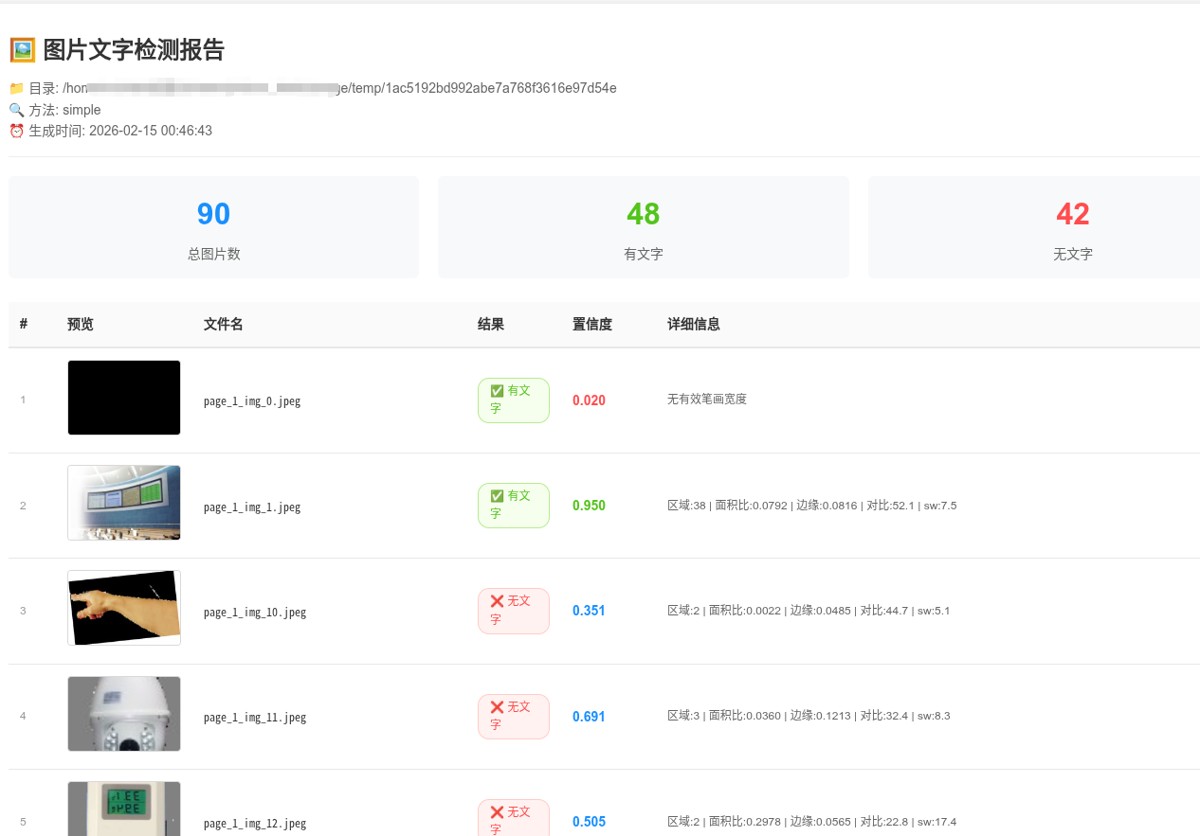
一、核心思路
不识别具体文字内容,只判断“有没有文字的视觉特征”:
- 自适应二值化 → 提取潜在文字区域
- 连通组件分析 → 筛选形状、面积、填充率像“文字笔画”的小块
- 估算平均笔画宽度 → 过滤掉大图标、实心 logo
- 综合边缘密度、区域数量、面积占比、局部对比度 → 计算置信度
- 阈值严格把控 → 显著降低把“树叶/草地/电路板/花纹”判成有文字的假阳性
二、功能亮点
- 递归目录扫描(rglob)
- 支持常见图片格式(jpg/jpeg/png/bmp/tiff/webp)
- html 报告:缩略图预览 + 鼠标悬停放大 + 相对路径显示 + 状态颜色区分
- 双模式:
simple(快速无依赖) /ocr(paddleocr 准确模式) - 进度打印 + 最终统计汇总
三、完整代码
#!/usr/bin/env python3
"""
图片文字检测 demo - 生成 html 报告(支持递归子目录)
检查目录及其所有子目录中的图片是否包含文字,结果以表格形式展示

用法:
    python check_image_has_text.py [图片目录] [方法]

示例:
    python check_image_has_text.py /path/to/images simple    # 简单方法(快速)
"""

import sys
import cv2
import numpy as np
from pathlib import path
import base64
from datetime import datetime


def image_to_base64(image_path: path) -> str:
    """将图片转为 base64,用于 html 显示"""
    try:
        with open(image_path, "rb") as f:
            return base64.b64encode(f.read()).decode()
    except:
        return ""


def check_text_by_simple_analysis(image_path: path) -> dict:
    """改进版 - 更严格的文字检测(尽量降低假阳性)"""
    try:
        img = cv2.imread(str(image_path))
        if img is none:
            return {"has_text": false, "confidence": 0, "detail": "无法读取图片"}

        # ── 预处理 ────────────────────────────────────────
        if img.shape[0] * img.shape[1] > 4000 * 4000:  # 太大就缩小加快速度
            scale = 2000 / max(img.shape[:2])
            img = cv2.resize(img, none, fx=scale, fy=scale)

        gray = cv2.cvtcolor(img, cv2.color_bgr2gray)

        # 尝试局部自适应二值化(对光照不均更鲁棒)
        binary = cv2.adaptivethreshold(
            gray, 255, cv2.adaptive_thresh_gaussian_c,
            cv2.thresh_binary_inv, 51, 9
        )

        # 轻度去噪
        kernel = cv2.getstructuringelement(cv2.morph_ellipse, (3,3))
        binary = cv2.morphologyex(binary, cv2.morph_open, kernel, iterations=1)

        # ── 连通区域分析 ─────────────────────────────────
        num_labels, labels, stats, _ = cv2.connectedcomponentswithstats(
            binary, connectivity=8
        )

        text_like_count = 0
        total_text_area = 0
        stroke_widths = []

        h, w = gray.shape

        for i in range(1, num_labels):
            x, y, bw, bh, area = stats[i]

            if area < 15 or area > 8000:
                continue

            aspect = bw / max(bh, 1)
            fill_ratio = area / (bw * bh + 1e-6)

            if not (0.08 < aspect < 8.0):
                continue
            if not (0.25 < fill_ratio < 0.92):
                continue
            if bw < 5 or bh < 5:
                continue

            roi = binary[y:y+bh, x:x+bw]
            if roi.size == 0:
                continue
            dist = cv2.distancetransform(roi, cv2.dist_l2, 3)
            max_dist = dist.max()
            if max_dist > 0:
                stroke_widths.append(max_dist * 2)

            text_like_count += 1
            total_text_area += area

        edges = cv2.canny(gray, 60, 180)
        edge_density = np.mean(edges > 0)

        if text_like_count > 0:
            local_std = np.std(gray[binary > 0])
        else:
            local_std = np.std(gray)

        score_density   = min(text_like_count / 45.0, 1.0)
        score_area      = min(total_text_area / (w * h * 0.018), 1.0)
        score_aspect    = 1.0 if 3 <= len(stroke_widths) <= 180 else 0.2
        score_edge      = min(edge_density * 12, 1.0) if edge_density < 0.25 else 0.0
        score_contrast  = min(local_std / 38.0, 1.0) if local_std > 18 else 0.0

        confidence = (
            score_density   * 0.30 +
            score_area      * 0.25 +
            score_edge      * 0.15 +
            score_contrast  * 0.20 +
            score_aspect    * 0.10
        )

        has_text = (
            confidence > 0.58 and
            text_like_count >= 12 and
            total_text_area >= w * h * 0.004 and
            (np.mean(stroke_widths) < 18 if stroke_widths else true)
        )

        detail = (
            f"区域:{text_like_count} | 面积比:{total_text_area/(w*h):.4f} | "
            f"边缘:{edge_density:.4f} | 对比:{local_std:.1f} | sw:{np.mean(stroke_widths):.1f}"
            if stroke_widths else "无有效笔画宽度"
        )

        return {
            "has_text": has_text,
            "confidence": round(float(confidence), 3),
            "edge_density": round(float(edge_density), 4),
            "contrast": round(float(local_std), 1),
            "text_regions": text_like_count,
            "text_area_ratio": round(total_text_area / (w * h), 4),
            "detail": detail
        }

    except exception as e:
        return {"has_text": false, "confidence": 0, "detail": f"错误: {str(e)}"}


def generate_html_report(results: list, root_directory: path, method: str) -> str:
    """生成 html 报告 - 支持显示相对路径"""

    has_text_count = sum(1 for r in results if r.get("has_text"))
    no_text_count = len(results) - has_text_count

    html = f"""<!doctype html>
<html lang="zh-cn">
<head>
    <meta charset="utf-8">
    <meta name="viewport" content="width=device-width, initial-scale=1.0">
    <title>图片文字检测结果(递归)</title>
    <style>
        * {{ margin: 0; padding: 0; box-sizing: border-box; }}
        body {{ font-family: -apple-system, blinkmacsystemfont, "segoe ui", roboto, sans-serif; background: #f5f5f5; padding: 20px; line-height: 1.6; }}
        .container {{ max-width: 1400px; margin: 0 auto; background: white; border-radius: 8px; box-shadow: 0 2px 8px rgba(0,0,0,0.1); padding: 30px; }}
        h1 {{ color: #333; margin-bottom: 10px; font-size: 24px; }}
        .meta {{ color: #666; font-size: 14px; margin-bottom: 20px; padding-bottom: 15px; border-bottom: 1px solid #eee; }}
        .stats {{ display: flex; gap: 20px; margin-bottom: 25px; }}
        .stat-item {{ flex: 1; background: #f8f9fa; padding: 15px 20px; border-radius: 6px; text-align: center; }}
        .stat-number {{ font-size: 32px; font-weight: bold; color: #1890ff; }}
        .stat-label {{ color: #666; font-size: 14px; margin-top: 5px; }}
        .stat-item.success .stat-number {{ color: #52c41a; }}
        .stat-item.error .stat-number {{ color: #ff4d4f; }}
        table {{ width: 100%; border-collapse: collapse; font-size: 14px; }}
        th {{ background: #fafafa; padding: 12px; text-align: left; font-weight: 600; color: #333; border-bottom: 2px solid #e8e8e8; position: sticky; top: 0; }}
        td {{ padding: 12px; border-bottom: 1px solid #e8e8e8; vertical-align: middle; }}
        tr:hover {{ background: #f5f5f5; }}
        .preview-img {{ width: 120px; height: 80px; object-fit: cover; border-radius: 4px; border: 1px solid #d9d9d9; cursor: pointer; transition: transform 0.2s; }}
        .preview-img:hover {{ transform: scale(2); z-index: 100; box-shadow: 0 4px 12px rgba(0,0,0,0.15); }}
        .status {{ display: inline-block; padding: 4px 12px; border-radius: 12px; font-size: 12px; font-weight: 500; }}
        .status-yes {{ background: #f6ffed; color: #52c41a; border: 1px solid #b7eb8f; }}
        .status-no {{ background: #fff2f0; color: #ff4d4f; border: 1px solid #ffccc7; }}
        .confidence {{ font-weight: 600; color: #1890ff; }}
        .confidence-high {{ color: #52c41a; }}
        .confidence-low {{ color: #ff4d4f; }}
        .detail {{ color: #666; font-size: 12px; max-width: 300px; overflow: hidden; text-overflow: ellipsis; white-space: nowrap; }}
        .detail:hover {{ white-space: normal; word-break: break-all; }}
        .index {{ color: #999; font-size: 12px; }}
        .relpath {{ font-family: monospace; font-size: 12px; color: #333; }}
        @media (max-width: 768px) {{ .container {{ padding: 15px; }} .stats {{ flex-direction: column; }} th, td {{ padding: 8px; font-size: 12px; }} .preview-img {{ width: 80px; height: 60px; }} }}
    </style>
</head>
<body>
    <div class="container">
        <h1>🖼️ 图片文字检测报告(递归子目录)</h1>
        <div class="meta">
            <div>📁 根目录: {root_directory}</div>
            <div>🔍 方法: {method}</div>
            <div>⏰ 生成时间: {datetime.now().strftime('%y-%m-%d %h:%m:%s')}</div>
        </div>

        <div class="stats">
            <div class="stat-item"><div class="stat-number">{len(results)}</div><div class="stat-label">总图片数</div></div>
            <div class="stat-item success"><div class="stat-number">{has_text_count}</div><div class="stat-label">有文字</div></div>
            <div class="stat-item error"><div class="stat-number">{no_text_count}</div><div class="stat-label">无文字</div></div>
        </div>

        <table>
            <thead>
                <tr>
                    <th style="width: 50px;">#</th>
                    <th style="width: 140px;">预览</th>
                    <th>相对路径 / 文件名</th>
                    <th style="width: 100px;">结果</th>
                    <th style="width: 100px;">置信度</th>
                    <th>详细信息</th>
                </tr>
            </thead>
            <tbody>
"""

    for i, r in enumerate(results, 1):
        img_base64 = image_to_base64(path(r["path"]))
        img_src = f"data:image/jpeg;base64,{img_base64}" if img_base64 else ""

        status_class = "status-yes" if r.get("has_text") else "status-no"
        status_text = "✅ 有文字" if r.get("has_text") else "❌ 无文字"

        conf = r.get("confidence", 0)
        conf_class = "confidence-high" if conf > 0.7 else ("confidence-low" if conf < 0.3 else "")

        rel_path = str(path(r["path"]).relative_to(root_directory))

        html += f"""
                <tr>
                    <td class="index">{i}</td>
                    <td>{f'<img src="{img_src}" class="preview-img" alt="预览">' if img_src else 'n/a'}</td>
                    <td class="relpath" title="{rel_path}">{rel_path}</td>
                    <td><span class="status {status_class}">{status_text}</span></td>
                    <td class="confidence {conf_class}">{conf:.3f}</td>
                    <td class="detail" title="{r.get('detail', '')}">{r.get('detail', '')}</td>
                </tr>
"""

    html += """
            </tbody>
        </table>
    </div>
</body>
</html>
"""
    return html


def process_directory(root_dir: path, method: str = "simple"):
    """递归处理目录及其所有子目录中的图片,并生成 html 报告"""

    image_extensions = {'.jpg', '.jpeg', '.png', '.bmp', '.tiff', '.webp'}

    # 递归查找所有图片
    images = [
        p for p in root_dir.rglob("*")
        if p.is_file() and p.suffix.lower() in image_extensions
    ]
    # 按相对路径排序,便于阅读
    images.sort(key=lambda p: str(p.relative_to(root_dir)))

    if not images:
        print(f"❌ 在 {root_dir} 及其子目录中没有找到任何图片")
        return

    print(f"📁 根目录: {root_dir}")
    print(f"🖼️  找到 {len(images)} 张图片(包含所有子目录)")
    print(f"🔍 使用方法: {method}")
    print("⏳ 正在处理...")

    results = []

    for i, img_path in enumerate(images, 1):
        print(f"  [{i}/{len(images)}] {img_path.relative_to(root_dir)}", end="\r")

        if method == "ocr":
            result = check_text_by_ocr(img_path)
        else:
            result = check_text_by_simple_analysis(img_path)

        results.append({
            "file": str(img_path.relative_to(root_dir)),  # 相对路径作为标识
            "path": str(img_path.absolute()),
            "method": method,
            **result
        })

    print()  # 换行

    # 生成并保存 html
    html_content = generate_html_report(results, root_dir, method)

    output_file = root_dir / "text_detection_report_recursive.html"
    output_file.write_text(html_content, encoding='utf-8')

    # 统计
    has_text_count = sum(1 for r in results if r.get("has_text"))

    print("\n" + "=" * 70)
    print("📊 检测结果汇总(递归):")
    print(f"   有文字: {has_text_count} 张")
    print(f"   无文字: {len(images) - has_text_count} 张")
    print(f"   总计: {len(images)} 张")
    print("-" * 70)
    print(f"📄 html 报告已生成: {output_file}")
    print(f"🌐 请在浏览器中打开查看(表格显示相对路径)")


def main():
    default_dir = "/home/michah/桌面/nlp/docu_intel/storage/temp"

    directory = path(sys.argv[1]) if len(sys.argv) > 1 else path(default_dir)
    method = sys.argv[2] if len(sys.argv) > 2 else "simple"

    if method not in ["simple"]:
        print("用法: python check_image_has_text.py [目录] [simple]")
        print("  simple : 简单图像分析(快速,无需额外依赖)")
        sys.exit(1)

    if not directory.is_dir():
        print(f"❌ 路径不是目录或不存在: {directory}")
        sys.exit(1)

    process_directory(directory, method)


if __name__ == "__main__":
    main()
四、使用方法
- 保存为
check_images_text.py - 安装依赖(simple 模式只需 opencv)
pip install opencv-python
- 运行示例
# 扫描当前目录及其子目录(simple 模式)
python check_images_text.py .

# 指定目录 + ocr 模式
python check_images_text.py /path/to/your/folder ocr
运行结束后会在根目录生成 text_detection_report.html,用浏览器打开即可看到完整报告。
五、适用场景 & 局限性
适合场景
- 批量清洗数据集(去除纯图片、无文字 meme)
- 文档/截图/海报快速分类
- 内容审核前过滤明显无文字的图片
- 离线、低资源环境
不适合 / 局限
- 艺术字、极度扭曲文字、极低对比度文字 → 可能漏判
- 极小字号密集文字 → 可能低估
- 需要知道具体文字内容时 → 还是要上 ocr
如果你的场景对准确率要求极高,建议把阈值适当下调(0.58 → 0.52)或结合 ocr 做二次确认。
以上就是利用python + opencv实现递归目录扫描和html可视化报告的详细内容,更多关于python目录扫描和html可视化报告的资料请关注代码网其它相关文章!




发表评论