
 我要评论
我要评论前言:为什么需要正则表达式?
在日常开发中,你是否遇到过这样的烦恼?
查找所有以"139"开头的手机号
验证邮箱格式是否正确
提取文本中的日期信息
匹配特定格式的身份证号
传统的 like 操作符在这些复杂场景下力不从心,而正则表达式就是解决这些问题的瑞士军刀!
第一章:正则表达式基础入门
1.1 什么是正则表达式?
正则表达式(regular expression)是一种用于描述字符串模式的强大工具。想象一下:
like ‘%abc%’ 只能找包含"abc"的字符串
正则表达式可以找:"以a开头,中间是任意数字,以c结尾"的字符串
1.2 mysql中的正则表达式函数
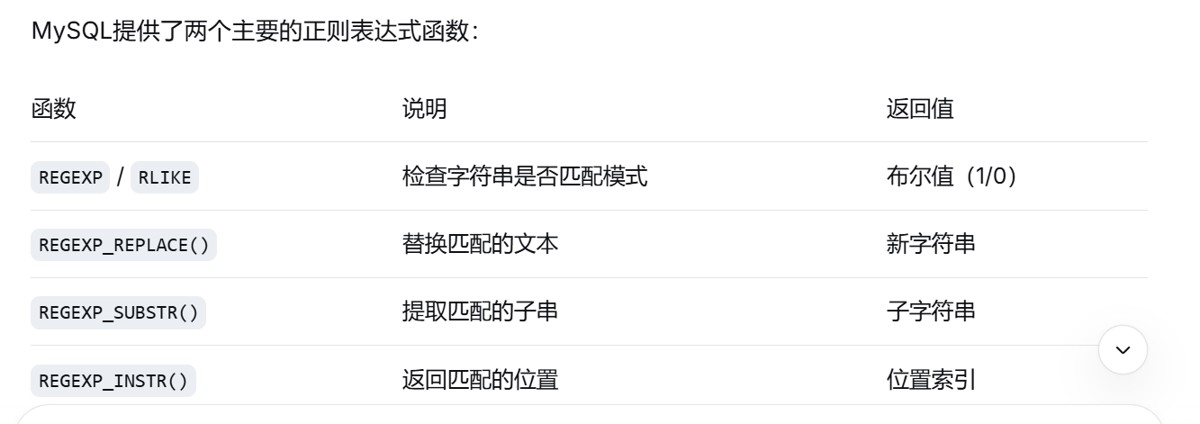
mysql提供了两个主要的正则表达式函数:
第二章:regexp基础匹配
2.1 最简单的匹配:查找包含特定文本的记录
sql
-- 传统like写法
select * from users
where username like '%admin%';

-- 使用正则表达式(更直观)
select * from users
where username regexp 'admin';

-- 两者的区别:
-- like '%admin%' 可以匹配:superadmin、admin123、myadmin
-- regexp 'admin'  可以匹配:admin、administrator、badmin(同样匹配!)
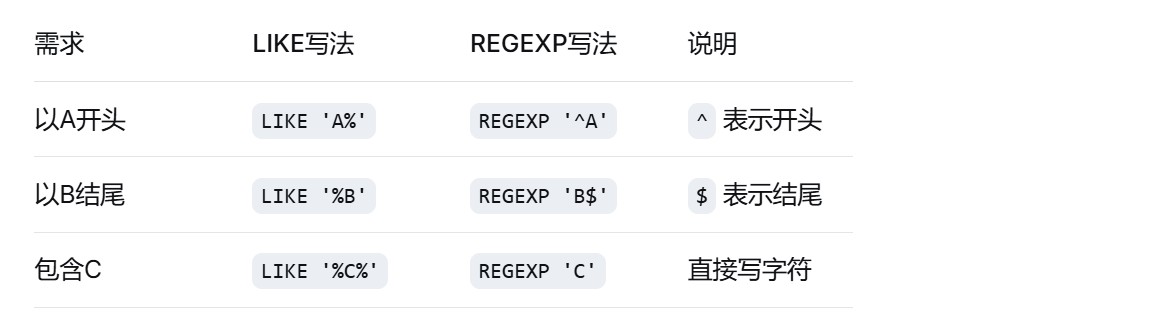
2.2 匹配开头和结尾
sql
-- 查找以"张"开头的姓名
select * from employees
where name regexp '^张';

-- 查找以"com"结尾的邮箱
select * from users
where email regexp 'com$';

-- 查找以"139"开头的手机号
select * from customers
where phone regexp '^139';

-- 精确匹配"hello"(开头到结尾都是hello)
select * from messages
where content regexp '^hello$';
对比表:
2.3 匹配多个字符之一
sql
-- 查找姓"张"或"王"的员工
select * from employees
where name regexp '^[张王]';

-- 查找包含数字0-5的电话
select * from contacts
where phone regexp '[0-5]';

-- 查找元音字母开头的单词
select * from articles
where title regexp '^[aeiouaeiou]';

-- 排除性匹配:查找不是数字的字符
select * from logs
where message regexp '[^0-9]';  -- ^在[]内表示"非"
字符集说明:
[abc]:匹配a、b或c中的任意一个
[a-z]:匹配任意小写字母
[a-z]:匹配任意大写字母
[0-9]:匹配任意数字
[^abc]:匹配除了a、b、c之外的字符
第三章:高级匹配技巧
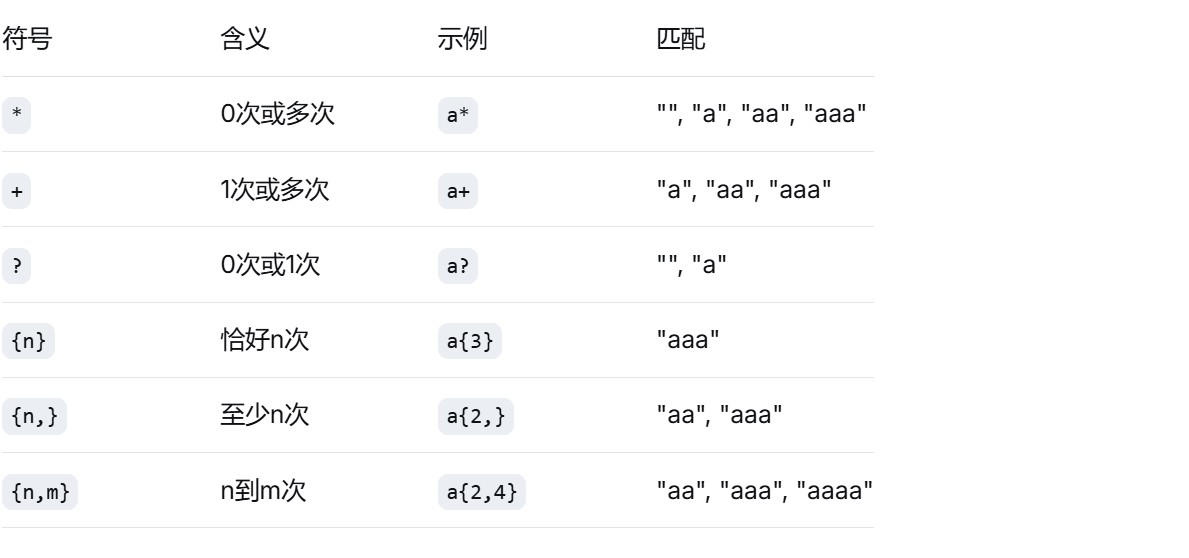
3.1 重复匹配:控制字符出现次数
sql
-- 精确匹配:包含3个连续数字
select * from products
where product_code regexp '[0-9]{3}';

-- 范围匹配:2到4个数字
select * from orders
where order_no regexp '[0-9]{2,4}';

-- 至少匹配:3个或更多字母
select * from books
where isbn regexp '[a-z]{3,}';

-- 可选匹配:0个或1个字母
select * from files
where filename regexp 'backup_[0-9]?\.sql';

-- 一个或多个:匹配连续的数字
select * from logs
where log_id regexp '[0-9]+';

-- 零个或多个:匹配可能的前缀
select * from configs
where key_name regexp 'debug_.*';
重复匹配符速查表:
3.2 分组和选择
sql
-- 匹配"区号-电话号码"格式
select * from contacts
where phone regexp '^([0-9]{3,4})-([0-9]{7,8})$';

-- 查找多种日期格式
select * from documents
where date_string regexp '(202[0-9]-[0-9]{2}-[0-9]{2})|([0-9]{2}/[0-9]{2}/202[0-9])';

-- 分组提取(mysql 8.0+)
select
    phone,
    regexp_substr(phone, '^([0-9]{3,4})-([0-9]{7,8})$', 1, 1, '', 1) as area_code,
    regexp_substr(phone, '^([0-9]{3,4})-([0-9]{7,8})$', 1, 1, '', 2) as phone_number
from contacts
where phone regexp '^[0-9]{3,4}-[0-9]{7,8}$';
3.3 特殊字符和转义
sql
-- 匹配点号(需要转义)
select * from files
where filename regexp '\.txt$';

-- 匹配包含方括号的内容
select * from logs
where message regexp '\\[error\\]';
– 常用特殊字符转义
/*
. 匹配点号
* 匹配星号
+ 匹配加号
? 匹配问号
\ 匹配反斜杠
$ 匹配美元符号
^ 匹配脱字符
[ 匹配左方括号
] 匹配右方括号
( 匹配左括号
) 匹配右括号
*/
第四章:实战应用场景
4.1 数据验证:确保数据质量
sql
-- 验证邮箱格式
select email,
       case
           when email regexp '^[a-za-z0-9._%+-]+@[a-za-z0-9.-]+\.[a-za-z]{2,}$'
           then '有效邮箱'
           else '无效邮箱'
       end as validation_result
from users;

-- 验证手机号(中国大陆)
select phone,
       case
           when phone regexp '^1[3-9][0-9]{9}$' then '有效手机号'
           when phone regexp '^[0-9]{3,4}-[0-9]{7,8}$' then '有效座机'
           else '无效号码'
       end as phone_type
from customers;

-- 验证身份证号(简单版)
select id_card,
       case
           when id_card regexp '^[1-9][0-9]{5}(18|19|20)[0-9]{2}(0[1-9]|1[0-2])(0[1-9]|[1-2][0-9]|3[0-1])[0-9]{3}[0-9xx]$'
           then '格式正确'
           else '格式错误'
       end as id_validation
from person_info;
4.2 数据清洗:处理杂乱数据
sql
-- 提取纯数字内容
select
    content,
    regexp_replace(content, '[^0-9]', '') as numbers_only
from mixed_data;

-- 清理多余空格
select
    address,
    regexp_replace(address, '\\s+', ' ') as cleaned_address
from customer_address;

-- 标准化日期格式
select
    original_date,
    case
        when original_date regexp '^[0-9]{4}-[0-9]{2}-[0-9]{2}$' then original_date
        when original_date regexp '^[0-9]{2}/[0-9]{2}/[0-9]{4}$'
        then concat(
            substring_index(substring_index(original_date, '/', -1), '/', 1),
            '-',
            lpad(substring_index(original_date, '/', 1), 2, '0'),
            '-',
            lpad(substring_index(substring_index(original_date, '/', 2), '/', -1), 2, '0')
        )
        else null
    end as standard_date
from dates_table;
4.3 日志分析:提取关键信息
sql
-- 从日志中提取ip地址
select
    log_entry,
    regexp_substr(log_entry, '[0-9]{1,3}\\.[0-9]{1,3}\\.[0-9]{1,3}\\.[0-9]{1,3}') as ip_address
from server_logs
where log_entry regexp '[0-9]{1,3}\\.[0-9]{1,3}\\.[0-9]{1,3}\\.[0-9]{1,3}';

-- 提取错误级别
select
    log_entry,
    case
        when log_entry regexp '\\[(error|fatal)\\]' then '严重错误'
        when log_entry regexp '\\[warning\\]' then '警告'
        when log_entry regexp '\\[info\\]' then '信息'
        else '未知级别'
    end as log_level
from application_logs;

-- 提取时间戳和消息
select
    log_entry,
    regexp_substr(log_entry, '\\[[0-9]{4}-[0-9]{2}-[0-9]{2} [0-9]{2}:[0-9]{2}:[0-9]{2}\\]') as timestamp,
    regexp_replace(log_entry, '^.*\\] ', '') as message
from system_logs;
第五章:性能优化与最佳实践
5.1 创建正则表达式索引(虚拟列)
sql
-- 创建虚拟列存储提取的信息
alter table users
add column email_domain varchar(100)
generated always as (
    regexp_substr(email, '@([a-za-z0-9.-]+)$', 1, 1, '', 1)
) stored;

-- 在虚拟列上创建索引
create index idx_email_domain on users(email_domain);

-- 现在可以快速查询特定域名的用户
select * from users where email_domain = 'gmail.com';
5.2 避免性能陷阱
sql
-- ❌ 避免过度复杂的正则表达式
select * from large_table
where content regexp '^([a-z]+)\\1{10,}';  -- 可能很慢!

-- ✅ 尽量使用更简单的模式
select * from large_table
where content regexp 'aaaaaaaaaaa';  -- 更高效

-- ❌ 避免在开头使用通配符
select * from users
where username regexp '.*admin';  -- 扫描全表

-- ✅ 尽量锚定开头
select * from users
where username regexp '^admin.*';  -- 可以使用索引
5.3 实用技巧和小贴士
sql
-- 1. 测试正则表达式(先select后where)
select 'test@example.com' regexp '^[a-za-z0-9._%+-]+@[a-za-z0-9.-]+\.[a-za-z]{2,}$' as is_valid;

-- 2. 使用变量存储复杂正则表达式
set @phone_regex = '^1[3-9][0-9]{9}$';
select * from customers where phone regexp @phone_regex;

-- 3. 组合使用like和regexp
select * from products
where
    -- 先用like过滤大部分数据(快)
    description like '%折扣%'
    and
    -- 再用regexp精确匹配(准)
    description regexp '限时折扣[0-9]{1,2}%';

-- 4. 正则表达式调试函数
select
    regexp_instr('hello123world', '[0-9]+') as match_position,  -- 返回6
    regexp_substr('hello123world', '[0-9]+') as match_string,    -- 返回"123"
    regexp_replace('hello123world', '[0-9]+', '###') as replaced_string;  -- "hello###world"
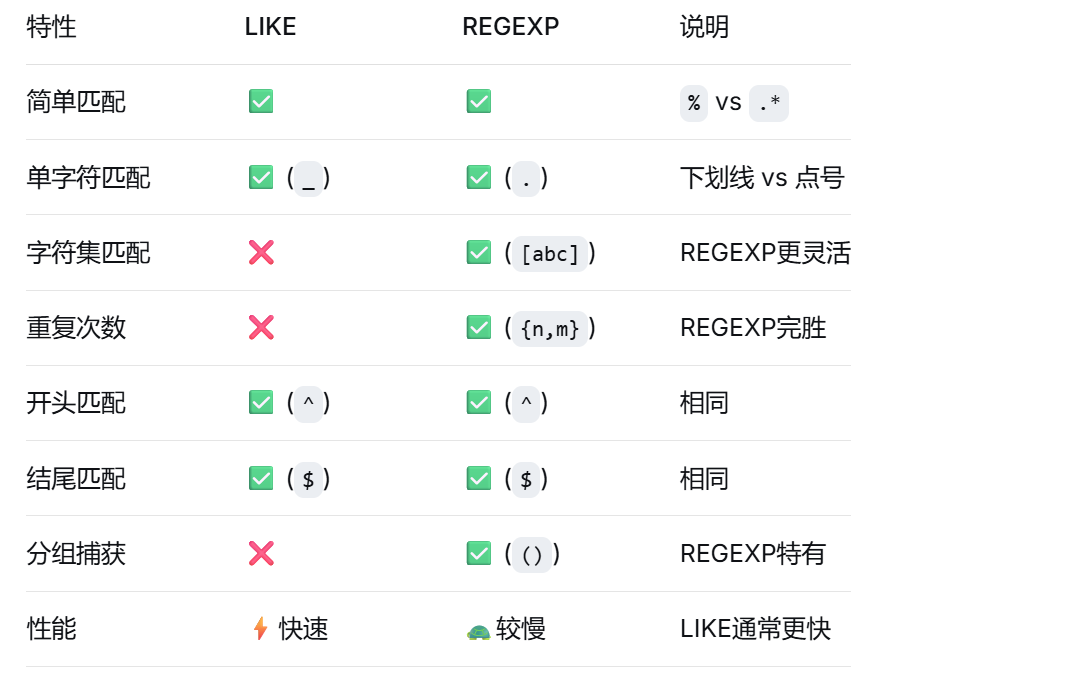
第六章:regexp vs like 全面对比
6.1 功能对比表
6.2 使用场景建议
sql
-- 场景1:简单前缀匹配(推荐like)
-- like版本(更快)
select * from products where name like 'apple%';

-- regexp版本
select * from products where name regexp '^apple';

-- 场景2:复杂模式匹配(必须用regexp)
-- 查找包含3个连续数字的产品编码
select * from products where code regexp '[0-9]{3}';
-- like无法实现!

-- 场景3:混合使用(最佳实践)
-- 先用like快速过滤,再用regexp精确匹配
select * from logs
where
    message like '%error%'  -- 快速过滤
    and message regexp 'error:[0-9]{4}';  -- 精确匹配
总结与进阶建议
核心要点回顾
✅ regexp比like更强大,适合复杂模式匹配
✅ 先测试后使用,复杂正则先在工具中测试
✅ 注意性能影响,大数据表慎用正则
✅ 合理使用索引,虚拟列是性能优化的利器
✅ 保持正则简洁,越复杂的正则性能越差
最后的小提示
从简单开始:不要一开始就写复杂的正则表达式
善用工具:在线测试工具能大大提高效率
写好注释:复杂的正则一定要写注释说明
性能监控:在生产环境监控正则查询的性能
记住:正则表达式是一门语言,需要不断练习才能掌握。开始可能会觉得符号很多很难记,但只要多练习,你会发现它是处理文本数据的强大武器!
以上就是mysql正则表达式进行模糊查询的完全指南的详细内容,更多关于mysql正则表达式模糊查询的资料请关注代码网其它相关文章!



发表评论