
 我要评论
我要评论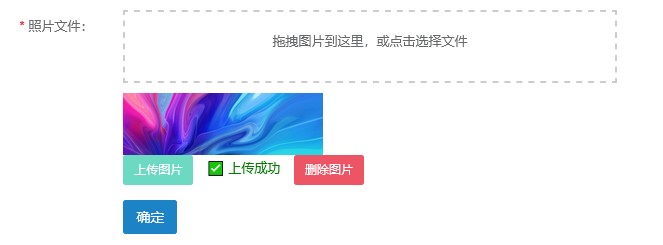
前端页面--新增:
<!-- 文件上传区域 -->
<div class="form-group">
    <label class="col-sm-3 control-label is-required">照片文件:</label>
    <div class="col-sm-8">
        <input type="hidden" name="photopath" id="photopathhidden">
        <!-- 使用 label 原生触发,覆盖整个区域 -->
        <div id="drop-area" style="border: 2px dashed #ccc; padding: 20px; text-align: center; margin-bottom: 10px; cursor: pointer;">
            <label for="fileelem" style="width:100%; height:100%; display:block;">
                <p>拖拽图片到这里,或点击选择文件</p>
            </label>
            <input type="file" id="fileelem" accept="image/*" style="display:none;" />
        </div>
        <div id="preview" style="margin-top: 10px;"></div>
        <button type="button" class="btn btn-primary btn-sm" id="uploadbtn" disabled>上传图片</button>
        <span id="uploadstatus" style="margin-left: 10px; color: green;"></span>
        <button type="button" class="btn btn-danger btn-sm" id="deletebtn" style="display:none; margin-left:10px;">删除图片</button>
    </div>
</div>
<!-- 提交按钮 -->
<div class="form-group">
    <div class="col-sm-offset-3 col-sm-8">
        <button type="button" class="btn btn-success" onclick="submithandler()">确定</button>
    </div>
</div>
<script th:inline="javascript">
var prefix = ctx + "system/record";
// 初始化日期控件
$("input[name='photodate']").datetimepicker({
format: "yyyy-mm-dd",
minview: "month",
autoclose: true
});
// 表单验证 & 提交
$("#form-record-add").validate({
focuscleanup: true
});
function submithandler() {
if (!$('#photopathhidden').val()) {
alert('请先上传照片!');
return;
}
if ($.validate.form()) {
console.log('准备提交到:', prefix + "/add");
$.operate.save(prefix + "/add", $('#form-record-add').serialize());
}
}
// ========== 文件上传逻辑 ==========
const droparea = document.getelementbyid('drop-area');
const fileelem = document.getelementbyid('fileelem');
const preview = document.getelementbyid('preview');
const uploadbtn = document.getelementbyid('uploadbtn');
const uploadstatus = document.getelementbyid('uploadstatus');
const deletebtn = document.getelementbyid('deletebtn');
let selectedfile = null;
// 文件选择变化
fileelem.addeventlistener('change', handlefiles);
// 拖拽事件
['dragenter', 'dragover', 'dragleave', 'drop'].foreach(eventname => {
droparea.addeventlistener(eventname, preventdefaults, false);
});
function preventdefaults(e) {
e.preventdefault();
e.stoppropagation();
}
['dragenter', 'dragover'].foreach(eventname => {
droparea.addeventlistener(eventname, highlight, false);
});
['dragleave', 'drop'].foreach(eventname => {
droparea.addeventlistener(eventname, unhighlight, false);
});
function highlight() {
droparea.style.bordercolor = '#007bff';
}
function unhighlight() {
droparea.style.bordercolor = '#ccc';
}
droparea.addeventlistener('drop', handledrop, false);
function handledrop(e) {
const dt = e.datatransfer;
const files = dt.files;
// 手动构造 event 对象传给 handlefiles
handlefiles({ target: { files: files } });
}
function handlefiles(e) {
const files = e.target.files;
if (files.length === 0) return;
selectedfile = files[0];
// 验证类型
if (!selectedfile.type.match('image.*')) {
alert('请选择图片文件(jpg/png/jpeg)');
selectedfile = null;
uploadbtn.disabled = true;
// 清空 input,以便下次可重新选择(包括同名文件)
fileelem.value = '';
return;
}
// 预览缩略图
preview.innerhtml = '';
const img = document.createelement('img');
img.src = url.createobjecturl(selectedfile);
img.style.maxwidth = '200px';
img.style.maxheight = '200px';
preview.appendchild(img);
uploadbtn.disabled = false;
uploadstatus.textcontent = '';
// 因为可能用户想重新上传同一文件(但通常不会),所以暂不在此清空
}
// 上传按钮点击
uploadbtn.addeventlistener('click', () => {
if (!selectedfile) return;
const formdata = new formdata();
formdata.append("file", selectedfile);
// ✅ 关键修复:使用 ctx 上下文路径,而非硬编码 /
fetch(ctx + 'common/upload', {
method: 'post',
body: formdata
})
.then(response => response.json())
.then(data => {
if (data.code === 0) {
$('#photopathhidden').val(data.filename);
uploadstatus.textcontent = '✅ 上传成功';
uploadbtn.disabled = true;
deletebtn.style.display = 'inline-block';
// 上传成功后清空 file input,避免后续干扰
fileelem.value = '';
} else {
alert('上传失败:' + (data.msg || '未知错误'));
uploadstatus.textcontent = '❌ 上传失败';
// 失败时也清空,允许重试
fileelem.value = '';
}
})
.catch(err => {
console.error('上传出错:', err);
alert('网络错误,请重试');
uploadstatus.textcontent = '❌ 网络错误';
fileelem.value = ''; // 允许重试
});
});
// 删除按钮点击事件
deletebtn.addeventlistener('click', function() {
if (!confirm('确定要删除这张照片吗?')) return;
const photopath = $('#photopathhidden').val();
if (photopath) {
fetch(ctx + 'common/deletefile?filename=' + encodeuricomponent(photopath), {
method: 'post'
})
.then(response => response.json())
.then(data => {
if (data.code !== 0) {
alert('服务器删除失败:' + (data.msg || ''));
}
clearphotopreview();
})
.catch(err => {
console.error('删除请求失败:', err);
alert('网络错误,但本地预览已清除');
clearphotopreview();
});
} else {
clearphotopreview();
}
});
// 清空预览和状态的函数
function clearphotopreview() {
selectedfile = null;
$('#photopathhidden').val('');
preview.innerhtml = '';
uploadstatus.textcontent = '';
uploadbtn.disabled = true;
deletebtn.style.display = 'none';
// 同时清空文件输入框
fileelem.value = '';
}
</script>修改com.ruoyi.project.common.commoncontroller的/deletefile方法:
/**
 * 删除文件
 * @param filename
 * @return
 */
@postmapping("/deletefile")
@responsebody
public ajaxresult deletefile(string filename) {
    try {
        if (stringutils.isblank(filename)) {
            return error("文件名为空");
        }
        if (filename.contains("..") || !filename.startswith("/profile/")) {
            return error("非法文件路径");
        }
        string profilepath = ruoyiconfig.getprofile();
        string relativepath = filename.substring("/profile/".length());
        // ✅ 使用 paths.get 自动处理路径分隔符
        string realpath = paths.get(profilepath, relativepath).tostring();
        file file = new file(realpath);
        if (file.exists()) {
            if (file.delete()) {
                return success();
            } else {
                return error("文件删除失败,可能被占用或无权限");
            }
        }
        return success(); // 文件不存在也视为成功(幂等)
    } catch (exception e) {
        log.error("删除文件异常", e);
        return error("系统异常:" + e.getmessage());
    }
}
前端页面---编辑:
<!-- 文件上传区域(复用新增页逻辑) -->
<div class="form-group">
    <label class="col-sm-3 control-label is-required">照片文件:</label>
    <div class="col-sm-8">
        <!-- 隐藏域:存储服务器路径 -->
        <input type="hidden" name="photopath" id="photopathhidden" th:value="*{photopath}">
        <!-- 拖拽区域 -->
        <div id="drop-area" style="border: 2px dashed #ccc; padding: 20px; text-align: center; margin-bottom: 10px; cursor: pointer;">
            <label for="fileelem" style="width: 100%; height: 100%; display: block;">
                <p>拖拽图片到这里,或点击选择文件</p>
            </label>
            <input type="file" id="fileelem" accept="image/*" style="display:none;" />
        </div>
        <!-- 缩略图预览 -->
        <div id="preview" style="margin-top: 10px;"></div>
        <!-- 操作按钮 -->
        <button type="button" class="btn btn-primary btn-sm" id="uploadbtn" disabled>上传新图片</button>
        <span id="uploadstatus" style="margin-left: 10px; color: green;"></span>
        <button type="button" class="btn btn-danger btn-sm" id="deletebtn" style="display:none; margin-left:10px;">删除当前图片</button>
    </div>
</div>
<script th:inline="javascript">
var prefix = ctx + "system/record";
// 初始化日期控件
$("input[name='photodate']").datetimepicker({
format: "yyyy-mm-dd",
minview: "month",
autoclose: true
});
// 表单验证
$("#form-record-edit").validate({ focuscleanup: true });
function submithandler() {
if (!$('#photopathhidden').val()) {
alert('请保留或上传一张照片后再提交!');
return;
}
if ($.validate.form()) {
$.operate.save(prefix + "/edit", $('#form-record-edit').serialize());
}
}
// ========== 文件上传逻辑 ==========
const droparea = document.getelementbyid('drop-area');
const fileelem = document.getelementbyid('fileelem');
const preview = document.getelementbyid('preview');
const uploadbtn = document.getelementbyid('uploadbtn');
const uploadstatus = document.getelementbyid('uploadstatus');
const deletebtn = document.getelementbyid('deletebtn');
let selectedfile = null;
// 获取初始 photopath(thymeleaf 渲染)
const initialphotopath = /*[[${photorecord.photopath}]]*/'';
// 初始化预览(如果有已有图片)
function initpreview() {
if (initialphotopath) {
preview.innerhtml = '';
const img = document.createelement('img');
// ⭐ 关键:如果 photopath 是相对路径(如 upload/xxx.jpg),需拼接 ctx 或 /
// 假设你的文件是通过 /common/upload 上传,且访问路径为 /upload/...
// 如果后端返回的是完整 url,则无需处理;否则建议统一前缀
img.src = initialphotopath.startswith('/') ? initialphotopath : ctx + initialphotopath;
img.style.maxwidth = '200px';
img.style.maxheight = '200px';
preview.appendchild(img);
deletebtn.style.display = 'inline-block';
}
}
initpreview();
// 文件选择变化
fileelem.addeventlistener('change', handlefiles);
// 拖拽事件
['dragenter', 'dragover', 'dragleave', 'drop'].foreach(eventname => {
droparea.addeventlistener(eventname, preventdefaults, false);
});
function preventdefaults(e) {
e.preventdefault();
e.stoppropagation();
}
['dragenter', 'dragover'].foreach(eventname => {
droparea.addeventlistener(eventname, highlight, false);
});
['dragleave', 'drop'].foreach(eventname => {
droparea.addeventlistener(eventname, unhighlight, false);
});
function highlight() {
droparea.style.bordercolor = '#007bff';
}
function unhighlight() {
droparea.style.bordercolor = '#ccc';
}
droparea.addeventlistener('drop', (e) => {
preventdefaults(e);
const files = e.datatransfer.files;
handlefiles({ target: { files } });
});
function handlefiles(e) {
const files = e.target.files;
if (files.length === 0) return;
selectedfile = files[0];
if (!selectedfile.type.match('image.*')) {
alert('请选择图片文件(jpg/png/jpeg)');
selectedfile = null;
uploadbtn.disabled = true;
fileelem.value = ''; // 清空,允许重新选择
return;
}
// 更新预览
preview.innerhtml = '';
const img = document.createelement('img');
img.src = url.createobjecturl(selectedfile);
img.style.maxwidth = '200px';
img.style.maxheight = '200px';
preview.appendchild(img);
uploadbtn.disabled = false;
uploadstatus.textcontent = '';
}
// 上传新图片
uploadbtn.addeventlistener('click', () => {
if (!selectedfile) return;
const formdata = new formdata();
formdata.append("file", selectedfile);
// ✅ 使用 ctx 上下文路径
fetch(ctx + 'common/upload', {
method: 'post',
body: formdata
})
.then(response => response.json())
.then(data => {
if (data.code === 0) {
$('#photopathhidden').val(data.filename);
uploadstatus.textcontent = '✅ 上传成功';
uploadbtn.disabled = true;
deletebtn.style.display = 'inline-block';
// 上传成功后清空 input
fileelem.value = '';
} else {
alert('上传失败:' + (data.msg || '未知错误'));
uploadstatus.textcontent = '❌ 上传失败';
fileelem.value = ''; // 允许重试
}
})
.catch(err => {
console.error('上传出错:', err);
alert('网络错误,请重试');
uploadstatus.textcontent = '❌ 网络错误';
fileelem.value = '';
});
});
// 删除当前图片
deletebtn.addeventlistener('click', function() {
if (!confirm('确定要删除这张照片吗?删除后无法恢复!')) return;
const photopath = $('#photopathhidden').val();
if (photopath) {
// ✅ 使用 ctx
fetch(ctx + 'common/deletefile?filename=' + encodeuricomponent(photopath), {
method: 'post'
})
.then(response => response.json())
.then(data => {
if (data.code !== 0) {
alert('服务器删除失败:' + (data.msg || ''));
}
clearphotopreview();
})
.catch(err => {
console.error('删除出错:', err);
alert('网络错误,请重试');
clearphotopreview(); // 仍清除前端
});
} else {
alert('当前没有照片可删除');
clearphotopreview();
}
});
function clearphotopreview() {
selectedfile = null;
$('#photopathhidden').val('');
preview.innerhtml = '';
uploadstatus.textcontent = '';
uploadbtn.disabled = true;
deletebtn.style.display = 'none';
fileelem.value = ''; // 关键:重置文件输入框
}
</script>以上是添加记录过程中对于图片的上传与删除。
下面是删除数据库记录时,同步删除文件的主要过程。
/remove控制器
@postmapping( "/remove")
@responsebody
public ajaxresult remove(string ids)
{
    return toajax(photorecordservice.deletephotorecordbyids(ids));
}
/remove方法所对应的services
@override
public int deletephotorecordbyids(string ids) {
    long[] idarray = convert.tolongarray(ids);
    // 查询这些记录
    list<photorecord> records = photorecordmapper.selectphotorecordbyids(idarray);
    // 删除文件
    for (photorecord r : records) {
        if (stringutils.isnotblank(r.getphotopath())) {
            try {
                string realpath = ruoyiconfig.getprofile() +
                        r.getphotopath().replacefirst("^/profile", "");
                path p = paths.get(realpath);
                if (files.exists(p)) files.delete(p);
            } catch (exception e) {
                log.warn("批量删除文件失败: {}", r.getphotopath(), e);
            }
        }
    }
    // 批量删除数据库
    return photorecordmapper.deletephotorecordbyids(idarray);
}
mapper
list<photorecord> selectphotorecordbyids(@param("ids") long[] ids);
int deletephotorecordbyids(long[] ids);
mapper.xml
<select id="selectphotorecordbyids" resulttype="photorecord" resultmap="photorecordresult">
    select * from sys_photo_record
    where id in
    <foreach collection="ids" item="id" open="(" separator="," close=")">
        #{id}
    </foreach>
</select>
<delete id="deletephotorecordbyids" parametertype="string">
    delete from sys_photo_record where id in
    <foreach item="id" collection="array" open="(" separator="," close=")">
        #{id}
    </foreach>
</delete>
到此这篇关于springboot上传文件与物理删除的文章就介绍到这了,更多相关springboot上传与删除内容请搜索代码网以前的文章或继续浏览下面的相关文章希望大家以后多多支持代码网!






发表评论