
 我要评论
我要评论摘要
只需一个 python 脚本,3 秒完成:从任意 md.md 文件一键生成 a4 打印完美适配的 pdf,支持中文、表格、代码块防截断,自动添加 带分隔线的页眉页脚 + 动态页码,无需手动调格式、写 html、调 css。 适合技术文档、教程、报告、培训资料,直接打印分发,专业感拉满! 零依赖配置,运行即得,告别 word 排版痛苦,解放生产力!
一、功能概览
本脚本实现 从 markdown 文件一键生成专业级 a4 打印友好 pdf,具备以下完整功能:
| 功能 | 实现方式 |
|---|---|
| 中文支持 | 使用 microsoft yahei + simsun 字体 |
| 表格美观 | 边框、表头灰底、自动分页 |
| 代码块防截断 | page-break-inside: avoid |
| 页眉(带下划线) | 自定义 header.html |
| 页脚(带上划线 + 动态页码) | 自定义 footer.html + javascript |
| 自动生成临时文件 | tempfile.mkdtemp() |
| 一键运行 | 无需手动创建 html 文件 |
二、使用方法(3步搞定)
1. 准备文件结构
项目文件夹/
├── md.md ← 你的 markdown 文档
├── md_to_a4_pdf.py ← 本脚本
2. 安装依赖
pip install markdown pdfkit
3. 安装 wkhtmltopdf
安装后 修改脚本第 15 行路径:
wkhtmltopdf_path = r"c:\program files\wkhtmltopdf\bin\wkhtmltopdf.exe"
4. 运行脚本
python md_to_a4_pdf.py
三、运行效果
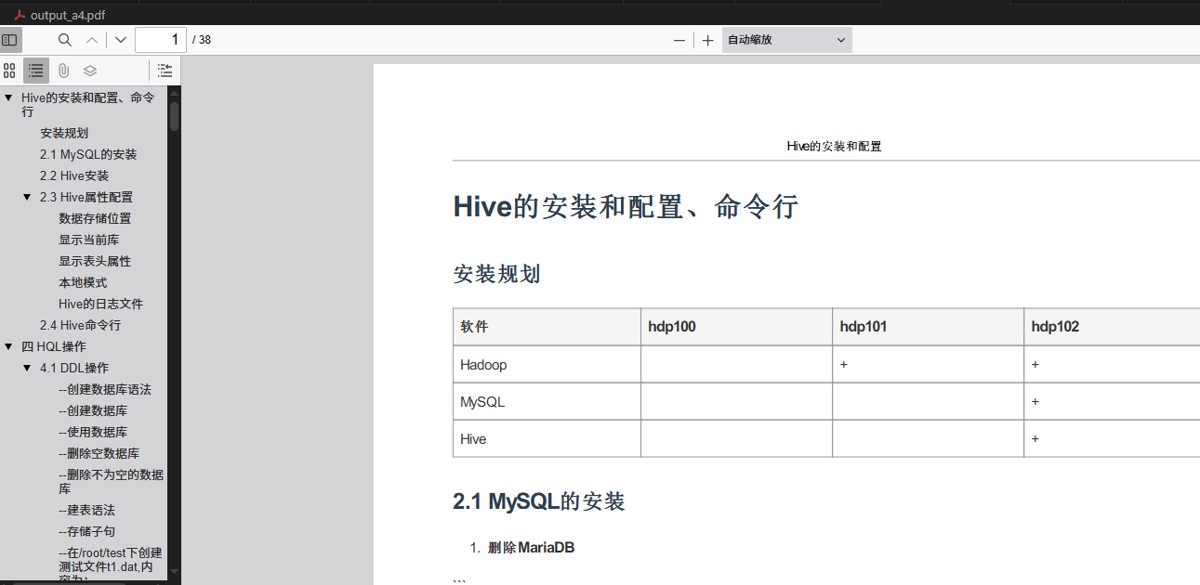
四、源代码
# -*- coding: utf-8 -*-
"""
a4 打印友好版 pdf 一键生成脚本(完整版)
功能:
1. 从 md.md 自动生成 pdf
2. 支持中文字体、表格、代码块
3. 带页眉(标题 + 下划线)、页脚(页码 + 上划线)
4. 自动适应 a4 页面,不裁切尾部
5. 自动生成 header.html 和 footer.html
"""

import os
import markdown
import pdfkit
import tempfile

# -------------------------------
# 配置参数(请修改这里)
# -------------------------------
source_md_file = "md.md"                    # 源 markdown 文件
output_pdf_file = "output_a4.pdf"           # 输出 pdf 文件名
wkhtmltopdf_path = r"c:\program files\wkhtmltopdf\bin\wkhtmltopdf.exe"  # 修改为你的路径

# 页眉页脚内容
header_title = "hive的安装和配置"           # 页眉标题
footer_text = "第 [page] 页 / 共 [topage] 页"  # 页脚页码(wkhtmltopdf 自动替换)

# -------------------------------
# 检查 wkhtmltopdf
# -------------------------------
if not os.path.exists(wkhtmltopdf_path):
    print(f"错误:未找到 wkhtmltopdf 可执行文件!")
    print(f"请确认路径正确:{wkhtmltopdf_path}")
    print("下载地址:https://wkhtmltopdf.org/downloads.html")
    exit(1)

# -------------------------------
# 检查 markdown 文件
# -------------------------------
if not os.path.exists(source_md_file):
    print(f"错误:找不到源 markdown 文件:{source_md_file}")
    print("请确保 md.md 与脚本在同一目录")
    exit(1)

# -------------------------------
# 读取 markdown 并转 html
# -------------------------------
print("正在读取 markdown 文件...")
with open(source_md_file, "r", encoding="utf-8") as f:
    md_text = f.read()

html_content = markdown.markdown(
    md_text,
    extensions=["tables", "fenced_code", "nl2br", "toc"]
)

# -------------------------------
# 临时目录:自动生成 header.html 和 footer.html
# -------------------------------
temp_dir = tempfile.mkdtemp(prefix="pdf_gen_")
header_path = os.path.join(temp_dir, "header.html")
footer_path = os.path.join(temp_dir, "footer.html")

# 生成 header.html(带下划线)
header_html = f"""<!doctype html>
<html><head><meta charset="utf-8"><style>
    body {{ margin:0; padding:0; font-family:"microsoft yahei","simsun",sans-serif; font-size:10pt; }}
    .c {{ text-align:center; padding:5px 0; }}
    .line {{ border-bottom:1px solid #999; margin-top:4px; }}
</style></head><body>
<div class="c">{header_title}</div>
<div class="line"></div>
</body></html>"""

# 生成 footer.html(带上划线)
# 生成 footer.html(带 js 动态页码)
footer_html = """<!doctype html>
<html><head><meta charset="utf-8"><style>
    body {margin:0;padding:0;font-family:"microsoft yahei","simsun",sans-serif;font-size:10pt;text-align:center;}
    .line {border-top:1px solid #999;margin:4px 0;}
</style>
<script>
    function subst() {
        var vars = {};
        location.search.substring(1).split("&").foreach(function(p){
            var pair = p.split("="); vars[pair[0]] = decodeuricomponent(pair[1]);
        });
        return vars;
    }
    document.addeventlistener('domcontentloaded', function(){
        var v = subst();
        var el = document.getelementbyid('pageinfo');
        if(el) el.innerhtml = '第 ' + v.page + ' 页 / 共 ' + v.topage + ' 页';
    });
</script>
</head><body>
<div class="line"></div>
<div id="pageinfo" style="padding:5px 0;"></div>
</body></html>"""

with open(header_path, "w", encoding="utf-8") as f:
    f.write(header_html)
with open(footer_path, "w", encoding="utf-8") as f:
    f.write(footer_html)

print(f"临时页眉页脚已生成:{temp_dir}")

# -------------------------------
# 完整 html 页面
# -------------------------------
full_html = f"""<!doctype html>
<html>
<head>
<meta charset="utf-8">
<title>{header_title}</title>
<style>
@page {{
    size: a4;
    margin: 27mm 18mm 27mm 18mm; /* 上右下左,为页眉页脚留空间 */
}}
body {{
    font-family: "microsoft yahei", "simsun", "arial", sans-serif;
    line-height: 1.7;
    margin: 0;
    color: #333;
}}
h1, h2, h3, h4 {{ color: #2c3e50; margin-top: 1.2em; page-break-after: avoid; }}
table {{ border-collapse: collapse; width: 100%; margin: 10px 0; page-break-inside: auto; }}
th, td {{ border: 1px solid #999; padding: 8px; text-align: left; }}
th {{ background-color: #f5f5f5; font-weight: bold; }}
pre, code {{
    background: #f8f8f8;
    border-radius: 4px;
    page-break-inside: avoid;
    font-family: consolas, "courier new", monospace;
}}
pre {{ padding: 12px; overflow: auto; }}
code {{ padding: 2px 6px; font-size: 90%; }}
p, ul, ol, blockquote {{ page-break-inside: avoid; }}
</style>
</head>
<body>
{html_content}
</body>
</html>"""

# -------------------------------
# pdf 配置
# -------------------------------
print("正在配置 pdf 生成参数...")
config = pdfkit.configuration(wkhtmltopdf=wkhtmltopdf_path)

options = {
    'page-size': 'a4',
    'margin-top': '27mm',
    'margin-bottom': '27mm',
    'margin-left': '18mm',
    'margin-right': '18mm',
    'zoom': '0.95',
    'encoding': 'utf-8',
    'enable-local-file-access': none,

    # 自定义页眉页脚(带线)
    'header-html': header_path,
    'header-spacing': '5',

    'footer-html': footer_path,
    'footer-spacing': '5',
    # 必须添加以下三行
    'enable-javascript': none,
    'javascript-delay': '500',
    'no-stop-slow-scripts': none,
}

# -------------------------------
# 生成 pdf
# -------------------------------
print("正在生成 pdf,请稍候...")
try:
    pdfkit.from_string(
        full_html,
        output_pdf_file,
        configuration=config,
        options=options
    )
    print(f"pdf 生成成功!")
    print(f"文件:{os.path.abspath(output_pdf_file)}")
    print(f"页眉页脚临时文件可删除:{temp_dir}")
except exception as e:
    print(f"pdf 生成失败:{e}")
    exit(1)

# -------------------------------
# 结束提示
# -------------------------------
print("\n" + "="*50)
print("所有任务完成!")
print("1. 打开 output_a4.pdf 即可查看打印效果")
print("2. 支持直接打印,a4 完美适配")
print("3. 页眉有下划线,页脚有上划线,专业美观")
print("="*50)
到此这篇关于python实现将markdown一键打印为a4专业文档的文章就介绍到这了,更多相关python打印markdown内容请搜索代码网以前的文章或继续浏览下面的相关文章希望大家以后多多支持代码网!





发表评论