
 我要评论
我要评论核心功能与解决的实际问题
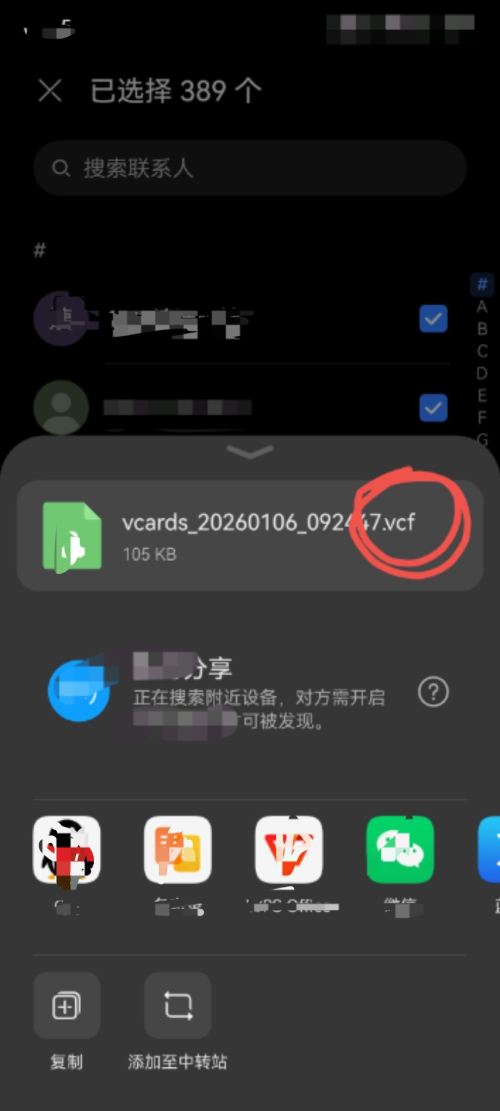
这段代码的核心功能是解析从手机导出的vcf格式通讯录文件,并将其中的联系人信息(如姓名、电话号码、邮箱等)转换并保存为结构清晰、易于编辑的excel表格。它专门解决了vcf文件(vcard格式)用文本编辑器查看杂乱无章、无法直接筛选或批量编辑的痛点,使得备份的通讯录数据变得可读、可管理。
完整的联系人信息提取与导出流程
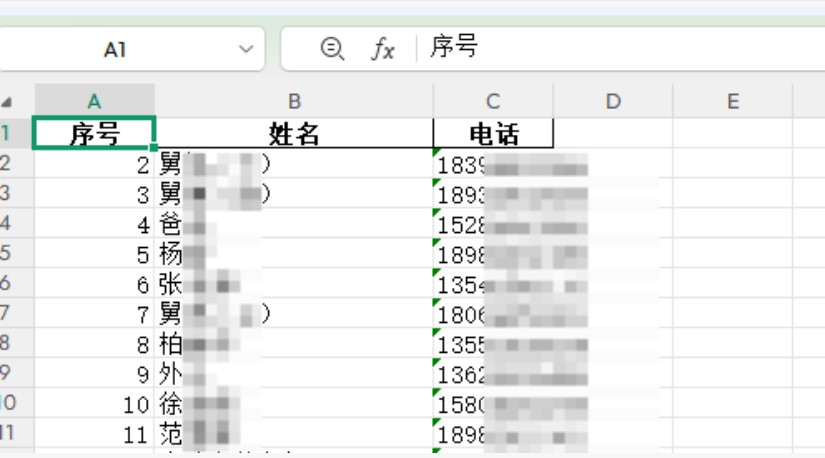
程序能够系统性地遍历vcf文件,识别每个以"begin:vcard"开始、“end:vcard"结束的联系人数据块,并从中提取关键字段。解析出的信息会结构化地存入数据集合,最后利用pandas库生成包含"姓名”、“电话”、"邮箱"等列的excel文件(.xlsx格式),确保所有联系信息一目了然,方便后续的查找、编辑或导入其他设备。
实现代码
import vobject
import chardet
import pandas as pd
import os

def debug_vcf_file(file_path):
    """
    调试vcf文件:检查编码、文件结构和内容
    """
    print("=== 开始调试vcf文件 ===")

    # 检查文件是否存在
    if not os.path.exists(file_path):
        print(f"错误:文件 '{file_path}' 不存在")
        return false

    # 检查文件大小
    file_size = os.path.getsize(file_path)
    print(f"文件大小: {file_size} 字节")

    if file_size == 0:
        print("错误:文件为空")
        return false

    # 读取原始字节数据
    with open(file_path, 'rb') as f:
        raw_data = f.read()

    # 检测编码
    encoding_result = chardet.detect(raw_data)
    detected_encoding = encoding_result['encoding']
    confidence = encoding_result['confidence']

    print(f"检测到的编码: {detected_encoding} (置信度: {confidence:.2f})")

    # 尝试不同编码
    encodings_to_try = [detected_encoding, 'gbk', 'gb2312', 'utf-8', 'iso-8859-1']

    for encoding in encodings_to_try:
        if not encoding:
            continue
        try:
            content = raw_data.decode(encoding)
            print(f"✓ 成功使用 {encoding} 编码解码")

            # 检查vcf基本结构
            if 'begin:vcard' in content and 'end:vcard' in content:
                vcard_count = content.count('begin:vcard')
                print(f"找到 {vcard_count} 个联系人卡片")

                # 显示前500个字符作为样本
                sample = content[:500]
                print("文件内容样本:")
                print("---" + sample + "---")

                return true, content, encoding
            else:
                print(f"× 使用 {encoding} 解码但未找到vcard结构")

        except unicodedecodeerror as e:
            print(f"× {encoding} 编码解码失败: {e}")
        except exception as e:
            print(f"× {encoding} 处理过程中出错: {e}")

    # 最后尝试忽略错误模式
    try:
        content = raw_data.decode('utf-8', errors='ignore')
        print("最后尝试:使用utf-8忽略错误模式解码")
        return true, content, 'utf-8 (errors ignored)'
    except exception as e:
        print(f"最终解码失败: {e}")
        return false, none, none

def parse_vcf_with_debug(file_path):
    """
    解析vcf文件并生成excel表格
    """
    # 调试文件
    debug_result, vcf_content, used_encoding = debug_vcf_file(file_path)

    if not debug_result:
        print("文件调试失败,无法继续解析")
        return []

    contacts = []
    print(f"\n=== 开始解析vcf内容(使用编码: {used_encoding})===")

    try:
        # 分割vcard块
        vcard_blocks = vcf_content.split('begin:vcard')

        for i, block in enumerate(vcard_blocks):
            if not block.strip() or 'end:vcard' not in block:
                continue

            # 重新构建完整的vcard
            vcard_text = 'begin:vcard' + block

            try:
                vcard = vobject.readone(vcard_text)
                contact_info = {'序号': i}

                # 提取姓名
                if hasattr(vcard, 'fn') and vcard.fn:
                    contact_info['姓名'] = str(vcard.fn.value)
                    print(f"联系人 {i}: 找到姓名 - {vcard.fn.value}")
                else:
                    contact_info['姓名'] = '未知'
                    print(f"联系人 {i}: 未找到姓名字段")

                # 提取电话
                contact_info['电话'] = ''
                if hasattr(vcard, 'tel'):
                    phones = []
                    if isinstance(vcard.tel, list):
                        for tel in vcard.tel:
                            if hasattr(tel, 'value') and tel.value:
                                phones.append(str(tel.value))
                    elif hasattr(vcard.tel, 'value') and vcard.tel.value:
                        phones.append(str(vcard.tel.value))

                    if phones:
                        contact_info['电话'] = '; '.join(phones)
                        print(f"联系人 {i}: 找到电话 - {phones}")
                    else:
                        print(f"联系人 {i}: 找到tel字段但值为空")

                # 提取其他信息
                if hasattr(vcard, 'email'):
                    emails = []
                    if isinstance(vcard.email, list):
                        for email in vcard.email:
                            if email.value:
                                emails.append(str(email.value))
                    elif vcard.email.value:
                        emails.append(str(vcard.email.value))
                    contact_info['邮箱'] = '; '.join(emails) if emails else ''

                contacts.append(contact_info)
                print(f"✓ 成功解析联系人 {i}: {contact_info['姓名']}")

            except exception as e:
                print(f"× 解析联系人 {i} 时出错: {e}")
                # 打印出错的vcard内容前200字符用于调试
                print(f"错误vcard样本: {vcard_text[:200]}")
                continue

    except exception as e:
        print(f"解析过程中出现严重错误: {e}")

    return contacts

def save_contacts_to_excel(contacts, output_file='contacts.xlsx'):
    """
    将联系人保存到excel文件
    """
    if not contacts:
        print("没有联系人数据可保存")
        return false

    try:
        # 创建dataframe
        df = pd.dataframe(contacts)

        # 重新排列列顺序
        columns_order = ['序号', '姓名', '电话', '邮箱']
        existing_columns = [col for col in columns_order if col in df.columns]
        df = df[existing_columns]

        # 保存到excel
        df.to_excel(output_file, index=false, engine='openpyxl')
        print(f"✓ 成功生成excel文件: {output_file}")
        print(f"✓ 共保存 {len(contacts)} 个联系人")

        # 显示前几行作为预览
        print("\n前5个联系人预览:")
        print(df.head())

        return true

    except exception as e:
        print(f"× 生成excel文件时出错: {e}")
        return false

# 主执行函数
def main():
    vcf_file_path = "你的通讯录.vcf"  # 请替换为您的vcf文件路径

    print("手机vcf联系人解析工具")
    print("=" * 50)

    # 解析vcf文件
    contacts_list = parse_vcf_with_debug(vcf_file_path)

    if contacts_list:
        # 生成excel文件
        save_contacts_to_excel(contacts_list)

        print(f"\n解析完成!成功处理 {len(contacts_list)} 个联系人")
    else:
        print("\n解析失败,未找到有效联系人")

if __name__ == "__main__":
    main()
效果如下:
以上就是python实现获取手机通讯录文件并导出为excel的详细内容,更多关于python获取手机通讯录的资料请关注代码网其它相关文章!





发表评论