
 我要评论
我要评论一、安装 python-docx 和 comtypes 库
在windows命令行窗口执行如下代码:
pip install python-docx
pip install comtypes

c:\users\wgx58>pip install python-docx
collecting python-docx
  using cached python_docx-1.2.0-py3-none-any.whl.metadata (2.0 kb)
requirement already satisfied: lxml>=3.1.0 in c:\python\lib\site-packages (from python-docx) (6.0.2)
requirement already satisfied: typing_extensions>=4.9.0 in c:\python\lib\site-packages (from python-docx) (4.15.0)
using cached python_docx-1.2.0-py3-none-any.whl (252 kb)
installing collected packages: python-docx
successfully installed python-docx-1.2.0

c:\users\wgx58>pip install comtypes
collecting comtypes
  downloading comtypes-1.4.12-py3-none-any.whl.metadata (7.3 kb)
downloading comtypes-1.4.12-py3-none-any.whl (253 kb)
installing collected packages: comtypes
successfully installed comtypes-1.4.12
二、程序代码
import os
import comtypes.client
from pathlib import path
import tkinter as tk
from tkinter import filedialog, messagebox
import threading


class wordtopdfconverter:
    def __init__(self):
        self.root = tk.tk()
        self.root.title("word转pdf批量转换器")
        self.root.geometry("500x400")

        self.setup_ui()

    def setup_ui(self):
        """设置用户界面"""
        # 标题
        title_label = tk.label(self.root, text="word转pdf批量转换器",
                               font=("arial", 16, "bold"))
        title_label.pack(pady=20)

        # 选择文件夹按钮
        self.select_btn = tk.button(self.root, text="选择word文档文件夹",
                                    command=self.select_folder,
                                    font=("arial", 12), bg="#4caf50", fg="white")
        self.select_btn.pack(pady=10)

        # 显示选择的文件夹
        self.folder_label = tk.label(self.root, text="未选择文件夹",
                                     font=("arial", 10), wraplength=400)
        self.folder_label.pack(pady=5)

        # 输出文件夹选择
        self.output_btn = tk.button(self.root, text="选择pdf输出文件夹",
                                    command=self.select_output_folder,
                                    font=("arial", 12), bg="#2196f3", fg="white")
        self.output_btn.pack(pady=10)

        self.output_label = tk.label(self.root, text="未选择输出文件夹",
                                     font=("arial", 10), wraplength=400)
        self.output_label.pack(pady=5)

        # 转换按钮
        self.convert_btn = tk.button(self.root, text="开始转换",
                                     command=self.start_conversion,
                                     font=("arial", 14), bg="#ff9800", fg="white",
                                     state="disabled")
        self.convert_btn.pack(pady=20)

        # 进度显示
        self.progress_label = tk.label(self.root, text="", font=("arial", 10))
        self.progress_label.pack(pady=5)

        # 日志文本框
        self.log_text = tk.text(self.root, height=10, width=60)
        self.log_text.pack(pady=10, padx=20, fill=tk.both, expand=true)

        # 滚动条
        scrollbar = tk.scrollbar(self.log_text)
        scrollbar.pack(side=tk.right, fill=tk.y)
        self.log_text.config(yscrollcommand=scrollbar.set)
        scrollbar.config(command=self.log_text.yview)

        self.input_folder = ""
        self.output_folder = ""

    def log_message(self, message):
        """添加日志消息"""
        self.log_text.insert(tk.end, f"{message}\n")
        self.log_text.see(tk.end)
        self.root.update()

    def select_folder(self):
        """选择包含word文档的文件夹"""
        folder = filedialog.askdirectory(title="选择包含word文档的文件夹")
        if folder:
            self.input_folder = folder
            self.folder_label.config(text=f"已选择: {folder}")
            self.check_ready()

    def select_output_folder(self):
        """选择pdf输出文件夹"""
        folder = filedialog.askdirectory(title="选择pdf输出文件夹")
        if folder:
            self.output_folder = folder
            self.output_label.config(text=f"已选择: {folder}")
            self.check_ready()

    def check_ready(self):
        """检查是否准备好转换"""
        if self.input_folder and self.output_folder:
            self.convert_btn.config(state="normal")

    def start_conversion(self):
        """开始转换过程"""
        self.convert_btn.config(state="disabled")
        thread = threading.thread(target=self.convert_word_to_pdf)
        thread.daemon = true
        thread.start()

    def convert_word_to_pdf(self):
        """执行word到pdf的转换"""
        try:
            self.log_message("开始扫描word文档...")

            # 支持的word文档扩展名
            word_extensions = ['.doc', '.docx', '.docm']
            word_files = []

            # 递归查找所有word文档
            for root, dirs, files in os.walk(self.input_folder):
                for file in files:
                    if any(file.lower().endswith(ext) for ext in word_extensions):
                        word_files.append(os.path.join(root, file))

            if not word_files:
                self.log_message("未找到任何word文档!")
                self.convert_btn.config(state="normal")
                return

            self.log_message(f"找到 {len(word_files)} 个word文档")
            self.log_message("开始转换...")

            success_count = 0
            error_count = 0

            # 初始化word应用程序
            word_app = comtypes.client.createobject('word.application')
            word_app.visible = false

            for i, word_file in enumerate(word_files, 1):
                try:
                    # 更新进度
                    self.progress_label.config(text=f"处理中: {i}/{len(word_files)}")

                    # 构建输出路径
                    relative_path = os.path.relpath(word_file, self.input_folder)
                    pdf_filename = os.path.splitext(relative_path)[0] + '.pdf'
                    pdf_path = os.path.join(self.output_folder, pdf_filename)

                    # 确保输出目录存在
                    os.makedirs(os.path.dirname(pdf_path), exist_ok=true)

                    # 转换文档
                    doc = word_app.documents.open(word_file)
                    doc.saveas(pdf_path, fileformat=17)  # 17代表pdf格式
                    doc.close()

                    self.log_message(f"✓ 成功转换: {os.path.basename(word_file)}")
                    success_count += 1

                except exception as e:
                    self.log_message(f"✗ 转换失败: {os.path.basename(word_file)} - {str(e)}")
                    error_count += 1

            # 关闭word应用程序
            word_app.quit()

            # 显示结果
            self.progress_label.config(text="")
            self.log_message(f"\n转换完成!")
            self.log_message(f"成功: {success_count} 个文件")
            self.log_message(f"失败: {error_count} 个文件")

            messagebox.showinfo("转换完成",
                                f"转换完成!\n成功: {success_count} 个文件\n失败: {error_count} 个文件")

        except exception as e:
            self.log_message(f"转换过程中发生错误: {str(e)}")
            messagebox.showerror("错误", f"转换过程中发生错误: {str(e)}")
        finally:
            self.convert_btn.config(state="normal")


def main():
    """主函数"""
    converter = wordtopdfconverter()
    converter.root.mainloop()


if __name__ == "__main__":
    main()
三、执行程序
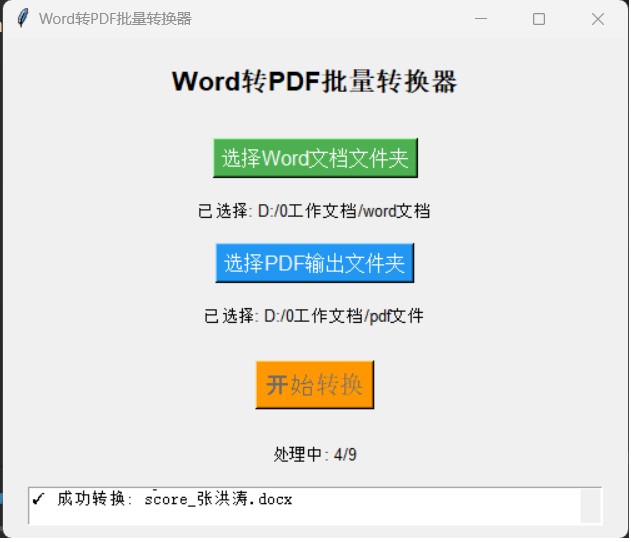
执行程序后弹出如下窗口,单击【选择word文档文件夹】选择word文档所在的文件夹,单击【选择pdf输出文件夹】选择存放pdf文档的文件夹,然后单击【开始转换】即可:
四、程序特点
1、图形界面
(1)直观的gui界面
(2)实时进度显示
(3)详细的日志记录
(4)支持文件夹选择
2、功能特性
(1)支持多种word格式(.doc, .docx, .docm)
(2)保持原有文件夹结构
(3)错误处理和日志记录
到此这篇关于python批量转换word文档为pdf文件的示例代码的文章就介绍到这了,更多相关python批量转换word和pdf内容请搜索代码网以前的文章或继续浏览下面的相关文章希望大家以后多多支持代码网!





发表评论