
 我要评论
我要评论pip 默认会将依赖包安装到 python 安装目录的 site-packages 中
一、修改pip安装镜像源
永久添加pip安装源
pip config set global.index-url --site https://pypi.tuna.tsinghua.edu.cn/simple
可见,配置信息被写入pip.ini文件中,而此pip.ini被存放在python安装路径下。
打开该配置文件,可见:
[global]
index-url = https://pypi.tuna.tsinghua.edu.cn/simple
显然,与配置参数中的 golbal.index-url 对应。
查看pip.ini文件的存储位置有
pip -v config list
可见:即,除了“site”对应的目录,还有其他目录可能存放pip配置文件。

查看pip config 的配置方法
pip config -help
可见,下面的 [< file-option >] 参数,即为 --global 、–user 、–site,对应上面不同的目录。而–user是默认位置。
usage:
  pip config [<file-option>] list
  pip config [<file-option>] [--editor <editor-path>] edit

  pip config [<file-option>] get name
  pip config [<file-option>] set name value
  pip config [<file-option>] unset name
  pip config [<file-option>] debug


description:
  manage local and global configuration.

  subcommands:

  - list: list the active configuration (or from the file specified)
  - edit: edit the configuration file in an editor
  - get: get the value associated with name
  - set: set the name=value
  - unset: unset the value associated with name
  - debug: list the configuration files and values defined under them

  if none of --user, --global and --site are passed, a virtual
  environment configuration file is used if one is active and the file
  exists. otherwise, all modifications happen on the to the user file by
  default.

config options:
  --editor <editor>           editor to use to edit the file. uses visual or editor environment variables if not provided.
  --global                    use the system-wide configuration file only
  --user                      use the user configuration file only
  --site                      use the current environment configuration file only

general options:
  -h, --help                  show help.
  --isolated                  run pip in an isolated mode, ignoring environment variables and user configuration.
  -v, --verbose               give more output. option is additive, and can be used up to 3 times.
  -v, --version               show version and exit.
  -q, --quiet                 give less output. option is additive, and can be used up to 3 times (corresponding to warning, error, and critical logging levels).
  --log <path>                path to a verbose appending log.
  --no-input                  disable prompting for input.
  --proxy <proxy>             specify a proxy in the form [user:passwd@]proxy.server:port.
  --retries <retries>         maximum number of retries each connection should attempt (default 5 times).
  --timeout <sec>             set the socket timeout (default 15 seconds).
  --exists-action <action>    default action when a path already exists: (s)witch, (i)gnore, (w)ipe, (b)ackup, (a)bort.
  --trusted-host <hostname>   mark this host or host:port pair as trusted, even though it does not have valid or any https.
  --cert <path>               path to alternate ca bundle.
  --client-cert <path>        path to ssl client certificate, a single file containing the private key and the certificate in pem format.
  --cache-dir <dir>           store the cache data in <dir>.
  --no-cache-dir              disable the cache.
  --disable-pip-version-check
                              don't periodically check pypi to determine whether a new version of pip is available for download. implied with --no-index.
  --no-color                  suppress colored output
  --no-python-version-warning
                              silence deprecation warnings for upcoming unsupported pythons.
  --use-feature <feature>     enable new functionality, that may be backward incompatible.
  --use-deprecated <feature>  enable deprecated functionality, that will be removed in the future.
删除配置信息
pip config --user unset site.index-url
pip config --user globalsite.index-url

把别处添加的源删除
二、查看当前安装位置
打开命令提示符或 powershell 窗口,使用如下命令来查看当前 pip 的包安装位置
pip show pip
输出如下信息,location 行显示了 pip 当前的包安装位置:
name: pip
version: 24.0
summary: the pypa recommended tool for installing python packages.
home-page:
author:
author-email: the pip developers <distutils-sig@python.org>
license: mit
location: c:\users\用户名\appdata\local\programs\python\python311\lib
requires:
required-by:
也可以使用 python -m site 查看 python 的模块搜索路径系统和包安装位置
python -m site
输出如下信息:
sys.path = [
    'c:\\users\\用户名',                   # 当前工作目录
    'c:\\python312\\python312.zip',        # python 标准库(压缩包)
    'c:\\python312\\dlls',                 # 动态链接库目录
    'c:\\python312\\lib',                  # 标准库目录
    'c:\\python312',                       # python 安装根目录
    'c:\\python312\\lib\\site-packages',   # 系统级包安装目录
]
user_base: 'c:\\users\\用户名\\appdata\\roaming\\python' (exists)
user_site: 'c:\\users\\用户名\\appdata\\roaming\\python\\python312\\site-packages' (exists)
enable_user_site: true
三、更改 pip 的默认包安装位置
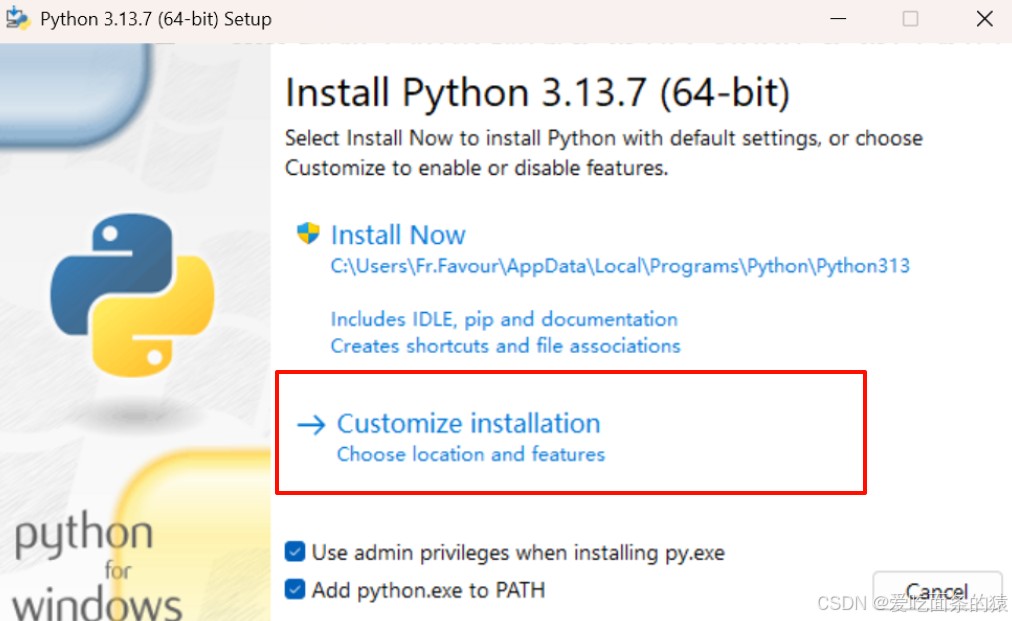
方法 1:在安装 python 时,使用自定义安装
在初次安装 python 时,如果指定了安装盘符(例如e盘),那么 pip 的默认安装路径也会随之改变。pip 默认会将第三方包安装到 python 安装目录下的 lib\site-packages 文件夹中。
方法 2:使用 pip install 的 --target 或 --prefix 参数(每次安装时指定)
使用 pip install 命令的 --target 或 --prefix 参数,可以指定包安装的位置(临时指定),例如,我们希望将 pip 包安装到 e 盘。
# 每次安装时指定目标路径
pip install 包名 --target e:\你的自定义路径\python\python312\site-packages

# 或者使用--prefix参数
pip install 包名 --prefix e:\你的自定义路径\python\python312
这将会将依赖包安装到指定的目录下,而不是默认位置,但是这个方法只在当前的命令下有效。
注:使用虚拟环境的项目建议优先使用 --target 或 --prefix 参数,构建项目级隔离。
方法 3:使用 pip.ini 配置文件
在用户目录下(c:\users\用户名\appdata)创建 pip 文件夹 和 pip.ini 配置文件
# 打开命令提示符或 powershell
mkdir %appdata%\pip
notepad %appdata%\pip\pip.ini
编辑 pip.ini 文件内容,这将覆盖默认的安装设置,使 pip 将依赖包安装到指定位置。
# 将路径替换为你想要的实际路径
[global]
target = e:\你的自定义路径\python\python312\site-packages
index-url=http://mirrors.aliyun.com/pypi/simple/     #指定镜像源

[install]
install-option = --prefix=e:\你的自定义路径\python\python312
方法 4:通过环境变量设置
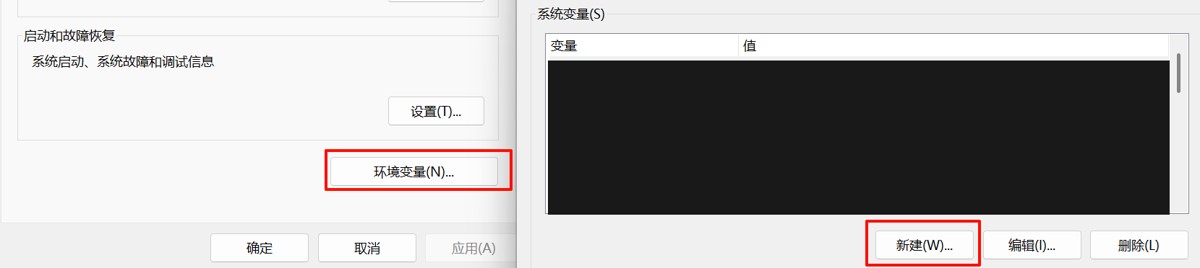
右键 "此电脑" → 属性 → 高级系统 → 环境变量 → 新建环境变量
# 设置 pip_target 环境变量
变量名:pip_target
变量值:e:\你的自定义路径\python\python312\site-packages
# 设置 pythonpath 环境变量
变量名:pythonpath
变量值:e:\你的自定义路径\python\python312\site-packages
相关环境变量的说明及其关系
| 变量名 | 作用范围 | 优先级 | 用途 |
|---|---|---|---|
| virtual_env | 虚拟环境 | 最高 | 项目级完全隔离 |
| pythonuserbase | 用户级安装 (- -user) | 中 | 无权限时的包安装 |
| pip_target | 全局 pip 安装 | 低 | 修改所有pip安装路径 |
| pythonpath | 模块搜索路径 | 自定义 | 添加额外导入路径 |
方法 5:修改 site.py 文件
查看 site.py 存放路径,site.py 一般存放在 python 安装目录下的 lib 目录,也可以使用命令查询
python -c "import site; print(site.__file__)"
打开 site.py 文件,编辑以下内容,修改为你的自定义路径:
修改前:

修改后:

注:如果设置了环境变量(无论值为何),python 都会跳过用户级的 site-packages,即,如果环境变量的设置有效,就无需修改 site.py 文件。
验证设置
再次查看安转路径,尝试运行一个 python 项目并使用 pip install 进一步验证。
注:如果之前已经使用 pip install 将依赖包安装到 site-packages 目录下,可以在修改完安装目录后直接将之前的 site-packages 目录剪切到新的目录下,无需重新下载依赖。
以上就是python修改pip install指定安装包的路径和默认镜像源的操作指南的详细内容,更多关于python修改pip install指定路径和默认镜像源的资料请关注代码网其它相关文章!




发表评论