
 我要评论
我要评论在数据处理和网页爬虫项目中,我们经常会遇到从 html 页面中提取表格的需求。手动复制粘贴不仅低效,还容易出错。本文将带你使用 python + beautifulsoup + pandas,实现 一键将 html 中的多个表格导出为 excel 文件(.xlsx),支持多 sheet 自动分表,代码简洁、实用性强。
一、依赖安装
pip install beautifulsoup4 pandas openpyxl
二、实现代码
from bs4 import beautifulsoup
import pandas as pd


def html_table_to_xlsx(html_content, output_file):
    """
    将 html 中的表格提取并导出为 xlsx 文件。

    :param html_content: html 文本内容
    :param output_file: 导出的 xlsx 文件路径
    """
    # 使用 beautifulsoup 解析 html
    soup = beautifulsoup(html_content, 'html.parser')


    # 查找 html 中的所有表格
    tables = soup.find_all('table')
    if not tables:
        print("html 中没有找到表格!")
        return


    # 逐个解析表格并导出到 excel
    with pd.excelwriter(output_file, engine='openpyxl') as writer:
        for i, table in enumerate(tables):
            # 将表格转为 dataframe
            df = pd.read_html(str(table))[0]
            # 写入 excel,不同表格写入不同的 sheet
            sheet_name = f"sheet{i + 1}"
            df.to_excel(writer, index=false, sheet_name=sheet_name)


    print(f"表格已成功导出到 {output_file}")


# 示例 html 内容
html_content = """
<html>
<head><title>测试表格</title></head>
<body>
    <table border="1">
        <tr>
            <th>姓名</th>
            <th>年龄</th>
            <th>城市</th>
        </tr>
        <tr>
            <td>张三</td>
            <td>28</td>
            <td>北京</td>
        </tr>
        <tr>
            <td>李四</td>
            <td>34</td>
            <td>上海</td>
        </tr>
    </table>
</body>
</html>
"""


# 调用函数,将 html 中的表格导出为 excel 文件
html_table_to_xlsx(html_content, "output.xlsx")
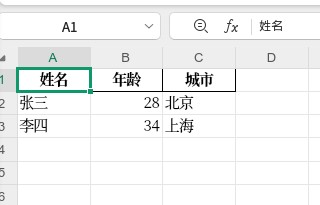
三、最终效果
四、方法补充
python 解析 html 表格并转换为 excel 表格
在处理数据时,我们常常会遇到需要从 html 表格中提取信息并将其转换为 excel 文件的需求。本文将介绍如何使用 python 来解析 html 表格,并将其转换为 excel 表格。
准备工作
在开始之前,请确保您的环境中已经安装了必要的库:
beautifulsoup4:用于解析 html。pandas:用于处理和转换数据。openpyxl:用于生成 excel 文件。
可以通过以下命令安装这些库:
pip install beautifulsoup4 pandas openpyxl
解析 html 表格
首先,我们需要从一个 html 文件中提取表格数据。假设我们有一个简单的 html 文件,其中包含一个表格。
html 示例代码:
<!doctype html>
<html>
<body>

<table border="1">
  <tr>
    <th>姓名</th>
    <th>年龄</th>
    <th>职业</th>
  </tr>
  <tr>
    <td>张三</td>
    <td>25</td>
    <td>工程师</td>
  </tr>
  <tr>
    <td>李四</td>
    <td>30</td>
    <td>医生</td>
  </tr>
</table>

</body>
</html>
接下来,我们将使用 beautifulsoup 来解析这个 html 文件并提取表格数据。
解析代码示例
from bs4 import beautifulsoup

# 读取 html 文件
with open('example.html', 'r', encoding='utf-8') as f:
    html_content = f.read()

# 使用 beautifulsoup 解析 html
soup = beautifulsoup(html_content, 'html.parser')

# 查找所有的表格
tables = soup.find_all('table')

# 遍历每个表格
for table in tables:
    # 提取表头
    headers = [header.text for header in table.find_all('th')]

    # 提取表格数据
    data = []
    for row in table.find_all('tr')[1:]:  # 跳过表头行
        cells = row.find_all('td')
        row_data = [cell.text for cell in cells]
        data.append(row_data)

    print("表头:", headers)
    print("数据:", data)
将数据转换为 excel
现在我们已经成功提取了表格数据,接下来我们将使用 pandas 将其转换为 excel 文件。
转换代码示例
import pandas as pd

# 创建 dataframe
df = pd.dataframe(data, columns=headers)

# 将 dataframe 写入 excel 文件
df.to_excel('output.xlsx', index=false)
上述代码将提取的表格数据保存到名为 output.xlsx 的 excel 文件中。
完整代码示例
以下是完整的代码示例,结合了 html 解析和 excel 转换的功能。
from bs4 import beautifulsoup
import pandas as pd

# 读取 html 文件
with open('example.html', 'r', encoding='utf-8') as f:
    html_content = f.read()

# 使用 beautifulsoup 解析 html
soup = beautifulsoup(html_content, 'html.parser')

# 查找所有的表格
tables = soup.find_all('table')

# 遍历每个表格
for i, table in enumerate(tables):
    # 提取表头
    headers = [header.text for header in table.find_all('th')]

    # 提取表格数据
    data = []
    for row in table.find_all('tr')[1:]:  # 跳过表头行
        cells = row.find_all('td')
        row_data = [cell.text for cell in cells]
        data.append(row_data)

    # 创建 dataframe
    df = pd.dataframe(data, columns=headers)

    # 将 dataframe 写入 excel 文件
    df.to_excel(f'table_{i+1}.xlsx', index=false)
到此这篇关于python实现将html表格一键导出为excel的文章就介绍到这了,更多相关python html表格转excel内容请搜索代码网以前的文章或继续浏览下面的相关文章希望大家以后多多支持代码网!



发表评论