
 我要评论
我要评论druid介绍
druid是阿里巴巴的一个开源项目,号称为监控而生的数据库连接池,在功能、性能、扩展性方面都超过其他例如dbcp、c3p0、bonecp、proxool、jboss datasource等连接池,而且druid已经在阿里巴巴部署了超过600个应用,通过了极为严格的考验,这才收获了大家的青睐!
本地开发环境说明
| 开发依赖 | 版本 |
|---|---|
| spring boot | 3.0.6 |
| druid-spring-boot-3-starter | 1.2.18 |
| jdk | 20 |
springboot集成druid
如果是springboot 2.x,使用以下依赖
<!-- springboot 2.x -->
<dependency>
    <groupid>com.alibaba</groupid>
    <artifactid>druid-spring-boot-starter</artifactid>
    <version>${druid-spring-boot-starter.version}</version>
</dependency>
如果是springboot 3.x,使用以下依赖
<!-- springboot 3.x -->
<dependency>
    <groupid>com.alibaba</groupid>
    <artifactid>druid-spring-boot-3-starter</artifactid>
    <version>${druid-spring-boot-starter.version}</version>
</dependency>
application.yml配置
为了方便演示和直观,配置文件拆分成2个,application.yml和application-druid.yml
application.yml
spring:
  profiles:
    active: druid
  datasource:
    driver-class-name: org.h2.driver
    url: jdbc:h2:tcp://localhost/d:/programfiles/h2database/data/test;mode=mysql;
    username:
    password:
application-druid.yml配置
spring:
  datasource:
    type: com.alibaba.druid.pool.druiddatasource
    # druid的其他属性配置
    druid:
      # 初始化时建立物理连接的个数
      initial-size: 5
      # 连接池的最小空闲数量
      min-idle: 5
      # 连接池最大连接数量
      max-active: 20
      # 获取连接时最大等待时间,单位毫秒
      max-wait: 60000
      # 申请连接的时候检测,如果空闲时间大于timebetweenevictionrunsmillis,执行validationquery检测连接是否有效。
      test-while-idle: true
      # 既作为检测的间隔时间又作为testwhileidel执行的依据
      time-between-eviction-runs-millis: 60000
      # 销毁线程时检测当前连接的最后活动时间和当前时间差大于该值时,关闭当前连接(配置连接在池中的最小生存时间)
      min-evictable-idle-time-millis: 30000
      # 用来检测数据库连接是否有效的sql 必须是一个查询语句(oracle中为 select 1 from dual)
      validation-query: select 'x'
      # 申请连接时会执行validationquery检测连接是否有效,开启会降低性能,默认为true
      test-on-borrow: false
      # 归还连接时会执行validationquery检测连接是否有效,开启会降低性能,默认为true
      test-on-return: false
      # 是否缓存preparedstatement, 也就是pscache,pscache对支持游标的数据库性能提升巨大,比如说oracle,在mysql下建议关闭。
      pool-prepared-statements: false
      # 置监控统计拦截的filters,去掉后监控界面sql无法统计,stat: 监控统计、slf4j:日志记录、wall: 防御sql注入
      filters: stat,wall,slf4j
      # 要启用pscache,必须配置大于0,当大于0时,poolpreparedstatements自动触发修改为true。在druid中,不会存在oracle下pscache占用内存过多的问题,可以把这个数值配置大一些,比如说100
      max-pool-prepared-statement-per-connection-size: -1
      # 合并多个druiddatasource的监控数据
      use-global-data-source-stat: true
      # 通过connectproperties属性来打开mergesql功能;慢sql记录
      connect-properties: druid.stat.mergesql=true;druid.stat.slowsqlmillis=5000
      web-stat-filter:
        # 是否启用statfilter默认值true
        enabled: true
        # 添加过滤规则
        url-pattern: /*
        # 忽略过滤的格式
        exclusions: /druid/*,*.js,*.gif,*.jpg,*.png,*.css,*.ico
      stat-view-servlet:
        # 是否启用statviewservlet默认值true
        enabled: true
        # 访问路径为/druid时,跳转到statviewservlet
        url-pattern: /druid/*
        # 是否能够重置数据
        reset-enable: false
        # 需要账号密码才能访问控制台,默认为root
        login-username: druid
        login-password: druid
        # ip白名单
        allow: 127.0.0.1
        # ip黑名单(共同存在时,deny优先于allow)
        deny:
集成过程出现的问题
由于本文使用springboot 3.x版本,启动后,在浏览器输入
http://localhost:8080/druid
- 但会报404的错误,首先要确保
pom.xml引用的是druid-spring-boot-3-starter而不是druid-spring-boot-starter- 通过源码分析,
druid-spring-boot-3-starter目前最新版本是1.2.18,虽然适配了springboot3,但缺少自动装配的配置文件,需要手动在resources目录下创建meta-inf/spring/org.springframework.boot.autoconfigure.autoconfiguration.imports,文件内容如下
com.alibaba.druid.spring.boot3.autoconfigure.druiddatasourceautoconfigure
- 本来想针对这个问题提个
issue和pr,无奈github在国内访问太不稳定了
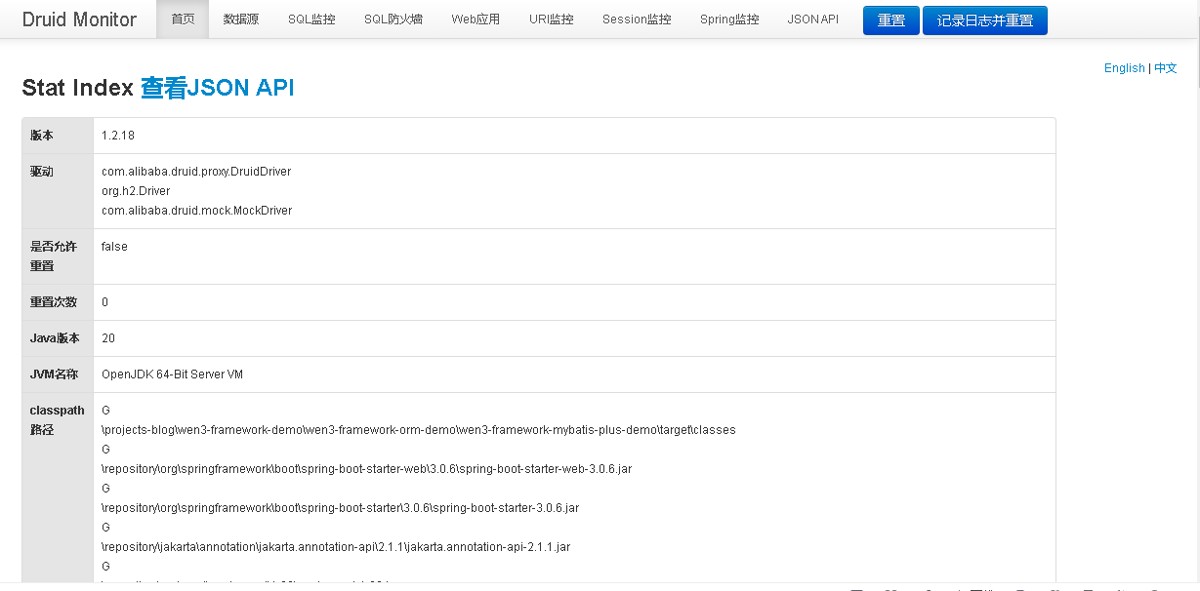
浏览器访问
- 在浏览器输入:
http://localhost:8080/druid - 登录账号密码是配置文件中指定的:
druid/druid
在线文档
- 官网:
https://github.com/alibaba/druid/tree/master/druid-spring-boot-starter
到此这篇关于springboot 3.x使用starter整合druid的文章就介绍到这了,更多相关springboot starter整合druid内容请搜索代码网以前的文章或继续浏览下面的相关文章希望大家以后多多支持代码网!





发表评论