
 我要评论
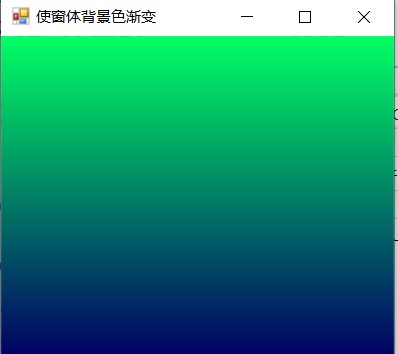
我要评论在winform项目开发中,需要实现渐变色。本文就详细介绍如何实现。效果如下:
实现方案
利用color类中fromargb属性,通过for循环,修改color颜色,并使用graphics类绘制
知识点
color
fromargb:
public static system.drawing.color fromargb (int red, int green, int blue);
参数:
- red :int32 新color的红色分量值。 有效值为 0 到 255。
- green int32 新color的绿色组件值。 有效值为 0 到 255。
- blue int32 新color的蓝色分量值。 有效值为 0 到 255。
返回
color
color color1 = new color();
for(int i=0;i<=255;i++)
{
    color1.fromargb(1,i,100);
}
solidbrush
定义单色画笔。 画笔用于填充图形形状,如矩形、椭圆、扇形、多边形和封闭路径。 此类不能被继承。
solidbrush(color) 初始化指定颜色的新 solidbrush 对象。
color color1 = new color();
for(int i=0;i<=255;i++)
{
    color1.fromargb(1,i,100);
    solidbrush sbrush = new solidbrush(color);//实例化一个单色画笔类对象sbrush
}
pen
定义用于绘制直线和曲线的对象。 此类不能被继承。
pen(brush, single): 用指定的 pen 和 color 属性初始化 width 类的新实例。
参数
- brush :brush.一个 brush,决定此 pen 的特征。
- width :single。新 pen 的宽度。
color color1 = new color();
for(int i=0;i<=255;i++)
{
    color1.fromargb(1,i,100);
    solidbrush sbrush = new solidbrush(color);//实例化一个单色画笔类对象sbrush
    pen pen = new pen(sbrush, 1);//实例化一个用于绘制直线和曲线的对象pen
}
graphics
封装一个 gdi+ 绘图图面。 此类不能被继承。
方法
drawrectangle:绘制由坐标对、宽度和高度指定的矩形。
drawrectangle(pen, int32, int32, int32, int32):绘制由坐标对、宽度和高度指定的矩形。
参数
- pen :pen。确定矩形的颜色、宽度和样式的 pen。
- x : int32,要绘制的矩形左上角的 x 坐标。
- y : int32,要绘制的矩形左上角的 y 坐标。
- width: int32 ,要绘制的矩形的宽度。
- height: int32.要绘制的矩形的高度。
onpaintbackground(painteventargs)
control.onpaintbackground(painteventargs) 方法
绘制控件的背景。
代码展示
protected override void onpaintbackground(painteventargs e)
{
    int intlocation, intheight;//定义两个int型的变量intlocation、intheight
    intlocation = this.clientrectangle.location.y;//为变量intlocation赋值
    intheight = this.clientrectangle.height / 200;//为变量intheight赋值
    for (int i =255; i >= 0; i--)
    {
        color color = new color();//定义一个color类型的实例color
        //为实例color赋值
        color = color.fromargb(1, i, 100);
        solidbrush sbrush = new solidbrush(color);//实例化一个单色画笔类对象sbrush
        pen pen = new pen(sbrush, 1);//实例化一个用于绘制直线和曲线的对象pen
        e.graphics.drawrectangle(pen, this.clientrectangle.x, intlocation, this.width, intlocation + intheight);//绘制图形
        intlocation = intlocation + intheight;//重新为变量intlocation赋值
    }
}
到此这篇关于c# winform实现窗体渐变色效果的方法步骤的文章就介绍到这了,更多相关c# winform窗体渐变色内容请搜索代码网以前的文章或继续浏览下面的相关文章希望大家以后多多支持代码网!






发表评论