
 我要评论
我要评论前言
在 专栏 之前的文章中,我们已经知道了协程的启动、挂起、取消、异常以及常用的协程作用域等基础应用。
这些基础应用适合的场景是一次性任务,执行完就结束了的场景。
launch / async 适合的场景
- 网络请求
- 数据库查询
- 文件读写
- 并行计算任务
- 等等
而对于一些相对复杂的场景,例如:持续的数据流、需要在不同的协程之间传递数据、需要顺序或背压控制等场景,基础的 launch / async
就不够用了。
例如:
- 用户点击、输入等事件流的处理
- 生产者-消费者模型的需求:任务排队、日志流
- 高频数据源处理(相机帧、音频流等)
类似这种持续的、需要顺序控制、或者多个协程配合执行的场景,就需要用到 channel 了。
channel 的概念和基本使用
概念
顾名思义,channel 有管道、通道的意思。channel 跟 java 中的 blockingqueue 很相似,区别在于 channel 是挂起的,不是阻塞的。
channel 的核心特点就是能够在不同的协程之间进行数据传递,并且能够控制数据传递的顺序。
使用起来很简单,基本就分为以下几步:
- 创建 channel
- 通过
channel.send发送数据 - 通过
channel.receive接收数据
整体的概念也比较简单形象,就是一根管道,一个口子发送数据,一个口子接收数据。
channel 的创建
先来看下 channel 的源码,可以看到会根据传入的参数选择不同的实现。
public fun <e> channel(
    capacity: int = rendezvous,
    onbufferoverflow: bufferoverflow = bufferoverflow.suspend,
    onundeliveredelement: ((e) -> unit)? = null
): channel<e> =
    when (capacity) {
        rendezvous -> {
            if (onbufferoverflow == bufferoverflow.suspend)
                bufferedchannel(rendezvous, onundeliveredelement) // an efficient implementation of rendezvous channel
            else
                conflatedbufferedchannel(
                    1,
                    onbufferoverflow,
                    onundeliveredelement
                ) // support buffer overflow with buffered channel
        }
        conflated -> {
            require(onbufferoverflow == bufferoverflow.suspend) {
                "conflated capacity cannot be used with non-default onbufferoverflow"
            }
            conflatedbufferedchannel(1, bufferoverflow.drop_oldest, onundeliveredelement)
        }
        unlimited -> bufferedchannel(
            unlimited,
            onundeliveredelement
        ) // ignores onbufferoverflow: it has buffer, but it never overflows
        buffered -> { // uses default capacity with suspend
            if (onbufferoverflow == bufferoverflow.suspend) bufferedchannel(
                channel_default_capacity,
                onundeliveredelement
            )
            else conflatedbufferedchannel(1, onbufferoverflow, onundeliveredelement)
        }
        else -> {
            if (onbufferoverflow === bufferoverflow.suspend) bufferedchannel(capacity, onundeliveredelement)
            else conflatedbufferedchannel(capacity, onbufferoverflow, onundeliveredelement)
        }
    }
参数概览
| 参数 | 类型 | 默认值 | 描述 |
|---|---|---|---|
capacity | int | rendezvous | 通道容量,决定缓冲区大小和行为模式 |
onbufferoverflow | bufferoverflow | suspend | 缓冲区溢出时的处理策略 |
onundeliveredelement | ((e) -> unit)? | null | 元素未能送达时的回调函数 |
capacity(容量配置)
capacity 参数决定了 channel 的缓冲行为和容量大小:
rendezvous(值为 0):无缓冲,发送者和接收者必须同时准备好conflated(值为 -1):只保留最新的元素,旧元素会被覆盖unlimited(值为int.max_value):理论上就是无限容量,永不阻塞发送buffered(值为 64):默认缓冲大小- 自定义正整数:自己指定具体的缓冲区大小
onbufferoverflow(溢出策略)
当缓冲区满时的处理策略:
suspend:挂起发送操作,等待缓冲区有空间(默认)drop_oldest:丢弃旧的元素,添加新元素drop_latest:丢弃新元素,保留缓冲区中的现有元素
onundeliveredelement(未送达回调)
当元素无法送达时的清理回调函数:
null:不执行任何清理操作(默认)- 自定义函数:用于资源清理、日志记录等,根据业务需求来定义
参数组合效果
| capacity | onbufferoverflow | 行为 | 适用场景 |
|---|---|---|---|
rendezvous | suspend | 无缓冲,同步通信 | 严格的生产者-消费者同步 |
buffered | suspend | 有限缓冲,满时挂起 | 一般的异步处理,默认的缓冲数量是 64 |
unlimited | suspend | 缓冲长度为 int.max_value | 高吞吐量场景(生产上不建议使用,有内存方面的风险) |
conflated | drop_oldest | 无缓冲,只保留最新值 | 状态更新、实时数据 |
| 自定义大小 | suspend | 固定大小,满时挂起 | 批量处理、批量任务 |
| 自定义大小 | drop_oldest | 固定大小,丢弃旧数据 | 获取最近 n 个元素 |
| 自定义大小 | drop_latest | 固定大小,拒绝新数据 | 保护重要历史数据 |
capacity
rendezvous(会合模式)
特点:
- 容量为 0,无缓冲区
- 发送者和接收者必须同时准备好才能完成数据传输
- 提供强同步保证,一手交钱一手交货
使用示例:
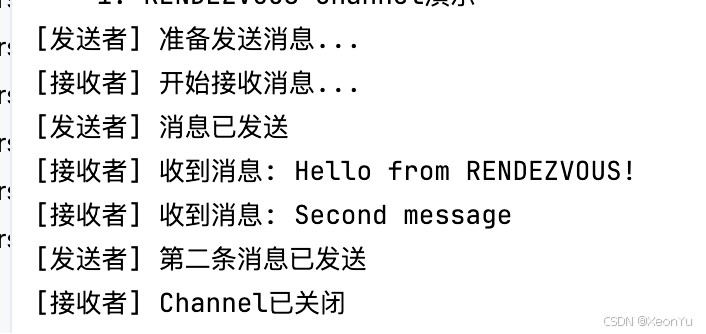
suspend fun demonstraterendezvouschannel() {
    // 创建 rendezvous channel(默认容量为 0),默认什么都不传就是 rendezvous 模式,channel<string>()
    val rendezvouschannel = channel<string>(channel.rendezvous)
    // 启动发送者协程
    val senderjob = globalscope.launch {
        println("[发送者] 准备发送消息...")
        rendezvouschannel.send("hello from rendezvous!")
        println("[发送者] 消息已发送")
        rendezvouschannel.send("second message")
        println("[发送者] 第二条消息已发送")
        rendezvouschannel.close()
    }
    // 启动接收者协程
    val receiverjob = globalscope.launch {
        delay(1000) // 延迟1秒,发送者会等待接收者准备好
        println("[接收者] 开始接收消息...")
        for (message in rendezvouschannel) {
            println("[接收者] 收到消息: $message")
            delay(500) // 模拟处理时间
        }
        println("[接收者] channel已关闭")
    }
    // 等待所有协程完成
    joinall(senderjob, receiverjob)
}
执行结果
conflated(只留最新值)
特点:
- 容量为 1,但会丢弃旧值
- 只保留最新的元素
- 发送操作永不阻塞
- 只能使用
bufferoverflow.suspend策略
源码分析:
conflated -> {
    require(onbufferoverflow == bufferoverflow.suspend) {
        "conflated capacity cannot be used with non-default onbufferoverflow"
    }
    conflatedbufferedchannel(1, bufferoverflow.drop_oldest, onundeliveredelement)
}
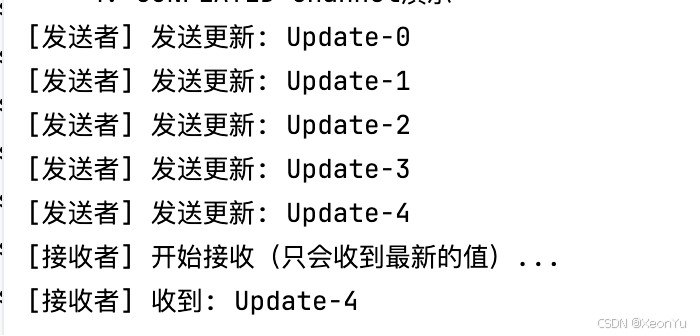
使用示例:
suspend fun demonstrateconflatedchannel() {
    // 创建 conflated channel,相当于:channel<string>(1, bufferoverflow.drop_oldest)
    val conflatedchannel = channel<string>(channel.conflated)
    // 快速发送多个消息
    val senderjob = globalscope.launch {
        repeat(5) { i ->
            val message = "update-$i"
            conflatedchannel.send(message)
            println("[发送者] 发送更新: $message")
            delay(100) // 短暂延迟
        }
        conflatedchannel.close()
    }
    // 慢速接收者
    val receiverjob = globalscope.launch {
        delay(1000) // 延迟1秒,让发送者发送完所有消息
        println("[接收者] 开始接收(只会收到最新的值)...")
        for (message in conflatedchannel) {
            println("[接收者] 收到: $message")
        }
    }
    joinall(senderjob, receiverjob)
}
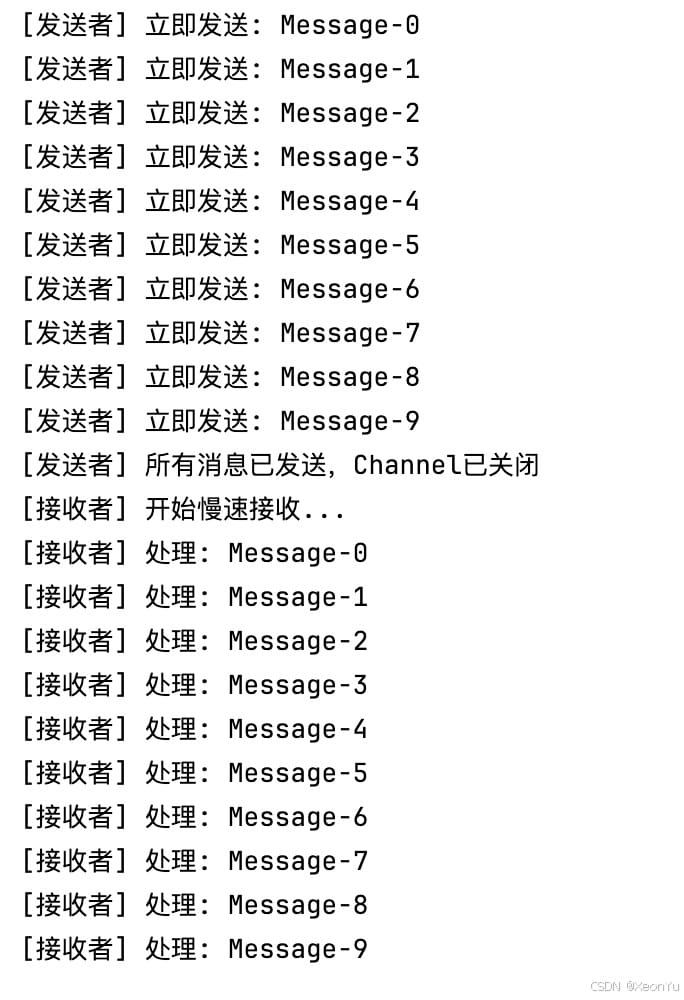
unlimited(无限容量)
特点:
- 容量为
int.max_value,理论上无限容量 - 发送操作永不阻塞,但要注意内存使用
- 忽略
onbufferoverflow参数 - 适用于高吞吐量场景,但生产环境需谨慎使用
suspend fun demonstrateunlimitedchannel() {
    val unlimitedchannel = channel<string>(channel.unlimited)
    val senderjob = globalscope.launch {
        repeat(10) { i ->
            val message = "message-$i"
            unlimitedchannel.send(message)
            println("[发送者] 立即发送: $message")
        }
        unlimitedchannel.close()
        println("[发送者] 所有消息已发送,channel已关闭")
    }
    val receiverjob = globalscope.launch {
        delay(1000) // 延迟1秒开始接收
        println("[接收者] 开始慢速接收...")
        for (message in unlimitedchannel) {
            println("[接收者] 处理: $message")
            delay(300) // 模拟处理时间
        }
    }
    joinall(senderjob, receiverjob)
}
buffered(有限容量)
特点:
- 使用默认容量 (
channel_default_capacity,通常为 64) - 在缓冲区满时根据
onbufferoverflow策略处理
源码分析:
buffered -> {
    if (onbufferoverflow == bufferoverflow.suspend)
        bufferedchannel(channel_default_capacity, onundeliveredelement)
    else
        conflatedbufferedchannel(1, onbufferoverflow, onundeliveredelement)
}
使用示例:
suspend fun demonstratebuffereddefaultchannel() {
    // 创建 buffered channel(默认容量为 64)
    val bufferedchannel = channel<string>(channel.buffered)
    val senderjob = globalscope.launch {
        repeat(100) { i ->
            bufferedchannel.send("message-$i")
            println("[发送者] 发送 message-$i")
        }
        bufferedchannel.close()
    }
    val receiverjob = globalscope.launch {
        delay(1000) // 延迟接收
        for (message in bufferedchannel) {
            println("[接收者] 收到: $message")
            delay(50)
        }
    }
    joinall(senderjob, receiverjob)
}
与下面自定义容量效果类似。
自定义容量
特点:
- 指定具体的缓冲区大小
- 根据
onbufferoverflow策略处理溢出
源码分析:
else -> {
    if (onbufferoverflow === bufferoverflow.suspend)
        bufferedchannel(capacity, onundeliveredelement)
    else
        conflatedbufferedchannel(capacity, onbufferoverflow, onundeliveredelement)
}
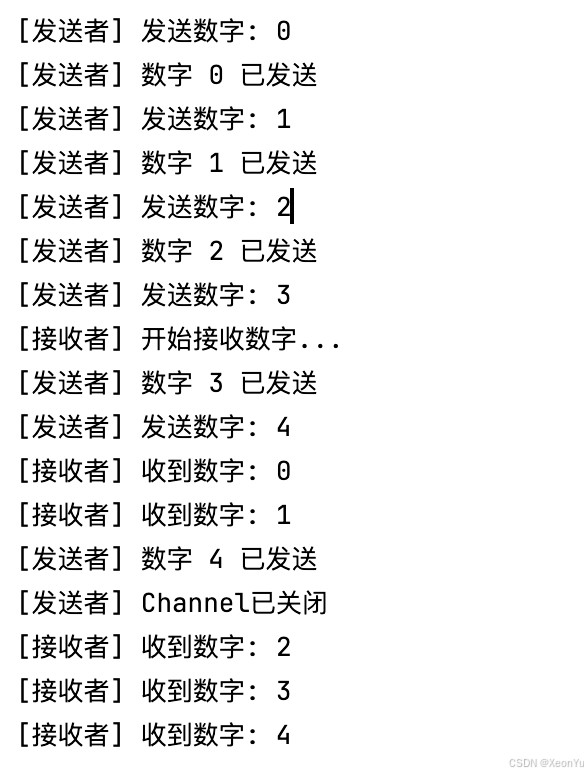
使用示例:
suspend fun demonstratebufferedchannel() {
    // 创建容量为3的缓冲channel
    val bufferedchannel = channel<int>(capacity = 3)
    // 启动发送者协程
    val senderjob = globalscope.launch {
        repeat(5) { i ->
            println("[发送者] 发送数字: $i")
            bufferedchannel.send(i)
            println("[发送者] 数字 $i 已发送")
        }
        bufferedchannel.close()
        println("[发送者] channel已关闭")
    }
    // 启动接收者协程,延迟接收以观察缓冲效果
    val receiverjob = globalscope.launch {
        delay(2000) // 延迟2秒开始接收
        println("[接收者] 开始接收数字...")
        for (number in bufferedchannel) {
            println("[接收者] 收到数字: $number")
            delay(800) // 模拟慢速处理
        }
    }
    joinall(senderjob, receiverjob)
}
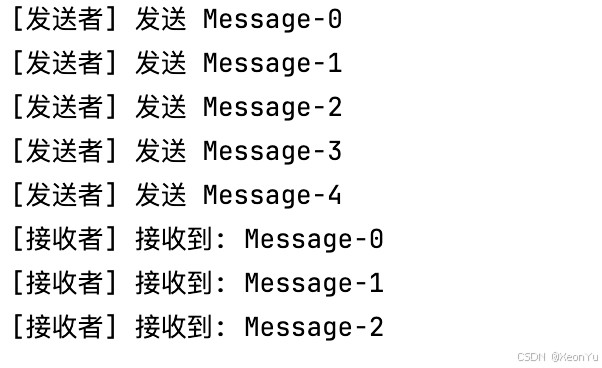
可以看到,因为默认的溢出策略是 suspend,所以当缓冲区满了时,发送者会被挂起,直到接收者处理完一个元素,才会继续发送。
bufferoverflow 策略详解
当 channel 的缓冲区满时,bufferoverflow 参数决定了如何处理新的发送请求:
suspend(默认策略)
- 行为:当缓冲区满时,挂起发送操作直到有空间可用
- 特点:提供背压控制,防止生产者过快
- 使用场景:需要确保所有数据都被处理的场景
suspend fun demonstratebasicoperations() {
    //容量为 2,溢出策略为suspend
    val channel = channel<string>(capacity = 2, onbufferoverflow = bufferoverflow.suspend)
    //发送的速度快
    val job1 = globalscope.launch {
        repeat(5) {
            channel.send("message-$it")
            println("[发送者] 发送 message-$it")
        }
        channel.close()
    }
    val job2 = globalscope.launch {
        //除了用 channel.recrive 外,也可以直接 用 for 循环接收数据
        for (message in channel) {
            //接收的速度慢
            delay(1000)
            println("[接收者] 接收到: $message")
        }
    }
    joinall(job1, job2)
}
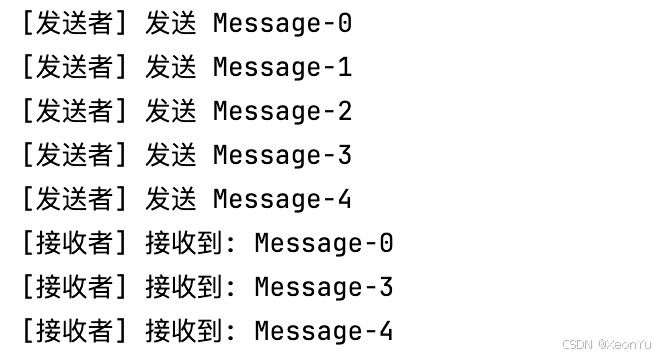
drop_latest
- 行为:当缓冲区满时,丢弃新元素,保留缓冲区中的现有元素
- 特点:保护已缓冲的数据不被覆盖
- 使用场景:保护重要的历史数据,防止新数据覆盖
- 性能特点:发送操作永不阻塞,但新数据可能被丢弃
suspend fun demonstratebasicoperations() {
    val channel = channel<string>(capacity = 2, onbufferoverflow = bufferoverflow.drop_latest)
    val job1 = globalscope.launch {
        repeat(5) {
            channel.send("message-$it")
            println("[发送者] 发送 message-$it")
        }
        channel.close()
    }
    val job2 = globalscope.launch {
        for (message in channel) {
            delay(1000)
            println("[接收者] 接收到: $message")
        }
    }
    joinall(job1, job2)
}
可以看到,当缓冲区满时,会把新数据丢弃掉,因此,接收端只接收到了旧数据。
drop_oldest
- 行为:当缓冲区满时,丢弃旧的元素,添加新元素
- 特点:保持固定的内存使用,优先保留新数据
- 使用场景:实时数据流、最近n个元素
- 性能特点:发送操作永不阻塞,但可能丢失历史数据
suspend fun demonstratebasicoperations() {
    val channel = channel<string>(capacity = 2, onbufferoverflow = bufferoverflow.drop_oldest)
    val job1 = globalscope.launch {
        repeat(5) {
            channel.send("message-$it")
            println("[发送者] 发送 message-$it")
        }
        channel.close()
    }
    val job2 = globalscope.launch {
        for (message in channel) {
            delay(1000)
            println("[接收者] 接收到: $message")
        }
    }
    joinall(job1, job2)
}
需要注意的是,当缓冲区满了之后,1 和 2 被丢弃了,3 和 4 被放进去了。从这里可以看出,丢弃数据时,并不是把最早的旧数据丢掉,这里跟内部的实现有关。
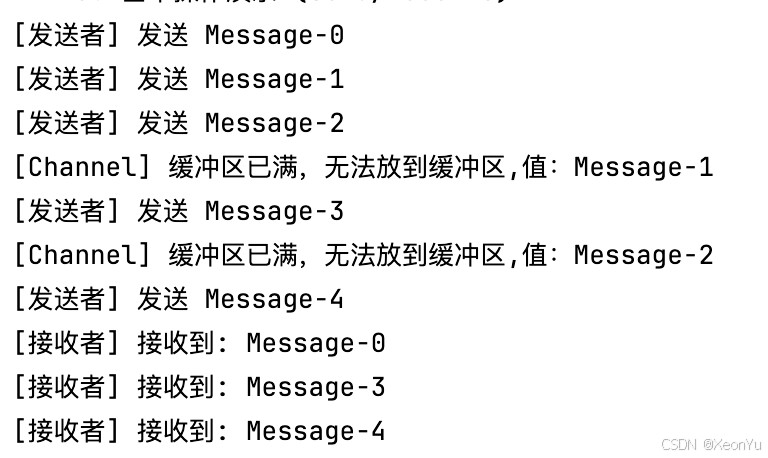
onundeliveredelement 回调
当元素无法送达时(如 channel 被取消或关闭),会调用此回调函数
suspend fun demonstratebasicoperations() {
    val channel = channel<string>(capacity = 2, onbufferoverflow = bufferoverflow.drop_oldest) {
        println("[channel] 缓冲区已满,无法放到缓冲区,值:${it}")
    }
    // 演示基本的send和receive操作
    val job1 = globalscope.launch {
        repeat(5) {
            channel.send("message-$it")
            println("[发送者] 发送 message-$it")
        }
        channel.close()
    }
    val job2 = globalscope.launch {
        for (message in channel) {
            delay(1000)
            println("[接收者] 接收到: $message")
        }
    }
    joinall(job1, job2)
}
channel 操作方式
channel 提供了两种操作方式:阻塞操作和非阻塞操作。
阻塞操作(send/receive)
send() 和 receive() 方法都是挂起方法,它们会阻塞当前协程,直到完成操作。
非阻塞操作(trysend/tryreceive)
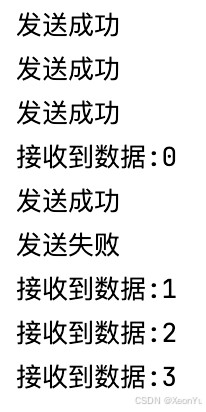
trysend() 和 tryreceive() 是 channel 提供的非阻塞操作 api。与阻塞版本不同,这些方法会立即返回结果,不会挂起当前协程,也不会抛出异常。
操作对比
| 操作类型 | 阻塞版本 | 非阻塞版本 | 行为差异 |
|---|---|---|---|
| 发送 | send() | trysend() | send() 会挂起直到有空间;trysend() 立即返回结果 |
| 接收 | receive() | tryreceive() | receive() 会挂起直到有数据;tryreceive() 立即返回结果 |
返回值类型
trysend()返回channelresult<unit>tryreceive()返回channelresult<t>
channelresult 是一个密封类,通过密封类中的成员 issuccess 和 getornull() 可以判断操作是否成功。
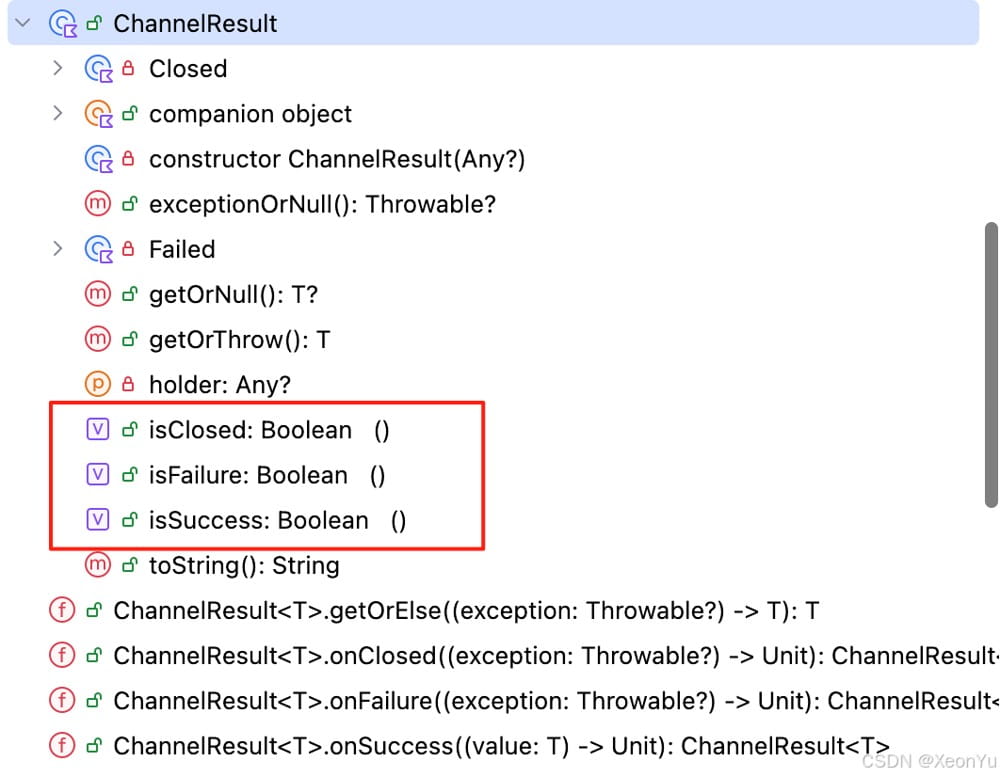
大部分场景下,send / receive + 合理的 channel 配置就能解决问题,trysend/tryreceive 更多的是想达到如下效果:
- 避免不必要的协程挂起开销,希望立即得到结果
- 提供更精细的控制逻辑,如:超时处理、重试机制等
- 实现更好的错误处理和用户反馈,能更好地处理异常场景
runblocking {
    val channel = channel<int>(2)
    val sendjob = launch {
        repeat(5) {
            delay(100)
            val sendresult = channel.trysend(it)
            sendresult.onsuccess {
                println("发送成功")
            }.onfailure {
                println("发送失败")
            }.onclosed {
                println("通道已关闭")
            }
        }
    }
    val receivejob = launch {
        for (i in channel) {
            delay(300)
            println("接收到数据:${i}")
        }
    }
    joinall(sendjob, receivejob)
}
channel 状态管理
channel 在其生命周期中会经历以下几个关键状态:
- 活跃状态(active):可以正常发送和接收数据
- 发送端关闭(closed for send):不能发送新数据,但可以接收缓冲区中的数据
- 接收端关闭(closed for receive):不能接收数据,缓冲区已清空
- 取消状态(cancelled):channel 被取消,所有操作都会失败
api
channel.close():关闭 channelchannel.isclosedforsend:判断发送端是否已关闭channel.isclosedforreceive:判断接收端是否已关闭channel.cancel():取消 channel
close(关闭操作)
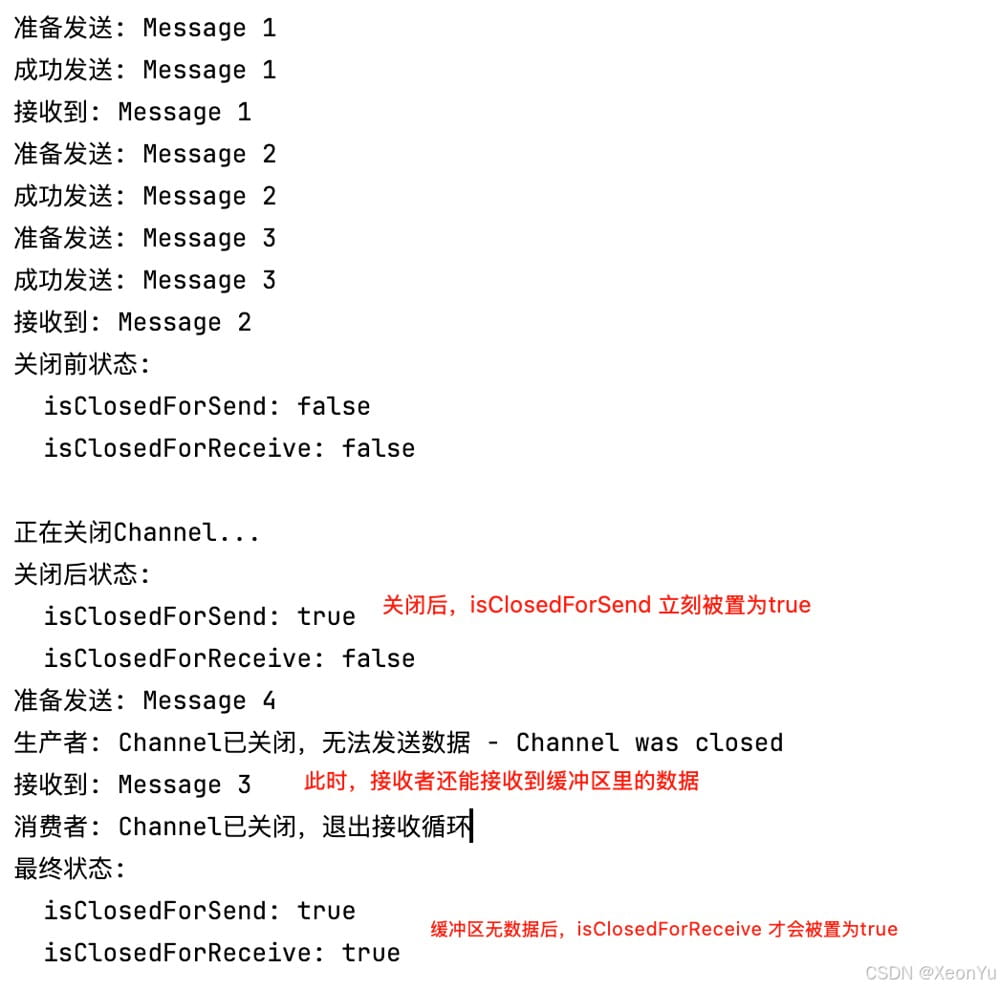
- 调用
close()后,isclosedforsend立即变为true - 此时,缓冲区中的数据仍可被消费
- 只有当缓冲区清空后,
isclosedforreceive才变为true
示例:
    suspend fun demonstratechannelclose() {
    val channel = channel<string>(1)
    val producer = globalscope.launch {
        try {
            for (i in 1..5) {
                val message = "message $i"
                println("准备发送: $message")
                channel.send(message)
                println("成功发送: $message")
                delay(100)
            }
        } catch (e: closedsendchannelexception) {
            println("生产者: channel已关闭,无法发送数据 - ${e.message}")
        }
    }
    val consumer = globalscope.launch {
        try {
            for (message in channel) {
                println("接收到: $message")
                delay(200)
            }
            println("消费者: channel已关闭,退出接收循环")
        } catch (e: exception) {
            println("消费者异常: ${e.message}")
        }
    }
    delay(300) // 模拟让一些数据能够被接收到
    // 检查channel状态
    println("关闭前状态:")
    println("  isclosedforsend: ${channel.isclosedforsend}")
    println("  isclosedforreceive: ${channel.isclosedforreceive}")
    // 关闭channel
    println("\n正在关闭channel...")
    channel.close()
    // 检查关闭后的状态
    println("关闭后状态:")
    println("  isclosedforsend: ${channel.isclosedforsend}")
    println("  isclosedforreceive: ${channel.isclosedforreceive}")
    // 等待协程完成
    producer.join()
    consumer.join()
    println("最终状态:")
    println("  isclosedforsend: ${channel.isclosedforsend}")
    println("  isclosedforreceive: ${channel.isclosedforreceive}")
}
cancel(取消操作)
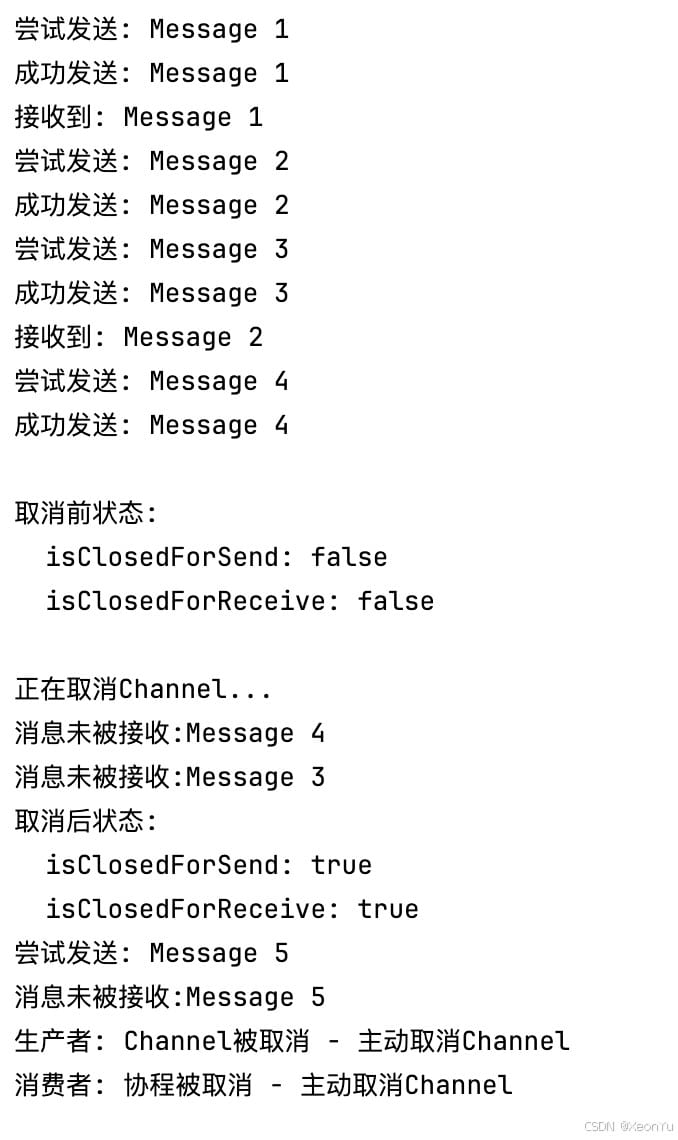
cancel() 方法用于强制取消 channel,它会:
- 立即关闭发送和接收端
- 清空缓冲区中的所有数据
- 触发
onundeliveredelement回调(如果设置了)
suspend fun demonstratechannelcancel() {
    val channel = channel<string>(capacity = 5) {
        println("消息未被接收:${it}")
    }
    val producer = globalscope.launch {
        try {
            for (i in 1..8) {
                val message = "message $i"
                println("尝试发送: $message")
                channel.send(message)
                println("成功发送: $message")
                delay(100)
            }
        } catch (e: cancellationexception) {
            println("生产者: channel被取消 - ${e.message}")
        }
    }
    val consumer = globalscope.launch {
        try {
            for (message in channel) {
                println("接收到: $message")
                delay(300)
            }
        } catch (e: cancellationexception) {
            println("消费者: 协程被取消 - ${e.message}")
        }
    }
    delay(400) // 让一些操作执行
    println("\n取消前状态:")
    println("  isclosedforsend: ${channel.isclosedforsend}")
    println("  isclosedforreceive: ${channel.isclosedforreceive}")
    // 取消channel
    println("\n正在取消channel...")
    channel.cancel(cancellationexception("主动取消channel"))
    println("取消后状态:")
    println("  isclosedforsend: ${channel.isclosedforsend}")
    println("  isclosedforreceive: ${channel.isclosedforreceive}")
    // 等待协程完成
    producer.join()
    consumer.join()
}
channel 异常处理
在使用 channel 的过程中,会遇到各种异常情况。主要包括以下几种类型:
closedsendchannelexception
触发条件:
- 在已关闭的 channel 上调用
send()方法 - channel 调用
close()后,发送端立即关闭
示例:
suspend fun demonstrateclosedsendexception() {
    val channel = channel<string>()
    // 关闭 channel
    channel.close()
    try {
        // 尝试在已关闭的 channel 上发送数据
        channel.send("this will throw exception")
    } catch (e: closedsendchannelexception) {
        println("捕获异常: ${e.message}")
        println("异常类型: ${e::class.simplename}")
    }
}
closedreceivechannelexception
触发条件:
- 从已关闭且缓冲区为空的 channel 调用
receive()方法 - 当
isclosedforreceive为true时调用receive()
示例:
suspend fun demonstrateclosedreceiveexception() {
    val channel = channel<string>()
    // 关闭 channel
    channel.close()
    try {
        // 尝试从已关闭且空的 channel 接收数据
        val message = channel.receive()
        println("收到消息: $message")
    } catch (e: closedreceivechannelexception) {
        println("捕获异常: ${e.message}")
        println("异常类型: ${e::class.simplename}")
    }
}
cancellationexception
触发条件:
- channel 被
cancel()方法取消 - 父协程被取消,导致 channel 操作被取消
- 超时或其他取消信号
示例:
suspend fun demonstratecancellationexception() {
    val channel = channel<string>()
    val job = globalscope.launch {
        try {
            // 这个操作会被取消
            channel.send("this will be cancelled")
        } catch (e: cancellationexception) {
            println("发送操作被取消: ${e.message}")
            throw e // 重新抛出 cancellationexception
        }
    }
    delay(100)
    // 取消 channel
    channel.cancel(cancellationexception("手动取消 channel"))
    try {
        job.join()
    } catch (e: cancellationexception) {
        println("协程被取消: ${e.message}")
    }
}
异常与状态关系
| channel 状态 | send() 行为 | receive() 行为 | trysend() 行为 | tryreceive() 行为 |
|---|---|---|---|---|
| 活跃状态 | 正常发送或挂起 | 正常接收或挂起 | 返回成功/失败结果 | 返回成功/失败结果 |
| 发送端关闭 | 抛出 closedsendchannelexception | 正常接收缓冲区数据 | 返回失败结果 | 正常返回结果 |
| 接收端关闭 | 抛出 closedsendchannelexception | 抛出 closedreceivechannelexception | 返回失败结果 | 返回失败结果 |
| 已取消 | 抛出 cancellationexception | 抛出 cancellationexception | 返回失败结果 | 返回失败结果 |
异常处理技巧
使用非阻塞操作避免异常
非阻塞操作不会抛出异常,而是返回结果对象:
suspend fun safechanneloperations() {
    val channel = channel<string>()
    // 安全的发送操作
    val sendresult = channel.trysend("safe message")
    when {
        sendresult.issuccess -> println("发送成功")
        sendresult.isfailure -> println("发送失败: ${sendresult.exceptionornull()}")
        sendresult.isclosed -> println("channel 已关闭")
    }
    // 安全的接收操作
    val receiveresult = channel.tryreceive()
    when {
        receiveresult.issuccess -> println("接收到: ${receiveresult.getornull()}")
        receiveresult.isfailure -> println("接收失败: ${receiveresult.exceptionornull()}")
        receiveresult.isclosed -> println("channel 已关闭")
    }
}
健壮的异常处理
suspend fun robustchannelusage() {
    val channel = channel<string>()
    val producer = globalscope.launch {
        try {
            repeat(5) { i ->
                if (channel.isclosedforsend) {
                    println("channel 已关闭,停止发送")
                    break
                }
                channel.send("message $i")
                delay(100)
            }
        } catch (e: closedsendchannelexception) {
            println("生产者: channel 已关闭")
        } catch (e: cancellationexception) {
            println("生产者: 操作被取消")
            throw e // 重新抛出取消异常
        } finally {
            println("生产者: 清理资源")
        }
    }
    val consumer = globalscope.launch {
        try {
            while (!channel.isclosedforreceive) {
                try {
                    val message = channel.receive()
                    println("消费者: 收到 $message")
                } catch (e: closedreceivechannelexception) {
                    println("消费者: channel 已关闭且无更多数据")
                    break
                }
                delay(200)
            }
        } catch (e: cancellationexception) {
            println("消费者: 操作被取消")
            throw e
        } finally {
            println("消费者: 清理资源")
        }
    }
    delay(1000)
    channel.close()
    joinall(producer, consumer)
}
总结
channel 关键概念对比
| 特性 | rendezvous | conflated | buffered | unlimited | 自定义容量 |
|---|---|---|---|---|---|
| 容量 | 0 | 1 | 64 | int.max_value | 指定值 |
| 缓冲行为 | 无缓冲,同步 | 只保留最新值 | 有限缓冲 | 无限缓冲 | 有限缓冲 |
| 发送阻塞 | 是 | 否 | 缓冲满时 | 否 | 缓冲满时 |
| 适用场景 | 严格同步 | 状态更新 | 一般异步 | 高吞吐量 | 批量处理 |
| 内存风险 | 低 | 低 | 中等 | 高 | 可控 |
溢出策略对比
| 策略 | 行为 | 性能特点 | 适用场景 |
|---|---|---|---|
| suspend | 挂起发送操作 | 提供背压控制 | 确保数据完整性 |
| drop_oldest | 丢弃旧元素 | 发送不阻塞 | 实时数据流 |
| drop_latest | 丢弃新元素 | 发送不阻塞 | 保护历史数据 |
操作方式
| 操作类型 | 阻塞版本 | 非阻塞版本 | 异常处理 | 返回值 |
|---|---|---|---|---|
| 发送 | send() | trysend() | 抛出异常 | channelresult<unit> |
| 接收 | receive() | tryreceive() | 抛出异常 | channelresult<t> |
| 特点 | 会挂起协程 | 立即返回 | 需要 try-catch | 通过结果对象判断 |
channel 状态生命周期
| 状态 | 描述 | send() | receive() | 检查方法 |
|---|---|---|---|---|
| 活跃 | 正常工作状态 | ✅ 正常 | ✅ 正常 | - |
| 发送关闭 | 调用 close() 后 | ❌ 异常 | ✅ 可接收缓冲区数据 | isclosedforsend |
| 接收关闭 | 缓冲区清空后 | ❌ 异常 | ❌ 异常 | isclosedforreceive |
| 已取消 | 调用 cancel() 后 | ❌ 异常 | ❌ 异常 | - |
总体来说,channel 是一种非常强大的协程通信机制,它可以帮助我们在协程之间进行安全、高效的通信。在使用 channel时,我们需要注意异常处理、缓冲区容量、溢出策略等问题。
感谢阅读,如果对你有帮助请三连(点赞、收藏、加关注)支持。有任何疑问或建议,欢迎在评论区留言讨论。如需转载,请注明出处:喻志强的博客
到此这篇关于kotlin 协程之channel的概念和基本使用详解的文章就介绍到这了,更多相关kotlin 协程channel使用内容请搜索代码网以前的文章或继续浏览下面的相关文章希望大家以后多多支持代码网!




发表评论