
 我要评论
我要评论简介
本文介绍了一个基于web的sql执行工具的设计与实现,该工具允许用户通过浏览器直接执行sql语句并查看结果。系统采用前后端分离架构,后端基于spring boot框架实现sql执行引擎,前端使用vue.js构建用户界面。该系统提供了直观的sql编辑器、数据库表管理、历史查询记录和结果展示等功能,有效提高了数据库操作效率。
(本质就是客户端不知为何连接不上服务器的数据库,紧急情况下,手搓了一个sql 执行器)
本文介绍的网页版sql执行工具,通过整合spring boot后端与vue前端,实现了数据库管理的范式转移,将复杂操作转化为直观的web界面体验。
技术架构解析
后端核心设计:
import org.slf4j.logger;
import org.slf4j.loggerfactory;
import org.springframework.beans.factory.annotation.autowired;
import org.springframework.jdbc.core.connectioncallback;
import org.springframework.jdbc.core.jdbctemplate;
import org.springframework.jdbc.core.resultsetextractor;
import org.springframework.web.bind.annotation.*;

import java.sql.databasemetadata;
import java.sql.resultset;
import java.sql.resultsetmetadata;
import java.util.*;

/**
 * @author:derek_smart
 * @date:2025/8/4 17:17
 */
@restcontroller
@requestmapping("/sqlutil")
public class sqlutilresource {

    @autowired
    private jdbctemplate jdbctemplate;

    private final logger logger = loggerfactory.getlogger(sqlutilresource.class);

    @postmapping("/executesqlp")
    public map<string, object> executesqlp(@requestbody sqlrequest request) {
        try {
            string sql = request.getsql();
            list<object> params = request.getparams();

            if (sql.trim().touppercase().startswith("select")) {
                // 查询操作
                list<map<string, object>> result = jdbctemplate.query(sql, params.toarray(), (rs, rownum) -> {
                    map<string, object> row = new linkedhashmap<>();
                    resultsetmetadata metadata = rs.getmetadata();
                    int columncount = metadata.getcolumncount();
                    for (int i = 1; i <= columncount; i++) {
                        string columnname = metadata.getcolumnlabel(i);
                        row.put(columnname, rs.getobject(i));
                    }
                    return row;
                });

                return createsuccessresponse(result);
            } else {
                // 更新操作
                int affectedrows = jdbctemplate.update(sql, params.toarray());
                return createsuccessresponse(collections.singletonmap("affectedrows", affectedrows));
            }
        } catch (exception e) {
            logger.error("sql执行错误: {}", e.getmessage(), e);
            return createerrorresponse("sql执行错误: " + e.getmessage());
        }
    }


    @postmapping("/executesql")
    public map<string, object> executesql(@requestbody sqlrequest request) {
        try {
            string sql = request.getsql();
            list<object> params = request.getparams();

            if (sql.trim().touppercase().startswith("select")) {
                // 查询操作 - 返回列和行数据
                return handlequery(sql, params);
            } else {
                // 更新操作 - 返回受影响行数
                return handleupdate(sql, params);
            }
        } catch (exception e) {
            logger.error("sql执行错误: {}", e.getmessage(), e);
            return createerrorresponse("sql执行错误: " + e.getmessage());
        }
    }


    /**
     * 获取数据库所有表名
     * @return 表名列表
     */
    @getmapping("/gettables")
    public map<string, object> getdatabasetables() {
        try {
            return jdbctemplate.execute((connectioncallback<map<string, object>>) connection -> {
                databasemetadata metadata = connection.getmetadata();
                // 获取所有表名(不包含系统表)
                resultset tables = metadata.gettables(
                        null, null, null, new string[]{"table"});

                list<string> tablenames = new arraylist<>();
                while (tables.next()) {
                    string tablename = tables.getstring("table_name");
                    tablenames.add(tablename);
                }

                // 按字母顺序排序
                collections.sort(tablenames);

                // 构建响应
                map<string, object> response = new linkedhashmap<>();
                response.put("success", true);
                response.put("data", tablenames);
                return response;
            });
        } catch (exception e) {
            logger.error("获取数据库表失败: {}", e.getmessage(), e);
            map<string, object> errorresponse = new linkedhashmap<>();
            errorresponse.put("success", false);
            errorresponse.put("message", "获取数据库表失败: " + e.getmessage());
            return errorresponse;
        }
    }


    private map<string, object> handlequery(string sql, list<object> params) {
        try {
            return jdbctemplate.query(sql, params.toarray(), (resultsetextractor<map<string, object>>) rs -> {
                resultsetmetadata metadata = rs.getmetadata();
                int columncount = metadata.getcolumncount();

                // 获取列名
                list<string> columns = new arraylist<>();
                for (int i = 1; i <= columncount; i++) {
                    columns.add(metadata.getcolumnlabel(i));
                }

                // 获取行数据
                list<list<object>> rows = new arraylist<>();
                while (rs.next()) {
                    list<object> row = new arraylist<>();
                    for (int i = 1; i <= columncount; i++) {
                        row.add(rs.getobject(i));
                    }
                    rows.add(row);
                }

                // 构建响应
                map<string, object> data = new linkedhashmap<>();
                data.put("columns", columns);
                data.put("rows", rows);

                map<string, object> response = new linkedhashmap<>();
                response.put("success", true);
                response.put("data", data);
                return response;
            });
        } catch (exception e) {
            logger.error("查询处理失败: {}", e.getmessage(), e);
            return createerrorresponse("查询处理失败: " + e.getmessage());
        }
    }


    private map<string, object> handleupdate(string sql, list<object> params) {
        int affectedrows = jdbctemplate.update(sql, params.toarray());

        map<string, object> data = new linkedhashmap<>();
        data.put("affectedrows", affectedrows);

        map<string, object> response = new linkedhashmap<>();
        response.put("success", true);
        response.put("data", data);
        return response;
    }

    // 创建成功响应
    private map<string, object> createsuccessresponse(object data) {
        map<string, object> response = new linkedhashmap<>();
        response.put("success", true);
        response.put("timestamp", system.currenttimemillis());
        response.put("data", data);
        return response;
    }

    // 创建错误响应
    private map<string, object> createerrorresponse(string message) {
        map<string, object> response = new linkedhashmap<>();
        response.put("success", false);
        response.put("timestamp", system.currenttimemillis());
        response.put("message", message);
        return response;
    }

    public static class sqlrequest {
        private string sql;
        private list<object> params = new arraylist<>();

        // getters and setters
        public string getsql() {
            return sql;
        }

        public void setsql(string sql) {
            this.sql = sql;
        }

        public list<object> getparams() {
            return params;
        }

        public void setparams(list<object> params) {
            this.params = params;
        }
    }
}
后端采用策略模式实现sql路由,自动区分查询与更新操作。通过jdbc元数据接口实现数据库自发现能力,为前端提供结构化数据支撑。
前端创新交互:
<template>
  <!-- 双面板设计 -->
  <div class="editor-container">
    <!-- 元数据导航区 -->
    <div class="sidebar">
      <div v-for="table in tables" @click="selecttable(table)">
        <i class="fas fa-table"></i> {{ table }}
      </div>
    </div>

    <!-- sql工作区 -->
    <textarea
      v-model="sqlquery"
      @keydown.ctrl.enter="executesql"></textarea>

    <!-- 智能结果渲染 -->
    <el-table :data="result.data.rows">
      <el-table-column
        v-for="(column, index) in result.data.columns"
        :label="column">
        <template v-slot="scope">
          <span v-if="scope.row[index] === null" class="null-value">null</span>
          <span v-else-if="typeof scope.row[index] === 'object'"
                @click="showjsondetail(scope.row[index])">
            {{ jsonpreview(scope.row[index]) }}
          </span>
        </template>
      </el-table-column>
    </el-table>
  </div>
</template>
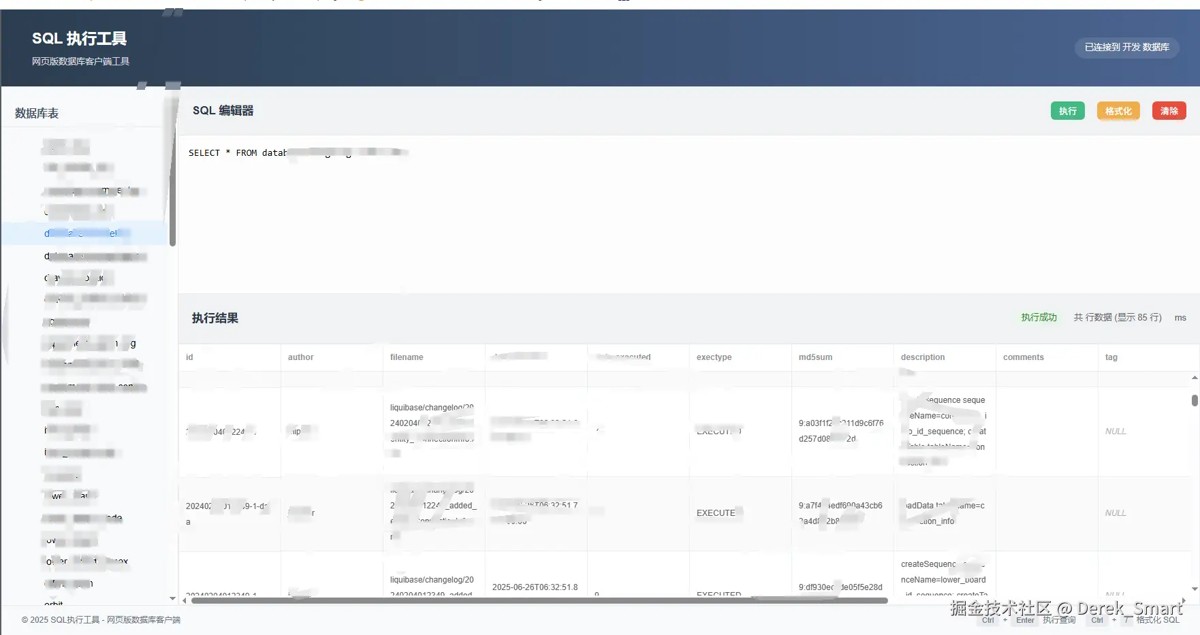
前端实现三区域布局:元数据导航、sql编辑器和智能结果面板。采用动态类型检测技术,对null值、json对象等特殊数据类型进行可视化区分处理。
核心技术亮点
实时元数据发现
- 自动加载数据库表结构
- 表名智能排序与即时搜索
- 点击表名自动生成select模板
智能sql处理
// sql执行核心逻辑
async executesql() {
  const paginatedsql = this.addpagination(this.sqlquery);
  const response = await executesql(paginatedsql);

  // 高级结果处理
  if (response.success) {
    this.result = {
      ...response,
      data: {
        ...response.data,
        executiontime: date.now() - starttime
      }
    }
  }
}
- 自动分页机制
- 执行耗时精准统计
- 语法错误实时反馈
历史版本管理
// 历史记录管理
addtohistory(sql) {
  if (this.history.includes(sql)) return;
  this.history.unshift(sql);
  localstorage.setitem('sqlhistory', json.stringify(this.history));
}
本地存储自动持久化
智能去重机制
一键恢复历史查询
数据可视化增强
- json对象折叠预览
- null值特殊标识
- 分页控件动态加载
性能优化策略
查询优化
- 自动追加limit子句
- 分页查询按需加载
- 结果集流式处理
缓存机制
// 表结构缓存
async fetchdatabasetables() {
  if (this.cachedtables) return this.cachedtables;
  const response = await fetchtables();
  this.cachedtables = response.data;
}
完整vue代码:
<template>
  <div class="sql-executor-container">
    <!-- 头部 -->
    <header>
      <div class="logo">
        <i class="fas fa-database logo-icon"></i>
        <div>
          <h1>sql 执行工具</h1>
          <p>网页版数据库客户端工具</p>
        </div>
      </div>
      <div class="connection-info">
        <i class="fas fa-plug"></i> 已连接到 {{ connectionname }} 数据库
      </div>
    </header>

    <!-- 主体内容 -->
    <div class="main-content">
      <!-- 侧边栏 -->
      <div class="sidebar">
        <div class="sidebar-section">
          <h3>数据库表</h3>
          <div
              v-for="table in tables"
              :key="table"
              class="schema-item"
              :class="{ active: selectedtable === table }"
              @click="selecttable(table)"
          >
            <i class="fas fa-table"></i> {{ table }}
          </div>
        </div>

        <div class="sidebar-section">
          <h3>历史查询</h3>
          <div
              v-for="(query, index) in history"
              :key="index"
              class="schema-item history-item"
              @click="loadhistoryquery(query)"
          >
            <i class="fas fa-history"></i> {{ query.substring(0, 40) }}{{ query.length > 40 ? '...' : '' }}
          </div>
        </div>
      </div>

      <!-- 编辑器区域 -->
      <div class="editor-container">
        <div class="sql-editor-container">
          <div class="sql-editor-header">
            <h2>sql 编辑器</h2>
            <div class="toolbar">
              <el-button
                  class="toolbar-btn run"
                  @click="executesql"
                  :loading="loading"
              >
                <i class="fas fa-play"></i> 执行
              </el-button>
              <el-button
                  class="toolbar-btn format"
                  @click="formatsql"
              >
                <i class="fas fa-indent"></i> 格式化
              </el-button>
              <el-button
                  class="toolbar-btn clear"
                  @click="cleareditor"
              >
                <i class="fas fa-trash-alt"></i> 清除
              </el-button>
            </div>
          </div>
          <textarea
              class="sql-editor"
              v-model="sqlquery"
              placeholder="输入 sql 语句,例如:select * from table_name"
              @keydown.ctrl.enter="executesql"
          ></textarea>
        </div>

        <!-- 结果区域 -->
        <div class="result-container">
          <div class="result-header">
            <h2>执行结果</h2>
            <div class="result-info">
              <div
                  class="result-status"
                  :class="result.success ? 'status-success' : 'status-error'"
                  v-if="result"
              >
                {{ result.success ? '执行成功' : '执行失败' }}
              </div>
              <div class="rows-count" v-if="result && result.success">
                共 {{ result.data.total }} 行数据 (显示 {{ result.data.rows.length }} 行)
              </div>
              <div class="execution-time" v-if="result && result.success">
                <i class="fas fa-clock"></i> {{ result.data.executiontime }} ms
              </div>
            </div>
          </div>

          <div class="result-content">
            <!-- 加载状态 -->
            <div v-if="loading" class="no-data">
              <i class="el-icon-loading" style="font-size: 48px;"></i>
              <p>正在执行查询...</p>
            </div>

            <!-- 查询结果 -->
            <div v-else-if="result && result.success && result.data.rows.length > 0" class="table-container">
              <div class="table-wrapper">
                <el-table
                    :data="result.data.rows"
                    height="100%"
                    style="width: 100%"
                    stripe
                    border
                    size="small"
                    :default-sort = "{prop: 'id', order: 'ascending'}"
                >
                  <el-table-column
                      v-for="(column, index) in result.data.columns"
                      :key="index"
                      :prop="'row.' + index"
                      :label="column"
                      min-width="150"
                  >
<!--                    <template slot-scope="scope">
                      <span v-if="scope.row[column] === null" class="null-value">null</span>
                      <span v-else-if="typeof scope.row[column] === 'object'" class="json-value" @click="showjsondetail(scope.row[column])">
                        {{ jsonpreview(scope.row[column]) }}
                      </span>
                      <span v-else>{{ scope.row[column] }}</span>
                    </template>-->

                    <template slot-scope="scope">
                      <span v-if="scope.row[index] === null" class="null-value">null</span>
                      <span v-else-if="typeof scope.row[index] === 'object'" class="json-value" @click="showjsondetail(scope.row[index])">
                      {{ jsonpreview(scope.row[index]) }}
                    </span>
                      <span v-else>{{ scope.row[index] }}</span>
                    </template>

                  </el-table-column>
                </el-table>
              </div>

              <!-- 分页控件 -->
              <el-pagination
                  v-if="result.data.total > pagesize"
                  @size-change="handlesizechange"
                  @current-change="handlecurrentchange"
                  :current-page="currentpage"
                  :page-sizes="[10, 20, 50, 100]"
                  :page-size="pagesize"
                  layout="total, sizes, prev, pager, next, jumper"
                  :total="result.data.total"
                  class="pagination"
              >
              </el-pagination>
            </div>

            <!-- 空结果 -->
            <div v-else-if="result && result.success && result.data.rows.length === 0" class="no-data">
              <i class="el-icon-inbox" style="font-size: 48px;"></i>
              <p>未查询到数据</p>
            </div>

            <!-- 错误信息 -->
            <div v-else-if="result && !result.success" class="error-container">
              <div class="error-header">
                <i class="el-icon-warning-outline" style="font-size: 20px;"></i>
                <h3>sql 执行错误</h3>
              </div>
              <div class="error-details">
                {{ result.message }}
              </div>
            </div>

            <!-- 初始状态 -->
            <div v-else class="no-data">
              <i class="el-icon-document" style="font-size: 48px;"></i>
              <p>输入 sql 并执行以查看结果</p>
            </div>
          </div>
        </div>
      </div>
    </div>

    <!-- 页脚 -->
    <div class="footer">
      <div class="copyright">
        © {{ new date().getfullyear() }} sql执行工具 - 网页版数据库客户端
      </div>
      <div class="shortcuts">
        <div class="shortcut-item">
          <span class="key">ctrl</span> + <span class="key">enter</span> 执行查询
        </div>
        <div class="shortcut-item">
          <span class="key">ctrl</span> + <span class="key">/</span> 格式化 sql
        </div>
      </div>
    </div>

    <!-- json 详情弹窗 -->
    <el-dialog
        title="json 详情"
        :visible.sync="showjsonmodal"
        width="70%"
        top="5vh"
    >
      <pre class="json-content">{{ formatjson(currentjson) }}</pre>
      <span slot="footer" class="dialog-footer">
        <el-button type="primary" @click="showjsonmodal = false">关 闭</el-button>
      </span>
    </el-dialog>
  </div>
</template>

<script>
import { fetchtables, executesql } from '@/api/sqlutil/sqlutil';

export default {
  name: 'sqlutil',
  data() {
    return {
      sqlquery: '',
      result: null,
      loading: false,
      tables: [],
      selectedtable: null,
      history: [],
      showjsonmodal: false,
      currentjson: null,
      connectionname: '生产',
      currentpage: 1,
      pagesize: 20
    }
  },
  mounted() {
    // 从本地存储加载历史记录
    const savedhistory = localstorage.getitem('sqlhistory');
    if (savedhistory) {
      this.history = json.parse(savedhistory);
    }

    // 获取当前连接信息
    this.getconnectioninfo();

    // 获取数据库表
    this.fetchdatabasetables();
  },
  methods: {
    async fetchdatabasetables() {
      try {
        this.loading = true;
        const response = await fetchtables();
        this.tables = response.data || [];
        if (this.tables.length > 0) {
          this.selectedtable = this.tables[0];
          this.sqlquery = `select * from ${this.selectedtable}`;
        }
      } catch (error) {
        console.error('获取数据库表失败:', error);
        this.$message.error('获取数据库表失败: ' + error.message);
      } finally {
        this.loading = false;
      }
    },

    async executesql() {
      if (!this.sqlquery.trim()) {
        this.result = {
          success: false,
          message: 'sql 语句不能为空'
        };
        return;
      }

      this.loading = true;
      this.result = null;

      try {
        // 添加分页参数
        const paginatedsql = this.addpagination(this.sqlquery);
        const response = await executesql(paginatedsql);
        this.result = response;

        // 保存到历史记录
        this.addtohistory(this.sqlquery);
      } catch (error) {
        this.result = {
          success: false,
          message: `请求失败: ${error.message || error}`
        };
      } finally {
        this.loading = false;
      }
    },

    // 添加分页到sql
    addpagination(sql) {
      // 如果是select查询,添加分页
      /*if (sql.trim().touppercase().startswith('select')) {
        const offset = (this.currentpage - 1) * this.pagesize;
        return `${sql} limit ${offset}, ${this.pagesize}`;
      }*/
      return sql;
    },

    handlesizechange(val) {
      this.pagesize = val;
      this.currentpage = 1;
      if (this.sqlquery.trim()) {
        this.executesql();
      }
    },

    handlecurrentchange(val) {
      this.currentpage = val;
      if (this.sqlquery.trim()) {
        this.executesql();
      }
    },

    // 获取数据库连接信息
    getconnectioninfo() {
      // 这里可以根据实际情况从api获取或从配置读取
      const env = process.env.node_env;
      this.connectionname = env === 'production' ? '生产' :
          env === 'staging' ? '预发布' : '开发';
    },

    formatsql() {
      // 简单的 sql 格式化
      this.sqlquery = this.sqlquery
          .replace(/\b(select|from|where|and|or|order by|group by|having|insert|update|delete|join|inner join|left join|right join|on|as|limit)\b/gi, '\n$1')
          .replace(/,/g, ',\n')
          .replace(/;/g, ';\n')
          .replace(/\n\s+\n/g, '\n')
          .trim();
    },

    cleareditor() {
      this.sqlquery = '';
      this.result = null;
    },

    selecttable(table) {
      this.selectedtable = table;
      this.sqlquery = `select * from ${table} limit 100`;
    },

    addtohistory(sql) {
      // 避免重复添加
      if (this.history.includes(sql)) return;

      this.history.unshift(sql);

      // 限制历史记录数量
      if (this.history.length > 10) {
        this.history.pop();
      }

      // 保存到本地存储
      localstorage.setitem('sqlhistory', json.stringify(this.history));
    },

    loadhistoryquery(sql) {
      this.sqlquery = sql;
    },

    jsonpreview(obj) {
      try {
        const str = json.stringify(obj);
        return str.length > 50 ? str.substring(0, 47) + '...' : str;
      } catch {
        return '[object]';
      }
    },

    showjsondetail(obj) {
      this.currentjson = obj;
      this.showjsonmodal = true;
    },

    formatjson(obj) {
      return json.stringify(obj, null, 2);
    }
  }
}
</script>

<style scoped>
.sql-executor-container {
  display: flex;
  flex-direction: column;
  height: 100vh;
  max-width: 100%;
  margin: 0 auto;
  background-color: rgba(255, 255, 255, 0.95);
  overflow: hidden;
}

header {
  background: linear-gradient(90deg, #2c3e50, #4a6491);
  color: white;
  padding: 15px 30px;
  display: flex;
  justify-content: space-between;
  align-items: center;
  flex-shrink: 0;
}

.logo {
  display: flex;
  align-items: center;
  gap: 15px;
}

.logo-icon {
  font-size: 28px;
  color: #42b983;
}

.logo h1 {
  font-weight: 600;
  font-size: 22px;
}

.logo p {
  opacity: 0.8;
  font-size: 13px;
  margin-top: 4px;
}

.connection-info {
  background: rgba(255, 255, 255, 0.1);
  padding: 8px 15px;
  border-radius: 20px;
  font-size: 13px;
}

.main-content {
  display: flex;
  flex: 1;
  min-height: 0;
  overflow: hidden;
}

.sidebar {
  width: 260px;
  background: #f8f9fa;
  border-right: 1px solid #eaeaea;
  padding: 15px 0;
  overflow-y: auto;
  flex-shrink: 0;
}

.sidebar-section {
  margin-bottom: 20px;
}

.sidebar-section h3 {
  padding: 0 20px 10px;
  font-size: 16px;
  color: #4a5568;
  border-bottom: 1px solid #eaeaea;
  margin-bottom: 12px;
}

.schema-item {
  padding: 8px 20px 8px 35px;
  cursor: pointer;
  transition: all 0.2s;
  position: relative;
  font-size: 14px;
  display: flex;
  align-items: center;
  gap: 8px;
}

.schema-item i {
  font-size: 14px;
  width: 20px;
}

.schema-item:hover {
  background: #e9ecef;
}

.schema-item.active {
  background: #e3f2fd;
  color: #1a73e8;
  font-weight: 500;
}

.history-item {
  font-size: 13px;
  color: #666;
}

.editor-container {
  flex: 1;
  display: flex;
  flex-direction: column;
  min-width: 0;
  overflow: hidden;
}

.sql-editor-container {
  flex: 0 0 40%;
  display: flex;
  flex-direction: column;
  border-bottom: 1px solid #eaeaea;
  min-height: 200px;
  overflow: hidden;
}

.sql-editor-header {
  padding: 12px 20px;
  background: #f1f3f4;
  display: flex;
  justify-content: space-between;
  align-items: center;
  border-bottom: 1px solid #eaeaea;
  flex-shrink: 0;
}

.sql-editor-header h2 {
  font-size: 17px;
  color: #2d3748;
}

.toolbar {
  display: flex;
  gap: 8px;
}

.toolbar-btn {
  padding: 7px 12px;
  border: none;
  border-radius: 6px;
  background: #4a6491;
  color: white;
  cursor: pointer;
  display: flex;
  align-items: center;
  gap: 5px;
  font-size: 13px;
  transition: all 0.2s;
}

.toolbar-btn:hover {
  opacity: 0.9;
  transform: translatey(-1px);
}

.toolbar-btn i {
  font-size: 13px;
}

.toolbar-btn.run {
  background: #42b983;
}

.toolbar-btn.format {
  background: #f0ad4e;
}

.toolbar-btn.clear {
  background: #e74c3c;
}

.sql-editor {
  flex: 1;
  padding: 15px;
  font-family: 'fira code', 'consolas', monospace;
  font-size: 14px;
  line-height: 1.5;
  border: none;
  resize: none;
  outline: none;
  background: #fcfcfc;
  min-height: 100px;
  overflow: auto;
}

.result-container {
  flex: 1;
  display: flex;
  flex-direction: column;
  min-height: 0;
  overflow: hidden;
}

.result-header {
  padding: 12px 20px;
  background: #f1f3f4;
  display: flex;
  justify-content: space-between;
  align-items: center;
  border-bottom: 1px solid #eaeaea;
  flex-shrink: 0;
}

.result-header h2 {
  font-size: 17px;
  color: #2d3748;
}

.result-info {
  display: flex;
  align-items: center;
  gap: 15px;
  font-size: 13px;
}

.result-status {
  padding: 4px 10px;
  border-radius: 20px;
  font-size: 13px;
  font-weight: 500;
}

.status-success {
  background: #e8f5e9;
  color: #2e7d32;
}

.status-error {
  background: #ffebee;
  color: #c62828;
}

.rows-count, .execution-time {
  color: #5f6368;
  display: flex;
  align-items: center;
  gap: 4px;
}

.result-content {
  flex: 1;
  overflow: auto;
  position: relative;
  min-height: 0;
}

.table-container {
  display: flex;
  flex-direction: column;
  height: 100%;
}

.table-wrapper {
  flex: 1;
  overflow: auto;
  min-height: 200px;
}

.el-table {
  width: 100%;
  min-width: 1000px;
}

.pagination {
  padding: 10px 15px;
  border-top: 1px solid #ebeef5;
  background: #fff;
  display: flex;
  justify-content: flex-end;
}

.null-value {
  color: #b0b0b0;
  font-style: italic;
}

.json-value {
  color: #d35400;
  cursor: pointer;
  text-decoration: underline dotted;
}

.no-data {
  position: absolute;
  top: 50%;
  left: 50%;
  transform: translate(-50%, -50%);
  text-align: center;
  color: #909399;
  font-size: 14px;
}

.error-container {
  padding: 20px;
  background-color: #ffebee;
  border-radius: 8px;
  margin: 20px;
  color: #c62828;
}

.error-header {
  display: flex;
  align-items: center;
  gap: 10px;
  margin-bottom: 10px;
}

.error-details {
  font-family: monospace;
  font-size: 14px;
  white-space: pre-wrap;
  background: rgba(255, 255, 255, 0.7);
  padding: 15px;
  border-radius: 6px;
  margin-top: 10px;
  overflow-x: auto;
}

.footer {
  padding: 12px 30px;
  background: #f8f9fa;
  border-top: 1px solid #eaeaea;
  display: flex;
  justify-content: space-between;
  align-items: center;
  font-size: 12px;
  color: #6c757d;
  flex-shrink: 0;
}

.shortcuts {
  display: flex;
  gap: 15px;
}

.shortcut-item {
  display: flex;
  align-items: center;
  gap: 5px;
}

.key {
  background: #e9ecef;
  padding: 3px 8px;
  border-radius: 4px;
  font-weight: 500;
  font-size: 11px;
}

.json-content {
  background: #f8f8f8;
  padding: 15px;
  border-radius: 4px;
  max-height: 70vh;
  overflow: auto;
  font-family: monospace;
  line-height: 1.5;
  font-size: 14px;
}

@media (max-width: 992px) {
  .main-content {
    flex-direction: column;
  }

  .sidebar {
    width: 100%;
    border-right: none;
    border-bottom: 1px solid #eaeaea;
    height: 200px;
    overflow: auto;
  }

  .result-info {
    flex-wrap: wrap;
    gap: 8px;
  }
}

@media (max-width: 768px) {
  header {
    flex-direction: column;
    gap: 10px;
    text-align: center;
  }

  .logo {
    flex-direction: column;
    gap: 5px;
  }

  .connection-info {
    margin-top: 5px;
  }

  .toolbar {
    flex-wrap: wrap;
    justify-content: center;
  }

  .footer {
    flex-direction: column;
    gap: 10px;
  }
}
</style>
import request from '@/utils/request'


export function executesql(sql) {
    return request({
        url: '/sqlutil/executesql',
        method: 'post',
        data: { sql: sql }
    })
}


export function fetchtables() {
    return request({
        url: '/sqlutil/gettables',
        method: 'get'
    })
}
import {message} from 'element-ui'
import axios from 'axios'

axios.defaults.headers.post['content-type'] = 'application/json;charset=utf-8'
import store from "@/store";
import router from '@/router';
// create an axios instance
const service = axios.create({
    baseurl: `http://127.0.0.1:8080`,
    timeout: 75000,
})

export default service
效果:
总结
该sql执行工具通过四大创新设计重塑了数据库交互体验:
- 元数据驱动:将数据库结构转化为可视化导航
- 上下文感知:自动识别sql类型并优化执行
- 渐进式渲染:平衡大数据量与用户体验
- 历史时空隧道:完整记录操作轨迹
到此这篇关于基于springboot与vue开发web版sql执行工具的文章就介绍到这了,更多相关springboot开发sql执行工具内容请搜索代码网以前的文章或继续浏览下面的相关文章希望大家以后多多支持代码网!



发表评论