
 我要评论
我要评论一、ini文件基础与python环境
1. ini文件简介
ini(initialization)文件是一种经典的配置文件格式:
- 基础结构:节(section)、键(key)、值(value)
- 主要特点:
- 人类可读的纯文本格式
- 简单直观的分层结构
- 广泛的应用支持(windows系统、各类应用)
- 适用场景:
- 应用程序配置
- 系统参数设置
- 简单的数据持久化
2. 典型ini文件结构
; 这是注释行
[database]  ; 节(section)
host = localhost  ; 键(key) = 值(value)
port = 5432
user = admin
password = secret123  ; 包含特殊字符的值

[logging]
level = debug
file = /var/log/app.log
max_size = 10  ; 单位:mb

[features]
enabled = true
modules = core, auth, api
3. python标准库支持
import configparser
configparser是python标准库的一部分,无需额外安装,支持:
- python 2.x和3.x全版本兼容
- 丰富的类型转换
- 安全的插值(interpolation)功能
- 灵活的读写选项
二、核心功能函数详解
1. 文件读取操作
configparser.read(filenames, encoding=none)
功能:读取并解析 ini 文件
参数:
filenames:文件路径(字符串或列表)encoding:文件编码(默认为系统编码)
返回:成功加载的文件列表
特点:- 支持多个文件输入
- 自动跳过不存在文件
案例:
import configparser

config = configparser.configparser()
loaded_files = config.read(['app.ini', 'user.ini'], encoding='utf-8')
print(f"成功加载文件: {loaded_files}")
configparser.get(section, option, *, raw=false, vars=none, fallback)
功能:获取配置项的值
参数:
section:配置节名称option:配置项名称fallback:未找到时的默认值raw:禁用插值处理vars:额外的变量字典
返回:配置项的字符串值
案例:
# 获取数据库端口(带默认值)
db_port = config.get('database', 'port', fallback='5432')
print(f"数据库端口: {db_port}")

# 禁用插值处理
log_file = config.get('logging', 'file_path', raw=true)
2. 类型安全获取
configparser.getint(section, option, **kwargs)
功能:获取整型配置值
参数:同 get()
返回:整数类型值
案例:
max_users = config.getint('system', 'max_users', fallback=100)
print(f"最大用户数: {max_users}")
configparser.getfloat(section, option, **kwargs)
功能:获取浮点型配置值
参数:同 get()
返回:浮点数类型值
案例:
mem_limit = config.getfloat('resources', 'memory_limit', fallback=0.75)
print(f"内存限制: {mem_limit}")
configparser.getboolean(section, option, **kwargs)
功能:获取布尔型配置值
参数:同 get()
支持的值:
'1', 'yes', 'true', 'on'→true'0', 'no', 'false', 'off'→false
案例:
debug_mode = config.getboolean('debug', 'enabled', fallback=false)
print(f"调试模式: {debug_mode}")
3. 文件写入操作
configparser.write(fileobject, space_around_delimiters=true)
功能:将配置写入文件
参数:
fileobject:文件对象space_around_delimiters:是否在等号周围添加空格
特点:保持原有顺序和注释(但注释会被丢弃)
案例:
# 更新配置并保存
config.set('database', 'host', 'new.db.example.com')

with open('app.ini', 'w', encoding='utf-8') as f:
    config.write(f, space_around_delimiters=false)  # 紧凑格式
configparser.add_section(section)
功能:添加新的配置节
参数:
section:节名称
错误:如果节已存在则抛出duplicatesectionerror
案例:
try:
    config.add_section('monitoring')
except configparser.duplicatesectionerror:
    print("监控节已存在")

config.set('monitoring', 'interval', '60')
4. 实用工具函数
configparser.has_section(section)
功能:检查节是否存在
返回:布尔值
案例:
if not config.has_section('backup'):
    config.add_section('backup')
configparser.has_option(section, option)
功能:检查选项是否存在
返回:布尔值
案例:
if config.has_option('logging', 'verbosity'):
    level = config.get('logging', 'verbosity')
configparser.items(section, raw=false, vars=none)
功能:获取节的所有键值对
返回:(name, value) 元组列表
案例:
print("数据库配置:")
for key, value in config.items('database'):
    print(f"  {key} = {value}")
三、高级特性与配置处理
1. 插值(值引用)处理
extendedinterpolation()
功能:支持跨节的值引用
语法:${section:option} 或 $option(当前节)
案例:
config = configparser.configparser(interpolation=configparser.extendedinterpolation())

config['default'] = {'app_root': '/opt/myapp'}
config['database'] = {
    'data_dir': '/var/data',
    'backup_dir': '${app_root}/backup'  # 引用默认值
}
config['logging'] = {
    'log_dir': '${database:data_dir}/logs',  # 跨节引用
    'file': '${log_dir}/app.log'  # 当前节引用
}

# 验证引用
print(config['logging']['file'])  # 输出: /var/data/logs/app.log
2. default 特殊节
全局默认值机制
功能:
- 所有节继承 default 的键值
- 节内同名键值覆盖 default
案例:
[default]
timeout = 30
retries = 3

[database]
host = localhost
timeout = 60  # 覆盖默认值

[api]
; 继承默认超时30和重试3
endpoint = /api/v1
# 验证继承
print(config['api']['timeout'])  # 输出: 30
print(config['database']['retries'])  # 输出: 3
3. 多级配置管理
分层配置处理
功能:实现基础配置 + 环境覆盖配置
方案:创建配置管理器类
class layeredconfig:
    def __init__(self):
        self.base = configparser.configparser()
        self.override = configparser.configparser()

    def load(self, base_file, override_file=none):
        self.base.read(base_file, encoding='utf-8')
        if override_file:
            self.override.read(override_file, encoding='utf-8')

    def get(self, section, option, default=none):
        # 1. 检查覆盖配置
        if self.override.has_option(section, option):
            return self.override.get(section, option)
        # 2. 检查基础配置
        if self.base.has_option(section, option):
            return self.base.get(section, option)
        # 3. 返回默认值
        return default

# 使用示例
config = layeredconfig()
config.load('base.ini', 'production.ini')
db_host = config.get('database', 'host', 'localhost')
三、企业级最佳实践
1. 配置验证模式
from schema import schema, and, use

config_schema = schema({
    'database': {
        'host': and(str, len),
        'port': and(use(int), lambda p: 1024 < p < 65535),
        'user': str,
        'password': str
    },
    'logging': {
        'level': or('debug', 'info', 'warning', 'error'),
        'file': str
    }
})

def validate_config(config):
    """验证配置是否符合预期模式"""
    # 转换为普通字典
    config_dict = {}
    for section in config.sections():
        config_dict[section] = dict(config.items(section))

    # 验证
    return config_schema.validate(config_dict)

# 使用
config = configparser.configparser()
config.read('app.ini')
try:
    validate_config(config)
    print("配置验证通过")
except exception as e:
    print(f"配置错误: {e}")
2. 安全加密存储
from cryptography.fernet import fernet

class secureconfig:
    def __init__(self, key_file='secret.key'):
        self.key = self._load_key(key_file)
        self.cipher_suite = fernet(self.key)

    def _load_key(self, path):
        """加载或生成密钥"""
        if os.path.exists(path):
            with open(path, 'rb') as f:
                return f.read()
        else:
            key = fernet.generate_key()
            with open(path, 'wb') as f:
                f.write(key)
            return key

    def save_encrypted(self, config, filepath):
        """加密保存配置"""
        with stringio() as buffer:
            config.write(buffer)
            encrypted = self.cipher_suite.encrypt(buffer.getvalue().encode())

        with open(filepath, 'wb') as f:
            f.write(encrypted)

    def load_encrypted(self, filepath):
        """加载并解密配置"""
        with open(filepath, 'rb') as f:
            encrypted = f.read()

        decrypted = self.cipher_suite.decrypt(encrypted).decode()

        config = configparser.configparser()
        config.read_string(decrypted)
        return config

# 使用示例
secure = secureconfig()
config = configparser.configparser()
config['database'] = {'password': 'super_secret'}

secure.save_encrypted(config, 'config.enc')
decrypted_config = secure.load_encrypted('config.enc')
3. 热重载配置
import os
import time
import threading

class hotreloadconfig:
    def __init__(self, filepath):
        self.filepath = filepath
        self.config = configparser.configparser()
        self.last_mtime = 0
        self._lock = threading.lock()
        self.load()

        # 启动监控线程
        self.watcher = threading.thread(target=self._watch_changes, daemon=true)
        self.watcher.start()

    def load(self):
        """加载配置"""
        with self._lock:
            self.config.read(self.filepath)
            self.last_mtime = os.path.getmtime(self.filepath)

    def _watch_changes(self):
        """监控文件变化"""
        while true:
            current_mtime = os.path.getmtime(self.filepath)
            if current_mtime > self.last_mtime:
                print("检测到配置文件修改,重新加载")
                self.load()
            time.sleep(3)  # 每3秒检查一次

    def get(self, section, option, fallback=none):
        """安全获取值"""
        with self._lock:
            return self.config.get(section, option, fallback=fallback)

# 使用示例
if __name__ == '__main__':
    config = hotreloadconfig('app.ini')

    while true:
        print(f"当前调试模式: {config.get('debug', 'enabled', 'false')}")
        time.sleep(5)
四、实用案例解析
1. 应用配置中心
class appconfig:
    _instance = none

    def __new__(cls):
        if not cls._instance:
            cls._instance = super().__new__(cls)
            cls._instance._init_config()
        return cls._instance

    def _init_config(self):
        self.config = configparser.configparser()
        self.config.read('app.ini', encoding='utf-8')

        # 预加载常用配置
        self.debug_mode = self.config.getboolean('general', 'debug', fallback=false)
        self.db_params = {
            'host': self.config['database']['host'],
            'port': self.config.getint('database', 'port'),
            'user': self.config['database']['user']
        }

    def get_feature_flag(self, feature):
        """获取特性开关状态"""
        return self.config.getboolean('features', feature, fallback=false)

    def update_setting(self, section, key, value):
        """更新配置"""
        if not self.config.has_section(section):
            self.config.add_section(section)
        self.config.set(section, key, value)
        self._save()

    def _save(self):
        """保存配置并重新加载"""
        with open('app.ini', 'w', encoding='utf-8') as f:
            self.config.write(f)
        self._init_config()  # 重新初始化

# 使用示例
config = appconfig()
print("数据库主机:", config.db_params['host'])

# 动态更新配置
config.update_setting('database', 'host', 'new.host.example.com')
2. 多语言国际支持
; locales.ini
[default]
language = en_us

[en_us]
greeting = hello!
farewell = goodbye!

[zh_cn]
greeting = 你好!
farewell = 再见!

[fr_fr]
greeting = bonjour!
farewell = au revoir!
class i18nmanager:
    def __init__(self, filepath='locales.ini'):
        self.config = configparser.configparser()
        self.config.read(filepath, encoding='utf-8')

        # 获取可用语言列表
        self.languages = [s for s in self.config.sections() if s != 'default']

        # 设置当前语言
        self.current_lang = self.config.get('default', 'language')

    def set_language(self, lang_code):
        """设置当前语言"""
        if lang_code in self.languages:
            self.current_lang = lang_code
            return true
        return false

    def translate(self, key, default=none):
        """翻译文本"""
        try:
            return self.config.get(self.current_lang, key)
        except configparser.nooptionerror:
            # 尝试使用默认语言
            try:
                return self.config.get('en_us', key)
            except configparser.nooptionerror:
                return default

# 使用示例
i18n = i18nmanager()
print(i18n.translate('greeting'))  # hello!

i18n.set_language('zh_cn')
print(i18n.translate('greeting'))  # 你好!
3. 跨平台路径处理
import os
from pathlib import path

def resolve_path(config, section, key, default=none):
    """解析配置中的路径并标准化"""
    raw_path = config.get(section, key, fallback=default)
    if raw_path is none:
        return none

    # 展开用户目录
    expanded = os.path.expanduser(raw_path)

    # 跨平台路径处理
    path = path(expanded)

    # 处理环境变量
    if '$' in expanded:
        path = path(os.path.expandvars(expanded))

    return path.resolve()

# 使用示例
config = configparser.configparser()
config.read('app.ini')

log_file = resolve_path(config, 'logging', 'file', '/var/log/app.log')
data_dir = resolve_path(config, 'database', 'data_dir', '~/app_data')

print(f"日志文件位置: {log_file}")
print(f"数据目录: {data_dir}")
五、总结:核心方法速查表
1. 文件操作
| 方法 | 描述 | 参数 | 返回 |
|---|---|---|---|
| read(filenames) | 读取ini文件 | 文件路径/列表 | 成功加载的文件列表 |
| write(fileobject) | 写入配置 | 文件对象 | none |
| read_file(f) | python 3.2+ 替代方法 | 文件对象 | none |
| read_dict(dictionary) | 从字典读取配置 | 字典对象 | none |
2. 配置访问
| 方法 | 描述 | 参数 | 返回 |
|---|---|---|---|
| sections() | 获取所有节 | 无 | 节列表 |
| options(section) | 获取节所有键 | 节名称 | 键列表 |
| get(section, option) | 获取配置值 | 节, 键 | 字符串 |
| items(section) | 获取所有键值对 | 节名称 | (键,值)元组列表 |
3. 类型安全访问
| 方法 | 描述 | 返回类型 |
|---|---|---|
| getint() | 获取整数值 | int |
| getfloat() | 获取浮点值 | float |
| getboolean() | 获取布尔值 | bool |
4. 配置修改
| 方法 | 描述 | 错误 |
|---|---|---|
| add_section(section) | 添加新节 | duplicatesectionerror |
| remove_section(section) | 删除节 | nosectionerror |
| set(section, option, value) | 设置配置值 | nosectionerror |
| remove_option(section, option) | 删除配置项 | nosectionerror |
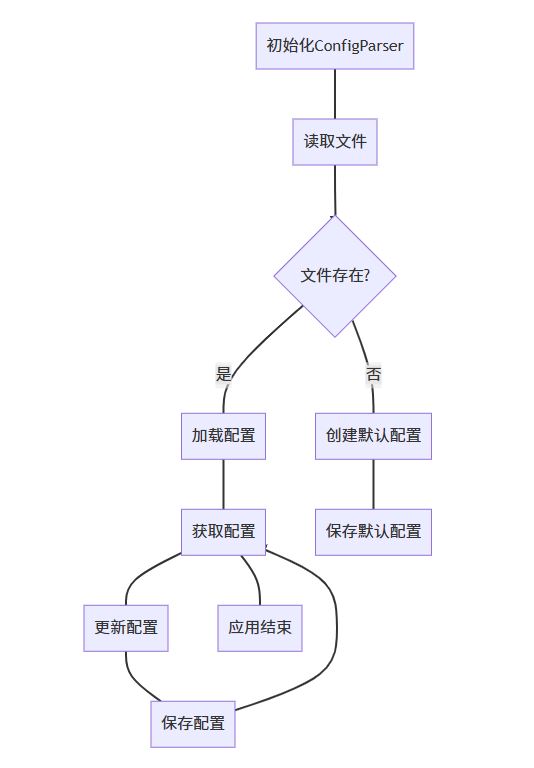
最佳实践总结:
- 使用安全访问:总是使用 get() 方法并提供 fallback 值
- 优先类型方法:使用 getint(), getboolean() 等进行类型转换
- 规范文件格式:保持统一缩进和空格风格
- 分层配置管理:使用 default 节提供全局默认值
- 配置文件加密:生产环境敏感配置应该加密存储
- 配置版本控制:ini 文件纳入版本控制系统管理
- 环境隔离:不同环境使用不同配置文件
通过掌握这些 ini 文件处理技术,您将能够构建高效可靠的配置管理系统,满足从简单应用到企业级系统的各种需求。
以上就是python ini文件读写的详细指南的详细内容,更多关于python ini文件读写的资料请关注代码网其它相关文章!






发表评论