
 我要评论
我要评论一:高德开放平台的使用
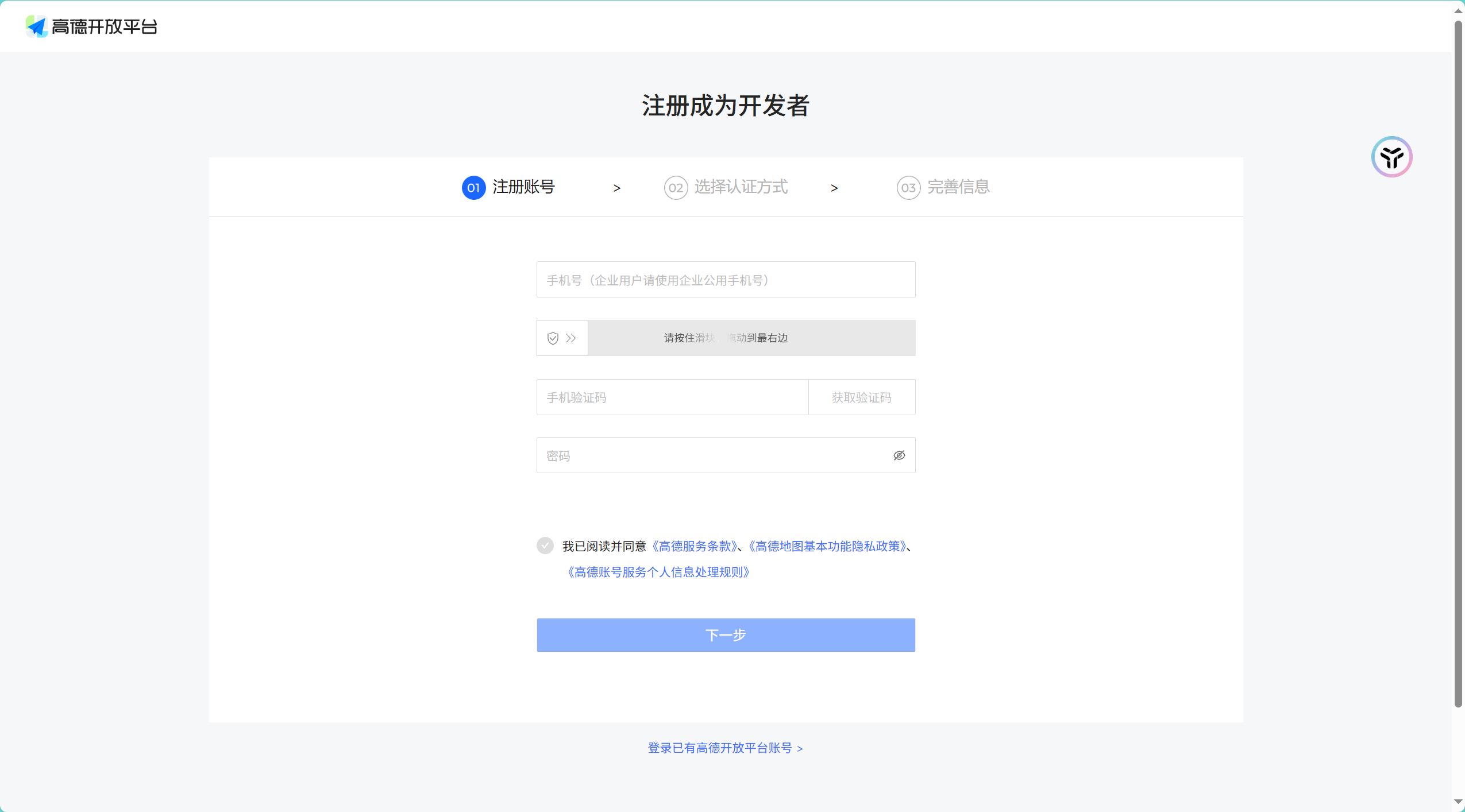
注册高德地图账号
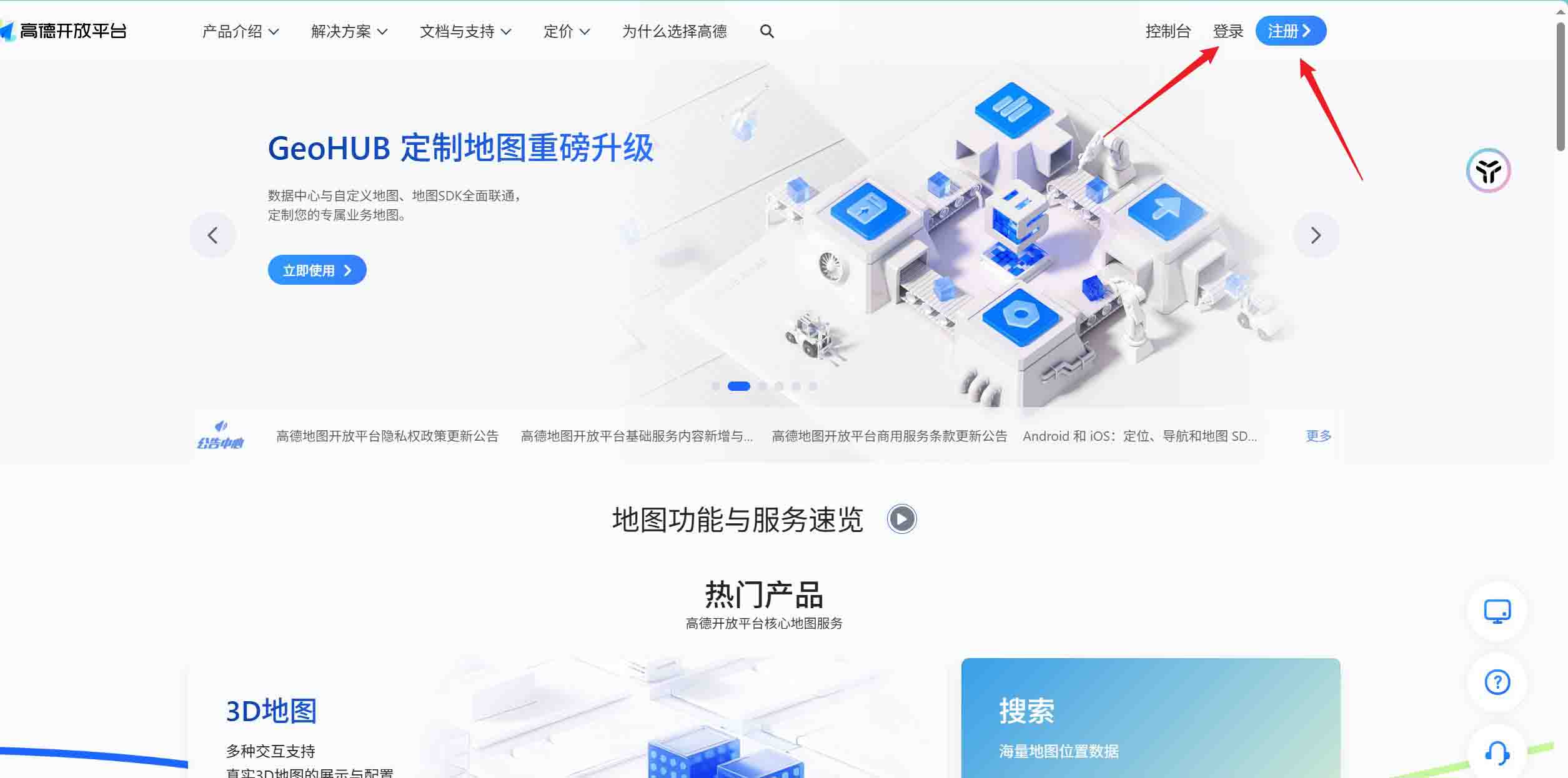
认证填写个人信息:
认证方式选择“个人认证开发者”即可,然后完善信息
认证成功之后,再次进入控制台,创建关于地图的应用
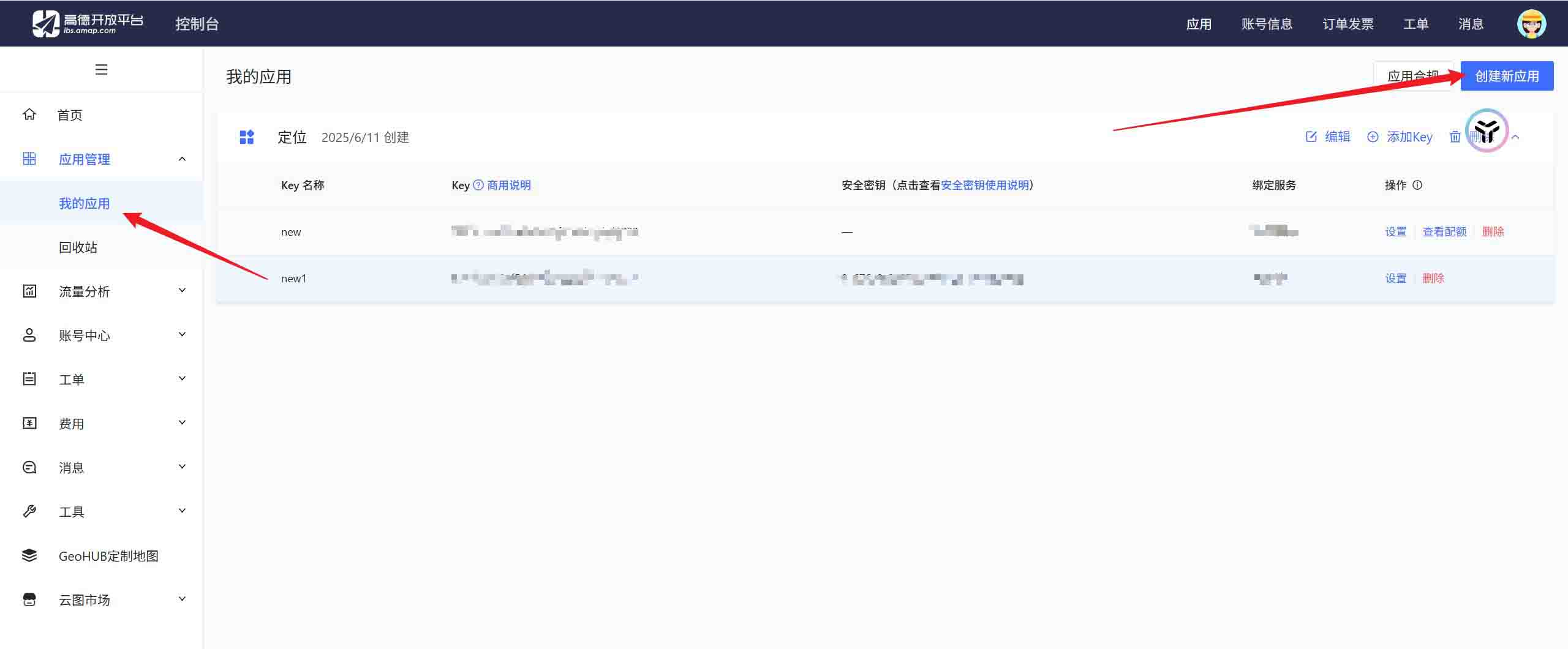
创建key(yml文件需要使用):
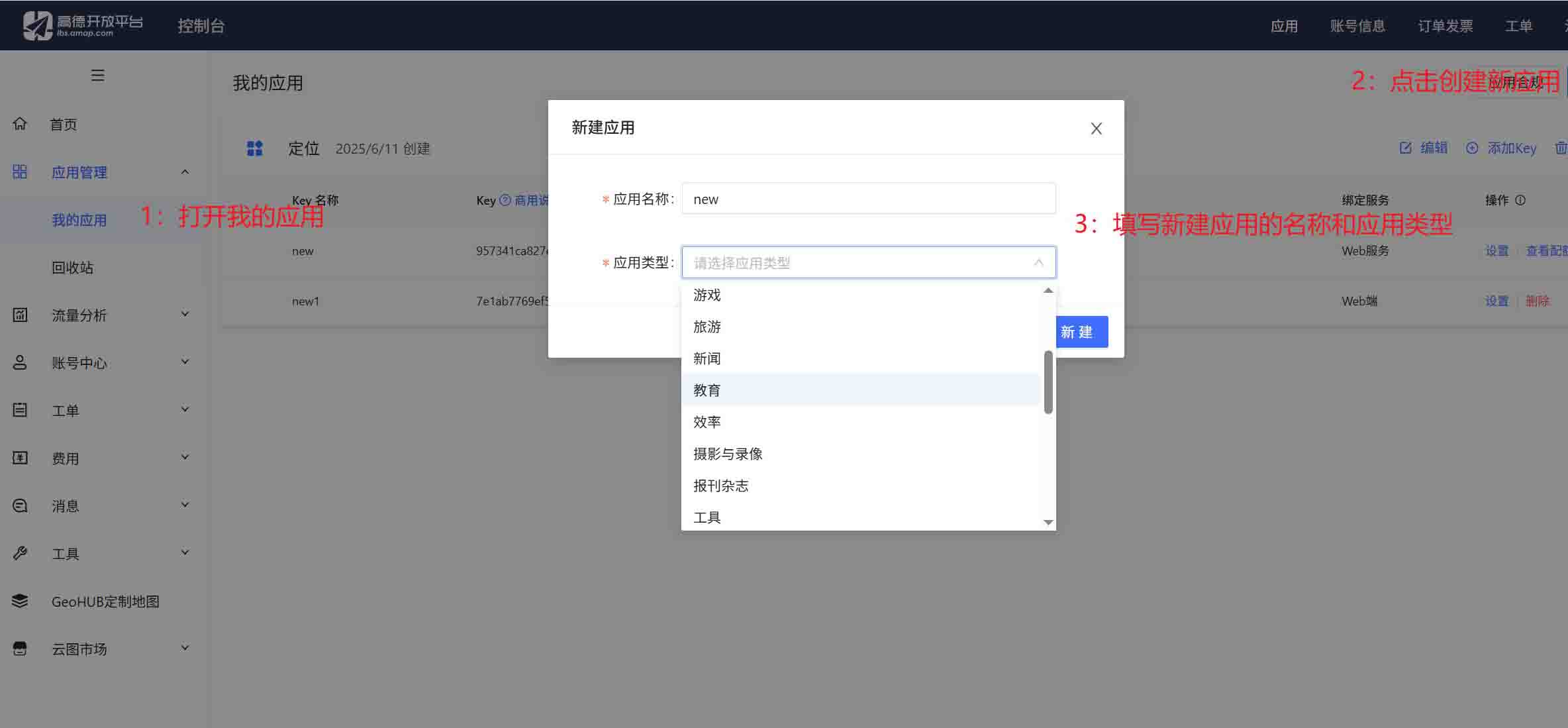
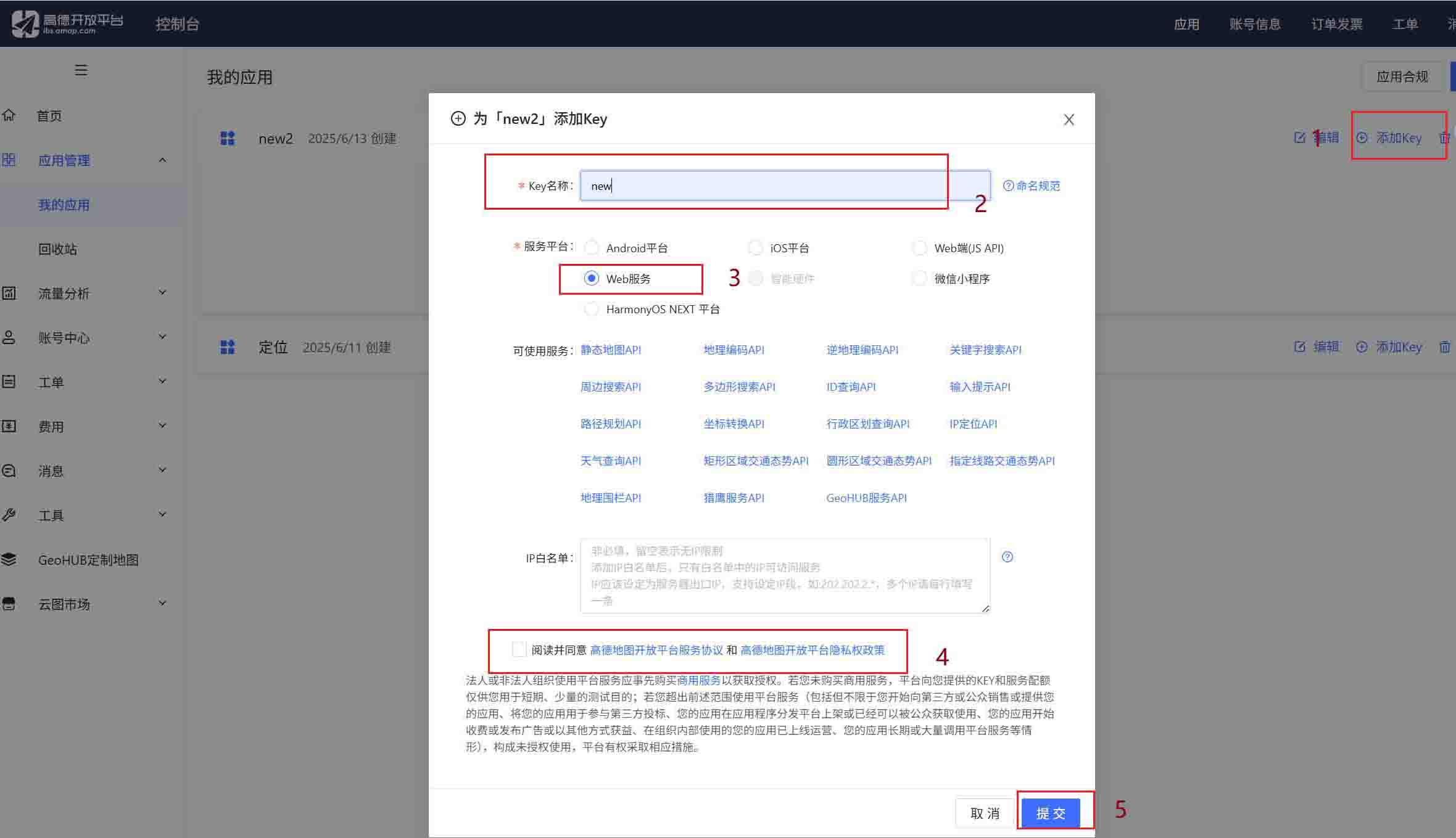
以上步骤便可以完成高德地图的申请和key的创建。
开始springboot的创建(就不从0到一的创建了)
二:创建数据库(我是用的是mysql)
建表语句:
create table `location_record` (
  `id` bigint not null auto_increment comment '主键id',
  `ip` varchar(50) default null comment '客户端ip地址',
  `longitude` double(10,6) not null comment '经度坐标,精确到小数点后6位',
  `latitude` double(10,6) not null comment '纬度坐标,精确到小数点后6位',
  `address` varchar(255) default null comment '详细地址信息',
  `formatted_address` varchar(255) default null comment '格式化后的完整地址',
  `city` varchar(100) default null comment '所在城市名称',
  `province` varchar(100) default null comment '所在省份名称',
  `district` varchar(100) default null comment '新增:所在区县名称',
  `street` varchar(100) default null comment '新增:街道信息',
  `create_time` datetime not null default current_timestamp comment '记录创建时间',
  `update_time` datetime default null on update current_timestamp comment '记录更新时间',
  primary key (`id`),
  key `idx_location` (`longitude`,`latitude`),
  key `idx_create_time` (`create_time`)
) engine=innodb default charset=utf8mb4 collate=utf8mb4_general_ci comment='地理位置信息记录表';
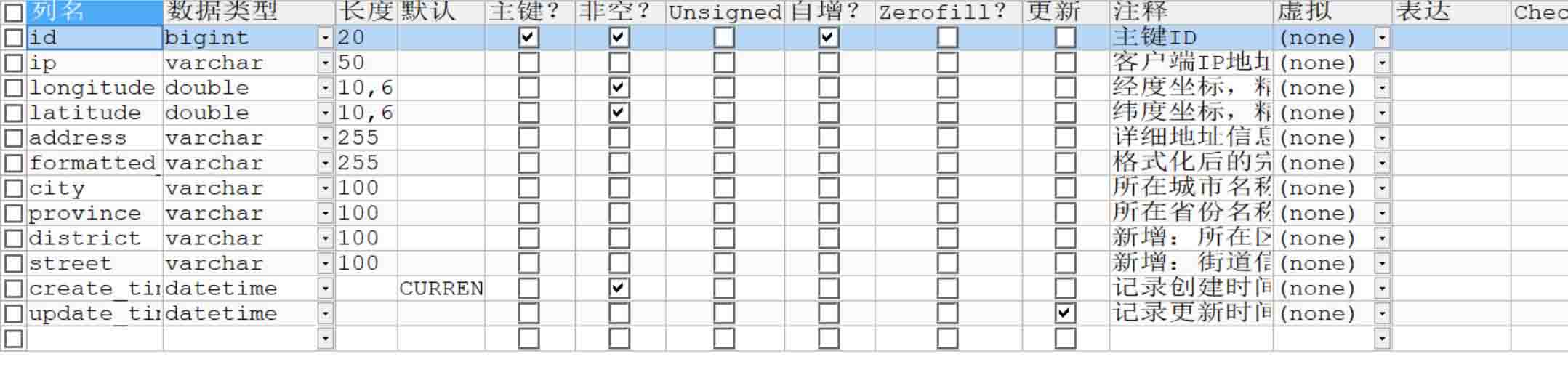
表中样式:
三:springboot所需的依赖(根据你的需求再去增加删除依赖)
dependencies>
    <!-- fastjson -->
    <dependency>
        <groupid>com.alibaba</groupid>
        <artifactid>fastjson</artifactid>
        <version>1.2.76</version>
    </dependency>

    <!-- okhttp -->
    <dependency>
        <groupid>com.squareup.okhttp3</groupid>
        <artifactid>okhttp</artifactid>
        <version>4.12.0</version>
    </dependency>


    <dependency>
         <groupid>com.alibaba</groupid>
         <artifactid>druid-spring-boot-starter</artifactid>
         <version> 1.2.23</version>
    </dependency>
    <dependency>
          <groupid>mysql</groupid>
          <artifactid>mysql-connector-java</artifactid>
          <version>8.0.33</version>
    </dependency>
     <dependency>
          <groupid>com.baomidou</groupid>
          <artifactid>mybatis-plus-boot-starter</artifactid>
           <version>3.5.6</version>
      </dependency>

    <!-- spring boot starter web -->
    <dependency>
        <groupid>org.springframework.boot</groupid>
        <artifactid>spring-boot-starter-web</artifactid>
        <version>2.6.13</version>
    </dependency>

    <!-- apache httpclient -->
    <dependency>
        <groupid>org.apache.httpcomponents</groupid>
        <artifactid>httpclient</artifactid>
        <version>4.5.13</version>
    </dependency>

    <!-- spring boot configuration processor -->
    <dependency>
        <groupid>org.springframework.boot</groupid>
        <artifactid>spring-boot-configuration-processor</artifactid>
        <version>2.6.13</version>
        <optional>true</optional>
    </dependency>

    <!-- lombok -->
    <dependency>
        <groupid>org.projectlombok</groupid>
        <artifactid>lombok</artifactid>
        <version>1.18.26</version>
    </dependency>
</dependencies>
四:yml文件的配置
server:
  port: 8096

spring:
  amap:
    key: "你的高德地图key值"
    version: 2.0
    geocode-url: https://restapi.amap.com/v3/geocode/geo
    ip-url: https://restapi.amap.com/v3/ip
    regeo-url: https://restapi.amap.com/v3/geocode/regeo

  datasource: # 数据源配置
    driver-class-name: com.mysql.cj.jdbc.driver
    url: jdbc:mysql://localhost:3306/你所建表对应的数据库?servertimezone=asia/shanghai&usessl=false
    username: root
    password: root
    type: com.alibaba.druid.pool.druiddatasource

# mybatis-plus配置,也可以不加,只是为了显示sql,springboot都自动配置好了
mybatis-plus:
  configuration:
    log-impl: org.apache.ibatis.logging.stdout.stdoutimpl
五:所需要的类
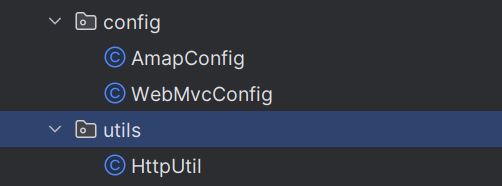
- amapconfig:
package com.qfedu.config;


import lombok.data;
import org.springframework.boot.context.properties.configurationproperties;
import org.springframework.context.annotation.configuration;

@data
@configuration
@configurationproperties(prefix = "spring.amap")
public class amapconfig {
    private string key;                   // 对应配置中的 key
    private string securityjscode;        // 对应 security-js-code
    private string version = "2.0";       // 默认版本号
    private string geocodeurl;            // 对应 geocode.url
    private string ipurl;                 // 对应 ip.url
    private string regeourl;              // 对应 regeo.url
}- webmvcconfig(因为我的项目中配置了拦截器,所以需要这样一个类)
package com.qfedu.config;

import com.qfedu.common.core.interceptor.logininterceptor;
import org.springframework.context.annotation.bean;
import org.springframework.context.annotation.configuration;
import org.springframework.web.servlet.config.annotation.interceptorregistry;
import org.springframework.web.servlet.config.annotation.webmvcconfigurer;

@configuration
public class webmvcconfig implements webmvcconfigurer {

    @bean
    public logininterceptor logininterceptor() {
        return new logininterceptor();
    }

    @override
    public void addinterceptors(interceptorregistry registry) {
        registry.addinterceptor(logininterceptor())
                .addpathpatterns("/**")
                .excludepathpatterns(
                        "/api/amap/**",
                        "/api/location/**"  // 新增排除location相关路径
                );
    }
}- httputils:
package com.qfedu.utils;

import com.sun.deploy.net.urlencoder;
import org.apache.http.httpentity;
import org.apache.http.client.methods.closeablehttpresponse;
import org.apache.http.client.methods.httpget;
import org.apache.http.impl.client.closeablehttpclient;
import org.apache.http.impl.client.httpclients;
import org.apache.http.util.entityutils;

import java.io.ioexception;
import java.nio.charset.standardcharsets;

public class httputil {
    public static string doget(string url) throws ioexception {
        if (url == null || url.trim().isempty()) {
            throw new illegalargumentexception("url不能为空");
        }

        closeablehttpclient httpclient = httpclients.createdefault();
        httpget httpget = new httpget(url);

        // 设置请求头
        httpget.setheader("accept", "application/json");
        httpget.setheader("content-type", "application/json");

        try (closeablehttpresponse response = httpclient.execute(httpget)) {
            int statuscode = response.getstatusline().getstatuscode();
            if (statuscode != 200) {
                throw new ioexception("http请求失败,状态码: " + statuscode + ", url: " + url);
            }

            httpentity entity = response.getentity();
            if (entity == null) {
                throw new ioexception("响应体为空");
            }

            return entityutils.tostring(entity, standardcharsets.utf_8);
        } finally {
            httpclient.close();
        }
    }

    public static string encodeurlparam(string param) {
        try {
            return urlencoder.encode(param, standardcharsets.utf_8.name());
        } catch (exception e) {
            return param;
        }
    }
}- 返回值r类:(我的r类没有使用泛型)
package com.qfedu.common.core.common;

public class r {
    /**
     * code,指状态码,
     * 随意定,20000 是正确,40000 错误
     * 50000 请求超时
     * 60000 没有权限
     * msg,指信息描述
     * data,返回的数据
     */
    private int code;
    private string msg;
    private object data;


    public static r ok() {
        r r = new r();
        r.setcode(200);
        r.setmsg("成功");
        return r;
    }

    public static r ok(object data) {
        r r = new r();
        r.setcode(200);
        r.setmsg("成功");
        r.setdata(data);
        return r;
    }


    public static r fail() {
        r r = new r();
        r.setcode(500);
        r.setmsg("失败");
        return r;
    }

    public static r fail(string msg) {
        r r = new r();
        r.setcode(500);
        r.setmsg(msg);
        return r;
    }

    public int getcode() {
        return code;
    }

    public void setcode(int code) {
        this.code = code;
    }

    public string getmsg() {
        return msg;
    }

    public void setmsg(string msg) {
        this.msg = msg;
    }

    public object getdata() {
        return data;
    }

    public void setdata(object data) {
        this.data = data;
    }


}- 免登录自定义注解:
package com.qfedu.common.core.annotation;

import java.lang.annotation.elementtype;
import java.lang.annotation.retention;
import java.lang.annotation.retentionpolicy;
import java.lang.annotation.target;

/**
 * 以梦为马,以汗为泉,不忘初心,不负韶华
 *
 * @author ${上官箫宇}
 * @version 1.0
 * @data 2025/6/3 16:08
 */
@target(elementtype.method)
@retention(retentionpolicy.runtime)//注解运行时生效
public @interface nologin {
}- 拦截器:
package com.qfedu.common.core.interceptor;


import com.qfedu.common.core.annotation.nologin;
import com.qfedu.common.core.constants.commonconstants;
import com.qfedu.common.core.utils.jwtutils;
import com.qfedu.common.core.utils.userutils;
import io.jsonwebtoken.claims;
import org.springframework.web.method.handlermethod;
import org.springframework.web.servlet.handlerinterceptor;

import javax.servlet.http.httpservletrequest;
import javax.servlet.http.httpservletresponse;
import java.lang.reflect.method;

/**
 * ---do first---
 *
 * @author:wellseasun
 * @date:2025/5/22 下午 8:30
 * @desc:
 */
public class logininterceptor implements handlerinterceptor {
    // prehandle:执行时机:访问接口前
    @override
    public boolean prehandle(httpservletrequest request, httpservletresponse response, object handler) {
        // handler表示处理某个请求的处理器对象,
        // 如果是类级别的拦截器,则handler为类对象,如果是方法级别的拦截器,则handler为方法对象

        if (handler instanceof handlermethod) {
            handlermethod handlermethod = (handlermethod) handler;
            method method = handlermethod.getmethod();
            boolean annotationpresent = method.isannotationpresent(nologin.class);
            if (annotationpresent) {
                // 如果使用了注解,直接放行
                return true;
            } else {
                // 没有使用注解,需要从请求头中获取名为login_token的token
                string token = request.getheader(commonconstants.login_token);
                if (token == null || token.isempty()) {
                    throw new runtimeexception("请重新登录");
                }
                try {
                    jwtutils jwtutils = new jwtutils();
                    claims claims = jwtutils.parsejwt(token);
                    userutils.setuid((integer) claims.get("uid"));
                } catch (exception e) {
                    throw e;
                }
            }
        }
        return true;
    }


}
没错,下面就是层级关系
- mapper:
package com.qfedu.mapper;


import com.baomidou.mybatisplus.core.mapper.basemapper;
import com.qfedu.common.core.entity.locationrecord;

public interface locationrecordmapper extends basemapper<locationrecord> {
}- service:
package com.qfedu.service;

import com.alibaba.fastjson.jsonobject;
import com.qfedu.common.core.entity.locationrecord;


public interface amapservice {
    /**
     * ip定位
     * @param ip ip地址
     * @return 定位结果
     */
    jsonobject iplocation(string ip);

    /**
     * 逆地理编码
     * @param longitude 经度
     * @param latitude 纬度
     * @return 地址信息
     */
    jsonobject regeolocation(double longitude, double latitude);

    /**
     * 地理编码
     * @param address 地址
     * @return 经纬度信息
     */
    jsonobject geolocation(string address);

    /**
     * 保存定位记录
     * @param record 定位记录
     * @return 是否成功
     */
    boolean savelocationrecord(locationrecord record);
}- service实现类:
package com.qfedu.service.impl;

import com.alibaba.fastjson.json;
import com.alibaba.fastjson.jsonobject;
import com.baomidou.mybatisplus.extension.service.impl.serviceimpl;
import com.qfedu.common.core.entity.locationrecord;
import com.qfedu.config.amapconfig;
import com.qfedu.mapper.locationrecordmapper;
import com.qfedu.service.amapservice;
import com.qfedu.utils.httputil;
import org.slf4j.logger;
import org.slf4j.loggerfactory;
import org.springframework.beans.factory.annotation.autowired;
import org.springframework.stereotype.service;
import org.springframework.util.stringutils;

import javax.annotation.postconstruct;

/**
 * 高德地图服务实现类
 * 提供ip定位、地理编码、逆地理编码等核心功能
 */
@service
public class amapserviceimpl extends serviceimpl<locationrecordmapper, locationrecord>
        implements amapservice {

    private static final logger logger = loggerfactory.getlogger(amapserviceimpl.class);

    @autowired
    private amapconfig amapconfig; // 高德配置参数(key/url等)

    /**
     * 初始化时打印配置信息(调试用)
     */
    @postconstruct
    public void init() {
        logger.info("高德地图配置加载: key={}, ipurl={}, geourl={}, regeourl={}",
                amapconfig.getkey(),
                amapconfig.getipurl(),
                amapconfig.getgeocodeurl(),
                amapconfig.getregeourl());
    }

    // ==================== 核心服务方法 ====================

    /**
     * ip定位服务
     * @param ip 需要查询的ip地址
     * @return 包含定位结果的json对象(status=1成功,0失败)
     */
    @override
    public jsonobject iplocation(string ip) {
        // 参数校验
        if (!stringutils.hastext(ip)) {
            return createerrorresponse("ip地址不能为空");
        }

        try {
            // 配置校验
            validateconfig(amapconfig.getkey(), amapconfig.getipurl());

            // 构建请求url(示例:https://restapi.amap.com/v3/ip?key=xxx&ip=8.8.8.8)
            string url = string.format("%s?key=%s&ip=%s",
                    amapconfig.getipurl().trim(),
                    amapconfig.getkey().trim(),
                    httputil.encodeurlparam(ip));

            validateurl(url); // url格式校验
            logger.info("请求高德ip定位api: {}", url);

            // 发送http请求并解析响应
            string response = httputil.doget(url);
            logger.debug("高德ip定位api响应: {}", response);

            return parseresponse(response);
        } catch (exception e) {
            logger.error("ip定位失败, ip: " + ip, e);
            return createerrorresponse("ip定位失败: " + e.getmessage());
        }
    }

    /**
     * 逆地理编码服务(坐标→地址)
     * @param longitude 经度
     * @param latitude 纬度
     * @return 包含地址信息的json响应
     */
    @override
    public jsonobject regeolocation(double longitude, double latitude) {
        if (longitude == null || latitude == null) {
            return createerrorresponse("经纬度不能为空");
        }

        try {
            validateconfig(amapconfig.getkey(), null); // 仅校验key

            // 构建请求url(示例:https://restapi.amap.com/v3/geocode/regeo?key=xxx&location=116.4,39.9)
            string location = longitude + "," + latitude;
            string url = string.format("%s?key=%s&location=%s",
                    amapconfig.getregeourl(),
                    amapconfig.getkey(),
                    httputil.encodeurlparam(location));

            logger.debug("请求高德逆地理编码api: {}", url);
            string response = httputil.doget(url);
            logger.debug("高德逆地理编码api响应: {}", response);

            return parseresponse(response);
        } catch (exception e) {
            logger.error("逆地理编码失败, 位置: " + longitude + "," + latitude, e);
            return createerrorresponse("逆地理编码失败: " + geterrormessage(e));
        }
    }

    /**
     * 地理编码服务(地址→坐标)
     * @param address 结构化地址(如"北京市海淀区中关村大街1号")
     * @return 包含经纬度的json响应
     */
    @override
    public jsonobject geolocation(string address) {
        if (!stringutils.hastext(address)) {
            return createerrorresponse("地址不能为空");
        }

        try {
            validateconfig(amapconfig.getkey(), null); // 仅校验key

            // 构建请求url(示例:https://restapi.amap.com/v3/geocode/geo?key=xxx&address=北京)
            string url = string.format("%s?key=%s&address=%s",
                    amapconfig.getgeocodeurl(),
                    amapconfig.getkey(),
                    httputil.encodeurlparam(address));

            logger.debug("请求高德地理编码api: {}", url);
            string response = httputil.doget(url);
            logger.debug("高德地理编码api响应: {}", response);

            return parseresponse(response);
        } catch (exception e) {
            logger.error("地理编码失败, 地址: " + address, e);
            return createerrorresponse("地理编码失败: " + geterrormessage(e));
        }
    }

    /**
     * 保存定位记录到数据库
     * @param record 定位记录实体
     * @return 是否保存成功
     */
    @override
    public boolean savelocationrecord(locationrecord record) {
        try {
            return this.save(record); // 调用mybatis-plus的save方法
        } catch (exception e) {
            logger.error("保存定位记录失败", e);
            return false;
        }
    }

    // ==================== 内部工具方法 ====================

    /**
     * 校验高德配置参数
     * @param key 高德api key
     * @param url 需要校验的api地址(可选)
     * @throws illegalstateexception 当配置不合法时抛出
     */
    private void validateconfig(string key, string url) {
        if (amapconfig == null || !stringutils.hastext(key)) {
            throw new illegalstateexception("高德地图配置未正确初始化");
        }
        if (url != null && !stringutils.hastext(url)) {
            throw new illegalstateexception("高德api地址未配置");
        }
    }

    /**
     * 校验url合法性
     * @param url 待校验的url
     * @throws illegalargumentexception 当url非法时抛出
     */
    private void validateurl(string url) {
        if (!url.startswith("http")) {
            throw new illegalargumentexception("无效的api url: " + url);
        }
    }

    /**
     * 解析高德api响应
     * @param response 原始json字符串
     * @return 解析后的jsonobject
     */
    private jsonobject parseresponse(string response) {
        if (!stringutils.hastext(response)) {
            return createerrorresponse("空响应");
        }
        try {
            jsonobject result = json.parseobject(response);
            return result != null ? result : createerrorresponse("响应解析失败");
        } catch (exception e) {
            logger.error("解析高德api响应失败", e);
            return createerrorresponse("响应解析失败: " + e.getmessage());
        }
    }

    /**
     * 创建错误响应
     * @param message 错误信息
     * @return 标准化错误json(status=0)
     */
    private jsonobject createerrorresponse(string message) {
        jsonobject result = new jsonobject();
        result.put("status", "0"); // 高德标准错误码
        result.put("info", message);
        return result;
    }

    /**
     * 提取异常信息(避免null)
     */
    private string geterrormessage(exception e) {
        return e.getmessage() != null ? e.getmessage() : "未知错误";
    }
}- controller:
package com.qfedu.controller;

import com.alibaba.fastjson.jsonobject;
import com.qfedu.common.core.annotation.nologin;
import com.qfedu.common.core.common.r;
import com.qfedu.common.core.entity.locationrecord;
import com.qfedu.service.amapservice;
import org.springframework.beans.factory.annotation.autowired;
import org.springframework.web.bind.annotation.getmapping;
import org.springframework.web.bind.annotation.requestmapping;
import org.springframework.web.bind.annotation.requestparam;
import org.springframework.web.bind.annotation.restcontroller;

import java.util.date;

/**
 * 高德地图定位服务控制器
 * 提供ip定位、逆地理编码、地理编码三大核心功能
 */
@restcontroller
@requestmapping("/api/location")
public class locationcontroller {

    @autowired
    private amapservice amapservice; // 高德地图服务接口

    /**
     * ip定位接口
     * @param ip 需要定位的ip地址(如8.8.8.8)
     * @return 标准化响应r<jsonobject>,包含定位结果或错误信息
     */
    @getmapping("/ip")
    @nologin
    public r locatebyip(@requestparam string ip) {
        // 调用高德ip定位服务
        jsonobject result = amapservice.iplocation(ip);

        // 校验高德api返回状态码(1=成功)
        if (result != null && "1".equals(result.getstring("status"))) {
            savelocationrecord(ip, result); // 持久化定位记录
            return r.ok(result); // 返回成功响应
        }
        // 失败时返回错误信息(优先使用高德返回的info字段)
        return r.fail(result != null ? result.getstring("info") : "ip定位服务不可用");
    }

    /**
     * 逆地理编码接口(坐标→地址)
     * @param longitude 经度(如116.404)
     * @param latitude 纬度(如39.915)
     * @return 包含地址信息的标准化响应
     */
    @getmapping("/regeo")
    @nologin
    public r regeo(
            @requestparam double longitude,
            @requestparam double latitude) {
        jsonobject result = amapservice.regeolocation(longitude, latitude);
        if (result != null && "1".equals(result.getstring("status"))) {
            savelocationrecord(null, longitude, latitude, result); // ip传null
            return r.ok(result);
        }
        return r.fail(result != null ? result.getstring("info") : "逆地理编码服务不可用");
    }

    /**
     * 地理编码接口(地址→坐标)
     * @param address 结构化地址(如"北京市海淀区中关村大街1号")
     * @return 包含经纬度的标准化响应
     */
    @getmapping("/geo")
    @nologin
    public r geo(@requestparam string address) {
        jsonobject result = amapservice.geolocation(address);
        if (result != null && "1".equals(result.getstring("status"))) {
            return r.ok(result); // 地理编码不保存记录
        }
        return r.fail(result != null ? result.getstring("info") : "地理编码服务不可用");
    }

    // 内部工具方法

    /**
     * 从ip定位结果提取经纬度并保存记录
     * @param ip ip地址
     * @param result 高德api返回的完整结果
     */
    private void savelocationrecord(string ip, jsonobject result) {
        jsonobject locationobj = result.getjsonobject("location");
        if (locationobj != null) {
            savelocationrecord(
                    ip,
                    locationobj.getdouble("lng"), // 经度字段
                    locationobj.getdouble("lat"), // 纬度字段
                    result
            );
        }
    }

    /**
     * 保存定位记录到数据库(核心方法)
     * @param ip 可能为null(当来源是逆地理编码时)
     * @param longitude 经度(必填)
     * @param latitude 纬度(必填)
     * @param result 高德api原始结果(用于提取地址信息)
     */
    private void savelocationrecord(
            string ip,
            double longitude,
            double latitude,
            jsonobject result) {
        if (result == null) return;

        // 1. 构建定位记录实体
        locationrecord record = new locationrecord();
        record.setip(ip); // ip可能为null
        record.setlongitude(longitude);
        record.setlatitude(latitude);

        // 2. 提取格式化地址(如"北京市海淀区中关村大街1号")
        string formattedaddress = result.getstring("formatted_address");
        record.setaddress(formattedaddress);
        record.setformattedaddress(formattedaddress);

        // 3. 提取结构化地址组件(省、市、区等)
        jsonobject addresscomponent = result.getjsonobject("addresscomponent");
        if (addresscomponent != null) {
            record.setprovince(addresscomponent.getstring("province"));
            record.setcity(addresscomponent.getstring("city"));
            // 可扩展:district(区)、street(街道)等字段
        }

        // 4. 设置时间戳并保存
        record.setcreatetime(new date());
        amapservice.savelocationrecord(record); // 调用mybatis-plus持久化
    }
}
下面就是启动类:(首先不要忘记启动类的扫描注解,还有就是本次用到的注解
@enableconfigurationproperties({amapconfig.class})// 启用amapconfig配置类)package com.qfedu;
import com.qfedu.config.amapconfig;
import org.mybatis.spring.annotation.mapperscan;
import org.springframework.boot.springapplication;
import org.springframework.boot.autoconfigure.springbootapplication;
import org.springframework.boot.context.properties.enableconfigurationproperties;
@springbootapplication
@mapperscan("com.qfedu.mapper")
@enableconfigurationproperties({amapconfig.class})// 启用amapconfig配置类
public class microserveamapapplication {
public static void main(string[] args) {
springapplication.run(microserveamapapplication.class, args);
}
}写一个简单的页面展示吧
位置你们知道吧,我就不说详细了
展示台湾省地图吧(中国一点都不能少)
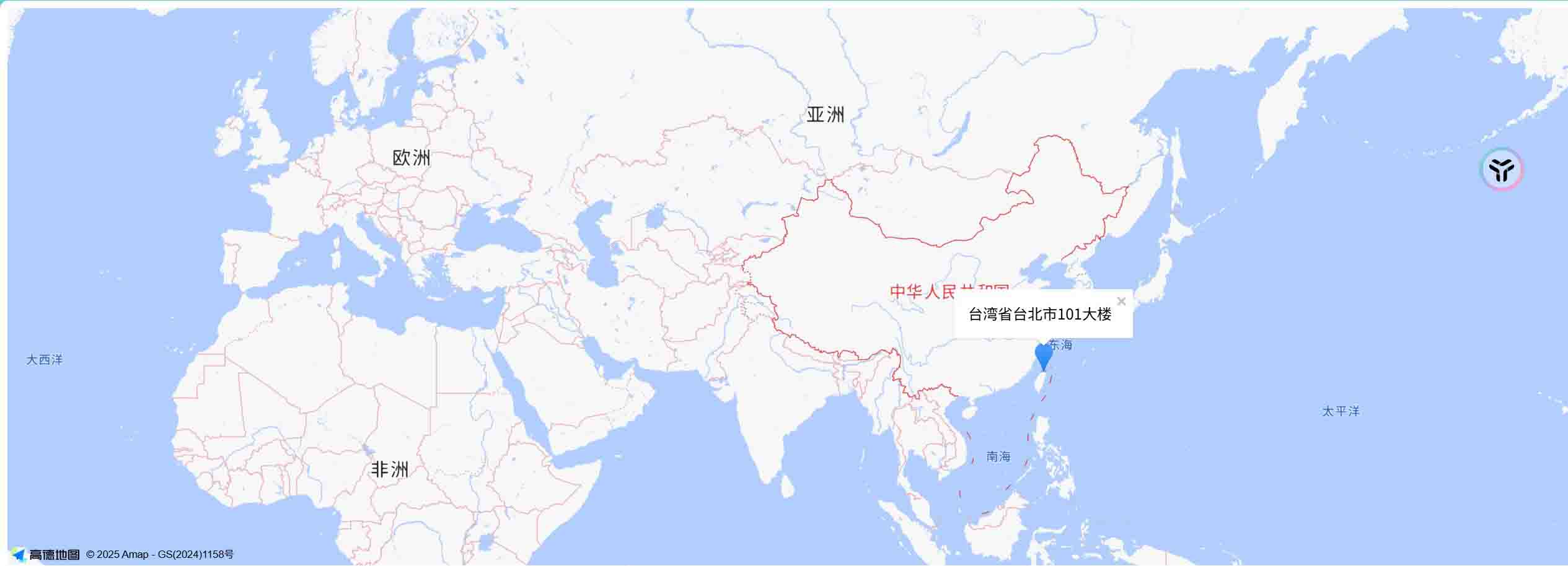
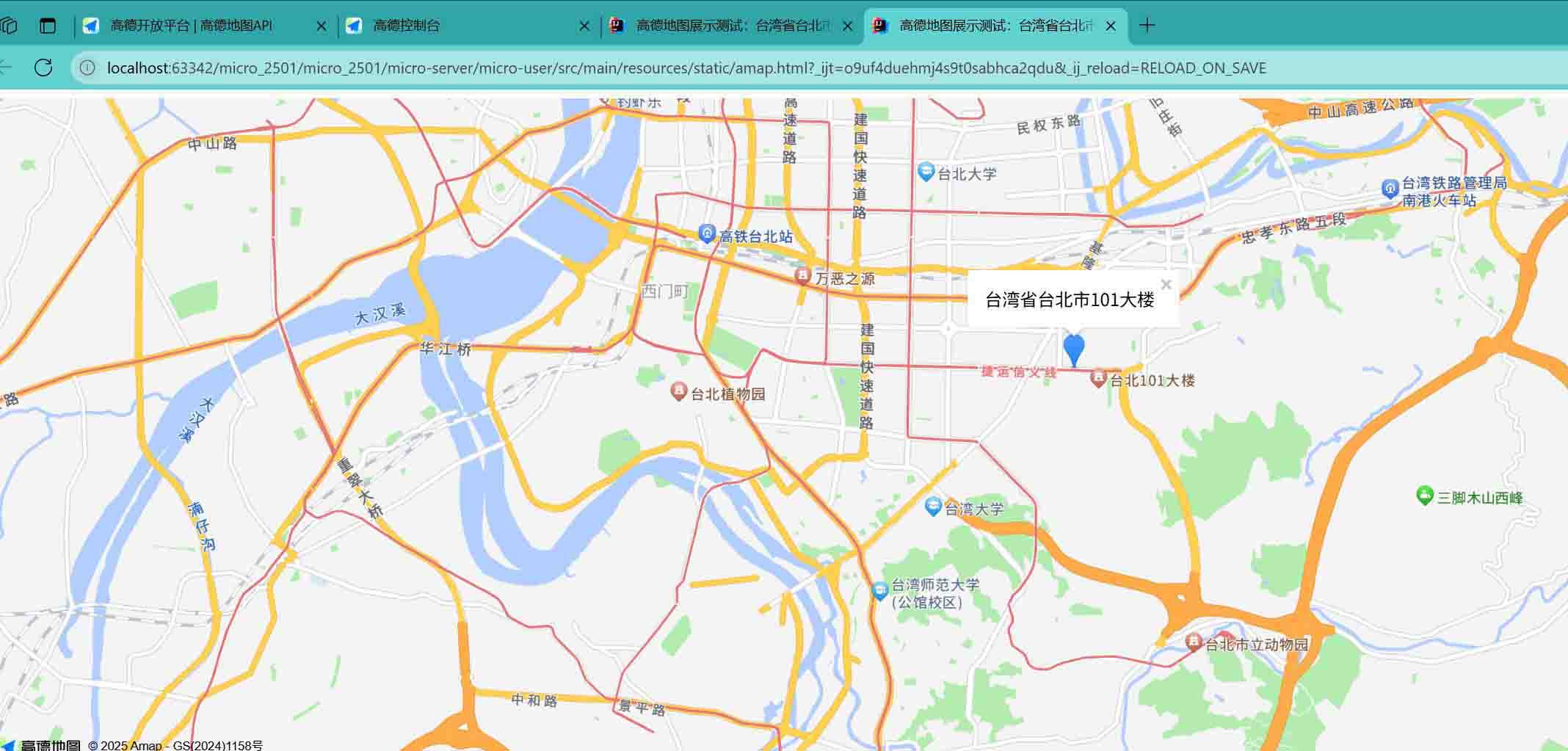
下面就是展示的代码,我只不过吧经纬度写成死值了,
<!doctype html>
<html>
<head>
    <meta charset="utf-8">
    <title>高德地图展示测试:台湾省台北市地图 - 台北101</title>
    <!-- 引入高德地图js api -->
    <script src="https://webapi.amap.com/maps?v=2.0&key=你的高德地图key"></script>
    <style>
        #container {
            width: 100%;
            height: 600px;
        }
    </style>
</head>
<body>
<!-- 地图容器 -->
<div id="container"></div>

<script>
    // 初始化地图,中心点设为台北市
    var map = new amap.map('container', {
        zoom: 14,          // 缩放级别
        center: [121.5654, 25.0330], // 台北市坐标
        viewmode: '2d'     // 2d地图
    });

    // 添加标记点(台北101大楼)
    var marker = new amap.marker({
        position: [121.5654, 25.0330], // 台北101坐标
        map: map
    });

    // 信息窗口内容
    var infowindow = new amap.infowindow({
        content: '<div style="padding:5px;">台北101大楼</div>',
        offset: new amap.pixel(0, -30)
    });
    infowindow.open(map, marker.getposition());
</script>
</body>
</html>
总结
以上为个人经验,希望能给大家一个参考,也希望大家多多支持代码网。






发表评论