
 我要评论
我要评论介绍
useragentutils 是于处理用户代理(user-agent)字符串的工具类,一般用于解析和处理浏览器、操作系统以及设备等相关信息,这些信息通常包含在接口请求的 user-agent 字符串中。
这个库可以用于解析用户代理头,以提取有关所使用的浏览器、浏览器版本、平台、平台版本和设备类型的信息。对于确定客户端是否是台式机、平板电脑或移动设备,或者客户端是否在windows或mac os上(仅举几例)非常有用。
- 超过150种不同的浏览器;
- 7种不同的浏览器类型;
- 超过60种不同的操作系统;
- 6种不同的设备类型;
- 9种不同的渲染引擎;
- 9种不同的web应用,如httpclient、bot。
官方文档:https://www.bitwalker.eu/software/user-agent-utils
github:https://github.com/haraldwalker/user-agent-utils/tree/release-1.21
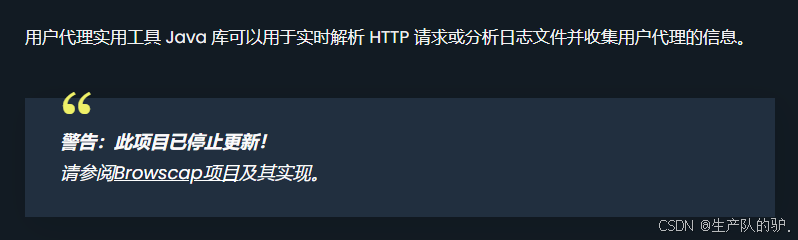
特别注意该项目已停止了维护,但是功能还是挺好用的
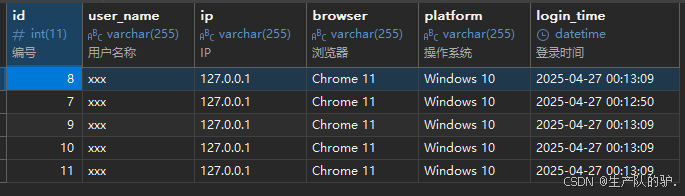
效果图
依赖
<!--解析浏览器字符串-->
<dependency>
    <groupid>eu.bitwalker</groupid>
    <artifactid>useragentutils</artifactid>
    <version>1.21</version>
</dependency>
<!--字符串工具-->
<dependency>
	<groupid>org.apache.commons</groupid>
    <artifactid>commons-lang3</artifactid>
    <version>3.12.0</version>
</dependency>
<!--提供了大量的工具类,更方便地进行字符串、日期、集合、反射等操作。-->
封装客户端工具
public class clientutils {
    /**
     * 获取当前线程的请求
     */
    public static servletrequestattributes getrequestattributes()
    {
        //获取当前线程的请求
        requestattributes attributes = requestcontextholder.getrequestattributes();
        //提供了更具体的 servlet 请求属性
        return (servletrequestattributes) attributes;
    }
    /**
     * 获取request信息
     */
    public static httpservletrequest getrequest()
    {
        return getrequestattributes().getrequest();
    }
}
封装ip工具
public class iputils {
    /**
     * 获取客户端ip
     *
     * @return ip地址
     */
    public static string getipaddr()
    {
        return getipaddr(clientutils.getrequest());
    }
    /**
     * 获取客户端ip
     *
     * @param request 请求对象
     * @return ip地址
     */
    public static string getipaddr(httpservletrequest request)
    {
        if (request == null)
        {
            return "unknown";
        }
        string ip = request.getheader("x-forwarded-for");
        if (ip == null || ip.length() == 0 || "unknown".equalsignorecase(ip))
        {
            ip = request.getheader("proxy-client-ip");
        }
        if (ip == null || ip.length() == 0 || "unknown".equalsignorecase(ip))
        {
            ip = request.getheader("x-forwarded-for");
        }
        if (ip == null || ip.length() == 0 || "unknown".equalsignorecase(ip))
        {
            ip = request.getheader("wl-proxy-client-ip");
        }
        if (ip == null || ip.length() == 0 || "unknown".equalsignorecase(ip))
        {
            ip = request.getheader("x-real-ip");
        }
        if (ip == null || ip.length() == 0 || "unknown".equalsignorecase(ip))
        {
            ip = request.getremoteaddr();
        }
        return "0:0:0:0:0:0:0:1".equals(ip) ? "127.0.0.1" : getmultistagereverseproxyip(ip);
    }
    /**
     * 从多级反向代理中获得第一个非unknown ip地址
     *
     * @param ip 获得的ip地址
     * @return 第一个非unknown ip地址
     */
    public static string getmultistagereverseproxyip(string ip)
    {
        // 多级反向代理检测
        if (ip != null && ip.indexof(",") > 0)
        {
            final string[] ips = ip.trim().split(",");
            for (string subip : ips)
            {
                if (false == isunknown(subip))
                {
                    ip = subip;
                    break;
                }
            }
        }
        return stringutils.substring(ip, 0, 255);
    }
    /**
     * 检测给定字符串是否为未知,多用于检测http请求相关
     *
     * @param checkstring 被检测的字符串
     * @return 是否未知
     */
    public static boolean isunknown(string checkstring)
    {
        return stringutils.isblank(checkstring) || "unknown".equalsignorecase(checkstring);
    }
}
实体类
@data
@equalsandhashcode(callsuper = false)
@accessors(chain = true)
@tablename("login_log")
public class loginlog implements serializable {
    private static final long serialversionuid = 1l;
    /**
     * 编号
     */
    @tableid(value = "id", type = idtype.auto)
    private integer id;
    /**
     * 用户名称
     */
    @tablefield("user_name")
    private string username;
    /**
     * ip
     */
    @tablefield("ip")
    private string ip;
    /**
     * 浏览器
     */
    @tablefield("browser")
    private string browser;
    /**
     * 操作系统
     */
    @tablefield("platform")
    private string platform;
    /**
     * 登录时间
     */
    @tablefield("login_time")
    @jsonformat(pattern = "yyyy-mm-dd hh:mm:ss")
    private string logintime;
}
获取设备信息入库
    public void recordlogin(loginlog loginlog){
    	//获取当前线程中的请求
        string s = clientutils.getrequest().getheader("user-agent");
		//反向代理中获取ip
        loginlog.setip(iputils.getipaddr());
		//异步执行
        completablefuture.runasync(() -> {
            // 获取当前线程请求头的 "user-agent"
            useragent useragent = useragent.parseuseragentstring(s);
            // 获取使用的浏览器
            loginlog.setbrowser(useragent.getbrowser().getname());
            // 获取使用的操作系统
            loginlog.setplatform(useragent.getoperatingsystem().getname());
            //数据入库
            mapper.insert(loginlog);
        });
    }
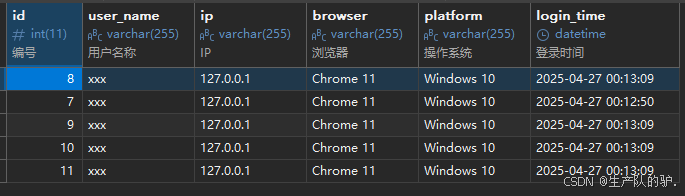
效果图
到此这篇关于springboot useragentutils获取用户浏览器 操作系统设备统计 信息统计 日志入库的文章就介绍到这了,更多相关springboot useragentutils获取用户浏览器 内容请搜索代码网以前的文章或继续浏览下面的相关文章希望大家以后多多支持代码网!





发表评论