
 我要评论
我要评论一、背景
异常现象
很长一段时间以来,前后端都是根据扩展名判断文件类型,但近期发现用户上传的.jpg格式图片存在解析异常的问题。拿到原图后测试发现:
- windows 10 原生图片查看器提示文件损坏
- 主流浏览器(chrome/firefox)可正常渲染
- windows 11 原生查看器正常显示
原因排查
这不禁让笔者感到好奇,于是打开二进制格式检查了下文件头,发现这些文件的 magic number 对应的并不是 jpeg 格式,而是 avif (文件头:6674797061766966),一种较新的图片格式。
用户的无心之过
从用户视角来看,用户上传.avif图片时发现系统不支持上传,于是手动修改图片后缀为.jpg(用户以为改了扩展名就相当于改了文件格式),绕过了前端校验,而且由于浏览器强大的兼容能力,用户上传后发现在浏览器上能正常预览图片,便认为自己的操作是合理的。而后,后端解码失败。这些用户并非恶意攻击者,而是因系统未兼容新型图片格式采取的无奈之举。
二、解决方案
除了判断文件扩展名之外,还可以进行文件头校验和内容特征解析
magic number判断
魔数指的是文件开头的一串特定的字节序列,相较于文件扩展名,魔数更能有效识别文件类型。魔数没有固定长度,大部分文件类型的魔数不同,但也有少量文件类型有相同魔数
| 文件类型 | 文件头 | 文件尾 |
|---|---|---|
| jpeg(jpg) | ff d8 | ff d9 |
| png | 89 50 4e 47 0d 0a 1a 0a | |
| bmp | 42 4d | |
| gif | 47 49 46 38 39 61 | |
| tiff | 4d 4d 或 49 49 | |
| zip/xlsx/pptx/docx | 50 4b 03 04 |
少量文件类型的判断,可以直接校验文件头。比如若只允许用户上传jpg/png格式的图片,实现如下:
@getter
public enum mimetypeenum {

    image_jpeg("image/jpeg", "ffd8", "ffd9"),
    image_png("image/png", "89504e470d0a1a0a", null),
    image_bmp("image/bmp", "424d", null),
    ;

    private final string mimetype;
    private final byte[] header; // 文件头
    private final byte[] footer; // 文件尾

    mimetypeenum(string mimetype, string header, string footer) {
        this.mimetype = mimetype;
        this.header = header == null ? null : datatypeconverter.parsehexbinary(header);
        this.footer = footer == null ? null : datatypeconverter.parsehexbinary(footer);
    }

    public static final set<mimetypeenum> whitelist = sets.newhashset(image_jpeg, image_png);
}
public static void test(multipartfile mfile) throws exception {
    mimetypeenum mimetype = detectmimetype(mfile);

    assert.istrue(mimetypeenum.whitelist.contains(mimetype), "不支持文件类型:" + mimetype);
}

public static mimetypeenum detectmimetype(multipartfile multipartfile) throws ioexception {
    try (inputstream inputstream = multipartfile.getinputstream()) {
        byte[] header = new byte[8]; // 读取前 8 个字节
        byte[] footer = new byte[2];// 读取后 2 个字节
        inputstream.read(header);
        inputstream.skip(multipartfile.getsize() - 2 - 8);
        inputstream.read(footer);

        for (mimetypeenum mimetypeenum : mimetypeenum.values()) {
            if (matchmagicnumber(header, footer, mimetypeenum)) {
                return mimetypeenum;
            }
        }
    }
    return null;
}


private static boolean matchmagicnumber(byte[] header, byte[] footer, mimetypeenum mimetype) {
    // 检查文件头
    if (!arrays.equals(mimetype.getheader(), arrays.copyof(header, mimetype.getheader().length))) {
        return false;
    }

    // 检查文件尾
    if (mimetype.getfooter() != null) {
        return arrays.equals(mimetype.getfooter(), footer);
    }
    return true;
}
注意,zip/xlsx/pptx/docx的魔数都是相同的,无法用魔数精确分辨。具体方法后面说
主流检测库对比
常见的文件类型极多,手动维护魔数判断繁琐,目前已有许多文件类型校验库,没必要重复造轮子了
| 库名称 | 格式覆盖 | 文件类型明细 |
|---|---|---|
| tika | >1k | org/apache/tika/mime/tika-mimetypes.xml |
| jmimemagic | >100 | src/main/resources/magic.xml |
tika的使用
tika支持的文件类型最多,由apache维护并跟进最新文件格式。在 tika-mimetypes.xml 中有笔者需要的.avif格式
<mime-type type="image/avif">
    <!-- according to https://github.com/libvips/libvips/pull/1657
      older avif used to use the the heif 'ftypmif1' as well -->
    <_comment>av1 image file</_comment>
    <acronym>avif</acronym>
    <tika:link>https://en.wikipedia.org/wiki/av1#av1_image_file_format_(avif)</tika:link>
    <magic priority="60">
      <match value="ftypavif" type="string" offset="4"/>
    </magic>
    <glob pattern="*.avif"/>
</mime-type>
引入pom依赖后,通过detect方法判断出mimetype,示例代码如下:
public void test(multipartfile file) {
    string mimetype = new tika().detect(file.getinputstream());

    log.info(mimetype) // image/avif
}
tika返回的mimetype(multipurpose internet mail extensions),用于标识互联网上传输的文件类型和格式,常见的mimetype如下:
| 扩展名 | mime 类型 |
|---|---|
| .jpeg, .jpg | image/jpeg |
| .png | image/png |
| .avif | image/avif |
| .gif | image/gif |
| .mp4 | video/mp4 |
| application/pdf | |
| .ppt | application/vnd.ms-powerpoint |
| .pptx | application/vnd.openxmlformats-officedocument.presentationml.presentation |
| .doc | application/msword |
| .docx | application/vnd.openxmlformats-officedocument.wordprocessingml.document |
| .xls | application/vnd.ms-excel |
| .xlsx | application/vnd.openxmlformats-officedocument.spreadsheetml.sheet |
区分zip/xlsx/pptx/docx
由于xlsx/pptx/docx魔数相同,都是ooxml(office open xml file formats),tika只能识别为application/x-tika-ooxml,因此需要额外读取实际内容判断其类型。如果将文件修改扩展名为zip,就可以发现excel的实际文件目录如下,我们可以通过workbook.xml识别其为excel。其他格式同理。
│ [content_types].xml
│
│───_rels
│ .rels
│
├───docprops
│ app.xml
│ core.xml
│
└───xl
│ sharedstrings.xml
│ styles.xml
│ workbook.xml
│
├───_rels
│ workbook.xml.rels
│
└───worksheets
sheet1.xml
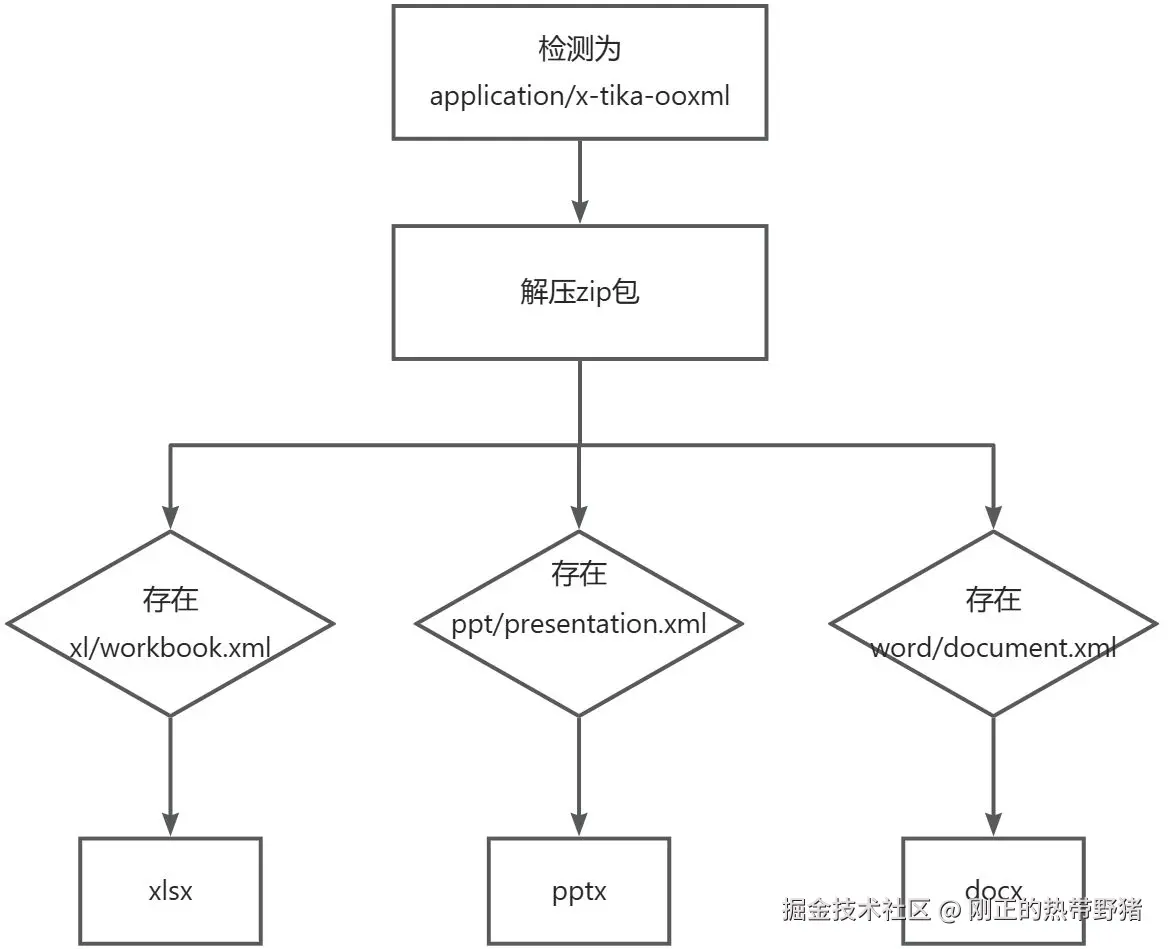
检测代码如下:
/* 文件类型白名单 */
public static list<string> mimetypewhitelist = arrays.aslist(
    "image/jpeg",
    "image/png");

public  void test(multipartfile multipartfile) throws exception {
    string mimetype = new tika().detect(file.getinputstream());

    if ("application/x-tika-ooxml".equals(mimetype)) {
        mimetype = detectooxml(file);
    }
    log.info(mimetype);

    assert.istrue(mimetypewhitelist.contains(mimetype), "不支持文件类型:" + mimetype);
}

/**
 * 解析ooxml(office open xml file formats)
 */
private string detectooxml(file file) throws ioexception {
    try (zipfile zipfile = new zipfile(file)) {
        if (zipfile.getentry("word/document.xml") != null) {
            return "application/vnd.openxmlformats-officedocument.wordprocessingml.document";
        }
        if (zipfile.getentry("xl/workbook.xml") != null) {
            return "application/vnd.openxmlformats-officedocument.spreadsheetml.sheet";
        }
        if (zipfile.getentry("ppt/presentation.xml") != null) {
            return "application/vnd.openxmlformats-officedocument.presentationml.presentation";
        }
    }
    return "application/zip";
}
区分xls/ppt/doc
xls/ppt/doc是microsoft office的早期版本,使用二进制文件格式,读取文件内容可以进行大致识别。
private static string detectmsoffice(inputstream inputstream) throws exception {
    byte[] buffer = new byte[1024 * 10];

    while (inputstream.read(buffer) != -1) { // todo 滑动窗口优化
        if (containssubarray(buffer, "excel".getbytes())) {
            return "application/vnd.ms-excel";
        }
        if (containssubarray(buffer, "powerpoint".getbytes())) {
            return "application/vnd.ms-powerpoint";
        }
        if (containssubarray(buffer, "office word".getbytes())) {
            return "application/msword";
        }
    }
    return "unknown";
}
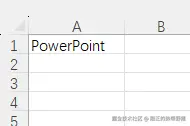
然而读取文件内容进行识别并不一定准确,如下图,假如在excel中输入"powerpoint"就可能被识别为ppt。所以目前三者之间并没有精确识别的办法。
三、总结
文件扩展名校验虽然不够准确,但实现起来简单,能满足大部分情况(毕竟修改扩展名的用户只是极少数),适合作为短期方案。但长期来看还是推荐组合校验(扩展名+魔数+内容),能更精确识别文件类型。
到此这篇关于java进行文件格式校验的方案详解的文章就介绍到这了,更多相关java文件格式校验内容请搜索代码网以前的文章或继续浏览下面的相关文章希望大家以后多多支持代码网!




发表评论