
 我要评论
我要评论背景
好久没使用c#操作过excel等文件,刚好今天有位大学同学问到博主。
他有100多个excel表格文件,需要提取每个文件的第二行数据统一保存到一张表里。
后面又需要把所有文件的excel数据全部放到同一个张表,npoi插件是插件首选。
读取并保存
创建一个新的工作簿,定义表头,创建表头行。
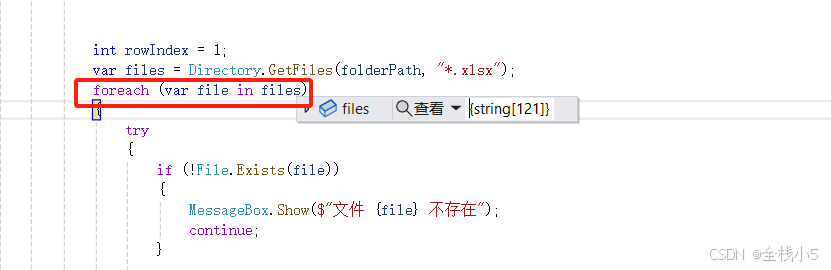
读取某个文件夹目录,遍历所有文件夹下的所有excel文件,并读取行数据,遍历每个列的行数据,追加到新的工作簿行里,最后进行保存输出到本地。
// 读取xlsx
private void readexcelfiles(string folderpath)
{
    if (!directory.exists(folderpath))
    {
        messagebox.show("指定的文件夹路径不存在");
        return;
    }

    // ===创建一个新的工作簿===
    iworkbook workbook = new xssfworkbook();
    isheet sheet = workbook.createsheet("sheet1");

    // 定义表头
    string[] headers = {
        "字段1", "字段2", "字段3", "字段4", "字段5"
    };

    // 创建表头行
    irow headerrow = sheet.createrow(0);
    for (int i = 0; i < headers.length; i++)
    {
        headerrow.createcell(i).setcellvalue(headers[i]);
    }
    // ===创建一个新的工作簿===


    int rowindex = 1;
    var files = directory.getfiles(folderpath, "*.xlsx");
    foreach (var file in files)
    {
        try
        {
            if (!file.exists(file))
            {
                messagebox.show($"文件 {file} 不存在");
                continue;
            }

            using (var filestream = new filestream(file, filemode.open, fileaccess.read))
            {
                iworkbook workbook2 = new xssfworkbook(filestream);
                isheet sheet2 = workbook2.getsheetat(0); // 获取第一个工作表

                // 获取行数
                int rowcount = sheet2.physicalnumberofrows;
                for (int rr = 0; rr < rowcount; rr++)
                {
                    irow row = sheet2.getrow(rr + 1); // 获取第二行

                    if (row != null)
                    {
                        var rowvalues = row.cells.select(cell => cell.tostring()).toarray();

                        irow datarow = sheet.createrow(rowindex);
                        for (int i = 0; i < rowvalues.length; i++)
                        {
                            datarow.createcell(i).setcellvalue(rowvalues[i]);
                        }
                    }

                    rowindex++;
                }
            }
        }
        catch (exception ex)
        {
            messagebox.show($"读取文件 {path.getfilename(file)} 时发生错误: {ex.message}");
        }
    }

    // ===保存文件===
    string filepath = path.combine(environment.getfolderpath(environment.specialfolder.desktop), "alldata.xlsx");
    using (var fs = new filestream(filepath, filemode.create, fileaccess.write))
    {
        workbook.write(fs);
    }
    // ===/保存文件===
}
npoi信息
npoi 是一个用于处理 microsoft office 文件的开源库,它提供了对 excel、word 和 powerpoint 文件的读写功能。
npoi 支持处理 .xls 和 .xlsx 格式的 excel 文件,.doc 和 .docx 格式的 word 文件,.ppt 和 .pptx 格式的 powerpoint 文件。
以下是 npoi 的基本功能和插件介绍:
npoi 插件介绍
1.npoi: 核心库,用于读取和写入 office 文件的基本操作。它包含处理 excel、word 和 powerpoint 文件的功能。
2.npoi.ooxml: 支持 .xlsx 格式的 excel 文件(即 office 2007 及以后版本)。这是 npoi 的一个扩展库,提供对 excel 2007 及以后版本格式的支持。
3.npoi.openxml4net: 支持 .docx 和 .pptx 格式的文件(即 office 2007 及以后版本)。它用于处理 open xml 格式的文件。
4.npoi.hssf: 支持 .xls 格式的 excel 文件(即 office 97-2003 版本)。用于读取和写入旧版本的 excel 文件。
5.npoi.ss.usermodel: 提供了处理 excel 文件的通用接口,包括 iworkbook、isheet 和 irow 等接口,适用于各种格式的 excel 文件。
基本功能
1.excel 文件操作
读取 excel 文件: 通过 npoi 读取 .xls 和 .xlsx 文件的数据,包括单元格内容、行和列的索引等。
写入 excel 文件: 可以创建新的 excel 文件或修改现有文件,包括设置单元格的格式、字体、颜色等。
数据操作: 读取和写入单元格内容,操作行和列,插入和删除行列,合并单元格等。
样式和格式: 设置单元格的样式,包括字体、颜色、边框、对齐方式等。
2.word 文件操作
读取 word 文件: 获取 .doc 和 .docx 文件中的文本、表格、段落等。
写入 word 文件: 创建新的 word 文档或修改现有文档,包括添加文本、表格、图片等。
格式设置: 设置段落格式、字体样式、字体大小、文本颜色等。
3.powerpoint 文件操作
读取 powerpoint 文件: 提取 .ppt 和 .pptx 文件中的幻灯片内容、文本、图片等。
写入 powerpoint 文件: 创建新的 powerpoint 演示文稿或修改现有的演示文稿,包括添加幻灯片、设置幻灯片的内容和样式等。
示例代码
读取 excel 文件的示例
using system;
using system.io;
using npoi.ss.usermodel;
using npoi.xssf.usermodel;  // 对于 .xlsx 格式
// using npoi.hssf.usermodel;  // 对于 .xls 格式

class program
{
    static void main()
    {
        string filepath = "your_file_path.xlsx";

        using (filestream filestream = new filestream(filepath, filemode.open, fileaccess.read))
        {
            iworkbook workbook = new xssfworkbook(filestream);  // 对于 .xlsx 文件
            isheet sheet = workbook.getsheetat(0);
            foreach (irow row in sheet)
            {
                foreach (icell cell in row)
                {
                    console.write($"{cell.tostring()} ");
                }
                console.writeline();
            }
        }
    }
}
写入 excel 文件的示例
using system;
using system.io;
using npoi.ss.usermodel;
using npoi.xssf.usermodel;  // 对于 .xlsx 格式
// using npoi.hssf.usermodel;  // 对于 .xls 格式

class program
{
    static void main()
    {
        string filepath = "your_file_path.xlsx";

        iworkbook workbook = new xssfworkbook();
        isheet sheet = workbook.createsheet("sheet1");

        irow row = sheet.createrow(0);
        icell cell = row.createcell(0);
        cell.setcellvalue("hello, npoi!");

        using (filestream filestream = new filestream(filepath, filemode.create, fileaccess.write))
        {
            workbook.write(filestream);
        }
    }
}
这些示例展示了如何使用 npoi 进行基本的文件读写操作。如果你需要更详细的文档或具体功能的实现,可以参考 npoi 的 官方文档 或其 github 页面。
以上就是c#使用npoi实现excel读取数据以及保存数据的详细内容,更多关于c# excel数据读取与保存的资料请关注代码网其它相关文章!




发表评论