
 我要评论
我要评论springboot使用httpclient实现http请求
越来越多的 java 应用程序需要直接通过 http 协议来访问网络资源。虽然在 jdk 的 java.net 包中已经提供了访问 http 协议的基本功能,但是对于大部分应用程序来说,jdk 库本身提供的功能还不够丰富和灵活。
httpclient 是 apache jakarta common 下的子项目,用来提供高效的、最新的、功能丰富的支持 http 协议的客户端编程工具包,并且它支持 http 协议最新的版本和建议。
新建一个 springboot 工程,引入 httpclient 的 pom 依赖:
<dependency>
	<groupid>org.apache.httpcomponents</groupid>
	<artifactid>httpclient</artifactid>
	<version>4.5.6</version>
</dependency>
总结:
public class httpclientutil {

    // get请求
    public static string get(string url, jsonobject params) {
        closeablehttpclient httpclient = httpclientbuilder.create().build();
        string sendurl = url;
        // 拼接参数
        if (objects.nonnull(params) && params.size() > 0) {
            sendurl = connectparams(url, params);
        }
        httpget httpget = new httpget(sendurl);
        closeablehttpresponse response = null;
        try {
            response = httpclient.execute(httpget);
            httpentity httpentity = response.getentity();
            if (httpstatus.sc_ok == response.getstatusline().getstatuscode() && null != httpentity) {
                return entityutils.tostring(httpentity);
            }
        } catch (ioexception e) {
            e.printstacktrace();
        } finally {
            try {
                close(httpclient, response);
            } catch (ioexception e) {
                e.printstacktrace();
            }
        }
        throw new jeecgbootexception("调用get请求失败!");
    }

    /**
     * @description: post 请求
     * @author: zzc
     * @date: 2022-12-16 16:48
     * @param url:
     * @param params:
     * @param requestbody: json 串
     * @return: java.lang.string
     **/
    public static string post(string url, jsonobject params, string requestbody) {
        closeablehttpclient httpclient = httpclientbuilder.create().build();
        string sendurl = url;
        // 1.拼接参数
        if (objects.nonnull(params) && params.size() > 0) {
            sendurl = connectparams(url, params);
        }
        httppost httppost = new httppost(sendurl);
        httppost.setheader("content-type", "application/json;charset=utf8");
        closeablehttpresponse response = null;
        try {
            // 2.设置request-body
            if (stringutils.isnotblank(requestbody)) {
                bytearrayentity entity = new bytearrayentity(requestbody.getbytes(standardcharsets.utf_8));
                entity.setcontenttype("application/json");
                httppost.setentity(entity);
            }
            response = httpclient.execute(httppost);
            httpentity httpentity = response.getentity();
            if (httpstatus.sc_ok == response.getstatusline().getstatuscode() && null != httpentity) {
                return entityutils.tostring(httpentity);
            }
        } catch (unsupportedencodingexception e) {
            e.printstacktrace();
        } catch (clientprotocolexception e) {
            e.printstacktrace();
        } catch (ioexception e) {
            e.printstacktrace();
        } finally {
            try {
                close(httpclient, response);
            } catch (ioexception e) {
                e.printstacktrace();
            }
        }
        throw new jeecgbootexception("调用post请求失败!");
    }

    private static string connectparams(string url, jsonobject params) {
        stringbuffer buffer = new stringbuffer();
        buffer.append(url).append("?");
        params.foreach((x, y) -> buffer.append(x).append("=").append(y).append("&"));
        buffer.deletecharat(buffer.length() - 1);
        return buffer.tostring();
    }

    public static void close(closeablehttpclient httpclient, closeablehttpresponse httpresponse) throws ioexception{
        if (null != httpclient) {
            httpclient.close();
        }
        if (null != httpresponse) {
            httpresponse.close();
        }
    }

}
详细使用示例
get 无参
调用接口:
http://localhost:8080/http/listusers
没有入参。
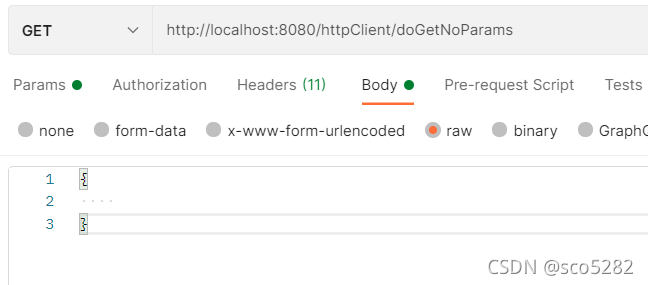
httpclientcontroller#dogetnoparams():get请求接口不带参数
@restcontroller
@requestmapping("/httpclient")
public class httpclientcontroller {

    @autowired
    private httpclientservice httpclientservice;

    // get请求接口不带参数
    @getmapping("/dogetnoparams")
    public string dogetnoparams() {
        return httpclientservice.dogetnoparams();
    }

}httpclientserviceimpl#dogetnoparams():get 请求接口不带参数
@slf4j
@service
public class httpclientserviceimpl implements httpclientservice {

    // get请求接口不带参数
    @override
    public string dogetnoparams() {
        string result = httpclientutil.dogetnoparams();
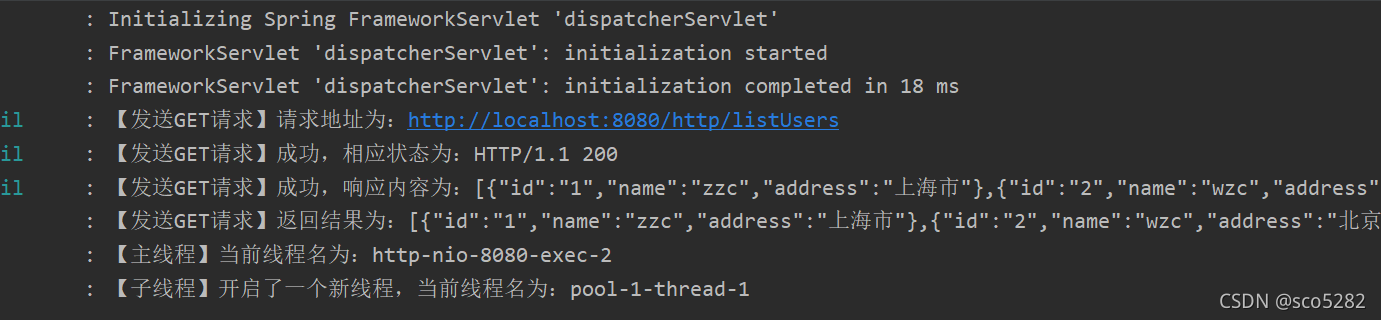
        log.info("【发送get请求】返回结果为:{}", result);
        if (!stringutil.isblank(result)) {
            taskcenterutil taskcenterutil = taskcenterutil.gettaskcenterutil();
            taskcenterutil.submittask(() -> {
                log.info("【子线程】开启了一个新线程,当前线程名为:{}", thread.currentthread().getname());
                return null;
            });
        }
        log.info("【主线程】当前线程名为:{}", thread.currentthread().getname());
        return result;
    }

}
说明:
- 当 http 调用成功后,通过线程池开一个子线程,去异步执行任务;主线程继续向下执行
httpclientutil#dogetnoparams():get请求接口不带参数
@slf4j
public class httpclientutil {

    // 服务器ip
    public static final string ip = "http://localhost";

    // 端口
    public static final string port = ":8080";

    // get请求接口不带参数
    public static final string get_url_no_params = ip + port + "/http/listusers";

    // get请求接口不带参数
    public static string dogetnoparams() {
        closeablehttpclient httpclient = httpclientbuilder.create().build();
        // 创建 get 请求
        httpget httpget = new httpget(get_url_no_params);
        httpget.setheader("accept-encoding", "identity");
        log.info("【发送get请求】请求地址为:{}", get_url_no_params);
        closeablehttpresponse httpresponse = null;
        try {
            httpresponse = httpclient.execute(httpget);
            httpentity httpentity = httpresponse.getentity();
            log.info("【发送get请求】成功,相应状态为:{}", httpresponse.getstatusline());
            if (httpstatus.sc_ok == httpresponse.getstatusline().getstatuscode() && null != httpentity) {
                string result = entityutils.tostring(httpentity);
                log.info("【发送get请求】成功,响应内容为:{}", result);
                return result;
            }
        } catch (ioexception e) {
            log.error("【发送get请求】失败,执行发送请求时,出现io异常,异常信息为:{}", e);
            return null;
        } finally {
            try {
                close(httpclient, httpresponse);
            } catch (ioexception e) {
                log.error("【发送get请求】失败,关闭流时,出现io异常,异常信息为:{}", e);
            }
        }
        return null;
    }

}
说明:
- 通过类
httpget发起 get 请求。
httpget:有 3 个构造方法
public class httpget extends httprequestbase {

    public httpget() {
    }

    public httpget(uri uri) {
        this.seturi(uri);
    }

    public httpget(string uri) {
        this.seturi(uri.create(uri));
    }

    ...
}
这里使用了 public httpget(string uri); 方式来构造 httpget 实例。
httpclientutil#close():关闭流
// 关闭流
public static void close(closeablehttpclient httpclient, closeablehttpresponse httpresponse) throws ioexception{
    if (null != httpclient) {
        httpclient.close();
    }
    if (null != httpresponse) {
        httpresponse.close();
    }
}taskcenterutil:线程池工具类
public class taskcenterutil {

    public static integer core_pool_size = 10;
    public static integer max_num_pool_size = 10;
    public static integer max_message_size = 100;
    public static long keep_alive_time = 60l;

    private threadpoolexecutor poolexecutor = new threadpoolexecutor(core_pool_size, max_num_pool_size, keep_alive_time,
            timeunit.seconds, new linkedblockingqueue<>(max_message_size), new threadpoolexecutor.callerrunspolicy());


    private taskcenterutil() {}

    private static taskcenterutil taskcenterutil = new taskcenterutil();

    public static taskcenterutil gettaskcenterutil() {
        return taskcenterutil;
    }

    // 提交任务
    public void submittask(callable task) {
        poolexecutor.submit(task);
    }

}
postman 调用:
控制台打印日志:
get 有参
- 方式一:使用
public httpget(string uri);方式来构造httpget实例。即:使用 url 字符串来拼接参数。 - 方式二:使用
public httpget(uri uri);方式来构造httpget实例。
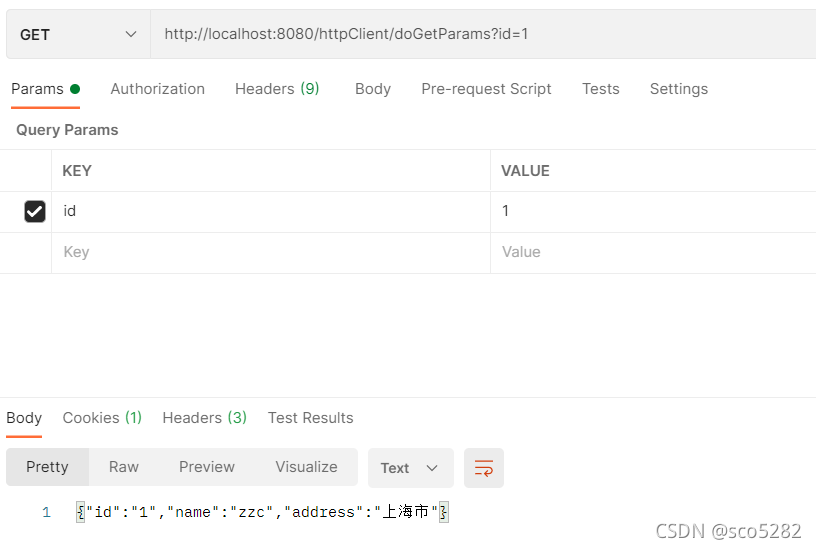
调用接口:
http://localhost:8080/http/getuserbyid?id=1
入参:
id=1
httpclientcontroller#dogetparams():get请求接口带参数
@getmapping("/dogetparams")
public string dogetparams(string id) {
    return httpclientservice.dogetparams(id);
}httpclientserviceimpl:
@override
public string dogetparams(string id) {
    string result = httpclientutil.dogetparams(id);
    log.info("【发送get请求】返回结果为:{}", result);
    return result;
}httpclientutil#dogetparams():get请求接口带参数
@slf4j
public class httpclientutil {

    // get请求接口带参数
    public static final string get_url_params = ip + port + "/http/getuserbyid";

    // 入参名称
    public static final string url_params_id = "id";

	// http 协议
    public static final string scheme_http = "http";

    // 主机
    public static final string local_host = "localhost";

    // 请求接口路径
    public static final string get_url_params_path = "/http/getuserbyid";

    // 端口
    public static final integer local_port = 8080;

    // get请求接口带参数
    public static string dogetparams(string id) {
        closeablehttpclient httpclient = httpclientbuilder.create().build();
        // 不同方式获取 httpget
        // 方式一:
        httpget httpget = getstrhttpget(get_url_params, id);
        // 方式二:
        //httpget httpget = geturlhttpget(id);
        // 获取请求头配置信息
        requestconfig requestconfig = httpclientconfig.getrequestconfig();
        httpget.setconfig(requestconfig);
        closeablehttpresponse response = null;
        try {
            response = httpclient.execute(httpget);
            httpentity httpentity = response.getentity();
            log.info("【发送get请求】成功,相应状态为:{}", response.getstatusline());
            if (httpstatus.sc_ok == response.getstatusline().getstatuscode() && null != httpentity) {
                string result = entityutils.tostring(httpentity);
                log.info("【发送get请求】成功,响应内容为:{}", result);
                return result;
            }
        } catch (ioexception e) {
            log.error("【发送get请求】失败,执行发送请求时,出现io异常,异常信息为:{}", e);
            return null;
        } finally {
            try {
                close(httpclient, response);
            } catch (ioexception e) {
                log.error("【发送get请求】失败,关闭流时,出现io异常,异常信息为:{}", e);
            }
        }
        return null;
    }
}getstrhttpget():方式一:url拼接参数
public static httpget getstrhttpget(string url, string id) {
    stringbuilder builder = new stringbuilder();
    // url 拼接参数  /http/getuserbyid?id=1
    string strurl = builder.append(url).append("?").append(url_params_id).append("=").append(id).tostring();
    log.info("【发送get请求】请求地址为:{}", strurl);
    httpget httpget = new httpget(strurl);
    return httpget;
}geturlhttpget():方式二:uri对象
public static httpget geturlhttpget(string id) {
    // 将参数键值对放入集合中
    list<namevaluepair> params = new arraylist<>();
    params.add(new basicnamevaluepair(url_params_id, id));
    try {
        uri uri = new uribuilder()
                .setscheme(scheme_http)
                .sethost(local_host)
                .setport(local_port)
                .setpath(get_url_params_path)
                .setparameters(params).build();
        return new httpget(uri);
    } catch (urisyntaxexception e) {
        log.error("【发送get请求】构建uri失败,失败信息为:{}", e);
    }
    return null;
}
说明:
- 方式一是使用
public httpget(string uri);方式来构造httpget实例 - 方式二是使用
public httpget(url uri);方式来构造httpget实例。即:使用 url 字符串来拼接参数。
postman 调用:
post 无参
调用接口:
http://localhost:8080/http/listuserlist
入参:无
httpclientcontroller#dopostnoparams():post请求接口不带参数
@postmapping("/dopostnoparams")
public string dopostnoparams() {
    return httpclientservice.dopostnoparams();
}httpclientserviceimpl#dopostnoparams():
@override
public string dopostnoparams() {
    string result = httpclientutil.dopostnoparams();
    log.info("【发送post请求】返回结果为:{}", result);
    return result;
}httpclientutil:
public class httpclientutil {

    // post请求接口不带参数
    public static final string post_url_no_params = ip + port + "/http/listuserlist";

	// post请求接口带参数
    public static final string post_url_params = ip + port + "/http/getuservobyid";

    // post请求接口带参数 -- 对象参数
    public static final string post_url_params_object = ip + port + "/http/listusers";

    // post请求接口不带参数
    public static string dopostnoparams() {
        closeablehttpclient httpclient = httpclientbuilder.create().build();
        httppost httppost = new httppost(post_url_no_params);
        log.info("【发送post请求】请求地址为:{}", post_url_no_params);
        closeablehttpresponse response = null;
        try {
            response = httpclient.execute(httppost);
            httpentity httpentity = response.getentity();
            log.info("【发送post请求】成功,相应状态为:{}", response.getstatusline());
            if (httpstatus.sc_ok == response.getstatusline().getstatuscode() && null != httpentity) {
                string result = entityutils.tostring(httpentity);
                log.info("【发送post请求】成功,响应内容为:{}", result);
                return result;
            }
        } catch (ioexception e) {
            log.error("【发送post请求】失败,执行发送请求时,出现io异常,异常信息为:{}", e);
            return null;
        } finally {
            try {
                close(httpclient, response);
            } catch (ioexception e) {
                log.error("【发送post请求】失败,关闭流时,出现io异常,异常信息为:{}", e);
            }
        }
        return null;
    }

}
post 有参
- 参数是:普通参数。方式与get一样即可,直接在 url 后缀上拼接参数
- 参数是:对象。将参数以请求体 request-body 的方式进行请求
- 参数是:普通参数+对象。普通参数 直接在 url 后缀上拼接参数;对象 以请求体 request-body 的方式进行请求
普通参数
请求接口:
http://localhost:8080/http/getuservobyid?id=1
对象参数
请求接口:
http://localhost:8080/http/listusers
入参 uservo:
{
	"id": 1
}
即:这个接口可以随便写
@postmapping("/listusers")
public list<uservo> listusers(@requestbody uservo uservo) {
    return httpservice.listusers();
}httpclientcontroller#dopostparams():post请求接口带参数
@postmapping("/dopostparams")
public string dopostparams(string id) {
    return httpclientservice.dopostparams(id);
}httpclientserviceimpl#dopostparams():
@override
public string dopostparams(string id) {
    string result = httpclientutil.dopostparams(id);
    log.info("【发送post请求】返回结果为:{}", result);
    return result;
}httpclientutil#dopostparams():
public static string dopostparams(string id) {
    closeablehttpclient httpclient = httpclientbuilder.create().build();
    // 参数是普通参数
    httppost httppost = getstrhttppost(post_url_params, id);
    // 参数是对象
    //httppost httppost = getobjecthttppost(id);
    // 设置contenttype(注:如果只是传普通参数的话,contenttype不一定非要用application/json)
    httppost.setheader("content-type", "application/json;charset=utf8");
    closeablehttpresponse response = null;
    try {
        response = httpclient.execute(httppost);
        httpentity httpentity = response.getentity();
        log.info("【发送post请求】成功,相应状态为:{}", response.getstatusline());
        if (httpstatus.sc_ok == response.getstatusline().getstatuscode() && null != httpentity) {
            string result = entityutils.tostring(httpentity);
            log.info("【发送post请求】成功,响应内容为:{}", result);
            return result;
        }
    } catch (ioexception e) {
        log.error("【发送post请求】失败,执行发送请求时,出现io异常,异常信息为:{}", e);
        return null;
    } finally {
        try {
            close(httpclient, response);
        } catch (ioexception e) {
            log.error("【发送post请求】失败,关闭流时,出现io异常,异常信息为:{}", e);
        }
    }
    return null;
}getstrhttppost():post请求有参:普通参数
public static httppost getstrhttppost(string url, string id) {
    stringbuilder builder = new stringbuilder();
    // url 拼接参数  /http/getuservobyid?id=1
    string strurl = builder.append(url).append("?").append(url_params_id).append("=").append(id).tostring();
    log.info("【发送post请求】请求地址为:{}", strurl);
    httppost httppost = new httppost(strurl);
    return httppost;
}getobjecthttppost():post请求有参:对象参数
public static httppost getobjecthttppost(string id) {
    httppost httppost = new httppost(post_url_params_object);
    log.info("【发送post请求】请求地址为:{}", post_url_params_object);
    uservo uservo = new uservo();
    uservo.setid(id);
    // 将java对象转换为json字符串
    string jsonstring = json.tojsonstring(uservo);
    stringentity stringentity = new stringentity(jsonstring, "utf-8");
    // post请求是将参数放在请求体里面传过去的
    httppost.setentity(stringentity);
    return httppost;
}
普通参数 + 对象
// params:name=zzc&age=17  marshal:json 串
public static string post(string url, string params, string marshal) {
    closeablehttpclient httpclient = httpclientbuilder.create().build();
    string strurl = url + "?" + params;
    httppost httppost = new httppost(strurl);
    httppost.setheader("content-type", "application/json;charset=utf8");

    closeablehttpresponse response = null;
    try {
        // 设置 requst-body 参数
        bytearrayentity entity = new bytearrayentity(marshal.getbytes("utf-8"));
        entity.setcontenttype("application/json");
        httppost.setentity(entity);

        response = httpclient.execute(httppost);
        httpentity httpentity = response.getentity();
        if (httpstatus.sc_ok == response.getstatusline().getstatuscode() && null != httpentity) {
            string result = entityutils.tostring(httpentity);
            return result;
        }
    } catch (exception e) {
        e.printstacktrace();
    } finally {
        try {
            close(httpclient, response);
        } catch (ioexception e) {
            e.printstacktrace();
        }
    }
    return null;
}
表单提交
public static string post(string url, map<string, string> params) {
    closeablehttpclient httpclient = httpclientbuilder.create().build();
    httppost httppost = new httppost(url);
    httppost.setheader("content-type", "application/x-www-form-urlencoded");
    // 参数
    list<namevaluepair> namevaluepairs = new arraylist<>();
    if (maputils.isnotempty(params)) {
        params.foreach((x, y) -> {
            namevaluepairs.add(new basicnamevaluepair(x, y));
        });
    }
    closeablehttpresponse response = null;
    try {
        httppost.setentity(new urlencodedformentity(namevaluepairs));
        response = httpclient.execute(httppost);
        httpentity httpentity = response.getentity();
        if (httpstatus.sc_ok == response.getstatusline().getstatuscode() && null != httpentity) {
            return entityutils.tostring(httpentity);
        }
    } catch (ioexception e) {
        e.printstacktrace();
    } finally {
        try {
            close(httpclient, response);
        } catch (ioexception e) {
            e.printstacktrace();
        }
    }
    throw new jeecgbootexception("调用accesstoken api失败");
}
总结
以上为个人经验,希望能给大家一个参考,也希望大家多多支持代码网。





发表评论