
 我要评论
我要评论背景
在实际开发过程中,我们经常需要调用对方提供的接口或测试自己写的接口是否合适。很多项目都会封装规定好本身项目的接口规范,所以大多数需要去调用对方提供的接口或第三方接口(短信、天气等)。若是普通java工程推荐使用okhttpclient,若是spring工程推荐使用resttemplate。,若是springcloud微服务可以用openfeign或dubbo
在java项目中调用第三方接口的方式有:
1、通过jdk网络类java.net.httpurlconnection;
2、通过common封装好的httpclient;
3、通过apache封装好的closeablehttpclient;
4、通过springboot-resttemplate;
5、通过feign服务调用
一、java调用第三方http接口几种方式总结
1. 通过jdk网络类java.net.httpurlconnection
比较原始的一种调用做法,这里把get请求和post请求都统一放在一个方法里面。
实现过程:
get:
- 1、创建远程连接
- 2、设置连接方式(get、post、put。。。)
- 3、设置连接超时时间
- 4、设置响应读取时间
- 5、发起请求
- 6、获取请求数据
- 7、关闭连接
post:
- 1、创建远程连接
- 2、设置连接方式(get、post、put。。。)
- 3、设置连接超时时间
- 4、设置响应读取时间
- 5、当向远程服务器传送数据/写数据时,需要设置为true(setdooutput)
- 6、当前向远程服务读取数据时,设置为true,该参数可有可无(setdoinput)
- 7、设置传入参数的格式:(setrequestproperty)
- 8、设置鉴权信息:authorization:(setrequestproperty)
- 9、设置参数
- 10、发起请求
- 11、获取请求数据
- 12、关闭连接
直接上代码:
import org.springframework.lang.nullable;

import java.io.*;
import java.net.httpurlconnection;
import java.net.malformedurlexception;
import java.net.url;
import java.net.urlconnection;


public class httpurlconnectionutil {

    /**
     * http get请求
     * @param httpurl 连接
     * @return 响应数据
     */
    public static string doget(string httpurl){
        //链接
        httpurlconnection connection = null;
        inputstream is = null;
        bufferedreader br = null;
        stringbuffer result = new stringbuffer();
        try {
            //创建连接
            url url = new url(httpurl);
            connection = (httpurlconnection) url.openconnection();
            //设置请求方式
            connection.setrequestmethod("get");
            //设置连接超时时间
            connection.setreadtimeout(15000);
            //开始连接
            connection.connect();
            //获取响应数据
            if (connection.getresponsecode() == 200) {
                //获取返回的数据
                is = connection.getinputstream();
                if (null != is) {
                    br = new bufferedreader(new inputstreamreader(is, "utf-8"));
                    string temp = null;
                    while (null != (temp = br.readline())) {
                        result.append(temp);
                    }
                }
            }
        } catch (ioexception e) {
            e.printstacktrace();
        } finally {
            if (null != br) {
                try {
                    br.close();
                } catch (ioexception e) {
                    e.printstacktrace();
                }
            }
            if (null != is) {
                try {
                    is.close();
                } catch (ioexception e) {
                    e.printstacktrace();
                }
            }
            //关闭远程连接
            connection.disconnect();
        }
        return result.tostring();
    }

    /**
     * http post请求
     * @param httpurl 连接
     * @param param 参数
     * @return
     */
    public static string dopost(string httpurl, @nullable string param) {
        stringbuffer result = new stringbuffer();
        //连接
        httpurlconnection connection = null;
        outputstream os = null;
        inputstream is = null;
        bufferedreader br = null;
        try {
            //创建连接对象
            url url = new url(httpurl);
            //创建连接
            connection = (httpurlconnection) url.openconnection();
            //设置请求方法
            connection.setrequestmethod("post");
            //设置连接超时时间
            connection.setconnecttimeout(15000);
            //设置读取超时时间
            connection.setreadtimeout(15000);
            //dooutput设置是否向httpurlconnection输出,doinput设置是否从httpurlconnection读入,此外发送post请求必须设置这两个
            //设置是否可读取
            connection.setdooutput(true);
            connection.setdoinput(true);
            //设置通用的请求属性
            connection.setrequestproperty("accept", "*/*");
            connection.setrequestproperty("connection", "keep-alive");
            connection.setrequestproperty("user-agent", "mozilla/4.0 (compatible; msie 6.0; windows nt 5.1; sv1)");
            connection.setrequestproperty("content-type", "application/json;charset=utf-8");

            //拼装参数
            if (null != param && param.equals("")) {
                //设置参数
                os = connection.getoutputstream();
                //拼装参数
                os.write(param.getbytes("utf-8"));
            }
            //设置权限
            //设置请求头等
            //开启连接
            //connection.connect();
            //读取响应
            if (connection.getresponsecode() == 200) {
                is = connection.getinputstream();
                if (null != is) {
                    br = new bufferedreader(new inputstreamreader(is, "gbk"));
                    string temp = null;
                    while (null != (temp = br.readline())) {
                        result.append(temp);
                        result.append("\r\n");
                    }
                }
            }

        } catch (malformedurlexception e) {
            e.printstacktrace();
        } catch (ioexception e) {
            e.printstacktrace();
        } finally {
            //关闭连接
            if(br!=null){
                try {
                    br.close();
                } catch (ioexception e) {
                    e.printstacktrace();
                }
            }
            if(os!=null){
                try {
                    os.close();
                } catch (ioexception e) {
                    e.printstacktrace();
                }
            }
            if(is!=null){
                try {
                    is.close();
                } catch (ioexception e) {
                    e.printstacktrace();
                }
            }
            //关闭连接
            connection.disconnect();
        }
        return result.tostring();
    }

    public static void main(string[] args) {
        string message = dopost("https://tcc.taobao.com/cc/json/mobile_tel_segment.htm?tel=13026194071", "");
        system.out.println(message);
    }
}
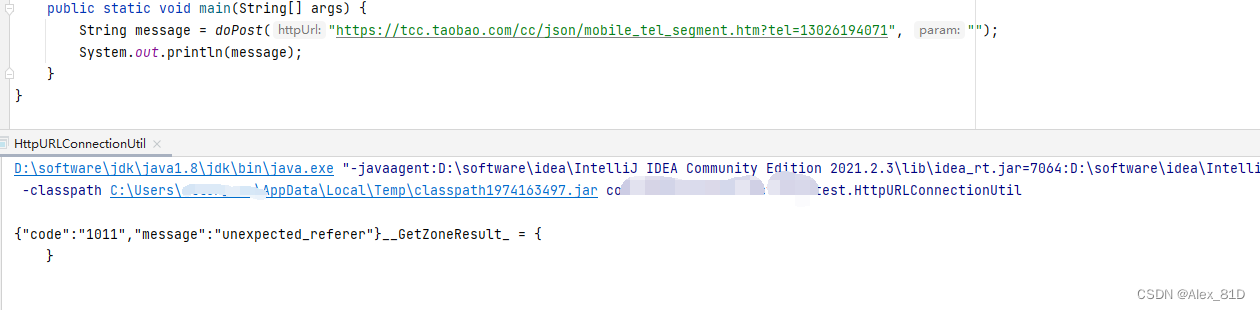
运行结果:
2. 通过apache common封装好的httpclient
httpclient的get或post请求方式步骤:
1.生成一个httpclient对象并设置相应的参数;
2.生成一个getmethod对象或postmethod并设置响应的参数;
3.用httpclient生成的对象来执行getmethod生成的get方法;
4.处理响应状态码;
5.若响应正常,处理http响应内容;
6.释放连接。
<!--httpclient-->
<dependency>
    <groupid>commons-httpclient</groupid>
    <artifactid>commons-httpclient</artifactid>
    <version>3.1</version>
</dependency>

<!--fastjson-->
<dependency>
    <groupid>com.alibaba</groupid>
    <artifactid>fastjson</artifactid>
    <version>1.2.32</version>
</dependency>
import com.alibaba.fastjson.jsonobject;
import org.apache.commons.httpclient.*;
import org.apache.commons.httpclient.methods.getmethod;
import org.apache.commons.httpclient.methods.postmethod;
import org.apache.commons.httpclient.params.httpmethodparams;

import java.io.ioexception;

/**
 * @author allen
 * @description todo
 * @date 2023-10-18 18:25
 * @version 1.0
 */
public class httpclientutil {
    /**
     * httpclient的get请求方式
     * 使用getmethod来访问一个url对应的网页实现步骤:
     * 1.生成一个httpclient对象并设置相应的参数;
     * 2.生成一个getmethod对象并设置响应的参数;
     * 3.用httpclient生成的对象来执行getmethod生成的get方法;
     * 4.处理响应状态码;
     * 5.若响应正常,处理http响应内容;
     * 6.释放连接。
     *
     * @param url
     * @param charset
     * @return
     */
    public static string doget(string url, string charset) {
        //1.生成httpclient对象并设置参数
        httpclient httpclient = new httpclient();
        //设置http连接超时为5秒
        httpclient.gethttpconnectionmanager().getparams().setconnectiontimeout(5000);
        //2.生成getmethod对象并设置参数
        getmethod getmethod = new getmethod(url);
        //设置get请求超时为5秒
        getmethod.getparams().setparameter(httpmethodparams.so_timeout, 5000);
        //设置请求重试处理,用的是默认的重试处理:请求三次
        getmethod.getparams().setparameter(httpmethodparams.retry_handler, new defaulthttpmethodretryhandler());
        string response = "";
        //3.执行http get 请求
        try {
            int statuscode = httpclient.executemethod(getmethod);
            //4.判断访问的状态码
            if (statuscode != httpstatus.sc_ok) {
                system.err.println("请求出错:" + getmethod.getstatusline());
            }
            //5.处理http响应内容
            //http响应头部信息,这里简单打印
            header[] headers = getmethod.getresponseheaders();
            for (header h : headers) {
                system.out.println(h.getname() + "---------------" + h.getvalue());
            }
            //读取http响应内容,这里简单打印网页内容
            //读取为字节数组
            byte[] responsebody = getmethod.getresponsebody();
            response = new string(responsebody, charset);
            system.out.println("-----------response:" + response);
            //读取为inputstream,在网页内容数据量大时候推荐使用
            //inputstream response = getmethod.getresponsebodyasstream();
        } catch (httpexception e) {
            //发生致命的异常,可能是协议不对或者返回的内容有问题
            system.out.println("请检查输入的url!");
            e.printstacktrace();
        } catch (ioexception e) {
            //发生网络异常
            system.out.println("发生网络异常!");
        } finally {
            //6.释放连接
            getmethod.releaseconnection();
        }
        return response;
    }

    /**
     * post请求
     *
     * @param url
     * @param json
     * @return
     */
    public static string dopost(string url, jsonobject json) {
        httpclient httpclient = new httpclient();
        postmethod postmethod = new postmethod(url);

        postmethod.addrequestheader("accept", "*/*");
        postmethod.addrequestheader("connection", "keep-alive");
        //设置json格式传送
        postmethod.addrequestheader("content-type", "application/json;charset=gbk");
        //必须设置下面这个header
        postmethod.addrequestheader("user-agent", "mozilla/5.0 (windows nt 10.0; win64; x64) applewebkit/537.36 (khtml, like gecko) chrome/58.0.3029.81 safari/537.36");
        //添加请求参数
        postmethod.addparameter("commentid", json.getstring("commentid"));

        string res = "";
        try {
            int code = httpclient.executemethod(postmethod);
            if (code == 200) {
                res = postmethod.getresponsebodyasstring();
                system.out.println(res);
            }
        } catch (ioexception e) {
            e.printstacktrace();
        }
        return res;
    }

    public static void main(string[] args) {
        system.out.println(doget("http://tcc.taobao.com/cc/json/mobile_tel_segment.htm?tel=13026194071", "gbk"));
        system.out.println("-----------分割线------------");
        system.out.println("-----------分割线------------");
        system.out.println("-----------分割线------------");

        jsonobject jsonobject = new jsonobject();
        jsonobject.put("commentid", "13026194071");
        system.out.println(dopost("http://tcc.taobao.com/cc/json/mobile_tel_segment.htm?tel=13026194071", jsonobject));
    }
}
3. 通过apache封装好的closeablehttpclient
closeablehttpclient是在httpclient的基础上修改更新而来的,这里还涉及到请求头token的设置(请求验证),利用fastjson转换请求或返回结果字符串为json格式,当然上面两种方式也是可以设置请求头token、json的,这里只在下面说明。
导入如下jar包:
<!--closeablehttpclient-->
<dependency>
    <groupid>org.apache.httpcomponents</groupid>
    <artifactid>httpclient</artifactid>
    <version>4.5.2</version>
</dependency>

<!--fastjson-->
<dependency>
    <groupid>com.alibaba</groupid>
    <artifactid>fastjson</artifactid>
    <version>1.2.32</version>
</dependency>
import com.alibaba.fastjson.jsonobject;
import org.apache.http.httpresponse;
import org.apache.http.httpstatus;
import org.apache.http.client.methods.closeablehttpresponse;
import org.apache.http.client.methods.httpget;
import org.apache.http.client.methods.httppost;
import org.apache.http.entity.stringentity;
import org.apache.http.impl.client.closeablehttpclient;
import org.apache.http.impl.client.httpclientbuilder;
import org.apache.http.util.entityutils;

import java.io.ioexception;

/**
 * @author allen
 * @description todo
 * @date 2023-10-18 18:31
 * @version 1.0
 */
public class closeablehttpclientutil {

    private static string tokenstring = "";
    private static string auth_token_expired = "auth_token_expired";
    private static closeablehttpclient httpclient = null;

    /**
     * 以get方式调用第三方接口
     * @param url
     * @param token
     * @return
     */
    public static string doget(string url, string token) {
        //创建httpclient对象
        closeablehttpclient httpclient = httpclientbuilder.create().build();
        httpget httpget = new httpget(url);
        if (null != tokenstring && !tokenstring.equals("")) {
            tokenstring = gettoken();
        }
        //api_gateway_auth_token自定义header头,用于token验证使用
        httpget.addheader("api_gateway_auth_token",tokenstring);
        httpget.addheader("user-agent", "mozilla/5.0 (windows nt 10.0; win64; x64) applewebkit/537.36 (khtml, like gecko) chrome/58.0.3029.81 safari/537.36");
        try {
            httpresponse response = httpclient.execute(httpget);
            if (response.getstatusline().getstatuscode() == httpstatus.sc_ok) {
                //返回json格式
                string res = entityutils.tostring(response.getentity());
                return res;
            }
        } catch (ioexception e) {
            e.printstacktrace();
        }
        return null;
    }

    /**
     * 以post方式调用第三方接口
     * @param url
     * @param json
     * @return
     */
    public static string dopost(string url, jsonobject json) {
        if (null == httpclient) {
            httpclient = httpclientbuilder.create().build();
        }
        httppost httppost = new httppost(url);
        if (null != tokenstring && tokenstring.equals("")) {
            tokenstring = gettoken();
        }
        //api_gateway_auth_token自定义header头,用于token验证使用
        httppost.addheader("api_gateway_auth_token", tokenstring);
        httppost.addheader("user-agent", "mozilla/5.0 (windows nt 10.0; win64; x64) applewebkit/537.36 (khtml, like gecko) chrome/58.0.3029.81 safari/537.36");
        try {
            stringentity se = new stringentity(json.tostring());
            se.setcontentencoding("utf-8");
            //发送json数据需要设置contenttype
            se.setcontenttype("application/x-www-form-urlencoded");
            //设置请求参数
            httppost.setentity(se);
            httpresponse response = httpclient.execute(httppost);
            if (response.getstatusline().getstatuscode() == httpstatus.sc_ok) {
                //返回json格式
                string res = entityutils.tostring(response.getentity());
                return res;
            }
        } catch (ioexception e) {
            e.printstacktrace();
        } finally {
            if (httpclient != null){
                try {
                    httpclient.close();
                } catch (ioexception e) {
                    e.printstacktrace();
                }
            }
        }
        return null;
    }

    /**
     * 获取第三方接口的token
     */
    public static string gettoken() {
        string token = "";
        jsonobject object = new jsonobject();
        object.put("appid", "appid");
        object.put("secretkey", "secretkey");
        if (null == httpclient) {
            httpclient = httpclientbuilder.create().build();
        }
        httppost httppost = new httppost("http://localhost/login");
        httppost.addheader("user-agent", "mozilla/5.0 (windows nt 10.0; win64; x64) applewebkit/537.36 (khtml, like gecko) chrome/58.0.3029.81 safari/537.36");
        try {
            stringentity se = new stringentity(object.tostring());
            se.setcontentencoding("utf-8");
            //发送json数据需要设置contenttype
            se.setcontenttype("application/x-www-form-urlencoded");
            //设置请求参数
            httppost.setentity(se);
            httpresponse response = httpclient.execute(httppost);
            //这里可以把返回的结果按照自定义的返回数据结果,把string转换成自定义类
            //resulttokenbo result = jsonobject.parseobject(response, resulttokenbo.class);
            //把response转为jsonobject
            jsonobject result = (jsonobject) jsonobject.parseobject(string.valueof(response));
            if (result.containskey("token")) {
                token = result.getstring("token");
            }
        } catch (ioexception e) {
            e.printstacktrace();
        }
        return token;
    }

    /**
     * 测试
     */
    public static void test(string telephone) {

        jsonobject object = new jsonobject();
        object.put("telephone", telephone);

        //首先获取token
        tokenstring = gettoken();
        string response = dopost("http://localhost/searchurl", object);
        //如果返回的结果是list形式的,需要使用jsonobject.parsearray转换
        //list<result> list = jsonobject.parsearray(response, result.class);
        system.out.println(response);
    }

    public static void main(string[] args) {
        test("12345678910");
    }
}
4. 通过springboot-resttemplate
springboot-resttemple是上面三种方式的集大成者,代码编写更加简单,目前可以采用的调用第三方接口有:
- delete() 在特定的url上对资源执行http delete操作
- exchange() 在url上执行特定的http方法,返回包含对象的responseentity,这个对象是从响应体中映射得到的
- execute() 在url上执行特定的http方法,返回一个从响应体映射得到的对象
- getforentity() 发送一个http get请求,返回的responseentity包含了响应体所映射成的对象
- getforobject() 发送一个http get请求,返回的请求体将映射为一个对象
- postforentity() post 数据到一个url,返回包含一个对象的responseentity,这个对象是从响应体中映射得到的
- postforobject() post 数据到一个url,返回根据响应体匹配形成的对象
- headforheaders() 发送http head请求,返回包含特定资源url的http头
- optionsforallow() 发送http options请求,返回对特定url的allow头信息
- postforlocation() post 数据到一个url,返回新创建资源的url
- put() put 资源到特定的url
首先导入springboot的web包
<parent>
        <groupid>org.springframework.boot</groupid>
        <artifactid>spring-boot-starter-parent</artifactid>
        <version>2.0.4.release</version>
    </parent>

    <dependencies>
        <!--closeablehttpclient-->
        <dependency>
            <groupid>org.apache.httpcomponents</groupid>
            <artifactid>httpclient</artifactid>
            <version>4.5.2</version>
        </dependency>

        <!--spring resttemplate-->
        <!-- @configurationproperties annotation processing (metadata for ides)
                生成spring-configuration-metadata.json类,需要引入此类-->
        <dependency>
            <groupid>org.springframework.boot</groupid>
            <artifactid>spring-boot-configuration-processor</artifactid>
            <optional>true</optional>
        </dependency>
        <dependency>
            <groupid>org.springframework.boot</groupid>
            <artifactid>spring-boot-starter-aop</artifactid>
        </dependency>
        <dependency>
            <groupid>org.springframework.boot</groupid>
            <artifactid>spring-boot-starter-web</artifactid>
            <exclusions>
                <exclusion>
                    <groupid>org.springframework.boot</groupid>
                    <artifactid>spring-boot-starter-tomcat</artifactid>
                </exclusion>
            </exclusions>
        </dependency>
        <dependency>
            <groupid>org.springframework.boot</groupid>
            <artifactid>spring-boot-starter-jetty</artifactid>
        </dependency>
        <dependency>
            <groupid>org.springframework.boot</groupid>
            <artifactid>spring-boot-starter-test</artifactid>
            <scope>test</scope>
        </dependency>
    </dependencies>
在启动类同包下创建resttemplateconfig.java类
import java.io.ioexception;

import org.springframework.beans.factory.annotation.autowired;
import org.springframework.context.annotation.bean;
import org.springframework.context.annotation.configuration;
import org.springframework.http.client.clienthttpresponse;
import org.springframework.http.client.httpcomponentsclienthttprequestfactory;
import org.springframework.web.client.responseerrorhandler;
import org.springframework.web.client.resttemplate;

import com.fasterxml.jackson.databind.objectmapper;

/**
 * @author allen
 * @description todo
 * @date 2023-10-18 18:41
 * @version 1.0
 */
@configuration
public class resttemplateconfig {

    @autowired
    private objectmapper objectmapper;

    @bean
    public resttemplate resttemplate() {

        resttemplate template = new resttemplate();

        // 设置 http 超时时间
        httpcomponentsclienthttprequestfactory httprequestfactory = new httpcomponentsclienthttprequestfactory();
        // 获取链接超时时间
        httprequestfactory.setconnectionrequesttimeout(6000);
        // 链接超时时间 6s
        httprequestfactory.setconnecttimeout(6000);
        // 读取超时 6s
        httprequestfactory.setreadtimeout(6000);
        template.setrequestfactory(httprequestfactory);

//        template.getinterceptors().add((request,body,execution) -> {
//            final requestattributes requestattributes=requestcontextholder.getrequestattributes();
//            if(requestattributes!=null&&requestattributes instanceof servletrequestattributes){
//                final httpservletrequest servletrequest = ((servletrequestattributes) requestattributes).getrequest();
//                request.getheaders().add("token", servletrequest.getheader("token"));
//                request.getheaders().add("location", servletrequest.getheader("location"));
//                request.getheaders().add("appid", servletrequest.getheader("appid"));
//            }
//            return execution.execute(request, body);
//        });


        template.seterrorhandler(new responseerrorhandler() {
            @override
            public boolean haserror(clienthttpresponse response) throws ioexception {
                system.out.println("resttemplateconfig------------------haserror");
                return response.getrawstatuscode() >= 400;
            }

            @override
            public void handleerror(clienthttpresponse response) throws ioexception {
                system.out.println("resttemplateconfig----------handleerror--------异常");
                string result = objectmapper.readvalue(response.getbody(), string.class);
                throw new runtimeexception(result);
            }
        });


//        template.getmessageconverters().set(1, new stringhttpmessageconverter(standardcharsets.utf_8));
        return template;
    }

}
然后在service类(resttemplatetointerface )中注入使用
具体代码如下:
import com.alibaba.fastjson.jsonobject;
import com.swordfall.model.user;
import org.springframework.beans.factory.annotation.autowired;
import org.springframework.http.*;
import org.springframework.stereotype.service;
import org.springframework.web.client.resttemplate;


@service
public class resttemplatetointerface {

    @autowired
    private resttemplate resttemplate;

    /**
     * 以get方式请求第三方http接口 getforentity
     * @param url
     * @return
     */
    public user dogetwith1(string url){
        responseentity<user> responseentity = resttemplate.getforentity(url, user.class);
        user user = responseentity.getbody();
        return user;
    }

    /**
     * 以get方式请求第三方http接口 getforobject
     * 返回值返回的是响应体,省去了我们再去getbody()
     * @param url
     * @return
     */
    public user dogetwith2(string url){
        user user  = resttemplate.getforobject(url, user.class);
        return user;
    }

    /**
     * 以post方式请求第三方http接口 postforentity
     * @param url
     * @return
     */
    public string dopostwith1(string url){
        user user = new user("小白", 20);
        responseentity<string> responseentity = resttemplate.postforentity(url, user, string.class);
        string body = responseentity.getbody();
        return body;
    }

    /**
     * 以post方式请求第三方http接口 postforentity
     * @param url
     * @return
     */
    public string dopostwith2(string url){
        user user = new user("小白", 20);
        string body = resttemplate.postforobject(url, user, string.class);
        return body;
    }

    /**
     * exchange
     * @return
     */
    public string doexchange(string url, integer age, string name){
        //header参数
        httpheaders headers = new httpheaders();
        string token = "asdfaf2322";
        headers.add("authorization", token);
        headers.setcontenttype(mediatype.application_json);

        //放入body中的json参数
        jsonobject obj = new jsonobject();
        obj.put("age", age);
        obj.put("name", name);

        //组装
        httpentity<jsonobject> request = new httpentity<>(obj, headers);
        responseentity<string> responseentity = resttemplate.exchange(url, httpmethod.post, request, string.class);
        string body = responseentity.getbody();
        return body;
    }
}
5 通过okhttp
应大家的响应,okhttp 现在也是蛮流行的,基于手机端很火,这里分享一下okhttpclient客户端,业务代码get、post请求直接调用就好哈。
pom文件引入依赖包
<dependency>
    <groupid>com.squareup.okhttp3</groupid>
    <artifactid>okhttp</artifactid>
    <version>3.10.0</version>
</dependency>
@slf4j
public class okhttpclient {
    private static final mediatype json = mediatype.parse("application/json; charset=utf-8");

    private volatile static okhttp3.okhttpclient client;

    private static final int max_idle_connection = integer
            .parseint(configmanager.get("httpclient.max_idle_connection"));

    private static final long keep_alive_duration = long
            .parselong(configmanager.get("httpclient.keep_alive_duration"));

    private static final long connect_timeout = long.parselong(configmanager.get("httpclient.connecttimeout"));

    private static final long read_timeout = long.parselong(configmanager.get("httpclient. "));

    /**
     * 单例模式(双重检查模式) 获取类实例
     *
     * @return client
     */
    private static okhttp3.okhttpclient getinstance() {
        if (client == null) {
            synchronized (okhttp3.okhttpclient.class) {
                if (client == null) {
                    client = new okhttp3.okhttpclient.builder()
                            .connecttimeout(connect_timeout, timeunit.seconds)
                            .readtimeout(read_timeout, timeunit.seconds)
                            .connectionpool(new connectionpool(max_idle_connection, keep_alive_duration,
                                    timeunit.minutes))
                            .build();
                }
            }
        }
        return client;
    }

    public static string syncpost(string url, string json) throws ioexception {
        requestbody body = requestbody.create(json, json);
        request request = new request.builder()
                .url(url)
                .post(body)
                .build();
        try {
            response response = okhttpclient.getinstance().newcall(request).execute();
            if (response.issuccessful()) {
                string result = response.body().string();
                log.info("syncpost response = {}, responsebody= {}", response, result);
                return result;
            }
            string result = response.body().string();
            log.info("syncpost response = {}, responsebody= {}", response, result);
            throw new ioexception("三方接口返回http状态码为" + response.code());
        } catch (exception e) {
            log.error("syncpost() url:{} have a ecxeption {}", url, e);
            throw new runtimeexception("syncpost() have a ecxeption {}" + e.getmessage());
        }
    }

    public static string syncget(string url, map<string, object> headparamsmap) throws ioexception {
        request request;
        final request.builder builder = new request.builder().url(url);
        try {
            if (!collectionutils.isempty(headparamsmap)) {
                final iterator<map.entry<string, object>> iterator = headparamsmap.entryset()
                        .iterator();
                while (iterator.hasnext()) {
                    final map.entry<string, object> entry = iterator.next();
                    builder.addheader(entry.getkey(), (string) entry.getvalue());
                }
            }
            request = builder.build();
            response response = okhttpclient.getinstance().newcall(request).execute();
            string result = response.body().string();
            log.info("syncget response = {},responsebody= {}", response, result);
            if (!response.issuccessful()) {
                throw new ioexception("三方接口返回http状态码为" + response.code());
            }
            return result;
        } catch (exception e) {
            log.error("remote interface url:{} have a ecxeption {}", url, e);
            throw new runtimeexception("三方接口返回异常");
        }
    }

}6 通过openfeign
可以参考博主的这篇文章
feign实战-springboot集成openfeign demo以及参数详解
二、方案扩展
我用的这个:
httputils如下:
import org.apache.commons.lang3.stringutils;
import org.apache.http.httpstatus;
import org.apache.http.httpversion;
import org.apache.http.namevaluepair;
import org.apache.http.parseexception;
import org.apache.http.client.clientprotocolexception;
import org.apache.http.client.config.requestconfig;
import org.apache.http.client.methods.closeablehttpresponse;
import org.apache.http.client.methods.httpdelete;
import org.apache.http.client.methods.httpget;
import org.apache.http.client.methods.httppost;
import org.apache.http.client.utils.uribuilder;
import org.apache.http.entity.contenttype;
import org.apache.http.entity.stringentity;
import org.apache.http.impl.client.closeablehttpclient;
import org.apache.http.impl.client.httpclients;
import org.apache.http.message.basicnamevaluepair;
import org.apache.http.util.entityutils;
import org.slf4j.logger;

import java.io.bufferedreader;
import java.io.ioexception;
import java.io.inputstreamreader;
import java.net.urisyntaxexception;
import java.net.url;
import java.net.urlconnection;
import java.nio.charset.unsupportedcharsetexception;
import java.util.linkedlist;
import java.util.list;
import java.util.map;

/**
 * http tool class
 */
public class httputils {

    public static string interface_call_error = "接口调用错误";
    private static logger logger = loggerutil.getlogger();

    /**
     * "post" request to transfer "json" data
     *
     * @param url
     * @param json
     * @param timeoutms (millisecond)
     * @return
     */
    public static string dopostparmamap(string url, map<?, ?> json, integer timeoutms) {
        if (null == json) {
            return dopost(url, null, timeoutms);
        }
        string formatjson = jsonutils.toformatjsonnoexception(json);
        return dopost(url, formatjson, timeoutms);
    }

    /**
     * "post" request to transfer "json" data
     *
     * @param url
     * @param json
     * @param timeoutms (millisecond)
     * @return
     */
    public static string dopost(string url, string json, integer timeoutms) {
        string result = "";

        // create an "httpclient" object
        closeablehttpclient httpclient = null;
        // create a "post" mode request object
        httppost httppost = null;
        try {
            // create an "httpclient" object
            httpclient = httpclients.createdefault();
            // create a "post" mode request object
            httppost = new httppost(url);

            logger.debug("afferent json param:" + json);
            // set parameters to the request object

            if (stringutils.isnotblank(json)) {
                stringentity stringentity = new stringentity(json.tostring(), contenttype.application_json);
                stringentity.setcontentencoding("utf-8");
                httppost.setentity(stringentity);
            }
            httppost.setprotocolversion(httpversion.http_1_1);
            if (null != timeoutms) {
                // set timeout
                requestconfig requestconfig = requestconfig.custom()
                        .setconnecttimeout(5000).setconnectionrequesttimeout(1000)
                        .setsockettimeout(timeoutms).build();
                httppost.setconfig(requestconfig);
            }

            logger.info("call '" + url + "' start");
            // perform the request operation and get the result (synchronous blocking)
            closeablehttpresponse response = httpclient.execute(httppost);
            logger.info("call succeeded,return msg:" + response.tostring());
            // get result entity
            // determine whether the network connection status code is normal (0--200 are normal)
            switch (response.getstatusline().getstatuscode()) {
                case httpstatus.sc_ok:
                    result = entityutils.tostring(response.getentity(), "utf-8");
                    logger.info("call succeeded,return msg:" + result);
                    break;
                case httpstatus.sc_created:
                    result = entityutils.tostring(response.getentity(), "utf-8");
                    logger.info("call succeeded,return msg:" + result);
                    break;
                default:
                    result = interface_call_error + ":" + entityutils.tostring(response.getentity(), "utf-8");
                    logger.warn("call failed,return msg:" + result);
                    break;
            }
        } catch (unsupportedcharsetexception e) {
            logger.error(interface_call_error, e);
            result = (interface_call_error + ":unsupportedcharsetexception");
        } catch (clientprotocolexception e) {
            logger.error(interface_call_error, e);
            result = (interface_call_error + ":clientprotocolexception");
        } catch (parseexception e) {
            logger.error(interface_call_error, e);
            result = (interface_call_error + ":parseexception");
        } catch (ioexception e) {
            logger.error(interface_call_error, e);
            result = (interface_call_error + ":ioexception");
        } finally {
            // close the connection and release the resource
            httppost.releaseconnection();
        }
        return result;
    }

    /**
     * get request to transfer data
     *
     * @param url
     * @param map       request incoming parameters ("key" is the parameter name, "value" is the parameter value) "map" can be empty
     * @param timeoutms (millisecond)
     * @return
     */
    public static string doget(string url, map<string, string> map, integer timeoutms) {
        string result = "";
        if (stringutils.isnotblank(url)) {
            try {
                // create an "httpclient" object
                closeablehttpclient httpclient = httpclients.createdefault();

                // create a "get" mode request object
                httpget httpget = null;
                // determine whether to add parameters
                if (null != map && !map.isempty()) {
                    // since the parameters of the "get" request are all assembled behind the "url" address, we have to build a "url" with parameters.

                    uribuilder uribuilder = new uribuilder(url);

                    list<namevaluepair> list = new linkedlist<>();
                    for (string key : map.keyset()) {
                        basicnamevaluepair param = new basicnamevaluepair(key, map.get(key));
                        list.add(param);
                    }

                    uribuilder.setparameters(list);
                    // construct a "get" request object from a "uri" object with parameters
                    httpget = new httpget(uribuilder.build());
                } else {
                    httpget = new httpget(url);
                }

                // add request header information
                // browser representation
                // httpget.addheader("user-agent", "mozilla/5.0 (windows; u; windows nt 5.1;
                // en-us; rv:1.7.6)");
                // type of transmission
                // httpget.addheader("content-type", "application/x-www-form-urlencoded");

                // type of transmission
                httpget.addheader("content-type", "application/json");
                if (null != timeoutms) {
                    // set timeout
                    requestconfig requestconfig = requestconfig.custom()
                            .setconnecttimeout(5000).setconnectionrequesttimeout(1000)
                            .setsockettimeout(timeoutms).build();
                    httpget.setconfig(requestconfig);
                }

                logger.info("call '" + url + "' start");
                // get the response object by requesting the object
                closeablehttpresponse response = httpclient.execute(httpget);
                //logger.info("call succeeded,return msg:" + response.tostring());
                logger.info("call succeeded");
                // get result entity
                // determine whether the network connection status code is normal (0--200 are normal)
                switch (response.getstatusline().getstatuscode()) {
                    case httpstatus.sc_ok:
                        result = entityutils.tostring(response.getentity(), "utf-8");
                        //logger.info("call succeeded,return msg:" + result);
                        logger.info("call succeeded");
                        break;
                    case httpstatus.sc_created:
                        result = entityutils.tostring(response.getentity(), "utf-8");
                        logger.info("call succeeded,return msg:" + result);
                        break;
                    default:
                        result = interface_call_error + ":" + entityutils.tostring(response.getentity(), "utf-8");
                        logger.warn("call failed,return msg:" + result);
                        break;
                }
                // release link
                response.close();
            } catch (clientprotocolexception e) {
                logger.error(interface_call_error, e);
                result = (interface_call_error + ":clientprotocolexception");
            } catch (parseexception e) {
                logger.error(interface_call_error, e);
                result = (interface_call_error + ":parseexception");
            } catch (ioexception e) {
                logger.error(interface_call_error, e);
                result = (interface_call_error + ":ioexception");
            } catch (urisyntaxexception e) {
                logger.error(interface_call_error, e);
                result = (interface_call_error + ":urisyntaxexception");
            }
        }
        return result;
    }

    public static string gethtml(string urlstr) {

        // define links to be accessed
        string url = urlstr;
        // define a string to store web content
        string result = "";
        // define a buffered character input stream
        bufferedreader in = null;
        try {
            // convert string to url object
            url realurl = new url(url);
            // initialize a link to the "url" link
            urlconnection connection = realurl.openconnection();
            // start the actual connection
            connection.connect();
            // initialize the "bufferedreader" input stream to read the response of the "url"
            in = new bufferedreader(new inputstreamreader(connection.getinputstream()));
            // used to temporarily store data for each fetched row
            string line;
            while ((line = in.readline()) != null) {
                // traverse each row that is fetched and store it in "result"
                result += line + "\n";
            }
        } catch (exception e) {
            logger.error("send get request is abnormal!" + e);
            e.printstacktrace();
        } // use "finally" to close the input stream
        finally {
            try {
                if (in != null) {
                    in.close();
                }
            } catch (exception e2) {
                e2.printstacktrace();
            }
        }
        logger.debug("html info:" + result);
        return result;
    }

    /**
     * "post" request to transfer "json" data
     *
     * @param url
     * @param timeoutms (millisecond)
     * @return
     */
    public static string dodelete(string url, integer timeoutms) {
        string result = "";

        // create an "httpclient" object
        closeablehttpclient httpclient = null;
        // create a "post" mode request object
        httpdelete httpdelete = null;
        try {
            // create an "httpclient" object
            httpclient = httpclients.createdefault();
            // create a "post" mode request object
            httpdelete = new httpdelete(url);
            httpdelete.setprotocolversion(httpversion.http_1_1);
            if (null != timeoutms) {
                // set timeout
                requestconfig requestconfig = requestconfig.custom()
                        .setconnecttimeout(5000).setconnectionrequesttimeout(1000)
                        .setsockettimeout(timeoutms).build();
                httpdelete.setconfig(requestconfig);
            }

            logger.info("call '" + url + "' start");
            // perform the request operation and get the result (synchronous blocking)
            closeablehttpresponse response = httpclient.execute(httpdelete);
            logger.info("call succeeded,return msg:" + response.tostring());
            // get result entity
            // determine whether the network connection status code is normal (0--200 are normal)
            switch (response.getstatusline().getstatuscode()) {
                case httpstatus.sc_ok:
                    result = entityutils.tostring(response.getentity(), "utf-8");
                    logger.info("call succeeded,return msg:" + result);
                    break;
                case httpstatus.sc_created:
                    result = entityutils.tostring(response.getentity(), "utf-8");
                    logger.info("call succeeded,return msg:" + result);
                    break;
                default:
                    result = interface_call_error + ":" + entityutils.tostring(response.getentity(), "utf-8");
                    logger.warn("call failed,return msg:" + result);
                    break;
            }
        } catch (unsupportedcharsetexception e) {
            logger.error(interface_call_error, e);
            result = (interface_call_error + ":unsupportedcharsetexception");
        } catch (clientprotocolexception e) {
            logger.error(interface_call_error, e);
            result = (interface_call_error + ":clientprotocolexception");
        } catch (parseexception e) {
            logger.error(interface_call_error, e);
            result = (interface_call_error + ":parseexception");
        } catch (ioexception e) {
            logger.error(interface_call_error, e);
            result = (interface_call_error + ":ioexception");
        } finally {
            // close the connection and release the resource
            httpdelete.releaseconnection();
        }
        return result;
    }
}
jsonutils.java
import com.fasterxml.jackson.annotation.jsoninclude.include;
import com.fasterxml.jackson.core.jsongenerationexception;
import com.fasterxml.jackson.core.jsongenerator;
import com.fasterxml.jackson.core.jsonparseexception;
import com.fasterxml.jackson.core.jsonprocessingexception;
import com.fasterxml.jackson.core.type.typereference;
import com.fasterxml.jackson.databind.*;
import org.apache.commons.lang3.stringutils;
import org.slf4j.logger;

import java.io.ioexception;
import java.text.simpledateformat;
import java.util.date;
import java.util.timezone;

/**
 * json utils
 */
@suppresswarnings("deprecation")
public class jsonutils {

    private static final objectmapper objectmapper;
    private static logger logger = loggerutil.getlogger();

    static {
        objectmapper = new objectmapper();
        // remove the default timestamp format
        objectmapper.configure(serializationfeature.write_dates_as_timestamps, false);
        // set to shanghai time zone in china
        objectmapper.settimezone(timezone.gettimezone("gmt+8"));
        objectmapper.configure(serializationfeature.write_null_map_values, false);
        // null value not serialized
        objectmapper.setserializationinclusion(include.non_null);
        // compatible processing when attributes are not present during deserialization
        objectmapper.configure(deserializationfeature.fail_on_unknown_properties, false);
        // uniform format of dates when serializing
        objectmapper.setdateformat(new simpledateformat("yyyy-mm-dd hh:mm:ss"));
        // it is forbidden to deserialize "enum" with "int" on behalf of "enum"
        objectmapper.configure(deserializationfeature.fail_on_numbers_for_enums, true);
        objectmapper.configure(deserializationfeature.accept_single_value_as_array, true);
        // objectmapper.configure(deserializationfeature.use_java_array_for_json_array,
        // true);
        objectmapper.configure(serializationfeature.fail_on_empty_beans, false);
        // single quote processing
        objectmapper.configure(com.fasterxml.jackson.core.jsonparser.feature.allow_single_quotes, true);
        // objectmapper.enabledefaulttyping(objectmapper.defaulttyping.object_and_non_concrete);
    }

    public static <t> t toobjectnoexception(string json, class<t> clazz) {
        try {
            return objectmapper.readvalue(json, clazz);
        } catch (jsonparseexception e) {
            logger.error(e.getmessage(), e);
        } catch (jsonmappingexception e) {
            logger.error(e.getmessage(), e);
        } catch (ioexception e) {
            logger.error(e.getmessage(), e);
        }
        return null;
    }

    public static <t> string tojsonnoexception(t entity) {
        try {
            return objectmapper.writevalueasstring(entity);
        } catch (jsongenerationexception e) {
            logger.error(e.getmessage(), e);
        } catch (jsonmappingexception e) {
            logger.error(e.getmessage(), e);
        } catch (ioexception e) {
            logger.error(e.getmessage(), e);
        }
        return null;
    }

    public static <t> string toformatjsonnoexception(t entity) {
        try {
            return objectmapper.writerwithdefaultprettyprinter().writevalueasstring(entity);
        } catch (jsongenerationexception e) {
            logger.error(e.getmessage(), e);
        } catch (jsonmappingexception e) {
            logger.error(e.getmessage(), e);
        } catch (ioexception e) {
            logger.error(e.getmessage(), e);
        }
        return null;
    }

    public static <t> t tocollectionnoexception(string json, typereference<t> typereference) {
        try {
            return objectmapper.readvalue(json, typereference);
        } catch (jsonparseexception e) {
            logger.error(e.getmessage(), e);
        } catch (jsonmappingexception e) {
            logger.error(e.getmessage(), e);
        } catch (ioexception e) {
            logger.error(e.getmessage(), e);
        }
        return null;
    }

    /**
     * object to "json" string
     *
     * @param object
     * @return
     * @throws jsonprocessingexception
     */
    public static string tostring(object object) throws jsonprocessingexception {
        return objectmapper.writevalueasstring(object);
    }

    /**
     * "json" string to object
     *
     * @param jsonstring
     * @param rspvaluetype
     * @return
     * @throws jsonparseexception
     * @throws jsonmappingexception
     * @throws ioexception
     */
    public static <t> t toobject(string jsonstring, class<t> rspvaluetype)
            throws jsonparseexception, jsonmappingexception, ioexception {
        return objectmapper.readvalue(jsonstring, rspvaluetype);
    }

    public static jsonnode readjsonnode(string jsonstr, string fieldname) {
        if (stringutils.isempty(jsonstr)) {
            return null;
        }
        try {
            jsonnode root = objectmapper.readtree(jsonstr);
            return root.get(fieldname);
        } catch (ioexception e) {
            logger.error("parse json string error:" + jsonstr, e);
            return null;
        }
    }

    @suppresswarnings("unchecked")
    public static <t> t readjson(jsonnode node, class<?> parametrized, class<?>... parameterclasses) throws exception {
        javatype javatype = objectmapper.gettypefactory().constructparametrictype(parametrized, parameterclasses);
        return (t) objectmapper.readvalue(tostring(node), javatype);
    }

    /**
     * when converting "json" when using "jackson", the date format setting "jackson" two methods set the date format of the output
     * <p>
     * 1. ordinary way: the default is to convert to "timestamps" form, you can cancel "timestamps" by the following way.
     * objectmapper.configure(serializationconfig.feature.write_dates_as_timestamps,
     * false); this will cause the time generation to use the so-called use a [iso-8601]-compliant notation, which outputs a time similar to the following:
     * "1970-01-01t00:00:00.000+0000". of course, you can also customize the output format:
     * objectmapper.getserializationconfig().setdateformat(mydateformat);
     * the mydateformat object is java.text.dateformat, which uses the annotation method of checking java api 2.annotaion:
     * first define the format you need as follows
     * <p>
     * then find the date get method on your pojo
     *
     * @jsonserialize(using = customdateserializer.class) public date getcreateat()
     * { return createat; }
     * <p>
     * "java" date object converted to "json" date formatted custom class via "jackson" library
     * @date 2010-5-3
     */
    public class customdateserializer extends jsonserializer<date> {
        @override
        public void serialize(date value, jsongenerator jgen, serializerprovider provider)
                throws ioexception, jsonprocessingexception {
            simpledateformat formatter = new simpledateformat("yyyy-mm-dd");
            string formatteddate = formatter.format(value);
            jgen.writestring(formatteddate);
        }
    }
}
调用示例:
post请求
string dopost = httputils.dopost("url", formatjson,  5 * 1000); //5秒
jsonobject obj = jsonobject.fromobject(dopost).getjsonobject("test");
get请求
map<string, string> map = new hashmap<>();
map.put("parms", parms);
string doget = httputils.doget("url", map, 10 * 1000); //10秒
string jsonresult = jsonobject.fromobject(doget).getstring("test");
jsonobject obj = jsonobject.fromobject(jsonresult);
以前工具仅供参考!!
到此这篇关于java实现http请求的常用方法详解的文章就介绍到这了,更多相关java http请求内容请搜索代码网以前的文章或继续浏览下面的相关文章希望大家以后多多支持代码网!




发表评论