
 我要评论
我要评论前言
本文只记录大致思路以及做法,代码不进行详细输出
场景:
模板导出
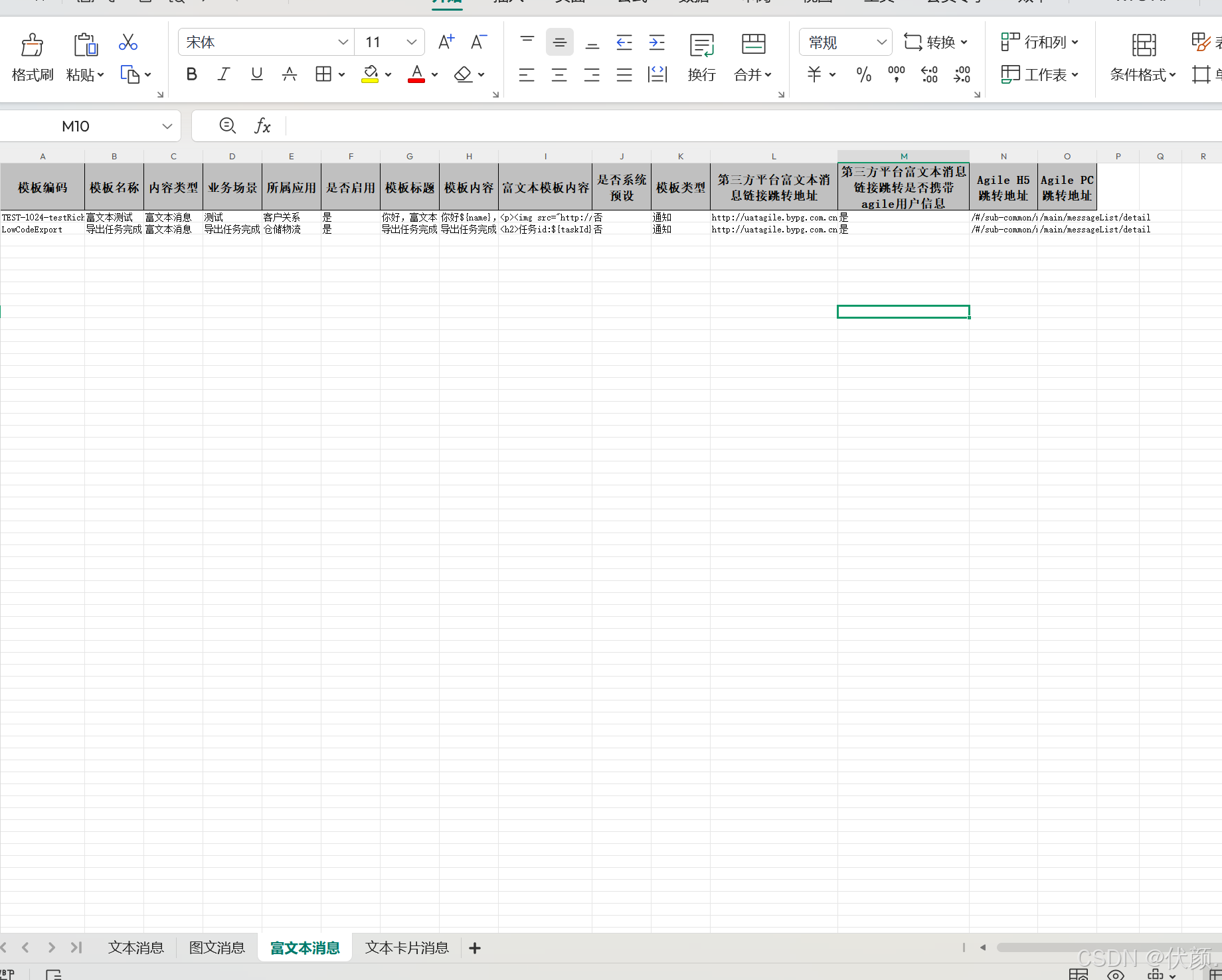
1.按照模板内容类型分组(分sheet):1.文本消息;2.文本卡片;3.富文本;4.图文
2.每个类型的动态参数不同,即为每个sheet的表头不同
一、效果展示

二、代码实现
1.固定头实体类
@data
@apimodel
@excelignoreunannotated
// @headrowheight(value = 50)
// @contentrowheight(value = 50)
@columnwidth(value = 20)
public class msgmoduleinfodto {

    @apimodelproperty(value = "模板id")
    private long id;

    @apimodelproperty(value = "模板ids")
    private list<long> ids;

    @apimodelproperty(value = "模板编码")
    @excelproperty(value = "模板编码")
    private string code;

    @apimodelproperty(value = "模板名称")
    @excelproperty(value = "模板名称")
    private string name;

    @apimodelproperty(value = "模板关联的渠道内容类型code")
    private string contenttypecode;

    @apimodelproperty(value = "模板关联的渠道内容类型value")
    @excelproperty(value = "内容类型")
    private string contenttypevalue;

    @apimodelproperty(value = "业务场景")
    @excelproperty(value = "业务场景")
    private string condition;


    @apimodelproperty(value = "所属应用id")
    private integer appid;

    @apimodelproperty(value = "所属应用名称")
    @excelproperty(value = "所属应用")
    private string appname;

    @apimodelproperty(value = "是否启用(1:启用 ;0:不启用)")
    @excelproperty(value = "是否启用")
    private integer isenable;


    @apimodelproperty(value = "app_消息跳转url")
    private string appurl;

    @apimodelproperty(value = "pc_消息跳转url")
    private string pcurl;

    @apimodelproperty(value = "模板标题")
    @excelproperty(value = "模板标题")
    private string title;

    @apimodelproperty(value = "模板内容")
    @excelproperty(value = "模板内容")
    private string content;

    @apimodelproperty(value = "富文本模板内容")
    @excelproperty(value = "富文本模板内容")
    private string richcontent;

    private messagetemplatedynamicproperties dynamicproperties;

    @apimodelproperty(value = "修改时间")
    private localdatetime lastupdatetime;

    @apimodelproperty(value = "修改者用户id")
    private long lastupdateuser;

    @apimodelproperty(value = "修改者用户名称")
    private string lastupdateusername;

    @apimodelproperty(value = "是否系统预设(1:是;0:不是)")
    @excelproperty(value = "是否系统预设", converter = msgsystemconverter.class)
    private integer issystemtype;

    @apimodelproperty(value = "模板类型编码")
    private string msgformcode;

    @apimodelproperty(value = "模板类型名称")
    @excelproperty(value = "模板类型")
    private string msgformname;

}
2.动态头实现
@getter
@requiredargsconstructor(staticname = "of")
public class codeandvalue {
    private final string code;
    private final string name;
    private final object value;
}
/**
    渠道动态配置属性数据提供接口
*/
public interface dynamicpropertiesgenerator {
    /**
     * 获取动态配置字段信息
     *
     * @return list<dynamicproperties>
     */
    @apimodelproperty(hidden = true)
    @jsonignore
    list<codeandvalue> getdynamicpropertieslist();
}

@apimodel("模板动态字段配置数据")
@jsontypeinfo(use = jsontypeinfo.id.name, property = "contenttype")
@jsonsubtypes(value = {
        @jsonsubtypes.type(value = messagerichtextconfigurationdynamicproperties.class, name = "richtextmessage"),
        @jsonsubtypes.type(value = messagetextconfigurationdynamicproperties.class, name = "textmessage"),
        @jsonsubtypes.type(value = messagecardconfigurationdynamicproperties.class, name = "textcardmessage"),
        @jsonsubtypes.type(value = messagepictureconfigurationdynamicproperties.class, name = "picturemessage")
})
public interface messagetemplatedynamicproperties extends dynamicpropertiesgenerator {
}
messagerichtextconfigurationdynamicproperties 富文本动态参数
@getter
public class messagerichtextconfigurationdynamicproperties implements messagetemplatedynamicproperties {
    private final list<codeandvalue> dynamicpropertieslist;
    @jsonignore
    private final messagerichconfiguration messagecardconfiguration;

    @jsoncreator
    public messagerichtextconfigurationdynamicproperties(@jsonproperty string messageplatformredirecturi,
                                                         @jsonproperty boolean messageplatformredirectwithagileuserinfo,
                                                         @jsonproperty string agileappredirecturi,
                                                         @jsonproperty string agilemainredirecturi) {
        this.messagecardconfiguration = new messagerichconfiguration(messageplatformredirecturi, messageplatformredirectwithagileuserinfo, agileappredirecturi, agilemainredirecturi);
        this.dynamicpropertieslist = dynamicvalueutil.configurationtodynamicproperties(messagecardconfiguration, mapper.values());
    }

    public string getmessageplatformredirecturi() {
        return messagecardconfiguration.getmessageplatformredirecturi();
    }

    public boolean getmessageplatformredirectwithagileuserinfo() {
        return messagecardconfiguration.getmessageplatformredirectwithagileuserinfo();
    }

    public string getagileappredirecturi() {
        return messagecardconfiguration.getagileappredirecturi();
    }

    public string getagilemainredirecturi() {
        return messagecardconfiguration.getagilemainredirecturi();
    }


    @data
    @allargsconstructor
    @noargsconstructor
    public static class messagerichconfiguration {
        @excelproperty(value = "第三方平台富文本消息链接跳转地址")
        private string messageplatformredirecturi;
        @excelproperty(value = "第三方平台富文本消息链接跳转是否携带agile用户信息")
        private boolean messageplatformredirectwithagileuserinfo;
        @excelproperty(value = "agile h5跳转地址")
        private string agileappredirecturi;
        @excelproperty(value = "agile pc跳转地址")
        private string agilemainredirecturi;
    }

    @getter
    @requiredargsconstructor
    enum mapper implements dynamicvaluemapper {
        message_platform_redirect_uri(lambdautil.getfieldname(messagerichconfiguration::getmessageplatformredirecturi), "第三方平台富文本消息链接跳转地址"),

        message_platform_redirect_with_agile_userinfo(lambdautil.getfieldname(messagerichconfiguration::getmessageplatformredirectwithagileuserinfo), "第三方平台富文本消息链接跳转是否携带agile用户信息"),

        agile_app_redirect_uri(lambdautil.getfieldname(messagerichconfiguration::getagileappredirecturi), "agile h5跳转地址"),

        agile_main_redirect_uri(lambdautil.getfieldname(messagerichconfiguration::getagilemainredirecturi), "agile pc跳转地址"),
        ;
        private final string code;
        private final string name;
    }
}
messagecardconfigurationdynamicproperties 文本卡片动态参数
@getter
@suppresswarnings("unused")
public class messagecardconfigurationdynamicproperties implements messagetemplatedynamicproperties {
    private final list<codeandvalue> dynamicpropertieslist;
    @jsonignore
    private final messagecardconfiguration messagecardconfiguration;

    @jsoncreator
    public messagecardconfigurationdynamicproperties(@jsonproperty boolean enableoauth2link,
                                                     @jsonproperty string btntxt,
                                                     @jsonproperty string messageplatformredirecturi,
                                                     @jsonproperty boolean messageplatformredirectwithagileuserinfo,
                                                     @jsonproperty string agileappredirecturi,
                                                     @jsonproperty string agilemainredirecturi) {
        this.messagecardconfiguration = new messagecardconfiguration(enableoauth2link, btntxt, messageplatformredirecturi, messageplatformredirectwithagileuserinfo,
                agileappredirecturi, agilemainredirecturi);
        this.dynamicpropertieslist = dynamicvalueutil.configurationtodynamicproperties(messagecardconfiguration, mapper.values());
    }

    public boolean getenableoauth2link() {
        return messagecardconfiguration.getenableoauth2link();
    }

    public string getbtntxt() {
        return messagecardconfiguration.getbtntxt();
    }

    public string getmessageplatformredirecturi() {
        return messagecardconfiguration.getmessageplatformredirecturi();
    }

    public boolean getmessageplatformredirectwithagileuserinfo() {
        return messagecardconfiguration.getmessageplatformredirectwithagileuserinfo();
    }

    public string getagileappredirecturi() {
        return messagecardconfiguration.getagileappredirecturi();
    }

    public string getagilemainredirecturi() {
        return messagecardconfiguration.getagilemainredirecturi();
    }

    @data
    @allargsconstructor
    @noargsconstructor
    public static class messagecardconfiguration {
        @excelproperty(value = "是否开启跳转链接")
        private boolean enableoauth2link;
        @excelproperty(value = "卡片消息跳转描述")
        private string btntxt;
        @excelproperty(value = "平台跳转链接")
        private string messageplatformredirecturi;
        @excelproperty(value = "是否携带agile用户信息")
        private boolean messageplatformredirectwithagileuserinfo;
        @excelproperty(value = "agile h5跳转地址")
        private string agileappredirecturi;
        @excelproperty(value = "agile pc跳转地址")
        private string agilemainredirecturi;
    }

    @getter
    @requiredargsconstructor
    enum mapper implements dynamicvaluemapper {
        enable_oauth2_link(lambdautil.getfieldname(messagecardconfiguration::getenableoauth2link), "跳转链接开启oauth2授权"),
        btn_txt(lambdautil.getfieldname(messagecardconfiguration::getbtntxt), "卡片消息跳转描述"),
        message_platform_redirect_uri(lambdautil.getfieldname(messagecardconfiguration::getmessageplatformredirecturi), "平台跳转链接"),
        message_platform_redirect_with_agile_userinfo(lambdautil.getfieldname(messagecardconfiguration::getmessageplatformredirectwithagileuserinfo), "是否携带agile用户信息"),
        agile_app_redirect_uri(lambdautil.getfieldname(messagecardconfiguration::getagileappredirecturi), "agile h5 跳转路由"),
        agile_main_redirect_uri(lambdautil.getfieldname(messagecardconfiguration::getagilemainredirecturi), "agile pc 跳转路由"),
        ;
        private final string code;
        private final string name;
    }
}
3.导出动态头
/**
     * 按照模板内容类型分组(分sheet):1.文本消息;2.文本卡片;3.富文本;4.图文
     *
     * @param querydto 查询条件
     * @param response 响应
     * @author zhumq
     * @date 2025/01/22 14:30:17
     */
    @override
    @sneakythrows
    public void exportexcel(querymsgmoduleinfodto querydto, httpservletresponse response) {

        log.info("【模板导出】导出模板数据,传入参数[querydto = {}]", querydto);

        // 获取模板数据
        page<msgmoduleinfoentity> page = convertpagebean(new paging(1, -1));
        list<msgmoduleinfodto> modulelist = msgmoduleinfomapper.selectpageinfo(querydto, page);

        if (collutil.isempty(modulelist)) {
            log.info("【模板导出】查询不到可导出的模板,传入参数[querydto = {}]", jsonutil.tojson(querydto));
            response.setcontenttype("application/json");
            response.setcharacterencoding("utf-8");
            response.getwriter().println(jsonutil.tojsonstr(apiresult.failmessage("没有数据可以导出")));
            return;
        }

        // 设置响应
        response.setcharacterencoding("utf-8");
        response.setcontenttype("application/vnd.ms-excel");
        string filename = urlencoder.encode("消息模板_" + system.currenttimemillis(), "utf-8");
        response.setheader("content-disposition", "attachment;filename=" + filename + ".xlsx");

        servletoutputstream outputstream = null;
        excelwriter excelwriter = null;

        try {
            outputstream = response.getoutputstream();
            excelwriter = easyexcel.write(outputstream).build();

            // 按内容类型分组
            map<string, list<msgmoduleinfodto>> contentmap = modulelist.stream()
                    .collect(collectors.groupingby(msgmoduleinfodto::getcontenttypecode));

            for (map.entry<string, list<msgmoduleinfodto>> entry : contentmap.entryset()) {
                string contenttype = entry.getkey();
                string sheetname = msgenum.contenttype.getlabelbykey(contenttype);

                list<msgmoduleinfodto> items = entry.getvalue();

                // 动态生成表头
                map<string, field> headmap = this.generateheader(items);
                list<list<string>> head = headmap.keyset().stream()
                        .map(collections::singletonlist)
                        .collect(collectors.tolist());

                // 提取数据行
                list<list<object>> datalist = this.obtainexportdata(items, headmap);
                // 写入数据到不同的 sheet 使用动态生成的表头
                writesheet writesheet = easyexcel.writersheet(sheetname)
                        .head(head)
                        .registerwritehandler(new customcolumnwidthstylestrategy())
                        .build();
                excelwriter.write(datalist, writesheet);

            }

            // 刷新输出流
            outputstream.flush();
        } catch (ioexception e) {
            log.error("导出模板数据失败", e);
            response.reset();
            response.setcontenttype("application/json");
            response.setcharacterencoding("utf-8");
            response.getwriter().println(jsonutil.tojsonstr(apiresult.failmessage("下载文件失败")));
        } finally {
            // 关闭 excelwriter
            if (excelwriter != null) {
                excelwriter.finish();
            }
            // 关闭输出流
            if (outputstream != null) {
                try {
                    outputstream.close();
                } catch (ioexception e) {
                    log.error("关闭输出流失败", e);
                }
            }
        }
    }

    /**
     * 提取数据行
     *
     * @param items
     * @param headmap
     * @return {@link list }<{@link list }<{@link object }>>
     * @author zhumq
     * @date 2025/01/22 14:59:11
     */
    private list<list<object>> obtainexportdata(list<msgmoduleinfodto> items, map<string, field> headmap) {
        list<list<object>> datalist = new arraylist<>();
        for (msgmoduleinfodto item : items) {
            list<object> datalistrow = new arraylist<>();
            // 填充固定字段
            for (map.entry<string, field> entryfield : headmap.entryset()) {
                string fieldname = entryfield.getkey();
                field field = entryfield.getvalue();
                if (field != null) {
                    // 固定字段通过反射获取
                    try {
                        field.setaccessible(true);
                        object value = field.get(item);
                        datalistrow.add(this.convertvalue(value));
                    } catch (exception e) {
                        log.error("反射获取字段值失败: {}", fieldname, e);
                        datalistrow.add("");
                    }
                } else {
                    // 动态字段通过getdynamicproperties获取
                    object value = optional.ofnullable(item.getdynamicproperties())
                            .map(messagetemplatedynamicproperties::getdynamicpropertieslist)
                            .orelse(collections.emptylist())
                            .stream()
                            .filter(cv -> cv.getname().equals(fieldname))
                            .findfirst()
                            .map(codeandvalue::getvalue)
                            .orelse("");
                    datalistrow.add(this.convertvalue(value));
                }
            }
            datalist.add(datalistrow);
        }
        return datalist;
    }

    /**
     * 生成excel表头结构
     *
     * @param items 模板数据
     * @return {@link map }<{@link string }, {@link field }>
     * @author zhumq
     * @date 2025/01/22 14:30:06
     */
    private map<string, field> generateheader(list<msgmoduleinfodto> items) {

        // 1. 固定字段(通过反射获取dto的@excelproperty)
        map<string, field> headermap = new linkedhashmap<>(this.getexcelheader(msgmoduleinfodto.class));

        // 2. 动态字段(直接从dynamicpropertieslist提取code)
        if (collutil.isnotempty(items)) {
            msgmoduleinfodto firstitem = items.get(0);
            messagetemplatedynamicproperties dynamicproperties = firstitem.getdynamicproperties();
            if (dynamicproperties != null && collutil.isnotempty(dynamicproperties.getdynamicpropertieslist())) {
                // 去重处理code,避免重复表头
                dynamicproperties.getdynamicpropertieslist().stream()
                        .map(codeandvalue::getname)
                        .distinct()
                        .foreach(name -> headermap.putifabsent(name, null));
            }
        }
        return headermap;
    }

    /**
     * 工具方法:获取类中带有@excelproperty注解的字段
     *
     * @param clazz 类
     * @return {@link map }<{@link string }, {@link field }>
     * @author zhumq
     * @date 2025/01/22 14:29:55
     */
    private map<string, field> getexcelheader(class<?> clazz) {
        map<string, field> fieldmap = new linkedhashmap<>();
        field[] fields = clazz.getdeclaredfields();
        for (field field : fields) {
            if (field.isannotationpresent(excelproperty.class)) {
                excelproperty excelproperty = field.getannotation(excelproperty.class);
                // 获取注解中的字段名称
                fieldmap.put(excelproperty.value()[0], field);
            }
        }
        return fieldmap;
    }

    /**
     * 转换字段值为字符串
     *
     * @param value
     * @return {@link object }
     * @author zhumq
     * @date 2025/01/22 14:50:16
     */
    private object convertvalue(object value) {
        if (value instanceof boolean) {
            return (boolean) value ? "是" : "否";
        } else if (value instanceof integer) {
            return (integer) value == 1 ? "是" : "否";
        } else if (value == null) {
            return "";
        }
        return value;
    }
到此这篇关于java导出excel动态表头的示例详解的文章就介绍到这了,更多相关java导出excel动态表头内容请搜索代码网以前的文章或继续浏览下面的相关文章希望大家以后多多支持代码网!





发表评论