
 我要评论
我要评论一、数据备份的重要性
在生产环境中,数据的安全性至关重要
任何数据的丢失都可能产生严重的后果
造成数据丢失的原因
- 程序错误(损失不会太大)
- 人为操作数据
- 运算错误
- 磁盘故障
- 灾难(如火灾、地震)和盗窃
拓展:容灾是一个旨在确保业务连续性的系统工程,它涉及it系统的设计和实施,以防止用户业务系统受到各种灾难的影响和破坏。容灾的核心目的是在自然或人为原因导致生产系统发生灾难时,尽可能保证业务的连续性。这通常包括建立两套或多套功能相同的it系统,这些系统分布在相隔较远的不同地点,并能够进行健康状态监视和功能切换。当一处系统因意外(如火灾、地震等)停止工作时,整个应用系统可以切换到另一处,使得系统功能可以继续正常工作
二、数据库备份的分类
1.从物理与逻辑的角度分类
物理备份:对数据库操作系统的物理文件(如数据文件、日志文件等)的备份
物理备份方法
- 冷备份(脱机备份):是在关机数据库的时候进行的(可备份整个数据库)(不建议使用)
- 热备份(联机备份):数据库处于运行状态,依赖于数据库的日志文件
- 温备份:数据库锁定表格(不可写入但可读)的状态下进行备份操作
逻辑备份:对数据库逻辑组件(如:表等数据库对象)的备份
2.从数据库的备份策略角度,备份可分为
- 完全备份:每次对数据库进行完整的备份
- 差异备份:备份自从上次完全备份之后被修改过的文件
- 增量备份:只有在上次完全备份或者增量备份后被修改的文件才会被备份
2.1完全备份
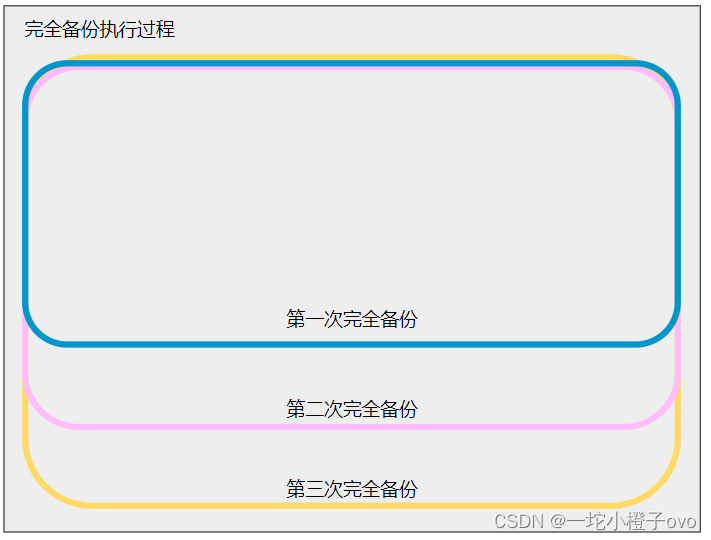
完全备份过程中每次备份都会进行完全备份,会导致备份文件占用大量的磁盘空间,并且有大量的重复数据,只适合第一次备份,不常用
2.2差异备份
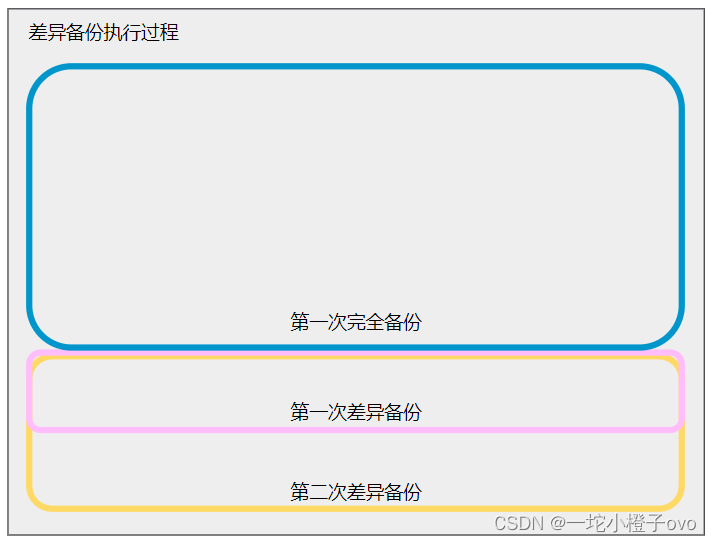
差异备份要先进行一次完全备份,每次差异备份都会备份上一次完全备份后的数据,可能会出现备份的重复数据,导致占用大量的磁盘空间;备份恢复时,先恢复完全备份呢,再导入差异备份的数据
2.3增量备份
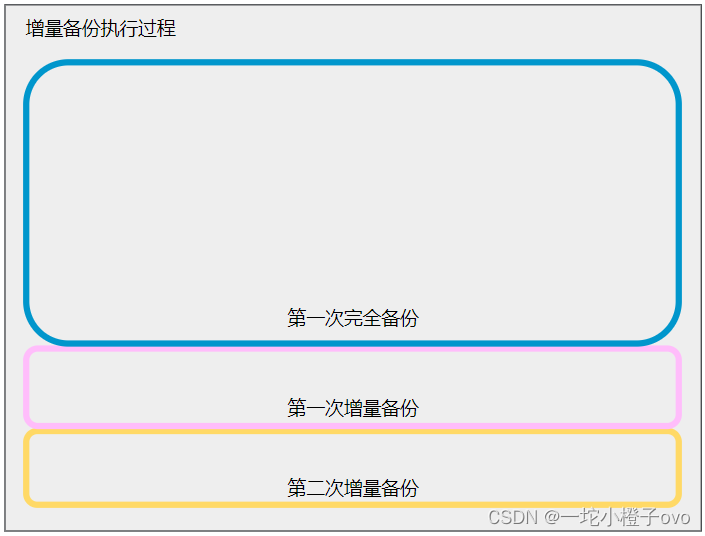
- 增量备份要先执行一次完全备份,每一次增量备份的数据都是备份在上一次完全备份或者上一次增量备份后的数据,不会出现重复数据,也不会占用额外的磁盘空间
- 增量备份数据恢复时,需要先恢复完全备份数据,再恢复增量备份数据(需要按照次序)
2.4总结
| 完全备份 | 差异备份 | 增量备份 | |
|---|---|---|---|
| 执行顺序 | 每次完全备份会备份之前完全备份的数据,会出现重复数据 | 每次执行差异备份会备份之前每次的差异备份 | 每一次增量备份的数据都是备份上一次增量备份后新增的数据 |
| 占用磁盘空间 | 占用大量的磁盘空间 | 占用少量额外的磁盘空间 | 占用极少量的磁盘空间 |
| 数据恢复 | 把完全备份的文件导入即可 恢复速度很快 | 先恢复完全备份数据,再导入差异备份数据 | 先恢复完全备份数据,再恢复增量备份数据(需要按照次序进恢复) |
备份频率建议:一周一次的全备,全备的时间要选择在不提供业务或者业务处理较少的时间段执行(建议为01点到05点之间);每天的增量备份;特定场景的差异备份
三、常见的备份方法
物理冷备
- 备份时数据库处于关闭状态,直接打包数据库文件
- 备份速度快,恢复时也是最简单的
专用备份工具mydump或mysqlhotcopy
- mysqldump常用的逻辑备份工具
- mysqlhotcopy仅拥有备份myisam和archive表
启用二进制日志进行增量备份
- 进行增量备份,需要刷新二进制日志
mysql支持增量备份,进行增量备份时必须启用二进制日志。二进制日志文件为用户提供复制,对执行的数据库更改所需的信息进行恢复。如果进行增量备份(包含上次完全备份或增量备份以来发生的数据修改),需要刷新二进制日志
第三方备份工具
- 免费的mysql热备份软件percona xtrabackup
四、mysql数据库完全备份
1.完全备份定义
- 是对整个数据库、数据库结构和文件结构的备份
- 保存的是备份完成时刻的数据库
- 是差异备份与增量备份的基础
2.优缺点
- 优点:备份与恢复操作简单方便
- 缺点:数据存在大量的重复;占用大量的备份空间;备份与恢复时间长
3.数据库完全备份分类
物理冷备份与恢复
- 关闭mysql数据库
- 使用tar命令直接打包数据库文件夹
- 直接替换现有mysql目录即可
mysqldump备份与恢复
- mysql自带的备份工具,可方便实现对mysql的备份
- 可以将指定的库、表导出为sql脚本
- 使用命令mysql导入备份的数据
导出使用的是mysqldump;导入使用的是mysql命令
4.mysql数据库完全备份实际操作
innodb 存储引擎的数据库在磁盘上存储成三个文件:
- db.opt(表属性文件)
- 表名.frm(表结构文件)
- 表名.ibd(表数据文件)
4.1环境准备
目前mysql数据库中存在class数据库,及class数据表以及数据表中的数据
mysql> show databases;
+--------------------+
| database           |
+--------------------+
| information_schema |
| mysql              |
| performance_schema |
| sys                |
+--------------------+
4 rows in set (0.05 sec)

mysql> create database class;
query ok, 1 row affected (0.00 sec)

mysql> use class;
database changed
mysql> show tables;
empty set (0.00 sec)

mysql> create table class(id int(6),name varchar(8),remark varchar(40));
query ok, 0 rows affected (0.01 sec)

mysql> show tables;
+-----------------+
| tables_in_class |
+-----------------+
| class           |
+-----------------+
1 row in set (0.00 sec)

mysql> insert into class values(1,'cxk','ctrl');
query ok, 1 row affected (0.01 sec)

mysql> insert into class values(2,'wyb','skateboarding');
query ok, 1 row affected (0.00 sec)

mysql> select * from class;
+------+------+---------------+
| id   | name | remark        |
+------+------+---------------+
|    1 | cxk  | ctrl          |
|    2 | wyb  | skateboarding |
+------+------+---------------+
2 rows in set (0.00 sec)
4.2物理冷备份与恢复——使用tar命令备份
4.2.1备份方法一
[root@localhost mysql]#systemctl stop mysqld
#物理冷备份需要先关闭mysqld服务
[root@localhost ~]#cd /usr/local/mysql/
[root@localhost mysql]#ls
bin      docs     man         mysql.sock.lock  share
copying  include  mysqld.pid  mysql-test       support-files
data     lib      mysql.sock  readme           usr
[root@localhost mysql]#tar zcvf data.tar.gz data/ -c /opt/
#使用tar命令进行压缩备份
[root@localhost mysql]#ls /opt
boost_1_59_0.tar.gz  mysql-5.7.17  mysql-5.7.17.tar.gz  rh  data.tar.gz
4.2.2备份方法二
[root@localhost mysql]#systemctl stop mysqld
#物理冷备份需要先关闭mysqld服务
[root@localhost mysql]#tar jcvf /opt/mysql_allbackup$(date +%f).tar.xz /usr/local/mysql/data
#压缩打包/usr/local/mysql/data下的数据  保存在/opt目录下取名为mysql_allbackup$(date +%f).tar.xz     date +%f代表当天的日期
[root@localhost mysql]#ls /opt
boost_1_59_0.tar.gz  mysql-5.7.17.tar.gz               rh
mysql-5.7.17         mysql_allbackup2024-03-25.tar.xz
4.2.3模式移走data数据文件目录
[root@localhost mysql]#mv data/ /home/
[root@localhost mysql]#ls
bin          docs     man         mysql.sock.lock  share
copying      include  mysqld.pid  mysql-test       support-files
data.tar.gz  lib      mysql.sock  readme           usr
[root@localhost mysql]#systemctl restart mysqld.service
#此时重启mysqld数据库 可能会报错 或者重新建立一个新的data数据文件目录(如果是新建的data数据文件目录)那么新建的data数据文件目录中无任何数据文件
[root@localhost mysql]#systemctl restart mysqld.service
[root@localhost mysql]#ls
bin      data.tar.gz  lib         mysql.sock       readme         usr
copying  docs         man         mysql.sock.lock  share
data     include      mysqld.pid  mysql-test       support-files
#这里看到有一个新的data数据文件目录已经建立
[root@localhost mysql]#cd data/
[root@localhost data]#ls
auto.cnf         client-key.pem  ib_logfile1         private_key.pem  sys
ca-key.pem       ib_buffer_pool  ibtmp1              public_key.pem
ca.pem           ibdata1         mysql               server-cert.pem
client-cert.pem  ib_logfile0     performance_schema  server-key.pem
#这里看不到之前数据库中的文件
4.2.4执行数据恢复操作一
[root@localhost mysql]#tar zxvf data.tar.gz -c /usr/local/mysql/
#使用tar命令解压刚刚完全备份的数据文件  指定解压目录为/usr/local/mysql目录下
[root@localhost mysql]#cd data/
[root@localhost data]#ls
auto.cnf    client-cert.pem  ib_logfile0  performance_schema  server-key.pem
ca-key.pem  client-key.pem   ib_logfile1  private_key.pem     sys
ca.pem      ib_buffer_pool   ibtmp1       public_key.pem
class       ibdata1          mysql        server-cert.pem
#此时我们看到刚刚完全备份的数据文件又恢复了
4.2.5执行数据恢复操作二
[root@localhost mysql]#tar jxvf /opt/mysql_allbackup2024-03-25.tar.xz -c /usr/local/mysql/data
#使用tar命令解压刚刚的完全备份文件 指定解压目录到/usr/local/mysql目录下
[root@localhost mysql]#ls
bin      data.tar.gz  lib         mysql.sock       readme         usr
copying  docs         man         mysql.sock.lock  share
data     include      mysqld.pid  mysql-test       support-files
[root@localhost mysql]#cd data/
[root@localhost data]#ls
auto.cnf    client-cert.pem  ib_logfile0  performance_schema  server-key.pem
ca-key.pem  client-key.pem   ib_logfile1  private_key.pem     sys
ca.pem      ib_buffer_pool   ibtmp1       public_key.pem
class       ibdata1          mysql        server-cert.pem
#此时可以看到刚刚完全备份的数据文件内容
mysql> show databases;
+--------------------+
| database           |
+--------------------+
| information_schema |
| class              |
| mysql              |
| performance_schema |
| sys                |
+--------------------+
5 rows in set (0.00 sec)

mysql> use class;
reading table information for completion of table and column names
you can turn off this feature to get a quicker startup with -a

database changed
mysql> select * from class;
+------+------+---------------+
| id   | name | remark        |
+------+------+---------------+
|    1 | cxk  | ctrl          |
|    2 | wyb  | skateboarding |
+------+------+---------------+
2 rows in set (0.00 sec)
数据库做迁移的时候 做整迁的时候使用该备份方式
4.3物理温备份与恢复——使用mysqldump命令
4.3.1备份单个数据库
mysql> show databases;
+--------------------+
| database           |
+--------------------+
| information_schema |
| class              |
| mysql              |
| performance_schema |
| sys                |
+--------------------+
5 rows in set (0.00 sec)

mysql> create database class2;
query ok, 1 row affected (0.00 sec)

mysql> show databases;
+--------------------+
| database           |
+--------------------+
| information_schema |
| class              |
| class2             |
| mysql              |
| performance_schema |
| sys                |
+--------------------+
6 rows in set (0.00 sec)
[root@localhost mysql]#mysqldump -uroot -p123456 --databases class > class.sql
#使用mysqldump命令 指定用户root 指定密码为123456 指定备份的数据库class 备份存储为class.sql数据文件
mysqldump: [warning] using a password on the command line interface can be insecure.
[root@localhost mysql]#ls
bin        data         include  mysqld.pid       mysql-test  support-files
class.sql  data.tar.gz  lib      mysql.sock       readme      usr
copying    docs         man      mysql.sock.lock  share
[root@localhost mysql]#cat class.sql
#class.sql数据文件存放了一些sql语句  也就是在sql环境中的操作  注意一定要以sql结尾 方便后期的恢复
-- mysql dump 10.13  distrib 5.7.17, for linux (x86_64)
--
-- host: localhost    database: class
-- ------------------------------------------------------
-- server version	5.7.17

/*!40101 set @old_character_set_client=@@character_set_client */;
/*!40101 set @old_character_set_results=@@character_set_results */;
/*!40101 set @old_collation_connection=@@collation_connection */;
/*!40101 set names utf8 */;
/*!40103 set @old_time_zone=@@time_zone */;
/*!40103 set time_zone='+00:00' */;
/*!40014 set @old_unique_checks=@@unique_checks, unique_checks=0 */;
/*!40014 set @old_foreign_key_checks=@@foreign_key_checks, foreign_key_checks=0 */;
/*!40101 set @old_sql_mode=@@sql_mode, sql_mode='no_auto_value_on_zero' */;
/*!40111 set @old_sql_notes=@@sql_notes, sql_notes=0 */;

--
-- current database: `class`
--

create database /*!32312 if not exists*/ `class` /*!40100 default character set utf8 */;

use `class`;

--
-- table structure for table `class`
--

drop table if exists `class`;
/*!40101 set @saved_cs_client     = @@character_set_client */;
/*!40101 set character_set_client = utf8 */;
create table `class` (
  `id` int(6) default null,
  `name` varchar(8) default null,
  `remark` varchar(40) default null
) engine=innodb default charset=utf8;
/*!40101 set character_set_client = @saved_cs_client */;

--
-- dumping data for table `class`
--

lock tables `class` write;
/*!40000 alter table `class` disable keys */;
insert into `class` values (1,'cxk','ctrl'),(2,'wyb','skateboarding');
/*!40000 alter table `class` enable keys */;
unlock tables;
/*!40103 set time_zone=@old_time_zone */;

/*!40101 set sql_mode=@old_sql_mode */;
/*!40014 set foreign_key_checks=@old_foreign_key_checks */;
/*!40014 set unique_checks=@old_unique_checks */;
/*!40101 set character_set_client=@old_character_set_client */;
/*!40101 set character_set_results=@old_character_set_results */;
/*!40101 set collation_connection=@old_collation_connection */;
/*!40111 set sql_notes=@old_sql_notes */;

-- dump completed on 2024-03-25 16:04:00
4.3.2备份多个数据库
[root@localhost mysql]#mysqldump -uroot -p123456 --databases class class2 > class-class2.sql
#使用mysqldump命令 指定用户root 指定密码为123456 指定备份的数据库class和class2 备份存储为class-class.sql数据文件
mysqldump: [warning] using a password on the command line interface can be insecure.
[root@localhost mysql]#ls
bin               data         lib         mysql.sock.lock  support-files
class-class2.sql  data.tar.gz  man         mysql-test       usr
class.sql         docs         mysqld.pid  readme
copying           include      mysql.sock  share
[root@localhost mysql]#cat class-class2.sql
#class-class2.sql数据文件存放了一些sql语句  也就是在sql环境中的操作  注意一定要以sql结尾 方便后期的恢复
-- mysql dump 10.13  distrib 5.7.17, for linux (x86_64)
--
-- host: localhost    database: class
-- ------------------------------------------------------
-- server version	5.7.17

/*!40101 set @old_character_set_client=@@character_set_client */;
/*!40101 set @old_character_set_results=@@character_set_results */;
/*!40101 set @old_collation_connection=@@collation_connection */;
/*!40101 set names utf8 */;
/*!40103 set @old_time_zone=@@time_zone */;
/*!40103 set time_zone='+00:00' */;
/*!40014 set @old_unique_checks=@@unique_checks, unique_checks=0 */;
/*!40014 set @old_foreign_key_checks=@@foreign_key_checks, foreign_key_checks=0 */;
/*!40101 set @old_sql_mode=@@sql_mode, sql_mode='no_auto_value_on_zero' */;
/*!40111 set @old_sql_notes=@@sql_notes, sql_notes=0 */;

--
-- current database: `class`
--

create database /*!32312 if not exists*/ `class` /*!40100 default character set utf8 */;

use `class`;

--
-- table structure for table `class`
--

drop table if exists `class`;
/*!40101 set @saved_cs_client     = @@character_set_client */;
/*!40101 set character_set_client = utf8 */;
create table `class` (
  `id` int(6) default null,
  `name` varchar(8) default null,
  `remark` varchar(40) default null
) engine=innodb default charset=utf8;
/*!40101 set character_set_client = @saved_cs_client */;

--
-- dumping data for table `class`
--

lock tables `class` write;
/*!40000 alter table `class` disable keys */;
insert into `class` values (1,'cxk','ctrl'),(2,'wyb','skateboarding');
/*!40000 alter table `class` enable keys */;
unlock tables;

--
-- current database: `class2`
--

create database /*!32312 if not exists*/ `class2` /*!40100 default character set utf8 */;

use `class2`;
/*!40103 set time_zone=@old_time_zone */;

/*!40101 set sql_mode=@old_sql_mode */;
/*!40014 set foreign_key_checks=@old_foreign_key_checks */;
/*!40014 set unique_checks=@old_unique_checks */;
/*!40101 set character_set_client=@old_character_set_client */;
/*!40101 set character_set_results=@old_character_set_results */;
/*!40101 set collation_connection=@old_collation_connection */;
/*!40111 set sql_notes=@old_sql_notes */;

-- dump completed on 2024-03-25 16:07:25
[root@localhost mysql]#ll
总用量 1428
drwxr-xr-x  2 mysql mysql    4096 3月  19 13:12 bin
-rw-r--r--  1 root  root     2174 3月  25 16:07 class-class2.sql
-rw-r--r--  1 root  root     2031 3月  25 16:04 class.sql
-rw-r--r--  1 mysql mysql   17987 11月 28 2016 copying
drwxr-x---  7 mysql mysql     188 3月  25 16:02 data
-rw-r--r--  1 root  root  1401469 3月  25 15:27 data.tar.gz
drwxr-xr-x  2 mysql mysql      55 3月  19 13:10 docs
drwxr-xr-x  3 mysql mysql    4096 3月  19 13:10 include
drwxr-xr-x  4 mysql mysql     191 3月  19 13:12 lib
drwxr-xr-x  4 mysql mysql      30 3月  19 13:11 man
-rw-r-----  1 mysql mysql       5 3月  25 15:58 mysqld.pid
srwxrwxrwx  1 mysql mysql       0 3月  25 15:58 mysql.sock
-rw-------  1 mysql mysql       5 3月  25 15:58 mysql.sock.lock
drwxr-xr-x 10 mysql mysql    4096 3月  19 13:13 mysql-test
-rw-r--r--  1 mysql mysql    2478 11月 28 2016 readme
drwxr-xr-x 28 mysql mysql    4096 3月  19 13:13 share
drwxr-xr-x  2 mysql mysql     112 3月  19 13:13 support-files
drwxr-xr-x  4 mysql mysql      30 3月  25 15:49 usr
[root@localhost mysql]#chown mysql:mysql class.sql class-class2.sql
[root@localhost mysql]#ll
总用量 1428
drwxr-xr-x  2 mysql mysql    4096 3月  19 13:12 bin
-rw-r--r--  1 mysql mysql    2174 3月  25 16:07 class-class2.sql
-rw-r--r--  1 mysql mysql    2031 3月  25 16:04 class.sql
-rw-r--r--  1 mysql mysql   17987 11月 28 2016 copying
drwxr-x---  7 mysql mysql     188 3月  25 16:02 data
-rw-r--r--  1 root  root  1401469 3月  25 15:27 data.tar.gz
drwxr-xr-x  2 mysql mysql      55 3月  19 13:10 docs
drwxr-xr-x  3 mysql mysql    4096 3月  19 13:10 include
drwxr-xr-x  4 mysql mysql     191 3月  19 13:12 lib
drwxr-xr-x  4 mysql mysql      30 3月  19 13:11 man
-rw-r-----  1 mysql mysql       5 3月  25 15:58 mysqld.pid
srwxrwxrwx  1 mysql mysql       0 3月  25 15:58 mysql.sock
-rw-------  1 mysql mysql       5 3月  25 15:58 mysql.sock.lock
drwxr-xr-x 10 mysql mysql    4096 3月  19 13:13 mysql-test
-rw-r--r--  1 mysql mysql    2478 11月 28 2016 readme
drwxr-xr-x 28 mysql mysql    4096 3月  19 13:13 share
drwxr-xr-x  2 mysql mysql     112 3月  19 13:13 support-files
drwxr-xr-x  4 mysql mysql      30 3月  25 15:49 usr
注意:这里一定要将sql结尾的备份数据文件修改为mysql属主和属组,否则mysqld服务无法调用
4.3.3备份所有的库
[root@localhost mysql]#mysqldump -uroot -p123456 --all-databases > alldatabases.sql
#使用mysqldump命令 指定用户root 指定密码为123456 指定备份的所有数据库 备份存储为alldatabases.sql数据文件
mysqldump: [warning] using a password on the command line interface can be insecure.
[root@localhost mysql]#ls
alldatabases.sql  copying      include     mysql.sock       share
bin               data         lib         mysql.sock.lock  support-files
class-class2.sql  data.tar.gz  man         mysql-test       usr
class.sql         docs         mysqld.pid  readme
4.3.4备份单个数据表
[root@localhost mysql]#mysqldump -uroot -p123456 class class > class_class.sql
#使用mysqldump命令 指定用户为root 指定密码为123456 指定class数据库下的class数据表 备份到当前目录下 取名为class_class.sql数据文件
mysqldump: [warning] using a password on the command line interface can be insecure.
[root@localhost mysql]#ls
alldatabases.sql  class.sql    docs     mysqld.pid       readme
bin               copying      include  mysql.sock       share
class-class2.sql  data         lib      mysql.sock.lock  support-files
class_class.sql   data.tar.gz  man      mysql-test       usr
4.3.5备份多个数据表
mysql> create table test(id int(6),name char(8),hobby varchar(40));
query ok, 0 rows affected (0.00 sec)

mysql> create table test2(id int(6),name char(8),hobby varchar(40));
query ok, 0 rows affected (0.00 sec)

mysql> show tables;
+-----------------+
| tables_in_class |
+-----------------+
| class           |
| test            |
| test2           |
+-----------------+
3 rows in set (0.00 sec)
[root@localhost mysql]#mysqldump -uroot -p123456 class class test test2 > class_class_test_test2.sql
#使用mysqldump命令 指定用户为root 指定密码为123456 指定class数据库下的class、test、test2三个数据表 备份到当前目录下 取名为class_class_test_test2.sql数据文件
mysqldump: [warning] using a password on the command line interface can be insecure.
[root@localhost mysql]#ls
alldatabases.sql            class.sql    include     mysql.sock.lock  usr
bin                         copying      lib         mysql-test
class-class2.sql            data         man         readme
class_class.sql             data.tar.gz  mysqld.pid  share
class_class_test_test2.sql  docs         mysql.sock  support-files
4.3.6只备份数据表结构
mysql> desc class;
+--------+-------------+------+-----+---------+-------+
| field  | type        | null | key | default | extra |
+--------+-------------+------+-----+---------+-------+
| id     | int(6)      | yes  |     | null    |       |
| name   | varchar(8)  | yes  |     | null    |       |
| remark | varchar(40) | yes  |     | null    |       |
+--------+-------------+------+-----+---------+-------+
3 rows in set (0.00 sec)
[root@localhost mysql]#mysqldump -uroot -p123456 -d class class > classdesc.sql
#使用mysqldump命令 指定用户为root 指定密码123456 -d只保存表结构(desc)class数据库下class数据表的结构  保存在当前目录下取名为classdesc.sql数据文件
mysqldump: [warning] using a password on the command line interface can be insecure.
[root@localhost mysql]#ls
alldatabases.sql            class.sql    lib              readme
bin                         copying      man              share
class-class2.sql            data         mysqld.pid       support-files
class_class.sql             data.tar.gz  mysql.sock       usr
class_class_test_test2.sql  docs         mysql.sock.lock
classdesc.sql               include      mysql-test
[root@localhost mysql]#cat classdesc.sql
-- mysql dump 10.13  distrib 5.7.17, for linux (x86_64)
--
-- host: localhost    database: class
-- ------------------------------------------------------
-- server version	5.7.17

/*!40101 set @old_character_set_client=@@character_set_client */;
/*!40101 set @old_character_set_results=@@character_set_results */;
/*!40101 set @old_collation_connection=@@collation_connection */;
/*!40101 set names utf8 */;
/*!40103 set @old_time_zone=@@time_zone */;
/*!40103 set time_zone='+00:00' */;
/*!40014 set @old_unique_checks=@@unique_checks, unique_checks=0 */;
/*!40014 set @old_foreign_key_checks=@@foreign_key_checks, foreign_key_checks=0 */;
/*!40101 set @old_sql_mode=@@sql_mode, sql_mode='no_auto_value_on_zero' */;
/*!40111 set @old_sql_notes=@@sql_notes, sql_notes=0 */;

--
-- table structure for table `class`
--

drop table if exists `class`;
/*!40101 set @saved_cs_client     = @@character_set_client */;
/*!40101 set character_set_client = utf8 */;
create table `class` (
  `id` int(6) default null,
  `name` varchar(8) default null,
  `remark` varchar(40) default null
) engine=innodb default charset=utf8;
/*!40101 set character_set_client = @saved_cs_client */;
/*!40103 set time_zone=@old_time_zone */;

/*!40101 set sql_mode=@old_sql_mode */;
/*!40014 set foreign_key_checks=@old_foreign_key_checks */;
/*!40014 set unique_checks=@old_unique_checks */;
/*!40101 set character_set_client=@old_character_set_client */;
/*!40101 set character_set_results=@old_character_set_results */;
/*!40101 set collation_connection=@old_collation_connection */;
/*!40111 set sql_notes=@old_sql_notes */;

-- dump completed on 2024-03-25 16:20:21
[root@localhost mysql]#grep -v "^--" classdesc.sql |grep -v "^/"|grep -v "^$"
#过滤出sql语句
#整条命令解释:过滤出classdesc.sql数据文件中不是以"--"开头的、不是以"/"开头的并且不是空行的内容
drop table if exists `class`;
create table `class` (
  `id` int(6) default null,
  `name` varchar(8) default null,
  `remark` varchar(40) default null
) engine=innodb default charset=utf8;
5.mysql数据库完全恢复实际操作
使用mysqldump命令导出的文件可以使用导入的方法
- source命令
- mysql命令
拓展:mysql -e是指在bash环境执行sql语句,-e指调用命令(此命令行方便在shell脚本中运行)
mysql> show tables;
+-----------------+
| tables_in_class |
+-----------------+
| class           |
| test            |
| test2           |
+-----------------+
3 rows in set (0.00 sec)
[root@localhost mysql]#mysql -uroot -p123456 -e 'drop table class.test2;'
#在bash环境使用mysql命令登入数据库指定用户root 指定密码 指定sql命令删除class数据库下的test2数据表
mysql: [warning] using a password on the command line interface can be insecure.
mysql> show tables;
+-----------------+
| tables_in_class |
+-----------------+
| class           |
| test            |
+-----------------+
2 rows in set (0.00 sec)
5.1使用source命令恢复数据库
mysql> source /usr/local/mysql/class_class_test_test2.sql
mysql> show tables;
+-----------------+
| tables_in_class |
+-----------------+
| class           |
| test            |
| test2           |
+-----------------+
3 rows in set (0.00 sec)
5.2使用mysql命令恢复数据库
[root@localhost mysql]#mysql -uroot -p123456 -e 'drop table class.class;'
mysql: [warning] using a password on the command line interface can be insecure.
[root@localhost mysql]#mysql -uroot -p123456 -e 'show tables from  class;'
mysql: [warning] using a password on the command line interface can be insecure.
+-----------------+
| tables_in_class |
+-----------------+
| test            |
| test2           |
+-----------------+
[root@localhost mysql]#mysql -uroot -p123456 class < class_class_test_test2.sql
#使用mysql命令 指定用户root 指定密码为123456 将该目录下的class_class_test_test2.sql数据文件导入到class数据库中
mysql: [warning] using a password on the command line interface can be insecure.
[root@localhost mysql]#mysql -uroot -p123456 -e 'show tables from  class;'
mysql: [warning] using a password on the command line interface can be insecure.
+-----------------+
| tables_in_class |
+-----------------+
| class           |
| test            |
| test2           |
+-----------------+
[root@localhost mysql]#mysql -uroot -p123456 -e 'select * from  class.class;'
mysql: [warning] using a password on the command line interface can be insecure.
+------+------+---------------+
| id   | name | remark        |
+------+------+---------------+
|    1 | cxk  | ctrl          |
|    2 | wyb  | skateboarding |
+------+------+---------------+
5.3有无--database的区别
mysqldump严格来说是属于温备份,需要对表进行写入的锁定。
在全量备份与恢复中,class数据库,class数据库中有class数据表
- 当备份增加--database时,表示针对class整个数据库;
- 当备份不增加--databases时,表示只针对class数据库下所有的数据表
5.3.1有database
[root@localhost mysql]#mysql -uroot -p123456 -e 'show databases;'
mysql: [warning] using a password on the command line interface can be insecure.
+--------------------+
| database           |
+--------------------+
| information_schema |
| class              |
| class2             |
| mysql              |
| performance_schema |
| sys                |
+--------------------+
[root@localhost mysql]#mysql -uroot -p123456 -e 'show tables from  class;'
mysql: [warning] using a password on the command line interface can be insecure.
+-----------------+
| tables_in_class |
+-----------------+
| class           |
| test            |
| test2           |
+-----------------+
[root@localhost mysql]#mysqldump -uroot -p123456 --databases class > class_all.sql
#使用mysqldump命令 指定root用户 指定密码 备份class数据库下所有内容到当前目录  取名为class_all.sql
mysqldump: [warning] using a password on the command line interface can be insecure.
[root@localhost mysql]#ls
alldatabases.sql            classdesc.sql  include          mysql-test
bin                         class.sql      lib              readme
class_all.sql               copying        man              share
class-class2.sql            data           mysqld.pid       support-files
class_class.sql             data.tar.gz    mysql.sock       usr
class_class_test_test2.sql  docs           mysql.sock.lock
[root@localhost mysql]#cat class_all.sql
-- mysql dump 10.13  distrib 5.7.17, for linux (x86_64)
--
-- host: localhost    database: class
-- ------------------------------------------------------
-- server version	5.7.17

/*!40101 set @old_character_set_client=@@character_set_client */;
/*!40101 set @old_character_set_results=@@character_set_results */;
/*!40101 set @old_collation_connection=@@collation_connection */;
/*!40101 set names utf8 */;
/*!40103 set @old_time_zone=@@time_zone */;
/*!40103 set time_zone='+00:00' */;
/*!40014 set @old_unique_checks=@@unique_checks, unique_checks=0 */;
/*!40014 set @old_foreign_key_checks=@@foreign_key_checks, foreign_key_checks=0 */;
/*!40101 set @old_sql_mode=@@sql_mode, sql_mode='no_auto_value_on_zero' */;
/*!40111 set @old_sql_notes=@@sql_notes, sql_notes=0 */;

--
-- current database: `class`
--

create database /*!32312 if not exists*/ `class` /*!40100 default character set utf8 */;

use `class`;

--
-- table structure for table `class`
--

drop table if exists `class`;
/*!40101 set @saved_cs_client     = @@character_set_client */;
/*!40101 set character_set_client = utf8 */;
create table `class` (
  `id` int(6) default null,
  `name` varchar(8) default null,
  `remark` varchar(40) default null
) engine=innodb default charset=utf8;
/*!40101 set character_set_client = @saved_cs_client */;

--
-- dumping data for table `class`
--

lock tables `class` write;
/*!40000 alter table `class` disable keys */;
insert into `class` values (1,'cxk','ctrl'),(2,'wyb','skateboarding');
/*!40000 alter table `class` enable keys */;
unlock tables;

--
-- table structure for table `test`
--

drop table if exists `test`;
/*!40101 set @saved_cs_client     = @@character_set_client */;
/*!40101 set character_set_client = utf8 */;
create table `test` (
  `id` int(6) default null,
  `name` char(8) default null,
  `hobby` varchar(40) default null
) engine=innodb default charset=utf8;
/*!40101 set character_set_client = @saved_cs_client */;

--
-- dumping data for table `test`
--

lock tables `test` write;
/*!40000 alter table `test` disable keys */;
/*!40000 alter table `test` enable keys */;
unlock tables;

--
-- table structure for table `test2`
--

drop table if exists `test2`;
/*!40101 set @saved_cs_client     = @@character_set_client */;
/*!40101 set character_set_client = utf8 */;
create table `test2` (
  `id` int(6) default null,
  `name` char(8) default null,
  `hobby` varchar(40) default null
) engine=innodb default charset=utf8;
/*!40101 set character_set_client = @saved_cs_client */;

--
-- dumping data for table `test2`
--

lock tables `test2` write;
/*!40000 alter table `test2` disable keys */;
/*!40000 alter table `test2` enable keys */;
unlock tables;
/*!40103 set time_zone=@old_time_zone */;

/*!40101 set sql_mode=@old_sql_mode */;
/*!40014 set foreign_key_checks=@old_foreign_key_checks */;
/*!40014 set unique_checks=@old_unique_checks */;
/*!40101 set character_set_client=@old_character_set_client */;
/*!40101 set character_set_results=@old_character_set_results */;
/*!40101 set collation_connection=@old_collation_connection */;
/*!40111 set sql_notes=@old_sql_notes */;

-- dump completed on 2024-03-25 16:51:08
[root@localhost mysql]#mysql -uroot -p123456 -e 'drop database class;'
mysql: [warning] using a password on the command line interface can be insecure.
[root@localhost mysql]#mysql -uroot -p123456 -e 'show databases;'
mysql: [warning] using a password on the command line interface can be insecure.
+--------------------+
| database           |
+--------------------+
| information_schema |
| class2             |
| mysql              |
| performance_schema |
| sys                |
+--------------------+
[root@localhost mysql]#mysql -uroot -p123456 class < class_all.sql
#恢复数据库
mysql: [warning] using a password on the command line interface can be insecure.
error 1049 (42000): unknown database 'class'
[root@localhost mysql]#mysql -uroot -p123456 -e 'create database class;'
mysql: [warning] using a password on the command line interface can be insecure.
[root@localhost mysql]#mysql -uroot -p123456 -e 'show databases;'
mysql: [warning] using a password on the command line interface can be insecure.
+--------------------+
| database           |
+--------------------+
| information_schema |
| class              |
| class2             |
| mysql              |
| performance_schema |
| sys                |
+--------------------+
[root@localhost mysql]#mysql -uroot -p123456 class < class_all.sql
mysql: [warning] using a password on the command line interface can be insecure.
[root@localhost mysql]#mysql -uroot -p123456 -e 'show databases;'
mysql: [warning] using a password on the command line interface can be insecure.
+--------------------+
| database           |
+--------------------+
| information_schema |
| class              |
| class2             |
| mysql              |
| performance_schema |
| sys                |
+--------------------+
[root@localhost mysql]#mysql -uroot -p123456 -e 'select * from class.class;'
mysql: [warning] using a password on the command line interface can be insecure.
+------+------+---------------+
| id   | name | remark        |
+------+------+---------------+
|    1 | cxk  | ctrl          |
|    2 | wyb  | skateboarding |
+------+------+---------------+
5.3.2无database
[root@localhost mysql]#mysqldump -uroot -p123456 class > /opt/class_all.sql
mysqldump: [warning] using a password on the command line interface can be insecure.
[root@localhost mysql]#ls /opt/|grep "class"
class_all.sql
[root@localhost mysql]#mysql -uroot -p123456 -e 'drop database class;'
mysql: [warning] using a password on the command line interface can be insecure.
[root@localhost mysql]#mysql -uroot -p123456 -e 'show databases;'
mysql: [warning] using a password on the command line interface can be insecure.
+--------------------+
| database           |
+--------------------+
| information_schema |
| class2             |
| mysql              |
| performance_schema |
| sys                |
+--------------------+
[root@localhost mysql]#mysql -uroot -p123456 -e 'create database class;'
mysql: [warning] using a password on the command line interface can be insecure.
[root@localhost mysql]#mysql -uroot -p123456 class < /opt/class_all.sql
mysql: [warning] using a password on the command line interface can be insecure.
[root@localhost mysql]#mysql -uroot -p123456 -e 'show databases;'
mysql: [warning] using a password on the command line interface can be insecure.
+--------------------+
| database           |
+--------------------+
| information_schema |
| class              |
| class2             |
| mysql              |
| performance_schema |
| sys                |
+--------------------+
[root@localhost mysql]#mysql -uroot -p123456 -e 'select * from class.class;'
mysql: [warning] using a password on the command line interface can be insecure.
+------+------+---------------+
| id   | name | remark        |
+------+------+---------------+
|    1 | cxk  | ctrl          |
|    2 | wyb  | skateboarding |
+------+------+---------------+
6.crontab -e——执行定时备份
0 1 * * 6 /usr/local/mysql/bin/mysqldump -uroot -p123456 class > class_all_$(date +%f).sql;
/usr/local/mysql/bin/mysqladmin -uroot -p flush-logs

或者

0 1 * * 6 /usr/local/mysql/bin/mysqldump -uroot -p123456 class > class_all_$(date +%y%m%d).sql;
/usr/local/mysql/bin/mysqladmin -uroot -p flush-logs
五、日志
数据库日志对于数据库的备份和恢复中起着至关重要的作用
日志默认存放位置/usr/local/mysql/data文件夹下
1.配置文件
[root@localhost mysql]#vim /etc/my.cnf
[root@localhost mysql]#sed -n '26,33p' /etc/my.cnf
log-error=/usr/local/mysql/data/mysql_error.log
#错误日志  存放位置子啊/usr/local/mysql/data/目录下  错误日志文件名为mysql_error.log

general_log=on
#通用查询日志开启

general_log_file=/usr/local/mysql/data/mysql_general.log
#通用查询日志 保存位置在/usr/local/mysql/data目录下  通用查询日志文件名为mysql_general.log

log-bin=mysql-bin
#二进制日志(binlog):用来记录所有更新了数据或者已经潜在更新了数据的语句,记录了数据的更改,可用于数据恢复,默认开启

slow_query_log=on
#慢查询开启  慢查询:用来记录所有执行时间超过long_query_time秒的语句,可以找到哪些查询语句执行时间长,以便提醒优化,默认关闭

slow_query_log_file=/usr/local/mysql/data/mysql_slow_query.log
#慢查询日志默认存放位置  /usr/local/mysql/data/  慢查询日志文件名为mysql_slow_query.log

long_query_time=5
#设置超过5秒执行的语句被记录  缺省时为10秒

binlog_format = mixed
#指定二进制日志(binlog)的记录格式为mixed(混合输入)
二进制日志开启后,重启mysql会在data目录中看到二进制日志(mysql-bin.000001,mysql-bin.000002...文件)开启二进制日志会产生一个索引文件及索引列表(mysql-bin.index)
[root@localhost mysql]#ls
alldatabases.sql            classdesc.sql  include          mysql-test
bin                         class.sql      lib              readme
class_all.sql               copying        man              share
class-class2.sql            data           mysqld.pid       support-files
class_class.sql             data.tar.gz    mysql.sock       usr
class_class_test_test2.sql  docs           mysql.sock.lock
[root@localhost mysql]#cd data/
[root@localhost data]#ls
auto.cnf        ibdata1      mysql             mysql_error.log       sys
class           ib_logfile0  mysql-bin.000001  mysql_general.log
class2          ib_logfile1  mysql-bin.000002  mysql_slow_query.log
ib_buffer_pool  ibtmp1       mysql-bin.index   performance_schema
其中,索引文件记录更新的sql语句;
索引文件刷新方式
- 重启mysql服务的时候会更新索引文件,用于记录新的更新的sql语句
- 刷新二进制日志
二进制日志(binlog)有三种不同的记录格式
- statement(基于sql语句)
- row(基于行)
- mixed(混合输入)
默认格式是statement记录格式
1.1statement(基于sql语句)记录格式
每一条设计到被修改的sql都会记录在binlog
- 缺点:日志量过大,如sleep()函数,last_insert_id()>,以及user-defined fuctions(udf)、主从复制等架构记录日志时会出现问题
- 总结:增删改查通过sql语句来实现记录,如果用高并发可能会出错,可能时间差异或者延迟,可能不是我们想想的恢复可能你先删除或者在修改,可能会倒过来。准确率低
如果使用statement记录格式,假如删除数据库数据表中的第四行的数据,再次恢复数据表的数据,不一定是第四行,有可能将第四行恢复到最后
1.2row(基于行)记录格式
只记录变动的记录,不记录sql的上下文环境
- 缺点:如果遇到update......set....where true 那么binlog的数据量会越来越大
- 总结:update、delete以多行数据起作用,来用行记录下来,只记录变动的记录,不记录sql的上下文环境,比如sql语句记录一行,但是row就可能记录10行,但是准确性高,高并发的时候由于操作量,性能变低 比较大所以记录都记下来
1.3mixed(混合输入)记录格式——推荐使用
一般的语句使用statement,函数使用row方式存储。
根据并发量进行分配,并发量低选择statement,并发量高选择row
2.查看数据库日志
mysql> show variables like 'log_bin%';
#查看二进制日志是否开启
+---------------------------------+---------------------------------------+
| variable_name                   | value                                 |
+---------------------------------+---------------------------------------+
| log_bin                         | on                                    |
| log_bin_basename                | /usr/local/mysql/data/mysql-bin       |
| log_bin_index                   | /usr/local/mysql/data/mysql-bin.index |
| log_bin_trust_function_creators | off                                   |
| log_bin_use_v1_row_events       | off                                   |
+---------------------------------+---------------------------------------+
5 rows in set (0.00 sec)

mysql> show variables like 'general%';
#查看通用查询日志状态
+------------------+-----------------------------------------+
| variable_name    | value                                   |
+------------------+-----------------------------------------+
| general_log      | on                                      |
| general_log_file | /usr/local/mysql/data/mysql_general.log |
+------------------+-----------------------------------------+
2 rows in set (0.00 sec)

mysql> show variables like '%slow%';
#查看慢查询日志是否开启
+---------------------------+--------------------------------------------+
| variable_name             | value                                      |
+---------------------------+--------------------------------------------+
| log_slow_admin_statements | off                                        |
| log_slow_slave_statements | off                                        |
| slow_launch_time          | 2                                          |
| slow_query_log            | on                                         |
| slow_query_log_file       | /usr/local/mysql/data/mysql_slow_query.log |
+---------------------------+--------------------------------------------+
5 rows in set (0.00 sec)

mysql> show variables like 'long_query_time';
#查看慢查询时间设置
+-----------------+----------+
| variable_name   | value    |
+-----------------+----------+
| long_query_time | 5.000000 |
+-----------------+----------+
1 row in set (0.00 sec)
variables 表示变量 like 表示模糊查询
- xxx%:以xxx为开头的字段
- %xxx:以xxx为结尾的字段
- %xxx%:只要出现xxx字段的都会显示出来
- xxx:精准查询
2.1查看二进制日志文件内容
[root@localhost data]#cp /usr/local/mysql/data/mysql-bin.000001 /opt
[root@localhost data]#vim /opt/mysql-bin.000001
[root@localhost data]#cat /opt/mysql-bin.000001                             _þbinª?fw{5.7.17-logª?f8

**4𓇆ª?f#¹f穵?f±'
[root@localhost data]#mysqlbinlog --no-defaults /opt/mysql-bin.000001
#使用mysql服务自带的binlog二进制解释器默认字符集查看/opt目录下的/mysql-bin.000001数据文件
/*!50530 set @@session.pseudo_slave_mode=1*/;
/*!50003 set @old_completion_type=@@completion_type,completion_type=0*/;
delimiter /*!*/;
# at 4
#240325 17:11:06 server id 1  end_log_pos 123 crc32 0x86c752f5 	start: binlog v 4, server v 5.7.17-log created 240325 17:11:06 at startup
rollback/*!*/;
binlog '
qj8bzg8baaaadwaaahsaaaaaaaqans43lje3lwxvzwaaaaaaaaaaaaaaaaaaaaaaaaaaaaaaaaaa
aaaaaaaaaaaaaaaaaacqpwfmezgnaagaegaebaqeegaaxwaegggaaaaicagcaaaacgokkioaejqa
afvsx4y=
'/*!*/;
# at 123
#240325 17:11:06 server id 1  end_log_pos 154 crc32 0x28e966b9 	previous-gtids
# [empty]
# at 154
#240325 17:12:21 server id 1  end_log_pos 177 crc32 0xf627839d 	stop
error: could not read entry at offset 177: error in log format or read error.
set @@session.gtid_next= 'automatic' /* added by mysqlbinlog */ /*!*/;
delimiter ;
# end of log file
/*!50003 set completion_type=@old_completion_type*/;
/*!50530 set @@session.pseudo_slave_mode=0*/;

[root@localhost data]#mysqlbinlog --no-defaults --base64-output=decode-rows -v /opt/mysql-bin.000001
#使用mysql服务自带的binlog二进制解释器默认字符集查看/opt目录下的/mysql-bin.000001数据文件
#--base64-output=decode-rows:使用64位编码机制去解码(decode)并按行读取(rows)
#-v: 显示详细内容
#--no-defaults : 默认字符集(不加会报utf-8的错误)


/*!50530 set @@session.pseudo_slave_mode=1*/;
/*!50003 set @old_completion_type=@@completion_type,completion_type=0*/;
delimiter /*!*/;
# at 4
#240325 17:11:06 server id 1  end_log_pos 123 crc32 0x86c752f5 	start: binlog v 4, server v 5.7.17-log created 240325 17:11:06 at startup
rollback/*!*/;
# at 123
#240325 17:11:06 server id 1  end_log_pos 154 crc32 0x28e966b9 	previous-gtids
# [empty]
# at 154
#240325 17:12:21 server id 1  end_log_pos 177 crc32 0xf627839d 	stop
error: could not read entry at offset 177: error in log format or read error.
set @@session.gtid_next= 'automatic' /* added by mysqlbinlog */ /*!*/;
delimiter ;
# end of log file
/*!50003 set completion_type=@old_completion_type*/;
/*!50530 set @@session.pseudo_slave_mode=0*/;


[root@localhost data]#mysqlbinlog --no-defaults --base64-output=decode-rows -v /opt/mysql-bin.000001 > /opt/mysql-bin.000001
#可以将解码后的文件导出为txt格式  方便查阅
二进制日志内容需要关注的重点部分
- at:开始的位置点
- end_log_pos:结束的位置点
- 时间戳:240325 18:05:20(2024年3月25日18点05分20秒)
- sql语句
六、增量备份
1.环境准备
mysql> create database class;
query ok, 1 row affected (0.00 sec)

mysql> use class
database changed
mysql> show table;
error 1064 (42000): you have an error in your sql syntax; check the manual that corresponds to your mysql server version for the right syntax to use near '' at line 1
mysql> show tables;
empty set (0.00 sec)

mysql> create table class(id int(6),name char(8),hobby varchar(40));
query ok, 0 rows affected (0.07 sec)

mysql> insert into class values(1,'cxk','ctrl');
query ok, 1 row affected (0.00 sec)

mysql> insert into class values(2,'wyb','skateboarding');
query ok, 1 row affected (0.00 sec)

mysql> select * from class;
+------+------+---------------+
| id   | name | hobby         |
+------+------+---------------+
|    1 | cxk  | ctrl          |
|    2 | wyb  | skateboarding |
+------+------+---------------+
2 rows in set (0.00 sec)
[root@localhost data]#mysqladmin -uroot -p123456 flush-logs
#使用mysqladmin命令 指定root用户 指定密码为123456 刷新日志
mysqladmin: [warning] using a password on the command line interface can be insecure.
[root@localhost data]#ls
auto.cnf        ib_logfile0       mysql-bin.000002   mysql_slow_query.log
class           ib_logfile1       mysql-bin.000003   performance_schema
class2          ibtmp1            mysql-bin.index    sys
ib_buffer_pool  mysql             mysql_error.log
ibdata1         mysql-bin.000001  mysql_general.log
#此时刷新后的日志为mysql-bin.000003该二进制日志为空,之前的数据内容存放在刷新前的日志
2.使用二进制日志备份与恢复
2.1数据备份
[root@localhost data]#mysqladmin -uroot -p123456 flush-logs
mysqladmin: [warning] using a password on the command line interface can be insecure.
[root@localhost data]#ls
auto.cnf        ib_logfile0  mysql-bin.000001  mysql_error.log       sys
class           ib_logfile1  mysql-bin.000002  mysql_general.log
ib_buffer_pool  ibtmp1       mysql-bin.000003  mysql_slow_query.log
ibdata1         mysql        mysql-bin.index   performance_schema
[root@localhost data]#mysqlbinlog --no-defaults --base64-output=decode-rows -v mysql-bin.000003

[root@localhost data]#cp mysql-bin.000003 /opt/
[root@localhost data]#ls /opt/
boost_1_59_0.tar.gz  mysql-5.7.17         mysql-bin.000002  rh
class_class.sql      mysql-5.7.17.tar.gz  mysql-bin.000003
删除数据表
[root@localhost data]#mysql -uroot -p123456 -e 'show tables from class;'
mysql: [warning] using a password on the command line interface can be insecure.
+-----------------+
| tables_in_class |
+-----------------+
| class           |
+-----------------+
[root@localhost data]#mysql -uroot -p123456 -e 'drop table class.class;'
mysql: [warning] using a password on the command line interface can be insecure.
[root@localhost data]#mysql -uroot -p123456 -e 'show tables from class;'
mysql: [warning] using a password on the command line interface can be insecure.
2.2数据恢复
[root@localhost data]#ls /opt/
boost_1_59_0.tar.gz  mysql-5.7.17         mysql-bin.000002
class_class.sql      mysql-5.7.17.tar.gz  rh
[root@localhost data]#mysqlbinlog --no-defaults /opt/mysql-bin.000003| mysql -uroot -p123456
mysql: [warning] using a password on the command line interface can be insecure.
[root@localhost data]#mysql -uroot -p123456 -e 'select * from class.class'
mysql: [warning] using a password on the command line interface can be insecure.
+------+------+---------------+
| id   | name | hobby         |
+------+------+---------------+
|    1 | cxk  | ctrl          |
|    2 | wyb  | skateboarding |
+------+------+---------------+
3.节点恢复
3.1插入数据
mysql> insert into class values(3,'zs','sing song');
query ok, 1 row affected (0.00 sec)

mysql> insert into class values(4,'lyx','an mo');
query ok, 1 row affected (0.00 sec)

mysql> insert into class values(5,'xzq','sing');
query ok, 1 row affected (0.00 sec)

mysql> select * from class;
+------+------+---------------+
| id   | name | hobby         |
+------+------+---------------+
|    1 | cxk  | ctrl          |
|    2 | wyb  | skateboarding |
|    3 | zs   | sing song     |
|    4 | lyx  | an mo         |
|    5 | xzq  | sing          |
+------+------+---------------+
5 rows in set (0.00 sec)
3.2备份二进制日志文件
[root@localhost data]#cp /usr/local/mysql/data/mysql-bin.000004 /opt
[root@localhost data]#ls /opt/
boost_1_59_0.tar.gz  mysql-5.7.17         mysql-bin.000002  mysql-bin.000004
class_class.sql      mysql-5.7.17.tar.gz  mysql-bin.000003  rh
[root@localhost data]#mysqladmin -uroot -p123456 flush-logs
mysqladmin: [warning] using a password on the command line interface can be insecure.
3.3删除数据库
mysql> drop database class;
query ok, 1 row affected (0.00 sec)

mysql> show databases;
+--------------------+
| database           |
+--------------------+
| information_schema |
| mysql              |
| performance_schema |
| sys                |
+--------------------+
4 rows in set (0.00 sec)
3.4恢复最原始数据
[root@localhost data]#mysqlbinlog --no-defaults mysql-bin.000001| mysql -uroot -p123456
mysql: [warning] using a password on the command line interface can be insecure.
mysql> show databases;
+--------------------+
| database           |
+--------------------+
| information_schema |
| class              |
| mysql              |
| performance_schema |
| sys                |
+--------------------+
5 rows in set (0.00 sec)

mysql> select * from class.class;
+------+------+---------------+
| id   | name | hobby         |
+------+------+---------------+
|    1 | cxk  | ctrl          |
|    2 | wyb  | skateboarding |
+------+------+---------------+
2 rows in set (0.00 sec)
3.5恢复第三条数据,跳过第四条数据,恢复第五条数据
[root@localhost data]#mysqlbinlog --no-defaults mysql-bin.000004
/*!50530 set @@session.pseudo_slave_mode=1*/;
/*!50003 set @old_completion_type=@@completion_type,completion_type=0*/;
delimiter /*!*/;
# at 4
#240325 19:05:35 server id 1  end_log_pos 123 crc32 0x8cca9a0f 	start: binlog v 4, server v 5.7.17-log created 240325 19:05:35
binlog '
f1obzg8baaaadwaaahsaaaaaaaqans43lje3lwxvzwaaaaaaaaaaaaaaaaaaaaaaaaaaaaaaaaaa
aaaaaaaaaaaaaaaaaaaaaaaaezgnaagaegaebaqeegaaxwaegggaaaaicagcaaaacgokkioaejqa
aq+ayow=
'/*!*/;
# at 123
#240325 19:05:35 server id 1  end_log_pos 154 crc32 0xc343a14d 	previous-gtids
# [empty]
# at 154
#240325 18:57:29 server id 1  end_log_pos 219 crc32 0x2363efd7 	anonymous_gtid	last_committed=0	sequence_number=1
set @@session.gtid_next= 'anonymous'/*!*/;
# at 219
#240325 18:57:29 server id 1  end_log_pos 342 crc32 0x0134024f 	query	thread_id=23	exec_time=597	error_code=0
set timestamp=1711364249/*!*/;
set @@session.pseudo_thread_id=23/*!*/;
set @@session.foreign_key_checks=1, @@session.sql_auto_is_null=0, @@session.unique_checks=1, @@session.autocommit=1/*!*/;
set @@session.sql_mode=1437073414/*!*/;
set @@session.auto_increment_increment=1, @@session.auto_increment_offset=1/*!*/;
/*!\c utf8 *//*!*/;
set @@session.character_set_client=33,@@session.collation_connection=33,@@session.collation_server=33/*!*/;
set @@session.lc_time_names=0/*!*/;
set @@session.collation_database=default/*!*/;
drop table "class"."class" /* generated by server */
/*!*/;
# at 342
#240325 19:04:31 server id 1  end_log_pos 407 crc32 0x6ecfc60a 	anonymous_gtid	last_committed=1	sequence_number=2
set @@session.gtid_next= 'anonymous'/*!*/;
# at 407
#240325 19:04:31 server id 1  end_log_pos 543 crc32 0x2b9a9ccc 	query	thread_id=23	exec_time=175	error_code=0
use `class`/*!*/;
set timestamp=1711364671/*!*/;
create table class(id int(6),name char(8),hobby varchar(40))
/*!*/;
# at 543
#240325 19:05:03 server id 1  end_log_pos 608 crc32 0x93301d7a 	anonymous_gtid	last_committed=2	sequence_number=3
set @@session.gtid_next= 'anonymous'/*!*/;
# at 608
#240325 19:05:03 server id 1  end_log_pos 689 crc32 0x9a4dfeb5 	query	thread_id=23	exec_time=143	error_code=0
set timestamp=1711364703/*!*/;
begin
/*!*/;
# at 689
#240325 19:05:03 server id 1  end_log_pos 805 crc32 0x00cd6a8b 	query	thread_id=23	exec_time=143	error_code=0
set timestamp=1711364703/*!*/;
insert into class values(1,'cxk','ctrl')
/*!*/;
# at 805
#240325 19:05:03 server id 1  end_log_pos 836 crc32 0xe04e6909 	xid = 235
commit/*!*/;
# at 836
#240325 19:05:16 server id 1  end_log_pos 901 crc32 0x75fad878 	anonymous_gtid	last_committed=3	sequence_number=4
set @@session.gtid_next= 'anonymous'/*!*/;
# at 901
#240325 19:05:16 server id 1  end_log_pos 982 crc32 0x93099481 	query	thread_id=23	exec_time=130	error_code=0
set timestamp=1711364716/*!*/;
begin
/*!*/;
# at 982
#240325 19:05:16 server id 1  end_log_pos 1107 crc32 0xcb3e3715 	query	thread_id=23	exec_time=130	error_code=0
set timestamp=1711364716/*!*/;
insert into class values(2,'wyb','skateboarding')
/*!*/;
# at 1107
#240325 19:05:16 server id 1  end_log_pos 1138 crc32 0x725b9d8c 	xid = 241
commit/*!*/;
# at 1138
#240325 19:10:43 server id 1  end_log_pos 1203 crc32 0xdc7ee633 	anonymous_gtid	last_committed=4	sequence_number=5
set @@session.gtid_next= 'anonymous'/*!*/;
# at 1203
#240325 19:10:43 server id 1  end_log_pos 1284 crc32 0xa40309c5 	query	thread_id=3	exec_time=0	error_code=0
set timestamp=1711365043/*!*/;
begin
/*!*/;
# at 1284
#240325 19:10:43 server id 1  end_log_pos 1404 crc32 0xd6055200 	query	thread_id=3	exec_time=0	error_code=0
set timestamp=1711365043/*!*/;
insert into class values(3,'zs','sing song')
/*!*/;
# at 1404
#240325 19:10:43 server id 1  end_log_pos 1435 crc32 0xc6f4a164 	xid = 250
commit/*!*/;
# at 1435
#240325 19:11:01 server id 1  end_log_pos 1500 crc32 0xd23eccd1 	anonymous_gtid	last_committed=5	sequence_number=6
set @@session.gtid_next= 'anonymous'/*!*/;
# at 1500
#240325 19:11:01 server id 1  end_log_pos 1581 crc32 0x9a58b66d 	query	thread_id=3	exec_time=0	error_code=0
set timestamp=1711365061/*!*/;
begin
/*!*/;
# at 1581
#240325 19:11:01 server id 1  end_log_pos 1698 crc32 0x0583193e 	query	thread_id=3	exec_time=0	error_code=0
set timestamp=1711365061/*!*/;
insert into class values(4,'lyx','an mo')
/*!*/;
# at 1698
#240325 19:11:01 server id 1  end_log_pos 1729 crc32 0xbecfd71f 	xid = 251
commit/*!*/;
# at 1729
#240325 19:11:14 server id 1  end_log_pos 1794 crc32 0x9d8d8f8f 	anonymous_gtid	last_committed=6	sequence_number=7
set @@session.gtid_next= 'anonymous'/*!*/;
# at 1794
#240325 19:11:14 server id 1  end_log_pos 1875 crc32 0x1124da5c 	query	thread_id=3	exec_time=0	error_code=0
set timestamp=1711365074/*!*/;
begin
/*!*/;
# at 1875
#240325 19:11:14 server id 1  end_log_pos 1991 crc32 0xee4f0216 	query	thread_id=3	exec_time=0	error_code=0
set timestamp=1711365074/*!*/;
insert into class values(5,'xzq','sing')
/*!*/;
# at 1991
#240325 19:11:14 server id 1  end_log_pos 2022 crc32 0x4d943848 	xid = 252
commit/*!*/;
# at 2022
#240325 19:12:56 server id 1  end_log_pos 2069 crc32 0xd63fcb53 	rotate to mysql-bin.000005  pos: 4
set @@session.gtid_next= 'automatic' /* added by mysqlbinlog */ /*!*/;
delimiter ;
# end of log file
/*!50003 set completion_type=@old_completion_type*/;
/*!50530 set @@session.pseudo_slave_mode=0*/;
[root@localhost data]#mysqlbinlog --no-defaults --start-position='1284' --stop-position='1435' mysql-bin.000004|mysql -uroot -p123456
#第三条数据插入at值为1284  结束值为1435
mysql: [warning] using a password on the command line interface can be insecure.
mysql> select * from class.class;
+------+------+---------------+
| id   | name | hobby         |
+------+------+---------------+
|    1 | cxk  | ctrl          |
|    2 | wyb  | skateboarding |
|    3 | zs   | sing song     |
+------+------+---------------+
3 rows in set (0.00 sec)
使用时间节点恢复第五条数据
[root@localhost data]#mysqlbinlog --no-defaults --start-datetime='2024-03-25 19:11:14' mysql-bin.000004|mysql -uroot -p123456
mysql: [warning] using a password on the command line interface can be insecure.
mysql> select * from class.class;
+------+------+---------------+
| id   | name | hobby         |
+------+------+---------------+
|    1 | cxk  | ctrl          |
|    2 | wyb  | skateboarding |
|    3 | zs   | sing song     |
|    5 | xzq  | sing          |
+------+------+---------------+
4 rows in set (0.00 sec)
七、总结
1.物理冷备份
- 关闭mysqld服务
- 使用tar命令进行打包data目录
- 恢复直接解压即可
2.逻辑备份
- mysqldump -u -p --database 备份库1,库2 > xxx.sql #备份多个数据库
- mysqldump -u -p --all-database > xxx.sql #备份所有数据库
- mysql -u -p 库1,库2 表1,表2 > xxx.sql #备份多库多表
3.完全恢复
- mysql -u -p < xxx.sql #恢复整个库
- mysql -u -p 库名 < xxx.sql #恢复表
4.增量备份
- 要先开启二进制日志,设置二进制格式为mixed
- 进行一次完全备份,可每周备份一次,通过crontable -e 进行编辑
- mysqladmin -uroot -p flush-logs 刷新二进制日志文件 分割出二进制日志文件,由于刷新之前的数据都会记录在老的二进制文件里
- 可以通过mysqlbinlog --no-defaults --base64-output=decode-rows -v 二进制文件名称 可以查看日志内容
- 可以通过mysqlbinlog --no-defaults 二进制日志文件名 mysql -uroot -p 恢复丢失的数据库
位置恢复——position
- start:--start-position
- stop:--stop-position
- start、stop:--start-position --stop-position
时间恢复——datetime
- start:--start-datetime
- stop:--stop-datetime
- start、stop:--start-datetime --stop-datetime
以上为个人经验,希望能给大家一个参考,也希望大家多多支持代码网。



发表评论