
 我要评论
我要评论什么是 webclient?
在 spring boot 中,webclient 是 spring webflux 提供的一个非阻塞、响应式的 http 客户端,用于与 restful 服务或其他 http 服务交互。相比于传统的 resttemplate,webclient 更加现代化,具有异步和非阻塞的特点,适合高性能、高并发的应用场景。
webclient 的特点
非阻塞 i/o:适用于响应式编程模型,能高效处理大量并发请求。
功能强大:支持同步和异步调用,处理复杂的 http 请求和响应,包括流式数据。
灵活的配置:可自定义超时、请求拦截器、认证方式等。
响应式编程支持:返回 mono 或 flux,与 spring webflux 的响应式编程模型无缝集成。
引入依赖
在使用 webclient 之前,需要确保 spring boot 项目已包含相关依赖。
<dependency>
    <groupid>org.springframework.boot</groupid>
    <artifactid>spring-boot-starter-webflux</artifactid>
</dependency>
配置及使用 webclient
现在有以下服务
- service1服务:http://localhost:8081/
- service2服务:http://localhost:8082/
- common服务:http://localhost:8079/
创建 webclientconfig 配置类,为 service1 和 service2 配置独立的 webclient。
package com.example.common.config;

import io.netty.channel.channeloption;
import io.netty.handler.timeout.readtimeouthandler;
import io.netty.handler.timeout.writetimeouthandler;
import org.springframework.context.annotation.bean;
import org.springframework.context.annotation.configuration;
import org.springframework.web.reactive.function.client.exchangefilterfunction;
import org.springframework.web.reactive.function.client.exchangestrategies;
import org.springframework.web.reactive.function.client.webclient;
import reactor.core.publisher.mono;
import reactor.netty.http.client.httpclient;
import reactor.netty.tcp.tcpclient;
import org.springframework.http.client.reactive.reactorclienthttpconnector;

/**
 * 配置 webclient,支持基础功能(独立 webclient 实例)和高级特性(超时、拦截器、内存限制)。
 */
@configuration
public class webclientconfig {

    /**
     * 配置 webclient,用于调用 service1(http://localhost:8081)
     *
     * @param builder webclient.builder 实例
     * @return 针对 service1 的 webclient 实例
     */
    @bean(name = "service1webclient")
    public webclient service1webclient(webclient.builder builder) {
        return builder
                .baseurl("http://localhost:8081") // 配置 service1 的基本 url
                .defaultheader("content-type", "application/json") // 设置默认请求头
                .exchangestrategies(
                        exchangestrategies.builder()
                                .codecs(configurer -> configurer
                                        .defaultcodecs()
                                        .maxinmemorysize(16 * 1024 * 1024)) // 设置最大内存限制为 16mb
                                .build())
                .filter(logrequest()) // 添加请求日志拦截器
                .filter(logresponse()) // 添加响应日志拦截器
                .build();
    }

    /**
     * 配置 webclient,用于调用 service2(http://localhost:8082)
     *
     * @param builder webclient.builder 实例
     * @return 针对 service2 的 webclient 实例
     */
    @bean(name = "service2webclient")
    public webclient service2webclient(webclient.builder builder) {
        return builder
                .baseurl("http://localhost:8082") // 配置 service2 的基本 url
                .defaultheader("content-type", "application/json") // 设置默认请求头
                .filter(logrequest()) // 添加请求日志拦截器
                .filter(logresponse()) // 添加响应日志拦截器
                .build();
    }

    /**
     * 提供全局的 webclient.builder 配置,支持超时和高级功能。
     *
     * @return 配置好的 webclient.builder
     */
    @bean
    public webclient.builder webclientbuilder() {
        // 配置 tcp 客户端,设置连接超时、读超时和写超时
        tcpclient tcpclient = tcpclient.create()
                .option(channeloption.connect_timeout_millis, 5000) // 连接超时 5秒
                .doonconnected(connection ->
                        connection.addhandlerlast(new readtimeouthandler(5)) // 读超时 5秒
                                  .addhandlerlast(new writetimeouthandler(5))); // 写超时 5秒

        // 使用配置的 tcpclient 创建 httpclient
        httpclient httpclient = httpclient.from(tcpclient);

        // 创建 webclient.builder 并配置 httpclient 和拦截器
        return webclient.builder()
                .clientconnector(new reactorclienthttpconnector(httpclient)) // 配置 httpclient
                .filter(logrequest()) // 请求日志拦截器
                .filter(logresponse()); // 响应日志拦截器
    }

    /**
     * 请求日志拦截器:记录请求的详细信息(方法和 url)
     *
     * @return exchangefilterfunction 拦截器
     */
    private exchangefilterfunction logrequest() {
        return exchangefilterfunction.ofrequestprocessor(request -> {
            system.out.println("request: " + request.method() + " " + request.url());
            return mono.just(request);
        });
    }

    /**
     * 响应日志拦截器:记录响应的状态码
     *
     * @return exchangefilterfunction 拦截器
     */
    private exchangefilterfunction logresponse() {
        return exchangefilterfunction.ofresponseprocessor(response -> {
            system.out.println("response status: " + response.statuscode());
            return mono.just(response);
        });
    }
}
service1相应的接口
package cloud.service1.controller;

import org.springframework.web.bind.annotation.getmapping;
import org.springframework.web.bind.annotation.requestmapping;
import org.springframework.web.bind.annotation.restcontroller;

import java.util.map;

/**
 * service1 的控制器类,用于处理与api相关的请求.
 * 该类被spring框架管理,作为处理http请求的一部分.
 */
@restcontroller
@requestmapping("/api/service1")
public class service1controller {

    /**
     * 获取service1的数据信息.
     *
     * @return 包含服务信息的映射,包括服务名称和问候消息.
     */
    @getmapping("/data")
    public map<string, string> getdata() {
        // 返回一个不可变的映射,包含服务名称和问候消息
        return map.of("service", "service1", "message", "hello from service1");
    }
}
service2相应的接口
package cloud.service2.controller;

import org.springframework.web.bind.annotation.getmapping;
import org.springframework.web.bind.annotation.requestmapping;
import org.springframework.web.bind.annotation.restcontroller;

import java.util.map;

/**
 * service2的控制器类,用于处理与service2相关的http请求.
 * 该类被spring框架管理,作为处理restful请求的控制器.
 */
@restcontroller
@requestmapping("/api/service2")
public class service2controller {

    /**
     * 处理get请求到/api/service2/info,返回service2的信息.
     *
     * @return 包含服务信息的map,包括服务名称和欢迎消息.
     */
    @getmapping("/info")
    public map<string, string> getinfo() {
        return map.of("service", "service2", "message", "hello from service2");
    }
}
服务调用实现
package com.example.common.service;

import org.springframework.beans.factory.annotation.qualifier;
import org.springframework.stereotype.service;
import org.springframework.web.reactive.function.client.webclient;
import reactor.core.publisher.mono;

/**
 * commonservice 类提供了对其他服务进行调用的方法
 * 它通过 webclient 实例与 service1 和 service2 进行通信
 */
@service
public class commonservice {

    // 用于与 service1 通信的 webclient 实例
    private final webclient service1webclient;
    // 用于与 service2 通信的 webclient 实例
    private final webclient service2webclient;

    /**
     * 构造函数注入两个 webclient 实例
     *
     * @param service1webclient 用于 service1 的 webclient
     * @param service2webclient 用于 service2 的 webclient
     */
    public commonservice(
            @qualifier("service1webclient") webclient service1webclient,
            @qualifier("service2webclient") webclient service2webclient) {
        this.service1webclient = service1webclient;
        this.service2webclient = service2webclient;
    }

    /**
     * 调用 service1 的接口
     *
     * @return 来自 service1 的数据
     */
    public mono<string> callservice1() {
        // 通过 service1webclient 调用 service1 的 api,并处理可能的错误
        return service1webclient.get()
                .uri("/api/service1/data")
                .retrieve()
                .bodytomono(string.class)
                .onerrorresume(e -> {
                    // 错误处理:打印错误信息并返回错误提示
                    system.err.println("error calling service1: " + e.getmessage());
                    return mono.just("error calling service1");
                });
    }

    /**
     * 调用 service2 的接口
     *
     * @return 来自 service2 的数据
     */
    public mono<string> callservice2() {
        // 通过 service2webclient 调用 service2 的 api,并处理可能的错误
        return service2webclient.get()
                .uri("/api/service2/info")
                .retrieve()
                .bodytomono(string.class)
                .onerrorresume(e -> {
                    // 错误处理:打印错误信息并返回错误提示
                    system.err.println("error calling service2: " + e.getmessage());
                    return mono.just("error calling service2");
                });
    }
}
package com.example.common.controller;

import com.example.common.service.commonservice;
import org.springframework.web.bind.annotation.getmapping;
import org.springframework.web.bind.annotation.requestmapping;
import org.springframework.web.bind.annotation.restcontroller;
import reactor.core.publisher.mono;

/**
 * 通用控制器类,处理与通用服务相关的api请求
 */
@restcontroller
@requestmapping("/api/common")
public class commoncontroller {

    // 注入通用服务接口,用于调用具体的服务方法
    private final commonservice commonservice;

    /**
     * 构造函数注入commonservice实例
     *
     * @param commonservice 通用服务接口实例
     */
    public commoncontroller(commonservice commonservice) {
        this.commonservice = commonservice;
    }

    /**
     * 调用 service1 的接口
     *
     * @return service1 的响应数据
     */
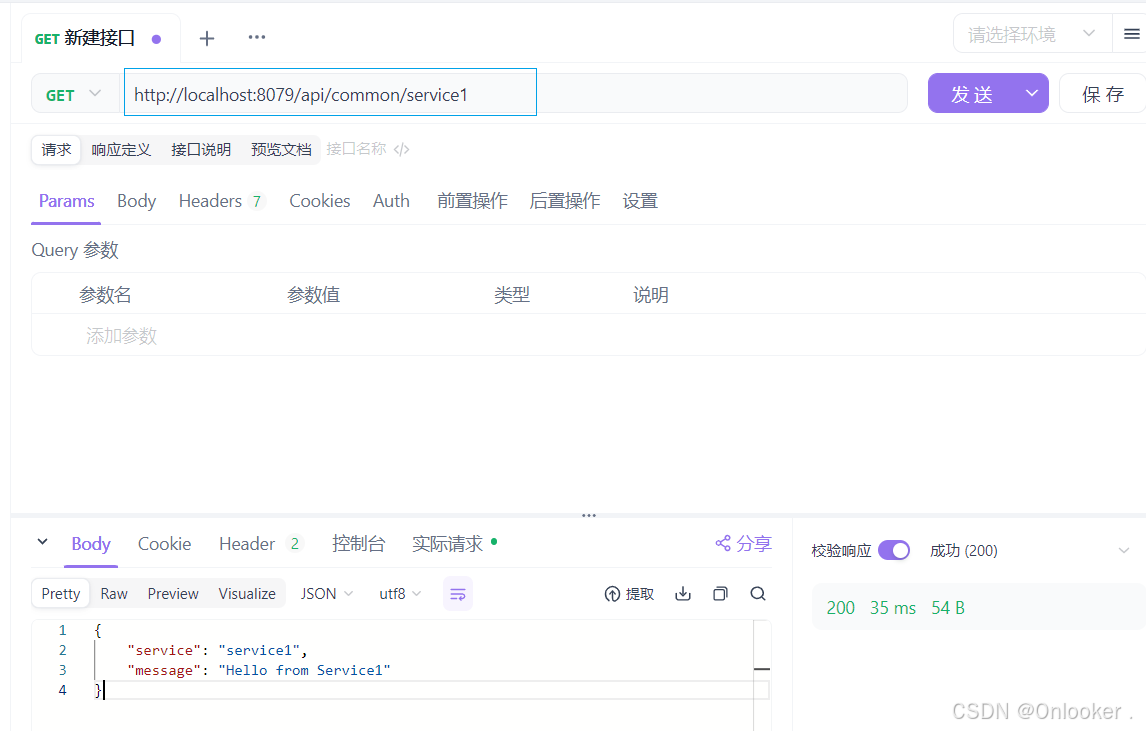
    @getmapping("/service1")
    public mono<string> getservice1data() {
        return commonservice.callservice1();
    }

    /**
     * 调用 service2 的接口
     *
     * @return service2 的响应数据
     */
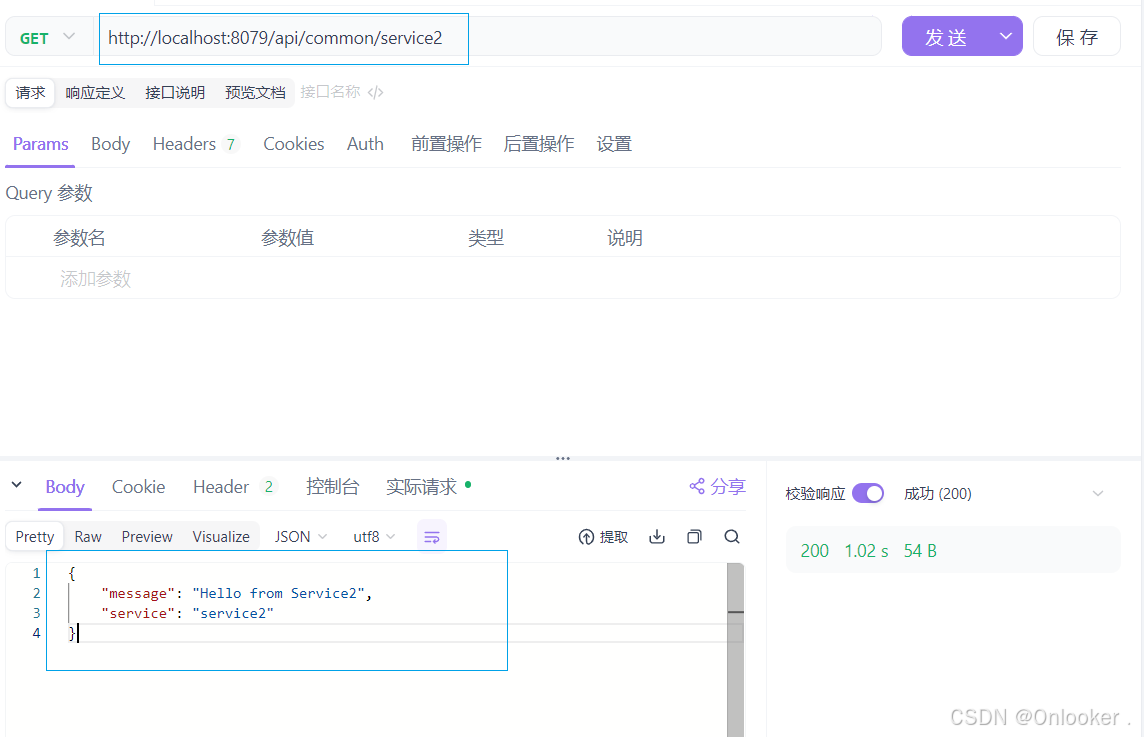
    @getmapping("/service2")
    public mono<string> getservice2info() {
        return commonservice.callservice2();
    }
}
测试接口
优化实践
将上述代码进一步优化和整合以确保代码可维护性和高效性。
package com.example.common.config;

import io.netty.channel.channeloption;
import io.netty.handler.timeout.readtimeouthandler;
import io.netty.handler.timeout.writetimeouthandler;
import org.springframework.context.annotation.bean;
import org.springframework.context.annotation.configuration;
import org.springframework.http.client.reactive.reactorclienthttpconnector;
import org.springframework.web.reactive.function.client.exchangefilterfunction;
import org.springframework.web.reactive.function.client.exchangestrategies;
import org.springframework.web.reactive.function.client.webclient;
import reactor.core.publisher.mono;
import reactor.netty.http.client.httpclient;
import reactor.netty.tcp.tcpclient;

/**
 * 配置 webclient 的各类设置和日志记录
 */
@configuration
public class webclientconfig {

    /**
     * 全局 webclient.builder 配置
     *
     * @return 配置好的 webclient.builder
     */
    @bean
    public webclient.builder webclientbuilder() {
        // 配置 tcp 客户端的连接、读取、写入超时时间
        tcpclient tcpclient = tcpclient.create()
                .option(channeloption.connect_timeout_millis, 5000) // 连接超时
                .doonconnected(conn -> conn
                        .addhandlerlast(new readtimeouthandler(5)) // 读超时
                        .addhandlerlast(new writetimeouthandler(5))); // 写超时

        // 将 tcp 客户端配置应用到 http 客户端
        httpclient httpclient = httpclient.from(tcpclient);

        // 配置 webclient 构建器,包括 http 连接器、交换策略、请求和响应日志
        return webclient.builder()
                .clientconnector(new reactorclienthttpconnector(httpclient))
                .exchangestrategies(exchangestrategies.builder()
                        .codecs(configurer -> configurer.defaultcodecs().maxinmemorysize(16 * 1024 * 1024)) // 内存限制
                        .build())
                .filter(logrequest())  // 请求日志
                .filter(logresponse()); // 响应日志
    }

    /**
     * 针对 service1 的 webclient 配置
     *
     * @param builder 全局配置的 webclient.builder
     * @return 配置好的 webclient 实例
     */
    @bean(name = "service1webclient")
    public webclient service1webclient(webclient.builder builder) {
        // 为 service1 配置特定的 base url 和默认头部
        return builder
                .baseurl("http://localhost:8081")
                .defaultheader("content-type", "application/json")
                .build();
    }

    /**
     * 针对 service2 的 webclient 配置
     *
     * @param builder 全局配置的 webclient.builder
     * @return 配置好的 webclient 实例
     */
    @bean(name = "service2webclient")
    public webclient service2webclient(webclient.builder builder) {
        // 为 service2 配置特定的 base url 和默认头部
        return builder
                .baseurl("http://localhost:8082")
                .defaultheader("content-type", "application/json")
                .build();
    }

    /**
     * 请求日志拦截器
     *
     * @return 记录请求日志的 exchangefilterfunction
     */
    private exchangefilterfunction logrequest() {
        // 拦截请求并打印请求方法和url
        return exchangefilterfunction.ofrequestprocessor(request -> {
            system.out.println("request: " + request.method() + " " + request.url());
            return mono.just(request);
        });
    }

    /**
     * 响应日志拦截器
     *
     * @return 记录响应日志的 exchangefilterfunction
     */
    private exchangefilterfunction logresponse() {
        // 拦截响应并打印响应状态码
        return exchangefilterfunction.ofresponseprocessor(response -> {
            system.out.println("response status: " + response.statuscode());
            return mono.just(response);
        });
    }
}
package com.example.common.service;

import org.springframework.core.parameterizedtypereference;
import org.springframework.stereotype.service;
import org.springframework.web.reactive.function.client.webclient;
import reactor.core.publisher.mono;

import java.util.map;

/**
 * commonservice 类提供了调用两个不同服务的公共方法,并合并其结果
 */
@service
public class commonservice {

    // service1 的 webclient 实例
    private final webclient service1webclient;
    // service2 的 webclient 实例
    private final webclient service2webclient;

    /**
     * 构造函数注入 webclient 实例
     *
     * @param service1webclient service1 的 webclient
     * @param service2webclient service2 的 webclient
     */
    public commonservice(webclient service1webclient, webclient service2webclient) {
        this.service1webclient = service1webclient;
        this.service2webclient = service2webclient;
    }

    /**
     * 异步调用 service1 和 service2,并返回合并结果(json 格式)
     *
     * @return 包含两个服务响应的 mono 对象
     */
    public mono<map<string, map<string, string>>> callservicesasync() {
        // 调用 service1,返回 map 响应
        mono<map<string, string>> service1response = service1webclient.get()
                // 设置请求的uri
               .uri("/api/service1/data")
                // 检索响应
               .retrieve()
                // 处理错误状态
               .onstatus(
                        // 检查状态是否为4xx或5xx
                        status -> status.is4xxclienterror() || status.is5xxservererror(),
                        // 如果是,创建一个运行时异常
                        response -> mono.error(new runtimeexception("service1 error: " + response.statuscode()))
                )
                // 将响应体转换为mono<map<string, string>>
               .bodytomono(new parameterizedtypereference<map<string, string>>() {})
                // 处理错误
               .onerrorresume(e -> {
                    // 打印错误信息
                    system.err.println("error calling service1: " + e.getmessage());
                    // 返回一个包含错误信息的map
                    return mono.just(map.of("error", "fallback response for service1"));
                });

        // 调用 service2,返回 map 响应
        mono<map<string, string>> service2response = service2webclient.get()
                // 设置请求的uri
               .uri("/api/service2/info")
                // 检索响应
               .retrieve()
                // 处理错误状态
               .onstatus(
                        // 检查状态是否为4xx或5xx
                        status -> status.is4xxclienterror() || status.is5xxservererror(),
                        // 如果是,创建一个运行时异常
                        response -> mono.error(new runtimeexception("service2 error: " + response.statuscode()))
                )
                // 将响应体转换为mono<map<string, string>>
               .bodytomono(new parameterizedtypereference<map<string, string>>() {})
                // 处理错误
               .onerrorresume(e -> {
                    // 打印错误信息
                    system.err.println("error calling service2: " + e.getmessage());
                    // 返回一个包含错误信息的map
                    return mono.just(map.of("error", "fallback response for service2"));
                });

        // 合并两个响应
        return mono.zip(service1response, service2response, (response1, response2) -> map.of(
                "service1", response1,
                "service2", response2
        ))
        // 处理合并过程中的错误
       .onerrorresume(e -> {
            // 打印错误信息
            system.err.println("error combining responses: " + e.getmessage());
            // 返回一个包含错误信息的map
            return mono.just(map.of(
                    "error", map.of(
                            "status", "error",
                            "message", e.getmessage() // 捕获异常并输出信息
                    )
            ));
        });
    }
}
package com.example.common.controller;

import com.example.common.service.commonservice;
import org.springframework.web.bind.annotation.getmapping;
import org.springframework.web.bind.annotation.requestmapping;
import org.springframework.web.bind.annotation.restcontroller;
import reactor.core.publisher.mono;

import java.util.map;

@restcontroller
@requestmapping("/api/common")
public class commoncontroller {

    private final commonservice commonservice;

    public commoncontroller(commonservice commonservice) {
        this.commonservice = commonservice;
    }

    /**
     * 提供异步调用的 rest 接口,返回 json 格式的数据
     */
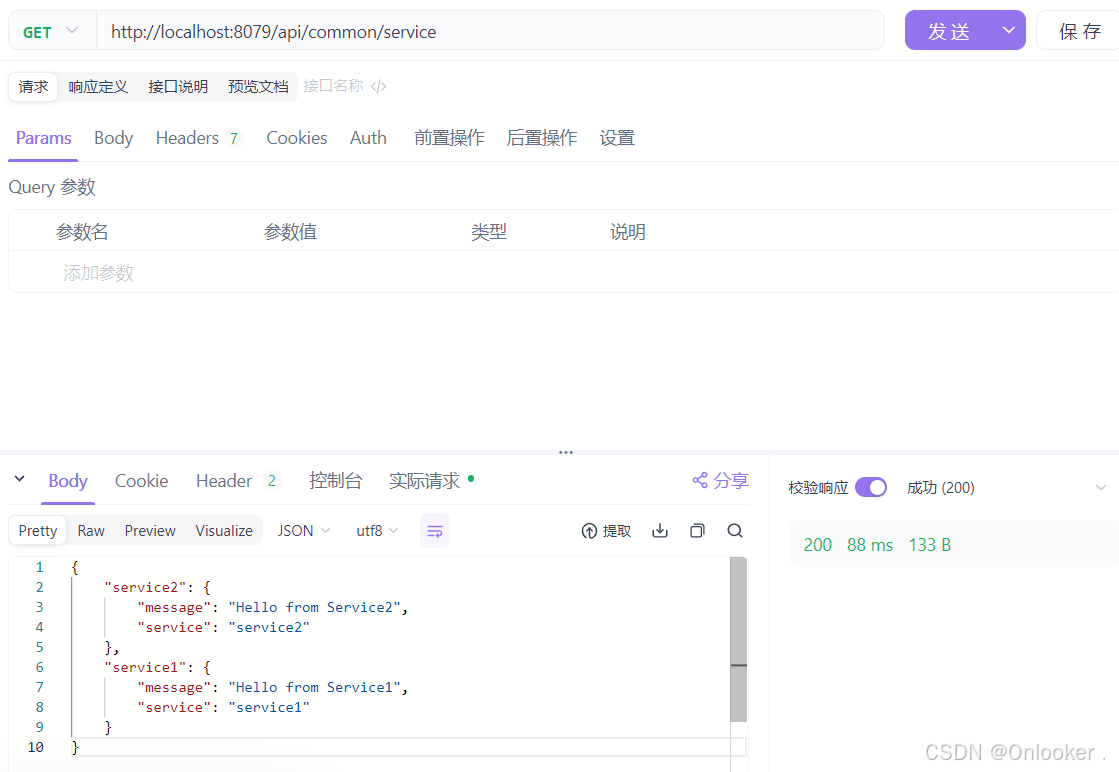
    @getmapping("/service")
    public mono<map<string, map<string, string>>> getservicesdata() {
        system.out.println("received request for combined service data");
        return commonservice.callservicesasync()
                .doonsuccess(response -> system.out.println("successfully retrieved data: " + response))
                .doonerror(error -> system.err.println("error occurred while fetching service data: " + error.getmessage()));
    }
}
测试接口
结语
webclient 是一个功能强大且灵活的非阻塞 http 客户端,特别适合在高并发和响应式编程场景下使用,是替代传统 resttemplate 的优秀选择。在实际项目中,通过合理配置(如超时、连接池)和优化(如负载均衡、重试机制),可以显著提高服务间通信的效率和可靠性,降低延迟和资源消耗。
同时,结合 spring webflux 提供的响应式编程支持,webclient 能够更好地应对微服务架构中复杂的通信需求,成为开发现代分布式系统的重要工具。
到此这篇关于springboot中webclient的实践的文章就介绍到这了,更多相关springboot webclient内容请搜索代码网以前的文章或继续浏览下面的相关文章希望大家以后多多支持代码网!


发表评论