
 我要评论
我要评论python版
完整代码
import tkinter as tk
from tkinter import ttk, messagebox
import matplotlib.pyplot as plt
from matplotlib.backends.backend_tkagg import figurecanvastkagg
from datetime import datetime

class stockdesigner:
    def __init__(self, root):
        self.root = root
        self.root.title("股票交易计算器")
        self.root.geometry("1000x700")

        # 设置主题样式
        style = ttk.style()
        style.theme_use('clam')  # 使用 clam 主题

        # 自定义样式
        style.configure('tlabel', font=('微软雅黑', 10))
        style.configure('tbutton', font=('微软雅黑', 10))
        style.configure('tlabelframe', font=('微软雅黑', 10))
        style.configure('tlabelframe.label', font=('微软雅黑', 10, 'bold'))
        style.configure('custom.tbutton', padding=10, font=('微软雅黑', 10, 'bold'))

        # 设置默认手续费率
        self.commission_rate = 0.00025
        self.stamp_duty = 0.001
        self.min_commission = 5

        # 创建主框架
        self.main_frame = ttk.frame(root, padding="20")
        self.main_frame.grid(row=0, column=0, sticky="nsew")

        self.create_widgets()

        # 配置根窗口的网格权重
        root.grid_rowconfigure(0, weight=1)
        root.grid_columnconfigure(0, weight=1)

    def create_widgets(self):
        # 创建标题
        title_label = ttk.label(self.main_frame, text="股票交易计算器",
                              font=('微软雅黑', 16, 'bold'))
        title_label.grid(row=0, column=0, columnspan=2, pady=(0, 20))

        # 创建左侧输入框架
        input_frame = ttk.labelframe(self.main_frame, text="交易数据输入", padding="20")
        input_frame.grid(row=1, column=0, padx=(0, 10), sticky="nsew")

        # 修改输入框布局
        labels = ["股票代码:", "买入价格:", "买入数量:", "目标卖出价:", "目标盈利金额:"]
        entries = ["code_entry", "buy_price_entry", "volume_entry", "sell_price_entry", "target_profit_entry"]

        for i, (label, entry) in enumerate(zip(labels, entries)):
            ttk.label(input_frame, text=label).grid(row=i, column=0, pady=10, padx=(0, 10), sticky="e")
            entry_widget = ttk.entry(input_frame, width=25, font=('微软雅黑', 10))
            entry_widget.grid(row=i, column=1, pady=10, sticky="w")
            setattr(self, entry, entry_widget)

        # 添加说明文本
        hint_text = "注:手续费率为万分之2.5,印花税为千分之1"
        ttk.label(input_frame, text=hint_text, font=('微软雅黑', 9), foreground='gray')\
            .grid(row=len(labels), column=0, columnspan=2, pady=(10, 0))

        # 添加两个计算按钮
        calc_button = ttk.button(input_frame, text="计算交易成本和收益",
                               command=self.calculate_profit, style='custom.tbutton')
        calc_button.grid(row=len(labels)+1, column=0, columnspan=2, pady=(20,5))

        reverse_calc_button = ttk.button(input_frame, text="计算目标卖出价",
                                       command=self.calculate_target_price, style='custom.tbutton')
        reverse_calc_button.grid(row=len(labels)+2, column=0, columnspan=2, pady=(5,20))

        # 创建右侧显示框架
        display_frame = ttk.labelframe(self.main_frame, text="计算结果", padding="20")
        display_frame.grid(row=1, column=1, sticky="nsew")

        # 创建结果显示区
        self.result_text = tk.text(display_frame, height=20, width=45,
                                 font=('consolas', 10), bg='#f8f8f8')
        self.result_text.grid(row=0, column=0, sticky="nsew")

        # 添���滚动条
        scrollbar = ttk.scrollbar(display_frame, orient="vertical",
                                command=self.result_text.yview)
        scrollbar.grid(row=0, column=1, sticky="ns")
        self.result_text.configure(yscrollcommand=scrollbar.set)

        # 设置网格权重
        self.main_frame.grid_columnconfigure(1, weight=1)
        self.main_frame.grid_rowconfigure(1, weight=1)
        display_frame.grid_columnconfigure(0, weight=1)
        display_frame.grid_rowconfigure(0, weight=1)

    def calculate_profit(self):
        try:
            buy_price = float(self.buy_price_entry.get())
            volume = int(self.volume_entry.get())
            sell_price = float(self.sell_price_entry.get())

            if not all([buy_price > 0, volume > 0, sell_price > 0]):
                messagebox.showerror("错误", "请输入有效的数据!")
                return

            # 计算买入成本
            buy_amount = buy_price * volume
            buy_commission = max(buy_amount * self.commission_rate, self.min_commission)

            # 计算卖出收入
            sell_amount = sell_price * volume
            sell_commission = max(sell_amount * self.commission_rate, self.min_commission)
            stamp_duty = sell_amount * self.stamp_duty

            # 计算总成本和收益
            total_cost = buy_amount + buy_commission + sell_commission + stamp_duty
            total_income = sell_amount
            net_profit = total_income - total_cost
            profit_rate = (net_profit / total_cost) * 100

            # 显示结果
            result = f"""┌{'─'*40}┐
│            交易明细                    │
└{'─'*40}┘
 买入价格: {buy_price:.3f}元
 买入数量: {volume:,}股
 买入金额: {buy_amount:,.2f}元
 买入手续费: {buy_commission:.2f}元
 卖出价格: {sell_price:.3f}元
 卖出金额: {sell_amount:,.2f}元
 卖出手续费: {sell_commission:.2f}元
 印花税: {stamp_duty:.2f}元
┌{'─'*40}┐
│            盈亏分析                    │
└{'─'*40}┘
 总成本: {total_cost:,.2f}元
 总收入: {total_income:,.2f}元
 净利润: {net_profit:,.2f}元
 收益率: {profit_rate:.2f}%
┌{'─'*40}┐
│            盈亏平衡点                  │
└{'─'*40}┘
 最低卖出价格: {(total_cost/volume):.3f}元
"""
            self.result_text.delete(1.0, tk.end)
            self.result_text.insert(tk.end, result)

        except valueerror:
            messagebox.showerror("错误", "请输入正确的数值!")

    def calculate_target_price(self):
        try:
            buy_price = float(self.buy_price_entry.get())
            volume = int(self.volume_entry.get())
            target_profit = float(self.target_profit_entry.get())

            if not all([buy_price > 0, volume > 0, target_profit > 0]):
                messagebox.showerror("错误", "请输入有效的数据!")
                return

            # 计算买入成本
            buy_amount = buy_price * volume
            buy_commission = max(buy_amount * self.commission_rate, self.min_commission)

            # 通过二分法查找目标卖出价
            left, right = buy_price, buy_price * 2
            target_price = 0

            while left <= right:
                mid = (left + right) / 2
                sell_amount = mid * volume
                sell_commission = max(sell_amount * self.commission_rate, self.min_commission)
                stamp_duty = sell_amount * self.stamp_duty

                total_cost = buy_amount + buy_commission + sell_commission + stamp_duty
                net_profit = sell_amount - total_cost

                if abs(net_profit - target_profit) < 0.01:
                    target_price = mid
                    break
                elif net_profit < target_profit:
                    left = mid + 0.0001
                else:
                    right = mid - 0.0001

            # 计算详细成本
            buy_amount = buy_price * volume
            buy_commission = max(buy_amount * self.commission_rate, self.min_commission)

            sell_amount = target_price * volume
            sell_commission = max(sell_amount * self.commission_rate, self.min_commission)
            stamp_duty = sell_amount * self.stamp_duty

            total_cost = buy_amount + buy_commission + sell_commission + stamp_duty

            # 修改显示结果,添加成本明细
            result = f"""┌{'─'*40}┐
│            反向计算结果                │
└{'─'*40}┘
 买入价格: {buy_price:.3f}元
 买入数量: {volume:,}股
 买入金额: {buy_amount:,.2f}元
 买入手续费: {buy_commission:.2f}元
 目标盈利: {target_profit:.2f}元
 需要卖出价格: {target_price:.3f}元
 卖出金额: {sell_amount:,.2f}元
 卖出手续费: {sell_commission:.2f}元
 印花税: {stamp_duty:.2f}元
┌{'─'*40}┐
│            成本与收益                  │
└{'─'*40}┘
 总成本: {total_cost:,.2f}元
 总收入: {sell_amount:,.2f}元
 净利润: {target_profit:.2f}元
 上涨幅度: {((target_price/buy_price - 1) * 100):.2f}%
"""
            self.result_text.delete(1.0, tk.end)
            self.result_text.insert(tk.end, result)

            # 自动填充卖出价格输入框
            self.sell_price_entry.delete(0, tk.end)
            self.sell_price_entry.insert(0, f"{target_price:.3f}")

        except valueerror:
            messagebox.showerror("错误", "请输入正确的数值!")

if __name__ == "__main__":
    root = tk.tk()
    app = stockdesigner(root)
    root.mainloop()
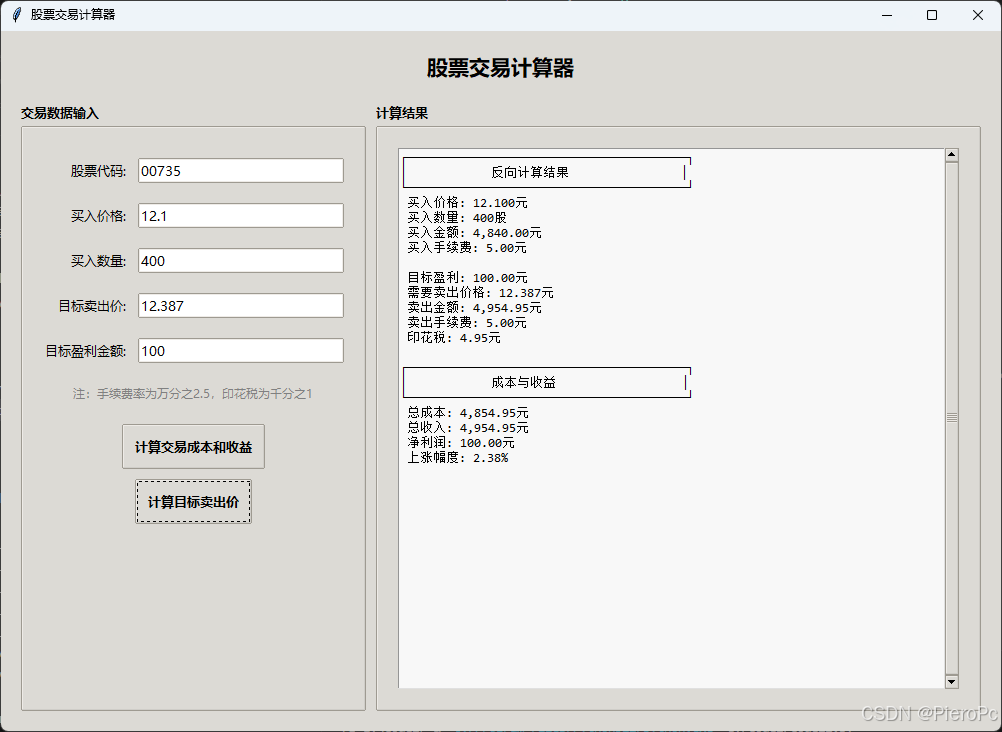
效果图
html 版
完整代码
<!doctype html>
<html lang="zh">
<head>
    <meta charset="utf-8">
    <meta name="viewport" content="width=device-width, initial-scale=1.0">
    <title>股票交易计算器</title>
    <style>
        body {
            font-family: arial, sans-serif;
            max-width: 600px;
            margin: 0 auto;
            padding: 20px;
        }
        .calculator {
            border: 1px solid #ccc;
            padding: 20px;
            border-radius: 5px;
        }
        .input-group {
            margin-bottom: 15px;
        }
        label {
            display: inline-block;
            width: 120px;
        }
        input {
            width: 150px;
            padding: 5px;
        }
        button {
            background-color: #4caf50;
            color: white;
            padding: 10px 20px;
            border: none;
            border-radius: 4px;
            cursor: pointer;
        }
        button:hover {
            background-color: #45a049;
        }
        .result {
            margin-top: 20px;
            padding: 10px;
            background-color: #f9f9f9;
        }
    </style>
</head>
<body>
    <div class="calculator">
        <h2>股票交易计算器</h2>
        <div class="input-group">
            <label>买入价格:</label>
            <input type="number" id="buyprice" step="0.01">
        </div>
        <div class="input-group">
            <label>卖出价格:</label>
            <input type="number" id="sellprice" step="0.01">
        </div>
        <div class="input-group">
            <label>交易数量:</label>
            <input type="number" id="quantity">
        </div>
        <div class="input-group">
            <label>手续费率:</label>
            <input type="number" id="feerate" value="0.00025" step="0.0001">
        </div>
        <button onclick="calculate()">计算</button>
        <div class="result" id="result"></div>
    </div>

    <script>
        function calculate() {
            // 获取输入值
            const buyprice = parsefloat(document.getelementbyid('buyprice').value);
            const sellprice = parsefloat(document.getelementbyid('sellprice').value);
            const quantity = parseint(document.getelementbyid('quantity').value);
            const feerate = parsefloat(document.getelementbyid('feerate').value);

            // 验证输入
            if (!buyprice || !sellprice || !quantity || !feerate) {
                alert('请填写所有必要信息!');
                return;
            }

            // 计算交易费用
            const buytotal = buyprice * quantity;
            const selltotal = sellprice * quantity;
            const buyfee = math.max(buytotal * feerate, 5); // 最低手续费5元
            const sellfee = math.max(selltotal * feerate, 5);

            // 计算盈亏
            const profit = selltotal - buytotal - buyfee - sellfee;
            const profitrate = (profit / buytotal * 100).tofixed(2);

            // 显示结果
            const resulthtml = `
                <h3>交易明细:</h3>
                <p>买入总额:¥${buytotal.tofixed(2)}</p>
                <p>买入手续费:¥${buyfee.tofixed(2)}</p>
                <p>卖出总额:¥${selltotal.tofixed(2)}</p>
                <p>卖出手续费:¥${sellfee.tofixed(2)}</p>
                <p>净盈亏:¥${profit.tofixed(2)}</p>
                <p>收益率:${profitrate}%</p>
            `;

            document.getelementbyid('result').innerhtml = resulthtml;
        }
    </script>
</body>
</html>
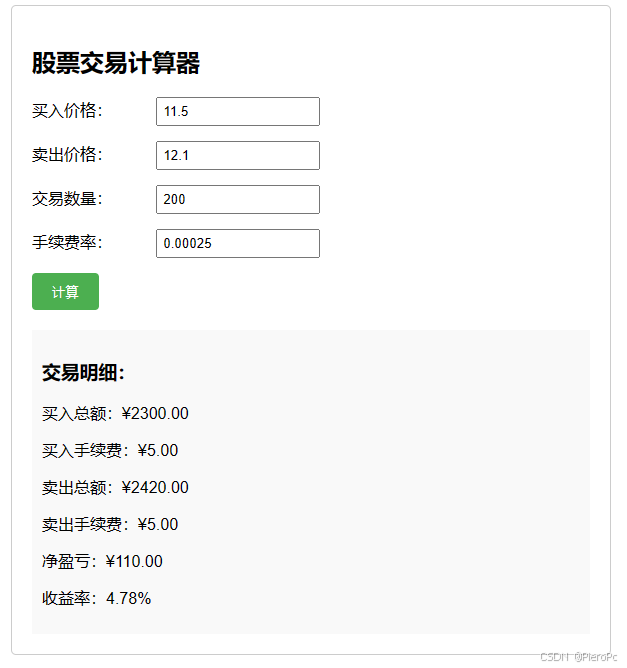
效果图
到此这篇关于基于python制作股票交易计算器的文章就介绍到这了,更多相关python股票交易计算器内容请搜索代码网以前的文章或继续浏览下面的相关文章希望大家以后多多支持代码网!






发表评论