
 我要评论
我要评论介绍
vue 动态组件的应用场景很多,可应用于动态页签,动态路由等场景,其核心原理是批量注册。在vue2和vue3中实现原理相同,只是语法略有差异。
vue2 实现
基于 webpack
require.context() 是webpack提供的一个自动导入的api
参数1:加载的文件目录
参数2:是否加载子目录
参数3:正则,匹配文件
返回值:导入函数 fn
使用require提供的函数context加载某一个目录下所有的.vue后缀的文件,他的返回值是一个对象,对象里面有一个属keys(), 可以获取所有的文件路径,我们可以遍历importfn.keys(),最后在遍历中使用
首先先描述下应用场景,比如我想在父容器遍历组件集合,根据组件类型(字符串)来首先动态加载组件,如下图:
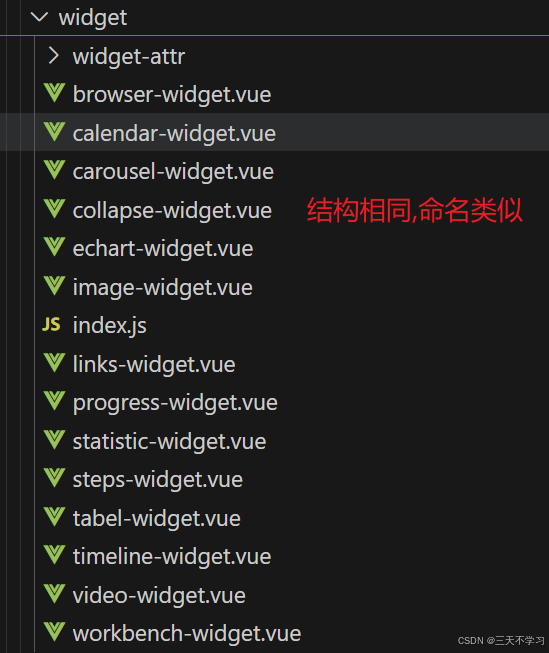
如果要是按正常一个个注册的话,也是可以的,就是代码冗余多,不够优雅,所以需要一个方法来实现,这个方法就放到一个js里去,然后把该index.js直接丢到widget-attr文件夹里.
//index.js
const requirecomponent = require.context('./', false, /\w+\.vue$/)
let comps = {}
requirecomponent.keys().map(filename => {
  let comp = requirecomponent(filename).default;
  comps[comp.name] = comp
})
export default comps;
然后在页面引用,如下图:
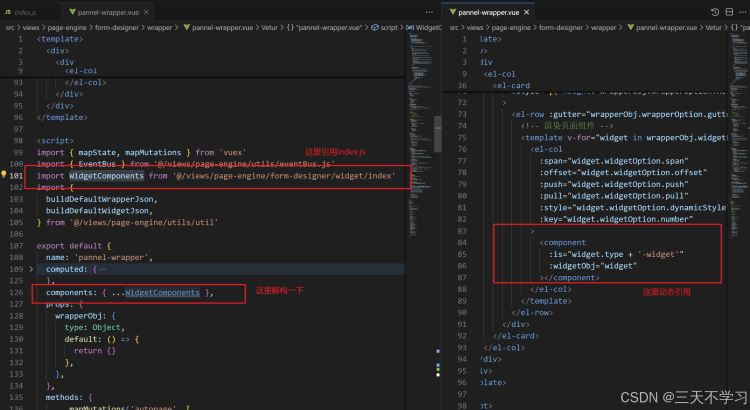
好了,到这里简简单单就实现了,我现在整个项目需要这样批量注册的场景也就两三个,所以我在需要批量注册的组件对应的文件夹就放置这个一个index.js就能实现了,如果实际场景不想放那么多,可以自行稍微改造下,传个路径进去,我vue3版本就是这样实现的
vue3 实现
基于 vite
const components = import.meta.glob("./*.vue");
//注意 :  import.meta.glob 不支持变量,
vue3 使用 组合式 ,方法里也用到了vite的语法,首页也要把核心代码封装到 dynamiccomponents.js里面
详细如下
// utils/dynamiccomponents.js
import { defineasynccomponent } from 'vue';
function loadcomponentsfromfolder(folderpath) {
  const components = {};
  let modules = import.meta.glob('@/components/form-designer/widget/*.vue', { eager: false });
  if (folderpath == 'widgetarrt') {
    modules = import.meta.glob('@/components/form-designer/widget/widget-attr/*.vue', { eager: false });
  }
  for (const path in modules) {
    const componentname = path.match(/\/([^/]+)\.vue$/)[1];
    components[componentname] = defineasynccomponent(modules[path]);
  }
  return components;
}
export default loadcomponentsfromfolder;
这个并不完美,理想中应该是根据传参(需要动态注册的组件所在文件夹路径)来实现,但是,如下目前好像并不支持:
// utils/dynamiccomponents.js
function loadcomponentsfromfolder(folderpath) {
   //省略...
    modules = import.meta.glob(`${folderpath}/*.vue`, { eager: false   });
   //省略...
}
export default loadcomponentsfromfolder;
这样写会报错,提示import.meta.glob不支持变量.
[plugin:vite:import-glob] invalid glob import syntax:
 expected glob to be a string, but got dynamic template literal
 //大致意思: 只能使用文本,而我们的 path 使用了变量,所以会报错.
这个有其他解决办法,待会下面会说到,因为我在该项目批量注册应用场景不多,所以我就直接传参判断来写死了.
.接下来就是引用了,如下图:
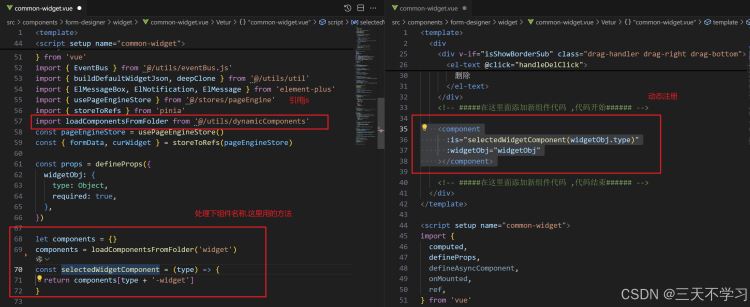
至此,就实现批量动态注册了,另外注意, 组件集合不要用绑定模式,虽然不报错,但是会报黄提示影响效率
 // let components =ref({})  //不要写成响应式的了,会有性能风险提示
 let components = {}
 components = loadcomponentsfromfolder('widget')
最后
用其他办法来解决这个问题吧,有点复杂,有更好办法的小伙伴可以留言~
使用 fs 模块读取文件列表:
在 node.js 环境中使用 fs 模块读取指定文件夹下的文件列表。
将文件列表传递给前端,前端再使用 import() 动态导入这些文件。
前端动态导入:

前端根据接收到的文件列表动态导入组件。
实现步骤
1. 后端读取文件列表
首先,在 vite 项目的 vite.config.js 或者单独的 node.js 脚本中,使用 fs 模块读取文件列表,并将结果暴露给前端。

javascript
// vite.config.js 或者单独的 node.js 脚本
const fs = require('fs');
const path = require('path');

function getcomponentpaths(folderpath) {
  const basefolderpath = path.resolve(__dirname, 'src/components/form-designer/widget/');
  const fullfolderpath = folderpath ? path.join(basefolderpath, folderpath) : basefolderpath;

  const files = fs.readdirsync(fullfolderpath);
  const componentpaths = files
    .filter(file => file.endswith('.vue'))
    .map(file => path.join(fullfolderpath, file));

  return componentpaths.map(p => p.replace(/\\/g, '/').replace(path.resolve(__dirname, 'src/'), '@/'));
}

module.exports = {
  getcomponentpaths,
};
2. 前端动态导入
在前端,使用 import() 动态导入这些文件。

javascript
// utils/dynamiccomponents.js
import { defineasynccomponent } from 'vue';

const componentcache = {};

async function loadcomponentsfromfolder(folderpath) {
  // 检查缓存
  if (componentcache[folderpath]) {
    return componentcache[folderpath];
  }

  // 获取文件路径列表
  const componentpaths = await fetchcomponentpaths(folderpath);

  const components = {};

  // 动态导入模块
  await promise.all(componentpaths.map(async (path) => {
    const componentname = path.match(/\/([^/]+)\.vue$/)[1];
    components[componentname] = defineasynccomponent(() => import(path));
  }));

  // 缓存结果
  componentcache[folderpath] = components;

  return components;
}

async function fetchcomponentpaths(folderpath) {
  // 这里假设你有一个 api 端点来获取文件路径列表
  const response = await fetch(`/api/get-component-paths?folderpath=${folderpath}`);
  const data = await response.json();
  return data.paths;
}

export default loadcomponentsfromfolder;
3. 创建 api 端点
在 vite 项目中创建一个简单的 api 端点来返回文件路径列表。

javascript
// server/index.js
const express = require('express');
const { getcomponentpaths } = require('../vite.config');

const app = express();
const port = 3000;

app.get('/api/get-component-paths', (req, res) => {
  const folderpath = req.query.folderpath;
  const paths = getcomponentpaths(folderpath);
  res.json({ paths });
});

app.listen(port, () => {
  console.log(`server running at http://localhost:${port}`);
});
使用示例
在组件或页面中使用 loadcomponentsfromfolder 函数时,只需传递不同的 folderpath 参数即可动态注册不同路径下的组件。

javascript
// 在某个 vue 组件中使用
<script setup>
import { ref, onmounted } from 'vue';
import loadcomponentsfromfolder from '@/utils/dynamiccomponents';

const folderpath = 'widgetattr'; // 可以根据实际需求动态设置
const dynamiccomponents = ref({});

onmounted(async () => {
  dynamiccomponents.value = await loadcomponentsfromfolder(folderpath);
});
</script>

<template>
  <div>
    <component v-for="(component, name) in dynamiccomponents" :is="component" :key="name"></component>
  </div>
</template>
注意事项
文件路径处理:

确保文件路径在前后端一致,特别是在 windows 系统中,路径分隔符需要转换。
api 端点:

确保 api 端点能够正确返回文件路径列表。
性能优化:

如果组件数量较多,可以考虑使用懒加载和缓存机制来优化性能。
通过这种方式,你可以根据路径参数动态注册不同文件夹下的组件,而不需要使用 if-else 判断。
以上就是vue批量注册组件实现动态组件技巧的详细内容,更多关于vue动态组件的资料请关注代码网其它相关文章!




发表评论