
 我要评论
我要评论引言
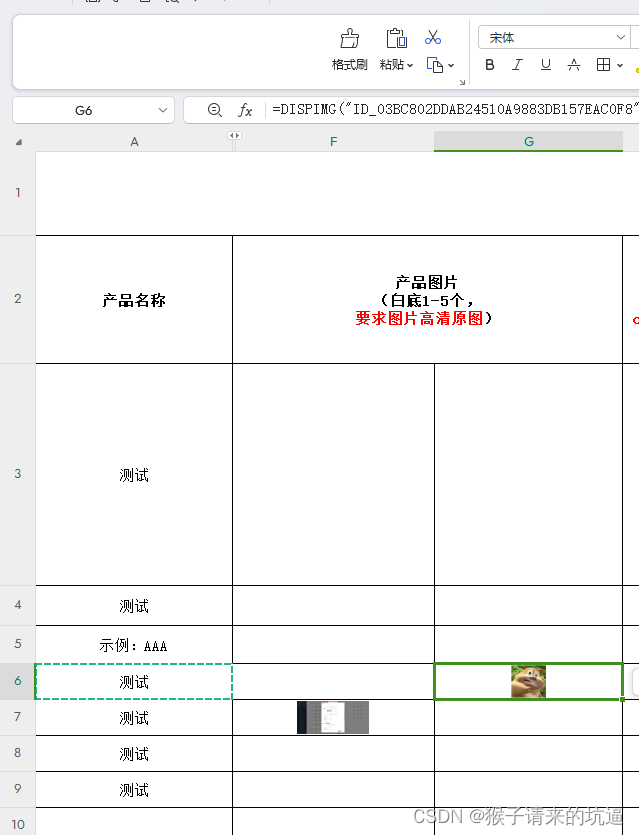
许多数据文件中可能包含嵌入式图片,这些图片对于数据分析和可视化非常重要。然而,从 wps 在 excel 中读取这些图片可能会有一些技术挑战。在本文中,我将展示如何从 wps excel 文件中读取嵌入的图片,并提供代码示例。
提取图片资源的方法
以下是用于从 wps excel 文件中读取图片资源的方法。我们使用了 apache poi 库来处理 excel 文件,并使用了 cn.hutool.json 库来处理 xml 数据。这些库可以帮助我们解析 excel 文件中的嵌入式图片。
主函数
首先,我们定义了主函数 main,用于测试图片提取功能:
public static void main(string[] args) {
    picturesutils picturesutils = new picturesutils();
    byte[] filedata = picturesutils.getfilestream(new file("你的文件路径"));
    map<string, xssfpicturedata> pictures = picturesutils.getpictures(filedata);
    pictures.foreach((id, xssfpicturedata) -> {
        system.out.println("id:" + id);
        string filename = xssfpicturedata.getpackagepart().getpartname().getname();
        system.out.println("filename:" + filename);
        file file = new file("d:\\" + filename);
        file dir = file.getparentfile();
        dir.mkdirs();
        try {
            files.write(path.of(file.getpath()), xssfpicturedata.getdata());
        } catch (ioexception e) {
            e.printstacktrace();
        }
    });
}
在这个函数中,我们创建了一个 picturesutils 实例,并从文件路径中获取文件数据。然后,我们调用 getpictures 方法来提取图片资源,并遍历结果将图片写入本地文件。
获取浮动图片
接下来,我们展示了如何从 excel 文件中获取浮动图片:
public static map<string, xssfpicturedata> getfloatingpictures(xssfsheet xssfsheet) {
    map<string, xssfpicturedata> mapfloatingpictures = new hashmap<>();
    xssfdrawing drawingpatriarch = xssfsheet.getdrawingpatriarch();
    if (drawingpatriarch != null) {
        list<xssfshape> shapes = drawingpatriarch.getshapes();
        for (xssfshape shape : shapes) {
            if (shape instanceof xssfpicture picture) {
                xssfclientanchor anchor = (xssfclientanchor) picture.getanchor();
                xssfpicturedata picturedata = picture.getpicturedata();
                string key = anchor.getrow1() + "-" + anchor.getcol1();
                mapfloatingpictures.put(key, picturedata);
            }
        }
    }
    return mapfloatingpictures;
}
该方法接收一个 xssfsheet 对象,并返回一个包含浮动图片的映射。它遍历工作表中的所有形状,并将图片数据存储在映射中。
处理图片数据
最后,我们展示了如何处理 excel 文件中的图片数据,包括嵌入式图片和浮动式图片:
public map<string, xssfpicturedata> getpictures(byte[] data) {
    try {
        map<string, string> mapconfig = processzipentries(new bytearrayinputstream(data));
        map<string, xssfpicturedata> mappictures = processpictures(new bytearrayinputstream(data), mapconfig);
        iterator<sheet> sheetiterator = workbookfactory.create(new bytearrayinputstream(data)).sheetiterator();
        while (sheetiterator.hasnext()) {
            mappictures.putall(getfloatingpictures((xssfsheet) sheetiterator.next()));
        }
        return mappictures;
    } catch (ioexception e) {
        return new hashedmap<>();
    }
}
在该方法中,我们使用 processzipentries 和 processpictures 方法来处理 zip 文件中的条目和图片数据。然后,通过遍历 excel 文件中的所有工作表,获取浮动图片。
完整代码
实际在程序中读取的内容为=dispimg(“id_03bc802ddab24510a9883db157eac0f8”,1)公式
将公式中的id提取出来id_03bc802ddab24510a9883db157eac0f8,最后就可以使用下面方法拿到当前id获取到的图片资源 jdk版本17
import cn.hutool.json.jsonarray;
import cn.hutool.json.jsonobject;
import cn.hutool.json.xml;
import lombok.extern.slf4j.slf4j;
import org.apache.commons.collections4.map.hashedmap;
import org.apache.commons.io.ioutils;
import org.apache.commons.lang3.stringutils;
import org.apache.poi.openxml4j.opc.packagepartname;
import org.apache.poi.ss.usermodel.sheet;
import org.apache.poi.ss.usermodel.workbook;
import org.apache.poi.ss.usermodel.workbookfactory;
import org.apache.poi.xssf.usermodel.*;

import java.io.*;
import java.nio.charset.standardcharsets;
import java.nio.file.files;
import java.nio.file.path;
import java.util.hashmap;
import java.util.iterator;
import java.util.list;
import java.util.map;
import java.util.zip.zipentry;
import java.util.zip.zipinputstream;


/**
 * @author bianhl
 * @version 1.0
 * @description 获取图片资源
 * @date 2024年4月28日08:44:42
 */
@slf4j
public class picturesutils {

    public static void main(string[] args) {
        picturesutils picturesutils = new picturesutils();
        byte[] filedata = picturesutils.getfilestream(new file("你的文件路径"));
        map<string, xssfpicturedata> pictures = picturesutils.getpictures(filedata);
        pictures.foreach((id, xssfpicturedata) -> {
            system.out.println("id:" + id);
            string filename = xssfpicturedata.getpackagepart().getpartname().getname();
            system.out.println("filename:" + filename);
            file file = new file("c:\\users\\xxx\\desktop\\" + filename);
            file dir = file.getparentfile();
            dir.mkdirs();
            try {
                files.write(path.of(file.getpath()), xssfpicturedata.getdata());
            } catch (ioexception e) {
                e.printstacktrace();
            }
        });
    }

    /**
     * 获取浮动图片,以 map 形式返回,键为行列格式 x-y。
     *
     * @param xssfsheet wps 工作表
     * @return 浮动图片的 map
     */
    public static map<string, xssfpicturedata> getfloatingpictures(xssfsheet xssfsheet) {
        map<string, xssfpicturedata> mapfloatingpictures = new hashmap<>();
        xssfdrawing drawingpatriarch = xssfsheet.getdrawingpatriarch();
        if (drawingpatriarch != null) {
            list<xssfshape> shapes = drawingpatriarch.getshapes();
            for (xssfshape shape : shapes) {
                if (shape instanceof xssfpicture picture) {
                    xssfclientanchor anchor = (xssfclientanchor) picture.getanchor();
                    xssfpicturedata picturedata = picture.getpicturedata();
                    string key = anchor.getrow1() + "-" + anchor.getcol1();
                    mapfloatingpictures.put(key, picturedata);
                }
            }
        }
        return mapfloatingpictures;
    }

    /**
     * 处理 wps 文件中的图片数据,返回图片信息 map。
     *
     * @param stream    输入流
     * @param mapconfig 配置映射
     * @return 图片信息的 map
     * @throws ioexception
     */
    private map<string, xssfpicturedata> processpictures(bytearrayinputstream stream, map<string, string> mapconfig) throws ioexception {
        map<string, xssfpicturedata> mappictures = new hashedmap<>();
        workbook workbook = workbookfactory.create(stream);
        list<xssfpicturedata> allpictures = (list<xssfpicturedata>) workbook.getallpictures();
        for (xssfpicturedata picturedata : allpictures) {
            packagepartname partname = picturedata.getpackagepart().getpartname();
            string uri = partname.geturi().tostring();
            if (mapconfig.containskey(uri)) {
                string strid = mapconfig.get(uri);
                mappictures.put(strid, picturedata);
            }
        }
        return mappictures;
    }

    /**
     * 获取 wps 文档中的图片,包括嵌入式图片和浮动式图片。
     *
     * @param data 二进制数据
     * @return 图片信息的 map
     * @throws ioexception
     */
    public map<string, xssfpicturedata> getpictures(byte[] data) {
        try {
            map<string, string> mapconfig = processzipentries(new bytearrayinputstream(data));
            map<string, xssfpicturedata> mappictures = processpictures(new bytearrayinputstream(data), mapconfig);
            iterator<sheet> sheetiterator = workbookfactory.create(new bytearrayinputstream(data)).sheetiterator();
            while (sheetiterator.hasnext()) {
                mappictures.putall(getfloatingpictures((xssfsheet) sheetiterator.next()));
            }
            return mappictures;
        } catch (ioexception e) {
            return new hashedmap<>();
        }
    }

    /**
     * 处理 zip 文件中的条目,更新图片配置信息。
     *
     * @param stream zip 输入流
     * @return 配置信息的 map
     * @throws ioexception
     */
    private map<string, string> processzipentries(bytearrayinputstream stream) throws ioexception {
        map<string, string> mapconfig = new hashedmap<>();
        zipinputstream zipinputstream = new zipinputstream(stream);
        zipentry zipentry;
        while ((zipentry = zipinputstream.getnextentry()) != null) {
            try {
                final string filename = zipentry.getname();
                if ("xl/cellimages.xml".equals(filename)) {
                    processcellimages(zipinputstream, mapconfig);
                } else if ("xl/_rels/cellimages.xml.rels".equals(filename)) {
                    return processcellimagesrels(zipinputstream, mapconfig);
                }
            } finally {
                zipinputstream.closeentry();
            }
        }
        return new hashedmap<>();
    }

    /**
     * 处理 zip 文件中的 cellimages.xml 文件,更新图片配置信息。
     *
     * @param zipinputstream zip 输入流
     * @param mapconfig      配置信息的 map
     * @throws ioexception
     */
    private void processcellimages(zipinputstream zipinputstream, map<string, string> mapconfig) throws ioexception {
        string content = ioutils.tostring(zipinputstream, standardcharsets.utf_8);
        jsonobject jsonobject = xml.tojsonobject(content);
        if (jsonobject != null) {
            jsonobject cellimages = jsonobject.getjsonobject("etc:cellimages");
            if (cellimages != null) {
                jsonarray cellimagearray = null;
                object cellimage = cellimages.get("etc:cellimage");
                if (cellimage != null && cellimage instanceof jsonarray) {
                    cellimagearray = (jsonarray) cellimage;
                } else if (cellimage != null && cellimage instanceof jsonobject cellimageobj) {
                    if (cellimageobj != null) {
                        cellimagearray = new jsonarray();
                        cellimagearray.add(cellimageobj);
                    }
                }
                if (cellimagearray != null) {
                    processimageitems(cellimagearray, mapconfig);
                }
            }
        }
    }

    /**
     * 处理 cellimagearray 中的图片项,更新图片配置信息。
     *
     * @param cellimagearray 图片项的 jsonarray
     * @param mapconfig      配置信息的 map
     */
    private void processimageitems(jsonarray cellimagearray, map<string, string> mapconfig) {
        for (int i = 0; i < cellimagearray.size(); i++) {
            jsonobject imageitem = cellimagearray.getjsonobject(i);
            if (imageitem != null) {
                jsonobject pic = imageitem.getjsonobject("xdr:pic");
                if (pic != null) {
                    processpic(pic, mapconfig);
                }
            }
        }
    }

    /**
     * 处理 pic 中的图片信息,更新图片配置信息。
     *
     * @param pic       图片的 jsonobject
     * @param mapconfig 配置信息的 map
     */
    private void processpic(jsonobject pic, map<string, string> mapconfig) {
        jsonobject nvpicpr = pic.getjsonobject("xdr:nvpicpr");
        if (nvpicpr != null) {
            jsonobject cnvpr = nvpicpr.getjsonobject("xdr:cnvpr");
            if (cnvpr != null) {
                string name = cnvpr.getstr("name");
                if (stringutils.isnotempty(name)) {
                    string strimageembed = updateimageembed(pic);
                    if (strimageembed != null) {
                        mapconfig.put(strimageembed, name);
                    }
                }
            }
        }
    }

    /**
     * 获取嵌入式图片的 embed 信息。
     *
     * @param pic 图片的 jsonobject
     * @return embed 信息
     */
    private string updateimageembed(jsonobject pic) {
        jsonobject blipfill = pic.getjsonobject("xdr:blipfill");
        if (blipfill != null) {
            jsonobject blip = blipfill.getjsonobject("a:blip");
            if (blip != null) {
                return blip.getstr("r:embed");
            }
        }
        return null;
    }

    /**
     * 处理 zip 文件中的 relationship 条目,更新配置信息。
     *
     * @param zipinputstream zip 输入流
     * @param mapconfig      配置信息的 map
     * @return 配置信息的 map
     * @throws ioexception
     */
    private map<string, string> processcellimagesrels(zipinputstream zipinputstream, map<string, string> mapconfig) throws ioexception {
        string content = ioutils.tostring(zipinputstream, standardcharsets.utf_8);
        jsonobject jsonobject = xml.tojsonobject(content);
        jsonobject relationships = jsonobject.getjsonobject("relationships");
        if (relationships != null) {
            jsonarray relationshiparray = null;
            object relationship = relationships.get("relationship");

            if (relationship != null && relationship instanceof jsonarray) {
                relationshiparray = (jsonarray) relationship;
            } else if (relationship != null && relationship instanceof jsonobject relationshipobj) {
                if (relationshipobj != null) {
                    relationshiparray = new jsonarray();
                    relationshiparray.add(relationshipobj);
                }
            }
            if (relationshiparray != null) {
                return processrelationships(relationshiparray, mapconfig);
            }
        }
        return null;
    }

    /**
     * 处理 relationshiparray 中的关系项,更新配置信息。
     *
     * @param relationshiparray 关系项的 jsonarray
     * @param mapconfig         配置信息的 map
     * @return 配置信息的 map
     */
    private map<string, string> processrelationships(jsonarray relationshiparray, map<string, string> mapconfig) {
        map<string, string> maprelationships = new hashedmap<>();
        for (int i = 0; i < relationshiparray.size(); i++) {
            jsonobject relaitem = relationshiparray.getjsonobject(i);
            if (relaitem != null) {
                string id = relaitem.getstr("id");
                string value = "/xl/" + relaitem.getstr("target");
                if (mapconfig.containskey(id)) {
                    string strimageid = mapconfig.get(id);
                    maprelationships.put(value, strimageid);
                }
            }
        }
        return maprelationships;
    }

    /**
     * @param file 数据文件
     * @return {@link byte[]}
     * @description
     * @author bianhl
     * @date 2024/4/26 13:52
     */
    private byte[] getfilestream(file file) {
        try (inputstream inputstream = new fileinputstream(file)) {
            // 创建 bytearrayoutputstream 来暂存流数据
            bytearrayoutputstream bytearrayoutputstream = new bytearrayoutputstream();
            // 将 inputstream 读取到 bytearrayoutputstream 中
            byte[] buffer = new byte[1024];
            int length;
            while ((length = inputstream.read(buffer)) != -1) {
                bytearrayoutputstream.write(buffer, 0, length);
            }
            // 将 bytearrayoutputstream 的内容获取为字节数组
            return bytearrayoutputstream.tobytearray();
        } catch (ioexception e) {
            return null;
        }
    }


}
输出结果:
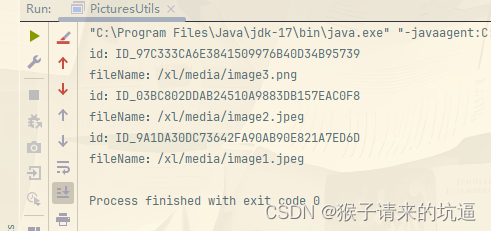
拿到的图片数据

以上就是利用java实现读取wps excel中嵌入的图片的详细内容,更多关于java读取excel嵌入的图片的资料请关注代码网其它相关文章!





发表评论