
 我要评论
我要评论springboot3 使用 easyexcel 封装工具类实现 自定义表头 导出并实现 数据格式化转换 与 添加下拉框 操作
在现代企业应用中,数据导出功能是非常常见的需求。特别是在处理大量数据时,将数据导出为 excel 文件不仅方便用户查看和分析,还能提高数据处理的效率。apache poi 是一个常用的 java excel 处理库,但它在处理大数据量时性能较差。为此,阿里巴巴开源了 easyexcel,这是一个基于 java 的简单、优雅的 excel 操作库,它在处理大数据量时表现优异。
本文将详细介绍如何使用 easyexcel 实现自定义表头导出,并实现数据格式化转换。
官网 : easyexcel
封装了很多导出方法针对不同的业务场景,这里直接展示自定义表头的代码 .
1. 使用示例
vo 示例(部分字段)

使用方法 export
用户自定义表头的 字段显示名称 , 需跟导出注解 @excelproperty 的 value 相对应 , 不然无法取到值
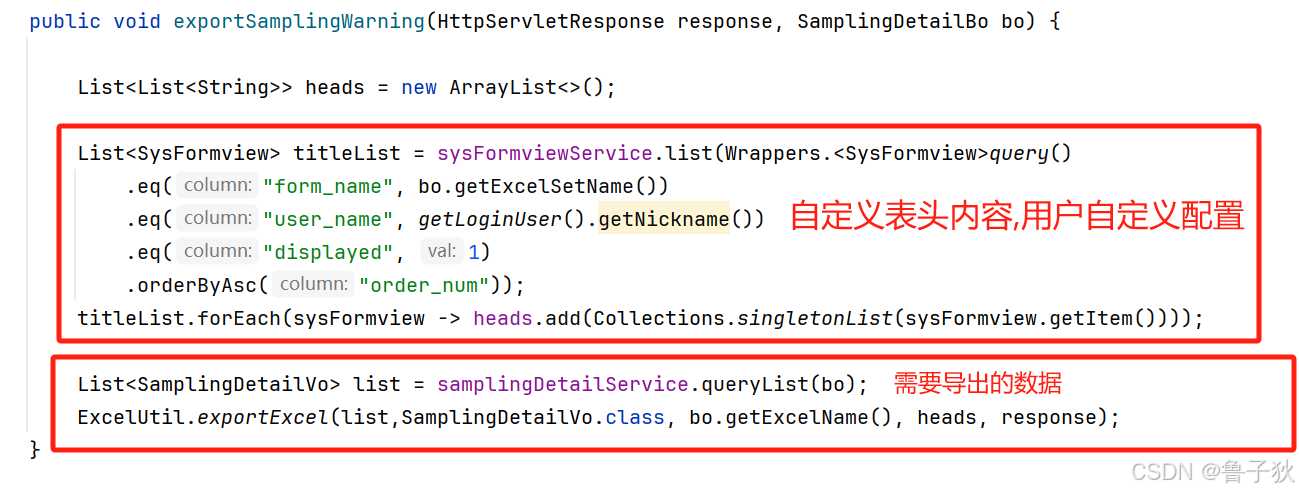
页面显示数据

导出 excel 数据

2. 工具类
/**
 * excel相关处理
 *
 * @author 鲁子狄
 */
@noargsconstructor(access = accesslevel.private)
public class excelutil {
	/**
     * 导出 excel 文件
     *
     * @param list      导出数据集合
     * @param sheetname 工作表的名称
     * @param heads     表头
     * @param response  响应体
     */
    public static <t> void exportexcel(list<t> list, class<t> clazz, string sheetname, list<list<string>> heads, httpservletresponse response) {
        try {
            // 将对象列表转换为自定义的数据列表
            list<list<object>> data = excelutil.convertobjectstoexcelrows(list, heads);
            // 重置响应体,设置响应头
            excelutil.resetresponse(sheetname, response);
            // 获取响应输出流
            servletoutputstream os = response.getoutputstream();
            // 导出 excel 文件
            excelutil.exportexcel(data, clazz, heads, sheetname, false, os, null);
        } catch (ioexception e) {
            throw new runtimeexception("导出 excel 异常");
        }
    }
    /**
     * 重置响应体
     */
    private static void resetresponse(string sheetname, httpservletresponse response) throws unsupportedencodingexception {
        string filename = excelutil.encodingfilename(sheetname);
        fileutils.setattachmentresponseheader(response, filename);
        response.setcontenttype("application/vnd.openxmlformats-officedocument.spreadsheetml.sheet;charset=utf-8");
    }
    /**
     * 导出 excel 文件
     *
     * @param data      导出数据集合
     * @param heads     表头
     * @param sheetname 工作表的名称
     * @param merge     是否合并单元格
     * @param os        输出流
     * @param options   级联下拉选内容
     */
    public static <t> void exportexcel(list<list<object>> data, class<t> clazz, list<list<string>> heads, string sheetname, boolean merge,
                                       outputstream os, list<dropdownoptions> options) {
        excelwritersheetbuilder builder = easyexcel.write(os, clazz)
            .autoclosestream(false)
            // 自动适配列宽
            .registerwritehandler(new longestmatchcolumnwidthstylestrategy())
            // 大数值自动转换,防止失真
            .registerconverter(new excelbignumberconvert())
            .sheet(sheetname)
            .head(heads);
        if (merge) {
            // 注册合并单元格处理器
            builder.registerwritehandler(new cellmergestrategy(data, true));
        }
        // 添加下拉框操作
        builder.registerwritehandler(new exceldownhandler(options, heads));
        // 写入数据
        builder.dowrite(data);
    }
    /**
     * convertobjectstoexcelrows 将对象列表转换为 excel 行数据
     *
     * @param list  对象集合
     * @param heads 表头
     * @return {@link list<list<object>>}  excel 行数据
     */
    private static <t> list<list<object>> convertobjectstoexcelrows(list<t> list, list<list<string>> heads) {
        return list.stream()
            // 将对象转换为 map
            .map(excelutil::convertobjecttomap)
            .map(map -> {
                list<object> row = new arraylist<>();
                for (list<string> header : heads) {
                    // 假设表头只有一个元素
                    string key = header.get(0);
                    // 根据表头获取对应的值
                    row.add(map.get(key));
                }
                return row;
            })
            .tolist();
    }
    /**
     * convertobjecttomap   将对象转换为 map,键为 @excelproperty 注解中的列标题,值为字段值。
     *
     * @param vo 对象
     * @return {@link map<string,object>} 包含列标题和字段值的 map
     */
    private static map<string, object> convertobjecttomap(object vo) {
        // 获取对象的所有字段
        return arrays.stream(vo.getclass().getdeclaredfields())
            // 过滤带有 @excelproperty 注解的字段
            .filter(field -> field.isannotationpresent(excelproperty.class))
            .map(field -> {
                try {
                    // 设置字段可访问
                    field.setaccessible(true);
                    // 获取字段名和值
                    string fieldname = field.getdeclaredannotation(excelproperty.class).value()[0];
                    object fieldvalue = field.get(vo);
                    // 检查是否有 @exceldictformat 注解
                    exceldictformat dictformat = field.getdeclaredannotation(exceldictformat.class);
                    if (dictformat != null && fieldvalue != null) {
                        fieldvalue = convertexceldictformat(fieldvalue, dictformat);
                    }
                    return new abstractmap.simpleentry<>(fieldname, fieldvalue);
                } catch (illegalaccessexception e) {
                    throw new illegalstateexception("获取字段值失败: " + field.getname(), e);
                }
            })
            // 过滤掉值为 null 的条目
            .filter(entry -> entry.getvalue() != null)
            .collect(collectors.tomap(
                // 键为字段名
                abstractmap.simpleentry::getkey,
                // 值为字段值
                abstractmap.simpleentry::getvalue,
                // 如果键重复,保留第一个值
                (existing, replacement) -> existing,
                // 使用 hashmap 存储结果
                hashmap::new
            ));
    }
    /**
     * converttoexceldata   根据 @exceldictformat 注解转换数据
     *
     * @param value       字段值
     * @param dictformat  注解信息
     * @return 转换后的值
     */
    private static string convertexceldictformat(object value, exceldictformat dictformat) {
        string type = dictformat.dicttype();
        string label;
        if (stringutils.isblank(type)) {
            label = convertbyexp(value.tostring(), dictformat.readconverterexp(), dictformat.separator());
        } else {
            label =  springutils.getbean(dictservice.class).getdictlabel(type, value.tostring(), dictformat.separator());
        }
        return label;
    }
}
    /**
     * 解析导出值 0=男,1=女,2=未知
     *
     * @param propertyvalue 参数值
     * @param converterexp  翻译注解
     * @param separator     分隔符
     * @return 解析后值
     */
    public static string convertbyexp(string propertyvalue, string converterexp, string separator) {
        stringbuilder propertystring = new stringbuilder();
        string[] convertsource = converterexp.split(stringutils.separator);
        for (string item : convertsource) {
            string[] itemarray = item.split("=");
            if (stringutils.containsany(propertyvalue, separator)) {
                for (string value : propertyvalue.split(separator)) {
                    if (itemarray[0].equals(value)) {
                        propertystring.append(itemarray[1] + separator);
                        break;
                    }
                }
            } else {
                if (itemarray[0].equals(propertyvalue)) {
                    return itemarray[1];
                }
            }
        }
        return stringutils.stripend(propertystring.tostring(), separator);
    }
注意
- 在使用
easyexcel导出 excel 文件时,converttoexceldata方法的调用与否取决于你如何传递数据以及数据的结构。 - 传入单个对象或对象列表时
- 当你传入一个对象列表(如
list<user>),easyexcel会根据对象的属性和字段上的注解来决定如何处理每个字段。如果某个字段上有@exceldictformat注解,并且你已经注册了相应的转换器(如exceldictconvert),那么easyexcel会在导出时调用converttoexceldata方法。- 传入嵌套列表
list<list<object>>时 (自定义表头使用) - 当你传入一个嵌套列表
list<list<object>>时,easyexcel不会自动解析对象的属性和字段注解。这是因为list<list<object>>是一个二维数组,每个元素都是一个object,easyexcel无法知道这些object应该如何转换。 - 因为自定义表头使用
list<list<object>>, 所以我的解决方案(convertobjecttomap方法)是:map表示动态数据:将list<list<object>>转换为list<map<string, object>>,其中键是字段名,值是字段值。- 手动调用转换器:在导出数据之前,手动调用
converttoexceldata方法进行数据转换。
- 传入嵌套列表
3. excelbignumberconvert 大数值自动转换,防止失真
/**
 * 大数值转换
 * excel 数值长度位15位 大于15位的数值转换位字符串
 */
@slf4j
public class excelbignumberconvert implements converter<long> {
    @override
    public class<long> supportjavatypekey() {
        return long.class;
    }
    @override
    public celldatatypeenum supportexceltypekey() {
        return celldatatypeenum.string;
    }
    @override
    public long converttojavadata(readcelldata<?> celldata, excelcontentproperty contentproperty, globalconfiguration globalconfiguration) {
        return convert.tolong(celldata.getdata());
    }
    @override
    public writecelldata<object> converttoexceldata(long object, excelcontentproperty contentproperty, globalconfiguration globalconfiguration) {
        if (objectutil.isnotnull(object)) {
            string str = convert.tostr(object);
            if (str.length() > 15) {
                return new writecelldata<>(str);
            }
        }
        writecelldata<object> celldata = new writecelldata<>(new bigdecimal(object));
        celldata.settype(celldatatypeenum.number);
        return celldata;
    }
}
4. cellmergestrategy 注册合并单元格处理器
**
 * 列值重复合并策略
 */
@slf4j
public class cellmergestrategy extends abstractmergestrategy implements workbookwritehandler {
    private final list<cellrangeaddress> celllist;
    private final boolean hastitle;
    private int rowindex;
    public cellmergestrategy(list<?> list, boolean hastitle) {
        this.hastitle = hastitle;
        // 行合并开始下标
        this.rowindex = hastitle ? 1 : 0;
        this.celllist = handle(list, hastitle);
    }
    @override
    protected void merge(sheet sheet, cell cell, head head, integer relativerowindex) {
        //单元格写入了,遍历合并区域,如果该cell在区域内,但非首行,则清空
        final int rowindex = cell.getrowindex();
        if (collutil.isnotempty(celllist)){
            for (cellrangeaddress celladdresses : celllist) {
                final int firstrow = celladdresses.getfirstrow();
                if (celladdresses.isinrange(cell) && rowindex != firstrow){
                    cell.setblank();
                }
            }
        }
    }
    @override
    public void afterworkbookdispose(final workbookwritehandlercontext context) {
        //当前表格写完后,统一写入
        if (collutil.isnotempty(celllist)){
            for (cellrangeaddress item : celllist) {
                context.getwritecontext().writesheetholder().getsheet().addmergedregion(item);
            }
        }
    }
    @sneakythrows
    private list<cellrangeaddress> handle(list<?> list, boolean hastitle) {
        list<cellrangeaddress> celllist = new arraylist<>();
        if (collutil.isempty(list)) {
            return celllist;
        }
        field[] fields = reflectutils.getfields(list.get(0).getclass(), field -> !"serialversionuid".equals(field.getname()));
        // 有注解的字段
        list<field> mergefields = new arraylist<>();
        list<integer> mergefieldsindex = new arraylist<>();
        for (int i = 0; i < fields.length; i++) {
            field field = fields[i];
            if (field.isannotationpresent(cellmerge.class)) {
                cellmerge cm = field.getannotation(cellmerge.class);
                mergefields.add(field);
                mergefieldsindex.add(cm.index() == -1 ? i : cm.index());
                if (hastitle) {
                    excelproperty property = field.getannotation(excelproperty.class);
                    rowindex = math.max(rowindex, property.value().length);
                }
            }
        }
        map<field, repeatcell> map = new hashmap<>();
        // 生成两两合并单元格
        for (int i = 0; i < list.size(); i++) {
            for (int j = 0; j < mergefields.size(); j++) {
                field field = mergefields.get(j);
                object val = reflectutils.invokegetter(list.get(i), field.getname());
                int colnum = mergefieldsindex.get(j);
                if (!map.containskey(field)) {
                    map.put(field, new repeatcell(val, i));
                } else {
                    repeatcell repeatcell = map.get(field);
                    object cellvalue = repeatcell.getvalue();
                    if (cellvalue == null || "".equals(cellvalue)) {
                        // 空值跳过不合并
                        continue;
                    }
                    if (!cellvalue.equals(val)) {
                        if ((i - repeatcell.getcurrent() > 1)) {
                            celllist.add(new cellrangeaddress(repeatcell.getcurrent() + rowindex, i + rowindex - 1, colnum, colnum));
                        }
                        map.put(field, new repeatcell(val, i));
                    } else if (i == list.size() - 1) {
                        if (i > repeatcell.getcurrent() && ismerge(list, i, field)) {
                            celllist.add(new cellrangeaddress(repeatcell.getcurrent() + rowindex, i + rowindex, colnum, colnum));
                        }
                    } else if (!ismerge(list, i, field)) {
                        if ((i - repeatcell.getcurrent() > 1)) {
                            celllist.add(new cellrangeaddress(repeatcell.getcurrent() + rowindex, i + rowindex - 1, colnum, colnum));
                        }
                        map.put(field, new repeatcell(val, i));
                    }
                }
            }
        }
        return celllist;
    }
    private boolean ismerge(list<?> list, int i, field field) {
        boolean ismerge = true;
        cellmerge cm = field.getannotation(cellmerge.class);
        final string[] mergeby = cm.mergeby();
        if (strutil.isallnotblank(mergeby)) {
            //比对当前list(i)和list(i - 1)的各个属性值一一比对 如果全为真 则为真
            for (string fieldname : mergeby) {
                final object valcurrent = reflectutil.getfieldvalue(list.get(i), fieldname);
                final object valpre = reflectutil.getfieldvalue(list.get(i - 1), fieldname);
                if (!objects.equals(valpre, valcurrent)) {
                    //依赖字段如有任一不等值,则标记为不可合并
                    ismerge = false;
                }
            }
        }
        return ismerge;
    }
    @data
    @allargsconstructor
    static class repeatcell {
        private object value;
        private int current;
    }
}
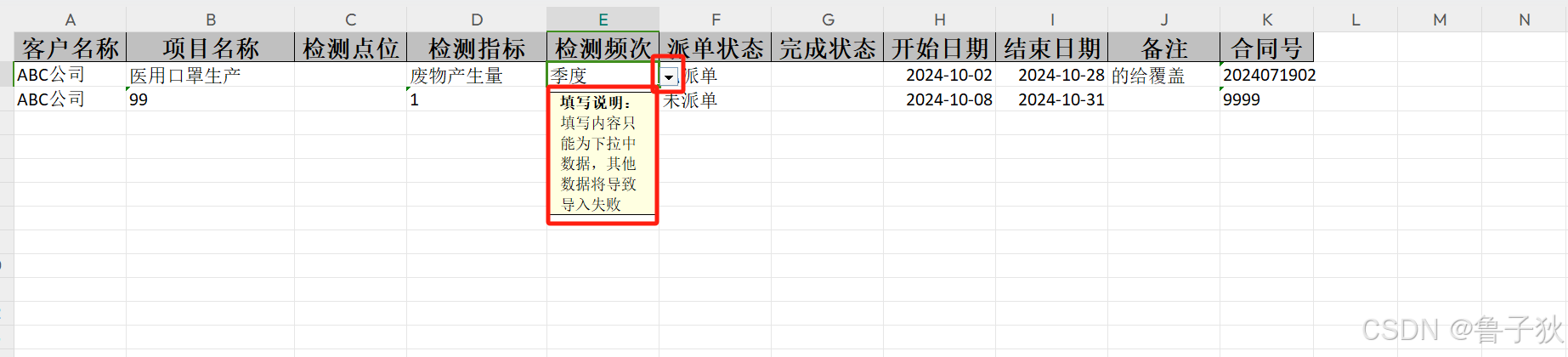
5. exceldownhandler 添加下拉框操作

/**
 * <h1>excel表格下拉选操作</h1>
 * 考虑到下拉选过多可能导致excel打开缓慢的问题,只校验前1000行
 * <p>
 * 即只有前1000行的数据可以用下拉框,超出的自行通过限制数据量的形式,第二次输出
 */
@slf4j
public class exceldownhandler implements sheetwritehandler {
    /**
     * excel表格中的列名英文
     * 仅为了解析列英文,禁止修改
     */
    private static final string excel_column_name = "abcdefghijklmnopqrstuvwxyz";
    /**
     * 单选数据sheet名
     */
    private static final string options_sheet_name = "options";
    /**
     * 联动选择数据sheet名的头
     */
    private static final string linked_options_sheet_name = "linkedoptions";
    /**
     * 下拉可选项
     */
    private final list<dropdownoptions> dropdownoptions;
    /**
     * 表头
     */
    private final list<list<string>> heads;
    /**
     * 当前单选进度
     */
    private int currentoptionscolumnindex;
    /**
     * 当前联动选择进度
     */
    private int currentlinkedoptionssheetindex;
    private final dictservice dictservice;
    public exceldownhandler(list<dropdownoptions> options, list<list<string>> heads) {
        dropdownoptions = options;
        this.heads = heads;
        currentoptionscolumnindex = 0;
        currentlinkedoptionssheetindex = 0;
        dictservice = springutils.getbean(dictservice.class);
    }
    /**
     * <h2>开始创建下拉数据</h2>
     * 1.通过解析传入的@excelproperty同级是否标注有@dropdown选项
     * 如果有且设置了value值,则将其直接置为下拉可选项
     * <p>
     * 2.或者在调用excelutil时指定了可选项,将依据传入的可选项做下拉
     * <p>
     * 3.二者并存,注意调用方式
     */
    @override
    public void aftersheetcreate(writeworkbookholder writeworkbookholder, writesheetholder writesheetholder) {
        sheet sheet = writesheetholder.getsheet();
        // 开始设置下拉框 hssfworkbook
        datavalidationhelper helper = sheet.getdatavalidationhelper();
        workbook workbook = writeworkbookholder.getworkbook();
        fieldcache fieldcache = classutils.declaredfields(writeworkbookholder.getclazz(), writeworkbookholder);
        for (map.entry<integer, fieldwrapper> entry : fieldcache.getsortedfieldmap().entryset()) {
            integer index = entry.getkey();
            fieldwrapper wrapper = entry.getvalue();
            field field = wrapper.getfield();
            // 循环实体中的每个属性
            // 可选的下拉值
            list<string> options = new arraylist<>();
            if (field.isannotationpresent(exceldictformat.class)) {
                // 如果指定了@exceldictformat,则使用字典的逻辑
                exceldictformat format = field.getdeclaredannotation(exceldictformat.class);
                string dicttype = format.dicttype();
                string converterexp = format.readconverterexp();
                if (stringutils.isnotblank(dicttype)) {
                    // 如果传递了字典名,则依据字典建立下拉
                    collection<string> values = optional.ofnullable(dictservice.getalldictbydicttype(dicttype))
                        .orelsethrow(() -> new serviceexception(string.format("字典 %s 不存在", dicttype)))
                        .values();
                    options = new arraylist<>(values);
                } else if (stringutils.isnotblank(converterexp)) {
                    // 如果指定了确切的值,则直接解析确切的值
                    list<string> strlist = stringutils.splitlist(converterexp, format.separator());
                    options = streamutils.tolist(strlist, s -> stringutils.split(s, "=")[1]);
                }
            } else if (field.isannotationpresent(excelenumformat.class)) {
                // 否则如果指定了@excelenumformat,则使用枚举的逻辑
                excelenumformat format = field.getdeclaredannotation(excelenumformat.class);
                list<object> values = enumutil.getfieldvalues(format.enumclass(), format.textfield());
                options = streamutils.tolist(values, string::valueof);
            }
            if (objectutil.isnotempty(options)) {
                // 如过自定义表头不为空
                if (collutil.isnotempty(heads)) {
                    // 获取对应的下拉表头的下标
                    index = intstream.range(0, heads.size())
                        .filter(i -> wrapper.getheads()[0].equals(heads.get(i).get(0)))
                        .findfirst().orelse(0);
                }
                // 仅当下拉可选项不为空时执行
                if (options.size() > 20) {
                    // 这里限制如果可选项大于20,则使用额外表形式
                    dropdownwithsheet(helper, workbook, sheet, index, options);
                } else {
                    // 否则使用固定值形式
                    dropdownwithsimple(helper, sheet, index, options);
                }
            }
        }
        if (collutil.isempty(dropdownoptions)) {
            return;
        }
        dropdownoptions.foreach(everyoptions -> {
            // 如果传递了下拉框选择器参数
            if (!everyoptions.getnextoptions().isempty()) {
                // 当二级选项不为空时,使用额外关联表的形式
                dropdownlinkedoptions(helper, workbook, sheet, everyoptions);
            } else if (everyoptions.getoptions().size() > 10) {
                // 当一级选项参数个数大于10,使用额外表的形式
                dropdownwithsheet(helper, workbook, sheet, everyoptions.getindex(), everyoptions.getoptions());
            } else if (!everyoptions.getoptions().isempty()) {
                // 当一级选项个数不为空,使用默认形式
                dropdownwithsimple(helper, sheet, everyoptions.getindex(), everyoptions.getoptions());
            }
        });
    }
    /**
     * <h2>简单下拉框</h2>
     * 直接将可选项拼接为指定列的数据校验值
     *
     * @param celindex 列index
     * @param value    下拉选可选值
     */
    private void dropdownwithsimple(datavalidationhelper helper, sheet sheet, integer celindex, list<string> value) {
        if (objectutil.isempty(value)) {
            return;
        }
        markoptionstosheet(helper, sheet, celindex, helper.createexplicitlistconstraint(arrayutil.toarray(value, string.class)));
    }
    /**
     * <h2>额外表格形式的级联下拉框</h2>
     *
     * @param options 额外表格形式存储的下拉可选项
     */
    private void dropdownlinkedoptions(datavalidationhelper helper, workbook workbook, sheet sheet, dropdownoptions options) {
        string linkedoptionssheetname = string.format("%s_%d", exceldownhandler.linked_options_sheet_name, currentlinkedoptionssheetindex);
        // 创建联动下拉数据表
        sheet linkedoptionsdatasheet = workbook.createsheet(workbookutil.createsafesheetname(linkedoptionssheetname));
        // 将下拉表隐藏
        workbook.setsheethidden(workbook.getsheetindex(linkedoptionsdatasheet), true);
        // 完善横向的一级选项数据表
        list<string> firstoptions = options.getoptions();
        map<string, list<string>> secoundoptionsmap = options.getnextoptions();
        // 创建名称管理器
        name name = workbook.createname();
        // 设置名称管理器的别名
        name.setnamename(linkedoptionssheetname);
        // 以横向第一行创建一级下拉拼接引用位置
        string firstoptionsfunction = string.format("%s!$%s$1:$%s$1",
            linkedoptionssheetname,
            exceldownhandler.getexcelcolumnname(0),
            exceldownhandler.getexcelcolumnname(firstoptions.size())
        );
        // 设置名称管理器的引用位置
        name.setreferstoformula(firstoptionsfunction);
        // 设置数据校验为序列模式,引用的是名称管理器中的别名
        markoptionstosheet(helper, sheet, options.getindex(), helper.createformulalistconstraint(linkedoptionssheetname));
        for (int columindex = 0; columindex < firstoptions.size(); columindex++) {
            // 先提取主表中一级下拉的列名
            string firstoptionscolumnname = exceldownhandler.getexcelcolumnname(columindex);
            // 一次循环是每一个一级选项
            int finali = columindex;
            // 本次循环的一级选项值
            string thisfirstoptionsvalue = firstoptions.get(columindex);
            // 创建第一行的数据
            optional.ofnullable(linkedoptionsdatasheet.getrow(0))
                // 如果不存在则创建第一行
                .orelseget(() -> linkedoptionsdatasheet.createrow(finali))
                // 第一行当前列
                .createcell(columindex)
                // 设置值为当前一级选项值
                .setcellvalue(thisfirstoptionsvalue);
            // 第二行开始,设置第二级别选项参数
            list<string> secondoptions = secoundoptionsmap.get(thisfirstoptionsvalue);
            if (collutil.isempty(secondoptions)) {
                // 必须保证至少有一个关联选项,否则将导致excel解析错误
                secondoptions = collections.singletonlist("暂无_0");
            }
            // 以该一级选项值创建子名称管理器
            name sonname = workbook.createname();
            // 设置名称管理器的别名
            sonname.setnamename(thisfirstoptionsvalue);
            // 以第二行该列数据拼接引用位置
            string sonfunction = string.format("%s!$%s$2:$%s$%d",
                linkedoptionssheetname,
                firstoptionscolumnname,
                firstoptionscolumnname,
                secondoptions.size() + 1
            );
            // 设置名称管理器的引用位置
            sonname.setreferstoformula(sonfunction);
            // 数据验证为序列模式,引用到每一个主表中的二级选项位置
            // 创建子项的名称管理器,只是为了使得excel可以识别到数据
            string mainsheetfirstoptionscolumnname = exceldownhandler.getexcelcolumnname(options.getindex());
            for (int i = 0; i < 100; i++) {
                // 以一级选项对应的主体所在位置创建二级下拉
                string secondoptionsfunction = string.format("=indirect(%s%d)", mainsheetfirstoptionscolumnname, i + 1);
                // 二级只能主表每一行的每一列添加二级校验
                marklinkedoptionstosheet(helper, sheet, i, options.getnextindex(), helper.createformulalistconstraint(secondoptionsfunction));
            }
            for (int rowindex = 0; rowindex < secondoptions.size(); rowindex++) {
                // 从第二行开始填充二级选项
                int finalrowindex = rowindex + 1;
                int finalcolumindex = columindex;
                row row = optional.ofnullable(linkedoptionsdatasheet.getrow(finalrowindex))
                    // 没有则创建
                    .orelseget(() -> linkedoptionsdatasheet.createrow(finalrowindex));
                optional
                    // 在本级一级选项所在的列
                    .ofnullable(row.getcell(finalcolumindex))
                    // 不存在则创建
                    .orelseget(() -> row.createcell(finalcolumindex))
                    // 设置二级选项值
                    .setcellvalue(secondoptions.get(rowindex));
            }
        }
        currentlinkedoptionssheetindex++;
    }
    /**
     * <h2>额外表格形式的普通下拉框</h2>
     * 由于下拉框可选值数量过多,为提升excel打开效率,使用额外表格形式做下拉
     *
     * @param celindex 下拉选
     * @param value    下拉选可选值
     */
    private void dropdownwithsheet(datavalidationhelper helper, workbook workbook, sheet sheet, integer celindex, list<string> value) {
        // 创建下拉数据表
        sheet simpledatasheet = optional.ofnullable(workbook.getsheet(workbookutil.createsafesheetname(exceldownhandler.options_sheet_name)))
            .orelseget(() -> workbook.createsheet(workbookutil.createsafesheetname(exceldownhandler.options_sheet_name)));
        // 将下拉表隐藏
        workbook.setsheethidden(workbook.getsheetindex(simpledatasheet), true);
        // 完善纵向的一级选项数据表
        for (int i = 0; i < value.size(); i++) {
            int finali = i;
            // 获取每一选项行,如果没有则创建
            row row = optional.ofnullable(simpledatasheet.getrow(i))
                .orelseget(() -> simpledatasheet.createrow(finali));
            // 获取本级选项对应的选项列,如果没有则创建
            cell cell = optional.ofnullable(row.getcell(currentoptionscolumnindex))
                .orelseget(() -> row.createcell(currentoptionscolumnindex));
            // 设置值
            cell.setcellvalue(value.get(i));
        }
        // 创建名称管理器
        name name = workbook.createname();
        // 设置名称管理器的别名
        string namename = string.format("%s_%d", exceldownhandler.options_sheet_name, celindex);
        name.setnamename(namename);
        // 以纵向第一列创建一级下拉拼接引用位置
        string function = string.format("%s!$%s$1:$%s$%d",
            exceldownhandler.options_sheet_name,
            exceldownhandler.getexcelcolumnname(currentoptionscolumnindex),
            exceldownhandler.getexcelcolumnname(currentoptionscolumnindex),
            value.size());
        // 设置名称管理器的引用位置
        name.setreferstoformula(function);
        // 设置数据校验为序列模式,引用的是名称管理器中的别名
        markoptionstosheet(helper, sheet, celindex, helper.createformulalistconstraint(namename));
        currentoptionscolumnindex++;
    }
    /**
     * 挂载下拉的列,仅限一级选项
     */
    private void markoptionstosheet(datavalidationhelper helper, sheet sheet, integer celindex,
                                    datavalidationconstraint constraint) {
        // 设置数据有效性加载在哪个单元格上,四个参数分别是:起始行、终止行、起始列、终止列
        cellrangeaddresslist addresslist = new cellrangeaddresslist(1, 1000, celindex, celindex);
        markdatavalidationtosheet(helper, sheet, constraint, addresslist);
    }
    /**
     * 挂载下拉的列,仅限二级选项
     */
    private void marklinkedoptionstosheet(datavalidationhelper helper, sheet sheet, integer rowindex,
                                          integer celindex, datavalidationconstraint constraint) {
        // 设置数据有效性加载在哪个单元格上,四个参数分别是:起始行、终止行、起始列、终止列
        cellrangeaddresslist addresslist = new cellrangeaddresslist(rowindex, rowindex, celindex, celindex);
        markdatavalidationtosheet(helper, sheet, constraint, addresslist);
    }
    /**
     * 应用数据校验
     */
    private void markdatavalidationtosheet(datavalidationhelper helper, sheet sheet,
                                           datavalidationconstraint constraint, cellrangeaddresslist addresslist) {
        // 数据有效性对象
        datavalidation datavalidation = helper.createvalidation(constraint, addresslist);
        // 处理excel兼容性问题
        if (datavalidation instanceof xssfdatavalidation) {
            //数据校验
            datavalidation.setsuppressdropdownarrow(true);
            //错误提示
            datavalidation.seterrorstyle(datavalidation.errorstyle.stop);
            datavalidation.createerrorbox("提示", "此值与单元格定义数据不一致");
            datavalidation.setshowerrorbox(true);
            //选定提示
            datavalidation.createpromptbox("填写说明:", "填写内容只能为下拉中数据,其他数据将导致导入失败");
            datavalidation.setshowpromptbox(true);
            sheet.addvalidationdata(datavalidation);
        } else {
            datavalidation.setsuppressdropdownarrow(false);
        }
        sheet.addvalidationdata(datavalidation);
    }
    /**
     * <h2>依据列index获取列名英文</h2>
     * 依据列index转换为excel中的列名英文
     * <p>例如第1列,index为0,解析出来为a列</p>
     * 第27列,index为26,解析为aa列
     * <p>第28列,index为27,解析为ab列</p>
     *
     * @param columnindex 列index
     * @return 列index所在得英文名
     */
    private static string getexcelcolumnname(int columnindex) {
        // 26一循环的次数
        int columncirclecount = columnindex / 26;
        // 26一循环内的位置
        int thiscirclecolumnindex = columnindex % 26;
        // 26一循环的次数大于0,则视为栏名至少两位
        string columnprefix = columncirclecount == 0
            ? strutil.empty
            : strutil.subwithlength(exceldownhandler.excel_column_name, columncirclecount - 1, 1);
        // 从26一循环内取对应的栏位名
        string columnnext = strutil.subwithlength(exceldownhandler.excel_column_name, thiscirclecolumnindex, 1);
        // 将二者拼接即为最终的栏位名
        return columnprefix + columnnext;
    }
}
6. exceldictformat 字典格式化注解
/**
 * 字典格式化
 */
@target({elementtype.field})
@retention(retentionpolicy.runtime)
@inherited
public @interface exceldictformat {
    /**
     * 如果是字典类型,请设置字典的type值 (如: sys_user_sex)
     */
    string dicttype() default "";
    /**
     * 读取内容转表达式 (如: 0=男,1=女,2=未知)
     */
    string readconverterexp() default "";
    /**
     * 分隔符,读取字符串组内容
     */
    string separator() default stringutils.separator;
}
7. exceldictconvert 字典格式化转换处理 (普通导出方法调用)
/**
 * 字典格式化转换处理
 */
@slf4j
public class exceldictconvert implements converter<object> {
    @override
    public class<object> supportjavatypekey() {
        return object.class;
    }
    @override
    public celldatatypeenum supportexceltypekey() {
        return null;
    }
    @override
    public object converttojavadata(readcelldata<?> celldata, excelcontentproperty contentproperty, globalconfiguration globalconfiguration) {
        exceldictformat anno = getannotation(contentproperty.getfield());
        string type = anno.dicttype();
        string label = celldata.getstringvalue();
        string value;
        if (stringutils.isblank(type)) {
            value = excelutil.reversebyexp(label, anno.readconverterexp(), anno.separator());
        } else {
            value = springutils.getbean(dictservice.class).getdictvalue(type, label, anno.separator());
        }
        return convert.convert(contentproperty.getfield().gettype(), value);
    }
    @override
    public writecelldata<string> converttoexceldata(object object, excelcontentproperty contentproperty, globalconfiguration globalconfiguration) {
        if (objectutil.isnull(object)) {
            return new writecelldata<>("");
        }
        exceldictformat anno = getannotation(contentproperty.getfield());
        string type = anno.dicttype();
        string value = convert.tostr(object);
        string label;
        if (stringutils.isblank(type)) {
            label = excelutil.convertbyexp(value, anno.readconverterexp(), anno.separator());
        } else {
            label = springutils.getbean(dictservice.class).getdictlabel(type, value, anno.separator());
        }
        return new writecelldata<>(label);
    }
    private exceldictformat getannotation(field field) {
        return annotationutil.getannotation(field, exceldictformat.class);
    }
}
8. 后续修改
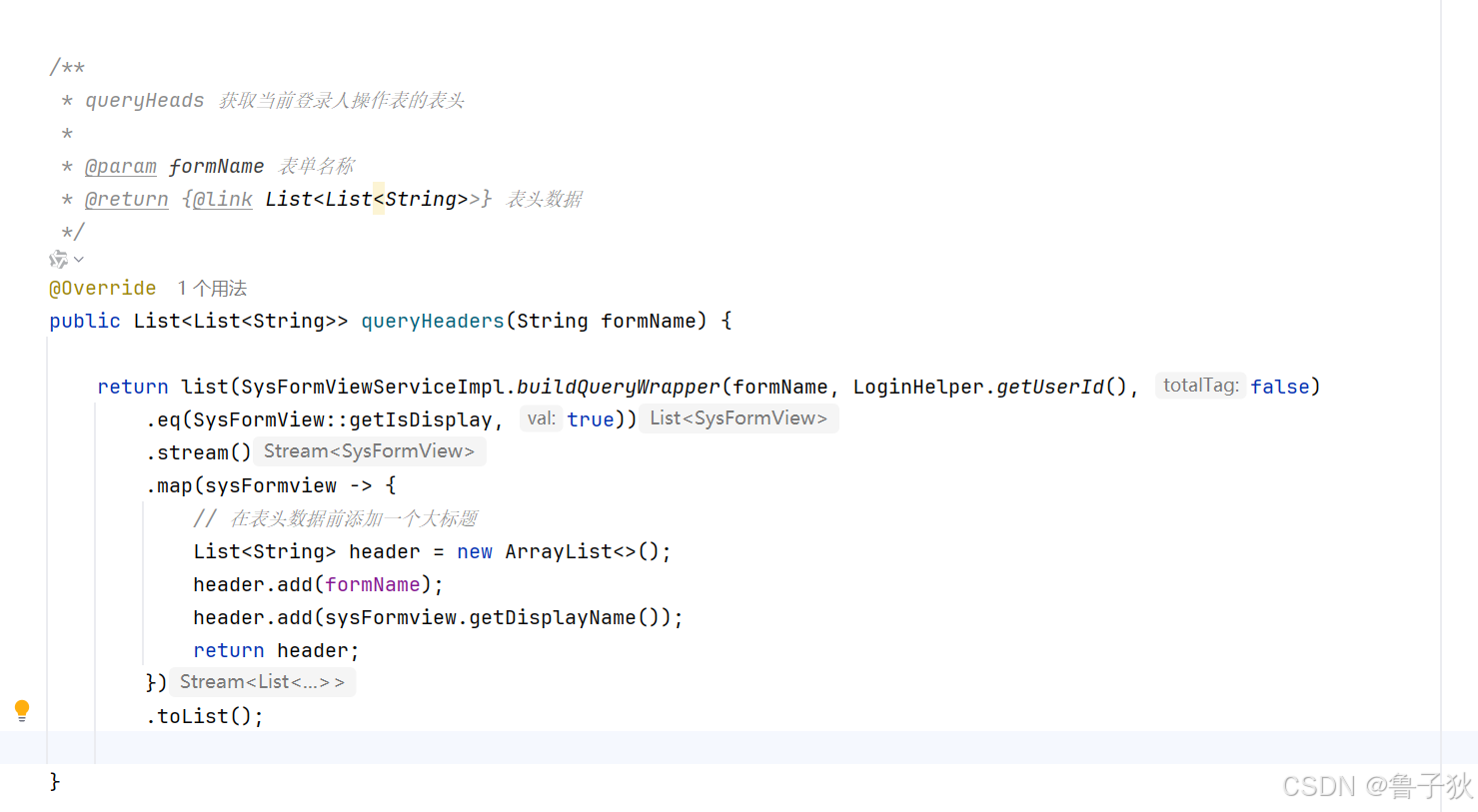
1. 添加大标题,自动合并单元格
a. 添加大标题
b. 修改取数据方法
修改取下标为1的元素
/**
     * convertobjectstoexcelrows 将对象列表转换为 excel 行数据
     *
     * @param list  对象集合
     * @param heads 表头
     * @return {@link list<list<object>>}  excel 行数据
     */
    private static <t> list<list<object>> convertobjectstoexcelrows(list<t> list, list<list<string>> heads) {
        return list.stream()
            // 将对象转换为 map
            .map(excelutil::convertobjecttomap)
            .map(map -> {
                list<object> row = new arraylist<>();
                for (list<string> header : heads) {
                    string key = header.get(1);
                    // 根据表头获取对应的值
                    row.add(map.get(key));
                }
                return row;
            })
            .tolist();
    }
c. 导出方法

d. 导出内容

2. 解决 can not find ‘converter’ support class localtime.
a. 原因
easyexcel 默认支持一些常见的数据类型,但对于 localtime 这样的类型,可能需要自定义一个转换器。
b. 解决方案
- 自定义
localtime转换器 - 直接添加个数据转换 (因为是自定义表头,所以走此方法)
c.直接数据转换(因不同的java版本写法会有不同,我用的java17)
/**
     * converttoexceldata 数据转换
     *
     * @param value 值
     * @return {@link java.lang.object}
     */
    private static object converttoexceldata(object value) {
        if (objectutil.isempty(value)) {
            return value;
        }
        if (value instanceof localtime localtime) {
            return localtime.format(datetimeformatter.ofpattern("hh:mm:ss"));
        } else if (value instanceof localdatetime localdatetime) {
            return localdatetime.format(datetimeformatter.ofpattern("yyyy-mm-dd hh:mm:ss"));
        } else if (value instanceof localdate localdate) {
            return localdate.format(datetimeformatter.ofpattern("yyyy-mm-dd"));
        } else {
            return value;
        }
    }
d. 修改 convertobjecttomap 方法




发表评论