
 我要评论
我要评论前言
简单实现一下在springboot中操作redis stream队列的方式,监听队列中的消息进行消费。
- jdk:1.8
- springboot-version:2.6.3
- redis:5.0.1(5版本以上才有stream队列)
准备工作
1、pom
redis 依赖包(version 2.6.3)
        <dependency>
            <groupid>org.projectlombok</groupid>
            <artifactid>lombok</artifactid>
        </dependency>
        <dependency>
            <groupid>org.springframework.boot</groupid>
            <artifactid>spring-boot-starter-data-redis</artifactid>
        </dependency>
2、 yml
spring:
  redis:
    database: 0
    host: 127.0.0.1
3、 redisstreamutil工具类
import org.springframework.beans.factory.annotation.autowired;
import org.springframework.data.redis.connection.stream.maprecord;
import org.springframework.data.redis.connection.stream.streaminfo;
import org.springframework.data.redis.connection.stream.streamoffset;
import org.springframework.data.redis.core.redistemplate;
import org.springframework.stereotype.component;

import java.util.list;
import java.util.map;

@component
public class redisstreamutil {

	@autowired
	private redistemplate<string, object> redistemplate;

	/**
	 * 创建消费组
	 *
	 * @param key   键名称
	 * @param group 组名称
	 * @return {@link string}
	 */
	public string oup(string key, string group) {
		return redistemplate.opsforstream().creategroup(key, group);
	}

	/**
	 * 获取消费者信息
	 *
	 * @param key   键名称
	 * @param group 组名称
	 * @return {@link streaminfo.xinfoconsumers}
	 */
	public streaminfo.xinfoconsumers queryconsumers(string key, string group) {
		return redistemplate.opsforstream().consumers(key, group);
	}

	/**
	 * 查询组信息
	 *
	 * @param key 键名称
	 * @return
	 */
	public streaminfo.xinfogroups querygroups(string key) {
		return redistemplate.opsforstream().groups(key);
	}

	// 添加map消息
	public string addmap(string key, map<string, object> value) {
		return redistemplate.opsforstream().add(key, value).getvalue();
	}

	// 读取消息
	public list<maprecord<string, object, object>> read(string key) {
		return redistemplate.opsforstream().read(streamoffset.fromstart(key));
	}

	// 确认消费
	public long ack(string key, string group, string... recordids) {
		return redistemplate.opsforstream().acknowledge(key, group, recordids);
	}

	// 删除消息。当一个节点的所有消息都被删除,那么该节点会自动销毁
	public long del(string key, string... recordids) {
		return redistemplate.opsforstream().delete(key, recordids);
	}

	// 判断是否存在key
	public boolean haskey(string key) {
		boolean aboolean = redistemplate.haskey(key);
		return aboolean != null && aboolean;
	}
}
代码实现
生产者发送消息
生产者发送消息,在service层创建addmessage方法,往队列中发送消息。
代码中addmap()方法第一个参数为key,第二个参数为value,该key要和后续配置的保持一致,暂时先记住这个key。
@service
@slf4j
@requiredargsconstructor
public class redisstreammqserviceimpl implements redisstreammqservice {

    private final redisstreamutil redisstreamutil;

    /**
     * 发送一个消息
     *
     * @return {@code object}
     */
    @override
    public object addmessage() {
        redisuser redisuser = new redisuser();
        redisuser.setage(18);
        redisuser.setname("hcr");
        redisuser.setemail("156ef561@gmail.com");

        map<string, object> message = new hashmap<>();
        message.put("user", redisuser);

        string recordid = redisstreamutil.addmap("mystream", message);
        return recordid;
    }
}
controller接口方法
@restcontroller
@requestmapping("/redis")
@slf4j
@requiredargsconstructor
public class rediscontroller {

    private final redisstreammqservice redisstreammqservice;

    @getmapping("/addmessage")
    public object addmessage() {
        return redisstreammqservice.addmessage();
    }
}
调用测试,查看redis中是否正常添加数据。
接口返回数据
1702622585248-0
查看redis中的数据
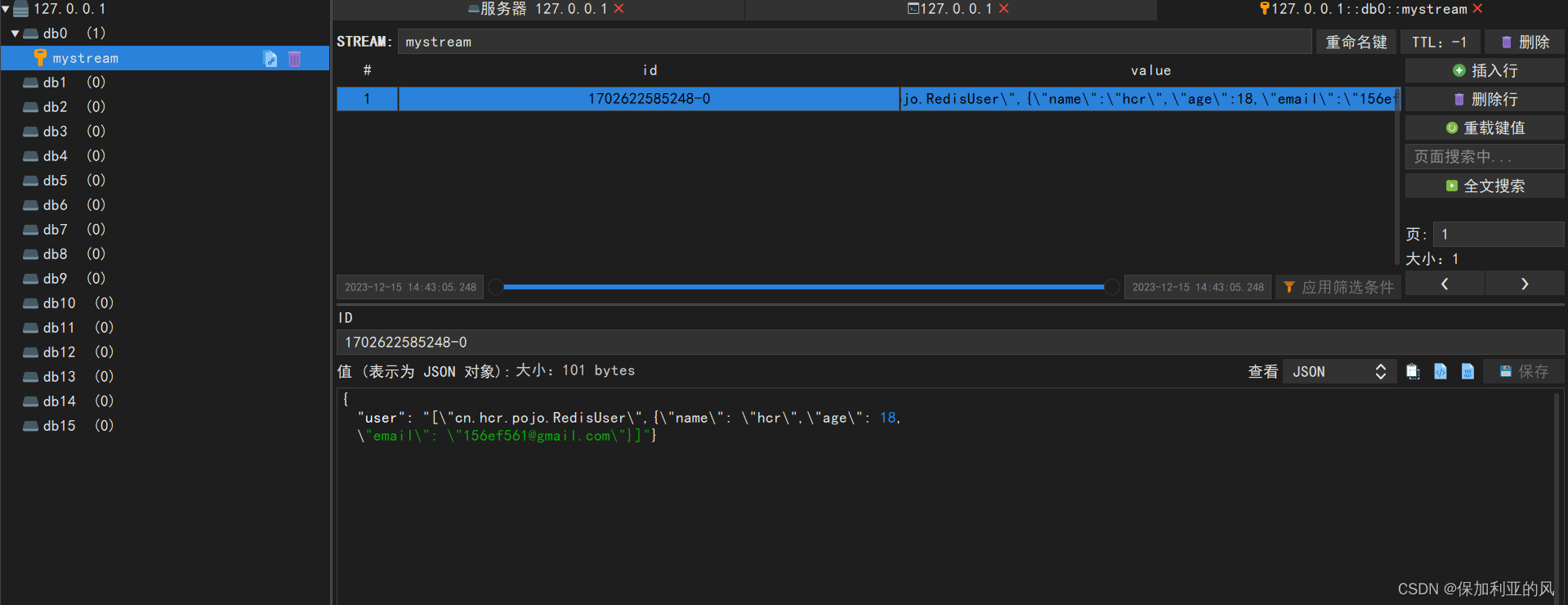
消费者监听消息进行消费
创建redisconsumerslistener监听器
import cn.hcr.utils.redisstreamutil;
import lombok.requiredargsconstructor;
import lombok.extern.slf4j.slf4j;
import org.springframework.data.redis.connection.stream.maprecord;
import org.springframework.data.redis.connection.stream.recordid;
import org.springframework.data.redis.stream.streamlistener;
import org.springframework.stereotype.component;

import java.util.map;

@component
@slf4j
@requiredargsconstructor
public class redisconsumerslistener implements streamlistener<string, maprecord<string, string, string>> {

    public final redisstreamutil redisstreamutil;

    /**
     * 监听器
     *
     * @param message
     */
    @override
    public void onmessage(maprecord<string, string, string> message) {
        // stream的key值
        string streamkey = message.getstream();
        //消息id
        recordid recordid = message.getid();
        //消息内容
        map<string, string> msg = message.getvalue();
        log.info("【streamkey】= " + streamkey + ",【recordid】= " + recordid + ",【msg】=" + msg);

        //处理逻辑

        //逻辑处理完成后,ack消息,删除消息,group为消费组名称
        streaminfo.xinfogroups xinfogroups = redisstreamutil.querygroups(streamkey);
        xinfogroups.foreach(xinfogroup -> redisstreamutil.ack(streamkey, xinfogroup.groupname(), recordid.getvalue()));
        redisstreamutil.del(streamkey, recordid.getvalue());
    }
}
创建redisconfig配置类,配置监听
package cn.hcr.config;

import cn.hcr.listener.redisconsumerslistener;
import cn.hcr.utils.redisstreamutil;
import com.fasterxml.jackson.annotation.jsonautodetect;
import com.fasterxml.jackson.annotation.propertyaccessor;
import com.fasterxml.jackson.databind.objectmapper;
import lombok.extern.slf4j.slf4j;
import lombok.var;
import org.springframework.context.annotation.bean;
import org.springframework.context.annotation.configuration;
import org.springframework.data.redis.connection.redisconnectionfactory;
import org.springframework.data.redis.connection.stream.consumer;
import org.springframework.data.redis.connection.stream.maprecord;
import org.springframework.data.redis.connection.stream.readoffset;
import org.springframework.data.redis.connection.stream.streamoffset;
import org.springframework.data.redis.core.redistemplate;
import org.springframework.data.redis.serializer.jackson2jsonredisserializer;
import org.springframework.data.redis.serializer.stringredisserializer;
import org.springframework.data.redis.stream.streammessagelistenercontainer;
import org.springframework.data.redis.stream.subscription;

import javax.annotation.resource;
import java.time.duration;
import java.util.hashmap;
import java.util.map;
import java.util.concurrent.linkedblockingdeque;
import java.util.concurrent.threadpoolexecutor;
import java.util.concurrent.timeunit;
import java.util.concurrent.atomic.atomicinteger;

@configuration
@slf4j
public class redisconfig {

    @resource
    private redisstreamutil redisstreamutil;

    /**
     * redis序列化
     *
     * @param redisconnectionfactory
     * @return {@code redistemplate<string, object>}
     */
    @bean
    public redistemplate<string, object> redistemplate(redisconnectionfactory redisconnectionfactory) {
        redistemplate<string, object> template = new redistemplate<>();
        template.setconnectionfactory(redisconnectionfactory);
        jackson2jsonredisserializer jackson2jsonredisserializer = new jackson2jsonredisserializer(object.class);
        objectmapper om = new objectmapper();
        om.setvisibility(propertyaccessor.all, jsonautodetect.visibility.any);
        om.enabledefaulttyping(objectmapper.defaulttyping.non_final);
        jackson2jsonredisserializer.setobjectmapper(om);
        stringredisserializer stringredisserializer = new stringredisserializer();
        template.setkeyserializer(stringredisserializer);
        template.sethashkeyserializer(stringredisserializer);
        template.setvalueserializer(jackson2jsonredisserializer);
        template.sethashvalueserializer(jackson2jsonredisserializer);
        template.afterpropertiesset();
        return template;
    }

    @bean
    public subscription subscription(redisconnectionfactory factory) {
        atomicinteger index = new atomicinteger(1);
        int processors = runtime.getruntime().availableprocessors();
        threadpoolexecutor executor = new threadpoolexecutor(processors, processors, 0, timeunit.seconds,
                new linkedblockingdeque<>(), r -> {
            thread thread = new thread(r);
            thread.setname("async-stream-consumer-" + index.getandincrement());
            thread.setdaemon(true);
            return thread;
        });
        streammessagelistenercontainer.streammessagelistenercontaineroptions<string, maprecord<string, string, string>> options =
                streammessagelistenercontainer
                        .streammessagelistenercontaineroptions
                        .builder()
                        // 一次最多获取多少条消息
                        .batchsize(5)
                        .executor(executor)
                        .polltimeout(duration.ofseconds(1))
                        .errorhandler(throwable -> {
                            log.error("[mq handler exception]", throwable);
                            throwable.printstacktrace();
                        })
                        .build();

        //该key和group可根据需求自定义配置
        string streamname = "mystream";
        string groupname = "mygroup";

        initstream(streamname, groupname);
        var listenercontainer = streammessagelistenercontainer.create(factory, options);
        // 手动ask消息
        subscription subscription = listenercontainer.receive(consumer.from(groupname, "zhuyazhou"),
                streamoffset.create(streamname, readoffset.lastconsumed()), new redisconsumerslistener(redisstreamutil));
        // 自动ask消息
           /* subscription subscription = listenercontainer.receiveautoack(consumer.from(redismqgroup.getname(), redismqgroup.getconsumers()[0]),
                    streamoffset.create(streamname, readoffset.lastconsumed()), new reportreadmqlistener());*/
        listenercontainer.start();
        return subscription;
    }

    private void initstream(string key, string group) {
        boolean haskey = redisstreamutil.haskey(key);
        if (!haskey) {
            map<string, object> map = new hashmap<>(1);
            map.put("field", "value");
            //创建主题
            string result = redisstreamutil.addmap(key, map);
            //创建消费组
            redisstreamutil.oup(key, group);
            //将初始化的值删除掉
            redisstreamutil.del(key, result);
            log.info("stream:{}-group:{} initialize success", key, group);
        }
    }
}
redistemplate:该bean用于配置redis序列化
subscription:配置监听
initstream:初始化消费组
监听测试
使用addmessage()方法投送一条消息后,查看控制台输出信息。
【streamkey】= mystream,
【recordid】= 1702623008044-0,
【msg】=
{user=[
    "cn.hcr.pojo.redisuser",
    {"name":"hcr","age":18,"email":"156ef561@gmail.com"}
    ]
}
总结
以上就是在springboot中简单实现redis stream队列的demo,如有需要源码或者哪里不清楚的请评论或者发送私信。
template:该bean用于配置redis序列化
subscription:配置监听
initstream:初始化消费组
到此这篇关于springboot中实现redis stream队列的文章就介绍到这了,更多相关springboot实现redis stream队列内容请搜索代码网以前的文章或继续浏览下面的相关文章希望大家以后多多支持代码网!



发表评论