
 我要评论
我要评论前言
实现嵌入各种窗口控件后,其实还会有一种需求:嵌入外部程序,我们有时可能需要嵌入一个浏览器或者或者播放器等一些已有的程序,其嵌入原理也和前面差不多,只要能获取进程的主窗口句柄,然后将窗口嵌入。
一、如何实现
1、定义属性
定义一个依赖属性,提供给xaml设置进程运行的命令行
public class apphost : hwndhost
{
    /// <summary>
    /// 进程运行的命令行
    /// </summary>
    public string cmdline
    {
        get { return (string)getvalue(cmdlineproperty); }
        set { setvalue(cmdlineproperty, value); }
    }

    // using a dependencyproperty as the backing store for cmdline.  this enables animation, styling, binding, etc...
    public static readonly dependencyproperty cmdlineproperty =
        dependencyproperty.register("cmdline", typeof(string), typeof(apphost), new propertymetadata(""));
}
2、进程嵌入
在下列方法中进行进程嵌入,具体操作如下列步骤。
protected override handleref buildwindowcore(handleref hwndparent)
(1)启动进程
var cmds = cmdline.split(" ", 2);
process? _process;
_process.startinfo.filename = cmds.first();
_process.startinfo.arguments = cmds.last();
_process.startinfo.useshellexecute = false;
_process.startinfo.createnowindow = true;
_process.startinfo.windowstyle = processwindowstyle.minimized;
_process.start();
(2)进程加入作业对象
这个步骤是用于管理进程,确保。
static job _job = new job();
_job.addprocess(_process.handle);
(3)获取主窗口句柄
下列提供的是简单获取主窗口句柄的方法。通过延时等待的方式获取。需要精确时间获取主窗口句柄则可以使用钩子,在子进程窗口创建事件中获取句柄。
for (int i = 0; i < 200 && _process.mainwindowhandle == 0; i++) thread.sleep(5);
if (_process.mainwindowhandle == 0)
{
    throw new exception("process no window");
}
return new handleref(this, handle);
3、销毁进程
protected override void destroywindowcore(handleref hwnd)
{
    _process?.kill();
    _process?.dispose();
    _process = null;
}
二、完整代码
其中job对象在中。
apphost.cs
using jobmanagement;
using system.componentmodel;
using system.diagnostics;
using system.runtime.interopservices;
using system.windows;
using system.windows.interop;
using process = system.diagnostics.process;
using textbox = system.windows.controls.textbox;
using thread = system.threading.thread;

namespace wpfhwndelement
{
    /// <summary>
    /// 需要手动dispose此控件。
    /// </summary>
    public class apphost : hwndhost
    {
        static job _job = new job();
        process? _process;
        /// <summary>
        /// 进程运行的命令行
        /// </summary>
        public string cmdline
        {
            get { return (string)getvalue(cmdlineproperty); }
            set { setvalue(cmdlineproperty, value); }
        }

        // using a dependencyproperty as the backing store for cmdline.  this enables animation, styling, binding, etc...
        public static readonly dependencyproperty cmdlineproperty =
            dependencyproperty.register("cmdline", typeof(string), typeof(apphost), new propertymetadata(""));

        new public intptr handle
        {
            get { return (intptr)getvalue(handleproperty); }
            private set { setvalue(handleproperty, value); }
        }
        // using a dependencyproperty as the backing store for hwnd.  this enables animation, styling, binding, etc...
        public static readonly dependencyproperty handleproperty =
            dependencyproperty.register("handle", typeof(intptr), typeof(nativehost), new propertymetadata(intptr.zero));
        protected override handleref buildwindowcore(handleref hwndparent)
        {
            try
            {
                if (designerproperties.getisindesignmode(this)) throw new exception("design mode won't show app");
                var cmds = cmdline.split(" ", 2);
                _process = new process();
                _process.startinfo.filename = cmds.first();
                _process.startinfo.arguments = cmds.length > 1 ? cmds.last() : "";
                _process.startinfo.useshellexecute = false;
                _process.startinfo.createnowindow = true;
                _process.startinfo.windowstyle = processwindowstyle.minimized;
                _process.start();
                _job.addprocess(_process.handle);
                for (int i = 0; i < 200 && _process.mainwindowhandle == 0; i++) thread.sleep(5);
                if (_process.mainwindowhandle == 0)
                {
                    throw new exception("process no window");
                }
                handle = _process.mainwindowhandle;
                var wndstyle = getwindowlong(handle, gwl_style);
                wndstyle &= ~ws_thickframe;
                wndstyle &= ~ws_caption;
                setwindowlong(handle, gwl_style, wndstyle | ws_child);
                setparent(handle, hwndparent.handle);
            }
            catch (exception ex)
            {
                var window = new window() { width = 0, height = 0, resizemode = resizemode.noresize, windowstyle = windowstyle.none, content = new textbox() { isreadonly = true, text = ex.message + " " + ex.stacktrace, textwrapping = textwrapping.wrap } };
                var hwnd = new windowinterophelper(window).ensurehandle();
                window.show();
                setwindowlong(hwnd, gwl_style, getwindowlong(hwnd, gwl_style) | ws_child);
                setparent(hwnd, hwndparent.handle);
                handle = hwnd;
            }
            return new handleref(this, handle);
        }
        protected override void destroywindowcore(handleref hwnd)
        {
            var window = hwndsource.fromhwnd(hwnd.handle)?.rootvisual as window;
            window?.close();
            _process?.kill();
            _process?.dispose();
            _process = null;
        }
        const int ws_caption = 0x00c00000;
        const int ws_thickframe = 0x00040000;
        const int ws_child = 0x40000000;
        const int gwl_style = (-16);
        [dllimport("user32.dll", entrypoint = "getwindowlongw")]
        static extern int getwindowlong(intptr hwnd, int nindex);
        [dllimport("user32.dll", entrypoint = "setwindowlongw")]
        static extern int setwindowlong(intptr hwnd, int nindex, int dwnewlong);
        [dllimport("user32.dll")]
        public static extern intptr setparent(intptr hwndchild, intptr hwndnewparent);
    }
}
三、使用示例
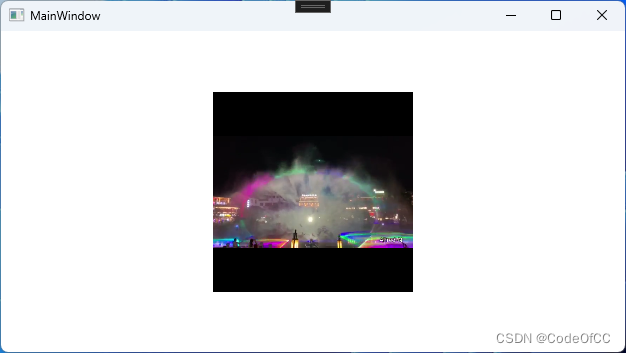
嵌入ffplay.exe
mainwindow.xaml
<window x:class="wpfhwndelement.mainwindow"
        xmlns="http://schemas.microsoft.com/winfx/2006/xaml/presentation"
        xmlns:x="http://schemas.microsoft.com/winfx/2006/xaml"
        xmlns:d="http://schemas.microsoft.com/expression/blend/2008"
        xmlns:mc="http://schemas.openxmlformats.org/markup-compatibility/2006"
        xmlns:local="clr-namespace:wpfhwndelement"
        mc:ignorable="d"
        title="mainwindow" height="360" width="640"
        >
    <grid>
        <local:apphost cmdline="ffplay" width="200" height="200"></local:apphost>
    </grid>
</window>
效果预览
总结
嵌入外部程序还是相对比较容易实现的,而且也有一定的使用场景。创建进程,并能获取到进程的主窗口句柄即可。另外要注意的是管理子进程的退出,其他都问题不大。
以上就是详解c# wpf如何嵌入外部程序的详细内容,更多关于c# wpf嵌入外部程序的资料请关注代码网其它相关文章!





发表评论