
 我要评论
我要评论python httpx 完整使用指南与示例
httpx 是 python 生态中新一代的 http 客户端库,完全兼容 requests 的核心api,同时新增了异步 async/await 支持、原生 http/2、类型注解、连接池优化等特性,是目前现代 python 项目(异步服务、爬虫、api 调用、微服务交互)的主流选择。
核心优势(对比 requests)
- 双编程模型:同时支持同步和异步调用,一套语法适配两种场景
- 原生支持 http/2,高并发场景性能显著提升
- 默认启用超时机制,避免请求无限挂死
- 完整的类型注解,配合 ide 实现智能提示与类型校验
- 支持 websocket、流式传输、代理认证等高级特性
- 几乎无缝迁移 requests 代码,学习成本极低
安装
# 基础安装
pip install httpx
# 额外支持 http/2 功能
pip install httpx[http2]
一、基础同步用法
基础 api 与 requests 几乎完全一致,可直接替换使用。
1. get 请求
import httpx
# 基础 get 请求
response = httpx.get("[https://httpbin.org/get](https://httpbin.org/get)")
print(response.status_code)  # 响应状态码
print(response.json())       # 解析 json 响应体
print(response.text)         # 字符串形式响应体
print(response.content)      # 字节形式响应体
print(response.headers)      # 响应头(字典形式)
print(response.url)          # 最终请求 url
带查询参数(自动 url 编码):
params = {"page": 1, "keyword": "你好", "size": 10}
response = httpx.get("[https://httpbin.org/get](https://httpbin.org/get)", params=params)
# 最终url: [https://httpbin.org/get?page=1&keyword=%e4%bd%a0%e5%a5%bd&size=10](https://httpbin.org/get?page=1&keyword=%e4%bd%a0%e5%a5%bd&size=10)
2. post 请求
(1)json 提交(最常用)
json 参数自动序列化并设置 content-type: application/json:
payload = {"username": "test", "password": "123456"}
response = httpx.post("[https://httpbin.org/post](https://httpbin.org/post)", json=payload)
print(response.json())
(2)表单提交
data 参数对应 application/x-www-form-urlencoded 格式:
form_data = {"username": "admin", "age": 20}
response = httpx.post("[https://httpbin.org/post](https://httpbin.org/post)", data=form_data)
3. 其他请求方法
put、delete、patch、head、options 用法完全一致:
httpx.put(url, json=data)
httpx.delete(url)
httpx.patch(url, json=data)
httpx.head(url)
httpx.options(url)
二、通用请求配置
所有请求方法均支持以下公共参数。
1. 自定义请求头
headers = {
    "user-agent": "myapp/1.0",
    "authorization": "bearer your_token_here"
}
response = httpx.get("[https://httpbin.org/headers](https://httpbin.org/headers)", headers=headers)
2. 超时设置
httpx 默认 5 秒总超时(requests 默认无超时),可精细化配置:
# 统一设置总超时 10 秒
httpx.get(url, timeout=10.0)
# 分阶段精细化超时
timeout = httpx.timeout(connect=5.0, read=30.0, write=10.0, pool=5.0)
httpx.get(url, timeout=timeout)
# 只限制连接超时,其余阶段不限制
timeout = httpx.timeout(none, connect=5.0)
# 禁用超时(仅特殊场景使用,不推荐)
httpx.get(url, timeout=none)
httpx.get(url, timeout=10.0) 中的 timeout 参数用来限制一次请求最多能花多长时间,防止程序被"卡死"。
如果不设置超时(或设为 none),当服务器不响应时,你的程序会无限期等待:
这会带来:
- 程序卡死,无法继续执行
- 线程/连接被长期占用,资源泄漏
- 批量请求时整体被一个慢请求拖垮
设置超时后,超过时限就抛异常,程序能及时处理。
httpx 的超时不是"一个时间",而是分阶段的
这是 httpx 和 requests 的一个重要区别。requests 的 timeout=10 只区分"连接"和"读取"两种;而 httpx 把超时拆成了四个独立阶段:
- connect 建立 tcp 连接的最长时间
- read 等待服务器返回每一块数据的最长时间
- write 发送请求体(如上传文件)的最长时间
- pool 从连接池中等待一个可用连接的最长时间
当你写 timeout=10.0 时,相当于给这四个阶段都设为 10 秒
如果想要限制总时长,用 asyncio.wait_for 或 anyio 在外面再包一层:
import asyncio
import httpx
async def main():
    async with httpx.asyncclient() as client:
        try:
            # 整体最多 10 秒,超了就取消
            resp = await asyncio.wait_for(
                client.get("https://example.com"),
                timeout=10.0
            )
            print(resp.status_code)
        except asyncio.timeouterror:
            print("整个请求超过 10 秒,已取消")
asyncio.run(main())
httpx 会抛出不同的异常,便于区分:
import httpx
try:
    resp = httpx.get(url, timeout=5.0)
except httpx.connecttimeout:
    print("连接超时")
except httpx.readtimeout:
    print("读取超时")
except httpx.writetimeout:
    print("写入超时")
except httpx.pooltimeout:
    print("连接池等待超时")
except httpx.timeoutexception:
    print("其他超时")   # 上面几个的父类
3. 代理配置
proxies = {
    "http://": "[http://127.0.0.1:7890](http://127.0.0.1:7890)",
    "https://": "[http://127.0.0.1:7890](http://127.0.0.1:7890)",
}
httpx.get("[https://example.com](https://example.com)", proxies=proxies)
4. ssl 证书控制
# 跳过 ssl 证书验证(仅测试环境使用)
httpx.get("[https://self-signed.badssl.com/](https://self-signed.badssl.com/)", verify=false)
# 指定客户端证书
httpx.get(url, cert="client_cert.pem")
证书验证的作用就是:让攻击者无法伪装成 xxx.com。 因为你手里的浏览器/python 会检查:对方出示的证书是不是由可信机构签发的、是不是真的属于 xxx.com。
如果攻击者能冒充服务器和你建立加密连接,那你就是在跟骗子加密聊天,内容对骗子完全透明。证书验证就是用来堵这个漏洞的。
关闭验证只应该出现在:本地调试、访问你自己完全信任的内网自签服务。绝不要在生产环境对公网服务关闭验证。
5. 重定向控制
默认自动跟随重定向,可手动关闭:
response = httpx.get("[https://httpbin.org/redirect/1](https://httpbin.org/redirect/1)", follow_redirects=false)
print(response.status_code)  # 302
自动跟随重定向指的是:当服务器返回一个重定向响应(如 301、302)时,客户端自动再向新地址发起请求,最终拿到真正的结果,而不需要你手动处理。
import httpx
resp = httpx.get("http://example.com", follow_redirects=false)
# 手动检查并跟随
while resp.status_code in (301, 302, 303, 307, 308):
    url = resp.headers["location"]
    resp = httpx.get(url, follow_redirects=false)
print(resp.text)
三、client 会话对象(生产推荐)
httpx.client 对应 requests.session,复用底层连接池,自动保留 cookie、统一公共配置,多次请求时性能远高于单次调用,是生产环境的标准用法。
基础用法(上下文管理器)
import httpx
with httpx.client(
    base_url="[https://httpbin.org](https://httpbin.org)",  # 基础url,后续请求自动拼接
    headers={"user-agent": "myapp/1.0"},  # 公共请求头
    timeout=10.0,  # 公共超时
) as client:
    # 自动拼接为 [https://httpbin.org/get](https://httpbin.org/get)
    r1 = client.get("/get")
    print(r1.json())
    # 自动拼接为 [https://httpbin.org/post](https://httpbin.org/post)
    r2 = client.post("/post", json={"key": "value"})
    print(r2.json())
核心优势:连接复用、cookie 自动携带、配置统一管理,避免重复传参。
四、异步用法(asyncclient)
异步是 httpx 最核心的价值,配合 asyncio 实现高并发请求,非常适合 fastapi 异步服务、批量数据爬取、多接口并行调用等场景。
1. 基础异步请求
import asyncio
import httpx
async def main():
    # 异步上下文管理器,自动释放资源
    async with httpx.asyncclient(base_url="[https://httpbin.org](https://httpbin.org)") as client:
        # 异步 get
        resp = await client.get("/get")
        print(resp.json())
        # 异步 post
        resp = await client.post("/post", json={"name": "test"})
        print(resp.json())
if __name__ == "__main__":
    asyncio.run(main())
2. 并发请求(核心价值)
使用 asyncio.gather 并行执行多个请求,大幅提升批量任务效率。
import asyncio
import httpx
async def fetch(client: httpx.asyncclient, page: int):
    resp = await client.get("/get", params={"page": page})
    return page, resp.status_code
async def batch_demo():
    async with httpx.asyncclient(base_url="[https://httpbin.org](https://httpbin.org)") as client:
        # 创建 10 个并发任务
        tasks = [fetch(client, i) for i in range(1, 11)]
        # 等待所有任务完成
        results = await asyncio.gather(*tasks)
        for page, status in results:
            print(f"第{page}页 -> 状态码{status}")
if __name__ == "__main__":
    asyncio.run(batch_demo())
五、高级特性
1. 文件上传
支持 multipart/form-data 格式上传文件:
# 方式1:直接传入文件对象
with open("test.txt", "rb") as f:
    files = {"file": f}
    resp = httpx.post("[https://httpbin.org/post](https://httpbin.org/post)", files=files)
# 方式2:指定文件名、类型
files = {
    "avatar": ("user.png", open("user.png", "rb"), "image/png")
}
resp = httpx.post("[https://httpbin.org/post](https://httpbin.org/post)", files=files)
2. 流式响应(大文件下载)
下载大文件时逐块读取,避免一次性加载到内存:
# 同步流式下载
with httpx.stream("get", "[https://example.com/large.zip](https://example.com/large.zip)") as resp:
    with open("large.zip", "wb") as f:
        for chunk in resp.iter_bytes(chunk_size=1024*1024):
            f.write(chunk)
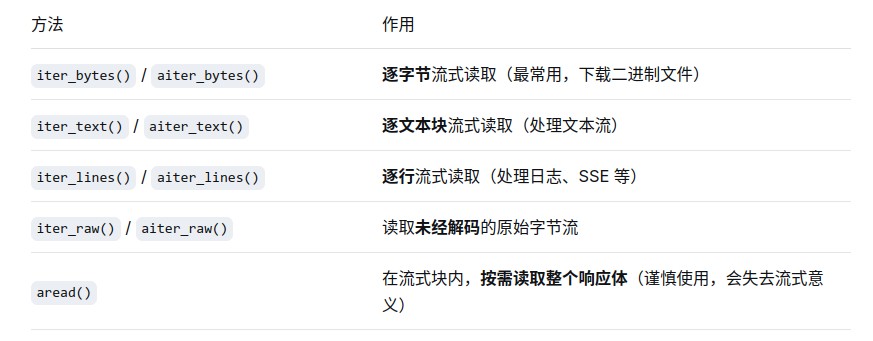
httpx.stream 是专门用于流式处理 http 响应的函数,核心价值在于:不必等整个响应体下载完,就能逐块处理数据。这对于下载大文件、处理流式 api(如 sse)或转发数据流至关重要,能有效避免内存被撑爆
使用 httpx.stream 必须搭配 with 上下文管理器,它会在代码块结束时自动关闭连接,防止资源泄漏。
关于 chunk_size:iter_bytes() 可以接收 chunk_size 参数来指定每次读取的字节数。如果不指定,httpx 会自行决定合适的块大小,通常不建议手动设置过大的值,否则可能触发底层网络问题。
流式上传
httpx.stream 主要用于处理响应。对于发送流式请求体(如上传大文件),通常直接使用 client.post() 并传入一个生成器(generator)作为 content 参数即可。
import httpx
def generate_data():
    # 模拟分块读取文件
    with open("large_file.bin", "rb") as f:
        while chunk := f.read(1024 * 1024):  # 每次读 1mb
            yield chunk
# 直接作为 content 传入生成器
response = httpx.post("https://api.example.com/upload", content=generate_data())
异步版本 (asyncclient.stream)
异步用法与同步类似,但需使用 async with 和 async for
# 异步流式下载
async with httpx.asyncclient() as client:
    async with client.stream("get", url) as resp:
        with open("large.zip", "wb") as f:
            async for chunk in resp.aiter_bytes(chunk_size=1024*1024):
                f.write(chunk)
3. 启用 http/2
安装 http2 依赖后,一行配置即可启用:
# 同步
client = httpx.client(http2=true)
# 异步
client = httpx.asyncclient(http2=true)
4. 异常处理
httpx 提供了清晰的异常层级,常用异常如下:
import httpx
from httpx import httpstatuserror, timeoutexception, requesterror
try:
    resp = httpx.get("[https://httpbin.org/status/404](https://httpbin.org/status/404)")
    # 4xx/5xx 状态码自动抛出异常
    resp.raise_for_status()
except httpstatuserror as e:
    print(f"状态码错误: {e.response.status_code}")
except timeoutexception:
    print("请求超时")
except requesterror as e:
    print(f"请求失败: {e}")
六、最佳实践与注意事项
- 优先使用 client/asyncclient:单次调用便捷但性能低,多次请求务必使用会话对象复用连接。
- 不要随意关闭超时:默认 5 秒超时是安全设计,避免程序意外挂死,特殊场景再调整。
- asyncclient 不跨线程:异步客户端不是线程安全的,每个协程上下文单独通过上下文管理器管理。
- requests 迁移成本极低:绝大多数代码只需将
import requests替换为import httpx即可运行。 - 大文件用流式传输:上传下载大文件一律使用流式模式,避免内存溢出。
- 生产环境禁用 verify=false:跳过 ssl 验证存在安全风险,仅用于测试调试。
fastapi 服务内异步调用外部接口 完整生产级示例
fastapi 是基于 asyncio 的异步 asgi 框架,在接口中调用外部 http 服务时必须使用异步 http 客户端(httpx.asyncclient)。如果使用同步客户端(requests、httpx.client)会直接阻塞整个事件循环,导致服务并发能力急剧下降。
前置依赖
pip install fastapi uvicorn httpx tenacity
httpx:异步 http 客户端tenacity:生产级重试库(可选,用于接口抖动容错)
一、核心架构:全局单例客户端 + 生命周期管理
这是生产环境的标准方案:整个服务只创建一个 asyncclient 实例,复用 tcp 连接池,大幅提升性能;通过 fastapi 生命周期统一管理初始化与销毁,避免连接泄漏。
推荐写法:lifespan 上下文管理器(官方新标准)
from contextlib import asynccontextmanager
from fastapi import fastapi, httpexception, depends
from fastapi.responses import streamingresponse
from pydantic import basemodel
import httpx
import asyncio
from tenacity import retry, stop_after_attempt, wait_exponential, retry_if_exception_type
# 全局客户端变量
external_client: httpx.asyncclient | none = none
@asynccontextmanager
async def lifespan(app: fastapi):
    """服务生命周期:启动时初始化客户端,关闭时释放资源"""
    global external_client
    # ========== 服务启动:初始化异步客户端 ==========
    external_client = httpx.asyncclient(
        # 分阶段超时:连接5s,读取15s,写入5s,避免外部故障拖垮自身
        timeout=httpx.timeout(connect=5.0, read=15.0, write=5.0, pool=3.0),
        # 连接池配置:最大100连接,保持20个长连接
        limits=httpx.limits(max_connections=100, max_keepalive_connections=20),
        follow_redirects=true,
        http2=true,  # 开启 http/2 支持
        headers={"user-agent": "fastapi-external-caller/1.0"}  # 公共请求头
    )
    yield  # 服务运行中
    # ========== 服务关闭:主动释放所有连接 ==========
    if external_client:
        await external_client.aclose()
# 创建 fastapi 应用
app = fastapi(title="外部接口调用示例", lifespan=lifespan)
兼容说明:旧版 fastapi 也可使用
@app.on_event("startup")+@app.on_event("shutdown")事件方式,功能一致。
二、基础调用示例
1. get 调用外部接口
@app.get("/api/external/get", summary="调用外部get接口")
async def call_external_get(keyword: str = "test"):
    # 异常分层处理:超时、状态错误、网络异常分开捕获
    try:
        response = await external_client.get(
            "[https://httpbin.org/get](https://httpbin.org/get)",
            params={"keyword": keyword, "source": "fastapi"},
            headers={"x-custom-trace": "trace-001"}
        )
        # 4xx/5xx 状态码主动抛出异常
        response.raise_for_status()
        # 解析 json 并返回
        return {
            "code": 0,
            "msg": "success",
            "data": response.json()
        }
    except httpx.timeoutexception:
        raise httpexception(status_code=504, detail="外部接口调用超时,请稍后重试")
    except httpx.httpstatuserror as e:
        raise httpexception(status_code=502, detail=f"外部服务错误:{e.response.status_code}")
    except exception as e:
        raise httpexception(status_code=500, detail=f"调用失败:{str(e)}")
2. post 提交 json 数据
结合 pydantic 做入参校验,再转发给外部接口:
# 定义请求体模型
class usercreatereq(basemodel):
    username: str
    email: str
    age: int
@app.post("/api/external/post", summary="调用外部post接口")
async def call_external_post(req: usercreatereq):
    try:
        response = await external_client.post(
            "[https://httpbin.org/post](https://httpbin.org/post)",
            json=req.model_dump()  # pydantic 模型转字典
        )
        response.raise_for_status()
        return response.json()
    except httpx.timeoutexception:
        raise httpexception(status_code=504, detail="外部接口超时")
    except exception as e:
        raise httpexception(status_code=500, detail=str(e))
三、进阶场景:并发调用多个外部接口
微服务聚合场景下,常需要并行调用多个下游服务再聚合结果,使用 asyncio.gather 实现真正的并行执行,总耗时等于最慢的那个接口,而非多个接口耗时相加。
@app.get("/api/external/batch", summary="并发调用多个外部接口")
async def call_multiple_apis():
    try:
        # 同时发起 3 个请求,并行执行
        task_user = external_client.get("[https://httpbin.org/get?type=user](https://httpbin.org/get?type=user)")
        task_order = external_client.get("[https://httpbin.org/get?type=order](https://httpbin.org/get?type=order)")
        task_product = external_client.get("[https://httpbin.org/get?type=product](https://httpbin.org/get?type=product)")
        # 等待所有请求完成
        resp_user, resp_order, resp_product = await asyncio.gather(
            task_user, task_order, task_product
        )
        # 聚合结果返回
        return {
            "code": 0,
            "data": {
                "user_info": resp_user.json()["args"],
                "order_info": resp_order.json()["args"],
                "product_info": resp_product.json()["args"]
            }
        }
    except exception as e:
        raise httpexception(status_code=500, detail=f"批量调用失败:{str(e)}")
扩展:如果需要部分失败不影响整体,可给
asyncio.gather加上return_exceptions=true,再单独处理异常。
四、流式转发:代理大文件/流式响应
当外部接口返回大文件、sse 流式数据时,使用流式模式转发,不会把完整响应加载到服务内存,避免内存溢出。
@app.get("/api/external/download", summary="流式代理外部文件下载")
async def proxy_external_download():
    try:
        # 以流式方式请求外部接口
        response = await external_client.stream(
            "get",
            "[https://httpbin.org/image/jpeg](https://httpbin.org/image/jpeg)",
        )
        response.raise_for_status()
        # 异步迭代字节块,流式返回给前端
        return streamingresponse(
            response.aiter_bytes(chunk_size=1024 * 1024),  # 1mb 一块
            media_type=response.headers.get("content-type", "application/octet-stream"),
            headers={
                "content-disposition": "attachment; filename=demo.jpg"
            }
        )
    except exception as e:
        raise httpexception(status_code=500, detail=f"下载代理失败:{str(e)}")
五、依赖注入方式(更优雅的工程化写法)
将客户端封装为 fastapi 依赖,便于单元测试时 mock 替换,符合依赖倒置原则。
# 定义依赖:返回全局异步客户端
async def get_external_client() -> httpx.asyncclient:
    return external_client
# 接口中注入使用
@app.get("/api/external/dep", summary="依赖注入方式调用")
async def call_with_dependency(
    client: httpx.asyncclient = depends(get_external_client)
):
    resp = await client.get("[https://httpbin.org/get](https://httpbin.org/get)")
    return resp.json()
六、生产级增强:自动重试机制
外部接口偶发网络抖动、超时是常态,对幂等接口(get、查询类)增加指数退避重试,大幅提升服务可用性。
# 封装带重试的通用调用方法
@retry(
    stop=stop_after_attempt(3),  # 最多重试 3 次
    wait=wait_exponential(multiplier=1, min=1, max=5),  # 指数退避:1s → 2s → 4s
    retry=retry_if_exception_type((httpx.timeoutexception, httpx.httpstatuserror)),
    reraise=true  # 重试失败后抛出原始异常
)
async def reliable_get(url: str, params: dict = none):
    """带重试保障的get请求"""
    response = await external_client.get(url, params=params)
    response.raise_for_status()
    return response.json()
@app.get("/api/external/retry", summary="带自动重试的外部调用")
async def call_with_retry():
    try:
        data = await reliable_get(
            "[https://httpbin.org/status/200](https://httpbin.org/status/200)",
            params={"test": "retry"}
        )
        return {"code": 0, "msg": "调用成功", "data": data}
    except exception as e:
        raise httpexception(status_code=502, detail=f"重试3次后仍失败:{str(e)}")
注意:非幂等接口(如创建订单、支付)不要随意重试,避免重复提交。
七、最佳实践与避坑指南
- 绝对禁止同步调用:不要在异步路径函数中使用
requests或httpx.client,会阻塞事件循环,并发能力直接下降到单线程水平。 - 必须复用客户端:不要每次请求都新建
asyncclient,频繁建立 tcp 连接性能极差,全局单例是标准做法。 - 超时必设:外部服务不可控,必须设置合理超时,防止请求无限挂死耗尽连接池。
- 异常统一收口:捕获超时、状态错误、网络异常,转换为标准 http 错误码,避免直接抛出堆栈给前端。
- 优雅关闭资源:服务停止时必须调用
aclose()关闭客户端,主动释放连接,避免连接泄漏。 - 故障隔离:核心下游建议结合熔断降级库(如
pybreaker),外部服务故障时快速失败,避免雪崩效应。 - 请求头透传:如果需要把用户的 token、traceid 透传给下游,从请求头中取出后再加入外部调用的 headers 中。
到此这篇关于python httpx 完整使用指南与示例详解的文章就介绍到这了,更多相关python httpx使用指南内容请搜索代码网以前的文章或继续浏览下面的相关文章希望大家以后多多支持代码网!





发表评论